

You open a game’s graphics menu, see a setting called DLSS, and wonder what it actually changes. So, what is DLSS? It stands for Deep Learning Super Sampling, and it is NVIDIA’s way of using AI to raise your frame rate while keeping the picture sharp. This guide explains how it works, what each DLSS feature does, which GeForce RTX cards can use it, and how to switch it on.
What Is DLSS, How Does It Work and When Should You Use It?
Table of Contents
What Is DLSS and What Does It Do?
DLSS is a suite of neural rendering technologies that runs on the Tensor Cores inside GeForce RTX graphics cards. NVIDIA first released it in 2018. The goal is simple: let your GPU do less brute-force work and let a trained AI model fill in the rest, so games run faster, respond quicker and still look good.
The AI models are trained ahead of time on NVIDIA supercomputers, then run locally on your graphics card while you play. DLSS is not one single trick anymore. It is a family of features that you can use together or separately, and the sections below cover each one.
How Does DLSS Work?
The original idea is called Super Resolution. Your GPU renders each frame at a lower resolution, which is much cheaper to draw. DLSS then samples several of those lower-resolution frames, combines them with motion data from the game and feedback from earlier frames, and builds a sharp image at your target resolution. Fewer pixels to render means more frames per second, and the AI reconstruction is what keeps the result from looking soft.
In the settings menu you usually choose a mode such as Quality, Balanced, Performance or Ultra Performance. Quality renders more pixels internally and looks closest to native. Ultra Performance renders the fewest and gives the biggest speed boost. The lower modes matter most at 4K, where NVIDIA says the newest model makes Ultra Performance a viable choice.
The DLSS Features Explained
When people say “DLSS” today, they may mean any of these. Each one solves a different problem.
- Super Resolution: renders at a lower resolution and uses AI to output a higher-resolution frame. This is the feature that boosts frame rate on every RTX card.
- DLAA (Deep Learning Anti-Aliasing): uses the same AI technology at your native resolution to improve image quality instead of speed. It suits games where you already have performance to spare.
- Frame Generation: uses AI to create an extra frame between the frames your GPU renders, which raises the frame rate again. It works alongside NVIDIA Reflex to keep the game responsive.
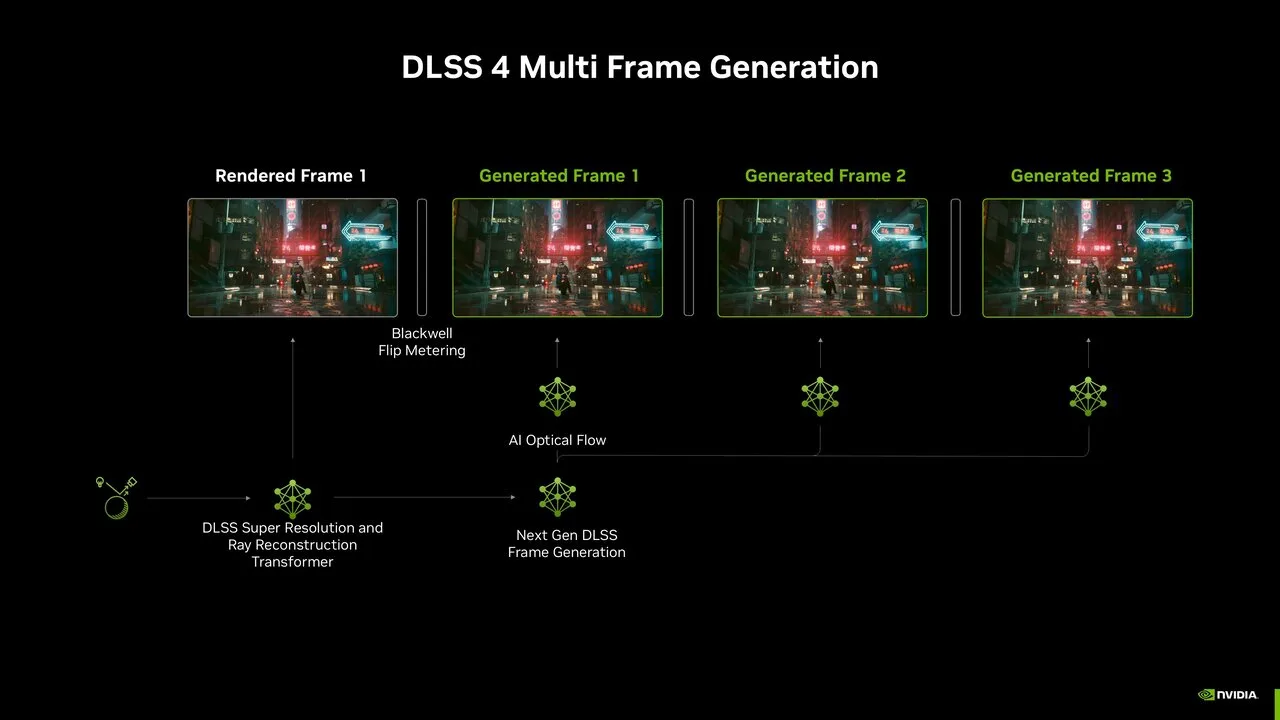
- Multi Frame Generation: the same idea taken further on GeForce RTX 50 Series cards. DLSS 4 can generate up to three additional frames per rendered frame, and DLSS 4.5 raises that to five additional frames in a 6X mode.
- Dynamic Multi Frame Generation: added with DLSS 4.5. Instead of using a fixed multiplier, it shifts between multipliers to reach your target frame rate or your monitor’s refresh rate, generating only the frames needed.
- Ray Reconstruction: replaces hand-tuned denoisers in ray-traced scenes with an AI network that builds cleaner lighting and reflections.
- 3D-Guided Neural Rendering (DLSS 5): a different kind of feature that focuses on visuals instead of speed. It adds lifelike lighting and materials on top of the game’s own rendered frame.
Frame Generation features create extra frames from what the GPU has already drawn, so they raise the number on your fps counter and the smoothness of motion. They do not make the game engine itself run any faster, which is why they work best when the game already runs at a decent base frame rate.
DLSS Versions: From DLSS 2 to DLSS 5
NVIDIA numbers each major release, and each number mostly adds a feature to the suite:
- DLSS 3: introduced Frame Generation for GeForce RTX 40 Series cards.
- DLSS 3.5: introduced Ray Reconstruction.
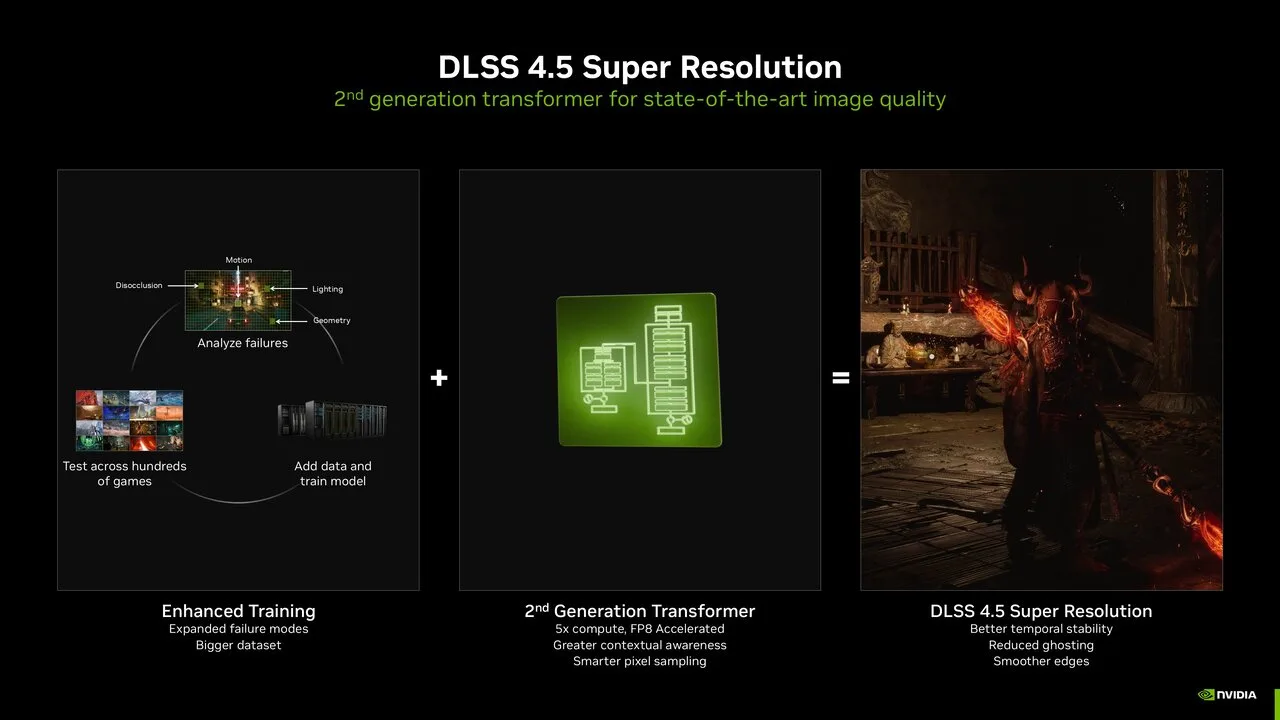
- DLSS 4 (January 2025): brought Multi Frame Generation for RTX 50 Series and moved Super Resolution, Ray Reconstruction and DLAA to a transformer-based AI model, the same type of architecture behind modern AI chatbots. NVIDIA says the transformer model gives better temporal stability, less ghosting and more detail in motion than the older convolutional design.
- DLSS 4.5 (January 2026): added a second-generation transformer model for Super Resolution that uses five times the compute of the first, plus Dynamic Multi Frame Generation and the 6X mode for RTX 50 Series. The Super Resolution update works on all GeForce RTX GPUs. Dynamic Multi Frame Generation and 6X reached the NVIDIA app on March 31, 2026.
- DLSS 5 (September 2026): introduced 3D-Guided Neural Rendering for GeForce RTX 50 Series. It debuted in NBA 2K27.
Newer versions are built to be backward compatible with existing DLSS games, so many titles can be upgraded without a patch from the developer. The NVIDIA app handles this with its DLSS Overrides.
Which GPUs Support DLSS?
DLSS needs a GeForce RTX graphics card. Older GTX cards, AMD cards and Intel cards cannot run it. Within the RTX family, the features split like this:
| Feature | RTX 50 Series | RTX 40 Series | RTX 30 Series | RTX 20 Series |
|---|---|---|---|---|
| Super Resolution | Yes | Yes | Yes | Yes |
| DLAA | Yes | Yes | Yes | Yes |
| Ray Reconstruction | Yes | Yes | Yes | Yes |
| Frame Generation | Yes | Yes | No | No |
| Multi Frame Generation | Yes | No | No | No |
| Dynamic Multi Frame Generation | Yes | No | No | No |
| 3D-Guided Neural Rendering (DLSS 5) | Yes | No | No | No |
If you own an RTX 20 or 30 Series card, you still get the biggest everyday benefit, which is Super Resolution. One caution for those cards: the newest DLSS 4.5 Super Resolution models run with a heavier performance cost on RTX 20 and 30 Series because those GPUs lack native FP8 support. NVIDIA suggests those owners may prefer to stay on the DLSS 4.0 model (Model K) for the best balance of quality and speed.
How to Turn On DLSS
There are two ways, and both take about a minute. Start by making sure your graphics driver is current. DLSS 4.5 Dynamic Multi Frame Generation needs Game Ready Driver 595.97 WHQL or newer, and our guide on how to update your GPU drivers walks through the process.
Turn On DLSS in the Game Settings
- Launch the game and open Settings or Options.
- Go to the Graphics, Video or Display tab.
- Find the option named DLSS, NVIDIA DLSS or Super Resolution, or an upscaling method list that includes DLSS.
- Set it to On and pick a mode. Quality or Balanced is a safe starting point.
- If your card supports it and the game offers it, also turn on Frame Generation and Ray Reconstruction.
- Play for a few minutes. If you see ghosting or shimmer, step up to a higher-quality mode.
DLSS 5 is a simple on or off toggle for players. In NBA 2K27, the first game to support it, the option is called DLSS Neural Rendering in the video settings and needs Game Ready Driver 616.64 WHQL.
Upgrade DLSS With the NVIDIA App
- Install the NVIDIA app and open the Graphics tab.
- Select a supported game, or use the global settings.
- Under DLSS Override – Model Presets, choose Recommended to use the newest Super Resolution models.
- On an RTX 50 Series card, open DLSS Override – Frame Generation Mode and pick Dynamic or Fixed. Dynamic can target your display’s maximum refresh rate or a custom frame rate. Note that Dynamic mode is currently not compatible with frame rate limiters or V-Sync.
DLSS 4.5 | Enhanced Super Resolution & Dynamic Multi Frame Gen
Is DLSS Worth Using? Pros and Downsides
For most RTX owners the answer is yes, with a few honest caveats.
Why It Helps
- Higher frame rates, because the GPU renders fewer pixels.
- Super Resolution works on every RTX generation.
- Image quality has improved with each AI model, with less ghosting and better stability.
- It makes ray-traced and path-traced games far easier to run.
- It can be upgraded through the NVIDIA app without waiting for a game patch.
Where It Falls Short
- It only works on GeForce RTX cards, and only in games that support it.
- The best features are tied to newer hardware. If you have an RTX 30 or 20 Series card, you will not get Frame Generation, and if you have an RTX 40 Series card you will not get Multi Frame Generation.
- Generated frames are not rendered by the game, so they add smoothness rather than faster controls. Players who are very sensitive to input delay in competitive shooters may prefer Super Resolution alone.
DLSS FAQ
Is DLSS actually AI?
Yes. DLSS uses neural networks that are trained offline and run on the Tensor Cores in your GPU.
Does DLSS improve FPS?
Yes. Super Resolution raises frame rate by rendering at a lower resolution and upscaling, and Frame Generation adds extra frames on top of that. The size of the gain depends on the game, your resolution, the mode you pick and your GPU.
Is it better to have DLSS on or off?
Turn it on if you want more frames or you play with ray tracing. Leave it off, or use DLAA, if you already hit your target frame rate and want the cleanest image your card can draw.
Does DLSS work on AMD or Intel graphics cards?
No. DLSS runs on GeForce RTX GPUs. AMD’s FSR is the main alternative on other hardware, and our DLSS vs FSR comparison covers how the two differ.
Does DLSS add input lag?
Super Resolution reduces the rendering work per frame. Frame Generation is designed to work with NVIDIA Reflex to keep responsiveness in check, and NVIDIA says DLSS 4.5 Multi Frame Generation can generate extra frames with minimal impact to responsiveness.
Do I need DLSS to play modern games?
No, but it can make a mid-range card feel like a faster one in demanding titles.
So, What Is DLSS Worth to You?
Put simply, what DLSS is today is a toolbox of AI features, and the one worth knowing first is Super Resolution, because every RTX card from the 20 Series up can use it. Turn it on in any demanding game, start at Quality or Balanced, and only move to Performance if you need the extra frames. If you own an RTX 40 or 50 Series card, add Frame Generation for smoother motion, and treat Multi Frame Generation and DLSS 5 as bonuses of the 50 Series. Planning an upgrade? Our best graphics cards for gaming roundup shows which RTX cards are on the shortlist.