GameCuki is reader-supported. When you buy through links on our site, we may earn an affiliate commission at no extra cost to you. As an Amazon Associate I earn from qualifying purchases. Learn more.
The Series S ships with a standard pad in the box, but the best controller for Xbox Series S owners is often a second one with something the first lacks: a rechargeable battery, back buttons, trigger stops or just a cable long enough for the couch. This guide covers 13 options for the compact all-digital console, from budget wired pads to pro wireless models, so a Game Pass library on a small TV stand gets the right pad.
For a broader look at every Xbox pad, see our best Xbox controller guide, and for the rest of a Series S setup, our best Xbox Series X and S accessories hub.
Best Controller for Xbox Series S: Our Picks in Detail

1
Best Overall for Series S
Xbox Wireless Controller
Bottom line: The easiest second controller for Series S owners, with the grips, Share button and Xbox Wireless connection of the pad that came in the box.
A second Xbox Wireless Controller is the simplest way to add a player to a Series S, since it matches the pad that already comes with the console. It has a hybrid D-pad, textured grips on the triggers, bumpers and back case, a Share button and a headset jack.
Pros & Cons
Pros- Same comfortable shape as the pad bundled with the console
- Textured grips on the triggers, bumpers and back case
- Share button for screenshots and clips
- Xbox Wireless, Bluetooth and USB-C connections
- 3.5mm jack for a wired headset
- Button remapping and profiles in the Xbox Accessories app
- Plug-and-play on Windows over USB-C
Cons- Runs on AA batteries instead of a rechargeable pack
- No back buttons or trigger stops
Why We Picked It
The standard Xbox pad is the safe baseline for every other pick here. Its sculpted body is comfortable for long sessions, it connects over Xbox Wireless, Bluetooth or USB-C, and the Xbox Accessories app lets you remap buttons and save profiles. It also pairs with a Windows PC, which is handy if your Series S sits next to a laptop.
Who It's For
You play on a Series S in a living room or bedroom and want a second pad for a friend or sibling without any setup. If you mostly play Game Pass story games and party games, the stock layout is all you need, and it works the same as the controller already in your box.
Specs & Configurations
- Connection
- Xbox Wireless, Bluetooth or USB-C
- Features
- hybrid D-pad, textured grips, Share button
- Audio
- 3.5mm headset jack
- Customization
- button remapping and profiles in the Xbox Accessories app
- Works with
- Xbox Series X/S, Xbox One, Windows

2
Best Budget Wired Pad
Turtle Beach Rematch Core Wired
Bottom line: A low-cost wired pad that adds Hall effect sticks and on-controller audio controls, a smart pick for Series S players who also use a headset.
The Turtle Beach Rematch Core is a wired pad for Xbox Series X|S and Windows PCs. It adds Hall effect sticks and audio controls in the D-pad for a modest step up from a basic wired controller.
Pros & Cons
Pros- Hall effect thumbsticks resist drift
- Game/chat mix and master volume built into the D-pad
- Dedicated mic mute button
- Impulse triggers and dual rumble motors
- Ergonomic shape for long sessions
- Control Hub app for configuration
- Nothing to charge, so it is always ready
Cons- Wired only, so you stay tied to the console by an 8 ft cable
- No Xbox Wireless or Bluetooth for couch play
Why We Picked It
Drift-resistant Hall effect sticks at this price are the main draw. The game/chat mix, master volume and mic mute controls are a real convenience when you play online with a headset plugged into the 3.5mm jack, and the 8 ft USB-C cable reaches a typical TV stand setup.
Who It's For
You have a Series S on a TV stand, play within a few feet of the screen and want a pad that never needs batteries. It suits online players who chat in Game Pass multiplayer titles and want volume and mic controls without opening a menu.
Specs & Configurations
- Connection
- wired, 8 ft USB-C cable
- Sticks
- Hall effect
- Triggers
- impulse triggers with dual rumble motors
- Audio
- 3.5mm jack, game/chat mix, master volume and mic mute
- Software
- Turtle Beach Control Hub app
- Works with
- Xbox Series X/S, Xbox One, Windows 10 and 11

3
Best Cheap Pad With Back Buttons
PowerA Advantage Wired with Lumectra
Bottom line: A budget wired controller that adds two back buttons and trigger locks, with a 10 ft cable that reaches the couch from a Series S.
The PowerA Advantage is an officially licensed wired controller for Series X|S. It layers two programmable buttons, trigger locks and RGB lighting onto a familiar Xbox layout.
Pros & Cons
Pros- Two mappable buttons you can program mid-game
- Three-way trigger locks for faster shooting
- Impulse triggers for rumble feedback
- Feels close to a standard Xbox pad
- 10 ft braided cable reaches the couch
- Four-zone RGB lighting with three modes
- Two-year limited warranty
Cons- Wired only
- Only two extra buttons, fewer than on pricier pads
Why We Picked It
Back buttons and trigger locks are the upgrades most players want first, and this pad delivers both without a wireless price tag. The two extra buttons are programmed on the fly, with no system settings to dig through, and the 10 ft cable gives a Series S owner room to sit back from the TV.
Who It's For
You want your first step up from the stock pad and play shooters, racers or anything where trigger travel matters. A wired controller also skips battery swaps, which suits a console that sits in a bedroom or dorm.
Specs & Configurations
- Connection
- wired, 10 ft USB-C cable
- Extra buttons
- 2 mappable on the fly
- Triggers
- 3-way trigger locks, impulse triggers
- Lighting
- 4-zone RGB, 3 modes
- Extras
- dual rumble motors, IR transmitter for Lumectra accessories
- Works with
- Xbox Series X/S, Xbox One, Windows 10/11

4
Best Retro Style Pad
Hyperkin Xenon Wired Controller
Bottom line: An officially licensed Xbox 360 replica with impulse triggers and a 10 ft cable, for Series S players who want that classic shape.
The Hyperkin Xenon recreates the Xbox 360 controller with modern touches for Series X|S, including impulse triggers, a Share button and a USB-C cable.
Pros & Cons
Pros- Xbox 360 shape and feel for players who grew up on it
- Officially licensed for Xbox Series X/S
- Impulse triggers with built-in motors
- Share button for clips and screenshots
- 3.5mm jack for a wired headset
- 10 ft detachable USB-C cable
- No batteries to replace
Cons- Wired only
- The older 360 shape feels different from the modern Series pad
Why We Picked It
It scratches a nostalgia itch without losing current-gen features. The Share button and impulse triggers keep it useful on a Series S, and the detachable 10 ft USB-C cable is long enough for most living rooms.
Who It's For
You played Halo and Gears on the 360 and want that familiar offset layout back on a new console. It is a fun second controller for retro Game Pass titles and local co-op nights.
Specs & Configurations
- Connection
- wired, 10 ft detachable USB-C cable
- Triggers
- impulse triggers
- Features
- Share button, 3.5mm audio jack
- Design
- Xbox 360 controller replica
- Works with
- Xbox Series X/S, Xbox One, Windows 10/11

5
Best Wired Upgrade
GameSir G7 SE
Bottom line: The wired Xbox controller to beat on a budget, with Hall effect sticks, back buttons and on-pad audio controls.
The GameSir G7 SE is a wired Xbox controller with Hall effect sticks and triggers, two back keys and a 3.5mm headset jack. It is officially licensed for Xbox.
Pros & Cons
Pros- Hall effect sticks and triggers resist drift
- Two custom back keys
- 3.5mm audio jack for a headset
- Pulse-type trigger motors and asymmetric grip motors for rumble
- Laser-textured grips for a secure hold
- Detachable USB-C cable
- Plug-and-play with no drivers needed
Cons- Wired only
- Back buttons are easy to press by accident until locked
- Stick tops are flatter than Xbox sticks
Why We Picked It
Hall effect sticks and triggers are usually reserved for pricier pads, and the two back keys give you a pro-style extra without a wireless markup. Rumble comes from a pulse-type trigger motor and asymmetric grip motors, and the textured grips help during long sessions.
Who It's For
You play competitive shooters on a Series S and want drift-resistant parts and back buttons without paying for wireless. Drop it into a small setup where the console sits close to the couch and a detachable cable is no hassle.
Specs & Configurations
- Sticks
- Hall effect
- Triggers
- Hall effect analog
- Extra buttons
- 2 back keys
- Audio
- 3.5mm jack
- Connection
- wired, detachable USB-C cable
- Works with
- Xbox Series X/S, Xbox One, Windows 10 and up

6
Best Rechargeable Upgrade
8BitDo Ultimate 3-mode for Xbox
Bottom line: The simplest upgrade from the standard Xbox pad, adding a charging dock, Hall effect sticks and back paddles.
The 8BitDo Ultimate 3-mode for Xbox is licensed by Xbox and Rare Ltd, and adds 2.4G wireless, Hall effect parts and a charging dock to the usual Xbox layout.
Pros & Cons
Pros- Hall effect sticks and triggers resist drift
- Integrated charging dock instead of AA batteries
- Two pro back paddles
- Metal D-pad with a tactile feel
- 3.5mm headset jack
- Three custom profiles
- 2.4G wireless plus Bluetooth for phones and Macs
Cons- Smaller than the standard Xbox pad
- No battery level readout on the Xbox home screen
Why We Picked It
It solves the most common Series S complaint, constant AA battery swaps. Drop the pad on its dock and it recharges and reconnects automatically, while the two paddles and Hall effect sticks add real upgrades over the stock design.
Who It's For
You want wireless play without buying batteries and a few extras on top. It fits a tidy desk or TV stand setup where the dock can sit next to the console.
Specs & Configurations
- Connection
- 2.4G wireless or wired (Xbox and Windows), Bluetooth (Apple and Android)
- Sticks and triggers
- Hall effect
- Extra buttons
- 2 back paddles
- D-pad
- golden metal tactile D-pad
- Extras
- charging dock, 3.5mm jack, 3 custom profiles, impulse triggers on Xbox and Windows

7
Best Wired Pad for Shooters
Flydigi Vader 5S
Bottom line: A wired controller with adjustable stick tension and switchable triggers, tuned for shooters and racing games on a Series S.
The Flydigi Vader 5S is a wired Xbox controller that lets you change stick tension and trigger behavior on the pad itself. It has six remappable buttons and a 3.5mm jack.
Pros & Cons
Pros- Stick tension adjusts from 40gf to 100gf
- Triggers switch between micro-click and linear
- Hall effect sticks resist drift
- Four vibration motors for recoil and impact feedback
- Rear and shoulder buttons
- Volume, profile and vibration changes without pausing the game
- Plug-and-play with no software required
Cons- Wired only
- Needs a replug after some restarts
Why We Picked It
Physically adjustable stick tension is rare outside pro pads. Light tension helps with flick shots, tighter tension steadies driving, and the trigger switch moves between rapid-fire micro-click and smooth linear response.
Who It's For
You split time between Game Pass shooters and racers and want one pad that adapts to both. A wired link also suits a Series S in a small room where cable length is not an issue.
Specs & Configurations
- Connection
- wired
- Sticks
- Hall effect, adjustable tension from 40gf to 100gf
- Triggers
- switch between micro-click and Hall effect linear
- Vibration
- 4 motors in the triggers and grips
- Extras
- rear and shoulder buttons, 3.5mm jack, on-controller adjustments, FLYDIGI software
- Works with
- Xbox Series X/S, Xbox One, Windows

8
Best for RGB Fans
PowerA Fusion Pro Wireless
Bottom line: A wireless pro-style pad with Hall effect sticks, four mappable buttons and RGB lighting, aimed at players who want a custom look.
The PowerA Fusion Pro Wireless is an officially licensed pro controller for Series X|S with hidden-design RGB lighting, Hall effect sticks and four programmable buttons.
Pros & Cons
Pros- Hall effect sticks resist drift
- Quick-Twist sticks change height mid-game
- Four buttons mappable on the fly
- Up to 30 hours of battery life
- Magnetic charger, display stand and case included
- Hidden-design RGB lighting with 6 modes
- Works wired or wireless
Cons- Wireless needs the USB adapter plugged into the console
- Impulse trigger support varies by title
Why We Picked It
Height-adjustable sticks that twist in seconds are a clever trick, and a magnetic charger plus case make it feel like a complete kit. Battery life of up to 30 hours is long for a wireless pro pad.
Who It's For
You want a pro pad that looks the part on a display shelf next to a Series S. It rewards players who like to tweak stick height and button layout for each game.
Specs & Configurations
- Connection
- 2.4G wireless with included USB adapter, wired 10 ft braided USB-C cable
- Sticks
- Hall effect, Quick-Twist height adjustment (3 settings)
- Extra buttons
- 4 mappable
- Lighting
- Ghost RGB, 6 modes across 4 zones
- Battery
- up to 30 hours
- In the box
- magnetic charger, display stand, protective case

9
Best Value Pro Controller
GameSir G7 Pro Wireless
Bottom line: A pro wireless controller for Series S owners that brings TMR sticks, Hall effect triggers and a charging station for less than Microsoft's Elite.
The GameSir G7 Pro is GameSir's first wireless Xbox controller. The listing here is the Wuchang: Fallen Feathers edition and uses the same TMR sticks and Hall effect triggers.
Pros & Cons
Pros- Drift-resistant TMR sticks
- Hall effect analog triggers
- Tri-mode connectivity for Xbox, PC and Android
- Charging station that starts charging when you set the pad down
- 1200mAh battery
- Extra remappable buttons
- Officially licensed for Xbox
Cons- Battery life is short, so dock it often
- Extra top buttons can get in the way
Why We Picked It
It packs features usually found on controllers that cost much more: TMR sticks, Hall effect triggers and a dock that charges as soon as you set it down. A 2.4G dongle keeps the connection solid on Series S, and Bluetooth covers Android.
Who It's For
You want a high-end wireless pad for a Series S without paying Elite-level money. It suits players who bounce between a console, a PC and an Android phone.
Specs & Configurations
- Connection
- 2.4G dongle or USB-C (Xbox and PC), Bluetooth (Android)
- Sticks
- GameSir Mag-Res TMR
- Triggers
- Hall effect
- Battery
- 1200mAh with charging station
- Extras
- smart charging station, one-press Xbox wake-up

10
Best for Claw Grip
Razer Wolverine V3 Pro
Bottom line: A pro controller with mouse-click back buttons and instant triggers for claw-grip shooter players, held back by its price and wireless polling rate.
The Razer Wolverine V3 Pro is a licensed pro controller with four mouse-click back buttons, Hall effect parts and a 2.4GHz dongle for Xbox and PC.
Pros & Cons
Pros- Mouse-click back buttons that fall right under your fingers
- Hall effect sticks and Hall effect analog triggers
- HyperTrigger stops turn triggers into instant clicks
- Two extra claw grip bumpers
- Mecha-Tactile buttons and 8-way floating D-pad
- 1000Hz wired Tournament Mode on PC
- Carrying case and braided cable included
Cons- Expensive
- Wireless and Xbox play are limited to 250Hz polling
- No Bluetooth, and wireless needs a USB-A dongle
Why We Picked It
Its back buttons use the same switches as Razer's gaming mice, so they feel crisp, and the HyperTrigger stops turn the triggers into instant clicks. The two extra bumpers help claw-grip players keep their thumbs on the sticks.
Who It's For
You play competitive shooters on a Series S and want Elite-class customization from a different brand. The Razer app saves layouts and stick sensitivity for each game.
Specs & Configurations
- Connection
- HyperSpeed 2.4GHz USB-A dongle, wired USB-C
- Sticks
- Hall effect
- Triggers
- Hall effect analog with mouse-click trigger stops
- Extra buttons
- 4 mouse-click back buttons and 2 claw grip bumpers
- Polling rate
- 1000Hz wired on PC, 250Hz wireless and on Xbox
- Audio
- 3.5mm jack
11
Best Premium Wireless Pad
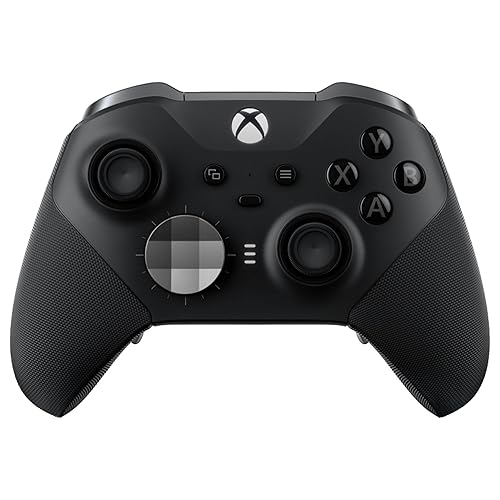
Xbox Elite Series 2
Bottom line: Microsoft's own pro controller for Series S owners who want adjustable tension, trigger locks and a rechargeable battery in one pad.
The Xbox Elite Wireless Series 2 is Microsoft's pro controller, with adjustable-tension sticks, hair trigger locks, interchangeable parts and a rechargeable battery rated for up to 40 hours.
Pros & Cons
Pros- Adjustable-tension thumbsticks
- Three-step hair trigger locks
- Four paddles and swappable D-pads
- Up to 40 hours of rechargeable battery
- Three profiles saved on the controller
- Carrying case and charging dock included
- Plays across Xbox Series X/S, Xbox One, Windows and cloud
Cons- Costs several times the price of a standard pad
- Quality control varies between units
Why We Picked It
It is the official premium option, designed with pro players. Swappable sticks, D-pads and paddles let you change the layout, and the dock keeps the battery topped up so you never reach for AA cells.
Who It's For
You play a lot on your Series S and want the highest-end official pad with a charging dock for a tidy setup.
Specs & Configurations
- Connection
- Xbox Wireless, Bluetooth or USB-C
- Battery
- rechargeable, up to 40 hours
- Sticks
- adjustable tension
- Triggers
- three-step hair trigger locks
- In the box
- 6 thumbsticks, 4 paddles, 2 D-pads, carrying case, charging dock
- Profiles
- 3 onboard
- Audio
- 3.5mm jack

12
Most Customizable
Nacon Revolution X Unlimited
Bottom line: The most customizable pad here and a strong Elite alternative, if you can put up with clunky software.
The Nacon Revolution X Unlimited is an officially licensed Xbox controller built around physical customization, with weights, D-pads and stick heads that swap in and out.
Pros & Cons
Pros- Hall effect sticks and triggers resist drift
- Swappable weights and stick heads
- LCD screen for on-the-fly changes
- Six mappable shortcut buttons
- Instant adjustable triggers
- Four vibration motors
- Charging station and storage case included
Cons- Software is clunky
- Firmware updates can be finicky
- Battery life is rated at only about 10 hours
Why We Picked It
Over 60 customization combinations is a lot, and the LCD screen lets you change settings without opening an app. Hall effect sticks and instant triggers keep it competitive.
Who It's For
You like to tinker, have larger hands or want your controller to fit your exact grip. It fits a Series S owner who plays on PC too, thanks to its dedicated PC mode.
Specs & Configurations
- Connection
- 2.4GHz wireless, wired or Bluetooth (Android)
- Sticks and triggers
- Hall effect
- Extra buttons
- 6 mappable shortcut buttons
- Battery
- up to 10 hours, charging station included
- Customization
- LCD screen, 3 sets of weights, 4-way and 6-way D-pads, 3 sets of stick heads
- Extras
- gyroscope, PC keyboard key mapping, 4 vibration motors

13
Best for On-Pad Settings
Turtle Beach Stealth Ultra
Bottom line: A wireless pro pad with a color display and charge dock that lets you change settings without leaving the game.
The Turtle Beach Stealth Ultra is a licensed wireless controller for Xbox Series X|S with a color display, charge dock and Bluetooth.
Pros & Cons
Pros- Hall effect thumbsticks
- Full-color Command Display for settings and notifications
- Adjustable trigger stops
- Tactile microswitch buttons
- Four mappable quick-action buttons
- Charge dock included
- Bluetooth for PC, phones and smart TVs
Cons- Short battery life compared with rivals
- Premium price
Why We Picked It
The Command Display shows settings on the pad itself, so you can tweak audio and sensitivity without pausing. Hall effect sticks and adjustable trigger stops add to the pro feature list.
Who It's For
You want settings at your fingertips and a dock to keep the pad charged on your Series S setup.
Specs & Configurations
- Connection
- wireless transmitter and Bluetooth
- Sticks
- Hall effect
- Buttons
- tactile microswitch, 4 mappable quick-action buttons
- Triggers
- adjustable trigger stops
- Battery
- 8 to 10 hours out of the box, up to 20 hours in Eco Power mode
- Extras
- Connected Command Display, charge dock, Control Center 2 app
How to Choose a Controller for Xbox Series S
Start with the connection. A wired pad avoids latency and batteries, but it ties you to a short cable. A wireless dongle keeps lag low, and Xbox’s own wireless protocol cuts it further. Bluetooth is best saved for phones and PCs. Wireless pads also need a plan for charging, since Xbox’s standard pad runs on AA batteries.
Next, think about comfort. A pad that is too heavy or poorly balanced gets tiring fast, and grips on the triggers, bumpers and back case help control. Then look at features: back paddles keep your thumbs on the sticks, trigger locks speed up shooters, and Hall effect or TMR sticks resist drift. A charging dock matters if you hate swapping batteries on a console that sits in a bedroom.
Budget matters too. Casual players do fine with a standard or budget pad, and only serious competitive players need a high-end model. If you also want a place to charge a spare pad, see our Xbox controller charging station picks. Not sure about the console itself? Our Xbox Series S vs Series X comparison covers the differences.
Which Controller for Xbox Series S Should You Buy?
For the best controller for Xbox Series S on a tight budget, a second Xbox Wireless Controller or a wired pad like the Turtle Beach Rematch Core or PowerA Advantage covers most players. If you want to stop buying AA batteries, the 8BitDo Ultimate 3-mode is the easiest rechargeable upgrade. Shooter players who want back buttons and trigger stops should look at the GameSir G7 Pro, the Razer Wolverine V3 Pro or the Elite Series 2, depending on how much you want to spend.
Frequently Asked Questions
What controller comes with the Xbox Series S?
The Series S comes with the Xbox Core Controller and AA batteries in the box. If you want a second player or a more customizable pad, you will need to buy an extra controller.
Can I use Xbox One controllers with the Xbox Series S?
Yes. Xbox One controllers work with the Series S, either plugged in or wirelessly, and most Xbox-certified accessories for Xbox One are supported as well.
Can I use a PS5 controller on the Xbox Series S?
Only with an adapter. A converter such as the Brooks Wingman XB 3 can connect a PS5 or Switch Pro controller to an Xbox console wirelessly.

