GameCuki is reader-supported. When you buy through links on our site, we may earn an affiliate commission at no extra cost to you. As an Amazon Associate I earn from qualifying purchases. Learn more.
Xbox Wireless Controllers still run on AA batteries out of the box, and swapping them mid-match gets old fast. The best charging station for Xbox Series X controllers ends that cycle and keeps a controller ready whenever you sit down to play. Because of those AA batteries, almost every dock here comes with its own rechargeable battery pack and battery doors, so the right choice depends on how many controllers you charge, how much battery life you want and whether you use an Elite Series 2.
To build this list, we compared Xbox controller chargers from Razer, PowerA, 8BitDo, Fosmon, Venom, OIVO, Nyko, PDP and more, and read owner reviews to see how easy each one is to dock, how long its batteries last and how well it holds up. Below you’ll find 16 picks and a quick comparison.
Best Charging Station for Xbox Series X Controllers: Our Picks in Detail

1
Best Overall
Razer Universal Quick Charging Stand for Xbox
Bottom line: The best Xbox controller charger for most players, snapping the controller into place and letting you use the dashboard while it charges.
Razer's Universal Quick Charging Stand is an officially licensed, magnetic stand that fully charges an Xbox controller in under 3 hours, with colors matched to official Xbox Wireless Controllers.
Pros & Cons
Pros- Magnetic contacts snap the controller into place
- Navigate the Xbox dashboard while it charges
- Colors match official Xbox controllers
- Fully charges in under 3 hours
- Officially licensed for Xbox
- Front light shows charging and done
- Works with Series X
- S, Xbox One and Elite Series 1
Cons- Charges only one controller
- Controller has to sit in the right spot on the cradle
Why We Picked It
The Razer stand gets the basics right better than any other single dock. Magnetic contacts click the controller into place so charging isn't interrupted, a front light shows when it's charging and when it's done, and the cradle is designed so you can still navigate the Xbox dashboard one-handed while the controller sits on it. It's officially licensed, works with Series X|S, Xbox One and Elite Series 1 controllers, and comes in colors that match Xbox's own controllers. That polish and reliability make it the best charging station for Xbox Series X controllers if you play with one controller.
Who It's For
You play with one main controller and want a color-matched stand next to the TV or on your desk. The magnetic contacts click the controller into place, the front light shows when it's done, and you can still navigate the dashboard one-handed while it sits on the cradle.
Specs & Configurations
- Controllers
- 1
- Compatibility
- Xbox Series X/S, Xbox One, Elite Series 1
- Charge time
- under 3 hours
- Power
- USB (console, PC or wall plug)
- Extras
- magnetic contacts, one-handed navigation, overcharge protection, officially licensed

2
Best Dual Charger
PowerA Dual Charging Station for Xbox Series X/S
Bottom line: The best dual charger for most homes, keeping two controllers charged without tying up the console's USB ports.
PowerA's Dual Charging Station charges two Xbox Series X|S or Xbox One controllers from its own AC adapter and includes two 1100 mAh batteries and four battery doors.
Pros & Cons
Pros- Its own AC adapter keeps console USB ports free
- Includes doors for both Series and One controllers
- Doubles as a controller stand
- Two 1100 mAh batteries included
- Four battery doors in the box
- Works with Series X
- S and Xbox One
- Orange light while charging, white when full
Cons- Batteries have a sweet spot on the contacts
- Batteries charge only on the dock
Why We Picked It
PowerA is one of the most established names in Xbox accessories, and its dual dock is a simple way to keep two controllers charged without using the console's USB ports. The four battery doors cover both Series X|S and Xbox One controllers, the LED turns from orange to white when a controller is full, and the dock doubles as a stand when you just want to put a controller down.
Who It's For
You have two controllers in the house and want a well-known brand that charges both from its own AC adapter. The console's USB ports stay free, the LED turns from orange to white when a controller is full, and the dock doubles as a stand when you put a controller down.
Specs & Configurations
- Controllers
- 2
- Compatibility
- Xbox Series X/S and Xbox One
- Batteries
- two 1100 mAh packs, four battery doors
- Power
- AC adapter
- Indicator
- orange charging, white full
3
Best Single Dock for Desks
8BitDo Charging Dock for Xbox Wireless Controllers
Bottom line: The single dock to buy for a gaming desk, with a minimal look and a light that won't compete with your setup.
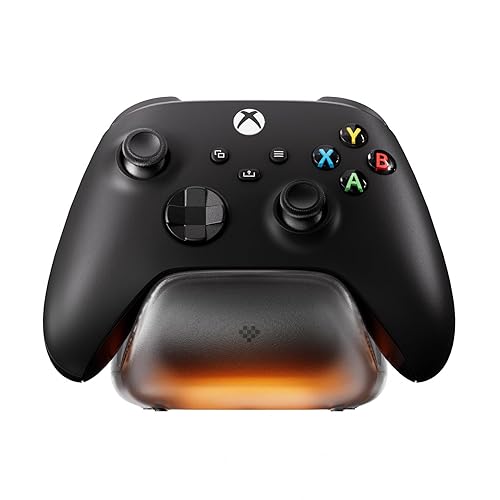
8BitDo's Charging Dock is an officially licensed, minimalist magnetic dock for one Xbox controller, with amber and white status lighting you can adjust and a storage compartment for the spare battery door.
Pros & Cons
Pros- Minimal design that blends into a desk setup
- Soft, adjustable status light
- Storage for the spare battery door
- Officially licensed for Xbox
- Magnetic charging
- 1100 mAh pack included
- Amber light while charging, white when full
Cons- Replacement batteries aren't sold separately
- Charges only one controller
Why We Picked It
If you want a dock that looks good on a gaming desk without competing with your lighting, 8BitDo's is the one. The status light is subtle and adjustable, the magnetic contacts make it quick to drop the controller on and pick it up, and the smoked base and matching battery door look clean next to a monitor. It's also officially licensed for Xbox.
Who It's For
You play at a desk or on PC and want a compact, understated dock for one controller. The smoked base and matching battery door look clean beside a monitor, the status light is subtle and adjustable, and the magnetic contacts make dropping the controller on quick.
Specs & Configurations
- Controllers
- 1
- Compatibility
- Xbox Series X/S and Xbox One
- Battery
- 1100 mAh pack, 2 battery doors
- Indicator
- amber charging, white full
- Extras
- magnetic charging, storage compartment, light adjustment, officially licensed

4
Best Budget Single Stand
PowerA Solo Charging Stand for Xbox Series X/S
Bottom line: The cheapest official way to stop buying AA batteries for your favorite controller.
PowerA's Solo Charging Stand is an officially licensed single-controller stand that includes a 1100 mAh battery, two battery doors, a 1 m USB cable and a two-year limited warranty.
Pros & Cons
Pros- Officially licensed with a two-year warranty
- Simple drop-on charging
- Light changes color when charged
- 1100 mAh battery and two battery doors included
- 1 m USB cable included
- Works with Series X
- S and Xbox One
Cons- Light stays on after charging
- Charges only one controller
Why We Picked It
The PowerA Solo is the easiest way to stop buying AA batteries for one favorite controller. Swap in the battery door, set the controller on the stand after each session, and it's ready next time, with a light that changes color once it's charged. Official licensing and a two-year warranty add peace of mind at an entry-level price.
Who It's For
You have one main controller and are tired of buying AA batteries. Swap in the battery door, set the controller on the stand after each session, and it's ready next time. Official licensing and a two-year warranty back it up at an entry-level price.
Specs & Configurations
- Controllers
- 1
- Compatibility
- Xbox Series X/S and Xbox One
- Battery
- 1100 mAh pack, 2 battery doors
- Power
- 3.3 ft (1 m) USB cable
- Warranty
- two-year limited, officially licensed

5
Best Battery Life
Fosmon Dual 2 Max Xbox Controller Charging Station
Bottom line: The pick for long gaming weekends, with batteries twice the size of most docks.
Fosmon's Dual 2 Max pairs a low, flat dual dock with two 2200 mAh batteries that Fosmon rates for up to 40-45 hours of play per charge, plus a limited lifetime warranty.
Pros & Cons
Pros- Large batteries for long sessions
- Place-and-charge contacts line up automatically
- Doors for both Series and One controllers
- Two 2200 mAh batteries included
- Auto stop when full
- Overheating and short circuit protection
- Limited lifetime warranty
Cons- Blinking green lights can be distracting
- Controllers sometimes need reseating
Why We Picked It
Battery life is where the Fosmon stands out. Its 2200 mAh packs are twice the capacity of the 1100 mAh batteries most docks include, so long gaming weekends don't end with a low-battery warning. The contacts line up automatically when you place a controller down, charging stops when the battery is full, and the flat design sits in front of a TV without blocking the screen.
Who It's For
You game for hours at a time, including long weekend sessions, and want the most play per charge. The two 2200 mAh packs are rated for up to 40-45 hours, the contacts line up when you place a controller down, and the flat dock sits in front of a TV without blocking the screen.
Specs & Configurations
- Controllers
- 2
- Compatibility
- Xbox Series X/S and Xbox One
- Batteries
- two 5280 mWh (2200 mAh) NiMH packs
- Rated play time
- up to 40-45 hours per charge
- Protection
- overheating, short circuit, auto stop when full
- Warranty
- limited lifetime

6
Best Drop-and-Charge
Venom Twin Charging Dock for Xbox Series X/S
Bottom line: The easiest dock to use, since controllers start charging the moment you set them down.
Venom's Twin Charging Dock uses a drop-and-charge design for two Xbox controllers, with two battery packs, red and green front LEDs and a rear USB port for charging other devices.
Pros & Cons
Pros- No need to line controllers up
- Extra USB port on the back
- Clean look that matches the console
- Two 850 mAh batteries included
- Red light charging, green light full
- Detachable cable
- Works with Series X
- S and Xbox One
Cons- No wall adapter included
- Lightweight base
Why We Picked It
The Venom dock is one of the easiest to use: you just set a controller down and it starts charging, with no lining up required. The front LEDs make charging status clear, the battery doors install easily, and the rear USB port lets you charge a headset or phone from the same dock.
Who It's For
You have a family or casual setup with two controllers and want the simplest docking. Set a controller down and it starts charging with no lining up, the front LEDs make status clear, and the rear USB port can charge a headset or phone.
Specs & Configurations
- Controllers
- 2
- Compatibility
- Xbox Series X/S and Xbox One
- Batteries
- two 850 mAh packs, up to 15 hours each
- Indicator
- red charging, green full
- Extras
- rear USB port, detachable cable
7
Best Value
OIVO XSX Controller Charger with 2 Batteries
Bottom line: The best value dual dock, balancing quick charging and long battery life and supporting the Elite too.
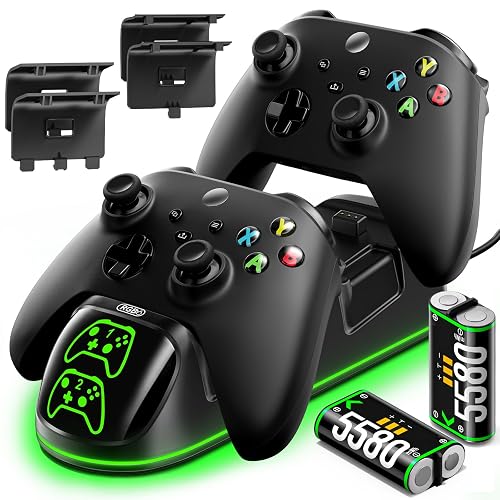
OIVO's XSX charger handles two controllers and includes two 5580 mWh batteries that OIVO rates for up to 20 hours of play and a full charge in under 2.5 hours.
Pros & Cons
Pros- Fast charge time for its battery size
- Works with Elite and older Xbox One controllers
- LEDs aren't overwhelming
- Two 5580 mWh batteries included
- Full charge in under 2.5 hours
- Four battery covers in the box
- Rated for 3000+ recharges
Cons- No wall adapter included
- Not for Xbox 360 or third-party controllers
Why We Picked It
OIVO's dock balances charge speed and battery life better than most at its price. Its larger battery packs charge in under 2.5 hours, it works with Series X|S, Xbox One and Elite controllers, and four battery covers mean you can mix controller generations. It's sturdy, easy to set up and its LEDs are soft enough for a bedroom setup.
Who It's For
You want a fast, affordable dock for two controllers, including older Xbox One and Elite pads. The four battery covers let you mix controller generations, the packs are rated for up to 20 hours of play, and the soft LEDs suit a bedroom setup.
Specs & Configurations
- Controllers
- 2
- Compatibility
- Xbox Series X/S, Xbox One X/S, Xbox One, Elite
- Batteries
- two 5580 mWh NiMH packs, rated 3000+ recharges
- Charge time
- under 2.5 hours, up to 20 hours of play
- Indicator
- red charging, green full
- In the box
- 31.5-inch USB-C cable, 4 battery covers

8
Best With Extra USB Port
Nyko Charge Base for Xbox Series X/S
Bottom line: A straightforward family dock with an extra USB port, though its batteries are smaller than the best here.
Nyko's Charge Base is a dual drop-and-charge dock for Xbox Series X|S and Xbox One controllers, with two 1100 mAh batteries, green LEDs and an extra USB port.
Pros & Cons
Pros- Charging starts as soon as you set a controller down
- Extra USB port for other devices
- Covers for Series and One controllers
- Two 1100 mAh batteries included
- USB-C cable included
- Green LED lighting
- Docks two Xbox controllers
Cons- Some units' charging ports fail early
- Smaller batteries than Fosmon or OIVO
Why We Picked It
Nyko has been in gaming accessories since 1996, and its Charge Base is a straightforward family dock. Controllers start charging as soon as you set them down, the green lights make charging status easy to read and look good under a TV, and the extra USB port is handy for a headset. Spare covers for both controller styles are included.
Who It's For
You have a family and want a simple, good-looking dock for two controllers under the TV. Controllers start charging as soon as you set them down, the green lights are easy to read, and the extra USB port is handy for a headset.
Specs & Configurations
- Controllers
- 2
- Compatibility
- Xbox Series X/S and Xbox One
- Batteries
- two 1100 mAh packs, up to 15 hours each
- Power
- USB, USB-C cable included
- Extras
- extra USB port, green LED lighting, both styles of battery cover

9
Best Compact Dual Dock
Upgraded Xbox Controller Charger Station with 2x6200mWh Batteries
Bottom line: The pick for tight shelf space, with big batteries in a small base, though charging is slow.
This upgraded dual dock packs two 6200 mWh batteries rated for 18-25 hours of play into a compact base, with soft X-shaped LEDs that turn red while charging and green when full.
Pros & Cons
Pros- Small footprint for tight spaces
- Large batteries for long play time
- Batteries store in the back of the dock
- Two 6200 mWh batteries included
- Rated 2000+ recharges
- Four battery covers in the box
- X-shaped LED indicators
Cons- Slow 4-5 hour charge
- Make sure all four covers are in the box
Why We Picked It
If shelf space is tight, this dock gives you big batteries without a bulky base. Its 6200 mWh packs are rated for 18-25 hours of play, the X-shaped indicators are a nice Xbox-style touch, and the batteries are stored in the back of the dock so they don't get lost. It pays for itself quickly compared with buying AA batteries.
Who It's For
Your shelf space is tight but you want long battery life from a two-controller dock. The packs are rated for 18-25 hours of play, the X-shaped LEDs add an Xbox-style touch, and the batteries store in the back so they don't get lost.
Specs & Configurations
- Controllers
- 2
- Compatibility
- Xbox Series X/S, Xbox One, Elite
- Batteries
- two 6200 mWh packs, rated 2000+ recharges
- Charge time
- 4-5 hours, up to 18-25 hours of play
- Indicator
- X-shaped LEDs, red charging, green full
- In the box
- 4 battery covers (2 per controller style)

10
Best for Spare Batteries
Froncha 4-in-1 Xbox Controller Charger with 4 Batteries
Bottom line: The only dock here that keeps spare batteries charged, so a dead controller never ends your session.
Froncha's 4-in-1 charger has two controller slots and two spare-battery slots, and includes four 6880 mWh batteries, RGB lighting and an on/off switch.
Pros & Cons
Pros- Swap in a charged spare without waiting
- Four large battery packs included
- RGB lighting with an on/off switch
- Charges two controllers plus two spare batteries
- Rated 3000+ recharges
- Up to 18-25 hours of play
- 4.9 ft USB-C cable
Cons- No wall adapter included
- Larger than a basic dual dock
Why We Picked It
Running out of battery mid-game is the one problem a normal dock can't fix, and the Froncha solves it with spare slots. Two batteries charge on their own while two sit in your controllers, so you can swap in a full pack and keep playing. The large 6880 mWh batteries, easy-to-read indicators and RGB lighting make it a strong all-in-one kit.
Who It's For
You or your household play all day and can't afford a dead controller. Two controllers charge while two spare batteries sit in their own slots, so you can swap in a full pack and keep playing. Easy-to-read indicators and RGB lighting round out the kit.
Specs & Configurations
- Charges
- 2 controllers and 2 spare batteries
- Compatibility
- Xbox Series X/S, Xbox One, Elite
- Batteries
- four 6880 mWh packs, rated 3000+ recharges
- Charge time
- 3-4 hours, up to 18-25 hours of play
- Extras
- RGB lighting modes, on/off switch, 4.9 ft USB-C cable

11
Best Design
DINOSTRIKE Xbox Controller Charger Station
Bottom line: The dock to get if you want a conversation piece, with a fun sci-fi look and hidden battery storage.
DINOSTRIKE's dock has a robot-helmet-inspired front, charges two controllers with its 5520 mWh batteries and hides spare batteries in a compartment underneath.
Pros & Cons
Pros- Fun robot-helmet look
- Hidden storage for spare batteries
- Covers for both controller generations
- Two 5520 mWh batteries included
- Rated 2000 recharges
- Overcharge and short circuit protection
- Four battery covers in the box
Cons- About 4 hours to charge
- Some covers may fit loosely
Why We Picked It
If you want your dock to be a conversation piece, the DINOSTRIKE's sci-fi helmet styling and green glow stand out on a side table or entertainment center. It's simple to set up, includes covers for both Series and One controllers, and stores spare batteries in its base so they don't get lost.
Who It's For
You want a dock with personality on your side table or entertainment center. The robot-helmet styling and green glow stand out, setup is simple, and spare batteries tuck into the base so they don't get lost. It makes a fun gift for an Xbox player.
Specs & Configurations
- Controllers
- 2
- Compatibility
- Xbox Series X/S, Xbox One, Elite
- Batteries
- two 5520 mWh packs, rated 2000 recharges
- Charge time
- about 4 hours, up to 18-25 hours of play
- Protection
- overcharge, overcurrent, overheating, short circuit
- Extras
- bottom battery storage, 4 battery covers

12
Best RGB Charger
PDP Afterglow Wave Dual Charger for Xbox
Bottom line: The best charger if lighting is part of your setup, with deep RGB control from your phone.
PDP's Afterglow Wave stacks two Xbox controllers vertically and adds eight RGB lighting zones you can customize through the PDP Control Hub app over Bluetooth.
Pros & Cons
Pros- Stacked design takes little space
- Deep RGB customization in the app
- Charges two controllers in under 3 hours
- Eight RGB zones and five saved profiles
- Control Hub app for status and lighting
- Works with Series X
- S and Xbox One
- Two 1100 mAh batteries included
Cons- Needs the app for full lighting control
- Costs more than basic docks
Why We Picked It
The Afterglow Wave is the dock to get if lighting is part of your setup. Its stacked layout shows off both controllers while taking up little room in front of a TV, the RGB zones and saved profiles go far beyond a basic glow, and you can check charging status from your phone. PDP rates it at under 3 hours for a full charge.
Who It's For
Lighting is part of your setup and you want a display-style dock for two controllers. The stacked layout shows both controllers off while taking little room in front of the TV, and the PDP Control Hub app lets you customize the RGB zones and check charging status from your phone.
Specs & Configurations
- Controllers
- 2 (stacked)
- Compatibility
- Xbox Series X/S and Xbox One
- Batteries
- two 1100 mAh packs, four battery doors
- Charge time
- under 3 hours, up to 40 hours of play (PDP rating)
- Lighting
- 8 RGB zones, 5 saved profiles, PDP Control Hub app

13
Best Slim Dock
PDP Metavolt Dual Charging Station for Xbox
Bottom line: The best fit for a bedroom or home theater, since its lights dim automatically in a dark room.
PDP's Metavolt is an officially licensed, slim dual dock with magnetic ports and lighting that dims automatically to match the room.
Pros & Cons
Pros- Officially licensed
- Lights dim automatically in a dark room
- Slim enough for some controller covers
- Magnetic port snap
- Micro-suction base
- Charge status LED
- Docks two controllers side by side
Cons- Base doesn't grip as well as advertised
- Batteries differ between older and newer models
Why We Picked It
Auto-dimming lights make the Metavolt a good fit for a bedroom or home-theater setup, where a bright charger can be distracting during a movie or late-night session. It's officially licensed, slim enough that it can work with some silicone controller covers, and holds two controllers side by side.
Who It's For
You game in a bedroom or home theater and don't want a bright charger distracting you. The lights dim automatically in a dark room, the dock is officially licensed, and the slim body can work with some silicone controller covers.
Specs & Configurations
- Controllers
- 2
- Compatibility
- Xbox Series X/S and Xbox One
- Design
- magnetic port snap, micro-suction base
- Lighting
- auto-dimming lights, charge status LED
- Licensing
- officially licensed for Xbox

14
Best Color-Matched Stand
Controller Gear Xbox Pro Charging Stand
Bottom line: The stand to buy if you want an exact color match for your Xbox controller.
Controller Gear's Xbox Pro Charging Stand is an officially licensed magnetic stand made in the same material and color as matching first-party Xbox Series X controllers, like Pulse Red.
Pros & Cons
Pros- Exact color match with Xbox controllers
- Magnetic contacts for a secure charge
- One-handed dashboard navigation while docked
- Officially licensed for Xbox
- 1100 mAh pack included
- Works with Series X
- S, Xbox One and Elite Series 1
- Same material and color as first-party controllers
Cons- Charges only one controller
- Takes more desk space than a battery pack
Why We Picked It
If you own a colored Xbox controller and want a stand that matches it exactly, Controller Gear is the specialist. Its stands are made in the same material and color as first-party controllers, the magnetic contacts give a secure charge, and you can still navigate the dashboard while the controller is docked. It feels close enough to an official product that it fits right into an Xbox setup.
Who It's For
You own a colored Xbox controller, like Pulse Red, and want a stand that matches it exactly. The magnetic contacts give a secure charge, you can still navigate the dashboard one-handed while it's docked, and it fits right into an Xbox setup.
Specs & Configurations
- Controllers
- 1
- Compatibility
- Xbox Series X/S, Xbox One, Elite Series 1
- Battery
- 1100 mAh pack
- Design
- magnetic contacts, one-hand navigation
- Licensing
- officially licensed for Xbox

15
Best for Elite Series 2
OSTROGEAR Magnetic Charging Dock for Xbox Elite Series 2
Bottom line: The best replacement dock for the Elite Series 2, charging without removing the back paddles.
OSTROGEAR's magnetic dock is designed for the Xbox Elite Series 2 and Series 2 Core, charging with the back paddles attached and including its own USB-C cable.
Pros & Cons
Pros- Charges without removing the back paddles
- Strong magnetic connection
- Cable included
- LED turns solid green when full
- Auto shut-off when charged
- Non-slip rubber base
- Fits Elite Series 2 and Series 2 Core
Cons- Light stays on while docked
- Lining up can take a moment
Why We Picked It
The Elite Series 2 Core doesn't come with a charging dock, and this is a strong replacement for the official one. You don't have to remove the back paddles to charge, the magnets hold the controller securely, the LED turns solid green when charging is done, and the dock shuts off power once the battery is full. Its non-slip base doubles as a clean display stand.
Who It's For
You have an Elite Series 2 or Series 2 Core and need a dock that charges with the back paddles still on. The magnets hold the controller securely, the LED turns solid green when charging is done, and the non-slip base works as a clean display stand.
Specs & Configurations
- Controllers
- 1 Elite Series 2 or Series 2 Core (Model 1797)
- Design
- magnetic, charges with back paddles on
- Power
- USB Type-C cable included
- Indicator
- color-changing LED, solid green when full
- Extras
- auto shut-off, non-slip rubber base

16
Best Budget Elite Dock
AreMe Charging Station Dock for Xbox Elite Series 2
Bottom line: The cheapest fix for an Elite Series 2 without a dock, as long as you supply your own cable.
AreMe's dock is a low-cost, low-profile replacement for the Elite Series 2 charging base, with magnetic pins and overcharge protection that stops charging when the controller is full.
Pros & Cons
Pros- Costs far less than the official dock
- Magnetic pins line up like the original
- Low profile fits wall mounts and desks
- Overcharge protection
- Auto stop when full
- Fits Elite Series 2 and Series 2 Core
- Low-profile magnetic dock
Cons- No cable included
- Very light, so it can lift with the controller
Why We Picked It
If you've lost your Elite's original dock or bought the Series 2 Core without one, AreMe's dock is a simple, inexpensive fix. Its magnetic connection lines up the same way as the official base, it stops charging automatically when the battery is full, and its small size works on a desk or paired with a wall mount.
Who It's For
You lost the Elite's original dock or bought the Series 2 Core without one, and you already have a USB cable. The magnetic connection lines up the same way as the official base, charging stops automatically when full, and the small size suits a desk or a wall mount.
Specs & Configurations
- Controllers
- 1 Elite Series 2 or Series 2 Core
- Design
- low-profile magnetic dock
- Protection
- overcharge protection, auto stop when full
- In the box
- dock only (no cable)
Xbox Series X Controller Charging Stations Compared
| Charger |
Controllers |
Batteries included |
Charge time |
Power |
| Razer Universal Quick Charging Stand |
1 |
Not listed |
Under 3 hours |
USB |
| PowerA Dual |
2 |
2 x 1100 mAh |
Not listed |
AC adapter |
| 8BitDo Charging Dock |
1 |
1 x 1100 mAh |
Not listed |
Not listed |
| PowerA Solo |
1 |
1 x 1100 mAh |
Not listed |
USB |
| Fosmon Dual 2 Max |
2 |
2 x 2200 mAh |
Not listed |
USB |
| Venom Twin |
2 |
2 x 850 mAh |
Not listed |
USB |
| OIVO XSX |
2 |
2 x 5580 mWh |
Under 2.5 hours |
USB-C |
| Nyko Charge Base |
2 |
2 x 1100 mAh |
Not listed |
USB |
| Upgraded 2x6200mWh Station |
2 |
2 x 6200 mWh |
4-5 hours |
Not listed |
| Froncha 4-in-1 |
2 + 2 spares |
4 x 6880 mWh |
3-4 hours |
USB-C |
| DINOSTRIKE |
2 |
2 x 5520 mWh |
About 4 hours |
USB-C |
| PDP Afterglow Wave |
2 |
2 x 1100 mAh |
Under 3 hours |
Not listed |
| PDP Metavolt |
2 |
Not listed |
Not listed |
Not listed |
| Controller Gear Xbox Pro Stand |
1 |
1 x 1100 mAh |
Not listed |
Not listed |
| OSTROGEAR Elite Dock |
1 (Elite Series 2) |
Uses Elite’s built-in battery |
Not listed |
USB-C |
| AreMe Elite Dock |
1 (Elite Series 2) |
Uses Elite’s built-in battery |
Not listed |
USB (cable not included) |
“Not listed” means the maker doesn’t state it in its product listing. Charge times and play times are the makers’ figures.
FAQ
What is the best charging station for Xbox Series X controllers?
The best charging station for Xbox Series X controllers is the Razer Universal Quick Charging Stand for one controller, thanks to its magnetic contacts, under-3-hour charging and official licensing. For two controllers, the PowerA Dual Charging Station is our pick, and the Fosmon Dual 2 Max offers the longest battery life.
Do Xbox Series X controllers need a battery pack to use a charging station?
Yes. Standard Xbox Wireless Controllers use AA batteries, so a dock needs a rechargeable battery pack and a matching battery door to make contact. Almost every dock here includes them. The Elite Series 2 has a built-in battery and uses its own style of dock.
Can you leave your Xbox controller on the charging station?
With most docks, yes. Many, like the Fosmon, AreMe and OSTROGEAR, stop charging once the battery is full, and Razer lists overcharge protection.
How long does an Xbox controller take to charge on a docking station?
Most docks fully charge a controller in about 2.5 to 4 hours. The OIVO is rated at under 2.5 hours, Razer and PDP at under 3 hours, and docks with larger batteries, like the DINOSTRIKE and the upgraded 2x6200mWh station, take about 4 to 5 hours.
How long do charging station batteries last?
Play time per charge ranges from about 15 hours for smaller packs to 40-45 hours for Fosmon’s 2200 mAh batteries, based on the makers’ ratings. Several makers rate their packs for 2000 to 3000 recharge cycles.
Final Verdict: Which Xbox Controller Charger Should You Buy?
Playing solo? The Razer Universal Quick Charging Stand is the one to get. For two controllers, get the PowerA Dual Charging Station. For the longest battery life, go with the Fosmon Dual 2 Max, and for the best value, the OIVO XSX. If you want spare batteries ready to swap, choose the Froncha 4-in-1, and for RGB lighting, the PDP Afterglow Wave. Elite Series 2 owners should look at the OSTROGEAR or AreMe docks. Need a new controller? See our guide to the best Xbox controller, and if you also play on PlayStation, our pick for the best charging station for PS5 controller.

