GameCuki is reader-supported. When you buy through links on our site, we may earn an affiliate commission at no extra cost to you. As an Amazon Associate I earn from qualifying purchases. Learn more.
A DualSense lasts only a handful of hours on a charge, so it always seems to die right when you want to play. The best charging station for PS5 controller setups keeps it topped up without a tangle of USB cables. The right one depends on whether you own a DualSense Edge, how many controllers you charge, and whether you want a simple dock, RGB lighting or a stand that also cools your PS5.
To build this list, we compared PS5 controller chargers from Sony, PowerA, OIVO, NEWDERY, NexiGo, Razer and more, and read owner reviews to see how easy each one is to dock, how fast it charges and how well it holds up. Below you’ll find 17 picks, a quick comparison and tips on choosing the right one.
Best Charging Station for PS5 Controller: Our Picks in Detail

1
Best Overall
NEWDERY PS5 Controller Charger Station
Bottom line: The best PS5 controller charger for most players, because controllers drop straight in and start charging with no fiddling, Edge included.
The NEWDERY charger is the PS5 controller dock we'd recommend to most people. It charges two controllers at once, works with both the standard DualSense and the DualSense Edge, and fully charges them in up to 2.5 hours.
Pros & Cons
Pros- Works with the DualSense Edge
- Drop-in slots line up with the contacts every time
- Sturdy, compact and quiet
- Charges two controllers at once
- Full charge in up to 2.5 hours
- Anti-slip mats and blue LED indicator
Cons- Charging lights are small
- Remove controller skins before charging
Why We Picked It
The biggest frustration with PS5 docks is fiddling with a controller until it finally starts charging, and NEWDERY's slot design solves it: you simply drop each controller in and it lines up with the contacts without any wiggling. It works with the DualSense Edge, which many docks don't, and it's sturdy, compact and built to last. It's also a handy fix if your controllers' own charging ports have started to fail. That combination of easy docking, Edge support and reliability makes it the best charging station for PS5 controller owners.
Who It's For
You own a PS5 and want a dock where controllers drop straight in and start charging without wiggling. It handles a DualSense Edge as well as the standard pad, and it is a handy fix if a controller's own USB-C port has started to fail. The compact, sturdy build sits easily next to the console.
Specs & Configurations
- Controllers
- 2 (DualSense and DualSense Edge)
- Charge time
- up to 2.5 hours
- Power
- USB-C cable included (5V/3A adapter recommended)
- Indicator
- blue LED, flashing while charging
- Extras
- anti-slip mats

2
Best Official Charger
PlayStation DualSense Charging Station
Bottom line: The safe, official choice that matches your PS5, though it takes some practice to seat the controllers.
Sony's DualSense Charging Station is the official way to charge two controllers at once without connecting them to your PS5. It matches the console's look and plugs straight into the wall.
Pros & Cons
Pros- Official Sony design that matches the PS5
- Charges two controllers without the console
- Clean, cable-free setup
- Charges two DualSense controllers at once
- Plugs into the wall, not the console
- Keeps cables out of sight
- Shows which controller is ready
Cons- Hard to tell when charging is finished
- Takes practice to seat controllers
- Check that your unit ships with a US plug
Why We Picked It
If you want guaranteed compatibility and a design that matches your console, Sony's own dock is the safe choice. It charges two DualSense controllers at once without tying up the console's USB ports, keeps cables out of sight, and means you'll always know which controller is ready. It takes a little practice to seat the controllers correctly, but once you get used to it, it's simple and dependable.
Who It's For
You want the official Sony accessory and a clean setup that matches your PS5. It charges two DualSense controllers without tying up the console's USB ports, and once you get used to seating them, it keeps your controllers charged and ready.
Specs & Configurations
- Controllers
- 2 DualSense
- Power
- wall plug
- Design
- official PlayStation styling
- Maker
- Sony Interactive Entertainment

3
Best Officially Licensed
PowerA Twin Charging Station
Bottom line: A simple, officially licensed dual charger with a two-year warranty that looks clean next to the console.
PowerA's Twin Charging Station is an officially licensed alternative to Sony's dock, charging two DualSense controllers from its own AC adapter, with a two-year limited warranty.
Pros & Cons
Pros- Officially licensed for PS5
- Charges about as fast as a USB cable
- Clean, understated design
- Two-year limited warranty
- Charges two DualSense controllers
- Own AC adapter
- Works with official Sony controllers
Cons- Controllers must sit at the right angle
- No wall-mount option
Why We Picked It
The PowerA Twin gives you official PlayStation licensing along with a two-year limited warranty. It charges about as quickly as plugging straight into USB, works with official Sony controllers, and its simple, understated design looks clean next to the console rather than overly gamer-styled.
Who It's For
You want a licensed, no-fuss charger for two controllers with a solid warranty behind it. It charges from its own AC adapter about as quickly as a USB cable, and the understated design looks clean next to the console instead of overly gamer-styled.
Specs & Configurations
- Controllers
- 2 DualSense
- Power
- AC adapter
- Licensing
- officially licensed for PlayStation 5
- Warranty
- two-year limited

4
Best Single-Controller Charger
PowerA Solo Charging Station
Bottom line: The best charger if you play solo, taking up far less space while still giving your controller a home.
If you only use one controller, the PowerA Solo is a compact, officially licensed snap-down dock that fits on a desk or end table.
Pros & Cons
Pros- Small enough for an end table or desk
- Charges faster than the console's USB
- Officially licensed
- Snap-down charging
- Two-year limited warranty
- Useful if the controller's USB-C port fails
Cons- Charges only one controller
- Can be tricky to seat at first
Why We Picked It
Dual docks are overkill if you play solo, and the PowerA Solo takes up far less space while still giving you a dedicated home for your controller. It snaps the controller into place, charges faster than plugging into the console, and is also a lifesaver if your controller's own USB-C port has stopped working.
Who It's For
You play solo and want a dedicated home for your controller on a desk or end table. The compact dock snaps the controller into place, charges faster than plugging into the console, and also helps if your controller's own USB-C port has stopped working.
Specs & Configurations
- Controllers
- 1 DualSense
- Design
- snap-down charging
- Licensing
- officially licensed
- Warranty
- two-year limited

5
Best Fast Charger
OIVO PS5 Controller Charger with AC Adapter
Bottom line: The fastest way to fully charge two controllers, as long as you have a free wall outlet.
OIVO's dual charger includes its own AC adapter and copper contacts, and OIVO rates it at about two hours for a full charge on both controllers. It also fits the DualSense Edge.
Pros & Cons
Pros- Fast, full charges with its own AC adapter
- Clear front LED indicators
- Compact and portable
- Charges two controllers with a copper-contact dock
- Fits the DualSense Edge
- About 2 hours for a full charge
- Own AC adapter included
Cons- Needs a wall outlet
- Has a protective film to remove
Why We Picked It
Charging from the wall instead of the console makes a difference, and OIVO's dedicated AC adapter tops up two controllers quickly, charging them to 100% every time. The front-facing LEDs make it easy to see when they're done, the controllers sit securely, and the compact size makes it easy to move around.
Who It's For
You want the fastest top-up for two controllers and have a free wall outlet near the console. The dedicated AC adapter charges both quickly, the front-facing LEDs show when they are done, and the compact size makes it easy to move around. Edge owners are covered too.
Specs & Configurations
- Controllers
- 2 (DualSense and DualSense Edge)
- Charge time
- about 2 hours
- Power
- AC adapter included
- Indicator
- front LED
- Contacts
- copper

6
Best Drop-and-Charge Dock
bibuks Self-Aligning PS5 Controller Charging Dock
Bottom line: A no-fuss drop-and-charge dock that won't scratch your controllers, though some units charge inconsistently.
The bibuks self-aligning dock is built so you just drop a controller in and it lands on the charging pins, with orange lights while charging and blue when full.
Pros & Cons
Pros- Controllers fall into place automatically
- No scratching the top of the controller
- Clear charging indicators
- Holds both controllers securely
- Built-in over-voltage and overheating protection
- Orange light while charging, blue when full
- Up to 2.5 hours for a full charge
Cons- Some units charge inconsistently
- Needs a 5V/3A adapter for full speed
Why We Picked It
Upside-down docks can scratch the top of your controller and need careful balancing, but this self-aligning design lets the controller fall right into place. It holds both controllers securely without wobbling, the status lights are easy to read, and built-in protection guards against over-voltage, overheating and short circuits.
Who It's For
You want a drop-and-charge dock without careful balancing. The self-aligning design lets each controller fall onto the charging pins, it holds both without wobbling, and the orange and blue lights are easy to read. It suits households where kids charge the controllers.
Specs & Configurations
- Controllers
- 2
- Charge time
- up to 2.5 hours (5V/3A)
- Design
- self-aligning drop-and-charge
- Indicator
- orange charging, blue full
- Protection
- over-voltage, over-current, overheating, short circuit

7
Best RGB Charger
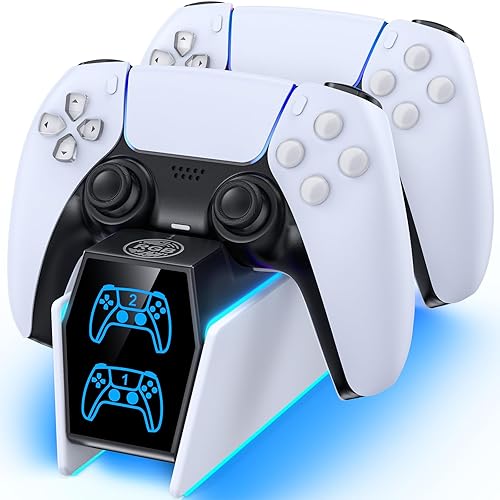
OIVO Drop & Go RGB Charger Station
Bottom line: A drop-and-charge dock that also adds a customizable glow to your setup, Edge included.
OIVO's Drop & Go station combines alignment-free docking with 9 RGB lighting modes, and it works with both the DualSense and DualSense Edge.
Pros & Cons
Pros- Drop-and-charge, no alignment needed
- Works with the DualSense Edge
- Customizable RGB glow
- Nine RGB lighting modes
- Built-in USB-C cable
- Charges two controllers in about 2.5 hours
- Over-current and short circuit protection
Cons- LED strip is a little dim
- Needs a USB power source
Why We Picked It
If you want your charger to look good on your setup, this OIVO dock adds a customizable ambient glow without giving up practicality. You just set the controller down and it starts charging right away, it handles the DualSense Edge, and it charges quickly. Setup is as simple as plugging in its USB-C cable.
Who It's For
You want your charger to look good on your setup. Set the controller down and it starts charging right away, the customizable glow adds an accent, and a DualSense Edge works just as easily as the standard pad.
Specs & Configurations
- Controllers
- 2 (DualSense and DualSense Edge)
- Charge time
- about 2.5 hours
- Lighting
- 9 RGB modes (7 colors, 2 breathing)
- Power
- built-in USB-C cable
- Protection
- over-current, over-voltage, short circuit
8
Best RGB Charger With On/Off Switch
Tokluck PS5 Controller Charger Station
Bottom line: A good-looking RGB dock with easy-to-read battery lights, as long as your controllers don't wear grip sleeves.
Tokluck's charger is a budget dual dock for the DualSense and Edge with 10 RGB light modes, red and blue charge indicators and an on/off switch.
Pros & Cons
Pros- Battery indicators are easy to read
- RGB lighting with touch control
- On/off switch for all power
- Fits DualSense and DualSense Edge
- About 2 hours to charge
- Ten RGB modes
- Red and blue charge indicators
Cons- Won't charge controllers with anti-slip sleeves
- Off-brand
Why We Picked It
The DualSense drains its battery quickly, and Tokluck's dock makes keeping two controllers charged simple. Its battery indicators are easy to read, it charges quickly from the console or a laptop, and the RGB lighting blends nicely into a gaming setup. The on/off switch lets you cut power entirely.
Who It's For
You want a budget RGB dock that handles the Edge and can be switched off completely. The battery lights are easy to read, the lighting blends into a gaming setup, and the on/off switch cuts power when you are done. It also makes a good gift.
Specs & Configurations
- Controllers
- 2 (DualSense and DualSense Edge)
- Charge time
- about 2 hours
- Lighting
- 10 RGB modes, touch control
- Indicator
- red charging, blue full
- Extras
- on/off switch, 34.8-inch USB cable

9
Best Bundle
NexiGo Controller Charger with Thumb Grip Kit
Bottom line: The best bundle here, with a wall adapter and thumb grips in the box and a slim shape for crowded stands.
NexiGo's charger bundles a slim dual dock with its own 5V/3A adapter and four thumb grips, so you get two accessories in one box.
Pros & Cons
Pros- Includes a 5V/3A adapter and thumb grips
- Slim footprint fits narrow stands
- Controllers fit without adapters
- Charges two DualSense controllers
- Overcharge and short circuit protection
- Orange LEDs turn off when full
- Four thumb grips in the box
Cons- Sleek shape makes sliding controllers in a bit tricky
- Not listed for the DualSense Edge
Why We Picked It
This NexiGo dock is narrower than the controllers themselves, so it fits on crowded entertainment stands, and the controllers seat directly without any USB-C attachments. It recharges controllers quickly from its own adapter, the orange lights turn off when they're full, and the included thumb grips are a nice bonus for better aim and comfort.
Who It's For
You want a charger and thumb grips together. The dock is narrower than the controllers, so it fits on crowded entertainment stands, the controllers seat without any USB-C attachments, and the included 5V/3A adapter means you can charge quickly from the wall.
Specs & Configurations
- Controllers
- 2 DualSense
- Power
- 5V/3A adapter included
- Indicator
- orange LEDs that turn off when full
- Protection
- overcharge, over-voltage, overheating, short circuit
- In the box
- dock, adapter, 4 thumb grips

10
Best Cheap Charger
NexiGo Enhanced Dual Charging Station
Bottom line: The cheapest reliable way to keep two controllers charged, as long as you can spare two console USB ports.
NexiGo's Enhanced Dual Charging Station is an inexpensive dock from an established brand, with red and green front lights and about 3 hours to charge two controllers.
Pros & Cons
Pros- Very affordable
- Subtle, non-distracting status lights
- Doubles as a controller stand
- Charges two DualSense controllers
- Overcharge and short circuit protection
- Red and green front lights
- About 3 hours for a full charge
Cons- Its dual USB plug ties up two console ports
- No wall adapter included
Why We Picked It
If you just want two controllers charged for as little money as possible, this NexiGo dock does the job reliably. Its red and green front lights are bright enough to read but never distracting, it doubles as a tidy controller stand, and it's dependable enough to replace a failed official charger.
Who It's For
You want two controllers charged for as little money as possible, or need more than one dock for the household. The red and green lights are readable without distracting, and the dock doubles as a tidy controller stand.
Specs & Configurations
- Controllers
- 2 DualSense
- Charge time
- about 3 hours
- Power
- dual USB cable (no wall adapter included)
- Indicator
- red charging, green full
- Protection
- overcharge, over-voltage, overheat, short circuit

11
Best Premium Stand
Razer Quick Charging Stand for PlayStation 5
Bottom line: The premium single-controller stand to buy if you want a cradle that looks great and lasts for years.
Razer's Quick Charging Stand is a curved, premium cradle for a single DualSense that charges it in under 3 hours, in colors that match Sony's controller editions.
Pros & Cons
Pros- Premium, stable curved cradle
- Navigate PS5 menus while it charges
- Durable over years of use
- Colors match DualSense editions
- Charges in under 3 hours
- Overcharge protection
- Curved cradle holds the controller securely
Cons- Charges only one controller
- Costs more than basic docks
Why We Picked It
The Razer stand feels more like a piece of display hardware than a dock. Its curved cradle holds the controller securely without fiddling, you can still navigate PS5 menus one-handed while it charges, and it's built well enough to last for years. Colors are matched to the DualSense editions for a clean, coordinated setup.
Who It's For
You want a premium stand for one controller on your desk or next to the TV. The curved cradle holds the DualSense without fiddling, you can still navigate PS5 menus one-handed while it charges, and the colors match Sony's controller editions for a coordinated setup.
Specs & Configurations
- Controllers
- 1 DualSense
- Charge time
- under 3 hours
- Power
- USB (wall adapter sold separately)
- Design
- curved cradle, colors match DualSense editions
- Extras
- one-handed navigation while docked, overcharge protection

12
Best Vertical Design
HEATFUN Vertical PS5 Controller Charger
Bottom line: The dock that best matches a vertical PS5, though it charges more slowly than most.
HEATFUN's vertical charger is styled to mimic a vertical PS5, charging two controllers with LED lighting and rubber pads to keep it steady.
Pros & Cons
Pros- Styling matches a vertical PS5
- Charges reliably and holds controllers securely
- Can charge with some controller cases on
- Charges two DualSense controllers
- LED lighting and rubber pads
- Safety protection chip
Cons- Slower than most docks
- Stand can feel slightly wobbly
Why We Picked It
This dock looks like it could have come from PlayStation itself, matching a vertical PS5 perfectly. It holds both controllers securely, charges them reliably every time, and can even work with some cases left on the controller, which many docks can't. The LED glow and rubber pads add to a clean, stable setup.
Who It's For
You have a vertical PS5 and want a dock that looks like it belongs with it. The styling matches the console, both controllers sit securely and charge reliably, and the rubber pads keep it steady. It can also work with some controller cases left on.
Specs & Configurations
- Controllers
- 2 DualSense
- Charge time
- about 4 hours for both
- Power
- USB cable (5V/2A adapter recommended)
- Indicator
- controller light shows orange while charging
- Extras
- LED lighting, rubber pads, safety protection chip

13
Best Value With Adapter
afbptek PS5 Controller Charging Station
Bottom line: The best value if you want a wall adapter included, and it's safe to leave charging overnight.
afbptek's compact click-in dock includes both a 5V/2A adapter and a 3-foot USB-C cable, with a blue light bar that turns off once controllers are full.
Pros & Cons
Pros- Adapter included at a low price
- Stops charging when full, so it's safe overnight
- Compact, click-in design
- 5V/2A adapter and 3-foot USB-C cable included
- About 2.5 hours for two controllers
- One-year warranty
- Blue light bar turns off when full
Cons- Blue light is bright while charging
- Plain styling
Why We Picked It
Many budget docks skip the wall adapter, but afbptek includes one and still comes in at a low price. It charges two controllers in about 2.5 hours through the bottom contacts, stops charging once they're full so you can leave them overnight, and a 1-year warranty adds peace of mind.
Who It's For
You are on a budget and want everything in the box. The adapter and cable come included, two controllers charge in about 2.5 hours, and the dock stops charging when they are full, so it is fine to leave them overnight.
Specs & Configurations
- Controllers
- 2 DualSense
- Charge time
- about 2.5 hours
- Power
- 5V/2A adapter and 3-foot USB-C cable included
- Lighting
- blue light bar that turns off when full
- Warranty
- 1 year

14
Best Compact Design
Dobe PS5 Charging Station
Bottom line: A sleek, compact dock that looks great next to a PS5 and holds up for years.
Dobe's charging station is a compact, modern dual dock with a blue glow that stops charging once controllers are full.
Pros & Cons
Pros- Compact, modern design
- Stops charging when full
- Durable over years of use
- Charges two DualSense controllers
- Type-C cable included
- Blue LED glow
- Keeps controllers organized
Cons- Base isn't the most stable
- Not powered when the PS5 is fully off
Why We Picked It
Dobe's dock stands out for its unique, sleek look that sits nicely next to a PS5 while keeping both controllers organized. It charges quickly, cuts power once the controllers are full to avoid wasting energy, and holds up well over years of use.
Who It's For
You want a compact, stylish dock for two controllers next to your PS5. The sleek look keeps both pads organized, charging is quick, and the dock cuts power once the controllers are full.
Specs & Configurations
- Controllers
- 2 DualSense
- Power
- Type-C cable included
- Lighting
- blue LED
- Extras
- stops charging when full

15
Best Stand and Charger Combo
OIVO PS5 Stand and Cooling Station
Bottom line: The best combo if you want to charge controllers, cool the console and organize your games in one unit.
OIVO's stand turns your PS5 into an organized station, with a 3-speed cooling fan, dual controller charging, three extra USB ports, a headset holder and storage slots. It fits the PS5, PS5 Slim and PS5 Pro.
Pros & Cons
Pros- Charges controllers and cools the console
- Organizes controllers, headset and games
- Fits PS5, Slim and Pro
- 3-speed cooling fan
- Three extra USB ports
- Headset holder and storage slots
- Charges two controllers in about 2.5 hours
Cons- Takes more space than a simple dock
- Fan isn't completely silent
Why We Picked It
If you'd rather solve charging and storage at once, this OIVO stand gives every accessory a home. It charges two controllers in about 2.5 hours, its fan helps keep the console cool in warm rooms, and it organizes your headset and games, all in a sturdy, well-designed unit that saves space on your entertainment center.
Who It's For
You want charging, cooling and storage in one stand for a PS5, Slim or Pro. The fan helps keep the console cool in warm rooms, the headset holder and storage slots give every accessory a home, and it saves space on your entertainment center.
Specs & Configurations
- Fits
- PS5, PS5 Slim, PS5 Pro
- Controllers
- 2, charged in about 2.5 hours
- Cooling
- 3-speed fan
- Extras
- 3 USB ports, headset holder, storage slots, LED indicators
- Protection
- overcharge, overheat, over-voltage, short circuit

16
Best Stand With USB Hub
Rysker PS5 Cooling and Charging Stand
Bottom line: A smart pick if you need a stand for the Slim or Pro anyway, with quiet fans and room for the Edge.
Rysker's stand holds a PS5, Slim or Pro upright with quiet cooling fans, a dual charger with an adjustable port for the DualSense or Edge, and a 3-port USB hub.
Pros & Cons
Pros- Adjustable port fits the DualSense Edge
- Quiet fans keep the console cool
- Extra USB ports for other devices
- Fits PS5, Slim and Pro
- Three-speed fans
- Hidden cables and RGB lights
- Dual charger for DualSense and Edge
Cons- Needs PS5 USB power enabled in Rest Mode
- LED lights are mainly on the sides
Why We Picked It
This stand is a smart choice if you need a stand for the Slim or Pro anyway. Its adjustable charging ports fit both the DualSense and DualSense Edge, the fans stay quiet even on higher settings, and three extra USB ports charge other devices. It's sturdy and easy to put together.
Who It's For
You need a stand for a PS5 Slim or Pro anyway and want charging and cooling built in. The adjustable port fits the DualSense or the Edge, the quiet fans stay low even on higher settings, and the three USB ports charge other devices. It is sturdy and easy to put together.
Specs & Configurations
- Fits
- PS5, PS5 Slim, PS5 Pro (disc and digital)
- Controllers
- 2 (DualSense and Edge, adjustable port)
- Cooling
- 3-speed fans
- Extras
- 3-port USB hub, RGB lights, hidden cables

17
Best Wall Mount
NexiGo Wall Mount Kit with Charging Station
Bottom line: The ultimate space saver, putting your PS5 and both controllers on the wall, though installation takes effort.
NexiGo's steel wall mount puts your PS5, two charging controllers and a headset on the wall, with a vented base for airflow.
Pros & Cons
Pros- Frees up shelf and desk space
- Sturdy steel construction
- Charges two controllers on the wall
- Holds PS5, two controllers and a headset
- Dual DualSense charger with LED indicators
- Vented base for airflow
- Fits PS5, Slim and Pro
Cons- DualSense Edge doesn't fit by default
- Installation takes some effort
Why We Picked It
If your setup is short on space, getting the console and controllers onto the wall is the ultimate fix. This NexiGo kit is sturdy, powder-coated steel, the dual charger keeps controllers topped up with LED indicators, and the vented base helps the console breathe. It makes a gaming area look clean and organized.
Who It's For
Your setup is short on space and you want the console, controllers and headset off the furniture. The powder-coated steel mount keeps everything on the wall, the dual charger tops up the controllers with LED indicators, and the vented base helps the console breathe.
Specs & Configurations
- Holds
- PS5 and PS5 Slim/Pro, 2 controllers, headset
- Charging
- dual DualSense charger with LED indicators
- Build
- powder-coated steel
- Extras
- vented base for airflow
PS5 Controller Charging Stations Compared
| Charger |
Controllers |
DualSense Edge |
Charge time |
Power |
| NEWDERY |
2 |
Yes |
Up to 2.5 hours |
USB-C cable |
| Sony DualSense Charging Station |
2 |
Not listed |
Not listed |
AC adapter |
| PowerA Twin |
2 |
Not listed |
Not listed |
AC adapter |
| PowerA Solo |
1 |
Not listed |
Not listed |
USB |
| OIVO with AC Adapter |
2 |
Yes |
About 2 hours |
AC adapter |
| bibuks Self-Aligning Dock |
2 |
Not listed |
Up to 2.5 hours |
USB (5V/3A) |
| OIVO Drop & Go RGB |
2 |
Yes |
About 2.5 hours |
USB-C cable |
| Tokluck |
2 |
Yes |
About 2 hours |
USB cable |
| NexiGo with Thumb Grips |
2 |
Not listed |
Not listed |
5V/3A adapter |
| NexiGo Enhanced |
2 |
Not listed |
About 3 hours |
Dual USB cable |
| Razer Quick Charging Stand |
1 |
Not listed |
Under 3 hours |
USB |
| HEATFUN Vertical |
2 |
Not listed |
About 4 hours |
USB (5V/2A) |
| afbptek |
2 |
Not listed |
About 2.5 hours |
5V/2A adapter |
| Dobe |
2 |
Not listed |
Not listed |
USB-C cable |
| OIVO Stand and Cooling Station |
2 |
Not listed |
About 2.5 hours |
Console stand |
| Rysker Stand |
2 |
Yes |
Not listed |
Console USB |
| NexiGo Wall Mount |
2 |
No (by default) |
Not listed |
Console USB-C |
“Not listed” means the maker doesn’t state it in its product listing. Charge times are the makers’ figures.
How to Choose a PS5 Controller Charging Station
Charging speed and power source
Docks with their own wall adapter, like the OIVO and NexiGo picks, usually charge fastest, at around 2 to 2.5 hours. Docks powered from the PS5 depend on the console’s USB ports, and if you want them to charge while the PS5 is in Rest Mode, turn on USB power for Rest Mode in the PS5’s power-saving settings.
Controller compatibility
The DualSense Edge is shaped differently from the standard DualSense, and many docks don’t fit it. If you own an Edge, choose one that lists Edge support, like the NEWDERY, OIVO, Tokluck or Rysker picks. Also remove silicone skins and anti-slip sleeves, which stop most docks from making contact.
Docking style
Drop-in and self-aligning docks, like the NEWDERY, bibuks and OIVO Drop & Go, are the easiest to use. Docks that hold controllers upside down or at a specific angle need more care to start charging.
Safety features
Look for overcharge, over-voltage, overheating and short-circuit protection, which most third-party picks here list. Docks that stop charging when full are safe to leave controllers on overnight.
Official Sony vs third-party stations
Sony’s dock and PowerA’s licensed docks offer guaranteed compatibility and official styling, while third-party docks often add faster charging, Edge support, RGB lighting or extras like thumb grips for less money.
FAQ
What is the best charging station for PS5 controller?
The best charging station for PS5 controller owners is the NEWDERY PS5 Controller Charger Station, an easy drop-in dual dock that works with both the DualSense and DualSense Edge. If you want an official accessory, choose Sony’s DualSense Charging Station, and for an officially licensed alternative with a two-year warranty, the PowerA Twin.
Is a PS5 controller charging station worth it?
For most players, yes. A dock keeps controllers organized and ready, saves your console’s USB ports, and is a handy fix if a controller’s USB-C port wears out.
Is Sony’s charging station better than PowerA’s?
Both charge two DualSense controllers from an AC adapter. Sony’s is the official accessory, while PowerA’s Twin is officially licensed and includes a two-year limited warranty.
Can you leave PS5 controllers on the charging station overnight?
With most docks, yes. Many list overcharge protection, and docks like the afbptek and Dobe stop charging once controllers are full.
Why won’t my PS5 controller charge on the dock?
The most common causes are a controller skin or sleeve blocking the contacts, a controller that isn’t seated correctly, or a dock powered from the PS5 while USB power is turned off in Rest Mode.
Final Verdict: Which PS5 Controller Charger Should You Buy?
Our pick is the NEWDERY PS5 Controller Charger Station, mainly for its easy drop-in design and DualSense Edge support. Choose Sony’s DualSense Charging Station for the official option, the PowerA Twin for a licensed charger with a longer warranty, or the PowerA Solo for a single controller. For the fastest charging, get the OIVO with AC Adapter. For RGB, go with the OIVO Drop & Go or Tokluck, and on a tight budget, the NexiGo Enhanced or afbptek. If you want a stand or wall mount too, look at the OIVO Stand and Cooling Station, Rysker stand or NexiGo Wall Mount. Need a new controller? See our guide to the best game controller for PS5. Also playing on Xbox? See our pick for the best charging station for Xbox Series X controllers.

