GameCuki is reader-supported. When you buy through links on our site, we may earn an affiliate commission at no extra cost to you. As an Amazon Associate I earn from qualifying purchases. Learn more.
The best game controller for PS5 depends on how you play. Sony’s DualSense is excellent for most people, but competitive players often want back buttons and drift-resistant sticks, fighting game fans want a better D-pad, and some players need a fully adaptive setup.
To build this list, we compared officially licensed PS5 controllers on Amazon from Sony, Victrix, Nacon, Razer, SCUF and HORI, and read owner reviews to see how they hold up, what problems come up on PS5 and who each one suits best. Below you’ll find 8 picks, a feature comparison and the PS5 quirks owners ran into. Read more about our process on our How We Review page.
Best Game Controller for PS5: Our Picks in Detail
1
Best Overall
Sony DualSense Wireless Controller
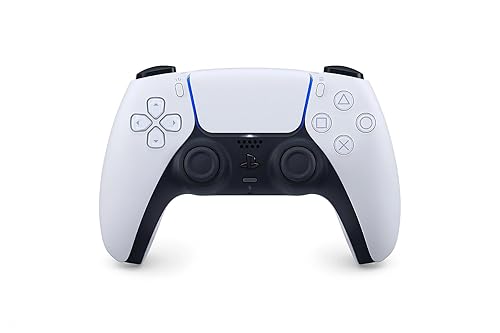
Bottom line: Sony's own controller, with haptic feedback, adaptive triggers and a built-in mic, and owners praise its comfort and feel.
Pros- Haptic feedback and adaptive triggers that owners say make games feel more realistic
- Owners praise its comfort and button response
- Built-in mic, speaker and headset jack
Cons- No back buttons
- A few heavy users report stick drift after around a year or 1,000 hours
Check Price on Amazon
For most PS5 owners, the standard DualSense is still the controller to beat. Along with the DualSense Edge, it's the only controller on this list that lists Sony's haptic feedback and adaptive triggers, which change resistance under your fingers in supported games.
Why We Picked It
- Immersive features: owners say the vibration and triggers make games feel more realistic, and one calls it dangerously immersive.
- Comfortable: owners say it feels very comfortable in the hands with responsive buttons.
- Everything built in: a microphone, a speaker, a headset jack and a create button for capturing gameplay.
Who It's For
- Most PS5 players: especially for single-player games that use haptics and adaptive triggers.
- Anyone who needs a second controller: it connects automatically to the PS5, according to owners.
Who It's Not For
- Competitive players who want paddles: it has no back buttons. Look at the DualSense Edge or a pro controller below.
- Very heavy users: a few owners report stick drift after around a year, and one noticed drift and trigger squeaking after about 1,000 hours.
Specs & Configurations
- Connection
- Bluetooth or USB-C
- Features
- haptic feedback, adaptive triggers
- Audio
- built-in mic, speaker and 3.5mm headset jack
- Battery
- built-in rechargeable
- Works with
- PS5, Windows PC, Mac
2
Best Premium Sony Controller
Sony DualSense Edge

Bottom line: Sony's pro controller keeps haptics and adaptive triggers and adds back buttons, trigger stops, profiles and swappable stick modules.
Pros- Keeps the DualSense's haptics and adaptive triggers
- Replaceable stick modules extend its life
- Owners call it the best controller they've owned
Cons- The most expensive Sony option
- Back buttons can only be mapped to existing buttons
Check Price on Amazon
If you love the DualSense but want pro features, the DualSense Edge adds two sets of swappable back buttons, adjustable trigger travel, button remapping, quick-swap profiles and replaceable stick modules.
Why We Picked It
- Sony features plus pro controls: haptic feedback and adaptive triggers, with back buttons and trigger stops on top.
- Longer lifespan: worn sticks can be swapped with new modules instead of replacing the whole controller.
- Owner favorite: one owner who has used theirs since 2023 calls it the best controller they've ever owned, and others say it's very comfortable.
Who It's For
- DualSense fans: who want back buttons without losing haptics.
- Players with larger hands: one owner with big hands says it fits nicely.
Who It's Not For
- Budget buyers: it costs far more than the standard DualSense.
- Macro fans: one owner was disappointed that the back buttons can only be assigned to existing controller buttons.
Specs & Configurations
- Connection
- wireless
- Extra buttons
- 2 sets of swappable back buttons
- Triggers
- adjustable trigger travel
- Sticks
- replaceable stick modules, 3 types of caps
- Extras
- remappable buttons, quick-swap profiles, haptic feedback, adaptive triggers
3
Best Modular Controller
Victrix Pro BFG Reloaded
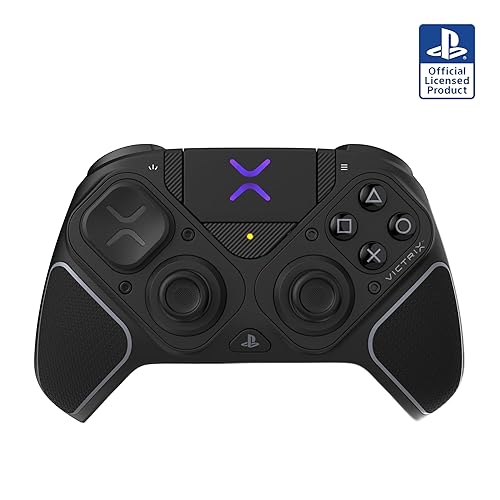
Bottom line: A modular pro controller with Hall effect modules, a six-button fightpad module and 5-stop triggers you can rebuild for any game.
Pros- Swap modules for shooters, fighting games and more
- Owners report no stick drift, including one with two units a year apart
- Works on PS4 and PS5
Cons- One owner says it can't turn on the PS5 with its PlayStation button
- One owner's dongle only paired from the PS5's front USB ports
Check Price on Amazon
The Victrix Pro BFG Reloaded is the most flexible controller on this list. You can swap its modules, including a six-button fightpad module, choose from interchangeable sticks and D-pads, and set its Hall effect triggers to five different stops.
Why We Picked It
- Drift-resistant and swappable: one owner with two units says neither shows a hint of stick drift, and that you could swap modules if it ever happened.
- Competitive gains: one owner whose PS5 controllers all drifted within a year says their scores in Call of Duty, Rainbow Six and Fortnite improved with its precise Hall effect sticks.
- Great for fighting games too: one owner bought it blind for its modular design and loves switching things around for fighting games.
Who It's For
- Players of many genres: who want one controller that adapts to shooters and fighters.
- Owners of PS4 and PS5: one owner uses it on both.
Who It's Not For
- Players who wake the PS5 with the controller: one owner says the PlayStation button can't turn the console on, and that the dongle only paired when plugged into the front USB ports.
- PC tweakers: a 3-star reviewer couldn't get the Victrix app working on their main PC. Another found the thumbsticks small and the triggers pointy at first.
Specs & Configurations
- Connection
- wired or wireless (up to 20-hour battery)
- Modules
- 3 customizable modules with Hall effect, including a 6-button fightpad module
- Triggers
- 5-stop Hall effect clutch triggers with hair-trigger mode
- Extra buttons
- 4 mappable quick-action buttons
- Extras
- 11 interchangeable components, 3.5mm jack with Sony 3D Audio
4
Best for Big Hands
Nacon Revolution 5 Pro
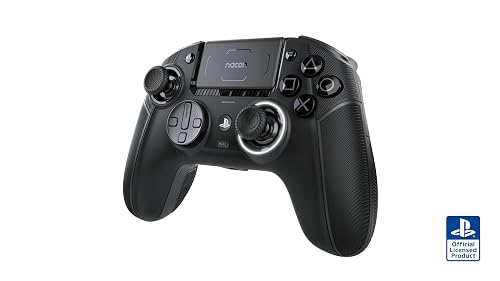
Bottom line: An Xbox-style PS5 pro controller with Hall effect sticks and triggers, four Omron back paddles and a special D-pad, which owners with big hands love.
Pros- Hall effect sticks and triggers, with one owner reporting no drift after 700+ hours
- One owner with big hands calls it the best controller they've had
- Xbox-style ergonomics on PS5
Cons- Customization app isn't available on PS5 or mobile, and one owner couldn't get it running on Mac
- Its recessed USB-C port only fits certain cables, says one owner
Check Price on Amazon
The Nacon Revolution 5 Pro brings an Xbox-style asymmetric layout to PS5, with Hall effect sticks and triggers, trigger blockers, four Omron micro-switch back paddles and a swappable D-pad designed with fighting game pro Mister Crimson.
Why We Picked It
- No drift so far: one owner has used theirs for over a year and 700+ hours of Call of Duty with no stick drift, and others bought it after their standard PS5 controllers drifted.
- Comfort for large hands: one owner with big hands calls it the best controller they've had, and another says it feels like playing with an Xbox controller.
- Bluetooth headset support: one owner points out you can pair a Bluetooth headset with it.
Who It's For
- Xbox-layout fans on PS5: who want the stick offset of an Xbox pad.
- Marvel Rivals and Call of Duty players: owners mention long sessions in both.
Who It's Not For
- Players who want haptics: one owner chose it over the DualSense Edge while accepting it doesn't have the same vibration and haptic feedback.
- Mac or console-only tweakers: there's no app on PS5 or mobile, and one owner couldn't open the Mac version. Another found the recessed USB-C port only fits certain cables, and two owners say the paint or button symbols wear off over time.
Specs & Configurations
- Connection
- USB-A wireless adapter or wired (3 m USB-C cable)
- Battery
- up to 10 hours
- Sticks and triggers
- Hall effect
- Triggers
- trigger blockers for long or short pulls
- Extra buttons
- 4 Omron micro-switch back paddles
- D-pad
- swappable specialized D-pad designed with pro player Mister Crimson
5
Best for Competitive Shooters
Razer Raiju V3 Pro

Bottom line: A symmetrical PS5 pro controller with TMR sticks, six remappable buttons and mouse-click triggers that owners pick for competitive shooters.
Pros- One owner who also uses a Victrix Pro and DualSense Edge calls it their favorite for competitive shooters
- Owners report no stick drift after six months
- One owner says its battery outlasts their DualSense Edge
Cons- One owner found the extra shoulder buttons awkward and the R1/R2 reach tiring
- A 3-star reviewer feels the build doesn't match the price
Check Price on Amazon
The Razer Raiju V3 Pro is built for competitive play. It uses a symmetrical layout with TMR sticks, four removable mouse-click back buttons plus two claw-grip bumpers, triggers that switch between mouse-click and analog, and a 2.4GHz dongle for PS5.
Why We Picked It
- Competitive favorite: one owner who has used a Victrix Pro with Hall effect sticks and a DualSense Edge says this is by far their favorite for competitive shooters.
- Drift-free so far: one owner hasn't noticed stick drift after six months, and loves the customizable triggers.
- Battery and buttons: another owner says its battery life, buttons and sticks are better than their DualSense Edge.
Who It's For
- FPS players: who want mouse-click triggers and extra buttons.
- PS5 and PC players: it's licensed for PS5 and works on PC with 2000Hz wired polling.
Who It's Not For
- Action game players with smaller hands: one owner playing God of War found switching between R2 and R1 for combos tiring, and the extra shoulder buttons a little awkward.
- Buyers who expect luxury materials: a 3-star reviewer feels the construction doesn't justify the price, and one buyer returned theirs within a few days.
Specs & Configurations
- Connection
- 2.4GHz HyperSpeed dongle or wired (2000Hz wired polling on PC)
- Sticks
- TMR with swappable caps
- Extra buttons
- 4 removable back buttons + 2 claw-grip bumpers
- Triggers
- HyperTriggers (mouse-click or analog)
- Buttons
- Mecha-Tactile action buttons, 8-way floating D-pad
- Extras
- 4 onboard profiles, carrying case
6
Best Customization
SCUF Omega PS5

Bottom line: A light pro controller with 11 extra inputs, TMR sticks, Omron mechanical switches and a phone app you can use to tweak settings while you play.
Pros- Owners say the wireless connection has been flawless
- Phone app customization that one owner rates above the Edge's
- Light, with long battery life according to owners
Cons- Bluetooth only works with mobile devices, says one owner
- One owner finds the back buttons a little hard to reach
Check Price on Amazon
The SCUF Omega gives you more ways to customize than any other pick. It has 11 extra inputs, including four rear paddles, two side buttons and G-keys, and SCUF's phone app lets you adjust stick and trigger curves, remap buttons and set a 0% stick deadzone in real time.
Why We Picked It
- Deep customization: one owner set up three profiles and says customizing from their phone while connected to the PS5 beats the Edge's system.
- Reliable wireless: owners describe the wireless connection as flawless and stable, and say battery life is fantastic.
- Crisp inputs: Omron mechanical switches in the triggers, D-pad and action buttons, which owners describe as very responsive.
Who It's For
- Competitive players: who want extra inputs and fine-tuned response curves.
- PS5 and PC players: one owner bought it specifically for wireless PC gaming.
Who It's Not For
- Players with large hands: one owner finds it smaller in size and the paddle design lacking.
- Anyone planning Bluetooth on PC: one owner says Bluetooth only works with mobile devices, not Windows or Linux. Another finds the back buttons a little hard to reach.
Specs & Configurations
- Connection
- 2.4GHz on PS5, Bluetooth 5.0 for mobile
- Sticks
- TMR
- Switches
- Omron mechanical for instant triggers, D-pad and action buttons
- Extra inputs
- 11 (4 rear paddles, 2 side buttons, G-keys)
- Extras
- SCUF mobile app with 0% deadzone option, tournament cable lock
7
Best for Fighting Games
HORI Fighting Commander OCTA (PS5)

Bottom line: A wired six-button fightpad, officially licensed by Sony, with an adjustable D-pad that Tekken and Street Fighter owners praise.
Pros- A Tekken player says advanced movement like Korean backdash is very consistent
- Owners say the D-pad makes difficult motions easier
- One owner's pad is still going after two to three years
Cons- One owner says the D-pad doesn't read diagonals consistently
- Small and light, which some owners dislike
Check Price on Amazon
For Street Fighter 6, Tekken 8 and other fighters on PS5, the HORI Fighting Commander OCTA is a dedicated fightpad. It's officially licensed by Sony, with six micro switch face buttons, a D-pad with adjustable sensitivity and a 10-foot cable.
Why We Picked It
- Accurate D-pad: a Tekken player who bought two says Korean backdash, wavedash and sidestep cancels are very consistent.
- Arcade layout: six face buttons with clicky micro switches.
- Durable: one owner has used theirs for two to three years without problems.
Who It's For
- Fighting game players: who want a better D-pad than the DualSense. One Street Fighter 6 player switched after their old D-pad started misreading directions.
Who It's Not For
- Players who rely on diagonals: one owner gave up after four days because diagonals didn't register consistently.
- Players with big hands: one owner found it small for average-size hands. For more fighting game options, see our guide to the best controller for fighting games.
Specs & Configurations
- Connection
- wired (10 ft cable)
- Layout
- six face buttons
- Buttons
- micro switch
- D-pad
- adjustable sensitivity
- Extras
- HORI Device Manager app with 4 profiles, headset jack
- Works with
- PS5, PS4, PC
8
Best Accessible Controller
PlayStation Access Controller
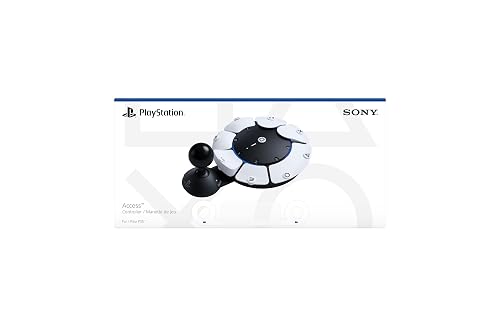
Bottom line: Sony's adaptive controller lets players with limited mobility build a layout that works for them, and owners say it lets them play again.
Pros- Owners with disabilities say it lets them play games again
- Highly customizable buttons, stick and placement
- Can be combined with a DualSense for haptics, motion and touchpad
Cons- Many games need two Access controllers (one for moving, one for camera)
- One owner couldn't make it work for GTA
Check Price on Amazon
The PlayStation Access Controller is Sony's adaptive controller for players with limited mobility. You can rearrange its buttons and stick caps, adjust the stick length, place it in any orientation or on a mount, and combine it with a second Access controller or a DualSense.
Why We Picked It
- Life-changing for some players: an owner with a connective tissue disorder who uses a wheelchair says it lets them play again, and an owner with incomplete paraplegia who only has use of their left arm says it let them play games they hadn't played in over a decade.
- Flexible setup: configurable buttons, toggles and up to 30 profiles on PS5.
- Combines with other controllers: pair two Access controllers, or add a DualSense for haptics, motion and touchpad swipes.
Who It's For
- Players with disabilities: who struggle with standard controllers.
Who It's Not For
- Anyone expecting one unit to cover every game: owners say most games need two, one for movement and one for the camera.
- Every game and need: one owner couldn't make it work for GTA, which needs two joysticks and simultaneous presses.
Specs & Configurations
- Layout
- swappable button and stick caps, adjustable stick length
- Placement
- any 360° orientation, flat surfaces, wheelchair trays or AMPS mounts
- Profiles
- up to 30 on PS5, 3 stored on the controller
- Pairing
- up to two Access controllers, or combine with a DualSense or DualSense Edge
- Buttons
- configurable, toggle, disable or map two commands to one button
PS5 Controllers Compared
| Controller |
Haptics and adaptive triggers |
Extra buttons |
Sticks |
Connection |
| Sony DualSense |
Yes |
None |
Standard |
Bluetooth, USB-C |
| Sony DualSense Edge |
Yes |
Swappable back buttons |
Replaceable modules |
Wireless |
| Victrix Pro BFG Reloaded |
Not listed |
4 |
Hall effect modules |
Wireless, wired |
| Nacon Revolution 5 Pro |
Not listed |
4 paddles |
Hall effect |
Wireless adapter, wired |
| Razer Raiju V3 Pro |
Not listed |
6 |
TMR |
2.4GHz dongle, wired |
| SCUF Omega PS5 |
Not listed |
11 inputs |
TMR |
2.4GHz, Bluetooth (mobile) |
| HORI Fighting Commander OCTA |
Not listed |
6-button layout |
Standard |
Wired |
| PlayStation Access Controller |
With a paired DualSense |
Configurable |
Adjustable stick |
Not listed |
“Not listed” means the feature isn’t mentioned in the product’s Amazon listing. Based on listings and owner reviews at the time of writing.
PS5 Quirks Owners Ran Into
- Turning on the console: one Victrix Pro BFG Reloaded owner says its PlayStation button can’t turn on the PS5, so you’ll need another controller or the power button.
- Dongle placement: the same owner found the Victrix dongle only paired in the PS5’s front USB ports.
- Customization apps: Sony’s controllers are customized in the PS5’s own settings, while third-party pads use separate apps. The Nacon app isn’t available on PS5 or mobile, and SCUF’s app runs on your phone.
- Charging cables: one Nacon owner says the recessed USB-C port only fits certain cables, so keep the included one.
How to Choose a PS5 Controller
Do you want haptics and adaptive triggers?
Sony’s DualSense and DualSense Edge are the only picks here that list haptic feedback and adaptive triggers. If you mostly play single-player games that use them, stick with Sony.
Back buttons and trigger stops
For shooters, back buttons let you jump, slide or reload without moving your thumbs, and trigger stops or mouse-click triggers let you fire faster. The Edge, Victrix, Nacon, Razer and SCUF picks all offer these.
Drift-resistant sticks
Several owners bought a pro controller after their standard PS5 controllers developed stick drift. Hall effect and TMR sticks, like those in the Victrix, Nacon, Razer and SCUF pads, use magnetic sensing to resist drift, while the Edge lets you swap out worn stick modules.
Layout and hand size
The DualSense, DualSense Edge and Razer Raiju V3 Pro use a symmetrical PlayStation-style layout, while the Nacon uses an Xbox-style layout that one owner with big hands loves. If you have smaller hands, pay attention to owner notes about size.
FAQ
What is the best game controller for PS5?
For most players, the best game controller for PS5 is Sony’s DualSense, thanks to its haptic feedback, adaptive triggers and comfort. If you want pro features, the DualSense Edge keeps those features and adds back buttons, while the Razer Raiju V3 Pro and SCUF Omega are top picks for competitive shooters.
Is the DualSense Edge worth it?
If you want back buttons, trigger stops and replaceable sticks without giving up Sony’s haptics and adaptive triggers, yes. It’s the only pro controller on our list that lists both. If you don’t need haptics, third-party pro controllers offer more extra buttons.
What PS5 controller doesn’t get stick drift?
No controller can promise it will never drift, but Hall effect and TMR sticks are designed to resist it. Owners of the Victrix Pro BFG Reloaded, Nacon Revolution 5 Pro and Razer Raiju V3 Pro report no drift after months or more of use.
Do third-party PS5 controllers have haptic feedback?
None of the third-party controllers on our list mention haptic feedback or adaptive triggers in their Amazon listings, and one Nacon owner chose it knowing it doesn’t have the Edge’s haptics.
What is the best PS5 controller for disabled gamers?
The PlayStation Access Controller. It’s Sony’s adaptive controller with customizable buttons, an adjustable stick and flexible mounting, and owners with disabilities say it lets them play again.
Final Verdict: Which PS5 Controller Should You Buy?
All eight picks are officially licensed, so the best game controller for PS5 comes down to how you play. The DualSense is right for most people, and the DualSense Edge is the premium Sony upgrade. For competitive shooters, choose the Razer Raiju V3 Pro or the highly customizable SCUF Omega; for modular flexibility, the Victrix Pro BFG Reloaded; and for big hands or an Xbox-style layout, the Nacon Revolution 5 Pro. Fighting game fans should get the HORI Fighting Commander OCTA, and the PlayStation Access Controller opens up gaming for players with limited mobility. Also playing on PC? See our guide to the best game controller for PC Steam.