GameCuki is reader-supported. When you buy through links on our site, we may earn an affiliate commission at no extra cost to you. As an Amazon Associate I earn from qualifying purchases. Learn more.
Fighting games punish sloppy inputs. A quarter-circle that comes out as a jump, or a diagonal that doesn’t register, can cost you a round. That’s why many players move away from a standard controller to a fightpad with a better D-pad, an arcade fight stick, or a leverless controller that replaces the stick with buttons.
To find the best controller for fighting games on PC, we compared the features of popular fightpads, fight sticks and leverless controllers on Amazon, and read owner reviews from players of Street Fighter 6, Tekken 8, Guilty Gear Strive and other fighters. Below you’ll find 8 picks across all three styles, plus a quick guide to which style suits you and how each one connects to a PC. Read more about our process on our How We Review page.
The Best Controllers for Fighting Games on PC: Our Picks in Detail
1
Best Fight Stick for Most Players
8BitDo Arcade Stick (Switch and Windows)

Bottom line: A wireless, moddable fight stick that owners call the best entry-level stick, and that works on PC like an Xbox controller.
Pros- Owners call it a very solid stick for fireballs, dragon punches and other special moves
- Three ways to connect, including lag-free 2.4GHz on PC per owners
- Easy to upgrade with arcade parts
Cons- One owner found the stock buttons loud and replaced them
- One owner dislikes the angle of the button layout
Check Price on Amazon
The 8BitDo Arcade Stick is the fight stick we'd recommend to most PC players, especially if it's your first. It connects over a 2.4GHz receiver, Bluetooth or USB-C, and owners say Windows recognizes it like an Xbox controller, so most games work right away.
Why We Picked It
- Clean special moves: one owner who judges a stick by how easily fireballs and dragon punches come out in Capcom's fighting game collections calls it unbelievably good.
- Works smoothly on PC: one owner uses it wirelessly on Windows 10 with the 2.4GHz receiver and calls the connection solid and lag free, and another says it worked out of the box on Windows and Linux in wired, Bluetooth and 2.4GHz modes.
- Built to be upgraded: a universal mounting plate supports Sanwa sticks, and owners have swapped in Seimitsu buttons and other arcade parts.
- Stays put: one owner says it's hefty and stays in place thanks to a metal plate inside.
Who It's For
- First-time stick players: several owners call it a great starter stick, and one calls it the best entry-level fight stick.
- Guilty Gear Strive and Street Fighter players on PC: one owner uses it for Strive and Street Fighter V on PC.
Who It's Not For
- Quiet-room players: one owner found the stock buttons a little loud and swapped them for quieter Seimitsu buttons.
- Players with a different preferred layout: one owner dislikes the angle of the button layout and found the stretch uncomfortable. If you play mostly on Xbox and PC, 8BitDo also sells an Xbox-licensed version.
Specs & Configurations
- Type
- arcade fight stick
- PC connection
- 2.4GHz receiver, Bluetooth or USB-C
- PC mode
- recognized like an Xbox controller (XInput), per owners
- Mods
- universal mounting plate supports Sanwa sticks
- Extras
- button mapping and macros in 8BitDo Ultimate Software, hidden receiver compartment
2
Best Fightpad
HORI Fighting Commander OCTA (PS5, PS4 and PC)

Bottom line: A wired six-button fightpad with micro switch buttons and an adjustable D-pad that Tekken and Street Fighter owners praise.
Pros- Owners say the D-pad makes difficult motions like dragon punches easier
- A Tekken player says movement like Korean backdash and wavedash is very consistent
- One owner's pad is still going after two to three years
Cons- One owner says the D-pad doesn't read diagonals consistently
- Small and light, which some owners with larger hands dislike
Check Price on Amazon
If you'd rather stick with a pad, the HORI Fighting Commander OCTA is built for fighting games. It has six face buttons, micro switch buttons, a D-pad with adjustable sensitivity and a 10-foot cable, and HORI's Device Manager app lets you remap buttons, tweak the D-pad and save four profiles.
Why We Picked It
- Accurate D-pad: a Tekken player who bought two says Korean backdash, wavedash and sidestep cancels are very consistent, and another owner says the D-pad makes difficult inputs like dragon punches easier.
- Arcade-style layout: six face buttons with micro switches that owners describe as clicky.
- Durable: one owner has used theirs for two to three years, including days left in a hot car, without damage.
Who It's For
- Pad players: who want a better D-pad than a standard controller. One Street Fighter 6 owner bought it after their old PS4 D-pad started misreading directions.
- Stick players who want a pad option: a fight stick player of 12 years says its D-pad is probably their favorite.
Who It's Not For
- Players who rely on diagonals: one owner gave up on it after four days because the D-pad didn't read diagonal inputs consistently, and another says the D-pad needed time to break in.
- Thumbstick or big-hand players: one owner says the thumbstick kept missing down-forward inputs, and another found the pad small for average-size hands.
Specs & Configurations
- Type
- fightpad
- PC connection
- wired (10 ft cable)
- Layout
- six face buttons
- Buttons
- micro switch
- D-pad
- adjustable sensitivity
- Extras
- HORI Device Manager app with 4 profiles, headset jack
3
Best Leverless for Most Players
8BitDo All-Button Arcade Controller (Xbox and PC)

Bottom line: A thin, wireless leverless controller with hot-swappable mechanical switches that owners say feels premium for the price.
Pros- Owners say it works flawlessly on PC and Xbox
- Hot-swappable switches for long-term use
- One owner says it feels better than some of their pricier fight sticks
Cons- No Bluetooth, and PlayStation needs an adapter
- One owner says the mic jack is poor
Check Price on Amazon
Leverless controllers replace the joystick with four movement buttons, and the 8BitDo All-Button is one of the most affordable ways to try one. It's Xbox-licensed, works on Windows, connects wirelessly over 2.4GHz or with a cable, and uses 16 hot-swappable Kailh low-profile mechanical switches.
Why We Picked It
- Works on PC out of the box: one owner with about 50 hours on it says it has worked flawlessly on both PC and Xbox.
- Premium feel: owners describe it as sturdy with some weight despite being thin, and one says it feels better than some of their fight sticks that cost over $150.
- Long-term flexibility: hot-swappable switches and easy on-the-fly button reprogramming, including WASD-style layouts.
Who It's For
- Players curious about leverless: several owners say it's their first leverless and call it an excellent starter.
- PC and Xbox players: who want wireless without extra adapters.
Who It's Not For
- PlayStation players: owners note you'll need an adapter on PS5, and it has no Bluetooth.
- Anyone who uses the headset jack: one owner says the mic jack is terrible, and another dislikes the lock and volume knobs. The switches are also very clicky, which you'll either love or not.
Specs & Configurations
- Type
- leverless (all-button)
- PC connection
- 2.4GHz wireless or wired
- Switches
- 16 Kailh low-profile mechanical, hot-swappable
- Thickness
- about 1.6 cm
- Extras
- 2 programmable buttons, lock caps, 3.5mm audio jack, RGB lighting
4
Best Budget Fightpad
8BitDo M30 Wired Controller (Xbox and Windows)

Bottom line: A cheap, wired six-button pad with a D-pad that fighting game players call one of the best, but it's small.
Pros- Owners repeatedly praise the D-pad, one calling it a rare gem for fighting games
- Wired USB-C with very low latency, according to owners
- Fully remappable with three onboard profiles
Cons- Several owners find it too small and not ergonomic
- Face buttons come in two different sizes, which some find awkward
Check Price on Amazon
The 8BitDo M30 is a Sega Genesis-style pad with six face buttons, and this wired version is officially licensed for Xbox and works with Windows. It's the cheapest pick on our list, and it has one of the best D-pads you can buy, according to owners.
Why We Picked It
- Standout D-pad: one owner who says the D-pad is perfect calls it a rare gem for fighting game players, and another with over 40 controllers ranks it among the top three D-pads they've used.
- Low latency and more buttons: owners say the wired connection has almost no latency, and this version adds four shoulder buttons instead of the original M30's two.
- Total control over buttons: three onboard profiles let you remap any button, including the D-pad.
Who It's For
- 2D fighting game fans on a budget: owners recommend it for classic and modern fighters and retro games.
- Players with smaller hands: the compact size suits some owners.
Who It's Not For
- Larger hands: several owners find it too small and not ergonomic, including one with small hands.
- Players who press multiple buttons at once: one owner says the different-size face buttons make kara and multi-button inputs harder. There are also no analog triggers.
Specs & Configurations
- Type
- fightpad (Sega-style)
- PC connection
- wired USB-C (detachable cable)
- Layout
- six face buttons, 2 bumpers + 2 triggers
- Extras
- 3 onboard profiles, 8BitDo Ultimate Software, layout switches, 3.5mm audio jack
- Licensing
- officially licensed by Xbox
5
Best Cheap Fight Stick
MAYFLASH F300 Arcade Fight Stick

Bottom line: A budget fight stick that works with PC and many consoles, is easy to mod with Sanwa parts, and owners say lasts for years.
Pros- Supports both XInput and DInput on PC
- Easy to upgrade with Sanwa parts, even for first-timers
- One owner used theirs roughly for six years before the buttons gave out
Cons- One owner found the stock buttons mushy and loud
- On PlayStation and Xbox, owners say you need a controller connected
Check Price on Amazon
If you just want to try a fight stick without spending much, the MAYFLASH F300 is the one to get. It works on PC in both XInput and DInput modes, supports many consoles, and accepts Sanwa Denshi buttons and joysticks when you're ready to upgrade.
Why We Picked It
- Great value for beginners: owners say the stick and buttons are clicky and responsive for the money, and one notes it includes an octagonal gate option.
- Easy to mod: owners, including first-timers, say swapping in Sanwa buttons and sticks is easy.
- Durable: one owner bought theirs in 2020 and used it often and roughly for six years before the buttons finally gave out.
Who It's For
- First-time stick players: on a tight budget.
- Multi-system players: one owner uses it with a MiSTer, Neo Geo and Xbox without noticing latency.
Who It's Not For
- Players who want premium parts out of the box: a 3-star reviewer found the stock buttons mushy and loud, and owners suggest upgrading them.
- Console players who don't want extra steps: owners note PlayStation and Xbox require a controller connected, and PS5 needs a separate MAYFLASH adapter. On PC, it plugs in directly.
Specs & Configurations
- Type
- arcade fight stick
- PC connection
- wired, XInput and DInput modes
- Platforms
- Windows, macOS, Steam Deck, Switch/Switch 2, PS4, Xbox and more
- Mods
- compatible with Sanwa Denshi buttons and joystick
- Extras
- turbo with adjustable speeds
6
Best Tournament-Style Stick
HORI Fighting Stick Alpha (PS5, PS4 and PC)
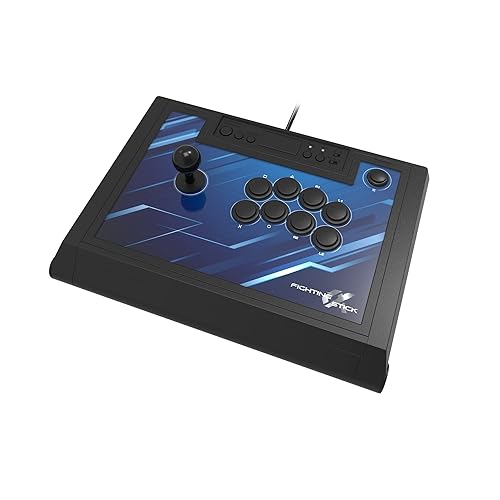
Bottom line: A tournament-grade stick with HORI Hayabusa parts that's easy to open and mod, and works on PC with no issues, per owners.
Pros- Owners call it one of the easiest sticks to mod
- Responsive inputs with no perceptible lag, according to owners
- One owner reports no compatibility issues on Windows 10
Cons- One owner found the Hayabusa buttons too sensitive
- The internal cable hooks make the case hard to close, says one owner
Check Price on Amazon
The HORI Fighting Stick Alpha is a tournament-style stick that's officially licensed for PS5 and also works on PC. It uses HORI's Hayabusa joystick and buttons, opens up for easy maintenance and mods, and adds a tournament lock and four custom profiles.
Why We Picked It
- Reliable inputs: one owner says all inputs like dragon punches and quarter circles come out nicely with no perceptible lag.
- Easy to mod: an owner with four fight sticks calls it the easiest to mod, and others have swapped in Sanwa and Seimitsu parts.
- Works on PC: one owner reports no compatibility issues on Windows 10.
Who It's For
- Players who want a tournament-style stick: with built-in carry handles and a tournament lock.
- Modders: who plan to customize buttons, lever and artwork.
Who It's Not For
- Light-touch or late-night players: one owner found the Hayabusa buttons a bit sensitive, and a Victrix owner says they switched away from the Alpha because it was too noisy at night.
- Anyone who wants great cable storage: one owner says the internal cord hooks bunch up the cable and make it hard to close.
Specs & Configurations
- Type
- arcade fight stick
- PC connection
- wired (10 ft cable)
- Parts
- HORI Hayabusa joystick and buttons
- Mods
- opens for easy customization, replaceable artwork
- Extras
- tournament lock, touchpad, 4 profiles via app, audio controls
7
Best Premium Leverless
Razer Kitsune (PS5 and PC)

Bottom line: A slim, light leverless controller with low-profile optical switches that owners say is close to perfect out of the box.
Pros- Owners say inputs are crisp with fast response
- Thin and light enough to fit in a backpack
- One owner says it ended the wrist pain and blisters they had on a fight stick
Cons- Expensive compared with other leverless options
- Takes a few weeks to adjust if you're coming from a stick
Check Price on Amazon
The Razer Kitsune is the leverless controller to get if you want something polished that works out of the box. It has low-profile linear optical switches, a slim design, a detachable USB-C cable with a locking clasp and a tournament lock, and owners say a switch toggles XInput mode for Windows.
Why We Picked It
- Crisp inputs: a long-time Tekken player says their throw game already feels better, and that it's easier to input directions and multiple buttons quickly.
- Comfort: one owner who used to get wrist pain and finger blisters on a fight stick says the Kitsune solved both.
- Ready to play: owners call it close to perfect out of the box, and one says the PlayStation touchpad doubles as a mouse in PC mode.
Who It's For
- Players switching to leverless: who want a premium, ready-made option instead of hard-to-find boutique models.
- Tournament travelers: the thin body fits in a laptop pocket of a backpack, according to one owner.
Who It's Not For
- Budget buyers: owners agree it's expensive, and the 8BitDo All-Button costs much less.
- Impatient learners: owners say the button layout can take a few weeks to get used to.
Specs & Configurations
- Type
- leverless (all-button)
- PC connection
- wired, detachable USB-C with locking clasp
- PC mode
- switch to toggle XInput for Windows, per owners
- Switches
- low-profile linear optical
- Extras
- tournament lock, removable aluminum top plate, Chroma RGB
8
Best Premium Fight Stick
Victrix Pro FS (PS5, PS4 and PC)

Bottom line: An aluminum, tournament-ready stick with Sanwa parts that owners call the last stick they'll ever need, at a premium price.
Pros- Premium aluminum build with genuine Sanwa parts
- Owners say it's easy to mod and holds up to heavy use
- Comfortable on the lap with a built-in foam pad
Cons- One owner's USB-C port loosened over time
- One owner dislikes the reversed R and L button placement
Check Price on Amazon
If you want one stick to keep for years, the Victrix Pro FS is built for it. It has a single-piece aluminum body, 30mm Sanwa Denshi buttons, a detachable joystick on a Sanwa JLF base, a foam lap pad and a mode switch for PS5, PS4 and PC.
Why We Picked It
- Owner favorite: one owner who tried the HORI Alpha, 8BitDo Arcade Stick and others says the Victrix is the stick they finally settled on.
- Tough and moddable: one owner says it's still as good as the day they bought it after heavy use, and that modding is a breeze.
- Comfortable: a wrist slope and foam lap pad, and owners like how it sits on the lap.
Who It's For
- Serious stick players: who want premium parts and build quality.
- Tournament players: with carrying handles and a tournament mode that locks the control bar.
Who It's Not For
- Budget buyers: it's the most expensive pick here, and one 2-star owner says its USB-C port developed too much wiggle over time.
- Players who want a standard shoulder layout: one owner points out the R and L buttons are reversed from the usual order, and that internal cables have little slack for mods. Another received a faulty unit at first, though the replacement worked well.
Specs & Configurations
- Type
- arcade fight stick
- PC connection
- wired, PC mode via built-in switch
- Parts
- 30mm Sanwa Denshi buttons, Link 2 detachable joystick on a Sanwa JLF base
- Build
- single-piece aluminum body, foam lap pad, 6.28° wrist slope
- Extras
- tournament mode, quick-access back panel for mods, carrying handles
Fighting Game Controllers Compared
| Controller |
Type |
PC connection |
Standout feature |
| 8BitDo Arcade Stick |
Fight stick |
2.4GHz, Bluetooth, USB-C |
Wireless and moddable |
| HORI Fighting Commander OCTA |
Fightpad |
Wired |
Adjustable D-pad, six buttons |
| 8BitDo All-Button |
Leverless |
2.4GHz, wired |
Hot-swappable mechanical switches |
| 8BitDo M30 Wired |
Fightpad |
Wired USB-C |
Highly praised D-pad |
| MAYFLASH F300 |
Fight stick |
Wired (XInput/DInput) |
Cheap and Sanwa-compatible |
| HORI Fighting Stick Alpha |
Fight stick |
Wired |
Hayabusa parts, easy to mod |
| Razer Kitsune |
Leverless |
Wired USB-C |
Low-profile optical switches |
| Victrix Pro FS |
Fight stick |
Wired |
Aluminum body, Sanwa parts |
Features are taken from each product’s Amazon listing and owner reviews at the time of writing.
Fightpad, Fight Stick or Leverless?
Fightpad
A fightpad keeps a controller shape but uses six face buttons, like an arcade layout, and focuses on a precise D-pad. It’s the easiest switch if you already play on a pad. Our picks: the HORI Fighting Commander OCTA and 8BitDo M30.
Fight stick
A fight stick uses an arcade joystick for movement and large arcade buttons. Most are built to be modded with parts from brands like Sanwa, Seimitsu and HORI. Our picks: the 8BitDo Arcade Stick, MAYFLASH F300, HORI Fighting Stick Alpha and Victrix Pro FS.
Leverless
A leverless (or all-button) controller replaces the joystick with four movement buttons. Razer says this layout avoids the input errors of typical fight sticks, and owners say it makes quick, precise inputs easier, though it takes time to learn. Our picks: the 8BitDo All-Button and Razer Kitsune.
Setting Up a Fighting Game Controller on PC
- Use XInput when you can: most PC games expect an Xbox-style (XInput) controller. Owners say the 8BitDo Arcade Stick is recognized like an Xbox controller, the MAYFLASH F300 supports XInput and DInput, and the Razer Kitsune has a switch to toggle XInput for Windows.
- Remap in the game too: most fighting games let you assign buttons in their settings, and one HORI OCTA owner says they adjust their whole button configuration in-game.
- Check console needs separately: some controllers that work directly on PC need adapters on consoles. Owners note the 8BitDo All-Button needs an adapter for PS5, and the MAYFLASH F300 needs a controller connected on PlayStation and Xbox.
FAQ
What is the best controller for fighting games on PC?
For most players, the 8BitDo Arcade Stick is the best controller for fighting games on PC. It connects wirelessly or with a cable, is recognized like an Xbox controller on Windows according to owners, and is easy to upgrade. If you prefer a pad, get the HORI Fighting Commander OCTA, and if you want to try leverless, start with the 8BitDo All-Button.
Is a fight stick better than a controller for fighting games?
Not necessarily. It comes down to what feels right in your hands. A fightpad keeps a familiar shape with a better D-pad, while sticks and leverless controllers give you arcade-style buttons. Some owners switch for comfort: one Razer Kitsune owner says leverless ended the wrist pain they had on a stick.
What is a leverless controller?
A leverless controller replaces the joystick with four buttons for movement, like the Razer Kitsune and 8BitDo All-Button. Owners say it makes precise inputs easier, though it can take a few weeks to adjust.
What is the best budget fight stick for PC?
The MAYFLASH F300 is our budget pick. It supports XInput and DInput on PC, works with many consoles, and accepts Sanwa parts when you want to upgrade.
Do fight sticks work with Street Fighter 6 and Tekken 8 on PC?
Yes, the controllers on this list are used by owners for games like Street Fighter 6, Tekken 8 and Guilty Gear Strive. Use XInput mode where available, and set your button layout in the game’s settings.
Final Verdict: Which Fighting Game Controller Should You Buy?
All eight picks are among the best controllers for fighting games on PC, so it comes down to style. Get the 8BitDo Arcade Stick if you want a great first stick, the HORI Fighting Commander OCTA if you’d rather stay on a pad, or the 8BitDo All-Button to try leverless without spending much. On a tight budget, the 8BitDo M30 and MAYFLASH F300 are hard to beat, while the HORI Fighting Stick Alpha, Razer Kitsune and Victrix Pro FS are worth it for serious players. For general PC gaming, see our guide to the best PC controllers.