

You’ve watched pros glide through Street Fighter 6 and Tekken 8 on flat boxes covered in buttons, and now you want to try it yourself. The best leverless controller for you depends on where you play, how big your hands are and how much you want to tinker, because leverless pads now run from tiny keyboard-style boxes to licensed aluminum controllers with Hall effect switches. These 13 cover PC, PS5, Xbox and Switch, from budget Haute42 boards to the Corsair Novablade Pro.
Best Leverless Controllers in 2026
GameCuki is reader-supported. When you buy through links on our site, we may earn an affiliate commission at no extra cost to you. As an Amazon Associate I earn from qualifying purchases. Learn more.
Our Top Picks

Best Overall
Haute42 C16 Leverless Controller
Bottom line: The best leverless controller for most players, with 16 buttons, open firmware and a tool-free art panel in a slim, lap-friendly body.
- Magnetic top panel swaps art without screws
- Center screen shows your SOCD and input modes
- Wide enough for comfortable lap play
- Tournament lock switch disables extra buttons
- 16 buttons including a right index button and two thumb buttons
- Open GP2040-CE firmware with web configuration
- PS5 and Xbox need a separate adapter
- Screen area picks up fingerprints and light scratches

Best Value
Haute42 T16 Leverless Controller
Bottom line: The best-value full-size leverless controller, as long as it spends more time on a desk than on your lap.
- Full-size 16-button layout at an entry-level price
- Works with a long list of devices, including Raspberry Pi and MiSTer
- Every button can be remapped or turned into a macro
- Hot-swappable low-profile switches
- Clear acrylic body with RGB lighting
- Same GP2040-CE firmware as pricier models
- 30mm button spacing feels wide for small hands
- Acrylic body can warp with heavy lap use
- Stick-on rubber feet

Best Budget
Haute42 B16 Mini Plus Leverless Controller
Bottom line: The cheapest way to try leverless, as long as you play at a desk and like the feel of a mechanical keyboard.
- Small and light enough for any bag
- Keyboard-style keys feel natural to PC players
- Lowest-cost pick in this guide
- Hot-swappable switches with a spare and pullers included
- Built-in web tool for SOCD modes, turbo and layout swap
- Only 10.8 oz
- Too small for lap play or large hands
- Consoles need a separate adapter
- Clicky keys are loud
Best for PS5
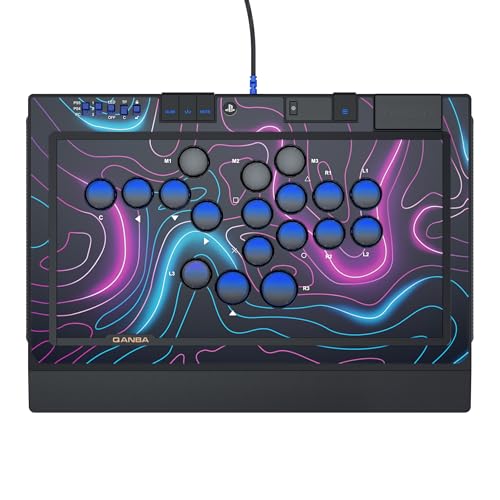
Qanba Sapphire S1 Leverless Controller (PS5, PS4 and PC)
Bottom line: The best leverless for PS5 players, with official licensing, 18 buttons and adjustable travel for less than other licensed models.
- Plug and play on PS5 with no adapter
- 18 buttons with lock caps to cover the ones you don't use
- Three saved layouts for different games
- Adjustable button travel
- Memory foam wrist rest and shoulder strap included
- Official PlayStation licensing
- Plastic body feels less premium than metal rivals
- Wide button spacing may not suit small hands

Best Hall Effect
Corsair Novablade Pro Wireless Hall Effect Leverless Controller
Bottom line: The most advanced leverless controller here, with Hall effect switches, Rapid Trigger and licensed wireless play on PS5 and PC.
- Per-key actuation and Rapid Trigger
- Wireless play with 1000Hz polling on PC
- Game Mode switches to tournament settings in one press
- Hall effect switches rated for 150 million presses
- Wired, 2.4GHz and Bluetooth connections
- Five onboard profiles
- Buttons are louder than most leverless controllers
- Macros only work on PC

Best for Xbox
8BitDo All-Button Arcade Controller for Xbox and PC
Bottom line: The easiest leverless for Xbox players, with official licensing, 2.4GHz wireless and a sturdy build at a beginner-friendly price.
- Officially licensed for Xbox with wireless play
- Heavy and sturdy despite its thin profile
- Hot-swappable switches
- 2.4GHz wireless or wired connection
- 3.5mm audio jack with volume control
- Only 1.6cm thick
- No Bluetooth
- Clicky switches are loud

Best for Switch
8BitDo All-Button Arcade Controller for Switch and Windows
Bottom line: The best leverless for Switch and Switch 2, with Bluetooth, remappable stick inputs and the same sturdy build as the Xbox model.
- Wireless on both Switch and PC
- Stick mapping makes it usable in platform fighters
- Smudge-resistant tempered glass top
- Four programmable P buttons
- Magnetic feet fold out for two angles
- Hot-swappable Kailh Wizard switches
- Clicky switches are loud
- No official PlayStation or Xbox support

Best for Smaller Hands
Haute42 R16 Leverless Controller
Bottom line: The Haute42 to get if the T16 feels too spread out, with a tighter layout, button rims and a lighter body.
- Tighter button spacing than the T16
- Rims make slide inputs easier
- Light enough to carry all day
- Left pinky button
- Works with a Steam Deck as soon as you plug it in
- Web tool for mapping, lighting and SOCD modes
- Acrylic body can creak under pressure
- Stick-on rubber feet

Best Aluminum Build
Haute42 M Ultra Gen2 Aluminum Leverless Controller
Bottom line: The most premium-feeling Haute42, trading acrylic for a solid aluminum body without jumping to licensed-controller prices.
- Solid metal body that resists smudges
- Fast low-profile switches
- Cable clasp and tournament lock
- Larger OLED screen for input and SOCD modes
- Left pinky button and aligned thumb buttons
- Hot-swappable switches
- Compact right-hand cluster takes some adjustment
- Grip pads cover only part of the base

Best Adjustable Travel
Haute42 C-AT Leverless Controller
Bottom line: The most adjustable Haute42 yet, with 18 buttons and three travel settings for players who want to fine-tune every press.
- 18 buttons support split layouts
- Adjustable button travel
- Magnetic art panel and wrist rest
- Snappy hot-swappable Wind Engine switches
- Larger OLED screen shows modes and button status
- Braided USB-C cable locks into the rear port
- Newer model with a short track record
- Widest Haute42 here, so it takes more lap space

Best Budget Wireless
Qanba Ruby Wireless Leverless Controller for PC
Bottom line: A quiet, slim wireless leverless for PC players who want couch play without paying Corsair prices.
- Low-cost wireless leverless
- Quiet, dampened buttons
- Carrying case in the box
- Battery lasts 30+ hours
- Wired USB-C also available
- Thin 1.5cm body
- PC only
- Plastic body feels thin
- Jump button sits far to the left
Best Customizable Layout
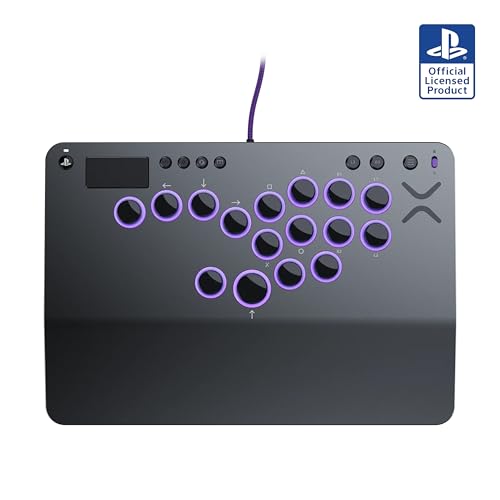
Victrix Pro KO Leverless Fight Stick (PS5, PS4 and PC)
Bottom line: The most customizable licensed leverless for PS5, with movable buttons and a premium aluminum build, though it costs the most here.
- Buttons can be moved to build your own layout
- Layout tuned by fighting game champion Momochi
- Built-in storage for spare buttons and switches
- Official PlayStation licensing
- Hot-swappable Cherry MX Speed Silver switches
- 3m braided USB-C cable
- Priciest pick in this guide
- Mixed reliability record, so update the firmware before you play

Best Lightweight
Razer Kitsune All-Button Arcade Controller (PS5 and PC)
Bottom line: A light, polished leverless that works on PS5 straight out of the box, best for players who only need 12 buttons.
- Native PS5 support out of the box
- Light and slim enough for a backpack laptop sleeve
- Quiet, fast optical switches
- Removable aluminum top plate
- Tournament lock switch
- Touchpad doubles as a mouse in PC mode
- Only 12 main buttons
- Custom switches limit repairs and swaps
- 30mm spacing feels wide for small hands
Table of Contents
- Our Top Picks
- What Is a Leverless Controller?
- Best Leverless Controllers: Our Picks in Detail
- What to Look for in a Leverless Controller
- SOCD Cleaning and Tournament Rules
- Leverless vs Traditional Fight Sticks
- Best Leverless Controller for Street Fighter 6 and Tekken
- How Long Does It Take to Learn a Leverless Controller?
- FAQ
- Final Thoughts
What Is a Leverless Controller?
A leverless controller, also called an all-button controller or hitbox-style controller, replaces the joystick of a traditional fight stick with four buttons for up, down, left and right. Your left hand handles movement with button presses, usually with your thumb on up, while your right hand handles attacks just like on an arcade stick. Because each direction is a separate button, you never land on a diagonal you didn’t mean to press, and moves like dashes, charge inputs and quarter circles come out cleanly once your fingers learn the layout.
Most leverless controllers also add extra buttons beyond the classic 12, such as thumb and pinky buttons you can map to macros, the Drive Parry in Street Fighter 6 or a second up button. The firmware handles what happens when you press left and right together, which is called SOCD cleaning and is covered further down.
Best Leverless Controllers: Our Picks in Detail
1
Best Overall
Haute42 C16 Leverless Controller
Bottom line: The best leverless controller for most players, with 16 buttons, open firmware and a tool-free art panel in a slim, lap-friendly body.
The Haute42 C16 is the most complete leverless controller for the money, putting the features most players want into one well-built pad.
Pros & Cons
Pros
- Magnetic top panel swaps art without screws
- Center screen shows your SOCD and input modes
- Wide enough for comfortable lap play
- Tournament lock switch disables extra buttons
- 16 buttons including a right index button and two thumb buttons
- Open GP2040-CE firmware with web configuration
Cons
- PS5 and Xbox need a separate adapter
- Screen area picks up fingerprints and light scratches
Why We Picked It
The C16 has 16 buttons, including a right index button and two extra thumb buttons that sit side by side, so both thumbs rest in the same position. A sloped wrist rest runs along the front, and the body is slim but wide enough to sit on your lap without squeezing your legs together. The button rims sit flush with the top panel, which makes it easy to slide your fingers across buttons for fast motion inputs.
It runs GP2040-CE, the open-source firmware used across the Haute42 range. Plug it into a PC, open 192.168.7.1 in a browser and you can remap any button, change SOCD modes, set RGB colors and update the firmware. A small screen in the center shows your current SOCD, directional and input modes plus live button presses. The top panel is magnetic, so you press a button on the back, lift it off and slide in new artwork, and Haute42 includes art templates in the box. A tournament lock switch turns off the extra buttons so you can't pause or disconnect by accident mid-match. On Switch 2, you hold A while plugging it in to enter Switch mode, then switch it to left stick mode.
Who It's For
You play on a PC or Steam Deck and want a full-featured leverless that's comfortable on a desk or your lap. The two thumb buttons sit side by side, the sloped wrist rest and slim body keep your hands relaxed, and GP2040-CE lets you remap buttons and change SOCD modes from a browser. A magnetic top panel and included art templates make it easy to personalize.
Specs & Configurations
- Buttons
- 16, including a right index button and two thumb buttons
- Firmware
- GP2040-CE with web configuration
- Switches
- hot-swappable, two spare Wind Engine switches included
- Screen
- center display for SOCD, input and directional modes
- Top panel
- magnetic, opens with a button on the back
- Size
- 11.8 x 7.87 x 0.53 inches
- Connection
- wired USB-C
- Platforms
- PC, Steam Deck, Switch, Switch 2, PS3, PS4 with adapter
Get It Now
Check Price on Amazon
2
Best Value
Haute42 T16 Leverless Controller
Bottom line: The best-value full-size leverless controller, as long as it spends more time on a desk than on your lap.
The Haute42 T16 is FightRise's pick for the best-value leverless, and it brings the full Haute42 feature set to an entry-level price.
Pros & Cons
Pros
- Full-size 16-button layout at an entry-level price
- Works with a long list of devices, including Raspberry Pi and MiSTer
- Every button can be remapped or turned into a macro
- Hot-swappable low-profile switches
- Clear acrylic body with RGB lighting
- Same GP2040-CE firmware as pricier models
Cons
- 30mm button spacing feels wide for small hands
- Acrylic body can warp with heavy lap use
- Stick-on rubber feet
Why We Picked It
For a fraction of what licensed leverless controllers cost, the T16 gives you a full 16-button layout, hot-swappable switches and the same GP2040-CE firmware as Haute42's pricier models. The web configuration tool lets you turn any button into any other button, add macros with built-in delays, change SOCD modes and set the lighting. It supports XInput, DInput, Switch, PS3, PS4 and keyboard modes, and it works with Raspberry Pi, MiSTer, Android, Linux and macOS as well as the Steam Deck. An EXT port on the side is for add-ons, not for plugging into a console, so connect your console through the main USB-C port.
The clear acrylic body glows with RGB, and you can customize its look with your own art. The trade-offs come from that build. The buttons use 30mm spacing, which can feel spread out if your hands are small, and the base relies on stick-on rubber feet. The acrylic can also bend over time if you press hard on your lap, so it's happiest on a desk or with a firm board underneath.
Who It's For
You want to try a full-size leverless without spending much, and you mostly play at a desk. You get a 16-button layout, hot-swappable switches and web configuration for macros and SOCD modes, plus XInput, DInput, Switch, PS3, PS4 and keyboard modes for a wide range of devices.
Specs & Configurations
- Buttons
- 16
- Firmware
- GP2040-CE with web configuration
- Body
- clear acrylic with RGB lighting
- Modes
- XInput, DInput, Switch, PS3, PS4 and keyboard
- Switches
- low-profile, hot-swappable, spare Kailh switch included
- Size
- 11.65 x 7.71 x 0.49 inches
- Weight
- 2.05 lb
- Platforms
- PC, Steam Deck, Switch, PS3, PS4 with adapter, Android, macOS, Linux, Raspberry Pi, MiSTer
Get It Now
Check Price on Amazon
3
Best Budget
Haute42 B16 Mini Plus Leverless Controller
Bottom line: The cheapest way to try leverless, as long as you play at a desk and like the feel of a mechanical keyboard.
The B16 Mini Plus shrinks a leverless down to less than 8 inches wide, making it the cheapest pick here and the easiest to carry.
Pros & Cons
Pros
- Small and light enough for any bag
- Keyboard-style keys feel natural to PC players
- Lowest-cost pick in this guide
- Hot-swappable switches with a spare and pullers included
- Built-in web tool for SOCD modes, turbo and layout swap
- Only 10.8 oz
Cons
- Too small for lap play or large hands
- Consoles need a separate adapter
- Clicky keys are loud
Why We Picked It
Instead of round arcade buttons, the B16 uses keyboard keycaps on mechanical switches. The left-hand movement keys are tilted and the right-hand attack keys follow an arc, so your fingers fall onto them naturally, and anyone who has played fighting games on a keyboard will feel at home right away. The switches and keycaps are hot-swappable, and Haute42 includes a spare switch, a keycap puller and a switch puller in the box.
At 7.79 inches wide and 10.8 ounces, it fits in the smallest bag compartment, which makes it a good backup controller for local events. The web configuration tool handles remapping, SOCD modes and turbo, and a few button presses set it up for platform fighters. The catch is console support. Like other Haute42 boards, it needs an adapter for PS4 and PS5, and it's too small to rest on your lap. If you have large hands, a full-size board will be more comfortable.
Who It's For
You're a PC player who has used a keyboard for fighting games and wants to try leverless for very little money, or you need a pocket-sized backup for local events. The tilted movement keys and arced attack keys let your fingers fall into place, and at 7.79 inches wide it fits in the smallest bag compartment.
Specs & Configurations
- Buttons
- 16 keyboard-style keys
- Configuration
- built-in web tool with SOCD modes, turbo and layout swap
- Switches
- hot-swappable, spare switch and pullers included
- Size
- 7.79 x 3.85 x 0.43 inches
- Weight
- 10.8 oz
- Connection
- wired USB-C
- Platforms
- PC, Steam Deck, Switch, PS3, PS4 with adapter, Android, macOS, Linux
Get It Now
Check Price on Amazon
4
Best for PS5
Qanba Sapphire S1 Leverless Controller (PS5, PS4 and PC)
Bottom line: The best leverless for PS5 players, with official licensing, 18 buttons and adjustable travel for less than other licensed models.
The Qanba Sapphire S1 is one of the most affordable officially licensed leverless controllers for PS5, and it doesn't skimp on features.
Pros & Cons
Pros
- Plug and play on PS5 with no adapter
- 18 buttons with lock caps to cover the ones you don't use
- Three saved layouts for different games
- Adjustable button travel
- Memory foam wrist rest and shoulder strap included
- Official PlayStation licensing
Cons
- Plastic body feels less premium than metal rivals
- Wide button spacing may not suit small hands
Why We Picked It
Because it's licensed by Sony, the Sapphire works on PS5 and PS4 straight out of the box with no adapter or passthrough dongle, and it has a touchpad for menu navigation. It has 18 buttons, including a left pinky button, and if that's more than you need, the box includes five lock caps to cover the extras. The buttons use hot-swappable Cherry MX Speed Silver switches, which are linear, fast and quiet.
Lift off the detachable memory foam wrist rest and you'll find an adjuster that sets each button's travel to long, medium or short. A screen shows your active button mapping, and you can store three layouts and cycle through them with one press, which is handy if you switch between Street Fighter 6 and Tekken 8. A rubber pad covers the whole bottom, the USB-C cable locks into a hinged compartment, and a shoulder strap and headset jack make it practical for events. The body is plastic, so it doesn't feel as solid as aluminum controllers, and the button spacing is on the wide side.
Who It's For
You play fighting games on a PS5 and want a licensed leverless that works the moment you plug it in. A screen shows your active mapping, three saved layouts cycle with one press when you switch between games like Street Fighter 6 and Tekken 8, and the shoulder strap and headset jack make it practical for events.
Specs & Configurations
- Buttons
- 18, fully programmable
- Switches
- Cherry MX Speed Silver, hot-swappable
- Button travel
- adjustable (long, medium, short)
- Layouts
- 3 saved profiles, switchable with one press
- Licensing
- official PlayStation
- Extras
- touchpad, headset jack, memory foam wrist rest, shoulder strap, 5 lock caps, 2 spare switches
- Connection
- detachable USB-C with locking compartment
- Platforms
- PS5, PS4, PC
Get It Now
Check Price on Amazon
5
Best Hall Effect
Corsair Novablade Pro Wireless Hall Effect Leverless Controller
Bottom line: The most advanced leverless controller here, with Hall effect switches, Rapid Trigger and licensed wireless play on PS5 and PC.
Corsair brought its keyboard know-how to fighting games with the Novablade Pro, and the result is the most technically advanced leverless in this guide.
Pros & Cons
Pros
- Per-key actuation and Rapid Trigger
- Wireless play with 1000Hz polling on PC
- Game Mode switches to tournament settings in one press
- Hall effect switches rated for 150 million presses
- Wired, 2.4GHz and Bluetooth connections
- Five onboard profiles
Cons
- Buttons are louder than most leverless controllers
- Macros only work on PC
Why We Picked It
Every main key uses Corsair's MGX Hyperdrive magnetic Hall effect switches, the same type found in its gaming keyboards. You can set each key's actuation point anywhere from 0.1mm to 4.0mm, and Rapid Trigger resets a key after it rises just 0.1mm, so double taps and fast dashes come out quicker. Corsair's FlashTap SOCD cleaning handles opposing directions, and a dedicated Game Mode button switches to competition-ready settings and helps prevent accidental disqualifications.
It connects by cable, 2.4GHz wireless or Bluetooth, with 1000Hz polling over the cable on PC and console and over 2.4GHz on PC. It's officially licensed for PS5 and PS4, so there's no adapter to deal with. The anodized aluminum top plate is magnetic and easy to remove, a non-slip base covers the bottom, and five onboard profiles store your layouts. A firmware update fixed an early complaint, so G-key remaps now duplicate an input instead of moving it. Two things to know before buying are that the switches are noticeably loud and macro recording works only on PC.
Who It's For
You compete on PS5 or PC and want the fastest switches and wireless freedom. Each key's actuation point can be set from 0.1mm to 4.0mm, Rapid Trigger resets after just 0.1mm so double taps and dashes come out quicker, and Game Mode switches to competition-ready settings in one press.
Specs & Configurations
- Buttons
- 15 main keys plus 8 programmable G-keys
- Switches
- Corsair MGX Hyperdrive Hall effect, rated for 150 million presses
- Actuation
- adjustable per key from 0.1mm to 4.0mm
- Rapid Trigger
- resets from 0.1mm
- Profiles
- 5 onboard
- Connection
- wired, 2.4GHz wireless, Bluetooth
- Polling
- 1000Hz wired, and over 2.4GHz on PC
- Licensing
- official PlayStation
- Platforms
- PS5, PS4, PC
Get It Now
Check Price on Amazon
6
Best for Xbox
8BitDo All-Button Arcade Controller for Xbox and PC
Bottom line: The easiest leverless for Xbox players, with official licensing, 2.4GHz wireless and a sturdy build at a beginner-friendly price.
8BitDo's All-Button Arcade Controller is officially licensed for Xbox, and it works wirelessly right out of the box.
Pros & Cons
Pros
- Officially licensed for Xbox with wireless play
- Heavy and sturdy despite its thin profile
- Hot-swappable switches
- 2.4GHz wireless or wired connection
- 3.5mm audio jack with volume control
- Only 1.6cm thick
Cons
- No Bluetooth
- Clicky switches are loud
Why We Picked It
Most leverless controllers need an adapter to work on Xbox, but this one is officially licensed for Xbox Series X/S, Xbox One and Windows. It connects over a 2.4GHz dongle or a cable, so you can play from the couch or plug in for ranked matches. It's about the size of an A4 sheet and only 1.6cm thin, but it has a solid weight that keeps it planted on a desk or lap.
The 16 buttons sit on Kailh Wizard low-profile mechanical switches with a tactile, clicky feel, and the PCB is hot-swappable if you'd rather fit quieter switches. Two programmable buttons support fast mapping, and you can set up a WASD-style layout or the traditional hitbox layout with your thumb on up. A built-in 3.5mm audio jack with volume control lets you plug in a headset, and an independent control panel holds the system buttons. There's no Bluetooth on the Xbox model, so look at the Switch version if you need it.
Who It's For
You play fighting games on an Xbox Series X/S, Xbox One or Windows PC and want a licensed leverless that works wirelessly out of the box. The 2.4GHz dongle lets you play from the couch, a cable is there for ranked matches, and the solid weight keeps the thin body planted on a desk or lap.
Specs & Configurations
- Buttons
- 16
- Switches
- Kailh Wizard low-profile mechanical, hot-swappable
- Connection
- 2.4GHz wireless or wired
- Thickness
- 1.6cm
- Licensing
- official Xbox
- Programmable buttons
- 2, with fast mapping
- Extras
- 3.5mm audio jack with volume control, lock caps, independent control panel
- Platforms
- Xbox Series X/S, Xbox One, Windows
Get It Now
Check Price on Amazon
7
Best for Switch
8BitDo All-Button Arcade Controller for Switch and Windows
Bottom line: The best leverless for Switch and Switch 2, with Bluetooth, remappable stick inputs and the same sturdy build as the Xbox model.
The Switch version of 8BitDo's leverless adds Bluetooth and four programmable buttons, making it the most flexible pick for Nintendo players.
Pros & Cons
Pros
- Wireless on both Switch and PC
- Stick mapping makes it usable in platform fighters
- Smudge-resistant tempered glass top
- Four programmable P buttons
- Magnetic feet fold out for two angles
- Hot-swappable Kailh Wizard switches
Cons
- Clicky switches are loud
- No official PlayStation or Xbox support
Why We Picked It
This model connects to Switch and Switch 2 over Bluetooth, to Windows over its 2.4GHz adapter, or to either one by cable. Switch 2 support needs the latest firmware. The four extra P buttons are bean-shaped and angled, giving you a larger surface to hit, and you can remap them quickly or cover them with the included lock caps. A firmware update added left and right stick mapping, which makes it a real option for platform fighters as well as traditional fighting games.
The tempered glass top resists fingerprints and smudges, a silicone mat keeps it from sliding, and magnetic feet fold out to give you two angles. Like the Xbox model, it uses hot-swappable Kailh Wizard low-profile switches with a clicky sound, and 8BitDo's Ultimate Software V2 handles remapping, macros and firmware updates. The software is functional but basic, and the switches are loud, though they're easy to swap for quieter ones.
Who It's For
You play fighting games and platformers on a Switch, Switch 2 or Windows PC and want a wireless leverless. It connects over Bluetooth to Switch, over 2.4GHz to Windows or by cable, and the four bean-shaped P buttons plus stick mapping suit both traditional fighters and platform fighters.
Specs & Configurations
- Buttons
- 16
- Switches
- Kailh Wizard low-profile mechanical, hot-swappable
- Programmable buttons
- P1 to P4
- Connection
- Bluetooth (Switch), 2.4GHz (Windows), wired
- Thickness
- 1.6cm
- Top
- tempered glass
- Software
- 8BitDo Ultimate Software V2
- Platforms
- Switch, Switch 2 (latest firmware), Windows
Get It Now
Check Price on Amazon
8
Best for Smaller Hands
Haute42 R16 Leverless Controller
Bottom line: The Haute42 to get if the T16 feels too spread out, with a tighter layout, button rims and a lighter body.
The R16 is Haute42's answer for players who find its larger boards too wide, and it ranks second in FightRise's leverless list.
Pros & Cons
Pros
- Tighter button spacing than the T16
- Rims make slide inputs easier
- Light enough to carry all day
- Left pinky button
- Works with a Steam Deck as soon as you plug it in
- Web tool for mapping, lighting and SOCD modes
Cons
- Acrylic body can creak under pressure
- Stick-on rubber feet
Why We Picked It
The R16 keeps the same 16-button count and GP2040-CE firmware as the T16 but tightens the layout and adds rims around the buttons, which help your fingers slide from one button to the next. Haute42 also moved the M2 button to your left pinky, so you can map it to something useful mid-match. It's thinner and lighter than the T16 at 780g, and it's sized to sit comfortably on a lap.
FightRise's reviewer took one to Evo and said it was the first Evo where carrying a controller all day wasn't a pain. It works with a Steam Deck as soon as you plug it in, and the web tool gives you full control over mapping, lighting and SOCD modes. The acrylic layers can creak when you push hard, and the bottom uses stick-on rubber feet, though aftermarket grip pads are easy to find.
Who It's For
You have smaller hands or you're a beginner who wants a light leverless that sits comfortably on your lap. The tighter 16-button layout with rims helps your fingers slide from button to button, the left pinky button gives you another input to map, and at 780g it's easy to carry all day to events.
Specs & Configurations
- Buttons
- 16, with a left pinky button
- Firmware
- GP2040-CE with web configuration
- Button rims
- yes
- Switches
- low-profile, hot-swappable
- Size
- 296 x 196 x 12.5 mm
- Weight
- 780g
- Connection
- wired USB-C
- Platforms
- PC, Steam Deck, Switch, PS3, PS4 with adapter
Get It Now
Check Price on Amazon
9
Best Aluminum Build
Haute42 M Ultra Gen2 Aluminum Leverless Controller
Bottom line: The most premium-feeling Haute42, trading acrylic for a solid aluminum body without jumping to licensed-controller prices.
The M Ultra Gen2 takes everything players liked about Haute42's acrylic boards and wraps it in aluminum.
Pros & Cons
Pros
- Solid metal body that resists smudges
- Fast low-profile switches
- Cable clasp and tournament lock
- Larger OLED screen for input and SOCD modes
- Left pinky button and aligned thumb buttons
- Hot-swappable switches
Cons
- Compact right-hand cluster takes some adjustment
- Grip pads cover only part of the base
Why We Picked It
The aluminum alloy body is heavy enough to stay put but light enough to carry, and it doesn't pick up smudges the way acrylic does. Compared with the original M16 Ultra, the Gen2 adds a left pinky button and lines up the two thumb buttons beside the jump button horizontally. It ships with Shadow Hunting low-profile switches that actuate at 0.8mm with 2.0mm of total travel, and you can hot-swap them if you prefer something else.
There's a larger OLED screen for your input, SOCD and directional modes, a sloped wrist rest, and LED rings around each button with a button that locks the lighting. Two USB-C ports on the front and side, plus a cable clasp, keep the cable secure, and the EXT port takes an adapter for extra consoles. The right-hand buttons are closer together than on the T series, which takes a short adjustment, and the grip pads sit under each leg rather than across the whole bottom.
Who It's For
You want a sturdier, more premium leverless that stays put on the desk but still carries easily. The aluminum body doesn't pick up smudges, the OLED shows your modes, and the cable clasp and tournament lock keep your match from being interrupted, with Shadow Hunting switches that actuate at 0.8mm.
Specs & Configurations
- Buttons
- 16, with a left pinky button
- Body
- aluminum alloy
- Switches
- Shadow Hunting low-profile, 0.8mm actuation, 2.0mm total travel, hot-swappable
- Screen
- OLED
- Ports
- two USB-C plus an EXT port for adapters
- Firmware
- GP2040-CE with web configuration
- Size
- 11.81 x 7.87 x 0.53 inches
- Platforms
- PC, Steam Deck, Switch, Switch 2, PS3, PS4 with adapter
Get It Now
Check Price on Amazon
10
Best Adjustable Travel
Haute42 C-AT Leverless Controller
Bottom line: The most adjustable Haute42 yet, with 18 buttons and three travel settings for players who want to fine-tune every press.
The C-AT is Haute42's first 18-button controller, and the AT in its name stands for adjustable travel.
Pros & Cons
Pros
- 18 buttons support split layouts
- Adjustable button travel
- Magnetic art panel and wrist rest
- Snappy hot-swappable Wind Engine switches
- Larger OLED screen shows modes and button status
- Braided USB-C cable locks into the rear port
Cons
- Newer model with a short track record
- Widest Haute42 here, so it takes more lap space
Why We Picked It
Using the included retaining rings and plates, you can set the main buttons to short, medium or long travel to match how you like to play. The six extra buttons beyond the classic 12 open up more than one layout, including a split layout that gives your hands more room. The buttons have a slightly dry, matte texture that makes them easy to slide across, and they use snappy, hot-swappable Wind Engine switches.
The top panel lifts off magnetically at the press of a button for quick art swaps, and the wrist rest is magnetic too, so you can swap it for a soft pad. A larger OLED screen shows input mode, turbo, SOCD and button status. The braided USB-C cable locks into the rear port, and a USB-A port on the side takes an adapter for extra consoles. It's the widest Haute42 in this guide at 14 inches, and as a newer model it has a shorter track record than the C16 or T16.
Who It's For
You're an experienced player who wants to fine-tune every press. The retaining rings and plates set travel to short, medium or long, the six extra buttons beyond the classic 12 open up layouts including a split layout with more room for your hands, and the magnetic panel and wrist rest swap quickly.
Specs & Configurations
- Buttons
- 18
- Button travel
- adjustable (short, medium, long)
- Switches
- Wind Engine, hot-swappable
- Screen
- OLED
- Wrist rest
- magnetic, swappable for a soft pad
- Top panel
- magnetic
- Firmware
- GP2040-CE with web configuration
- Size
- 14 x 7.87 x 0.53 inches
- Platforms
- PC, Steam Deck, Switch, Switch 2, PS3, PS4 with adapter
Get It Now
Check Price on Amazon
11
Best Budget Wireless
Qanba Ruby Wireless Leverless Controller for PC
Bottom line: A quiet, slim wireless leverless for PC players who want couch play without paying Corsair prices.
The Qanba Ruby is a rare budget leverless that goes wireless, and it's one of the quietest pads in this guide.
Pros & Cons
Pros
- Low-cost wireless leverless
- Quiet, dampened buttons
- Carrying case in the box
- Battery lasts 30+ hours
- Wired USB-C also available
- Thin 1.5cm body
Cons
- PC only
- Plastic body feels thin
- Jump button sits far to the left
Why We Picked It
The Ruby uses Qanba's NearLink wireless, which the company rates at as little as 1ms of latency and up to 20 meters of range, and the battery lasts more than 30 hours per charge. In fighting games like Street Fighter 6 and The King of Fighters XV, the wireless connection feels as responsive as a cable, and you can still plug in with USB-C if you prefer. It has 15 buttons, adding a left pinky button and two thumb buttons to the standard 12, and the right thumb button is the largest on the board.
Its custom Kailh Nightingale low-profile switches actuate at 0.8mm and are dampened, so your opponent on the couch won't hear every press. The body is just 1.5cm thick with a large textured non-slip pad, and it comes with a carrying case that also fits a slim laptop. The trade-off is the plastic chassis, which feels thinner than Haute42's boards at a similar price. It's also PC only.
Who It's For
You play on a PC and want a quiet wireless leverless for the couch or living room. NearLink wireless has Qanba-rated latency as low as 1ms with a battery that lasts more than 30 hours, the dampened Kailh Nightingale switches won't annoy anyone nearby, and the carrying case also fits a slim laptop.
Specs & Configurations
- Buttons
- 15, with left pinky and two thumb buttons
- Switches
- Kailh Nightingale low-profile, 0.8mm actuation, swappable
- Connection
- NearLink wireless or wired USB-C
- Latency
- down to 1ms wireless and 0.34ms wired (Qanba's figures)
- Range
- up to 20 meters
- Battery
- 30+ hours
- Thickness
- 1.5cm
- Extras
- carrying case
- Platform
- PC
Get It Now
Check Price on Amazon
12
Best Customizable Layout
Victrix Pro KO Leverless Fight Stick (PS5, PS4 and PC)
Bottom line: The most customizable licensed leverless for PS5, with movable buttons and a premium aluminum build, though it costs the most here.
The Victrix Pro KO won the 2024 EVO Awards for Best Tech Product, and its standout feature is a layout you can rebuild yourself.
Pros & Cons
Pros
- Buttons can be moved to build your own layout
- Layout tuned by fighting game champion Momochi
- Built-in storage for spare buttons and switches
- Official PlayStation licensing
- Hot-swappable Cherry MX Speed Silver switches
- 3m braided USB-C cable
Cons
- Priciest pick in this guide
- Mixed reliability record, so update the firmware before you play
Why We Picked It
Remove the aluminum top plate and you can move any of the 16 buttons, swap the hot-swappable Cherry MX Speed Silver switches and change button covers. The default layout was tuned by Japanese fighting game legend Momochi, and the Pro KO adds two extra right thumb buttons. There's built-in storage for spare buttons, covers, light rings and switches, so your parts travel with the controller.
It's officially licensed for PlayStation, so it works on PS5 and PS4 without an adapter, and on PC too. The 2.7 lb body has a 6.28-degree wrist slope, a 3.5mm audio port, RGB light rings you can set in the Victrix Control Hub app and a tournament lock switch. It also comes with a 3m braided USB-C cable, a switch puller and a protective sleeve. It has a mixed reliability record on PS5, with dropped connections and inputs reported, so update to the latest firmware before you play and keep the receipt handy.
Who It's For
You play on a PS5 or PC and enjoy building your own setup. Lift the aluminum top plate and you can move any of the 16 buttons, swap switches and covers, and keep spare parts in the built-in storage, all on a licensed controller with a layout tuned by Momochi.
Specs & Configurations
- Buttons
- 16, movable and mappable
- Switches
- Cherry MX Speed Silver RGB, hot-swappable
- Body
- aluminum top plate, 2.7 lb
- Wrist slope
- 6.28 degrees
- Cable
- 3m braided USB-C, detachable
- Licensing
- official PlayStation
- Extras
- 3.5mm audio port, tournament lock switch, storage for spare parts, protective sleeve
- Platforms
- PS5, PS4, PC
Get It Now
Check Price on Amazon
13
Best Lightweight
Razer Kitsune All-Button Arcade Controller (PS5 and PC)
Bottom line: A light, polished leverless that works on PS5 straight out of the box, best for players who only need 12 buttons.
Razer developed the Kitsune with feedback from pro players including Justin Wong, and it's still one of the most polished plug-and-play leverless controllers you can buy.
Pros & Cons
Pros
- Native PS5 support out of the box
- Light and slim enough for a backpack laptop sleeve
- Quiet, fast optical switches
- Removable aluminum top plate
- Tournament lock switch
- Touchpad doubles as a mouse in PC mode
Cons
- Only 12 main buttons
- Custom switches limit repairs and swaps
- 30mm spacing feels wide for small hands
Why We Picked It
The Kitsune uses Razer's low-profile linear optical switches, which actuate at a shorter height for faster response and stay quiet when you press them. It's thin like a tablet and weighs just 1.7 lb, so it slides into a laptop pocket in a backpack, and the slim profile means you don't have to bend your wrists up to reach the buttons. A detachable USB-C cable locks into place with a security clasp, and a tournament lock switch turns off non-essential buttons.
It works natively on PS5 and has a switch to change to PC mode, where the touchpad doubles as a mouse. The aluminum top plate unscrews so you can add a vinyl wrap, and Razer Chroma lighting glows through the sides. The limits are the 12-button layout, which leaves out the extra thumb and pinky buttons found on newer controllers, and Razer's custom switches, which have fewer replacement options than standard ones.
Who It's For
You play on a PS5 or PC with a standard 12-button layout and want a light leverless you can carry anywhere. At 1.7 lb and tablet-thin, it slides into a backpack's laptop pocket, plugs in on PS5 without setup, and the quiet optical switches keep play comfortable at home.
Specs & Configurations
- Buttons
- 12 main buttons
- Switches
- Razer low-profile linear optical
- Top plate
- removable aluminum
- Cable
- detachable USB-C with security clasp
- Weight
- 1.7 lb
- Lighting
- Razer Chroma RGB
- Extras
- touchpad, tournament lock switch
- Platforms
- PS5, PC
Get It Now
Check Price on AmazonWhat to Look for in a Leverless Controller
Button Count and Layout
Twelve buttons cover the basics, with four directions, six attacks and two extra functions. Most newer leverless controllers have 15 to 18 buttons, adding thumb and pinky buttons that you can map to a second up button, a macro or a system function. Button spacing matters too. Many boards use 30mm spacing, which can feel wide for small hands, while models like the Haute42 R16 and M Ultra Gen2 pack the buttons closer together.
Switches and Button Feel
Low-profile mechanical switches like Kailh Wizards and Wind Engines are fast and short, while Cherry MX Speed Silvers are linear and quick to actuate. Hall effect switches, like those in the Corsair Novablade Pro, use magnets so you can set the actuation point and use Rapid Trigger. Clicky switches are loud, so if you share a room, look for dampened or silent switches. Hot-swappable switches let you try different feels without soldering.
Build, Size and Weight
A heavier, solid body stays put on your lap during intense matches, while a light, slim body is easier to carry. Acrylic boards are cheap and easy to customize but can creak or flex, and aluminum or metal-plated models feel more solid. If you play on your lap, check that the controller is wide enough and has rubber grips across the bottom.
Platform Support
This is the biggest difference between budget and premium controllers. Officially licensed models like the Qanba Sapphire, Corsair Novablade Pro, Victrix Pro KO and Razer Kitsune work on PS5 with no extra hardware, and the 8BitDo Xbox model is licensed for Xbox. Haute42 boards run GP2040-CE firmware, which works on PC, Steam Deck and Switch out of the box, but PS5 and Xbox need a passthrough adapter plugged into the controller.
Wired or Wireless
Most leverless controllers are wired, and a cable is still the safest choice for tournaments. Wireless models like the Novablade Pro, Qanba Ruby and 8BitDo controllers are great for couch play, but a cable removes any chance of interference in ranked matches.
Customization and Modding
The best leverless controllers let you remap buttons, change SOCD modes, adjust lighting and swap art. GP2040-CE boards do this through a web page, while Victrix, Corsair, Razer and 8BitDo use their own apps or on-board shortcuts. Removable top plates make it easy to add custom art, and controllers like the Victrix Pro KO even let you move the buttons.
SOCD Cleaning and Tournament Rules
SOCD stands for simultaneous opposing cardinal directions, which means pressing left and right, or up and down, at the same time. On a joystick, that’s physically impossible, but on a leverless controller it’s easy, so the firmware has to decide what the game sees.
Evo’s controller rules say a controller may not send left plus right or up plus down to the game. That’s handled by cleaning firmware, and Evo allows the standard methods, including Neutral (both directions cancel out), First Input Priority (the first direction pressed wins) and Last Input Priority (the most recent direction wins), unless a game’s pro tour ruleset says otherwise. Check which SOCD mode your controller is set to before a tournament, since some games and events require a specific one. A tournament lock switch, found on the C16, M Ultra Gen2, Kitsune and Pro KO, turns off the home and share buttons so you can’t pause or quit by accident.
Leverless vs Traditional Fight Sticks
A leverless controller turns every motion into button presses, which makes dashes, charge inputs and quarter circles more precise, and there’s no loose joystick to send an accidental diagonal. Pressing a button also takes less effort than throwing a lever, so long sessions can be easier on your wrists and fingers. Charge characters like Guile in Street Fighter 6 become much simpler, because you can hold back and press forward instantly.
A traditional fight stick still feels more natural if you grew up in arcades, and it’s an easier switch for players with years of joystick muscle memory. Both are allowed in tournaments, and both are excellent for competitive play. For more options, including fight sticks and pads, see our guide to the best controller for fighting games on PC.
Best Leverless Controller for Street Fighter 6 and Tekken
Street Fighter 6 rewards clean motion inputs and fast charge inputs, so any leverless with good SOCD cleaning helps. On PS5, the Qanba Sapphire S1 is the easiest choice because it’s licensed and its three saved layouts let you keep a separate setup for each game. On PC, the Haute42 C16 gives you the same 16 buttons and full remapping for much less.
Tekken 8 leans heavily on precise directional inputs like the Korean backdash and sidesteps, which are easier with dedicated direction buttons. The Corsair Novablade Pro suits Tekken players who want the fastest response, thanks to Rapid Trigger, while the Victrix Pro KO lets you move the buttons to build a layout around your character.
How Long Does It Take to Learn a Leverless Controller?
Expect about two to four weeks before a leverless feels comfortable. The movement buttons take the longest, especially if you have years of joystick muscle memory. Start in training mode with basic motions like quarter circles and dragon punch inputs, then practice dashes and charge moves before jumping into ranked matches.
FAQ
What is the best leverless controller?
The best leverless controller for most players is the Haute42 C16. It has 16 buttons, GP2040-CE firmware, a magnetic art panel and a tournament lock switch in a slim, lap-friendly body. PS5 players who want native support should pick the Qanba Sapphire S1.
Are leverless controllers better for fighting games?
For many players, yes. Directions are separate buttons, so motion inputs, dashes and charge moves are more precise and consistent than on a joystick. They still take a few weeks to learn, and some players simply prefer the feel of a stick.
Are leverless controllers allowed in tournaments?
Yes. Major tournaments, including Evo, allow leverless controllers as long as they use SOCD cleaning so left plus right and up plus down can’t be sent at the same time.
Do Haute42 controllers work on PS5?
Not by themselves. Haute42 controllers work on PC, Steam Deck and Switch out of the box, but PS5 and Xbox need a passthrough adapter plugged into the controller. If you want plug-and-play PS5 support, choose a licensed model like the Qanba Sapphire S1, Corsair Novablade Pro, Victrix Pro KO or Razer Kitsune.
What is the best leverless controller for beginners?
The Haute42 T16 and R16 are the easiest ways to start. Both are affordable, use the same GP2040-CE firmware as pricier Haute42 boards and have 16 buttons. Pick the R16 if you have smaller hands or play on your lap.
Is a wireless leverless controller good for competitive play?
Wireless models like the Corsair Novablade Pro and Qanba Ruby are fast enough for casual and online play, but a cable is still the safest choice for tournaments and ranked matches, since it removes any chance of interference.
Final Thoughts
Not sure where to start? The Haute42 C16 gets the basics right, with 16 buttons, open firmware and a comfortable lap-friendly body. On a budget, the Haute42 T16 and B16 Mini Plus are cheap ways to try the format. PS5 players should start with the licensed Qanba Sapphire S1, Xbox and Switch players have the 8BitDo All-Button Arcade Controllers, and anyone who wants the fastest switches money can buy should look at the Corsair Novablade Pro.