GameCuki is reader-supported. When you buy through links on our site, we may earn an affiliate commission at no extra cost to you. As an Amazon Associate I earn from qualifying purchases. Learn more.
A mouse and keyboard are great for shooters and strategy games, but racing, platformers, fighting games and most action RPGs simply feel better on a gamepad. The good news: every controller on this list works on Windows, and some of the best ones cost less than a new game.
To find the best PC controllers, we compared the specs and features of the most popular models on Amazon, and read owner reviews to spot long-term problems like stick drift and failing buttons. Below you’ll find our top 7 picks for different budgets and play styles, plus a quick guide to choosing the right one. You can read more about our process on our How We Review page.
The Best PC Controllers: Our Picks in Detail
1
Best Overall
Xbox Wireless Controller

Bottom line: Microsoft's own controller is plug-and-play on PC and the safest choice for most players.
Pros- Plug-and-play on PC over USB-C, or wireless over Bluetooth
- Remap buttons and save profiles in the free Xbox Accessories app
- Textured grips on the triggers, bumpers and back
Cons- Uses AA batteries, with no built-in rechargeable battery
- Owners of the previous model report stick drift after months of heavy use
Check Price on Amazon
The official Xbox controller is the easiest choice for PC. Microsoft lists it as plug-and-play over USB-C, and you can also pair it over Bluetooth or Xbox Wireless and switch between devices. It's one of the best-selling controllers on Amazon, and owner feedback is overwhelmingly positive.
Why We Picked It
- No setup on PC: plug it in over USB-C, or pair it over Bluetooth or Xbox Wireless.
- Current-generation features: a Share button for screenshots and clips, a hybrid D-pad, textured grips and a 3.5mm headset jack.
- Free customization: remap buttons and save profiles in the Xbox Accessories app.
Who It's For
- Anyone who wants zero hassle: it's the controller most PC players already know.
- People who also play on Xbox, Android or iOS: Microsoft lists support for all of them.
Who It's Not For
- Players who hate swapping batteries: it runs on AA batteries, with no built-in rechargeable battery.
- Anyone worried about stick drift: owners of the previous model report drift after about three months, and one heavy user says each controller lasted 6 to 9 months. Our Hall effect picks below are built to avoid it.
Specs & Configurations
- Connection
- USB-C, Bluetooth or Xbox Wireless
- Power
- AA batteries
- Extras
- Share button, 3.5mm audio jack, hybrid D-pad
- Works with
- Windows, Xbox, Android, iOS
2
Best Budget Wireless
8BitDo Ultimate 2C Wireless
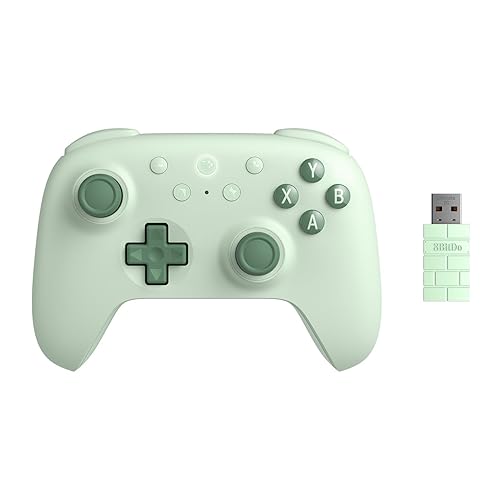
Bottom line: Hall effect sticks, a 1000Hz wireless dongle and remappable extra bumpers for much less than the Xbox pad.
Pros- Hall effect sticks and triggers with metal stick rings
- Two extra bumpers (L4/R4) you can remap without any software
- Owners say the battery lasts for days
Cons- One owner noticed the bumpers occasionally misbehaving
- Officially listed for Windows and Android only
Check Price on Amazon
The 8BitDo Ultimate 2C is our pick for most people on a budget. It costs much less than the Xbox controller, but uses Hall effect joysticks and triggers, which sense position with magnets instead of parts that wear down, so they're far less likely to drift.
Why We Picked It
- Drift-resistant sticks: Hall effect joysticks and triggers with wear-resistant metal stick rings.
- Fast connection: a 1000Hz polling rate with the included 2.4GHz dongle or a cable.
- Extra buttons without software: the L4 and R4 bumpers can be remapped directly on the controller, and there's a turbo function.
- Battery life: owners say it lasts for days between charges.
Who It's For
- Budget buyers: owners say it works right away with no setup, and some liked it enough to buy a second one.
- PC and Android players: owners use the dongle on PC and Bluetooth on Android.
Who It's Not For
- Console players: 8BitDo officially lists it for Windows and Android only. Switch 2 owners should see our guide to the best 8BitDo controller for Switch 2.
- Anyone who wants flawless bumpers: one owner noticed the bumpers occasionally misbehaving.
Specs & Configurations
- Connection
- 2.4GHz dongle, Bluetooth or USB cable
- Sticks
- Hall effect
- Polling rate
- 1000Hz (dongle and wired)
- Works with
- Windows, Android
3
Best Wired
GameSir G7 HE Wired Controller

Bottom line: A wired, officially licensed Xbox controller with Hall effect sticks, hair triggers and back buttons.
Pros- Hall effect sticks and triggers, with a hair-trigger mode
- Microswitch face buttons rated for 3 million clicks
- Two programmable back buttons
Cons- Wired only
- Some buyers needed the GameSir app before it worked properly on Windows 11
Check Price on Amazon
If your PC sits right next to you, a wired controller means no batteries and no connection drops. The GameSir G7 HE is officially licensed for Xbox and also works on Windows and Steam, but it adds features you usually only find on more expensive controllers.
Why We Picked It
- Built to last: Hall effect sticks rated for 5 million cycles and microswitch face buttons rated for 3 million clicks.
- Competitive features: triggers can switch to a short hair-trigger mode, and two back buttons let you jump or reload without moving your thumbs.
- Pro feel for less: a couple of reviewers who came from pricier pro controllers (a Scuf and an Xbox Elite) say it feels just as good.
Who It's For
- Desk players: anyone who games close to their PC and wants no batteries to charge.
- Shooter fans: hair triggers and back buttons help in fast-paced games.
Who It's Not For
- Couch gamers: it's wired only.
- Plug-and-play purists: one owner had to install GameSir's app before it worked on Windows 11, and another reported a double-click issue on the A button after a few months.
Specs & Configurations
- Connection
- USB-C cable
- Sticks
- Hall effect (rated for 5 million cycles)
- Extras
- 2 back buttons, 3.5mm jack, mic mute
- Works with
- Windows, Steam, Xbox Series X/S, Xbox One
4
Best for PlayStation Fans
Sony DualSense Wireless Controller
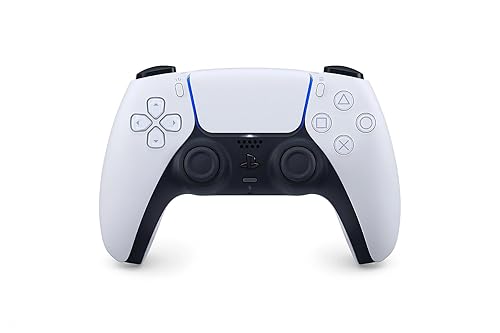
Bottom line: Sony's controller brings haptic feedback and adaptive triggers to supported PC games.
Pros- Haptic feedback and adaptive triggers in supported games
- Built-in mic, speaker and headset jack
- Owners praise its comfort and easy charging
Cons- Haptics and adaptive triggers only work in games that support them
- Some owners noticed stick drift after about a year of heavy use
Check Price on Amazon
Prefer PlayStation's layout? Sony lists the DualSense as working with Windows PCs and Macs over USB-C or Bluetooth. Its standout features are haptic feedback and adaptive triggers, which change resistance under your fingers.
Why We Picked It
- Immersive features: haptic feedback and adaptive triggers, which Sony says a range of big PC games support.
- Built-in audio: a microphone, a speaker and a 3.5mm headset jack.
- Owner favorite: owners praise its comfort and easy charging, and one PC-only player says it works very well with no connection issues.
Who It's For
- PlayStation fans: anyone who prefers Sony's layout and feel. For gyro aiming in Steam, see our guide to the best game controller for PC Steam.
- Players of big single-player games: where haptics and adaptive triggers are supported.
Who It's Not For
- Players of games without support: haptics and adaptive triggers only work in games that support them.
- Very heavy users worried about drift: a few owners report stick drift after around a year or 1,000 hours of play.
Specs & Configurations
- Connection
- Bluetooth or USB-C
- Extras
- haptic feedback, adaptive triggers, built-in mic, speaker and 3.5mm jack
- Works with
- Windows, Mac, PS5
5
Best Premium
Xbox Elite Series 2 Core

Bottom line: Microsoft's pro controller with adjustable sticks, trigger locks and a 40-hour battery, minus the extras.
Pros- Adjustable-tension thumbsticks and shorter hair trigger locks
- Save up to 3 custom profiles on the controller
- Up to 40 hours of battery life
Cons- Core version doesn't include back paddles (sold separately)
- Some owners report face buttons or bumpers failing
Check Price on Amazon
The Elite Series 2 is Microsoft's pro controller, and the Core edition lowers the price by leaving the extra parts out of the box. Owners who play on PC say it pairs easily and stays connected.
Why We Picked It
- Pro adjustments: adjustable-tension thumbsticks and shorter hair trigger locks.
- Profiles on the controller: save up to three custom profiles and switch on the fly.
- Long battery life: up to 40 hours, plus a wrap-around rubberized grip.
Who It's For
- Enthusiasts: players who want to fine-tune how their controller feels.
- People who play on Xbox and PC: it works over Xbox Wireless, Bluetooth or USB-C.
Who It's Not For
- Anyone who wants back paddles in the box: they're sold separately in the Complete Component Pack.
- Buyers who can't easily return it: some owners had face buttons that didn't always respond or a bumper that stopped working.
Specs & Configurations
- Connection
- Xbox Wireless, Bluetooth or USB-C
- Battery
- up to 40 hours (rechargeable)
- Extras
- adjustable stick tension, hair trigger locks, 3 profiles
- Works with
- Windows, Xbox, Android
6
Best for Shooters
Razer Wolverine V2 Wired

Bottom line: A wired Xbox-licensed controller with hair trigger switches and clicky buttons for fast reactions.
Pros- Hair trigger switches greatly shorten trigger travel
- Clicky Mecha-Tactile face buttons and D-pad
- Several owners report it lasting years
Cons- Extra buttons are on the front, not the back
- Long-term owners say the grips get dirty and are hard to clean
Check Price on Amazon
Razer's Wolverine V2 is built for fast reactions. Owners describe it as comfortable in larger hands with a solid, hefty feel, and several say theirs is still going after one and a half years or more.
Why We Picked It
- Hair trigger switches: two slide switches on the underside shorten trigger travel so you can fire faster.
- Clicky controls: Mecha-Tactile face buttons and D-pad with a short, clicky press.
- Extra buttons: two front buttons you can remap in the Razer Controller Setup for Xbox app, plus a headphone jack.
Who It's For
- Shooter fans: who want short trigger travel and crisp, clicky buttons.
- Players with larger hands: owners say it's comfortable to hold.
Who It's Not For
- Anyone worried about stick drift: Razer doesn't list Hall effect sticks for the V2, so the GameSir G7 HE is the safer wired pick.
- People who want back paddles: the extra buttons are on the front, and long-term owners say the grips get dirty and are hard to clean. One buyer also warns to buy from Amazon or an authorized seller for warranty support.
Specs & Configurations
- Connection
- USB cable
- Extras
- 2 remappable front buttons, hair trigger stop switches, 3.5mm jack
- Buttons
- Mecha-Tactile face buttons and D-pad
- Works with
- Windows, Xbox Series X/S, Xbox One
7
Best Cheap Option
Logitech G F310

Bottom line: A cheap, wired gamepad that's great as a backup or for casual and retro games.
Pros- Low price with plug-and-play setup on Windows 10 and 11
- Profiler software maps keyboard and mouse commands for games without controller support
- Owners report it lasting for years
Cons- No rumble
- Plain, light plastic build
Check Price on Amazon
Need a cheap second controller for a friend, or something for casual and retro games? The Logitech F310 has been a popular budget pick on Amazon for years, and owners call it a great budget backup.
Why We Picked It
- Simple and familiar: a six-foot cord, the same buttons as an Xbox 360 controller, and a D-pad that rests on four switches for quick direction changes.
- Works with almost anything: Profiler software can turn button presses into keyboard and mouse commands for games without controller support.
- Durable for the price: one owner says theirs lasted over three years before the left stick started acting up.
Who It's For
- Tight budgets: it's the cheapest pick on this list.
- Casual and retro players: and anyone who needs a spare controller for a friend.
Who It's Not For
- Players who want rumble: it has no vibration at all.
- Anyone after a premium feel: the plain plastic body feels light.
Specs & Configurations
- Connection
- USB cable (6 ft)
- Buttons
- same set as an Xbox 360 controller
- Extras
- Profiler software to map keyboard commands
- Works with
- Windows, Chromebook
Best PC Controllers Compared
| Controller |
Connection |
Drift-resistant sticks |
Extra buttons |
Best for |
| Xbox Wireless Controller |
Wireless + wired |
Not listed |
No |
Most players |
| 8BitDo Ultimate 2C |
Wireless + wired |
Yes (Hall effect) |
2 bumpers |
Best value |
| GameSir G7 HE |
Wired |
Yes (Hall effect) |
2 back buttons |
Desk setups |
| Sony DualSense |
Wireless + wired |
Not listed |
No |
PlayStation fans, immersive games |
| Xbox Elite Series 2 Core |
Wireless + wired |
Not listed |
Paddles sold separately |
Enthusiasts |
| Razer Wolverine V2 |
Wired |
Not listed |
2 front buttons |
Shooters, fighting games |
| Logitech F310 |
Wired |
Not listed |
No |
Tight budgets, retro games |
How to Choose a PC Controller
Xbox layout or PlayStation layout?
Six of our seven picks use an Xbox-style button set: the Xbox controllers themselves, plus the GameSir, Razer, 8BitDo and Logitech models. If you grew up with PlayStation and prefer its layout and features, the DualSense also works on Windows PCs and Macs.
Wired or wireless?
Wired controllers never need charging and have no connection problems, which makes them ideal if you sit at a desk. Wireless is better for playing from the couch on a TV. Some wireless controllers, like the 8BitDo Ultimate 2C, come with a 2.4GHz USB dongle in addition to Bluetooth.
Hall effect sticks
Stick drift, when your character moves without you touching the stick, was one of the most common complaints in the owner reviews we read. Hall effect sticks measure position with magnets instead of parts that rub together, so they’re much less likely to drift. If you play a lot, this is the single most useful feature to look for.
Back buttons and remapping
Extra buttons on the back or front of a controller let you jump, crouch or reload without moving your thumbs off the sticks. They’re a real advantage in shooters and action games. Check whether you can remap them on the controller itself or need an app.
Polling rate
Polling rate is how often the controller reports its position to your PC. Higher rates like 1000Hz can make the controller feel a little more responsive, but most players won’t notice a difference in casual games. Treat it as a nice bonus, not a deal-breaker.
FAQ
Can I use an Xbox controller on PC without an adapter?
Yes. The current Xbox Wireless Controller connects to a PC with a USB-C cable or over Bluetooth, so you don’t need an extra adapter.
Does a PS5 controller work on PC?
Yes. Sony lists the DualSense as compatible with Windows PCs and Macs over USB-C or Bluetooth. Its haptic feedback and adaptive triggers work in PC games that support them.
What is the best PC controller overall?
For most people, the Xbox Wireless Controller is the best PC controller: it’s plug-and-play over USB-C, also connects over Bluetooth, and lets you remap buttons in a free app. If you want drift-resistant Hall effect sticks, the 8BitDo Ultimate 2C (wireless) and GameSir G7 HE (wired) are the best alternatives.
What is the best cheap controller for PC?
The 8BitDo Ultimate 2C is the best value pick because it adds drift-resistant Hall effect sticks and a wireless dongle at a low price. If you just need the cheapest working gamepad, the wired Logitech F310 is hard to beat.
Are Hall effect controllers worth it?
For most players, yes. Hall effect sticks are much less likely to develop drift, and they no longer cost extra: both Hall effect picks on this list, the 8BitDo Ultimate 2C and GameSir G7 HE, cost less than the standard Xbox controller at the time of writing.
Final Verdict: Which PC Controller Should You Buy?
All seven picks on this list are among the best PC controllers you can buy right now, so the right one depends on your budget and how you play. For most PC players, the Xbox Wireless Controller is still the safest choice: it’s plug-and-play on PC and works over USB-C, Bluetooth or Xbox Wireless. If you want the best value, the 8BitDo Ultimate 2C gives you drift-resistant sticks and a wireless dongle for much less money. And if you play at a desk and want pro features without the pro price, the GameSir G7 HE is our favorite wired controller. Into fighting games? See our guide to the best controller for fighting games on PC.