GameCuki is reader-supported. When you buy through links on our site, we may earn an affiliate commission at no extra cost to you. As an Amazon Associate I earn from qualifying purchases. Learn more.
The best game controller for PC Steam isn’t always the one with the best specs. Steam has its own controller system, Steam Input, that lets you remap buttons, set up gyro aiming and save layouts per game, so how well a controller works with Steam matters as much as how it feels in your hands.
To build this list, we compared popular controllers on Amazon that owners use with Steam, checked which ones Steam Input supports natively and how each handles gyro (motion) controls, and read owner reviews from PC players. Below you’ll find 7 picks, a Steam compatibility table and a quick look at Valve’s own Steam Controller. Read more about our process on our How We Review page.
Best Game Controller for PC Steam: Our Picks in Detail
1
Best Overall for Steam
8BitDo Ultimate 2 Wireless
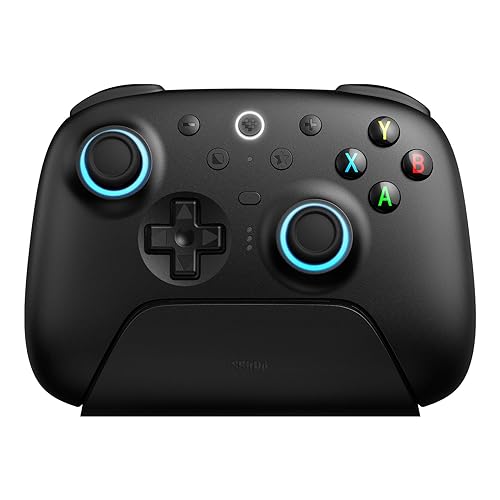
Bottom line: TMR sticks, a 1000Hz 2.4GHz dongle, back paddles and a charging dock, and owners say it works perfectly with Steam.
Pros- Owners say it works perfectly with Steam
- TMR sticks and Hall effect triggers that owners call buttery smooth
- Back paddles, extra bumpers and a charging dock for the price
Cons- One owner's PC games didn't recognize it at first and they almost returned it
- One owner finds the stick tops a little slick
Check Price on Amazon
The 8BitDo Ultimate 2 Wireless is the controller we'd recommend to most Steam players. It connects over 8BitDo's 8Speed 2.4GHz dongle, Bluetooth or USB, polls at 1000Hz, and packs TMR sticks, switchable triggers, two back paddles and extra bumpers.
Why We Picked It
- Works well with Steam: one owner with 234 hours on it calls it the best controller they've used on PC and says it works perfectly with Steam, with no connectivity issues.
- Precise and smooth: an owner who considered the Razer Wolverine V3 and ROG Raikiri II says the TMR sticks and Hall effect triggers feel buttery smooth and more accurate than any controller they'd used.
- Features for the price: back paddles, R4/L4 bumpers, customizable 6-axis motion control and a charging dock that doubles as the wireless adapter.
Who It's For
- Most Steam players: who want an Xbox-style layout with more buttons.
- Linux and multi-device users: one owner says it works effortlessly on CachyOS Linux, and others use it on Android and iPad.
Who It's Not For
- Anyone who won't troubleshoot: one owner's PC recognized it but it only worked in a few games at first, and they nearly returned it before getting it working.
- Players who need grippy sticks: one owner finds the stick tops a little slick.
Specs & Configurations
- Connection
- 2.4GHz (8Speed), Bluetooth or USB
- Sticks
- TMR
- Triggers
- switchable Hall effect or tactile
- Polling rate
- 1000Hz (2.4GHz and wired)
- Extra buttons
- 2 back paddles + R4/L4 bumpers
- Extras
- customizable 6-axis motion control, charging dock, rumble
2
Best for Steam Input Gyro
Sony DualSense Wireless Controller
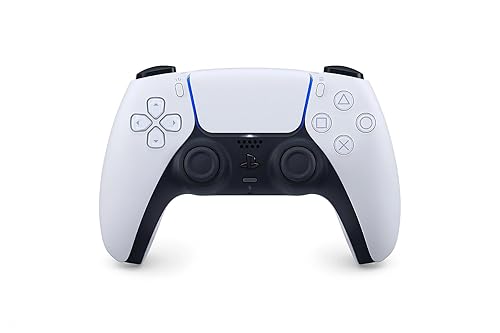
Bottom line: Steam Input supports the DualSense natively, including its motion sensors, making it the easiest way to try gyro aiming on Steam.
Pros- Native Steam Input support, including gyro
- Haptic feedback and adaptive triggers in supported PC games
- Owners praise its comfort and easy charging
Cons- Haptics and adaptive triggers only work in games that support them
- A few heavy users report stick drift after around a year
Check Price on Amazon
If you want to use gyro aiming on Steam with the least setup, start with Sony's DualSense. Steam Input supports it natively, along with the DualShock 4 and Nintendo's Switch Pro Controller, so you can bind the gyro, remap buttons and save layouts per game from Steam's controller settings.
Why We Picked It
- Native Steam support: Steam Input supports the DualSense out of the box, gyro included.
- Immersive extras: Sony lists haptic feedback and adaptive triggers in supported PC games, plus a built-in mic, speaker and headset jack.
- Owner favorite: one buyer who uses it only on PC says it works very well with no connection issues, and owners praise how comfortable it feels.
Who It's For
- Gyro beginners: who want motion aiming with Steam's built-in tools.
- PlayStation fans: who prefer Sony's layout. Playing on console too? See our guide to the best game controller for PS5.
Who It's Not For
- Players who want back buttons: the standard DualSense has none. See the DualSense Edge below.
- Very heavy users worried about drift: a few owners report stick drift after around a year or 1,000 hours.
Specs & Configurations
- Connection
- Bluetooth or USB-C
- Steam Input
- native support
- Motion
- built-in gyro
- Extras
- haptic feedback, adaptive triggers, built-in mic, speaker and 3.5mm jack
- Works with
- Windows PCs, Macs, PS5
3
Best Third-Party Gyro for Steam
8BitDo Pro 3 Bluetooth

Bottom line: A PlayStation-style pad with TMR sticks, swappable face buttons and motion controls that 8BitDo lists for Steam, and an owner says gyro works great in Steam Input.
Pros- An owner says gyro works great with Steam Input, a common weak spot for third-party pads
- Clicky D-pad that owners love for 2D and indie games
- Swappable ABXY buttons for Xbox or Nintendo layouts
Cons- One owner dislikes the face buttons and rumble
- 8BitDo's software can be a little buggy, says one owner
Check Price on Amazon
Most third-party controllers struggle with gyro on Steam, which makes the 8BitDo Pro 3 stand out. 8BitDo lists its 6-axis motion control for Switch and Steam, and one owner who uses it with a PC, a Steam Machine and a Switch 2 says gyro works great with Steam Input.
Why We Picked It
- Gyro that works in Steam Input: one owner specifically calls this out as a common problem with third-party controllers that the Pro 3 gets right.
- Great D-pad: owners describe it as clicky with little wiggle, ideal for 2D and indie games.
- Flexible layout: magnetic ABXY buttons swap between Xbox and Nintendo layouts, and there are back paddles, extra bumpers and three custom profiles.
Who It's For
- Gyro fans who want more buttons: than a DualSense offers.
- Retro and indie players: who want the D-pad in the main position.
Who It's Not For
- Players picky about button feel: one 4-star owner doesn't like the face buttons and rumble.
- Anyone who avoids companion apps: one owner says 8BitDo's software can be a little buggy.
Specs & Configurations
- Connection
- Bluetooth, 2.4GHz adapter or USB
- Sticks
- TMR
- Motion
- 6-axis (for Switch and Steam, per 8BitDo)
- Triggers
- switchable Hall effect or micro-switch
- Extra buttons
- 2 back paddles + R4/L4 bumpers
- Extras
- magnetic swappable ABXY, charging dock, 3 profiles
4
Best for PC and Xbox
GameSir G7 Pro

Bottom line: TMR sticks, 1000Hz wireless on PC and a PC-only gyro you can map to sticks, buttons or mouse through GameSir's app.
Pros- PC gyro that maps to sticks, buttons or mouse in GameSir's app
- Owners coming from Xbox Elite and Scuf pads say it's better for far less
- Charging station that also holds the 2.4GHz dongle
Cons- Two owners find the D-pad squishy or too sensitive
- One owner's first unit had a faulty right trigger switch (the replacement was fine)
Check Price on Amazon
The GameSir G7 Pro is the pick if you play on PC and Xbox and want gyro aiming without relying on Steam Input. GameSir says its built-in gyro is PC-only and can be mapped to sticks, buttons or mouse movement in the GameSir Nexus app.
Why We Picked It
- Performance pad for less: a self-described controller snob who went through six Xbox Elite pads and a Scuf says they've never been happier, and a PC player who always used official Xbox pads calls it one of the best they've used.
- PC features: 1000Hz polling over 2.4GHz or wired, TMR sticks and Hall effect triggers with switchable trigger stops.
- Handy dock: one owner explains that you can plug the charging base into your PC and leave the dongle in it.
Who It's For
- PC and Xbox players: it works wired on Xbox and wireless on PC.
- Shooter fans: who want gyro aim and four extra buttons.
Who It's Not For
- D-pad heavy players: one owner calls the D-pad wobbly and squishy, and another says it's too sensitive.
- Wireless Xbox players: one owner warns it's wired-only on Xbox. Another received a unit with a faulty right trigger switch, though the replacement worked well.
Specs & Configurations
- Connection
- 2.4GHz or wired on PC, wired on Xbox, Bluetooth on Android
- Sticks
- TMR
- Triggers
- Hall effect with micro switch trigger stops
- Polling rate
- 1000Hz on PC
- Motion
- built-in gyro (PC only) via GameSir Nexus app
- Extras
- 4 extra buttons, charging station, 1200mAh battery
5
Best Budget
GameSir Cyclone 2
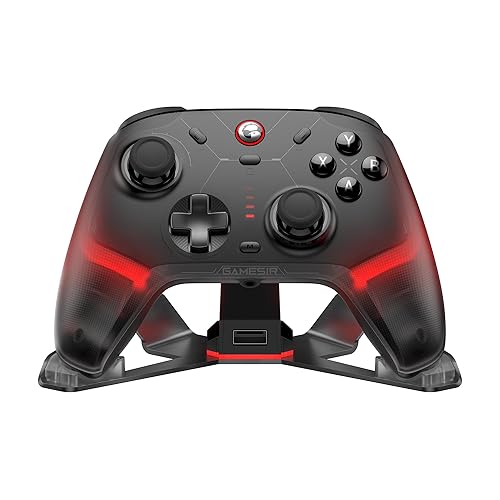
Bottom line: An affordable wireless pad with TMR sticks, 1000Hz polling, microswitch buttons and a charging dock that owners say rivals pricier controllers.
Pros- Owners call the TMR sticks the smoothest they've used
- Shift Layer feature in GameSir's app effectively doubles your buttons
- Aluminum charging dock included
Cons- One owner reports occasional disconnects or lag
- Not compatible with Xbox consoles
Check Price on Amazon
On a budget, the GameSir Cyclone 2 gives you most of what pricier pads offer: TMR sticks, switchable triggers, microswitch face buttons, 1000Hz polling over 2.4GHz or a cable, and an aluminum charging dock.
Why We Picked It
- Smooth sticks: one owner says these are the smoothest thumbsticks they've used, and another says it hasn't drifted after many previous controllers did.
- Powerful software: one owner chose it over the 8BitDo Ultimate 2 for GameSir's software, which supports keyboard key mapping and a Shift Layer that effectively doubles the buttons.
- Clicky feel: owners describe the buttons as satisfying and almost like a mechanical keyboard.
Who It's For
- Budget-minded Steam players: who want TMR sticks and a dock.
- Tinkerers: who want deep button mapping in a companion app.
Who It's Not For
- Gyro-first PC players: GameSir lists its gyro for Switch, iOS and Android titles, so pick the DualSense or Pro 3 for gyro on Steam.
- Anyone who needs rock-solid wireless: one owner reports occasional disconnects or lag, and another reports a right trigger malfunction. It also doesn't work with Xbox consoles.
Specs & Configurations
- Connection
- 2.4GHz, Bluetooth or USB-C
- Sticks
- TMR
- Triggers
- switchable Hall effect or micro mode
- Polling rate
- 1000Hz (wired and 2.4GHz)
- Buttons
- microswitch ABXY rated for 5 million clicks
- Extras
- aluminum charging dock, RGB, 6-axis gyro (listed for Switch, iOS and Android)
6
Best for Extra Buttons
Flydigi Vader 5 Pro

Bottom line: A PC controller with adjustable stick tension, eight extra buttons and four vibration motors for players who love customizing.
Pros- Adjust stick tension physically for each game
- Eight extra buttons to map jump, reload and more
- Owners say the new software is much less buggy than before
Cons- One owner finds the bottom back paddles poorly designed
- Shortcuts using the Windows key don't work, says one owner
Check Price on Amazon
If you love customizing, the Flydigi Vader 5 Pro has more extra buttons than anything else here. You can physically adjust stick tension from 40gf to 100gf, switch triggers between micro and linear modes, and map eight extra buttons.
Why We Picked It
- Adjustable sticks: owners say the tension knobs help find a sweet spot when a game doesn't feel right, and that stick accuracy is great.
- Lots of buttons: owners like the extra buttons next to the bumpers for games like Fortnite, and one says profile switching to a mouse mode is easy.
- Better software: a long-time Vader 3 and 4 owner says the new software is much less buggy and allows more macros.
Who It's For
- Power users: who want to fine-tune every input.
- Competitive players: who map actions to back and shoulder buttons.
Who It's Not For
- Console players: Flydigi says it isn't compatible with Xbox or PlayStation.
- Vader 4 owners: one 3-star reviewer feels it's a step back, with stiffer tension rings and poorly designed bottom paddles, and another found Windows key shortcuts don't work.
Specs & Configurations
- Connection
- wired, Bluetooth or 2.4GHz
- Sticks
- Hall effect with FORCEFLEX tension (40gf to 100gf)
- Triggers
- FORCESWITCH micro or Hall effect linear
- Extra buttons
- 8 (C/Z, 2 mini shoulder, 4 detachable rear and fixed rear)
- Latency
- 3ms wired, 4ms wireless (Flydigi)
- Extras
- 4-motor vibration in triggers and grips
7
Best Premium
Sony DualSense Edge

Bottom line: The DualSense with back buttons, swappable stick modules, adjustable triggers and profiles, and owners use it on PC through Steam.
Pros- Back buttons, trigger stops and profiles on top of the DualSense features
- Replaceable stick modules extend its life
- One owner has used it on PC since 2023 with no connection issues
Cons- The most expensive pick on our list
- Back buttons can only be mapped to existing buttons, one owner notes
Check Price on Amazon
The DualSense Edge adds pro features to Sony's controller: two sets of swappable back buttons, adjustable trigger travel, remapping, quick-swap profiles and replaceable stick modules.
Why We Picked It
- Proven on PC: one owner bought it for PC in 2023 and says they never had connection issues, with updates through Sony's PlayStation Accessories app and Steam.
- Longer lifespan: swappable stick modules mean you can replace worn sticks instead of the whole controller.
- Comfort and triggers: owners say it's very comfortable, and one calls the triggers the best part.
Who It's For
- DualSense fans: who want back buttons and trigger stops.
- Players with larger hands: one owner with big hands says it fits nicely.
Who It's Not For
- Budget buyers: it's the most expensive controller on our list.
- Players who want keyboard-style macros on the back buttons: one owner was disappointed that the back buttons can only be assigned to existing controller buttons.
Specs & Configurations
- Connection
- wireless
- Extras
- 2 sets of swappable back buttons, adjustable trigger travel, remappable buttons, quick-swap profiles
- Sticks
- replaceable stick modules with 3 types of caps
- Also includes
- haptic feedback, adaptive triggers
Steam Compatibility Compared
| Controller |
PC connection |
Gyro on PC |
Extra buttons |
| 8BitDo Ultimate 2 Wireless |
2.4GHz, Bluetooth, USB |
6-axis motion listed |
2 paddles + R4/L4 |
| Sony DualSense |
Bluetooth, USB-C |
Yes, native in Steam Input |
None |
| 8BitDo Pro 3 |
Bluetooth, 2.4GHz, USB |
Yes, listed for Steam (owner confirms Steam Input) |
2 paddles + R4/L4 |
| GameSir G7 Pro |
2.4GHz, wired |
Yes, via GameSir Nexus app |
4 |
| GameSir Cyclone 2 |
2.4GHz, Bluetooth, USB-C |
Listed for Switch, iOS, Android only |
Shift Layer in app |
| Flydigi Vader 5 Pro |
2.4GHz, Bluetooth, wired |
Not listed |
8 |
| Sony DualSense Edge |
Wireless |
Not listed |
2 back buttons |
Based on each manufacturer’s Amazon listing, 8BitDo’s product page and owner reviews at the time of writing.
How to Set Up a Controller in Steam
- Connect the controller by cable, dongle or Bluetooth.
- Open Steam’s controller settings and turn on configuration support for your controller type. For Nintendo’s Pro Controller, for example, the option is called Switch Pro Configuration Support.
- Calibrate the gyro if you plan to use motion aiming. For Switch Pro controllers, calibrating from the detected controllers list is recommended.
- Customize per game: in a game’s controller layout, you can bind the gyro, remap buttons and save your own configuration.
Controllers from 8BitDo, GameSir and Flydigi also have their own apps for mapping and profiles, and some features, like the G7 Pro’s PC gyro, are set up there instead of in Steam.
What About Valve’s Steam Controller?
Valve released a new Steam Controller in May 2026 with an MSRP of $100. According to a roundup of reviews by Boiling Steam, it has TMR sticks, a 6-axis gyro with Grip Sense to control when gyro is active, two trackpads with haptic clicks, four back buttons and a wireless “puck” that also works as a magnetic charger. Reviewers praise its stick precision, battery life and repairability, but note that it’s large, its plastic feels cheap to some, it lacks a headphone jack, and its best features depend on Steam Input.
At the time of writing, reviewers describe it as hard to get, and the Amazon listings we found were from resellers at far above its $100 MSRP. If you want one, check Valve’s official channels before paying a reseller markup.
How to Choose a Controller for Steam
Decide if you want gyro
Gyro aiming lets you fine-tune your aim by moving the controller. Standard Xbox controllers don’t have gyro sensors, so if gyro matters to you, choose a controller with native Steam Input gyro support, like the DualSense, or one with its own gyro software, like the GameSir G7 Pro.
Xbox layout or PlayStation layout
The 8BitDo Ultimate 2, GameSir G7 Pro, Cyclone 2 and Flydigi Vader 5 Pro use an Xbox-style layout, with the left stick on top. The DualSense, DualSense Edge and 8BitDo Pro 3 put the D-pad on top.
Extra buttons and software
Back buttons let you jump, reload or crouch without moving your thumbs. You can map them in Steam Input for supported controllers, or in the maker’s app for others.
Connection
A 2.4GHz dongle, like on the 8BitDo Ultimate 2 and GameSir pads, gives you a fast wireless connection without Bluetooth pairing, while a wired connection removes batteries from the equation.
FAQ
What is the best game controller for PC Steam?
For most players, the 8BitDo Ultimate 2 Wireless is the best game controller for PC Steam. It has TMR sticks, a 1000Hz 2.4GHz dongle, back paddles and a charging dock, and owners say it works perfectly with Steam. If gyro aiming is your priority, choose the Sony DualSense, which Steam Input supports natively.
Which controllers does Steam Input support natively?
Steam Input has native support for the DualSense, DualShock 4 and Nintendo’s Switch Pro Controller, including their gyro, and Valve’s own Steam Controller is built around Steam Input. Many third-party pads also work with Steam, and owners of 8BitDo controllers say Windows recognizes some of them like an Xbox controller.
Does gyro work on Steam with third-party controllers?
Sometimes. One 8BitDo Pro 3 owner says its gyro works great with Steam Input, which they call a common problem for third-party controllers. Others, like the GameSir G7 Pro, handle gyro through their own app instead.
Is the Steam Controller worth it?
Reviewers praise the 2026 Steam Controller’s TMR sticks, gyro, trackpads and repairability at its $100 MSRP, but it’s large, relies on Steam Input for its best features and has been hard to find. Avoid paying reseller prices well above MSRP.
Is a DualSense good for PC Steam games?
Yes. Steam Input supports it natively, including gyro, and Sony lists haptic feedback and adaptive triggers in supported PC games.
Final Verdict: Which Steam Controller Should You Buy?
All seven picks work well with Steam, so the best game controller for PC Steam depends on what you value. The 8BitDo Ultimate 2 Wireless is the best all-rounder, the Sony DualSense is the easiest way into gyro aiming with Steam Input, and the 8BitDo Pro 3 is the best third-party gyro option. For PC and Xbox, get the GameSir G7 Pro; on a budget, the GameSir Cyclone 2; for maximum customization, the Flydigi Vader 5 Pro; and for premium Sony features, the DualSense Edge. Looking for a plug-and-play Xbox-style pad instead? See our guide to the best PC controllers.