

Once your Steam Deck sits in its dock and feeds a TV, its built-in controls are out of reach, and the controller you pick decides how the whole setup feels. The best controller for Steam Deck docked play connects reliably from across the room, works smoothly with Steam Input and feels good on the couch for hours. These 11 range from low-latency 2.4G pads you plug into the dock to first-party options with gyro and trackpads.
Best Controller for Steam Deck Docked in 2026
GameCuki is reader-supported. When you buy through links on our site, we may earn an affiliate commission at no extra cost to you. As an Amazon Associate I earn from qualifying purchases. Learn more.
Our Top Picks
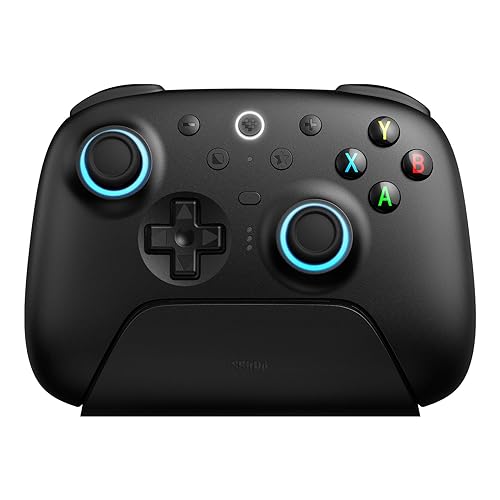
Best Overall
8BitDo Ultimate 2 Wireless
Bottom line: The best controller for a docked Steam Deck, thanks to a fast 2.4G adapter that ends Bluetooth headaches and a dock that keeps it charged.
- Official SteamOS support with inputs optimized for Steam
- 1000Hz 2.4G adapter avoids Bluetooth pairing hassles
- Charging dock, back paddles and long battery life
- TMR sticks with switchable Hall effect or tactile triggers
- Two back paddles plus L4/R4 bumpers
- About 20 hours of battery on 2.4G
- Motion controls map to a stick rather than a separate gyro input
- Settings app runs on Windows and macOS only
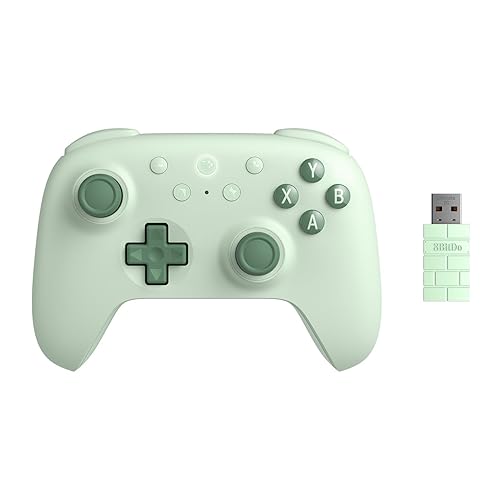
Best Budget
8BitDo Ultimate 2C Wireless
Bottom line: The best budget choice for docked play, with a responsive 2.4G connection and drift-resistant sticks for very little money.
- Very affordable for a 2.4G controller
- Hall effect sticks and triggers resist drift
- Stable 2.4G connection with long battery life
- L4/R4 bumpers map right on the controller
- 1000Hz polling over 2.4G and wired
- Turbo and wear-resistant stick rings
- Small for larger hands, no back paddles or dock
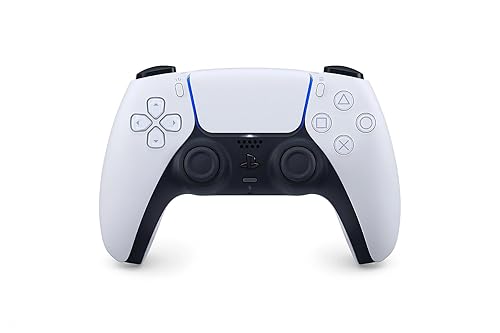
Best for Gyro and Trackpad
Sony DualSense Wireless Controller
Bottom line: The easiest way to keep the Deck's gyro and trackpad tricks on the TV, with no extra setup.
- Native Steam Input support, gyro and touchpad included
- Comfortable, premium feel
- Haptics and adaptive triggers in supported PC games
- Built-in gyro for motion aiming
- Haptic feedback and adaptive triggers
- Works with PC, Mac and PS5
- No 2.4G adapter, so it relies on Bluetooth or a cable
- Sticks can drift after heavy use
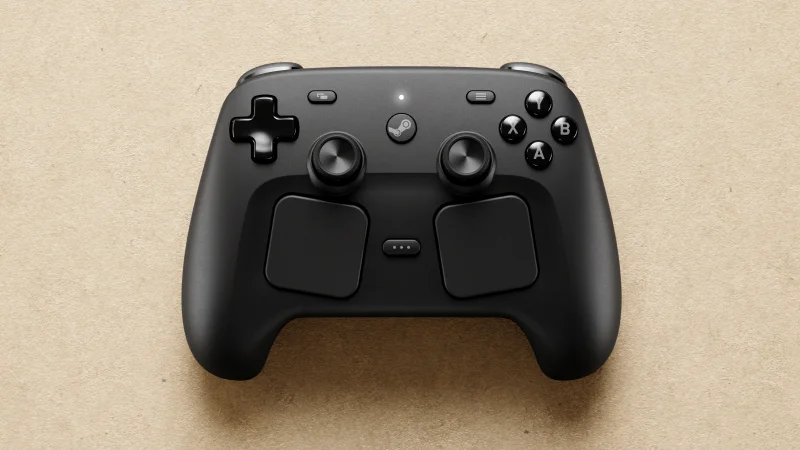
Best Official Option
Valve Steam Controller
Bottom line: The only controller that brings the Deck's two trackpads to the couch, if you can get one in stock.
- Built for Steam Input by Valve
- Two trackpads and touch-activated gyro
- Wireless Puck doubles as a charger, and 35+ hour battery
- TMR sticks with capacitive touch
- Grip Sense turns gyro on and off as you hold the grips
- Works with Steam Deck, PC and Steam Machine
- Sold only through Steam, and stock can be limited
- Too new for long-term reliability reports

Best Premium
GuliKit TT Max
Bottom line: The premium pick for tinkerers who want adjustable stick tension and four back buttons, though it's on the heavy side.
- Adjustable stick tension and lots of swappable parts
- Four back buttons with macro recording
- Fast Bluetooth polling and long battery life
- TMR sticks with 720-degree tension dial
- Six stick caps and two D-pads
- Dedicated SteamOS pairing mode
- Triggers switch between Hall effect and micro-switch
- GuliKit lists gyro aiming for Windows and Android only
- On the heavier side

Best for Retro and 2D Games
8BitDo Pro 3
Bottom line: Our favorite for retro and 2D games on the big screen, with a superb D-pad and gyro that works in Steam.
- Gyro works with Steam Input
- Excellent clicky D-pad for 2D and retro games
- Swappable ABXY to match Xbox or Nintendo prompts
- Official SteamOS support
- TMR sticks and switchable triggers
- Back paddles, L4/R4 bumpers and a charging dock
- Can wake a Steam Deck OLED from standby
- Its 2.4G adapter isn't supported on SteamOS, so it uses Bluetooth
- Loud face buttons

Best Standard Controller
Xbox Wireless Controller
Bottom line: The most familiar choice for docked play, matching the button prompts in nearly every PC game.
- Comfortable, familiar Xbox layout
- Matches the button prompts in most PC games
- Headset jack and textured grips
- Pairs over Bluetooth or plugs in with USB-C
- Comfortable for long sessions
- Works with Xbox, Windows and mobile
- Uses AA batteries unless you add a rechargeable pack
- No back buttons or gyro

Best Pro Controller
Sony DualSense Edge
Bottom line: The pro upgrade for DualSense fans who want back buttons and trigger stops, if you can justify the price.
- Back buttons and trigger stops on a DualSense
- Replaceable stick modules
- Works well on PC with Steam
- Gyro and touchpad kept from the standard DualSense
- Adjustable trigger travel and quick-swap control profiles
- Carrying case included
- Very expensive
- Bluetooth or cable only, no 2.4G adapter

Best for Nintendo Fans
Nintendo Switch Pro Controller
Bottom line: A comfortable pick for Nintendo fans and big hands, with native gyro support in Steam.
- Native Steam Input support with gyro
- Comfortable, especially for larger hands
- Long battery life
- Large face buttons are easy to mash
- Built-in gyro for motion aiming
- USB-C to USB-A charging cable included
- Nintendo button layout differs from PC prompts
- No back buttons

Best Value Retro Pad
8BitDo Pro 2 Bluetooth
Bottom line: The best value retro pad for a docked Deck, with a soft SNES-style D-pad and official SteamOS support.
- Officially supports SteamOS and Steam Deck
- Soft, SNES-style D-pad that's great for 2D games
- Removable battery pack can be swapped for AA batteries
- Hall effect sticks resist drift
- Two back paddles
- Four modes including X-input and Switch
- Three profiles
- Bluetooth or wired only, no 2.4G adapter
- Motion controls work on Switch only
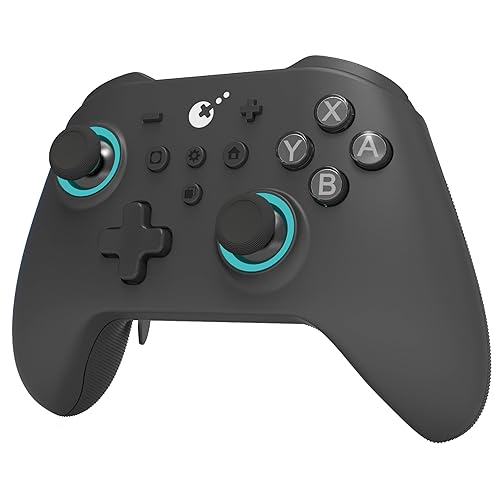
Best Xbox-Style Alternative
GuliKit KK3 Max
Bottom line: An accessory-packed Xbox-style alternative with a 2.4G adapter in the box.
- Comfortable Xbox-style shape
- Lots of accessories, including swappable keycaps and paddles
- Switchable triggers and long macro recording
- Hyperlink 2.4G adapter in the box
- Carrying case included
- Hall effect sticks resist drift
- Three sets of metal paddles
- Back paddles mirror other buttons rather than adding new inputs
- 1000Hz rating is listed for Windows only
Table of Contents
Do You Need a Controller for a Docked Steam Deck?
For handheld play, no. The Steam Deck has its own sticks, buttons, trackpads and gyro. But once you dock it to a TV or monitor, the Deck sits next to the screen and you need a separate controller to play from the couch. Valve built the Docking Station with exactly this in mind, pitching it as a way to play on the TV “with your favorite wireless controllers.” You’ll also want extra controllers for local co-op, since every player needs their own.
The good news is that SteamOS works with most modern controllers. You can connect over Bluetooth, plug a 2.4G wireless adapter into one of the dock’s USB ports, or use a cable. Which method a controller supports matters more for docked play than the brand name on it.
Best Controller for Steam Deck Docked: Our Picks in Detail
1
Best Overall
8BitDo Ultimate 2 Wireless
Bottom line: The best controller for a docked Steam Deck, thanks to a fast 2.4G adapter that ends Bluetooth headaches and a dock that keeps it charged.
The 8BitDo Ultimate 2 Wireless is the controller we'd buy for a docked Steam Deck. 8BitDo officially supports SteamOS 3.7.13 and later and says the controller's inputs are optimized to fully work with Steam.
Pros & Cons
Pros
- Official SteamOS support with inputs optimized for Steam
- 1000Hz 2.4G adapter avoids Bluetooth pairing hassles
- Charging dock, back paddles and long battery life
- TMR sticks with switchable Hall effect or tactile triggers
- Two back paddles plus L4/R4 bumpers
- About 20 hours of battery on 2.4G
Cons
- Motion controls map to a stick rather than a separate gyro input
- Settings app runs on Windows and macOS only
Why We Picked It
The Ultimate 2 Wireless solves the biggest docked problem, which is getting a fast, stable connection from across the room. Its 1000Hz 2.4G adapter plugs into a USB port on your dock, so there's no Bluetooth pairing to fight with, and the charging dock keeps the controller topped up between sessions. TMR sticks, Hall effect triggers with a tactile mode, two back paddles and L4/R4 bumpers give you more control than a standard Xbox pad, and a rating of about 20 hours on 2.4G means you won't be charging it every night. It's also a favorite among Steam Deck owners who play docked, which makes it the best controller for Steam Deck docked play for most people.
Who It's For
A docked Steam Deck on a TV across the room, where a stable connection matters most. The 1000Hz 2.4G adapter plugs into a USB port on the dock, so there is no Bluetooth pairing to fight with, and the charging dock keeps the controller topped up between sessions.
The Xbox-style layout, extra paddles and bumpers give more control than a standard pad, without charging it every night.
Specs & Configurations
- Connection
- 2.4G adapter, Bluetooth or USB-C
- SteamOS support
- official (SteamOS 3.7.13 or later)
- Polling rate
- 1000Hz (2.4G and wired)
- Sticks
- TMR
- Triggers
- switchable Hall effect or tactile
- Extra buttons
- 2 back paddles + L4/R4 bumpers
- Battery
- 1000mAh, about 20 hours on 2.4G
- Extras
- charging dock, 6-axis motion, RGB stick rings
Get It Now
Check Price on Amazon
2
Best Budget
8BitDo Ultimate 2C Wireless
Bottom line: The best budget choice for docked play, with a responsive 2.4G connection and drift-resistant sticks for very little money.
The 8BitDo Ultimate 2C Wireless is the easiest way to get a low-latency docked setup without spending much. It uses the same idea as our top pick, a 1000Hz 2.4G adapter you plug into the dock, in a simpler, cheaper body.
Pros & Cons
Pros
- Very affordable for a 2.4G controller
- Hall effect sticks and triggers resist drift
- Stable 2.4G connection with long battery life
- L4/R4 bumpers map right on the controller
- 1000Hz polling over 2.4G and wired
- Turbo and wear-resistant stick rings
Cons
- Small for larger hands, no back paddles or dock
Why We Picked It
For a budget controller, the Ultimate 2C gets the important things right. Its 2.4G adapter gives you a responsive connection from the couch, Hall effect sticks and triggers resist drift, and the L4/R4 bumpers can be mapped right on the controller. Battery life is rated at up to 19 hours over 2.4G. 8BitDo officially lists Windows and Android only, but the 2.4G adapter works as a standard PC controller, and Steam Deck owners regularly recommend it for docked play. It's also cheap enough to buy two for couch co-op.
Who It's For
A family or budget-minded player who wants one or two reliable, low-latency controllers for a docked Deck. The 2.4G adapter gives a responsive connection from the couch, the Hall effect sticks and triggers resist drift, and the price makes couch co-op with two easy.
Specs & Configurations
- Connection
- 2.4G adapter, Bluetooth or USB-C
- Officially supported
- Windows and Android
- Polling rate
- 1000Hz (2.4G and wired)
- Sticks
- Hall effect
- Triggers
- Hall effect
- Extra buttons
- L4/R4 bumpers (mappable without software)
- Battery
- 480mAh, up to 19 hours on 2.4G
- Extras
- turbo, wear-resistant stick rings
Get It Now
Check Price on Amazon
3
Best for Gyro and Trackpad
Sony DualSense Wireless Controller
Bottom line: The easiest way to keep the Deck's gyro and trackpad tricks on the TV, with no extra setup.
The DualSense is the best pick if you want the docked Deck to feel as flexible as the handheld. Steam Input supports it natively, so its gyro and touchpad work out of the box.
Pros & Cons
Pros
- Native Steam Input support, gyro and touchpad included
- Comfortable, premium feel
- Haptics and adaptive triggers in supported PC games
- Built-in gyro for motion aiming
- Haptic feedback and adaptive triggers
- Works with PC, Mac and PS5
Cons
- No 2.4G adapter, so it relies on Bluetooth or a cable
- Sticks can drift after heavy use
Why We Picked It
The Steam Deck's own trackpads and gyro are a big part of what makes it special, and the DualSense is the easiest way to keep those tricks on the TV. Its touchpad can act as a mouse or extra input through Steam Input, and its gyro works for motion aiming without any setup beyond Steam's controller settings. It's also comfortable for long sessions, and haptics and adaptive triggers add something extra in supported PC games. If you already own a PS5, it costs nothing to try.
Who It's For
A player who wants the Deck's gyro and touchpad tricks on the TV, or a PlayStation fan who already owns one. Steam Input supports it natively, so the touchpad can act as a mouse or extra input and gyro aiming works with nothing beyond Steam's controller settings.
It is comfortable for long sessions, with haptics and adaptive triggers adding extra in supported PC games.
Specs & Configurations
- Connection
- Bluetooth or USB-C
- Steam Input
- native support
- Motion
- built-in gyro
- Touchpad
- yes, mappable in Steam Input
- Extras
- haptic feedback, adaptive triggers, built-in mic and speaker, 3.5mm jack
- Works with
- Windows PC, Mac, PS5
Get It Now
Check Price on Amazon
4
Best Official Option
Valve Steam Controller
Bottom line: The only controller that brings the Deck's two trackpads to the couch, if you can get one in stock.
Valve's Steam Controller is the most Steam Deck-like controller you can buy, and it's designed around the same Steam Input system that runs the Deck's own controls.
Pros & Cons
Pros
- Built for Steam Input by Valve
- Two trackpads and touch-activated gyro
- Wireless Puck doubles as a charger, and 35+ hour battery
- TMR sticks with capacitive touch
- Grip Sense turns gyro on and off as you hold the grips
- Works with Steam Deck, PC and Steam Machine
Cons
- Sold only through Steam, and stock can be limited
- Too new for long-term reliability reports
Why We Picked It
If you love the Deck's trackpads, this is the only controller here that brings two of them to the couch. Valve pairs them with magnetic TMR sticks that also sense touch, plus a feature it calls Grip Sense, which turns gyro aiming on when you hold the grips and off when you let go. For docked play, the included Puck is a wireless transmitter that also works as a magnetic charging station, so you can plug it into your dock and keep the controller charged in one spot. Valve rates the battery at 35+ hours, the longest on this list.
Who It's For
A Steam Deck owner who loves the trackpads and wants the full Valve experience on the TV. Two trackpads, touch-sensing TMR sticks and gyro are built around Steam Input from the start.
For docked play, the Puck plugs into the dock as a wireless transmitter and magnetic charging station, keeping the controller charged in one spot.
Specs & Configurations
- Connection
- wireless Puck, Bluetooth or USB
- Sticks
- TMR with capacitive touch
- Trackpads
- 2
- Motion
- gyro with Grip Sense
- Battery
- 8.39Wh, 35+ hours
- Extras
- Puck works as a magnetic charging station
- Works with
- PC, Steam Deck, Steam Machine, Steam Frame
Get It Now
Check Price on Steam
5
Best Premium
GuliKit TT Max
Bottom line: The premium pick for tinkerers who want adjustable stick tension and four back buttons, though it's on the heavy side.
The GuliKit TT Max is the controller for players who want to tune every detail. It has a dedicated pairing mode for SteamOS and more customization than anything else on this list.
Pros & Cons
Pros
- Adjustable stick tension and lots of swappable parts
- Four back buttons with macro recording
- Fast Bluetooth polling and long battery life
- TMR sticks with 720-degree tension dial
- Six stick caps and two D-pads
- Dedicated SteamOS pairing mode
- Triggers switch between Hall effect and micro-switch
Cons
- GuliKit lists gyro aiming for Windows and Android only
- On the heavier side
Why We Picked It
The TT Max is packed with adjustable hardware. Its TMR sticks have a hidden dial for 720 degrees of tension adjustment, so you can make them stiffer for shooters or looser for platformers, and it ships with six stick caps and two D-pads. Four removable metal back buttons support remapping and macros, and the triggers switch between Hall effect and short micro-switch modes. GuliKit rates it at 730Hz over Bluetooth, which is fast for a wireless connection without a dongle, and battery life is rated at up to 26 hours with the RGB off.
Who It's For
An enthusiast who likes to tune every detail for serious docked play. Stiffer sticks for shooters, looser sticks for platformers, four removable metal back buttons with macros and plenty of swappable parts let them set it up exactly how they like.
It rates 730Hz over Bluetooth, which is fast for a connection without a dongle.
Specs & Configurations
- Connection
- Bluetooth or USB-C
- SteamOS
- dedicated pairing mode
- Polling rate
- 1000Hz wired, 730Hz Bluetooth
- Sticks
- TMR with 720-degree tension adjustment
- Triggers
- switchable Hall effect or micro-switch
- Extra buttons
- 4 removable metal back buttons
- Battery
- 950mAh, up to 26 hours without RGB
- Extras
- 6 stick caps, 2 D-pads, swappable layout, macros
Get It Now
Check Price on Amazon
6
Best for Retro and 2D Games
8BitDo Pro 3
Bottom line: Our favorite for retro and 2D games on the big screen, with a superb D-pad and gyro that works in Steam.
The 8BitDo Pro 3 is the pick for platformers, fighting games and emulation on a docked Deck. It's also one of the few third-party controllers whose gyro works with Steam Input.
Pros & Cons
Pros
- Gyro works with Steam Input
- Excellent clicky D-pad for 2D and retro games
- Swappable ABXY to match Xbox or Nintendo prompts
- Official SteamOS support
- TMR sticks and switchable triggers
- Back paddles, L4/R4 bumpers and a charging dock
- Can wake a Steam Deck OLED from standby
Cons
- Its 2.4G adapter isn't supported on SteamOS, so it uses Bluetooth
- Loud face buttons
Why We Picked It
The Pro 3's D-pad sits in the main position on a PlayStation-style body, and its clicky, precise feel makes it a natural fit for 2D and retro games on the big screen. 8BitDo officially supports SteamOS, and its 6-axis motion works with Steam, so you get gyro aiming without first-party hardware. It can also wake a Steam Deck OLED from standby, though not the LCD model. Magnetic face buttons let you match Xbox or Nintendo prompts, and TMR sticks, switchable triggers, back paddles and L4/R4 bumpers round out a very complete package.
Who It's For
A retro, 2D or emulation fan who prefers a PlayStation-style layout on a docked Deck. The clicky, precise D-pad sits in the main position, which suits platformers and fighting games, and the 6-axis motion works with Steam for gyro aiming.
Magnetic face buttons let them match Xbox or Nintendo prompts.
Specs & Configurations
- Connection on SteamOS
- Bluetooth or USB-C
- SteamOS support
- official (SteamOS 3.7.13 or later)
- Sticks
- TMR
- Motion
- 6-axis (Switch and Steam)
- Triggers
- switchable Hall effect or micro-switch
- Extra buttons
- 2 back paddles + L4/R4 bumpers
- Battery
- 1000mAh, about 20 hours
- Extras
- magnetic swappable ABXY, charging dock, 2 ball-top caps
7
Best Standard Controller
Xbox Wireless Controller
Bottom line: The most familiar choice for docked play, matching the button prompts in nearly every PC game.
The Xbox Wireless Controller is the safe choice if you already own one or just want the layout most PC games are built around.
Pros & Cons
Pros
- Comfortable, familiar Xbox layout
- Matches the button prompts in most PC games
- Headset jack and textured grips
- Pairs over Bluetooth or plugs in with USB-C
- Comfortable for long sessions
- Works with Xbox, Windows and mobile
Cons
- Uses AA batteries unless you add a rechargeable pack
- No back buttons or gyro
Why We Picked It
Most PC games show Xbox button prompts, so an Xbox controller on a docked Deck means you never have to translate A and B in your head. It's comfortable for long sessions, its textured grips keep it from slipping, and it pairs with the Deck over Bluetooth or plugs in with a USB-C cable. If you have one from an Xbox or PC already, it costs nothing to try. For fast action games, a USB-C cable to the dock gives you the most dependable connection.
Who It's For
A player who already owns an Xbox or PC controller, or wants the layout most PC games are built around. Most PC games show Xbox button prompts, so there is no translating A and B in your head, and the textured grips keep it from slipping during long sessions.
Specs & Configurations
- Connection
- Bluetooth or USB-C
- Power
- 2 AA batteries
- D-pad
- hybrid
- Extras
- textured grips, Share button, 3.5mm headset jack
- Works with
- Xbox Series X/S, Xbox One, Windows, mobile
Get It Now
Check Price on Amazon
8
Best Pro Controller
Sony DualSense Edge
Bottom line: The pro upgrade for DualSense fans who want back buttons and trigger stops, if you can justify the price.
The DualSense Edge is Sony's pro controller, and it adds the back buttons the standard DualSense is missing while keeping its gyro and touchpad.
Pros & Cons
Pros
- Back buttons and trigger stops on a DualSense
- Replaceable stick modules
- Works well on PC with Steam
- Gyro and touchpad kept from the standard DualSense
- Adjustable trigger travel and quick-swap control profiles
- Carrying case included
Cons
- Very expensive
- Bluetooth or cable only, no 2.4G adapter
Why We Picked It
If you like the DualSense but want more inputs, the Edge is the upgrade. It adds two swappable sets of back buttons, adjustable trigger travel for faster shooting and quick-swap control profiles. Stick modules can be replaced when they wear out instead of replacing the whole controller. It keeps the gyro, touchpad, haptics and adaptive triggers of the standard model, and it works well with Steam on PC.
Who It's For
A competitive DualSense fan who wants a premium pad for a docked Deck. Two swappable sets of back buttons, adjustable trigger travel for faster shooting and control profiles go on top of the gyro, touchpad, haptics and adaptive triggers of the standard model.
Specs & Configurations
- Connection
- Bluetooth or USB-C
- Steam Input
- native support
- Motion
- built-in gyro
- Extra buttons
- 2 swappable sets of back buttons
- Triggers
- adjustable travel
- Extras
- replaceable stick modules, 3 stick cap styles, control profiles, carrying case
Get It Now
Check Price on Amazon
9
Best for Nintendo Fans
Nintendo Switch Pro Controller
Bottom line: A comfortable pick for Nintendo fans and big hands, with native gyro support in Steam.
The Switch Pro Controller is a great option if you already own one or play lots of Nintendo emulation on your Deck.
Pros & Cons
Pros
- Native Steam Input support with gyro
- Comfortable, especially for larger hands
- Long battery life
- Large face buttons are easy to mash
- Built-in gyro for motion aiming
- USB-C to USB-A charging cable included
Cons
- Nintendo button layout differs from PC prompts
- No back buttons
Why We Picked It
Like the DualSense, the Switch Pro Controller has native Steam Input support, so its gyro works for motion aiming on a docked Deck. It's also one of the most comfortable controllers for larger hands, its battery lasts a long time between charges, and its large face buttons are easy to mash. Just expect a short adjustment period, since its A and B buttons sit in the opposite spots from an Xbox pad.
Who It's For
A Switch owner, Nintendo emulation fan or player with bigger hands who wants gyro on a docked Deck. It is one of the most comfortable controllers for larger hands, the battery lasts a long time between charges, and Steam Input supports its gyro natively.
Specs & Configurations
- Connection
- Bluetooth or USB-C
- Steam Input
- native support
- Motion
- built-in gyro
- Layout
- Nintendo (A and B swapped versus Xbox)
- In the box
- USB-C to USB-A charging cable
Get It Now
Check Price on Amazon
10
Best Value Retro Pad
8BitDo Pro 2 Bluetooth
Bottom line: The best value retro pad for a docked Deck, with a soft SNES-style D-pad and official SteamOS support.
The 8BitDo Pro 2 is a long-time favorite of Steam Deck owners, and it's still one of the best values for docked retro gaming.
Pros & Cons
Pros
- Officially supports SteamOS and Steam Deck
- Soft, SNES-style D-pad that's great for 2D games
- Removable battery pack can be swapped for AA batteries
- Hall effect sticks resist drift
- Two back paddles
- Four modes including X-input and Switch
- Three profiles
Cons
- Bluetooth or wired only, no 2.4G adapter
- Motion controls work on Switch only
Why We Picked It
The Pro 2 is officially supported on SteamOS, connects to the Deck over Bluetooth with no fuss and costs less than the Pro 3. Its soft D-pad has a classic SNES feel that's great for platformers and fighting games, the Hall effect sticks resist drift, and two back paddles add extra inputs. Its battery pack is also removable and can be swapped for AA batteries, which keeps it going long after a built-in battery would wear out.
Who It's For
A retro fan who wants a great D-pad and a battery that can be replaced. The classic SNES feel suits platformers and fighting games on a docked Deck, it connects over Bluetooth with no fuss, and the removable battery pack can be swapped for AA batteries.
Specs & Configurations
- Connection
- Bluetooth or USB-C
- SteamOS support
- official (SteamOS 3.7.13 or later)
- Sticks
- Hall effect
- Extra buttons
- 2 back paddles
- Battery
- 1000mAh, about 20 hours
- Modes
- Switch, X-input, D-input, Android
- Extras
- 3 profiles, motion controls (Switch only)
Get It Now
Check Price on Amazon
11
Best Xbox-Style Alternative
GuliKit KK3 Max
Bottom line: An accessory-packed Xbox-style alternative with a 2.4G adapter in the box.
The GuliKit KK3 Max is a good alternative to an Xbox controller if you want back paddles and more customization in the same familiar shape.
Pros & Cons
Pros
- Comfortable Xbox-style shape
- Lots of accessories, including swappable keycaps and paddles
- Switchable triggers and long macro recording
- Hyperlink 2.4G adapter in the box
- Carrying case included
- Hall effect sticks resist drift
- Three sets of metal paddles
Cons
- Back paddles mirror other buttons rather than adding new inputs
- 1000Hz rating is listed for Windows only
Why We Picked It
The KK3 Max lists Steam Deck support and comes with a lot in the box: a Hyperlink 2.4G adapter, a carrying case, three sets of metal paddles and two sets of keycaps for Nintendo or PC layouts. Its Hall effect sticks resist drift, the triggers switch between digital clicks and full analog pulls, and its macro recording lasts up to 10 minutes. The Xbox-style shape is comfortable for long couch sessions.
Who It's For
A player who likes the Xbox layout and wants more in the box for a docked Deck. It comes with a 2.4G adapter, a carrying case, three sets of metal paddles and keycaps for Nintendo or PC layouts, and the Xbox-style shape stays comfortable for long couch sessions.
Macro recording lasts up to 10 minutes.
Specs & Configurations
- Connection
- Bluetooth, USB-C or Hyperlink 2.4G adapter
- Listed compatibility
- Steam Deck, PC, Switch, Android, iOS, macOS
- Polling rate
- 1000Hz on Windows (wired or 2.4G)
- Sticks
- Hall effect
- Triggers
- switchable digital or analog
- Extra buttons
- metal back paddles (3 interchangeable sets)
- Battery
- 950mAh
- Extras
- Switch and PC keycaps, carrying case, macros, gyro
Get It Now
Check Price on AmazonHow to Choose the Best Controller for a Docked Steam Deck
Connection: 2.4G, Bluetooth or Wired
This matters most for docked play. A controller with a 2.4G adapter, like the 8BitDo Ultimate 2 Wireless or Ultimate 2C, plugs into a USB port on your dock and connects instantly every time, with no Bluetooth pairing to manage. Bluetooth works fine for most games and is the only wireless option on the DualSense, Switch Pro and Xbox controllers, but it can lag or drop the connection now and then when the Deck is docked across the room. A USB-C cable to the dock is the most dependable option if your couch is close enough.
Steam Input Support
Steam Input is the Deck’s controller system, and it’s where you remap buttons, set up gyro and save layouts per game. It supports Sony’s DualSense and the Switch Pro Controller natively, and Valve’s own Steam Controller is built around it. Most other modern controllers work as standard PC gamepads, but extra features like back paddles or gyro don’t always show up as separate inputs. If you also play Steam games on a desktop PC, see our guide to the best game controller for PC Steam.
Gyro and Trackpads
If you rely on the Deck’s gyro or trackpads in handheld mode, pick a controller that keeps them on the TV. The DualSense, DualSense Edge and Steam Controller have both. The Switch Pro Controller and 8BitDo Pro 3 offer gyro that works with Steam, while many other third-party controllers either lack gyro or limit it to certain platforms.
Back Buttons and Layout
Back buttons let you jump, reload or crouch without taking your thumbs off the sticks, which helps in shooters and action games. Layout is personal: an Xbox shape suits most PC games, a PlayStation shape puts the D-pad first for 2D games, and a Nintendo layout is great for emulation. Pick the one your hands already know.
Battery and Charging
Docked sessions can run long, so battery life matters. Controllers with a charging dock, like the 8BitDo Ultimate 2 Wireless and Pro 3, or Valve’s Puck, are easy to keep topped up. The Xbox controller runs on AA batteries, and the 8BitDo Pro 2’s battery pack can be swapped for AAs.
How to Connect a Controller to a Docked Steam Deck
- 2.4G adapter: Plug the controller’s adapter into a USB port on your dock or USB-C hub, set the controller to its 2.4G mode and turn it on.
- Bluetooth: Put the controller in pairing mode, then open Settings, Bluetooth on the Deck and select it from the list.
- Wired: Plug the controller into a USB port on the dock with its cable.
Once it’s connected, open Steam’s controller settings to check that the buttons respond correctly, and turn on gyro if your controller has it.
How We Picked
We started with the most popular controllers for docked Steam Deck play, then checked each one against official product pages and listings from 8BitDo, GuliKit, Sony, Microsoft, Nintendo and Valve, focusing on SteamOS support, connection type and Steam Input features, as well as known connection, comfort and durability issues.
FAQ
What is the best controller for Steam Deck docked play?
The best controller for Steam Deck docked play for most people is the 8BitDo Ultimate 2 Wireless. It officially supports SteamOS, connects through a 1000Hz 2.4G adapter you can plug into the dock, and adds TMR sticks, back paddles and a charging dock.
Can I use a PS5 controller on a docked Steam Deck?
Yes. The DualSense and DualSense Edge pair over Bluetooth or connect with a USB-C cable, and Steam Input supports them natively, including the gyro and touchpad.
Can I use an Xbox controller with a docked Steam Deck?
Yes. Pair it over Bluetooth or plug it into the dock with a USB-C cable. A cable is the most dependable option for fast action games.
Do third-party controllers work on the Steam Deck?
Most do, since SteamOS treats them like standard PC controllers. 8BitDo officially supports SteamOS on the Ultimate 2 Wireless, Pro 3 and Pro 2, and GuliKit lists Steam Deck or SteamOS support on the KK3 Max and TT Max.
Can I connect more than one controller for couch co-op?
Yes. You can pair several Bluetooth controllers or plug in multiple 2.4G adapters, as long as your dock has enough USB ports.
Final Thoughts
The best controller for Steam Deck docked play is the 8BitDo Ultimate 2 Wireless, thanks to its official SteamOS support, 1000Hz 2.4G adapter, charging dock and extra buttons. If you’re on a budget, the Ultimate 2C Wireless gives you the same low-latency connection for much less. And if you want to keep the Deck’s gyro and trackpad tricks on the TV, the DualSense or Valve’s Steam Controller is the way to go. For docks, power banks and other add-ons, see our guide to the best Steam Deck accessories. Torn between 8BitDo’s pads? See our 8BitDo Pro 3 vs Pro 2 and 8BitDo Pro 3 vs Ultimate 2 comparisons.