GameCuki is reader-supported. When you buy through links on our site, we may earn an affiliate commission at no extra cost to you. As an Amazon Associate I earn from qualifying purchases. Learn more.
Microsoft’s own pad is still the best Xbox controller for most players, but it isn’t the right fit for everyone. If you want back buttons, trigger stops, drift-resistant sticks or a rechargeable battery instead of AA batteries, a pro controller or a licensed third-party pad can be a better buy.
To build this list, we compared Xbox controllers from Microsoft, GameSir, Razer, 8BitDo, Flydigi, Nacon, PowerA and HORI, and read owner reviews to see how they hold up, what problems come up on Xbox and who each one suits best. Below you’ll find 9 picks, a feature comparison and the Xbox quirks owners ran into.
Best Xbox Controller: Our Picks in Detail

1
Best Overall
Xbox Wireless Controller
Bottom line: The best Xbox controller for most players, with ergonomics that are hard to beat and reliability that lasts for years.
For most Xbox Series X and Series S owners, the standard Xbox Wireless Controller is the one to beat. It has textured grips on the triggers, bumpers and back, a hybrid D-pad, a Share button for screenshots and clips, a headset jack, and button remapping through the Xbox Accessories app.
Pros & Cons
Pros- Excellent ergonomics with textured grips
- Reliable over long-term use
- Xbox Wireless, Bluetooth and USB-C
- Textured grips on triggers, bumpers and back
- Share button for screenshots and clips
- 3.5mm headset jack on the controller
- Button remapping in the Xbox Accessories app
Cons- Runs on AA batteries
- No back buttons or trigger stops
Why We Picked It
For most Xbox Series X and Series S owners, the standard Xbox Wireless Controller is still the one to beat. Its ergonomics are hard to improve on, the textured grips on the triggers, bumpers and back keep it secure during long sessions, and it holds up well over long-term use. It connects over Xbox Wireless, Bluetooth or USB-C, adds a Share button and headset jack, and supports remapping in the Xbox Accessories app, which makes it the best Xbox controller for most players.
Who It's For
You game on an Xbox Series X or Series S and want the pad that feels right out of the box. The textured grips keep it secure through long sessions, the headset jack lets you plug in without a dongle, and the Share button makes saving clips quick. It also works well as a second controller for couch co-op.
Specs & Configurations
- Connection
- Xbox Wireless, Bluetooth or USB-C
- Features
- hybrid D-pad, textured grips, Share button
- Audio
- 3.5mm headset jack
- Customization
- button remapping and profiles in the Xbox Accessories app
- Works with
- Xbox Series X and S, Xbox One, Windows, Android, iOS
2
Best Official Pro Controller
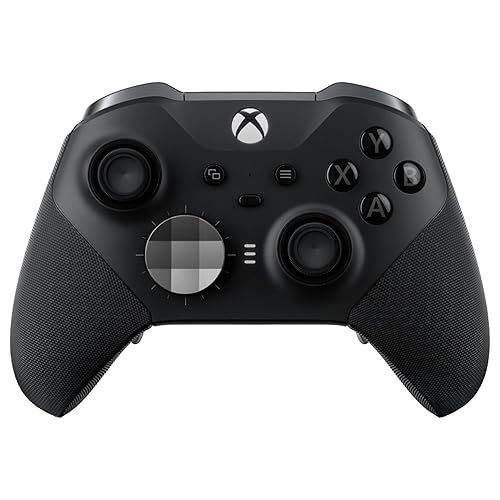
Xbox Elite Series 2
Bottom line: Microsoft's own pro controller and the premium pick for competitive Xbox players, if you can accept inconsistent quality control.
The Xbox Elite Series 2 is Microsoft's own pro controller. It adds adjustable-tension thumbsticks, three-step hair trigger locks, four back paddles, three onboard profiles and up to 40 hours of rechargeable battery life, and this version includes extra sticks, D-pads, a carrying case and a charging dock. A cheaper Elite Series 2 Core is also sold with just one D-pad, the standard thumbsticks and a USB-C cable.
Pros & Cons
Pros- Adjustable-tension sticks and three-stage trigger stops
- Swappable sticks, D-pads and paddles, plus case and dock
- Up to 40 hours of battery
- Four back paddles and hair trigger locks
- Three onboard profiles
- Rechargeable battery with charging dock included
- Works on both Xbox and PC
Cons- Quality control is inconsistent
- Paddles map only to existing controller buttons
Why We Picked It
The Elite Series 2 is Microsoft's own pro controller, and it's packed with features competitive players want: adjustable-tension thumbsticks, three-stage hair trigger locks, four back paddles, three onboard profiles and up to 40 hours of rechargeable battery life. Paddles let you move jump, crouch or stick clicks off your thumbs, and this version includes extra sticks, D-pads, a carrying case and a charging dock.
Who It's For
You play competitive Xbox games and want Microsoft's own pro features in one pad. Paddles move jump, crouch or stick clicks off your thumbs, and the stick tension and trigger locks can be set per game and saved in the Xbox Accessories app. If your library also lives on PC, the same controller follows you there.
Specs & Configurations
- Connection
- Xbox Wireless, Bluetooth or USB-C
- Battery
- rechargeable, up to 40 hours
- Sticks
- adjustable tension
- Triggers
- three-step hair trigger locks
- In the box
- 6 thumbsticks, 4 paddles, 2 D-pads, carrying case, charging dock
- Extras
- 3 onboard profiles, 3.5mm jack, Xbox Accessories app

3
Best Value Pro Controller
GameSir G7 Pro Wireless
Bottom line: The best value pro controller for Xbox, giving you Elite-level build quality and wireless play for far less money.
The GameSir G7 Pro Wireless gives you pro features for less. It uses TMR sticks, Hall effect triggers with a hair trigger mode, extra remappable buttons and a 2.4G wireless connection, and it can wake your Xbox with one press. This is the Wuchang: Fallen Feathers Edition, which has a themed design.
Pros & Cons
Pros- Elite-level build quality for less
- Drift-resistant TMR sticks
- Four extra remappable buttons and lockable triggers
- Hair trigger mode on Hall effect triggers
- One-press console wake-up for Xbox
- 2.4G wireless with a charging dock
- Works on Xbox, PC and Android
Cons- Battery life is short, so dock it often
- Extra top buttons can get in the way
Why We Picked It
The GameSir G7 Pro Wireless gives you pro features for far less than the Elite. Its build quality feels on par with Microsoft's pro controller, the TMR sticks are built to resist drift, and you get four extra remappable buttons, Hall effect triggers with a hair trigger mode and satisfying mouse-click buttons. It connects over 2.4G, wakes your Xbox with one press and charges on an included dock.
Who It's For
You are on a budget but still want back buttons and drift-resistant sticks on Xbox. The 2.4G dongle gives a wireless connection, the dock keeps the battery topped up, and one press wakes the console from the couch. It also connects to PC, so one pad covers both setups.
Specs & Configurations
- Connection
- 2.4G dongle or USB-C (Xbox and PC), Bluetooth 5.3 (Android)
- Sticks
- GameSir Mag-Res TMR
- Triggers
- Hall effect with hair trigger mode
- Battery
- 1200mAh with charging dock
- Polling rate
- 1000Hz
- Extras
- one-press console wake-up, receiver storage in the dock

4
Best for Competitive Shooters
Razer Wolverine V3 Pro
Bottom line: A top pick for competitive shooters, with extra bumpers that let you act without moving your thumbs, though it's small for big hands.
The Razer Wolverine V3 Pro is built for competitive play. It has four mouse-click back buttons and two extra claw-grip bumpers, triggers that switch between instant actuation and analog control, Hall effect thumbsticks and a 2.4GHz HyperSpeed dongle.
Pros & Cons
Pros- Extra bumpers you can use without moving your thumbs
- Tactile mouse-click buttons and a crisp D-pad
- Wide, comfortable grip
- Hall effect sticks for smooth control
- Four mouse-click back buttons
- Tactile Mecha-Tactile action buttons
- Wireless 2.4GHz HyperSpeed dongle
Cons- Stick centering isn't perfect at zero dead zone
- Small for big hands
Why We Picked It
The Wolverine V3 Pro is built for competitive play. Two extra claw-grip bumpers let you reload, crouch or dodge without taking your thumbs off the sticks, the four back buttons and face buttons have a tactile mouse-like click, and the triggers switch between instant actuation and analog control. Its wider grip is comfortable for long sessions, and the Hall effect sticks and HyperSpeed dongle round it out.
Who It's For
You play FPS and Soulslike games and want to keep your thumbs on the sticks. The extra claw-grip bumpers and instant triggers speed up reloads, dodges and crouches, and the wider grip stays comfortable over long sessions. A PC Tournament Mode and carrying case suit gaming on the go.
Specs & Configurations
- Connection
- 2.4GHz HyperSpeed dongle or wired (1000Hz Tournament Mode on PC)
- Sticks
- Hall effect with 2 replaceable caps
- Extra buttons
- 4 mouse-click back buttons + 2 claw-grip bumpers
- Triggers
- Pro HyperTriggers (instant or analog)
- Buttons
- Mecha-Tactile action buttons, 8-way floating D-pad
- Extras
- carrying case, 10 ft cable

5
Best Rechargeable Upgrade
8BitDo Ultimate 3-mode for Xbox
Bottom line: The simplest upgrade from the standard Xbox pad, adding a charging dock, Hall effect sticks and back paddles.
The 8BitDo Ultimate 3-mode for Xbox is a simple upgrade from the standard pad. It's officially licensed by Xbox and Rare, with Hall effect sticks and triggers, two back paddles, a metal D-pad, a headset jack and a charging dock, and it connects to Apple and Android devices over Bluetooth. This is the Rare 40th Anniversary Edition.
Pros & Cons
Pros- Hall effect sticks and triggers resist drift
- Charging dock instead of AA batteries
- Very comfortable
- Two back paddles
- Metal D-pad with a tactile feel
- 3.5mm headset jack
- Three custom profiles
Cons- No battery level on the Xbox home screen
- A bit smaller than the standard pad
Why We Picked It
The 8BitDo Ultimate 3-mode is the simplest upgrade from the standard Xbox pad. It's officially licensed, swaps AA batteries for a magnetic charging dock, uses Hall effect sticks and triggers that resist drift, and adds two back paddles, a metal D-pad and a headset jack. It's one of the most comfortable controllers here, and the Rare 40th Anniversary design is a treat for fans.
Who It's For
You like the standard Xbox pad but want to stop buying AA batteries and add a few extras. The charging dock, Hall effect sticks and two back paddles make it a simple step up, and Bluetooth lets it pair with Apple and Android devices too. Rare fans get a themed design to match.
Specs & Configurations
- Connection
- 2.4G wireless or wired (Xbox and PC), Bluetooth (Apple and Android)
- Sticks and triggers
- Hall effect
- Extra buttons
- 2 back paddles
- D-pad
- metal tactile D-pad
- Extras
- charging dock, 3.5mm jack, 3 custom profiles, impulse triggers on Xbox and Windows

6
Best Wired Controller
Flydigi Vader 5S
Bottom line: The best wired Xbox controller, with rare adjustable stick tension and switchable triggers for shooters and racing games.
The Flydigi Vader 5S lets you physically adjust stick tension, from light for fast aiming to tight for steering. It also has triggers that switch between a micro-click mode and linear Hall effect mode, four vibration motors, extra rear and shoulder buttons, and settings you can change on the controller itself. Its listing says it works with Xbox Series X and S, Xbox One and Windows PC.
Pros & Cons
Pros- Adjustable stick tension
- Switchable micro-click or linear triggers
- Excellent concave D-pad
- Four vibration motors for impact feedback
- Rear and shoulder buttons
- Settings adjustable on the controller itself
- Concave D-pad
Cons- Wired only
- Needs a replug after some restarts
Why We Picked It
The Flydigi Vader 5S stands out for adjustable stick tension, letting you loosen the sticks for fast aiming or tighten them for steering, a feature that's rare at any price. Its triggers switch between a micro-click mode for shooters and linear Hall effect mode for racing, the concave D-pad is a clear upgrade over the standard pad, and four vibration motors add impact. It's the best wired pick for shooter fans.
Who It's For
You play at a desk or near the console and don't mind a cable. Shooter fans can tighten the sticks for steady aim or loosen them for fast flicks, and racing fans can switch the triggers to linear mode for smooth throttle. The on-controller adjustments mean you can retune between games.
Specs & Configurations
- Connection
- wired
- Sticks
- Hall effect, adjustable tension from 40gf to 100gf
- Triggers
- switch between micro-click and Hall effect linear
- Vibration
- 4 motors in the triggers and grips
- Extras
- rear and shoulder buttons, on-controller adjustments, FLYDIGI software
- Works with
- Xbox Series X and S, Xbox One, Windows 10/11

7
Most Customizable
Nacon Revolution X Unlimited
Bottom line: The most customizable Xbox controller here and a strong Elite alternative, if you can put up with clunky software.
The Nacon Revolution X Unlimited is the most customizable controller on this list. It has Hall effect sticks and triggers, six mappable buttons, adjustable triggers, three sets of weights, swappable stick heads and D-pads, a gyroscope, and an LCD screen for remapping and audio mixing right on the controller.
Pros & Cons
Pros- Hall effect sticks and excellent analog triggers
- Swappable weights and sticks for big hands
- LCD screen for on-the-fly changes
- Six mappable shortcut buttons
- Gyroscope support
- Swappable weights and D-pads
- Four vibration motors
Cons- Software is clunky
- Firmware updates can be finicky
Why We Picked It
The Revolution X Unlimited is the most customizable controller on this list, and a strong Elite alternative. Hall effect sticks resist drift, the adjustable analog triggers are some of the best you'll find for shooters and racing games alike, and six mappable buttons, swappable weights, stick heads and D-pads let you build exactly the controller you want. The LCD screen lets you change mapping and profiles without leaving your game.
Who It's For
You like to tinker and want the controller to fit your hands exactly. Three weight sets, swappable stick heads and D-pads, and an LCD screen for remapping and audio mixing let you build the setup you want, and the build suits players with large hands.
Specs & Configurations
- Connection
- 2.4GHz wireless, wired (3 m cable) or Bluetooth (Android)
- Sticks and triggers
- Hall effect
- Extra buttons
- 6 mappable shortcut buttons
- Battery
- up to 10 hours, charging station
- Customization
- LCD screen, 3 sets of weights, 4-way and 6-way D-pads, 3 sets of stick heads
- Extras
- gyroscope, PC keyboard key mapping, 4 vibration motors

8
Best Budget
PowerA Advantage Wired with Lumectra
Bottom line: The best budget Xbox controller, adding back buttons and trigger locks for little more than a standard pad.
If you want back buttons and trigger locks for less, the PowerA Advantage Wired is officially licensed for Xbox Series X and S. It adds two mappable buttons you can program mid-game, three-way trigger locks, impulse triggers and customizable four-zone RGB lighting.
Pros & Cons
Pros- Back buttons and trigger locks for less
- Feels like a standard Xbox controller
- No batteries to swap
- Three-way trigger locks
- Two back buttons you can program mid-game
- Impulse triggers for rumble feedback
- Four-zone RGB lighting
Cons- Durability is inconsistent
- Can be hit-or-miss on Windows 11
Why We Picked It
The PowerA Advantage Wired brings pro features to a budget controller. It feels much like a standard Xbox pad, but adds two mappable back buttons you can program mid-game, three-way trigger locks, impulse triggers and customizable RGB lighting, all officially licensed for Xbox Series X and S. The long, removable cable means there are no batteries to worry about.
Who It's For
You game on Xbox near the console and want back buttons and trigger locks without paying for a pro controller. The long removable cable means no batteries or charging, and the layout feels familiar from the first match. It is officially licensed for Xbox Series X and S.
Specs & Configurations
- Connection
- wired
- Extra buttons
- 2 mappable on the fly
- Triggers
- 3-way trigger locks, impulse triggers
- Lighting
- 4-zone RGB, 3 modes
- Extras
- dual rumble motors, 3.5mm jack, PowerA Gamer HQ app
- Works with
- Xbox Series X and S, Xbox One, Windows 10/11

9
Best for Fighting Games
HORI Fighting Commander Octa for Xbox
Bottom line: The fightpad to get for Street Fighter and Tekken on Xbox, with some of the best face buttons on any gamepad.
For Street Fighter 6, Tekken 8 and other fighters on Xbox, the HORI Fighting Commander Octa is an officially licensed fightpad. It has six micro switch face buttons, an adjustable D-pad, a short-throw analog stick with an 8-way gate and four profiles you can switch with a button.
Pros & Cons
Pros- Excellent mechanical face buttons
- Precise 8-way gated stick for motions
- Arcade-style six-button layout
- Four profiles via the companion app
- Adjustable D-pad
- Officially licensed for Xbox
- Short-throw stick for quick motions
Cons- D-pad isn't for everyone
- No right stick
Why We Picked It
For Street Fighter 6, Tekken 8 and other fighters on Xbox, the Fighting Commander Octa is an officially licensed fightpad with some of the best face buttons on any gamepad. Six mechanical micro switch buttons give an arcade-style layout, the short-throw stick's 8-way gate makes quarter- and half-circle motions easy, and you can bind moves like Parry and Drive Impact to the shoulders.
Who It's For
You play Street Fighter 6, Tekken 8 and other fighters on Xbox and want an arcade-style layout. Six micro switch buttons give quick, clear presses, the 8-way gate makes quarter and half-circle motions easier, and moves like Parry and Drive Impact can be bound to the shoulders.
Specs & Configurations
- Connection
- wired
- Layout
- six face buttons
- Buttons
- micro switch
- D-pad
- adjustable
- Stick
- short-throw analog stick with 8-way gate
- Extras
- 4 profiles via the companion app
- Works with
- Xbox Series X and S, Xbox One, Windows 10
Xbox Controllers Compared
| Controller |
Connection |
Power |
Extra buttons |
Sticks |
Trigger stops |
| Xbox Wireless Controller |
Xbox Wireless, Bluetooth, USB-C |
AA batteries |
None |
Standard |
Not listed |
| Xbox Elite Series 2 |
Xbox Wireless, Bluetooth, USB-C |
Rechargeable, up to 40 hours |
4 paddles |
Adjustable tension |
3-step |
| GameSir G7 Pro Wireless |
2.4G, USB-C, Bluetooth (Android) |
1200mAh, charging dock |
4 |
TMR |
Hair trigger mode |
| Razer Wolverine V3 Pro |
2.4GHz dongle, wired |
Rechargeable (USB-C) |
6 |
Hall effect |
Instant or analog |
| 8BitDo Ultimate 3-mode for Xbox |
2.4G, wired, Bluetooth (Apple, Android) |
Rechargeable, charging dock |
2 paddles |
Hall effect |
Not listed |
| Flydigi Vader 5S |
Wired |
Wired |
Rear and shoulder buttons |
Hall effect, adjustable tension |
Micro-click or linear |
| Nacon Revolution X Unlimited |
2.4GHz, wired, Bluetooth (Android) |
Up to 10 hours, charging station |
6 |
Hall effect |
Adjustable |
| PowerA Advantage Wired |
Wired |
Wired |
2 |
Standard |
3-way |
| HORI Fighting Commander Octa |
Wired |
Wired |
6-button layout |
One 8-way gated stick |
Not listed |
“Not listed” means the feature isn’t mentioned in the product’s listing. Based on listings at the time of writing.
How to Choose an Xbox Controller
Batteries or rechargeable?
The standard Xbox Wireless Controller uses AA batteries. If you’d rather not swap them, the Elite Series 2, GameSir G7 Pro, Razer Wolverine V3 Pro, 8BitDo Ultimate and Nacon are rechargeable, and most come with a dock or charging station. Wired pads like the Flydigi, PowerA and HORI don’t need charging at all.
Back buttons and trigger stops
For shooters, back buttons let you jump, crouch or reload without moving your thumbs, and trigger stops shorten the pull so you can fire faster. Every pick except the standard Xbox controller and the HORI fightpad offers extra buttons, and most offer some form of trigger stop.
Drift-resistant sticks
Stick drift is the most common reason to replace a controller. Hall effect and TMR sticks, used in the GameSir, Razer, 8BitDo, Flydigi and Nacon picks, use magnetic sensing to resist drift.
Licensing and hand size
Most picks are officially licensed for Xbox. The Flydigi Vader 5S listing describes compatibility with Xbox Series X and S, Xbox One and Windows but doesn’t say it’s licensed. For hand size, the Nacon suits big hands best, while the 8BitDo and Razer run a bit small.
FAQ
What is the best Xbox controller?
For most players, the best Xbox controller is Microsoft’s own Xbox Wireless Controller, thanks to its comfort, reliability and wide device support. If you want pro features, the Xbox Elite Series 2 is the official upgrade, while the GameSir G7 Pro Wireless offers drift-resistant TMR sticks and extra buttons for less.
Is the Xbox Elite Series 2 worth it?
If you want adjustable-tension sticks, trigger stops, paddles and a rechargeable battery from Microsoft, it can be. But button failures and stick drift aren’t unusual, and third-party pro controllers like the Nacon Revolution X Unlimited offer drift-resistant Hall effect sticks.
Which Xbox controller doesn’t get stick drift?
No controller can promise it will never drift, but Hall effect and TMR sticks are designed to resist it. The GameSir G7 Pro Wireless, 8BitDo Ultimate 3-mode and Nacon Revolution X Unlimited all use drift-resistant sticks.
What is the best wired Xbox controller?
The Flydigi Vader 5S is our top wired pick for its adjustable-tension Hall effect sticks and switchable triggers. For a lower-cost wired controller with back buttons, the PowerA Advantage Wired is officially licensed for Xbox.
Which Xbox controller is rechargeable?
The standard Xbox Wireless Controller uses AA batteries. The Elite Series 2, GameSir G7 Pro Wireless, Razer Wolverine V3 Pro, 8BitDo Ultimate 3-mode and Nacon Revolution X Unlimited are all rechargeable.
Final Verdict: Which Xbox Controller Should You Buy?
Most players should stick with the Xbox Wireless Controller, and the Xbox Elite Series 2 is Microsoft’s pro upgrade. For pro features for less, choose the GameSir G7 Pro Wireless. For competitive shooters, go with the Razer Wolverine V3 Pro, and for a simple rechargeable upgrade, the 8BitDo Ultimate 3-mode for Xbox. If you don’t mind a cable, the Flydigi Vader 5S has adjustable stick tension, and the PowerA Advantage Wired is the budget pick. Tinkerers and players with large hands should look at the Nacon Revolution X Unlimited, and fighting game fans should get the HORI Fighting Commander Octa. Also playing on PC? See our guide to the best PC controllers. If fighting games are your focus on PC, our best controller for fighting games on PC guide goes deeper. Weighing the GameSir against 8BitDo for PC? See our GameSir G7 Pro vs 8BitDo Ultimate 2 comparison.

