GameCuki is reader-supported. When you buy through links on our site, we may earn an affiliate commission at no extra cost to you. As an Amazon Associate I earn from qualifying purchases. Learn more.
GameCuki VerdictRecommended
What Our Verdicts Mean
GameCuki Top PickThe best option in its class, with no serious, repeated problems.
RecommendedA good buy for most people. Weaknesses are minor or only matter to some players.
Buy With CaveatsRight for a specific kind of player only, because of a significant drawback.
Skip ItNot recommended. A better option exists at a similar price.
The Bottom LineOne of the best wireless pro controllers for Xbox, with superb mouse-click back buttons, Hall effect sticks and instant triggers, though its price and 250Hz wireless polling hold it back.
Mouse-click back buttons that fall right under your fingers
Hall effect sticks and Hall effect analog triggers
HyperTrigger stops turn triggers into instant mouse clicks
Two extra bumper buttons for claw-grip players
1000Hz wired Tournament Mode on PC
Carrying case, 10 ft cable and spare stick caps included
Cons
Expensive
Wireless and Xbox play are limited to 250Hz polling
No Bluetooth, and wireless needs a USB-A dongle
Razer Wolverine V3 Pro Specs
Sticks
Hall effect, swappable taller and shorter caps
Triggers
Hall effect analog with mouse-click trigger stops (HyperTriggers)
Face buttons and D-pad
Razer Mecha-Tactile, 8-way floating D-pad
Extra buttons
4 mouse-click back buttons and 2 claw grip bumpers (6 remappable)
Connection
HyperSpeed 2.4GHz USB-A dongle, wired USB-C
Polling rate
1000Hz wired on PC (Tournament Mode), 250Hz wireless and on Xbox
Battery
about 18 to 20 hours
Audio
3.5mm jack
In the box
carrying case, 10 ft braided USB-C cable, 2 extra thumbstick caps, dongle
License
officially licensed for Xbox
Platforms
Xbox Series X/S, Xbox One, Windows PC
Wireless on Xbox and Hall effect sticks rarely come in the same controller. The Wolverine V3 Pro has both, and this Razer Wolverine V3 Pro review weighs whether that combination justifies a price even higher than Microsoft’s Elite Series 2. Razer designed it with esports players, borrowing mouse-click switches for its back buttons and triggers, adding two extra bumpers for claw-grip players and a 1000Hz wired mode for PC. The catches are its price, short handles and a wireless connection limited to 250Hz.
What’s in the Box: Case Included
The Wolverine V3 Pro comes in a molded carrying case that holds the controller, the HyperSpeed USB-A dongle, a 10 ft braided USB-C cable and two extra thumbstick caps. The case has a sturdy outer shell with a soft lining, so it’s genuinely useful if you take your controller to friends’ houses or events. It doesn’t double as a charging dock, though.
The included case holds the controller, cable, dongle and spare caps. (Image: Razer)
The V3 Pro uses an Xbox-style layout with a good amount of weight and textured rubber on the back of the grips. The front half of the grips is plain plastic, and the handles are a little short, so players with large hands may not get a full grip and could feel cramped reaching the extra buttons. Others find it fits their hands perfectly and is comfortable for long sessions, so it’s worth trying in person if you can.
Buttons and D-Pad: Mecha-Tactile Clicks
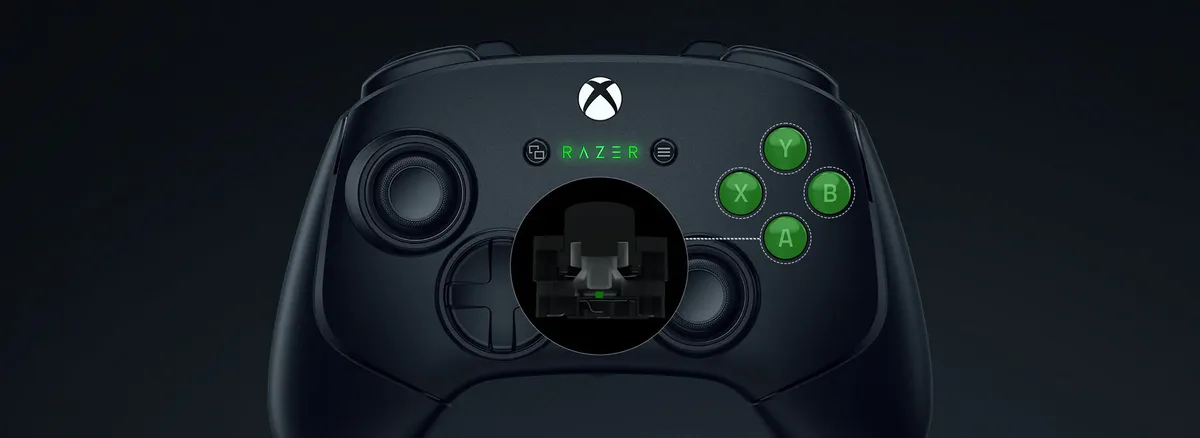
The ABXY buttons and the 8-way floating D-pad use Razer’s Mecha-Tactile switches, which combine a soft membrane feel at the start of the press with a crisp click at the end. They feel fast and precise without being as harsh as pure microswitches, and the D-pad is a good choice for fighting games. The face buttons are slightly softer than the rest of the controller’s clicky inputs.
Mecha-Tactile buttons pair a membrane feel with a crisp click. (Image: Razer)
Back Buttons and Extra Bumpers: The Highlight
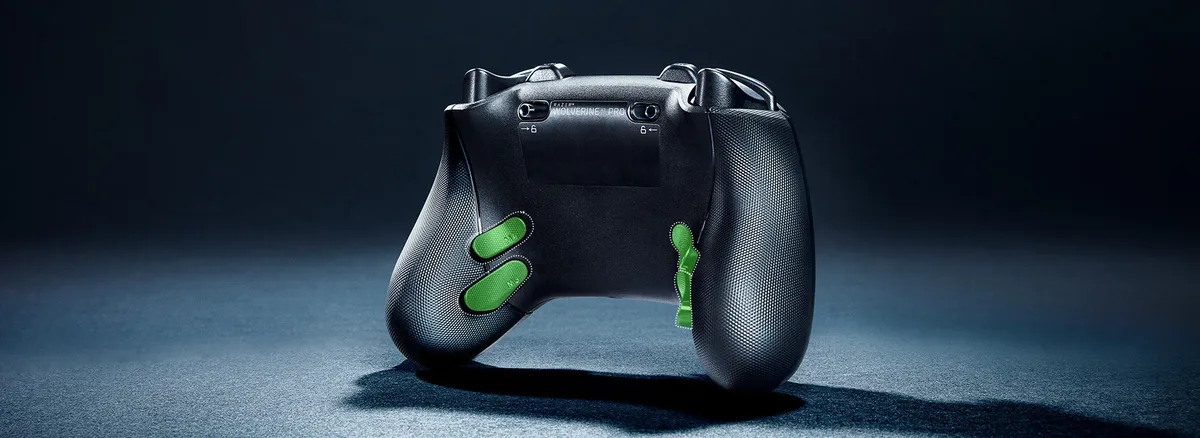
The four back buttons are the best part of the controller. Razer moved them from the V2’s central position to the grips, similar to the Xbox Elite, so they sit right under your middle and ring fingers and you don’t have to arch your hand to reach them. They use mouse-click switches with a very fast, satisfying response, and you can map each to any controller button.
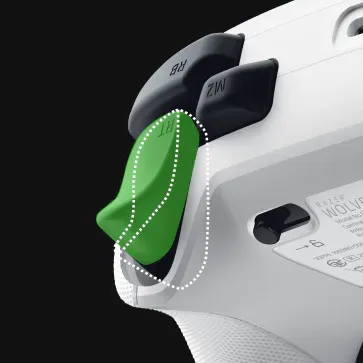
Two extra buttons sit on the inner side of the bumpers, aimed at players who use a claw grip and can’t comfortably reach the back. Everyone else can map them too, for six extra inputs in total. One small limitation is that the back buttons can’t be removed, unlike the Elite’s paddles.
Four mouse-click back buttons sit right on the grips. (Image: Razer)
Sticks and Triggers: Hall Effect With Instant Clicks
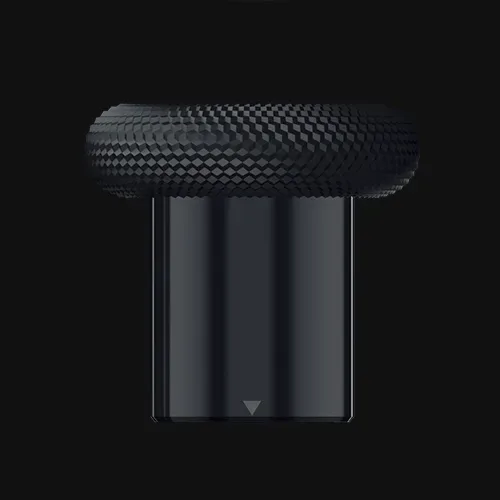
Both thumbsticks use Hall effect sensors, so they resist drift and stay accurate without calibration. They feel a little weightier than the V2’s sticks, and you get taller concave and shorter caps that clip on and off. Out of the box, it’s worth checking stick centering in the Razer app, since magnetic sticks can read slightly off-center.
The triggers are also Hall effect analog, with Razer’s HyperTrigger stops. Slide the switch under each trigger and a mouse-click switch moves into place, shortening the pull to an instant click for shooters. Slide it back and you get the full analog pull for racing games. Integrated rumble in the triggers adds feedback in both modes.
A HyperTrigger stop turns the trigger into an instant mouse click. (Image: Razer)Taller and shorter thumbstick caps clip on and off. (Image: Razer)
Connectivity: Wireless on Xbox, 1000Hz Only Wired on PC
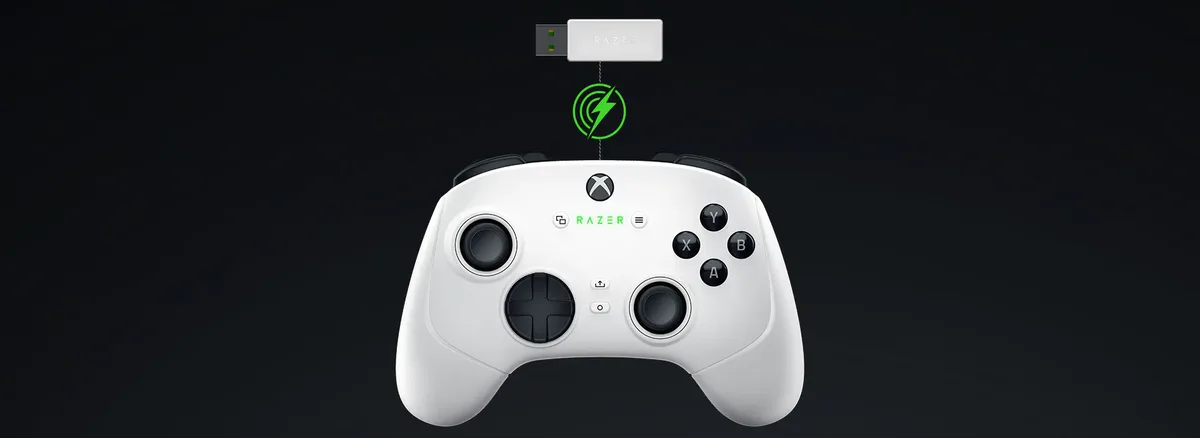
The V3 Pro is officially licensed for Xbox, so it connects wirelessly to Xbox Series X/S, Xbox One and PC through Razer’s HyperSpeed 2.4GHz USB-A dongle, or by USB-C cable. There’s no Bluetooth, so you can’t pair it directly with a phone or laptop without the dongle, and the dongle takes a USB-A port.
Polling rate is the important detail. Razer says the controller runs at 250Hz wirelessly and on Xbox consoles. Plug it into a PC and switch on Tournament Mode, from the app or a controller shortcut, and it jumps to 1000Hz. Stick with the included cable for wired play, because the USB-C connection can be finicky with other cables.
Wireless play runs through the HyperSpeed USB-A dongle. (Image: Razer)
Performance: Great Wired, Average Wireless
Latency follows that polling split. Wired at 1000Hz, the V3 Pro averages about 4.8ms of button latency. Over the dongle at 250Hz, button latency rises to about 10.6ms and stick latency to around 33ms, which is sluggish for a pro controller. Casual players won’t notice much, but competitive PC players should play wired. On Xbox, every controller is capped by the console’s own polling rate, so the gap matters less there.
Razer Controller App: Useful Tuning, No Macros
The Razer Controller app is available on Windows and Xbox, so console players can tune it too. You can remap the six extra buttons, adjust stick sensitivity and deadzones, set a sensitivity clutch that slows the sticks for precise aiming, change the stick circularity mode and store profiles on the controller. Some settings, like remapping and the clutch, also work through button shortcuts without the app. There’s no macro support, since Razer aims it at tournament play.
Battery Life: Long Enough for Most Weeks
Razer rates the battery at around 20 hours, and you’ll get roughly 18 in real use. A full charge takes around three hours, and the controller goes to sleep fairly quickly when idle, which helps it last. Turning the RGB down stretches it further, and you can always keep playing wired. There’s no charging dock or swappable battery.
Wolverine V3 Pro vs Tournament Edition and Xbox Elite
The Wolverine V3 Tournament Edition has the same Hall effect sticks, HyperTriggers and back buttons, but it’s wired only and costs about half as much. If you always play near your console or PC, it’s the better value. Microsoft’s Xbox Elite Series 2 costs less than the V3 Pro, has removable paddles and a charging case, but uses standard potentiometer sticks that can drift over time.
Alternatives: What to Consider Instead
If you want a cheaper wired Xbox pad with Hall effect sticks, read our GameSir G7 SE review. For an Xbox-licensed controller with TMR sticks and wireless play on PC, the GameSir G7 Pro is another option. And our best Xbox controller guide compares the full field.
Final Thoughts
Razer Wolverine V3 Pro
GameCuki VerdictRecommended
What Our Verdicts Mean
GameCuki Top PickThe best option in its class, with no serious, repeated problems.
RecommendedA good buy for most people. Weaknesses are minor or only matter to some players.
Buy With CaveatsRight for a specific kind of player only, because of a significant drawback.
Skip ItNot recommended. A better option exists at a similar price.
The Razer Wolverine V3 Pro gets the parts that matter most for competitive players exactly right. Its mouse-click back buttons are among the best on any controller, the Hall effect sticks resist drift, the HyperTriggers give you instant clicks or a full pull with one slider, and it's one of the few Hall effect pads that's wireless on Xbox. The high price, short handles and 250Hz wireless polling keep it from being perfect, and wired-only players should save money with the Tournament Edition. But if you want a premium wireless Xbox controller that won't drift, we recommend the Wolverine V3 Pro.
I'm Fraser, and I write the reviews on GameCuki. That covers consoles and handhelds, PC gaming hardware, controllers, headsets and accessories, from big purchases like gaming laptops to small add-ons like screen protectors and grips. I build each review from the manufacturer's specs, professional reviews and verified owner feedback, and I check long-term issues like comfort, battery life and durability against several sources before they make it into the pros and cons. Every review ends with who the product is for and who should skip it. I don't accept free products or paid placements, and what I write comes from research, not my own use of the products. You can read my full process on our How We Review page.