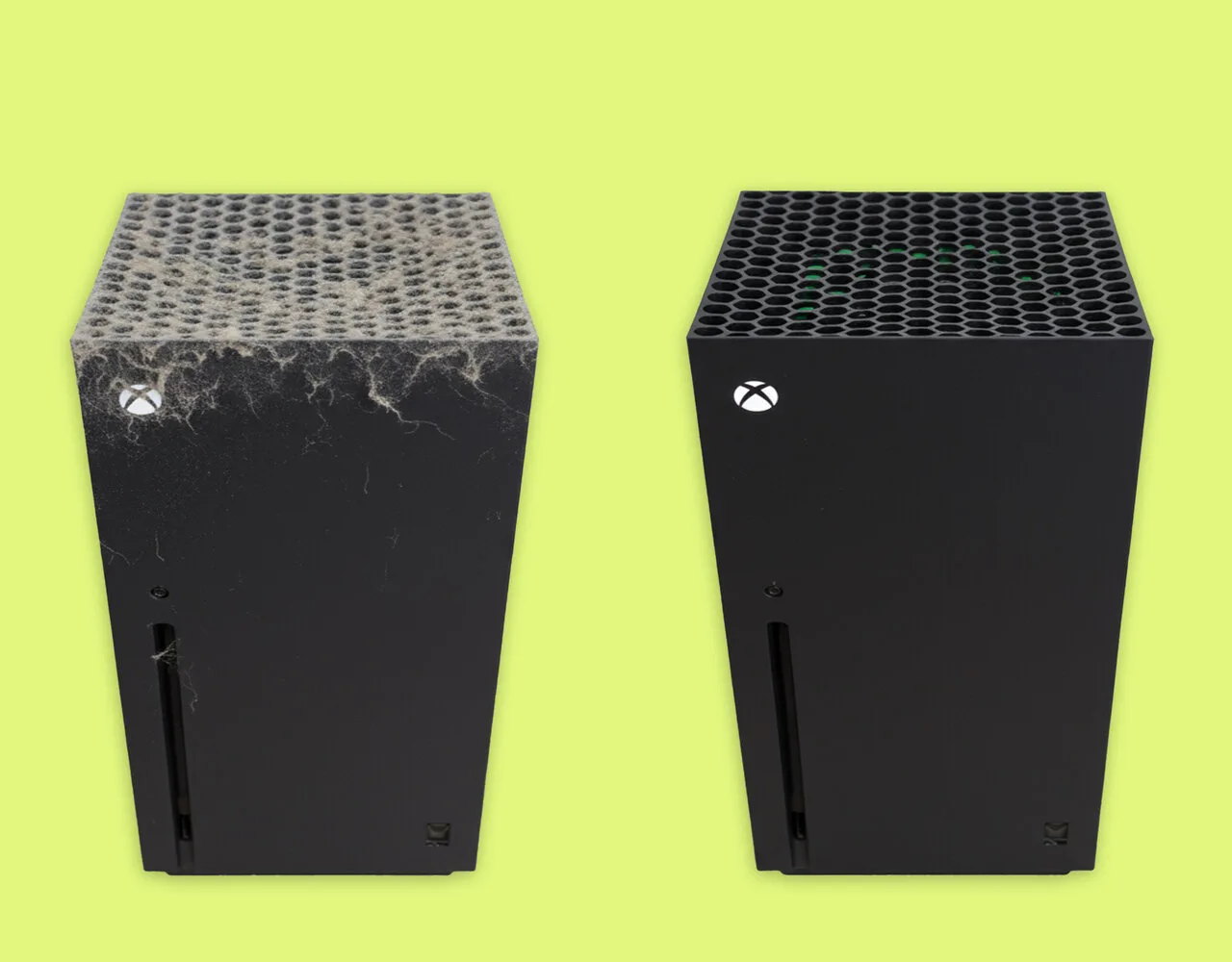
An Xbox Series X is a tall black box with a honeycomb vent on top, and that grille catches dust, lint and pet hair every time the fan spins. Knowing how to clean Xbox Series X hardware takes about 15 minutes and does not require opening the console. This guide covers the case, the vents, the disc drive slot and the controller, plus the products you should keep away from it.
Prefer to watch it done? This video shows the cleaning from start to finish:
Before You Clean Your Xbox Series X: Power Off and Unplug
Every method below starts here.
Turn the console off completely. Hold the Xbox button on the controller, then choose Turn off console.
Unplug the power cord from the wall, and pull the HDMI and any other cables from the back.
Let the console cool for a few minutes, since the case can stay warm after a long session.
Set it on a flat, clear surface. Never spray or pour any liquid directly onto the console or a controller.
How to Clean the Outside of an Xbox Series X
This is the quick job, and it removes fingerprints, smudges and the dust film on the case.
Start dry. Wipe the case with a soft, lint-free microfiber cloth to lift loose dust.
For marks that do not come off, dampen the cloth slightly. Use mild soap and water, or a 70% or lower isopropyl alcohol (IPA) solution, on Series X and Series S consoles.
Wipe the front, sides and back, then go over the top slowly so the cloth does not snag on the vent edges.
Let the case air dry before you plug anything back in.
Do not use disinfectant wipes on Xbox Series X, Series S and Xbox One consoles. Wipes are approved for the standard Xbox Wireless Controller, not the console.
How to Clean Xbox Series X Vents and Dust Without Opening It
The vent is where the dust builds up, and it is also where an Xbox Series X most often needs help. A clogged grille means less airflow and a louder fan. The vents can be cleaned from the outside with a brush and short blasts of air.
With the console still unplugged, loosen dust on the top vent with a soft-bristled brush. Brush the dust off the grille, not into it.
Clean around the edges of the honeycomb with a cotton swab. Do not push the swab deep, because it can pack dust inward.
Hold the nozzle of a compressed air can or electric duster a few inches from the vent. Use short bursts and move across the grille in rows.
Do the same on the back, around the ports and the power socket, and along the disc drive slot on the front if your model has one.
Finish with a dry microfiber cloth to catch whatever dropped out.
A clogged vent grille next to a clean one. (Image: Back Market)
Keep the blasts short. Long continuous blasts can force dust deeper. Keep a vacuum off the vents as well, since it can build up static that is bad for the electronics.
Should You Open the Xbox Series X to Clean the Fan?
For routine cleaning, no. The steps above handle ordinary dust. If the fan stays loud afterward, the dust may sit on the fan and heatsink inside. Opening the console means peeling the stickers over two back panel screws, removing them with a T8 Torx screwdriver and prying the panel off with a plastic tool. It is a job for someone comfortable with small screws and static, and you should read your warranty terms before you start. Otherwise, contact Xbox Support rather than forcing it.
How to Clean an Xbox Wireless Controller
The controller is the part you touch most, so it collects skin oils and grime faster than the console does. Unlike the console, the standard Xbox Wireless Controller can take disinfectant wipes.
Turn the controller off and remove the batteries or unplug any cable.
Blow loose dust and hair out of the seams, buttons and trigger gaps with short bursts of air.
Wipe the whole controller with a microfiber cloth. For grime, use a cloth dampened with mild soap and water, a 70% or lower IPA solution, or an approved disinfectant wipe such as Clorox Healthcare Bleach Germicidal Wipes or CaviWipes.
Dip a cotton swab in 70% IPA and clean around the buttons, triggers, D-pad and thumbsticks. Move the thumbsticks in a circle as you go.
Let the controller dry fully before you put batteries back in or use it.
If you own an Xbox Elite Wireless Controller Series 2, skip the wipes and use only a cloth dampened with 70% or lower IPA, Formula 409 All-Purpose Cleaner, Windex Glass Cleaner, or Dawn and water.
What Not to Use on an Xbox Series X
Liquids sprayed or poured directly onto the console or controller.
Disinfectant wipes on the console itself.
Isopropyl alcohol stronger than 70%.
A vacuum cleaner on the vents.
Paper towels or rough cloths that leave lint or scratch the case.
Anything pushed deep into the vents or ports.
How Often Should You Clean an Xbox Series X?
Clean the console and controllers every 3 to 6 months, or whenever they need it. A home with pets, carpet or a console on the floor will collect dust faster, so look at the vent every month or two. Leave open space around the console and keep it out of closed cabinets so the vents can move air.
Final Thoughts on How to Clean Xbox Series X
If you only want to know how to clean Xbox Series X dust out of the case, the easy routine is enough: power off and unplug, wipe the case, brush and blow the vents in short bursts, then wipe the controller. Skip the screwdriver unless the fan stays loud and you are comfortable with the repair. Do the routine twice a year and your Xbox should stay cooler and quieter than one that never gets looked at. Own a PlayStation too? Our guide on how to clean PS5 covers the same job for Sony’s console.
I'm Iain, and I write the step-by-step guides on GameCuki. I cover game tips and walkthroughs, PC gaming how-tos like settings, performance and troubleshooting, and practical guides for Steam, PlayStation, Xbox and Nintendo Switch. I build each guide from official game and platform documentation, write the steps in plain language and check them against the source before publishing. When a game or platform changes how something works, I update the guide. You can read my full process on our How We Review page.