GameCuki is reader-supported. When you buy through links on our site, we may earn an affiliate commission at no extra cost to you. As an Amazon Associate I earn from qualifying purchases. Learn more.
Missing flicks is often a shape problem, not a skill problem. The best gaming mouse is the one that fits your hand, your grip and your games, and a 49 g esports mouse will feel wrong in a big palm just as a 134 g MMO mouse will drag in a fast shooter. This list sorts 11 gaming mice by need, from the best overall pick to ultralight esports mice, MMO monsters and budget buys.
Every mouse below is a current model with a modern optical sensor, and each pick lists its weight, size, sensor and battery so you can match a mouse to your hand before you click.
Best Gaming Mouse: Our Picks in Detail

1
Best Overall
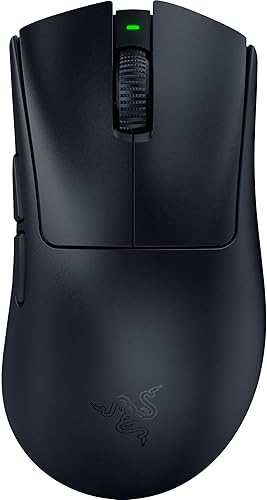
Razer Viper V4 Pro
Bottom line: A 49 g wireless esports mouse with a 50K sensor and 180 hours of battery, for players who want top performance in any game.
The Viper V4 Pro is Razer's lightest wireless flagship and the mouse most players can buy without a second thought.
Pros & Cons
Pros- 49 g keeps long sessions easy on the wrist
- 50K Focus Pro Gen-3 sensor tracks up to 930 IPS
- Up to 180 hours of battery at 1000 Hz
- True 8000 Hz polling for players who want it
- Optical switches with a tactile click and no pre-travel
- Optical scroll wheel feels precise
- Symmetrical shell suits palm, claw and fingertip grips
Cons- Optical clicks are loud, which may bother housemates
- No RGB and few extra buttons
Why We Picked It
It pairs a 49 g body with a 50K Focus Pro Gen-3 sensor and up to 180 hours of battery at 1000 Hz, a combination that used to cost you something in weight or endurance. The Gen-4 optical switches and optical scroll wheel are precise, and 8000 Hz polling is there if you want it, though battery drops to about 45 hours at that setting.
Who It's For
You play shooters, battle royales or any fast game and want a mouse that disappears in your hand. The symmetrical shape suits palm, claw and fingertip grips on medium hands, the wireless link is quick enough for ranked play, and the long battery means you charge it about once a week.
Specs & Configurations
- Weight
- 49 g
- Shape
- right-handed symmetrical
- Connection
- HyperSpeed 2.4 GHz wireless, USB-C
- Sensor
- Focus Pro 50K optical Gen-3
- Polling
- true 8000 Hz
- Battery
- up to 180 hours at 1000 Hz, 45 hours at 8000 Hz
- Switches
- optical Gen-4, rated for 100 million clicks
2
Best Ergonomic Wireless
Razer DeathAdder V4 Pro
Bottom line: A 56 g ergonomic shape with an 8K dongle in the box, for palm and claw grippers who want a classic hump without the weight.
The DeathAdder V4 Pro keeps the shape that esports players have used for years and trims the weight to 56 g.
Pros & Cons
Pros- Classic DeathAdder hump that fills a medium or large palm
- Only 56 g for an ergonomic shell
- 45K Focus Pro Gen-2 sensor tracks up to 900 IPS
- 8K wireless dongle included
- Up to 150 hours at 1000 Hz
- Optical switches and scroll wheel
Cons- No Bluetooth or RGB
- Right-handed only, so lefties should look elsewhere
Why We Picked It
Ergonomic mice are usually heavy, and this one is not. At 128 x 68 x 44 mm it gives a palm real support, while the Focus Pro 45K Gen-2 sensor, Gen-4 optical switches and up to 150 hours of battery put it in flagship territory. The desktop dongle that ships in the box handles 8000 Hz polling.
Who It's For
You rest your palm on the mouse and want to flick without fighting the weight. The curved right side and raised back suit palm and relaxed claw grips, and six buttons keep the layout clean for shooters and MOBAs.
Specs & Configurations
- Size
- 128 x 68 x 44 mm
- Weight
- 56 g
- Shape
- right-handed ergonomic
- Connection
- HyperSpeed Wireless Gen-2, USB-C
- Sensor
- Focus Pro 45K Gen-2
- Polling
- up to 8000 Hz
- Battery
- up to 150 hours at 1000 Hz
- Switches
- optical Gen-4, rated for 100 million clicks

3
Best for Customization
Razer Basilisk V3 Pro 35K
Bottom line: A comfortable, feature-rich wireless mouse with a tilt wheel and RGB, for players who want a big, customizable shape for every genre.
The Basilisk V3 Pro 35K is Razer's all-purpose big mouse, with more controls and more comfort than the esports models.
Pros & Cons
Pros- Dual-mode tilt wheel switches between tactile and free-spin scrolling
- Focus Pro 35K Gen-2 sensor tracks up to 750 IPS
- Up to 140 hours of battery
- Three connection modes: 2.4 GHz, Bluetooth and USB-C
- Thumb rest and built-in side grips for comfortable palm grip
- 13-zone Chroma RGB with underglow
- Multi-function trigger for push-to-talk or pings
Cons- At 112 g it is heavy for fast flick aiming
- 8000 Hz needs a separate dongle or dock
Why We Picked It
The body runs 130 x 75.4 x 42.5 mm with a contoured thumb rest, a programmable multi-function trigger and a software-switchable scroll wheel that works for both weapon swaps and fast scrolling. The Focus Pro 35K Gen-2 sensor and up to 140 hours of battery on 2.4 GHz make it a dependable daily driver.
Who It's For
You play a mix of games, from shooters and RPGs to strategy, and like a mouse with real heft and a thumb rest. Large and medium palms will find it comfortable, and the extra controls give you binds for push-to-talk, pings and macros without a second device.
Specs & Configurations
- Size
- 130 x 75.4 x 42.5 mm
- Weight
- 112 g
- Shape
- right-handed ergonomic with thumb rest
- Connection
- HyperSpeed 2.4 GHz, Bluetooth, USB-C
- Sensor
- Focus Pro 35K Gen-2
- Battery
- up to 140 hours on HyperSpeed
- Lighting
- 13-zone Chroma RGB with underglow

4
Best for FPS
Logitech G Pro X Superlight 2
Bottom line: A 60 g, five-button esports classic with a HERO 2 sensor and 95 hours of battery, for FPS players who want a shape that suits most grips.
The Superlight 2 is the shape most Counter-Strike and Valorant players know, now with USB-C charging and a faster sensor.
Pros & Cons
Pros- 60 g body that is easy to flick with
- HERO 2 sensor tracks over 888 IPS with no smoothing or acceleration
- Up to 95 hours of battery
- Up to 8000 Hz polling with LIGHTSPEED
- Shape suits palm, claw and fingertip grips
- Zero-additive PTFE feet glide on most pads
- USB-C charging and POWERPLAY compatible
Cons- No dedicated DPI button
- Only five buttons, so MMO players need more binds
Why We Picked It
Logitech kept the proven symmetrical body and upgraded the parts that matter: a HERO 2 sensor with up to 44,000 DPI, LIGHTFORCE hybrid switches, USB-C charging and up to 95 hours of battery. At 125 x 63.5 x 40 mm and 60 g, it suits a wide range of hand sizes and grips.
Who It's For
You play competitive FPS games, aim with your whole arm and want a mouse that gets out of the way. Medium hands will fit best, and the clean layout of two buttons, a wheel and two side buttons keeps accidental presses to a minimum. If you are weighing it against Razer's ergonomic option, our Superlight 2 vs DeathAdder V3 comparison covers the trade-offs.
Specs & Configurations
- Size
- 125 x 63.5 x 40 mm
- Weight
- 60 g
- Shape
- symmetrical
- Connection
- LIGHTSPEED wireless, USB-C
- Sensor
- HERO 2, up to 44,000 DPI
- Polling
- up to 8000 Hz
- Battery
- up to 95 hours
- Switches
- LIGHTFORCE hybrid optical-mechanical

5
Best for Fast Clicks
Logitech G Pro X2 Superstrike
Bottom line: A 61 g wireless mouse with adjustable actuation and rapid-trigger style click reset, for competitive players who want to tune every click.
The Superstrike swaps mechanical click switches for a magnetic system, so you choose when a click registers and resets.
Pros & Cons
Pros- Adjustable actuation across 10 levels
- 5 levels of rapid-trigger reset for repeated clicks
- Haptic feedback on clicks
- HERO 2 sensor tracks over 888 IPS
- 8000 Hz polling over LIGHTSPEED
- Thin-wall 0.7 mm shell keeps weight to 61 g
- POWERPLAY 2 compatible
Cons- Battery is 60 to 90 hours, shorter than the Superlight 2
- Click tuning matters mainly in competitive play
Why We Picked It
Logitech's Haptic Inductive Trigger System lets you set the actuation point and the reset point of each click, which is the same idea that made rapid-trigger keyboards popular. The mouse keeps the HERO 2 sensor and 8000 Hz polling of the Superlight 2 and weighs 61 g.
Who It's For
You play tactical shooters or rhythm-style games where spamming clicks and fast tap reset matter, and you enjoy tweaking settings in Logitech G HUB. If you just want a mouse that feels good out of the box, the standard click feel is already responsive.
Specs & Configurations
- Weight
- 61 g
- Shape
- symmetrical
- Connection
- LIGHTSPEED wireless, USB-C
- Sensor
- HERO 2, up to 44,000 DPI
- Polling
- 8000 Hz
- Battery
- 60 to 90 hours
- Clicks
- magnetic HITS switches with adjustable actuation

6
Best Ultralight
Pulsar X2 CrazyLight Medium
Bottom line: A 39 g wireless mouse with a low-profile shape and included dot skates, for claw and fingertip grippers who want the lightest option.
The X2 CrazyLight is built for players who feel every gram and want a feather-light flick.
Pros & Cons
Pros- 39 g is among the lightest wireless mice you can buy
- XS-1 sensor with 32,000 DPI and 750 IPS
- Wide, low-profile symmetrical shape for claw and fingertip grips
- Optical switches reduce unwanted double clicks
- Pulsar Blue Encoder gives the wheel a tactile feel
- Includes Pulsar Dot Skates
- Medium size suits average hands
Cons- Low profile is not ideal for a full palm grip
- Premium price
Why We Picked It
At 39 g it is nearly half the weight of mainstream esports mice, and Pulsar fits it with its own XS-1 sensor, optical switches and a set of 16 dot skates for low friction. The wide, flat body gives claw and fingertip grips a stable platform.
Who It's For
You play fast aim-heavy games at low sensitivity, like to hold the mouse with your fingertips and want the least possible mass on the pad. Average hands fit the Medium size, and you should be comfortable with a flatter back than most ergonomic mice offer.
Specs & Configurations
- Weight
- 39 g
- Shape
- right-handed symmetrical, low profile
- Connection
- 2.4 GHz wireless
- Sensor
- XS-1, 32,000 DPI
- Tracking
- 750 IPS, 50 G
- Size
- Medium

7
Best for Small Hands
Logitech G Pro X Superlight 2c
Bottom line: A 51 g compact version of the Superlight 2 with the same HERO 2 sensor, for players with small hands or a fingertip grip.
The Superlight 2c shrinks Logitech's esports formula for hands that find regular mice too long.
Pros & Cons
Pros- Compact body fits small hands and fingertip grips
- Only 51 g
- HERO 2 sensor tracks over 888 IPS and 88 G
- Up to 8 kHz polling
- Up to 95 hours of battery
- Programmable side thumb buttons
- Zero-additive PTFE feet
Cons- Too small for large palm grips
- Premium price
Why We Picked It
Logitech cut the size and trimmed the weight to 51 g while keeping the HERO 2 sensor, 8 kHz polling and up to 95 hours of battery. Programmable thumb buttons and PTFE feet are included.
Who It's For
Your palm barely reaches the back of a standard mouse, or you play with a fingertip grip and want a body you can control. It suits small hands in fast shooters, where a smaller shape cuts down on wrist movement.
Specs & Configurations
- Weight
- 51 g
- Shape
- right-handed compact
- Connection
- LIGHTSPEED wireless, USB-C
- Sensor
- HERO 2, up to 44,000 DPI
- Polling
- up to 8 kHz
- Battery
- up to 95 hours

8
Best for Large Hands
Logitech G502 X Plus
Bottom line: A wireless 106 g mouse with 13 programmable controls and a thumb rest, for large palms and players who want side buttons.
The G502 X Plus is the modern take on a mouse that built a reputation among action RPG and MMO players.
Pros & Cons
Pros- Large 131.4 mm body fills a big palm
- 13 programmable controls for binds and macros
- Dual-mode scroll wheel switches between free spin and ratchet
- LIGHTFORCE hybrid switches with a crisp click
- LIGHTSYNC RGB across 8 LEDs
- Removable, reversible DPI-shift button
- POWERPLAY charging support
Cons- 106 g is heavy for fast flicks
- Too large for small hands
Why We Picked It
Logitech kept the signature thumb rest and ridged shape and added LIGHTSPEED wireless, hybrid optical-mechanical switches and RGB. At 131.4 x 79.2 x 41.1 mm it gives big hands plenty of room.
Who It's For
You have large hands, rest your palm on the shell and like binds under your thumb for abilities, grenades or macros. If you want to compare it with another big mouse, read our G502 X Plus vs Basilisk V3 Pro breakdown.
Specs & Configurations
- Size
- 131.4 x 79.2 x 41.1 mm
- Weight
- 106 g
- Shape
- right-handed with thumb rest
- Connection
- LIGHTSPEED wireless, USB-C
- Sensor
- HERO
- Programmable controls
- 13
- Switches
- LIGHTFORCE hybrid

9
Best for MMOs
Razer Naga V2 Pro
Bottom line: A wireless MMO mouse with swappable 12, 6 and 2-button side plates, for players who need a wall of hotkeys under the thumb.
The Naga V2 Pro is the mouse for ability-heavy games that need more than five buttons.
Pros & Cons
Pros- Magnetic 12, 6 and 2-button side plates for any genre
- Up to 20 programmable buttons
- HyperScroll Pro wheel with adjustable tension and steps
- Focus Pro 30K sensor
- Three connection modes
- Plates hide a slot for the 2.4 GHz dongle
- Optical switches rated for 90 million clicks
Cons- At 134 g it is heavy for FPS play
- Very expensive
- Not for small hands or fingertip grips
Why We Picked It
Razer's magnetic plates let you swap between a 12-button grid for MMOs, a 6-button layout for MOBAs and a 2-button layout for shooters. A tunable scroll wheel adds firm or smooth scrolling, and the sensor and switches keep tracking sharp across the genres.
Who It's For
You play World of Warcraft, Final Fantasy XIV or other MMOs with long ability bars and want every key within thumb reach. Medium and large palms will like the shape, and the swappable plates give you a way to use the same mouse for a quick shooter.
Specs & Configurations
- Size
- 119.5 x 75.5 x 43.5 mm
- Weight
- 134 g
- Shape
- right-handed with swappable side plates
- Connection
- HyperSpeed 2.4 GHz, Bluetooth, USB-C
- Sensor
- Focus Pro 30K optical
- Buttons
- up to 20 programmable
- Battery
- up to 150 hours on HyperSpeed
10
Best Budget Wireless
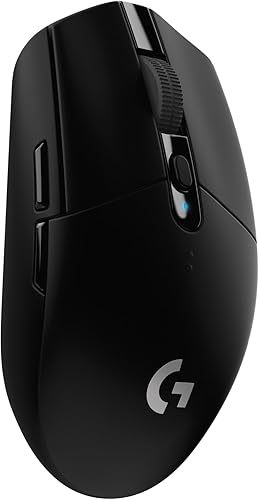
Logitech G305 LIGHTSPEED
Bottom line: A compact wireless mouse with a 250-hour AA battery and a HERO sensor, for budget players who want lag-free wireless.
The G305 has been a budget favorite for years because it does the basics well and sips battery.
Pros & Cons
Pros- LIGHTSPEED wireless with a 1 ms report rate
- Up to 250 hours on a single AA battery
- HERO sensor up to 12,000 DPI
- Nano receiver stores inside the mouse
- Compact ambidextrous body
- Proven, comfortable shape
Cons- Runs on a replaceable AA battery, not a rechargeable one
- 99 g with battery is heavy next to ultralights
- Only six buttons
Why We Picked It
Logitech's HERO sensor, LIGHTSPEED link and 250-hour AA battery cover what most players need. The 116.6 x 62.2 x 38.2 mm body is easy to carry, and the receiver stores inside for travel. For a closer look at its rival, see our Logitech G309 vs G305 comparison.
Who It's For
You want wireless gaming without spending flagship money, play casually or move a laptop between rooms, and do not mind the weight of a classic body. Small and medium hands will be comfortable.
Specs & Configurations
- Size
- 116.6 x 62.2 x 38.2 mm
- Weight
- 99 g with AA battery
- Shape
- compact, ambidextrous
- Connection
- LIGHTSPEED wireless
- Sensor
- HERO, up to 12,000 DPI
- Battery
- up to 250 hours on one AA
- Buttons
- 6

11
Best Budget Wired
Corsair Katar Pro XT
Bottom line: A 73 g wired FPS mouse with an 18,000 DPI sensor and a paracord cable, for budget players who want a light, simple shape.
The Katar Pro XT is a low-cost wired mouse that feels like a real gaming mouse instead of a cut-down one.
Pros & Cons
Pros- Light at 73 g without honeycomb holes
- 18,000 DPI PixArt sensor
- Paracord cable reduces drag
- QUICKSTRIKE buttons with no gap between click and switch
- Compact symmetric shape for claw and fingertip grips
- RGB scroll wheel and iCue software
Cons- Wired only
- Low profile and small for big palms
- Heavier than flagship ultralights
Why We Picked It
Corsair gave it a 73 g body, an 18,000 DPI PixArt PMW3391 sensor, a flexible paracord cable and spring-loaded QUICKSTRIKE buttons. It programs through iCue and adds RGB to the scroll wheel.
Who It's For
You want a reliable wired mouse for FPS or MOBA games and do not need wireless or lots of buttons. The compact 115.8 x 64.2 x 37.8 mm shape suits small and medium hands, especially for claw and fingertip grips.
Specs & Configurations
- Size
- 115.8 x 64.2 x 37.8 mm
- Weight
- 73 g
- Shape
- symmetric, ambidextrous
- Connection
- wired USB-A, paracord cable
- Sensor
- PixArt PMW3391, 18,000 DPI
- Buttons
- 6
How to Choose a Gaming Mouse
Weight
Mice under about 80 g suit fast, competitive shooters because they are easy to flick and less tiring over long sessions. Heavier mice give you slower, steadier control and often add buttons, so they suit palm grippers and MMO or RPG players.
Wireless or Wired
Modern 2.4 GHz wireless links feel as quick as a cable, and the flagships above run for 95 to 180 hours between charges. Aim for 40 hours or more of battery. Bluetooth adds lag and works best as a backup mode. A wired mouse is cheaper and never needs charging.
Sensor: DPI, IPS and Polling Rate
DPI, also called CPI, sets how far the cursor moves per inch. Most players run well under 2,000 DPI, so a headline figure like 44,000 is not something to shop for. Tracking speed (IPS) and acceleration (G) matter more for fast swipes, and a higher polling rate such as 8000 Hz only helps on a PC that can keep up and costs battery life.
Grip and Hand Size
Palm grip rests your whole hand on the mouse and suits large, ergonomic shapes. Claw grip arches your fingers and wants a mouse with a high back. Fingertip grip uses only the fingers and suits small, light, flat mice. For deeper picks by grip, see the guides below.
Buttons and Software
Most shooters need five or six buttons. MMOs and RPGs benefit from a grid of side buttons. Check that the mouse works with its maker’s software for remapping, DPI and polling settings.
Best Gaming Mouse: Specs Compared
| Mouse |
Best For |
Weight |
Connection |
Shape |
| Razer Viper V4 Pro |
Overall |
49 g |
Wireless |
Symmetrical |
| Razer DeathAdder V4 Pro |
Ergonomic wireless |
56 g |
Wireless |
Ergonomic |
| Razer Basilisk V3 Pro 35K |
Customization |
112 g |
Wireless, Bluetooth |
Ergonomic |
| Logitech G Pro X Superlight 2 |
FPS |
60 g |
Wireless |
Symmetrical |
| Logitech G Pro X2 Superstrike |
Fast clicks |
61 g |
Wireless |
Symmetrical |
| Pulsar X2 CrazyLight Medium |
Ultralight |
39 g |
Wireless |
Low-profile symmetrical |
| Logitech G Pro X Superlight 2c |
Small hands |
51 g |
Wireless |
Compact |
| Logitech G502 X Plus |
Large hands |
106 g |
Wireless |
Right-handed, thumb rest |
| Razer Naga V2 Pro |
MMOs |
134 g |
Wireless, Bluetooth |
Right-handed, side plates |
| Logitech G305 LIGHTSPEED |
Budget wireless |
99 g with battery |
Wireless |
Compact ambidextrous |
| Corsair Katar Pro XT |
Budget wired |
73 g |
Wired |
Symmetric |
Gaming Mouse FAQ
Why choose a gaming mouse over a regular mouse?
Gaming mouse sensors are built for fast, accurate tracking, and most let you turn off smoothing and acceleration. Programmable buttons and adjustable DPI make them more versatile than a standard office mouse.
Is a wireless mouse good for gaming?
Yes. Modern 2.4 GHz wireless connections add no difference you can feel compared with a cable, and pro players use wireless mice in competition. Bluetooth is still slower, so use it only as a backup.
What should I look for in a gaming mouse?
Comfort comes first: shape, size and weight for your hand and grip. After that, check battery life, sensor quality and the number of buttons you actually need.
What is a good weight for a gaming mouse?
Under 100 g works for most players, and under 60 g is common among competitive shooters. Heavier mice can feel steadier and often carry more buttons.
More Gaming Mouse Guides
Which Gaming Mouse Should You Buy?
If you want one mouse and do not want to think about it, the Razer Viper V4 Pro is the best gaming mouse here, thanks to its 49 g weight, flagship sensor and 180-hour battery. Palm grippers who want more shape should look at the DeathAdder V4 Pro, MMO players belong with the Naga V2 Pro, and anyone on a budget can save a lot with the G305 or Katar Pro XT. Match the shape to your hand first and the rest of the spec sheet matters far less.

