

If your palm hovers over the back of a mouse built for fingertips, your wrist ends up doing the steering. A good pick for the best gaming mouse for palm grip flips that around with a raised back that fills your hand, so your arm moves the cursor and your fingers only click. These ten ergonomic picks all suit a relaxed, full-contact grip, from the featherweight Razer DeathAdder V4 Pro to thumb-rest classics like the Logitech G502 X and Razer Basilisk V3.
Best Gaming Mouse for Palm Grip in 2026
GameCuki is reader-supported. When you buy through links on our site, we may earn an affiliate commission at no extra cost to you. As an Amazon Associate I earn from qualifying purchases. Learn more.
Our Top Picks
Best Overall
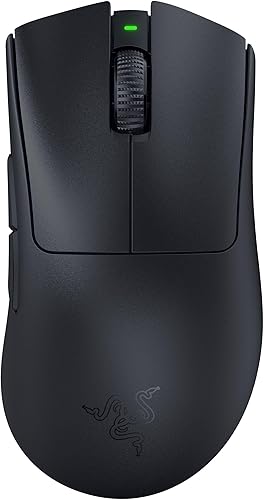
Razer DeathAdder V3 Pro
Bottom line: The easiest ergonomic mouse to recommend for palm grip, light enough for fast shooters and shaped to hold your whole hand, as long as you can live with five buttons.
- Raised arch that supports the palm
- Ring finger ledge for a secure hold
- Only 63 g for a full-size ergonomic shape
- Up to 90 hours per charge
- Focus Pro 30K sensor and Gen-3 optical switches
- Only five buttons
- Surface can feel chalky
- Razer quality control and support can be hit or miss
Best Lightweight
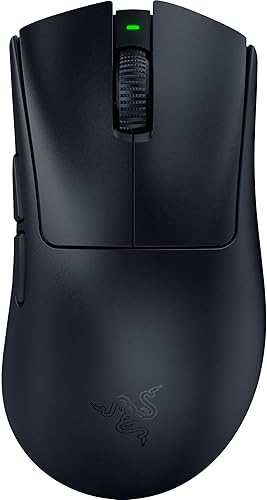
Razer DeathAdder V4 Pro
Bottom line: A 56 g ergonomic mouse that still lets your palm rest fully on the shell, worth the jump over the V3 Pro only if you want 8K polling and the newer clicks.
- Just 56 g
- Up to 8000 Hz polling
- Optical scroll wheel and Gen-4 switches
- Up to 150 hours at 1000 Hz
- Palm rests fully on the shell
- Premium price
- Clicks can be louder and more tactile than the V3 Pro
- Some units may have dongle connection hiccups

Best Wired
Razer DeathAdder V3
Bottom line: The same DeathAdder shape as the Pro in a cabled version, a smart buy if you would rather not pay for wireless and still want a light mouse for palm grip.
- Light at 59 g
- Same ergonomic shape as the V3 Pro
- Up to 8000 Hz polling over the cable
- Woven, flexible cable
- No battery to charge
- Wired only
- Right-handed shape only
- Only six buttons

Best Value Wireless
Glorious Model D 2 Wireless
Bottom line: A light, vented ergonomic wireless mouse that undercuts the Razer flagships, though build feel and wireless consistency can vary from unit to unit.
- Light at 66 g
- Ventilated shell helps keep a palm dry
- 2.4GHz and Bluetooth in one mouse
- Ergonomic shape that suits long sessions
- BAMF 2.0 26K sensor
- Shell can feel less solid than pricier mice
- Some units may have 2.4GHz dropouts
- Only six buttons

Cheapest Light Pick
Glorious Model D 2 Wired
Bottom line: A 58 g wired ergonomic mouse that keeps the Model D shape at a friendlier cost, as long as you can tolerate a cable that may stiffen over time.
- Only 58 g
- Flexible Ascended cable
- PTFE feet included
- Same ergonomic shape as the wireless model
- BAMF 2.0 26K sensor
- Cable may stiffen after heavy use
- Shell can feel cheaper than pricier mice
- Wired only

Best for Extra Buttons
Logitech G502 X Plus
Bottom line: The palm grip pick for players who want 13 controls and a thumb rest in a wireless body, with software that is the main thing to grumble about.
- 13 controls for MMO, MOBA and shooters
- Comfortable for long sessions
- Dual-mode tilt scroll wheel
- Works with POWERPLAY wireless charging
- Wide thumb rest and rubberized side grips
- Logitech's software draws complaints
- Premium price
- Can feel a little large for medium hands

Best Wired Thumb Rest
Logitech G502 X
Bottom line: A wired G502 that shed weight and kept the thumb rest, a strong palm grip pick if you want the classic shape without paying for wireless.
- Down to 89 g
- Thumb rest and wide body for palm support
- Removable and reversible DPI-shift button
- Dual-mode tilt scroll wheel
- HERO 25K sensor
- Wired only
- Still heavier than DeathAdder-style mice
- Fewer buttons than the Plus

Best Premium Wireless
Razer Basilisk V3 Pro
Bottom line: A roomy, button-rich wireless mouse that lets your palm rest naturally, best for players who prefer a substantial feel over a feather-light one.
- Ergonomic shape that lets the hand rest on the mouse
- 11 programmable buttons
- HyperScroll wheel switches between tactile and free spin
- 2.4GHz, Bluetooth and wired modes
- Up to 110 hours on HyperSpeed
- Not a lightweight mouse
- Expensive for a wireless palm grip mouse
- Too many buttons for some games

Best Budget Thumb Rest
Razer Basilisk V3
Bottom line: The most comfort per dollar here, a wired thumb-rest mouse with 11 buttons that suits palm grip, as long as you accept that it feels weighty.
- Thumb rest keeps the thumb from dragging
- 11 programmable buttons
- Comfortable for long sessions
- Dual-mode tilt scroll wheel
- Focus+ 26K sensor
- Wired only
- Feels heavy next to esports mice
- Matte surface can feel sweaty in a tight grip

Longest Battery Life
Razer Basilisk V3 X HyperSpeed
Bottom line: A budget wireless Basilisk with a huge battery, a good fit for relaxed palm grip play, though it runs on an AA battery and uses older mechanical switches.
- Up to 285 hours on HyperSpeed wireless
- Ergonomic Basilisk shape
- Nine customizable controls
- Bluetooth and 2.4GHz connections
- Wide, high body suits a resting palm
- Runs on an AA battery rather than a built-in rechargeable
- Mechanical switches rated lower than Razer's optical ones
- Lower-spec sensor than the Pro models
Table of Contents
Best Gaming Mouse for Palm Grip: Our Picks in Detail
1
Best Overall
Razer DeathAdder V3 Pro
Bottom line: The easiest ergonomic mouse to recommend for palm grip, light enough for fast shooters and shaped to hold your whole hand, as long as you can live with five buttons.
The DeathAdder has been the default ergonomic gaming mouse for years, and the V3 Pro is its lightest wireless version so far.
Pros & Cons
Pros
- Raised arch that supports the palm
- Ring finger ledge for a secure hold
- Only 63 g for a full-size ergonomic shape
- Up to 90 hours per charge
- Focus Pro 30K sensor and Gen-3 optical switches
Cons
- Only five buttons
- Surface can feel chalky
- Razer quality control and support can be hit or miss
Why We Picked It
Its raised arch sits right under the palm, and the ledge for your ring finger keeps the mouse from sliding sideways during fast swipes. Weight is the real surprise for a full-size ergonomic shell, since it comes in at just 63 g. Razer's Focus Pro 30K sensor and Gen-3 optical switches are the same class of hardware you find in esports mice, and the battery runs for up to 90 hours. Large hands settle into it comfortably, and our large hands guide covers more mice at that size.
Who It's For
You grip with your whole palm, play shooters or long sessions, and want a wireless mouse that doesn't weigh your hand down. At 63 g with a raised arch and a ring finger ledge, it holds large hands securely through fast swipes and runs up to 90 hours per charge.
Specs & Configurations
- Weight
- 63 g
- Shape
- right-handed ergonomic
- Connection
- HyperSpeed 2.4GHz wireless, USB-C
- Sensor
- Focus Pro 30K
- Switches
- optical Gen-3, rated for 90 million clicks
- Battery
- up to 90 hours
- Programmable buttons
- 5
Get It Now
Check Price on Amazon
2
Best Lightweight
Razer DeathAdder V4 Pro
Bottom line: A 56 g ergonomic mouse that still lets your palm rest fully on the shell, worth the jump over the V3 Pro only if you want 8K polling and the newer clicks.
This is the newest DeathAdder, and it keeps the shape palm grippers love while shaving the weight even further.
Pros & Cons
Pros
- Just 56 g
- Up to 8000 Hz polling
- Optical scroll wheel and Gen-4 switches
- Up to 150 hours at 1000 Hz
- Palm rests fully on the shell
Cons
- Premium price
- Clicks can be louder and more tactile than the V3 Pro
- Some units may have dongle connection hiccups
Why We Picked It
Razer re-engineered the ergonomic shell and dropped the weight to 56 g, yet players with large hands can still rest their whole palm on it instead of perching on their fingertips. It gets a 45K sensor, Gen-4 optical switches rated for over 100 million clicks and an optical scroll wheel. Battery life reaches up to 150 hours at 1000 Hz, and you can switch between wireless and wired without losing 8K polling.
Who It's For
You're a competitive player who wants the lightest possible palm grip mouse and will actually use high polling. At 56 g it still lets your whole palm rest on the shell, and it holds 8K polling wired or wireless with up to 150 hours of battery at 1000 Hz.
Specs & Configurations
- Weight
- 56 g
- Shape
- right-handed ergonomic
- Connection
- HyperSpeed Wireless Gen-2, USB-C
- Sensor
- Focus Pro 45K Gen-2
- Switches
- optical Gen-4, rated for over 100 million clicks
- Polling
- up to 8000 Hz wired and wireless
- Battery
- up to 150 hours at 1000 Hz
- Programmable buttons
- 6
Get It Now
Check Price on Amazon
3
Best Wired
Razer DeathAdder V3
Bottom line: The same DeathAdder shape as the Pro in a cabled version, a smart buy if you would rather not pay for wireless and still want a light mouse for palm grip.
Take the ergonomic shell of the V3 Pro, add a cable, and you get a lighter, cheaper way into the DeathAdder shape.
Pros & Cons
Pros
- Light at 59 g
- Same ergonomic shape as the V3 Pro
- Up to 8000 Hz polling over the cable
- Woven, flexible cable
- No battery to charge
Cons
- Wired only
- Right-handed shape only
- Only six buttons
Why We Picked It
The shell is built for the same palm-friendly grip, and at 59 g it is easy to move across a pad. Razer pairs it with the Focus Pro 30K sensor and Gen-3 optical switches, and the woven Speedflex cable is designed to cut drag during quick swipes. Wired also means no battery to charge and 8000 Hz polling without extra accessories.
Who It's For
You play shooters with a palm grip and don't mind a cable. The 59 g shell is easy to move across a pad, the Speedflex cable is designed to cut drag on quick swipes, and there's no battery to charge while you get 8000 Hz polling.
Specs & Configurations
- Weight
- 59 g
- Shape
- right-handed ergonomic
- Connection
- wired, flexible Speedflex cable
- Sensor
- Focus Pro 30K
- Switches
- optical Gen-3, rated for 90 million clicks
- Polling
- up to 8000 Hz
- Programmable buttons
- 6
Get It Now
Check Price on Amazon
4
Best Value Wireless
Glorious Model D 2 Wireless
Bottom line: A light, vented ergonomic wireless mouse that undercuts the Razer flagships, though build feel and wireless consistency can vary from unit to unit.
Glorious built the Model D 2 for players who like the old Model D shape but want a wireless, lighter, cheaper alternative to Razer's flagships.
Pros & Cons
Pros
- Light at 66 g
- Ventilated shell helps keep a palm dry
- 2.4GHz and Bluetooth in one mouse
- Ergonomic shape that suits long sessions
- BAMF 2.0 26K sensor
Cons
- Shell can feel less solid than pricier mice
- Some units may have 2.4GHz dropouts
- Only six buttons
Why We Picked It
The ergonomic shell and light 66 g body suit a relaxed palm grip, and the vented design helps when your palm gets warm in long sessions. You get the BAMF 2.0 26K sensor, switches rated for 80 million clicks and both 2.4GHz and Bluetooth connections, which is a lot of hardware for the money. It is the mouse to pick if you want a DeathAdder-style experience without the DeathAdder price.
Who It's For
You grip with a relaxed palm, your hand runs warm in long sessions, and you're watching your budget. The vented 66 g shell keeps things comfortable, and you get a 26K sensor plus both 2.4GHz and Bluetooth connections.
Specs & Configurations
- Weight
- 66 g
- Shape
- right-handed ergonomic
- Connection
- 2.4GHz wireless, Bluetooth 5.2, USB-C
- Sensor
- BAMF 2.0, up to 26,000 DPI
- Switches
- rated for 80 million clicks
- Programmable buttons
- 6
Get It Now
Check Price on Amazon
5
Cheapest Light Pick
Glorious Model D 2 Wired
Bottom line: A 58 g wired ergonomic mouse that keeps the Model D shape at a friendlier cost, as long as you can tolerate a cable that may stiffen over time.
The wired Model D 2 trims weight and cost while keeping the ergonomic hump that made the original Model D a favorite.
Pros & Cons
Pros
- Only 58 g
- Flexible Ascended cable
- PTFE feet included
- Same ergonomic shape as the wireless model
- BAMF 2.0 26K sensor
Cons
- Cable may stiffen after heavy use
- Shell can feel cheaper than pricier mice
- Wired only
Why We Picked It
Without a battery it weighs just 58 g, which puts it among the lightest ergonomic mice here. The shape keeps your palm supported and your fingers relaxed, and the box includes PTFE G-Skates and a flexible Ascended cable. It uses the same BAMF 2.0 26K sensor as the wireless version, so tracking is not what you are saving on.
Who It's For
You use a palm grip on a tight budget and still want a good sensor. The wired shell weighs just 58 g, supports your palm with relaxed fingers, and comes with PTFE G-Skates and a flexible Ascended cable.
Specs & Configurations
- Weight
- 58 g
- Shape
- right-handed ergonomic
- Connection
- wired, Ascended cable
- Sensor
- BAMF 2.0, up to 26,000 DPI
- Switches
- rated for 80 million clicks
- Feet
- PTFE G-Skates
- Programmable buttons
- 6
Get It Now
Check Price on Amazon
6
Best for Extra Buttons
Logitech G502 X Plus
Bottom line: The palm grip pick for players who want 13 controls and a thumb rest in a wireless body, with software that is the main thing to grumble about.
The G502 shape has been a palm grip staple for a decade, and the X Plus is its wireless, RGB-lit flagship.
Pros & Cons
Pros
- 13 controls for MMO, MOBA and shooters
- Comfortable for long sessions
- Dual-mode tilt scroll wheel
- Works with POWERPLAY wireless charging
- Wide thumb rest and rubberized side grips
Cons
- Logitech's software draws complaints
- Premium price
- Can feel a little large for medium hands
Why We Picked It
It has a long, contoured body with a wide thumb rest, so the whole hand has somewhere to sit, and rubberized side grips help you hold on. At 106 g it is heavier than the DeathAdders, which some palm grip players prefer. LIGHTFORCE hybrid switches and the HERO 25K sensor handle the clicks and tracking, while the dual-mode scroll wheel switches between free spin and ratcheting, with left and right tilt on top. It also works with Logitech's POWERPLAY charging, so the battery can stay topped up while you play.
Who It's For
You play MMOs, MOBAs or strategy games with a palm grip and want plenty of binds under your fingers. The long contoured body has a wide thumb rest and rubberized grips, the 106 g weight gives a planted feel, and POWERPLAY charging keeps the battery topped up while you play.
Specs & Configurations
- Weight
- 106 g
- Shape
- right-handed with thumb rest
- Connection
- LIGHTSPEED wireless, USB-C
- Sensor
- HERO 25K, up to 25,600 DPI
- Switches
- LIGHTFORCE hybrid optical-mechanical
- Programmable controls
- 13
- Scroll wheel
- dual-mode free spin and ratchet, with tilt
- Extras
- removable DPI-shift button, POWERPLAY compatible
Get It Now
Check Price on Amazon
7
Best Wired Thumb Rest
Logitech G502 X
Bottom line: A wired G502 that shed weight and kept the thumb rest, a strong palm grip pick if you want the classic shape without paying for wireless.
Logitech lightened the G502 formula for the X line, keeping the shape players know and cutting the grams.
Pros & Cons
Pros
- Down to 89 g
- Thumb rest and wide body for palm support
- Removable and reversible DPI-shift button
- Dual-mode tilt scroll wheel
- HERO 25K sensor
Cons
- Wired only
- Still heavier than DeathAdder-style mice
- Fewer buttons than the Plus
Why We Picked It
A thin-wall shell and lighter scroll wheel bring it down to 89 g, which is manageable for a mouse with a thumb rest and a high hump. You still get the HERO 25K sensor, LIGHTFORCE hybrid switches and a DPI-shift button you can reverse or remove if your thumb keeps hitting it. For palm grip, the wide body is the draw, since it gives your hand somewhere to rest.
Who It's For
You want the G502 feel with a thumb rest and a wide body for your palm, and you're fine with a cable. At 89 g it's manageable, and the DPI-shift button can be reversed or removed if your thumb keeps hitting it.
Specs & Configurations
- Weight
- 89 g
- Shape
- right-handed with thumb rest
- Connection
- wired
- Sensor
- HERO 25K, up to 25,600 DPI
- Switches
- LIGHTFORCE hybrid optical-mechanical
- Programmable buttons
- 9
Get It Now
Check Price on Amazon
8
Best Premium Wireless
Razer Basilisk V3 Pro
Bottom line: A roomy, button-rich wireless mouse that lets your palm rest naturally, best for players who prefer a substantial feel over a feather-light one.
Razer's answer to the G502 is a wide, sculpted mouse with a thumb rest and plenty of buttons.
Pros & Cons
Pros
- Ergonomic shape that lets the hand rest on the mouse
- 11 programmable buttons
- HyperScroll wheel switches between tactile and free spin
- 2.4GHz, Bluetooth and wired modes
- Up to 110 hours on HyperSpeed
Cons
- Not a lightweight mouse
- Expensive for a wireless palm grip mouse
- Too many buttons for some games
Why We Picked It
It comfortably fits larger palms and long sessions, and the hand can rest on the shell instead of hovering. Razer's Focus Pro 30K sensor and Gen-3 optical switches handle tracking and clicks, and the HyperScroll tilt wheel can free-spin or click through notches. Battery life reaches up to 110 hours on HyperSpeed wireless and up to 150 hours on Bluetooth.
Who It's For
You have larger palms, play long sessions, and like a substantial mouse with a thumb rest and lots of buttons. The sculpted shell lets your hand rest instead of hover, and wireless battery life reaches up to 110 hours on HyperSpeed or 150 on Bluetooth.
Specs & Configurations
- Shape
- right-handed ergonomic
- Connection
- HyperSpeed 2.4GHz, Bluetooth, USB-C
- Sensor
- Focus Pro 30K
- Switches
- optical Gen-3, rated for 90 million clicks
- Battery
- up to 110 hours on HyperSpeed, up to 150 hours on Bluetooth
- Programmable buttons
- 11
- Scroll wheel
- HyperScroll tilt wheel
Get It Now
Check Price on Amazon
9
Best Budget Thumb Rest
Razer Basilisk V3
Bottom line: The most comfort per dollar here, a wired thumb-rest mouse with 11 buttons that suits palm grip, as long as you accept that it feels weighty.
This is the wired version of Razer's G502 rival, and it remains one of the most comfortable palm grip options for the money.
Pros & Cons
Pros
- Thumb rest keeps the thumb from dragging
- 11 programmable buttons
- Comfortable for long sessions
- Dual-mode tilt scroll wheel
- Focus+ 26K sensor
Cons
- Wired only
- Feels heavy next to esports mice
- Matte surface can feel sweaty in a tight grip
Why We Picked It
Razer's own page calls out the built-in thumb rest, which is meant to reduce finger drag during fast flicks. The shape fills a large hand, the HyperScroll wheel lets you switch between tactile and free-spin scrolling, and the Focus+ 26K sensor and Gen-2 optical switches are plenty for most games. The weighty body gives it a planted, controlled feel in the hand.
Who It's For
You grip with a palm, have a large hand, and want a thumb rest and plenty of buttons without a big spend. The shape fills the hand, the thumb rest cuts finger drag on flicks, and the weighty body gives a planted, controlled feel.
Specs & Configurations
- Shape
- right-handed with thumb rest
- Connection
- wired
- Sensor
- Focus+ 26K
- Switches
- optical Gen-2, rated for up to 70 million clicks
- Programmable buttons
- 11
- Scroll wheel
- HyperScroll tilt wheel
Get It Now
Check Price on Amazon
10
Longest Battery Life
Razer Basilisk V3 X HyperSpeed
Bottom line: A budget wireless Basilisk with a huge battery, a good fit for relaxed palm grip play, though it runs on an AA battery and uses older mechanical switches.
The cheapest way into a wireless Basilisk trades a few premium parts for a battery that goes weeks between swaps.
Pros & Cons
Pros
- Up to 285 hours on HyperSpeed wireless
- Ergonomic Basilisk shape
- Nine customizable controls
- Bluetooth and 2.4GHz connections
- Wide, high body suits a resting palm
Cons
- Runs on an AA battery rather than a built-in rechargeable
- Mechanical switches rated lower than Razer's optical ones
- Lower-spec sensor than the Pro models
Why We Picked It
Razer says its signature shape supports different grips, and the wide, high body suits a palm resting on top. It offers 285 hours on HyperSpeed wireless and 535 hours on Bluetooth from a single AA battery, plus nine customizable controls. Switches are mechanical Gen-2 units rated for up to 60 million clicks, and the 18K sensor is still far above what most games need.
Who It's For
You play a relaxed palm grip and hate recharging. A single AA battery lasts up to 285 hours on HyperSpeed or 535 on Bluetooth, the wide, high body suits a resting palm, and nine customizable controls cover your binds.
Specs & Configurations
- Shape
- right-handed ergonomic
- Connection
- HyperSpeed 2.4GHz, Bluetooth
- Sensor
- 5G Advanced 18K
- Switches
- mechanical Gen-2, rated for up to 60 million clicks
- Battery
- AA, up to 285 hours on HyperSpeed, up to 535 hours on Bluetooth
Get It Now
Check Price on AmazonPalm Grip Gaming Mice Compared
| Mouse | Connection | Shape feature | Best for |
|---|---|---|---|
| Razer DeathAdder V3 Pro | Wireless | Raised arch, ring finger ledge | Fast shooters |
| Razer DeathAdder V4 Pro | Wireless | Re-engineered ergonomic shell | Lowest weight |
| Razer DeathAdder V3 | Wired | Raised arch, ring finger ledge | Light wired play |
| Glorious Model D 2 Wireless | Wireless | Ventilated ergonomic shell | Budget wireless |
| Glorious Model D 2 Wired | Wired | Ergonomic hump | Budget light |
| Logitech G502 X Plus | Wireless | Thumb rest, wide body | MMO and MOBA binds |
| Logitech G502 X | Wired | Thumb rest, wide body | Classic G502 feel |
| Razer Basilisk V3 Pro | Wireless | Thumb rest, sculpted body | Premium comfort |
| Razer Basilisk V3 | Wired | Thumb rest, rubber side grips | Budget comfort |
| Razer Basilisk V3 X HyperSpeed | Wireless | Ergonomic Basilisk shape | Battery life |
How to Choose a Gaming Mouse for Palm Grip
What palm grip means. In a palm grip your whole palm rests across the body of the mouse, with little gap between hand and shell. Most of the movement comes from your arm and shoulder, which gives stable tracking and less fatigue in long sessions. The trade-off is less finger mobility, so very small corrective flicks are harder than in a claw grip.
Pick a mouse that fills your hand. Palm grip mice are typically longer and wider than claw or fingertip mice. If the mouse is too small, your palm hangs off the back and your wrist takes the strain. Bigger hands should start with our best gaming mouse for large hands picks, while smaller palms are better served by the best gaming mouse for small hands list.
Look for a raised back. A hump under the center or rear of your palm is what carries the weight of your hand. Right-handed ergonomic shells like the DeathAdder and Model D 2 do this cleanly, and thumb rests like the Basilisk and G502 add support on the side.
Weight matters less than shape. Your palm carries the mouse, so a heavier model like the G502 X Plus or Basilisk V3 can feel steady and controlled. Fast shooter players may still prefer 55 to 65 g mice like the DeathAdder V3 Pro and V4 Pro.
Don’t overthink the sensor. The sensors in modern gaming mice are very close in real play, so shape and size decide comfort far more than DPI numbers. Buy for fit first, then for weight, wireless and buttons.
Count the buttons you actually use. Shooter players need five or six. MMO and MOBA players benefit from the 11 to 13 controls on the Basilisk and G502 models.
FAQ
What is the best gaming mouse for palm grip?
The Razer DeathAdder V3 Pro is the best all-round choice, a light wireless mouse with a raised arch that supports the whole palm. The DeathAdder V4 Pro is lighter still, and the Basilisk V3 and G502 X are better if you want a thumb rest.
Is a bigger mouse better for palm grip?
Usually, yes. A palm grip needs the mouse to be long and wide enough that your palm doesn’t hang off the back, and a mouse that is too small can strain the wrist.
Is palm grip good for gaming?
Yes, especially for stable aim and long sessions, since the palm and forearm share the work. It is a little less suited to games that need many rapid micro-flicks, where a claw grip can be quicker.
Does the sensor matter for palm grip?
Not much. Most modern gaming sensors track so closely that you won’t notice a difference, so pick the shape and size first.
Which palm grip mouse is best for MMOs or MOBAs?
The Logitech G502 X Plus and the Razer Basilisk V3 Pro both have a thumb rest and extra programmable controls that suit those games.