

When your pinky hangs off the side and your thumb strains to reach the side buttons, the problem is usually the mouse, not your aim. The best gaming mouse for small hands is short, narrow and low, so your fingers can reach every button without stretching. Every pick here is between 108 and 120 mm long and under 40 mm tall, and most weigh under 70 g.
Best Gaming Mouse for Small Hands in 2026
GameCuki is reader-supported. When you buy through links on our site, we may earn an affiliate commission at no extra cost to you. As an Amazon Associate I earn from qualifying purchases. Learn more.
Our Top Picks

Best Overall
Logitech G PRO X SUPERLIGHT 2c
Bottom line: The most polished compact wireless mouse for small hands, with a pro-grade sensor and a shape that stays comfortable, as long as you accept a premium price.
- Only 51 g
- Compact version of the full-size Superlight 2 shape
- Up to 8 kHz polling
- Up to 95 hours per charge
- HERO 2 sensor up to 44,000 DPI
- LIGHTSPEED wireless connection
- Premium price
- Only five buttons
- Right-handed shape only

Best Budget
Razer Cobra
Bottom line: A light, low-priced wired mouse that fits small hands well and lets you skip the wireless premium, though the 8,500 DPI sensor is basic for esports.
- Light at 58 g
- Gen-3 optical switches with no double-click issues
- Flexible SpeedFlex cable
- Fits most grip styles
- PTFE feet glide on most pads
- Switches rated for 90 million clicks
- Wired only
- 8,500 DPI sensor is modest

Best Value Wireless
Logitech G305 LIGHTSPEED
Bottom line: A proven, affordable wireless mouse with a small classic shape and very long battery life, if you can live with a heavier build than modern ultralights.
- Compact classic shape
- Up to 250 hours on a single AA battery
- HERO sensor up to 12,000 DPI
- Receiver stores inside the mouse
- Symmetrical body works for palm or claw grips
- Wireless gaming at a budget level
- 99 g with battery is heavy next to ultralights
- Runs on a replaceable AA battery

Best for FPS
ASUS ROG Harpe Ace Mini
Bottom line: A 49 g esports mouse made for fingertip and claw grips on small hands, though the four-button layout and short length will not suit palm grippers.
- Only 49 g
- Semi-symmetrical shape built for fingertip and claw grips
- 42,000 DPI AimPoint Pro sensor
- Tri-mode connectivity
- Up to 120 hours of battery
- Co-developed with FPS players
- Only four buttons
- May be too short for a relaxed palm grip
- Premium price

Best Battery Life
Razer Orochi V2
Bottom line: A tiny, travel-friendly wireless mouse with absurd battery life for small hands, though its short body and AA battery will not please everyone.
- Shortest mouse on the list
- Up to 445 hours on HyperSpeed with an AA lithium battery
- Takes AA or AAA batteries
- Dual wireless modes
- Dongle stores inside the body
- Compact, travel-friendly size
- Short body can feel cramped for medium hands
- Battery adds weight, so total weight depends on the cell
- Mechanical switches rated lower than optical rivals

Best Ambidextrous
ASUS ROG Strix Impact III Wireless
Bottom line: A compact ambidextrous wireless mouse with a strong sensor and huge battery life, handy for left-handed players with small hands.
- Ambidextrous shape
- 57 g without battery
- 36,000 DPI AimPoint sensor
- Up to 450 hours of battery life
- Two wireless modes
- Omni Receiver can pair other supported ASUS devices
- Needs an AA or AAA battery, which adds weight
- Only four buttons

Best Ultralight
Pulsar X2 CrazyLight Mini
Bottom line: The lightest mouse here by a wide margin, a 35 g symmetrical shell that suits small claw and fingertip grips, if you can pay a premium and live with a thin, flat build.
- Only 35 g
- Low-profile symmetrical shape for claw and fingertip grips
- XS-1 sensor up to 32,000 DPI
- Optical switches reduce double-click risk
- Dot skates suit glass and hard pads
- 8K polling compatible
- Premium price
- Wide, flat shell may not suit palm grip
- Very light mice can feel floaty on slow pads
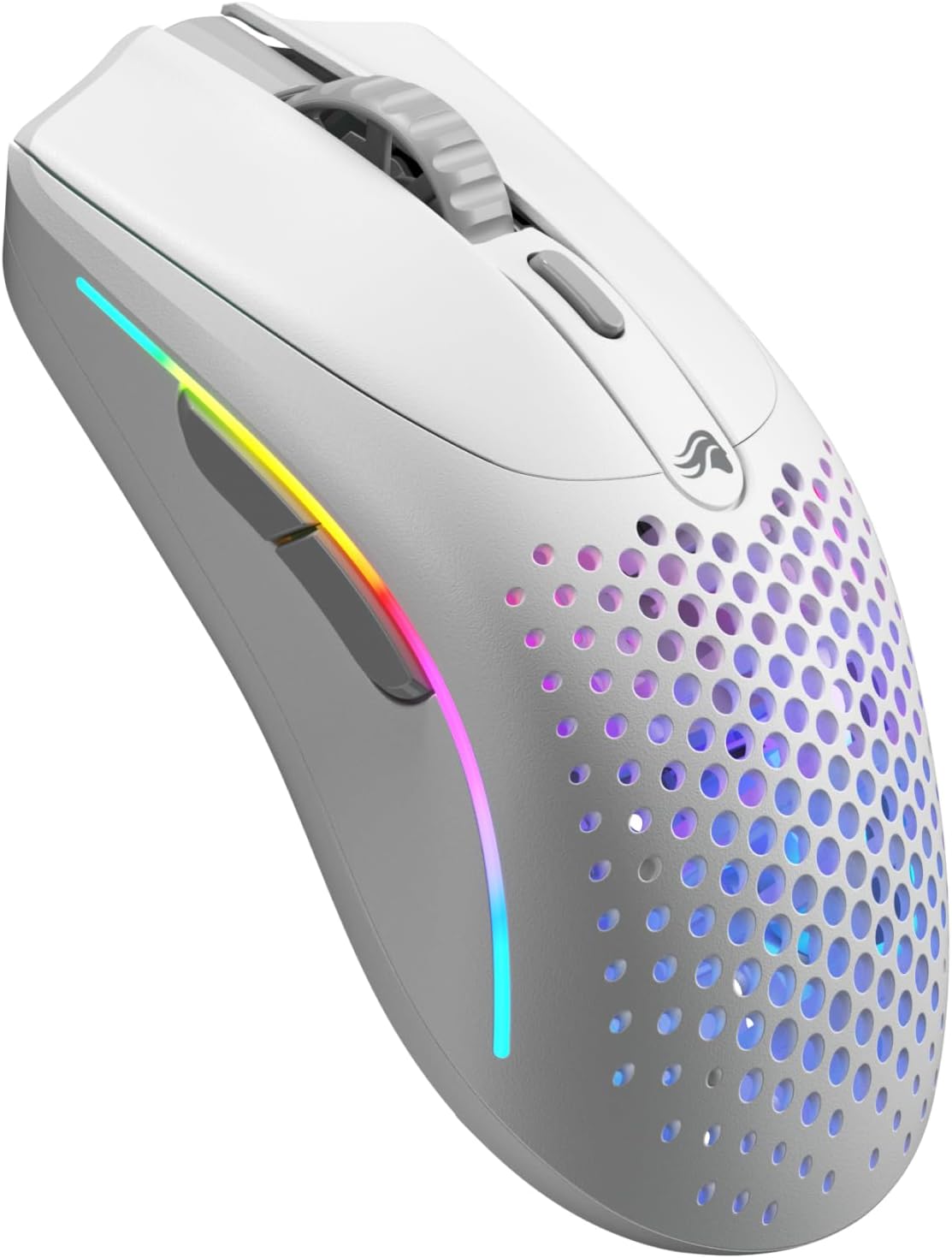
Best Symmetrical
Glorious Model O 2 Mini Wireless
Bottom line: A light symmetrical mouse in a mini size that suits several grips, though remapping depends on Glorious's cloud-based software.
- Symmetrical shape suits palm, claw and fingertip grips
- 57 g
- Up to 110 hours on 2.4 GHz and 210 on Bluetooth
- Next-generation switches rated for 80 million clicks
- BAMF 2.0 sensor up to 26K DPI
- Wired, 2.4 GHz or Bluetooth 5.2
- Remapping needs Glorious's cloud-based software
- Costs more than budget compacts
Table of Contents
Best Gaming Mouse for Small Hands: Our Picks in Detail
1
Best Overall
Logitech G PRO X SUPERLIGHT 2c
Bottom line: The most polished compact wireless mouse for small hands, with a pro-grade sensor and a shape that stays comfortable, as long as you accept a premium price.
The Superlight 2c takes the shape of Logitech's esports favorite and shrinks it for smaller hands and tighter grips.
Pros & Cons
Pros
- Only 51 g
- Compact version of the full-size Superlight 2 shape
- Up to 8 kHz polling
- Up to 95 hours per charge
- HERO 2 sensor up to 44,000 DPI
- LIGHTSPEED wireless connection
Cons
- Premium price
- Only five buttons
- Right-handed shape only
Why We Picked It
At 118.4 mm long, it is about 7 mm shorter than the full-size Superlight 2, and it drops to just 51 g, so flicking across the pad takes little effort. Logitech built it for players with smaller hands or a more tailored grip, and the HERO 2 sensor, wireless polling up to 8 kHz and about 95 hours of battery life carry over to the smaller body.
Who It's For
You have smaller hands or a tailored grip and play fast shooters where every flick counts. At 118.4 mm long and 51 g, the Superlight 2c takes the shape of Logitech's esports favorite and shrinks it so swiping across the pad takes little effort. The HERO 2 sensor, wireless polling up to 8 kHz and roughly 95 hours of battery come along in the smaller body.
Specs & Configurations
- Size
- 118.4 x 61.2 x 38.6 mm
- Weight
- 51 g
- Shape
- right-handed, compact
- Connection
- LIGHTSPEED wireless, USB-C
- Sensor
- HERO 2, up to 44,000 DPI
- Battery
- up to 95 hours
- Buttons
- 5
Get It Now
Check Price on Amazon
2
Best Budget
Razer Cobra
Bottom line: A light, low-priced wired mouse that fits small hands well and lets you skip the wireless premium, though the 8,500 DPI sensor is basic for esports.
The Cobra is Razer's compact wired mouse, built for gamers who want a small, light shape without paying for wireless.
Pros & Cons
Pros
- Light at 58 g
- Gen-3 optical switches with no double-click issues
- Flexible SpeedFlex cable
- Fits most grip styles
- PTFE feet glide on most pads
- Switches rated for 90 million clicks
Cons
- Wired only
- 8,500 DPI sensor is modest
Why We Picked It
It comes in at 119.6 x 62.5 x 38.1 mm and weighs 58 g without its cable, which is comfortable for small palms and light enough for fast aim. The Gen-3 optical switches are rated for 90 million clicks and 0.2 ms actuation, and the SpeedFlex cable drags less than a stiff stock cord. PTFE feet help it glide on most pads.
Who It's For
You have small palms and want a dependable wired mouse for shooters and everyday gaming without paying for wireless. At 58 g without the cable, it is light enough for fast aim, and the SpeedFlex cable drags less than a stiff stock cord. Optical switches, rated for 90 million clicks, and PTFE feet that glide on most pads keep it feeling consistent day to day.
Specs & Configurations
- Size
- 119.6 x 62.5 x 38.1 mm
- Weight
- 58 g without cable
- Shape
- right-handed, symmetrical
- Connection
- wired USB with SpeedFlex cable
- Sensor
- 8,500 DPI optical
- Switches
- Gen-3 optical, rated for 90 million clicks
- Buttons
- 6
Get It Now
Check Price on Amazon
3
Best Value Wireless
Logitech G305 LIGHTSPEED
Bottom line: A proven, affordable wireless mouse with a small classic shape and very long battery life, if you can live with a heavier build than modern ultralights.
The G305 is a budget wireless favorite with a small, familiar shape and a battery that lasts for weeks.
Pros & Cons
Pros
- Compact classic shape
- Up to 250 hours on a single AA battery
- HERO sensor up to 12,000 DPI
- Receiver stores inside the mouse
- Symmetrical body works for palm or claw grips
- Wireless gaming at a budget level
Cons
- 99 g with battery is heavy next to ultralights
- Runs on a replaceable AA battery
Why We Picked It
Its 116.6 mm length and 62.2 mm width suit small and medium hands, and the symmetrical body works for palm or claw grips. Logitech rates it at up to 250 hours on one AA battery, and the USB receiver tucks inside the mouse for travel. It is the pick for players who want wireless gaming without the ultralight price.
Who It's For
You have small or medium hands, play everyday games, and want to go wireless without an ultralight budget. The 116.6 mm symmetrical body suits palm or claw grips, and one AA battery runs for weeks. The USB receiver tucks inside the mouse, so it travels with a laptop without a lost dongle.
Specs & Configurations
- Size
- 116.6 x 62.2 x 38.2 mm
- Weight
- 99 g with AA battery
- Shape
- compact, ambidextrous
- Connection
- LIGHTSPEED wireless
- Sensor
- HERO, up to 12,000 DPI
- Battery
- up to 250 hours on one AA
- Buttons
- 6
Get It Now
Check Price on Amazon
4
Best for FPS
ASUS ROG Harpe Ace Mini
Bottom line: A 49 g esports mouse made for fingertip and claw grips on small hands, though the four-button layout and short length will not suit palm grippers.
The Harpe Ace Mini is a smaller version of ASUS's pro-approved Harpe Ace, co-developed with FPS players.
Pros & Cons
Pros
- Only 49 g
- Semi-symmetrical shape built for fingertip and claw grips
- 42,000 DPI AimPoint Pro sensor
- Tri-mode connectivity
- Up to 120 hours of battery
- Co-developed with FPS players
Cons
- Only four buttons
- May be too short for a relaxed palm grip
- Premium price
Why We Picked It
ASUS cut the shape down for smaller hands and tuned it for fingertip and claw grips, which suits tactical shooters and aim trainers. At 49 g it is one of the lightest mice on this list, and the AimPoint Pro sensor reaches 42,000 DPI with track-on-glass support. Tri-mode connectivity and about 120 hours of battery round it out.
Who It's For
You play Valorant or CS2 with small hands and a claw or fingertip grip. The shape is cut down and tuned for exactly those grips, and at 49 g it keeps long aim sessions light. Tri-mode connectivity lets you go 2.4 GHz at the desk, Bluetooth on the road or wired, with about 120 hours between charges.
Specs & Configurations
- Size
- about 117 x 63 x 37 mm
- Weight
- 49 g
- Shape
- right-handed, semi-symmetrical
- Connection
- 2.4 GHz RF, Bluetooth 5.1, wired USB
- Sensor
- ROG AimPoint Pro, 42,000 DPI
- Battery
- up to 120 hours
- Buttons
- 4
Get It Now
Check Price on Amazon
5
Best Battery Life
Razer Orochi V2
Bottom line: A tiny, travel-friendly wireless mouse with absurd battery life for small hands, though its short body and AA battery will not please everyone.
The Orochi V2 has been Razer's go-to compact wireless mouse for gamers who play on the go.
Pros & Cons
Pros
- Shortest mouse on the list
- Up to 445 hours on HyperSpeed with an AA lithium battery
- Takes AA or AAA batteries
- Dual wireless modes
- Dongle stores inside the body
- Compact, travel-friendly size
Cons
- Short body can feel cramped for medium hands
- Battery adds weight, so total weight depends on the cell
- Mechanical switches rated lower than optical rivals
Why We Picked It
At about 108 mm long, it is the smallest mouse here, with a hybrid battery slot that accepts a single AA or AAA cell. Razer rates it at up to 445 hours on HyperSpeed and up to 1,100 hours on Bluetooth with an AA lithium battery, and the dongle stores inside the body. The 60 g weight excludes the battery, so choosing AAA keeps it lighter.
Who It's For
You game on a laptop, travel often, and hate recharging. At about 108 mm it is the smallest mouse here, the dongle stores inside the body, and one AA lithium battery runs up to 445 hours on HyperSpeed. Picking an AAA cell keeps the weight down, and Bluetooth is there when you leave the dongle at home.
Specs & Configurations
- Size
- about 108 x 60 x 38 mm
- Weight
- 60 g without battery
- Shape
- right-handed, compact
- Connection
- HyperSpeed wireless, Bluetooth
- Sensor
- Focus X 18K optical
- Battery
- up to 445 hours on HyperSpeed with an AA lithium battery
- Buttons
- 6
Get It Now
Check Price on Amazon
6
Best Ambidextrous
ASUS ROG Strix Impact III Wireless
Bottom line: A compact ambidextrous wireless mouse with a strong sensor and huge battery life, handy for left-handed players with small hands.
The Strix Impact III Wireless is ASUS's compact, symmetrical mouse with two wireless modes.
Pros & Cons
Pros
- Ambidextrous shape
- 57 g without battery
- 36,000 DPI AimPoint sensor
- Up to 450 hours of battery life
- Two wireless modes
- Omni Receiver can pair other supported ASUS devices
Cons
- Needs an AA or AAA battery, which adds weight
- Only four buttons
Why We Picked It
ASUS lists it at 120 x 62 x 39 mm and 57 g without the battery and receiver, or 68 g with an AAA battery and 72 g with an AA. The ambidextrous shape works for left-handed players, and the ROG Omni Receiver can pair with other supported ASUS devices on a single dongle. It is a low-key option for small hands that does not chase pro-level lightness.
Who It's For
You are left-handed or switch hands, have small hands, and want a simple wireless mouse you can forget about. The compact symmetrical body works for either hand, and the battery runs up to 450 hours. Two wireless modes cover desk and laptop use, and the receiver can pair with other supported ASUS devices on the same dongle.
Specs & Configurations
- Size
- 120 x 62 x 39 mm
- Weight
- 57 g without battery and receiver
- Shape
- compact, ambidextrous
- Connection
- 2.4 GHz RF, Bluetooth
- Sensor
- ROG AimPoint, 36,000 DPI
- Battery
- up to 450 hours
- Buttons
- 4
Get It Now
Check Price on Amazon
7
Best Ultralight
Pulsar X2 CrazyLight Mini
Bottom line: The lightest mouse here by a wide margin, a 35 g symmetrical shell that suits small claw and fingertip grips, if you can pay a premium and live with a thin, flat build.
The X2 CrazyLight Mini is Pulsar's featherweight symmetrical mouse in its smaller size.
Pros & Cons
Pros
- Only 35 g
- Low-profile symmetrical shape for claw and fingertip grips
- XS-1 sensor up to 32,000 DPI
- Optical switches reduce double-click risk
- Dot skates suit glass and hard pads
- 8K polling compatible
Cons
- Premium price
- Wide, flat shell may not suit palm grip
- Very light mice can feel floaty on slow pads
Why We Picked It
Pulsar lists it at 115.6 mm long, 61 mm wide and 36.6 mm tall, and the shell is low and symmetrical, so small hands can claw or fingertip it without reaching. At 35 g it is far lighter than anything else on the list, which cuts fatigue in long aim sessions. The XS-1 sensor reaches 32,000 DPI, and the included dot skates suit glass and hard pads.
Who It's For
You have small hands, a claw or fingertip grip, and chase the lowest possible weight for shooters. At 35 g it is far lighter than anything else here, which cuts fatigue in long aim sessions. The low, symmetrical shell lets small hands reach every button without stretching, and the included dot skates suit glass and hard pads.
Specs & Configurations
- Size
- 115.6 x 61 x 36.6 mm
- Weight
- 35 g with dot skates, 37 g with regular skates, without cable
- Shape
- low-profile, symmetrical
- Connection
- 2.4 GHz wireless, USB-C
- Sensor
- XS-1, 32,000 DPI
- Polling
- 8K compatible
Get It Now
Check Price on Amazon
8
Best Symmetrical
Glorious Model O 2 Mini Wireless
Bottom line: A light symmetrical mouse in a mini size that suits several grips, though remapping depends on Glorious's cloud-based software.
The Model O 2 Mini shrinks Glorious's best-known shape by about 6 percent, aimed at players with smaller hands.
Pros & Cons
Pros
- Symmetrical shape suits palm, claw and fingertip grips
- 57 g
- Up to 110 hours on 2.4 GHz and 210 on Bluetooth
- Next-generation switches rated for 80 million clicks
- BAMF 2.0 sensor up to 26K DPI
- Wired, 2.4 GHz or Bluetooth 5.2
Cons
- Remapping needs Glorious's cloud-based software
- Costs more than budget compacts
Why We Picked It
It is 120 mm long, 62 mm wide and 36 mm tall, one of the lower shells here, and Glorious says it works for palm, claw and fingertip grips. The 57 g weight is lighter than the original Model O 2, and the BAMF 2.0 sensor reaches 26K DPI. You can pick 2.4 GHz at about 110 hours, Bluetooth 5.2 at about 210 hours or wired play.
Who It's For
You have smaller hands, like a classic symmetrical shape, and switch grips depending on the game. The mini body is 120 mm long and works for palm, claw and fingertip styles at a light 57 g. Choose 2.4 GHz for about 110 hours, Bluetooth 5.2 for about 210, or plug in and play wired.
Specs & Configurations
- Size
- 120 x 62 x 36 mm
- Weight
- 57 g
- Shape
- symmetrical, mini
- Connection
- 2.4 GHz wireless, Bluetooth 5.2, wired
- Sensor
- BAMF 2.0, 26K DPI
- Battery
- up to 110 hours on 2.4 GHz
- Buttons
- 6
Get It Now
Check Price on AmazonSmall Gaming Mice Compared
| Mouse | Length x width x height | Weight | Connection |
|---|---|---|---|
| Logitech G PRO X SUPERLIGHT 2c | 118.4 x 61.2 x 38.6 mm | 51 g | Wireless, wired charging |
| Razer Cobra | 119.6 x 62.5 x 38.1 mm | 58 g without cable | Wired |
| Logitech G305 LIGHTSPEED | 116.6 x 62.2 x 38.2 mm | 99 g with AA battery | Wireless |
| ASUS ROG Harpe Ace Mini | About 117 x 63 x 37 mm | 49 g | Wireless, Bluetooth, wired |
| Razer Orochi V2 | About 108 x 60 x 38 mm | 60 g without battery | Wireless, Bluetooth |
| ASUS ROG Strix Impact III Wireless | 120 x 62 x 39 mm | 57 g without battery | Wireless, Bluetooth |
| Pulsar X2 CrazyLight Mini | 115.6 x 61 x 36.6 mm | 35 g without cable | Wireless |
| Glorious Model O 2 Mini Wireless | 120 x 62 x 36 mm | 57 g | Wireless, Bluetooth, wired |
How to Choose a Gaming Mouse for Small Hands
Start With Your Hand Size
Measure from the small crease below your palm to the tip of your middle finger. Logitech’s sizing advice for small hands is to pick a mouse with less width, length and height, and to treat hard-to-reach side buttons as a sign the mouse is too big.
Look for a Compact, Low Shell
Every mouse in the table above is under 40 mm tall and between 108 and 120 mm long. A shorter shell lets your fingers reach the buttons without stretching, and a lower one keeps your wrist from bending up. If your hands are on the larger side, our best gaming mouse for large hands covers the opposite end of the size range.
Choose a Light Mouse
Small hands tire faster when a mouse is heavy. Most picks here weigh between 35 and 60 g, while the AA-powered G305 sits at 99 g with its battery. Mice with a replaceable battery can be lighter if you use a AAA cell instead of an AA.
Match the Grip Style
Fingertip and claw grippers do well with short, flat shapes like the Harpe Ace Mini and X2 CrazyLight Mini. Palm grippers should pick a taller symmetrical shell such as the Cobra or Model O 2 Mini. Logitech notes that fingertip users can favor compact mice, while palm users generally like fuller shapes.
Check the Side Buttons
If you can only reach the side buttons by shifting your hand, the mouse is likely too large. Small-handed MMO and MOBA players may want more buttons than the five or six on most compact mice, so check the layout before you buy.
FAQ
What size mouse is best for small hands?
A mouse around 108 to 120 mm long and under 40 mm tall is a good starting point, and the exact fit depends on your grip. Logitech advises choosing less width, length and height when your hands are small.
What is the best grip for small hands?
Fingertip and claw grips are common with small hands because a short, light mouse is easy to move with the fingers. Palm grip can still work if the shell is tall enough to support your hand, which is why symmetrical mice like the Cobra and Model O 2 Mini are good fits.
Can I use a small mouse for gaming?
Yes. Every pick above is built for gaming, with sensors from 8,500 to 44,000 DPI and weights from 35 to 99 g, so size is the only thing you give up compared to a full-size mouse.
How do I know if I need a small mouse?
You likely need one if your hand slides around on a full-size shell, your pinky or ring finger hangs off the side, or you have to move your hand to reach the side buttons.
Are wireless mice good for small hands?
They can be. Wireless models like the Superlight 2c and Harpe Ace Mini weigh around 50 g, which is easy on smaller hands, while the G305 and Orochi V2 trade a little weight for very long battery life.