

Claw grip puts your palm at the back of the mouse and curls your fingers down onto the buttons, so a shell that is too long or too flat leaves you reaching for clicks. Finding the best gaming mouse for claw grip means looking for a short, arched body with a rear hump to anchor your palm and enough weight savings to flick quickly. These seven picks run from the 39 g Pulsar X2 CrazyLight to the budget Logitech G305, and each one is built for a more upright, finger-driven hold than our palm grip picks.
Best Gaming Mouse for Claw Grip in 2026
GameCuki is reader-supported. When you buy through links on our site, we may earn an affiliate commission at no extra cost to you. As an Amazon Associate I earn from qualifying purchases. Learn more.
Our Top Picks

Best Overall
Razer Viper V4 Pro
Bottom line: A 49 g symmetrical esports mouse that Razer shapes for claw and fingertip players, and the easiest recommendation here if you want fast wireless play without compromise.
- Just 49 g
- Designed for claw and fingertip grips
- Up to 180 hours at 1000 Hz
- Grip tape included in the box
- Gen-4 optical switches rated for over 100 million clicks
- Premium price
- Battery drops to about 45 hours at 8000 Hz
- Narrow shell may feel small for large hands

Best Ultralight
Pulsar X2 CrazyLight Medium
Bottom line: At 39 g it is the lightest mouse here by a wide margin, a great fit for claw and fingertip players who prioritize speed over everything else.
- Only 39 g
- Low-profile symmetrical shell for claw and fingertip grips
- Optical switches reduce unintended double clicks
- Dot skates included
- XS-1 sensor with 32,000 DPI
- Extremely light mice can feel twitchy if you prefer weight
- Low profile may not suit large palms

Best Compact
Logitech G Pro X Superlight 2c
Bottom line: A 51 g compact take on Logitech's esports shape, ideal for claw players with small to medium hands who want proven hardware.
- Just 51 g
- Compact shape for smaller hands or a tighter grip
- HERO 2 sensor with 8 kHz polling
- Up to 95 hours per charge
- Sensor reaches up to 44,000 DPI
- Compact body can feel cramped for large hands
- Premium price
- Not meant for palm grip

Best Plug-and-Play
Zowie S2-DW
Bottom line: A short symmetrical Zowie that BenQ lists among its claw grip recommendations, with no software to install and a shape that rewards precise finger control.
- Short shell with side curves for stable control
- Driverless plug and play
- Up to 4000 Hz polling
- Seven buttons
- Up to 80 hours of battery at 1 kHz
- Heavier than the ultralight picks
- Battery drops sharply at 4 kHz
- No software for tuning settings

Best Bluetooth Option
Corsair M75 Air Wireless
Bottom line: A light FPS-focused wireless mouse with 2.4 GHz and Bluetooth modes and long battery life, a solid pick for claw players who also use it for work.
- Ultralight FPS design
- Bluetooth plus 2.4 GHz wireless
- Up to 100 hours of battery
- Optical switches rated for 100 million clicks
- Marksman 26K sensor
- Not the lightest at its price
- Not the most compact shell
- iCUE software is required for full customization

Best Value Wireless
Cooler Master MM712
Bottom line: A 59 g ambidextrous wireless mouse at a mid-range price, a smart way into lightweight claw grip play without paying flagship money.
- Light at 59 g
- Wired, 2.4 GHz and Bluetooth modes
- PTFE feet
- Costs far less than flagship wireless mice
- Seamless ambidextrous shell
- Lower DPI ceiling and click rating than flagship rivals
- Ambidextrous shell has no right-handed contouring
Best Budget
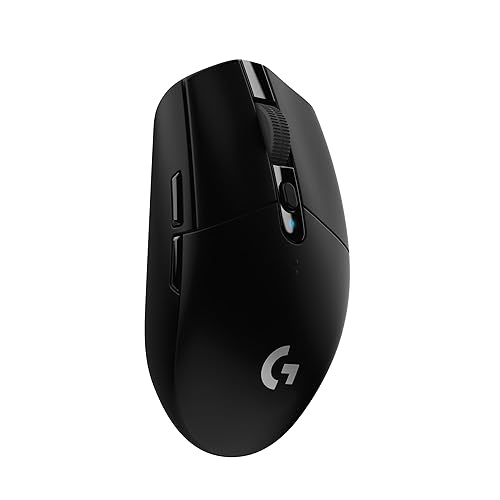
Logitech G305 Lightspeed
Bottom line: The cheapest and longest-running pick here, a compact AA-powered wireless mouse that suits claw grip and small to medium hands, as long as you accept a heavier body.
- Very low price
- Up to 250 hours from a single AA battery
- Compact, classic shape
- Built-in storage for the receiver
- 1 ms response with the HERO sensor
- Heavier than the ultralight mice here
- Uses an AA battery rather than rechargeable power
- Older design with fewer features
Table of Contents
Best Gaming Mouse for Claw Grip: Our Picks in Detail
1
Best Overall
Razer Viper V4 Pro
Bottom line: A 49 g symmetrical esports mouse that Razer shapes for claw and fingertip players, and the easiest recommendation here if you want fast wireless play without compromise.
Razer's latest Viper is the lightest mouse on this list apart from the Pulsar, and it is aimed squarely at players who keep their palm raised.
Pros & Cons
Pros
- Just 49 g
- Designed for claw and fingertip grips
- Up to 180 hours at 1000 Hz
- Grip tape included in the box
- Gen-4 optical switches rated for over 100 million clicks
Cons
- Premium price
- Battery drops to about 45 hours at 8000 Hz
- Narrow shell may feel small for large hands
Why We Picked It
Razer designs the Viper V4 Pro for claw and fingertip users, with a right-handed symmetrical shell and separate side buttons that stay out of the way of a curled hand. At 49 g it moves with very little effort, and the Focus Pro 50K Gen-3 sensor and Gen-4 optical switches are the same class of hardware used by competitive players. Battery life reaches up to 180 hours at 1000 Hz or about 45 hours at 8000 Hz, so you can choose between endurance and the lowest latency.
Who It's For
Competitive shooter players who want a light, fast wireless mouse for a claw hold. The 49 g right-handed symmetrical shell and side buttons that stay clear of a curled hand suit aim-heavy games, and you can run 1000 Hz for the long battery life or push to 8000 Hz when latency matters most.
Specs & Configurations
- Weight
- 49 g
- Shape
- right-handed symmetrical
- Connection
- HyperSpeed Wireless Gen-2, USB-C
- Sensor
- Focus Pro 50K Gen-3
- Switches
- optical Gen-4, rated for over 100 million clicks
- Polling
- up to 8000 Hz
- Battery
- up to 180 hours at 1000 Hz
- Programmable controls
- 6
Get It Now
Check Price on Amazon
2
Best Ultralight
Pulsar X2 CrazyLight Medium
Bottom line: At 39 g it is the lightest mouse here by a wide margin, a great fit for claw and fingertip players who prioritize speed over everything else.
Pulsar's X2 CrazyLight strips the weight down further than almost anything on the market, and the shape is designed around a claw hold.
Pros & Cons
Pros
- Only 39 g
- Low-profile symmetrical shell for claw and fingertip grips
- Optical switches reduce unintended double clicks
- Dot skates included
- XS-1 sensor with 32,000 DPI
Cons
- Extremely light mice can feel twitchy if you prefer weight
- Low profile may not suit large palms
Why We Picked It
The X2 CrazyLight uses a wide, low-profile symmetrical shell that Pulsar says supports both claw and fingertip grips. The 39 g body is the headline, and the XS-1 sensor, optical switches and included Dot skates round out a feature set that feels built for aim-heavy shooters. If you already like ultralight mice and your hand is medium sized, this is the one to try.
Who It's For
Claw and fingertip players with medium-sized hands who want the lowest weight possible. At 39 g the wide, low-profile symmetrical shell moves with almost no effort, which suits aim-heavy shooters, and the included Dot skates are ready to go out of the box.
Specs & Configurations
- Weight
- 39 g
- Shape
- right-handed symmetrical, low profile
- Connection
- wireless
- Sensor
- XS-1, 32,000 DPI
- Size
- Medium
Get It Now
Check Price on Amazon
3
Best Compact
Logitech G Pro X Superlight 2c
Bottom line: A 51 g compact take on Logitech's esports shape, ideal for claw players with small to medium hands who want proven hardware.
Logitech shrinks the Superlight shape for players who find the full-size model too long, which suits a claw hold well.
Pros & Cons
Pros
- Just 51 g
- Compact shape for smaller hands or a tighter grip
- HERO 2 sensor with 8 kHz polling
- Up to 95 hours per charge
- Sensor reaches up to 44,000 DPI
Cons
- Compact body can feel cramped for large hands
- Premium price
- Not meant for palm grip
Why We Picked It
A claw grip works best when the mouse is short enough for your palm to anchor at the back without your fingers stretching, and the 2c is built around that idea. It weighs about 51 g, runs the HERO 2 sensor with up to 44,000 DPI and 8 kHz polling, and lasts up to 95 hours on a charge. It is a safe choice if you want Logitech's esports reliability in a smaller body.
Who It's For
Claw grip players with small to medium hands who want a compact, lightweight wireless mouse. The short body lets your palm anchor at the back without your fingers stretching, and the 51 g weight, HERO 2 sensor and 8 kHz polling bring Logitech's esports hardware to a smaller shell.
Specs & Configurations
- Weight
- 51 g
- Shape
- right-handed compact
- Connection
- LIGHTSPEED wireless, USB-C
- Sensor
- HERO 2, up to 44,000 DPI
- Polling
- up to 8 kHz
- Battery
- up to 95 hours
Get It Now
Check Price on Amazon
4
Best Plug-and-Play
Zowie S2-DW
Bottom line: A short symmetrical Zowie that BenQ lists among its claw grip recommendations, with no software to install and a shape that rewards precise finger control.
Zowie names the S2-DW as one of its claw grip mice, and its shorter body keeps your hand compact.
Pros & Cons
Pros
- Short shell with side curves for stable control
- Driverless plug and play
- Up to 4000 Hz polling
- Seven buttons
- Up to 80 hours of battery at 1 kHz
Cons
- Heavier than the ultralight picks
- Battery drops sharply at 4 kHz
- No software for tuning settings
Why We Picked It
Zowie describes a claw grip mouse as shortened and arched, letting the palm anchor lightly at the back while the fingers stay curled, and the S2-DW follows that formula with a short symmetrical shell and curved sides. It is driverless, so you plug it in and play without installing anything, and the polling rate goes up to 4000 Hz with the included receiver. Battery runs for 80 hours at 1 kHz, falling to 24 hours at 4 kHz.
Who It's For
Claw grip players who want a stable, no-fuss shape and don't mind a slightly heavier mouse. The short symmetrical shell with curved sides keeps your hand compact, and because it is driverless you can plug in the receiver and play on any PC without installing anything.
Specs & Configurations
- Weight
- 65 g
- Shape
- right-handed symmetrical, short, side curves
- Connection
- 2.4 GHz wireless, USB
- Polling
- up to 4000 Hz
- Battery
- 80 hours at 1 kHz, 24 hours at 4 kHz
- Buttons
- 7
- Software
- driverless
Get It Now
Check Price on Amazon
5
Best Bluetooth Option
Corsair M75 Air Wireless
Bottom line: A light FPS-focused wireless mouse with 2.4 GHz and Bluetooth modes and long battery life, a solid pick for claw players who also use it for work.
Corsair's M75 Air is built for fast FPS play but works across devices thanks to its Bluetooth mode.
Pros & Cons
Pros
- Ultralight FPS design
- Bluetooth plus 2.4 GHz wireless
- Up to 100 hours of battery
- Optical switches rated for 100 million clicks
- Marksman 26K sensor
Cons
- Not the lightest at its price
- Not the most compact shell
- iCUE software is required for full customization
Why We Picked It
The M75 Air weighs roughly 60 g, uses the Marksman 26K sensor and optical switches, and offers both 2.4 GHz Slipstream and Bluetooth connections. Battery life reaches up to 100 hours, which makes it a low-maintenance option. It is a fit for claw grip players who want a lightweight, flexible mouse that can also handle a laptop.
Who It's For
Claw players who want a lightweight FPS mouse with Bluetooth for a second device. At about 60 g it handles fast shooter play over 2.4 GHz, then switches to Bluetooth when you want to use it with a laptop for work, and up to 100 hours of battery keeps charging to a minimum.
Specs & Configurations
- Weight
- 2.1 oz (about 60 g)
- Connection
- 2.4 GHz Slipstream, Bluetooth, USB
- Sensor
- Marksman 26K, 650 IPS
- Switches
- optical, rated for 100 million clicks
- Battery
- up to 100 hours
- Software
- iCUE
Get It Now
Check Price on Amazon
6
Best Value Wireless
Cooler Master MM712
Bottom line: A 59 g ambidextrous wireless mouse at a mid-range price, a smart way into lightweight claw grip play without paying flagship money.
Cooler Master's MM712 trades flagship specs for a lower price, while keeping the light, seamless body that claw grip players want.
Pros & Cons
Pros
- Light at 59 g
- Wired, 2.4 GHz and Bluetooth modes
- PTFE feet
- Costs far less than flagship wireless mice
- Seamless ambidextrous shell
Cons
- Lower DPI ceiling and click rating than flagship rivals
- Ambidextrous shell has no right-handed contouring
Why We Picked It
The MM712 uses a seamless ambidextrous shell that holds the weight at 59 g, with a hybrid connection that covers wired, 2.4 GHz and Bluetooth 5.1. Optical switches, PTFE feet and a lightweight Ultraweave cable for wired use round it out. It is an affordable way to try a modern wireless claw grip mouse without giving up the basics.
Who It's For
Budget-minded claw grip players who still want a light wireless shell with Bluetooth. The seamless 59 g body, optical switches and PTFE feet cover the basics of modern claw play, and the wired, 2.4 GHz and Bluetooth modes let one mouse serve the gaming desk and a laptop.
Specs & Configurations
- Weight
- 59 g
- Shape
- ambidextrous
- Connection
- 2.4 GHz wireless, Bluetooth 5.1, wired
- Sensor
- adjustable up to 19,000 DPI
- Switches
- optical, rated for 70 million clicks
- Software
- MasterPlus+
Get It Now
Check Price on Amazon
7
Best Budget
Logitech G305 Lightspeed
Bottom line: The cheapest and longest-running pick here, a compact AA-powered wireless mouse that suits claw grip and small to medium hands, as long as you accept a heavier body.
The G305 has been a budget favorite for years because it is small, reliable and wireless for very little money.
Pros & Cons
Pros
- Very low price
- Up to 250 hours from a single AA battery
- Compact, classic shape
- Built-in storage for the receiver
- 1 ms response with the HERO sensor
Cons
- Heavier than the ultralight mice here
- Uses an AA battery rather than rechargeable power
- Older design with fewer features
Why We Picked It
Its compact body suits a claw hold on small to medium hands, and the HERO sensor, 1 ms response time and 250-hour battery life are strong for the price. The mouse stores its receiver inside the shell, which is handy for travel. It is heavier than the ultralight mice above because of the AA battery, which is the main trade-off.
Who It's For
Claw grip players on a tight budget with small to medium hands, and anyone who wants a dependable wireless mouse for work and play. The compact shell is easy to control, one AA battery lasts up to 250 hours, and the receiver stores inside the mouse so it travels without losing a part.
Specs & Configurations
- Shape
- compact, symmetrical shell
- Connection
- LIGHTSPEED wireless
- Sensor
- HERO, 12,000 DPI
- Response
- 1 ms
- Battery
- up to 250 hours on one AA
- Buttons
- 6
Get It Now
Check Price on AmazonClaw Grip Gaming Mice Compared
| Mouse | Weight | Connection | Best for |
|---|---|---|---|
| Razer Viper V4 Pro | 49 g | Wireless | All-round claw play |
| Pulsar X2 CrazyLight Medium | 39 g | Wireless | Lowest weight |
| Logitech G Pro X Superlight 2c | 51 g | Wireless | Small to medium hands |
| Zowie S2-DW | 65 g | Wireless | Plug-and-play shape |
| Corsair M75 Air Wireless | About 60 g | Wireless and Bluetooth | Bluetooth flexibility |
| Cooler Master MM712 | 59 g | Wireless, Bluetooth, wired | Value |
| Logitech G305 Lightspeed | AA powered | Wireless | Budget |
How to Choose a Gaming Mouse for Claw Grip
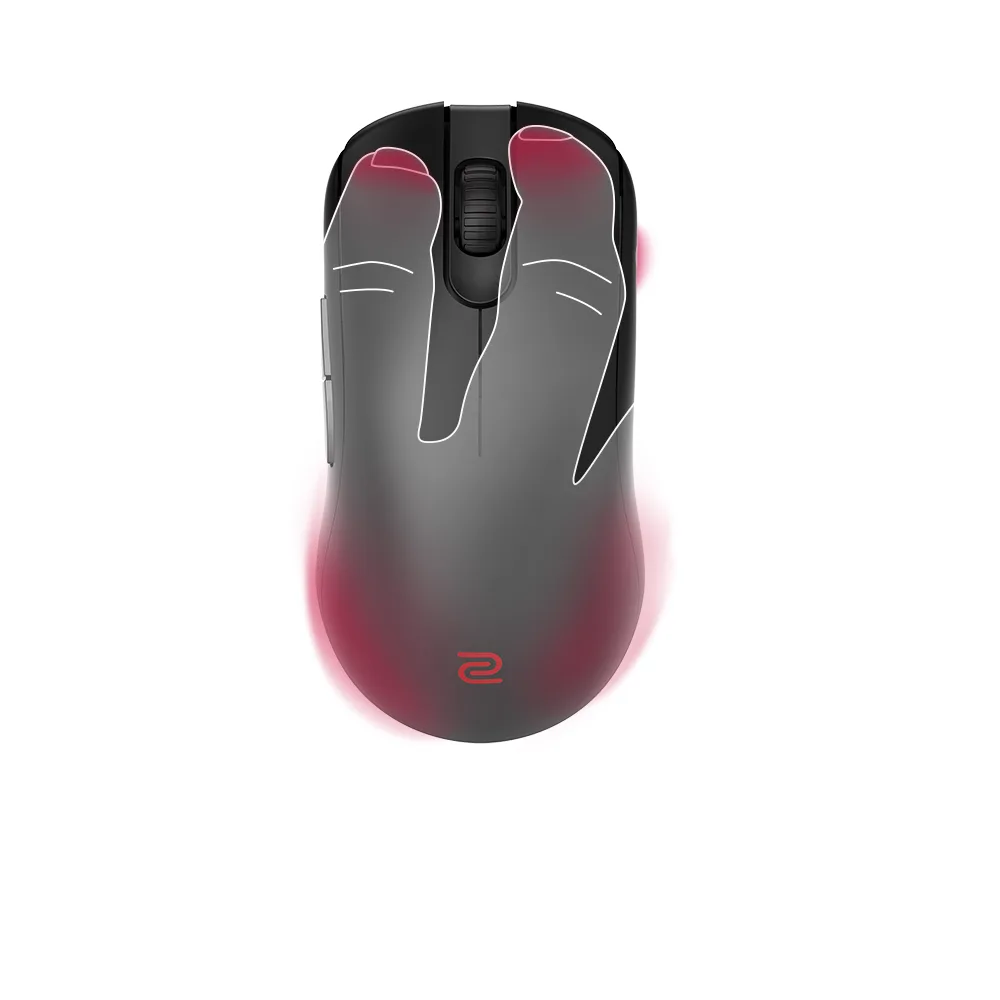
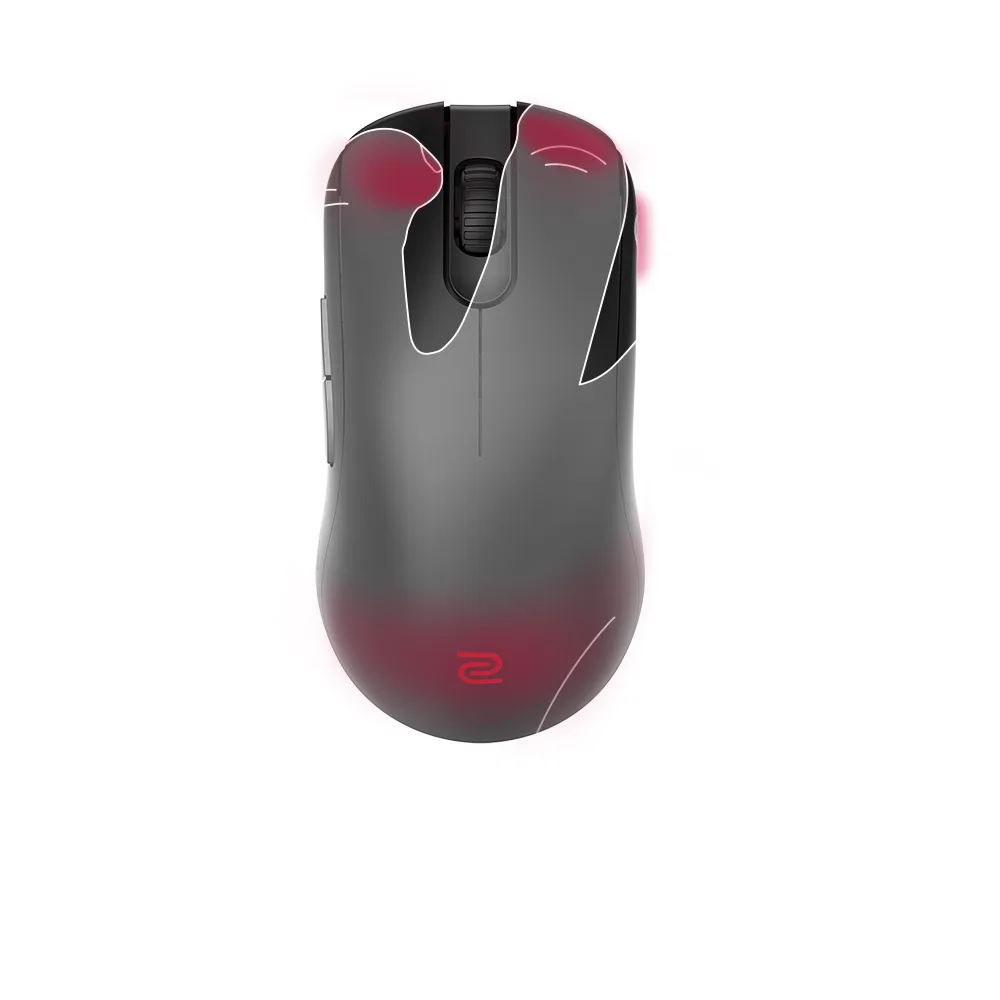
What claw grip means. In a claw grip the back of your palm anchors near the rear edge of the mouse while your fingers curl sharply so only the fingertips touch the buttons. That gives you fast flicks and lets both your wrist and fingers adjust aim, though holding the bent fingers for long tracking sessions can tire your hand.
Pick a short, arched shell. Claw grip mice are typically shortened with an arched back, so the palm sits lightly at the rear while the fingers stay curled. A mouse that is too long forces your fingers to stretch, and one that is too flat leaves your palm with nothing to anchor against. If you are unsure of your hold, our best gaming mouse for small hands list covers more compact shells, while larger hands should start with the best gaming mouse for large hands picks.
Keep the weight low. Ultralight shells under about 60 g make quick flicks easier, which is why most picks here sit in that range. A heavier mouse like the G305 can still work, but it will feel less nimble in fast shooters.
Check the side buttons. Your thumb and ring finger hold the sides, so look for mice with clean side contours and buttons that sit where your thumb naturally rests.
Don’t overthink the sensor. Modern gaming sensors are very close in real play, so shape and size decide comfort far more than DPI numbers.
FAQ
What is a claw grip mouse?
A claw grip mouse is a short, arched mouse that lets your palm anchor at the back while your fingers curl onto the buttons. Most picks are symmetrical or compact.
Is claw grip good for gaming?
Yes, especially in fast games, because it supports quick flicks and lets both your wrist and fingers adjust aim. It is less comfortable for very long sessions of slow tracking.
Is claw grip best for FPS games?
Many shooter players prefer it because it favors speed and acceleration, though palm and fingertip grips can work just as well if they suit your hand.
What is the disadvantage of claw grip?
Holding your fingers bent puts more strain on the hand over long sessions, and extra corrections can make aim paths less efficient.
Can I use a palm grip mouse with a claw grip?
You can, but a long, wide shell may feel awkward when your palm anchors at the back. A palm grip mouse is the better choice when you want full contact with the shell.
Which Claw Grip Gaming Mouse Should You Buy?
The Razer Viper V4 Pro is the best gaming mouse for claw grip if you want the all-round pick, with its 49 g shell and a design built around claw and fingertip hands. Pick the Pulsar X2 CrazyLight if you want the lightest option and medium-sized hands, the Logitech Superlight 2c for a compact fit and the Zowie S2-DW if you want a plug-and-play shape. On a budget, the Cooler Master MM712 and Logitech G305 get you into wireless claw play for far less.