GameCuki is reader-supported. When you buy through links on our site, we may earn an affiliate commission at no extra cost to you. As an Amazon Associate I earn from qualifying purchases. Learn more.
GameCuki VerdictRecommended
What Our Verdicts Mean
GameCuki Top PickThe best option in its class, with no serious, repeated problems.
RecommendedA good buy for most people. Weaknesses are minor or only matter to some players.
Buy With CaveatsRight for a specific kind of player only, because of a significant drawback.
Skip ItNot recommended. A better option exists at a similar price.
The Bottom LineA dense, quiet, endlessly tweakable aluminum 75% board that is a joy to type on, but a pricey and bulky choice if fast-paced gaming is your main reason to buy.
Double gasket mount and layers of foam give a muffled, low-pitched sound
Hot-swappable sockets accept 3-pin and 5-pin MX-style switches
2.4 GHz, Bluetooth 5.1, and wired USB-C with 1,000 Hz polling on 2.4 GHz and wired
VIA and QMK support with a volume knob and a standard 75% layout
Cons
Expensive next to most wireless 75% boards
About 3.8 lb and tall, so a wrist rest is close to a requirement
No adjustable feet, the typing angle is fixed at 5.2 degrees
Keychron Q1 Max Specs
Layout
75% (84 keys plus knob)
Body
CNC aluminum, PC plate, double gasket mount
Switches
Gateron Jupiter Red, Brown, or Banana (hot-swappable, 3-pin and 5-pin)
Keycaps
Double-shot PBT, KSA profile
Connectivity
2.4 GHz, Bluetooth 5.1 (up to 3 devices), wired USB-C
Polling rate
1,000 Hz (2.4 GHz and wired), 90 Hz (Bluetooth)
Battery
4,000 mAh, up to 180 hours with the backlight off
Dimensions
12.9 x 5.7 x 0.9 to 1.4 in (327.5 x 145 x 22.6 to 35.8 mm)
Weight
about 3.8 lb (1,724 g, fully assembled)
Typing angle
5.2 degrees, no adjustable feet
Software
VIA and QMK
Compatibility
Windows, macOS, Linux
This Keychron Q1 Max review starts with the question most buyers ask about a premium 75% board: is all that aluminum worth paying extra for? Mostly yes, with one big condition. This is a slab of CNC aluminum with a gasket-mounted plate, thick foam, and Gateron Jupiter switches, and it is built to be typed on all day. It is not built to compete with the magnetic-switch gaming boards that have taken over the 75% size. Below we go through the build, the sound, the three connection modes, battery life, customization, and who should look at something else, with links to our own picks if you land on the second group.
Design and Build: Almost 4 Pounds of Aluminum
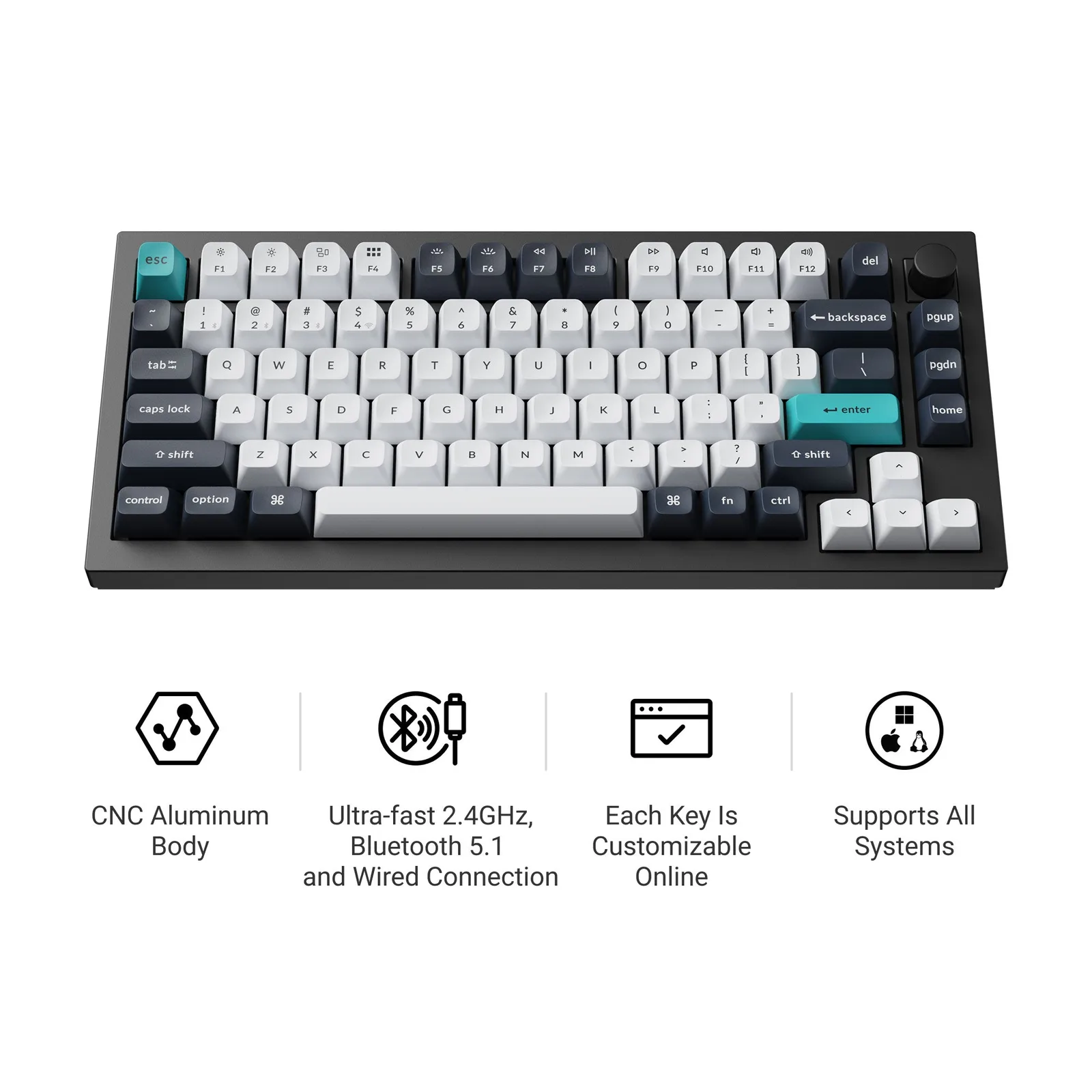
The Q1 Max sits at the top of Keychron’s Q line, and the body shows it. The case is 6063 aluminum, CNC machined, with a metal base instead of the plastic bottom common on cheaper boards. Fully assembled, it weighs about 3.8 lb (1,724 g), which is why it stays put on a desk and why there is essentially no flex when you press down on it. The layout is a conventional 75%, so you keep the arrow cluster, the function row, and a column with Page Up, Page Down, and Home, plus a volume knob in the corner. Nothing is moved to an odd spot, which makes touch typing easy to pick up.
The Q1 Max keeps a standard 75% layout with a knob in the top right corner. (Image: Keychron)
The trade-offs of all that metal are height and fixed geometry. The board is 0.9 in tall at the front and 1.4 in at the back with the keycaps off, the typing angle is a set 5.2 degrees, and there are no flip-out feet. Expect to want a wrist rest. If you prefer low, flat boards, our best low-profile gaming keyboard list is a better place to start. It comes in Carbon Black and Shell White, and the white version leans toward a retro, beige-keyboard look.
Switches, Keycaps, and Sound: Where the Q1 Max Earns Its Price
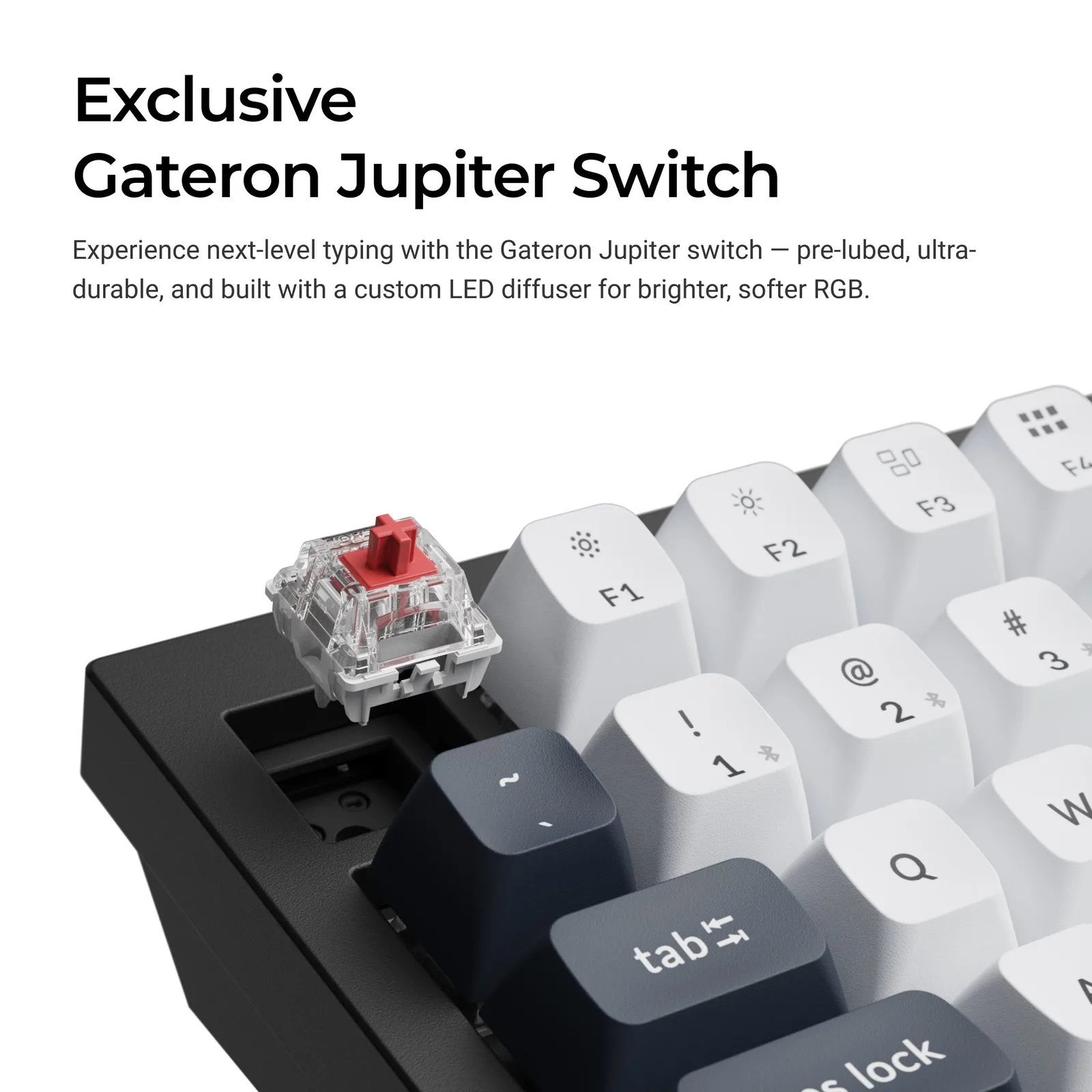
Fully assembled units ship with Gateron Jupiter switches in Red (linear), Brown (tactile), or Banana (a louder tactile option). They come pre-lubed and use a diffuser for the RGB. The keycaps are double-shot PBT in a KSA profile, which sit tall and sculpted, and they are not shine-through, so legends do not light up. Some typists need a few days to get used to the height and the heavy contouring, and fast glides between keys feel different than on slim caps.
The Q1 Max uses hot-swappable sockets, so a Jupiter switch can be pulled and replaced without soldering. (Image: Keychron)
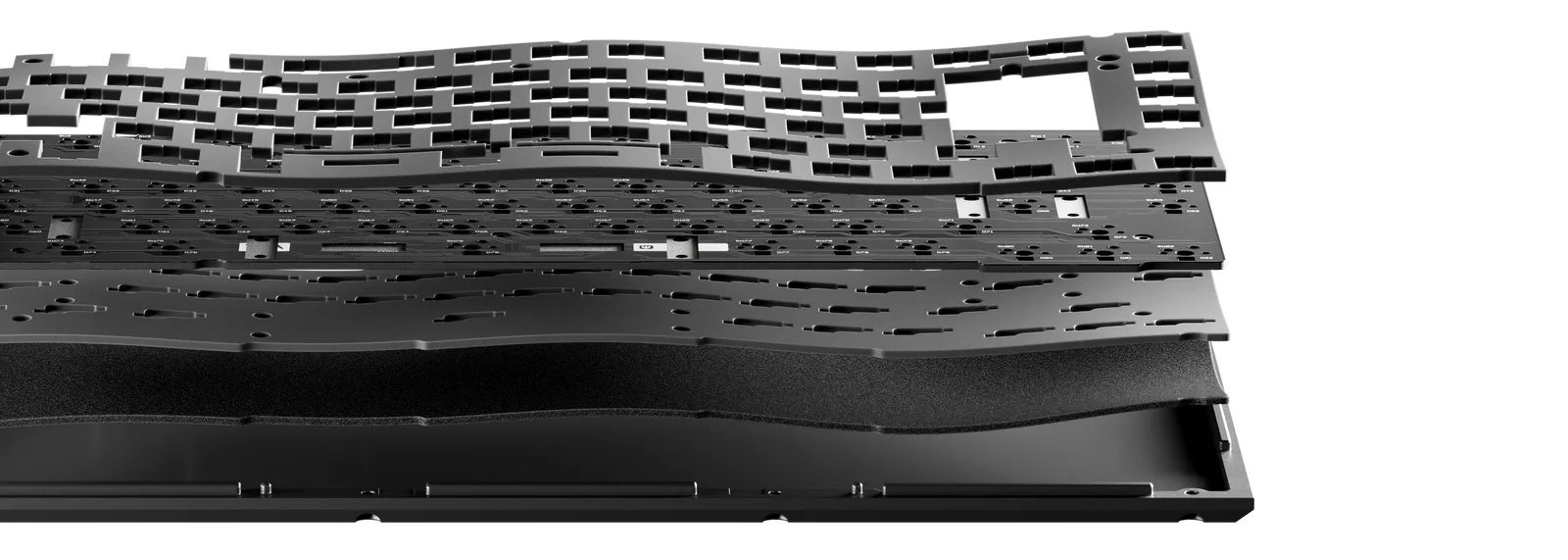
The sound is the main reason to pay extra. Under the top plate there is acoustic foam, IXPE foam, and PET film above the PCB, and a latex bottom pad, more foam, and more PET film below it. Silicone gaskets sit between the plate and the case and between the top and bottom case halves, which is the “double gasket” design. The result is a muffled, low “thock” with very little of the ping that hollow aluminum boards can produce. Everything is removable, so you can pull layers out to make it brighter. Our keyboard foam mod guide and mechanical keyboard mods explain what each layer does. The screw-in PCB stabilizers also help, and the spacebar feels solid.
Layers of foam and film sit above and below the PCB. (Image: Keychron)
Connectivity and Battery: Three Modes, One Big Cell
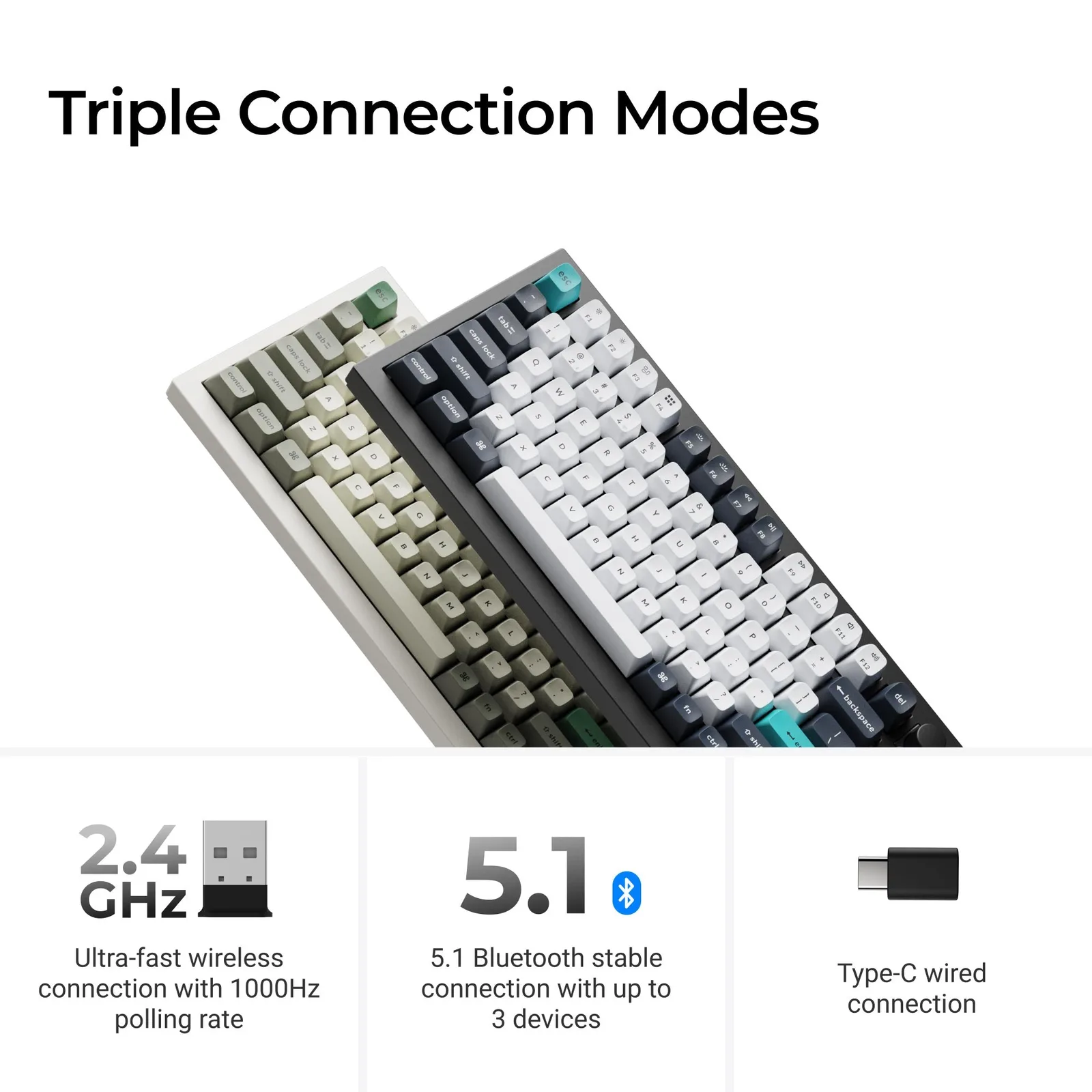
A switch on the back selects wired, Bluetooth, or 2.4 GHz mode. The 2.4 GHz receiver and the wired USB-C connection both run at 1,000 Hz polling, which is the right choice for games. Bluetooth 5.1 can store up to three devices and switch between them with key combinations, but it polls at about 90 Hz, so it suits typing on a laptop or tablet rather than gaming. A second switch moves between Mac and Windows layouts, and the box includes keycaps for both.
Keychron lists 2.4 GHz, Bluetooth 5.1 for up to three devices, and wired USB-C. (Image: Keychron)
The 4,000 mAh battery is rated for up to 180 hours with the backlight off. Turning the lighting on cuts that sharply, and the exact number depends on brightness and effect, so plan on charging more often if you like RGB. The lighting itself faces south, toward the typist, and with solid keycaps it mostly glows around the deck rather than through the letters.
Customization and Software: VIA, QMK, and Hot-Swap
The Q1 Max is fully remappable through VIA, and it runs QMK, so the knob, the layers, and individual keys can be reprogrammed on Windows, macOS, and Linux. The MCU is an ARM Cortex-M4 with 256 KB of flash, which gives developers more room for custom firmware than the cheaper Keychron boards. Hot-swap sockets take 3-pin and 5-pin MX-style switches from Gateron, Cherry, Kailh, and Panda, so changing the feel does not require a soldering iron. The tradeoff is that there is no polished companion app for lighting. Effects come from onboard presets, and deeper changes mean using VIA or flashing firmware. Razer Chroma and OpenRGB are not easy to connect.
Gaming on the Q1 Max: Fine, Not Fast
Keychron markets the board for gaming, and it works. A 1,000 Hz connection over 2.4 GHz or USB, N-key rollover, and a stable base are all fine for most players. The limits are the tall, heavily contoured keycaps, the longer travel of the Jupiter switches, and the lack of adjustable actuation. Competitive players who want Rapid Trigger or a very short reset will be better served by a magnetic board, and our best 75% gaming keyboard list covers those options. If one keyboard has to handle work and games in roughly equal parts, the Q1 Max is a reasonable compromise.
Keychron Q1 Max FAQ
Does the Keychron Q1 Max work on Linux?
Yes. It is plug and play, but there is no dedicated Linux mode switch and no Linux-specific keycaps in the box. VIA and QMK also run on Linux.
Can the Q1 Max RGB lighting be customized?
Onboard presets such as wave, rainbow, breathing, and reactive effects work without software. For custom effects you need VIA or custom QMK firmware.
Can you change the typing angle?
Not with feet. The case has a fixed 5.2 degree angle, so the only options are a wrist rest or different switches and keycaps.
Final Thoughts: Is the Keychron Q1 Max Worth It?
Keychron Q1 Max
GameCuki VerdictRecommended
What Our Verdicts Mean
GameCuki Top PickThe best option in its class, with no serious, repeated problems.
RecommendedA good buy for most people. Weaknesses are minor or only matter to some players.
Buy With CaveatsRight for a specific kind of player only, because of a significant drawback.
Skip ItNot recommended. A better option exists at a similar price.
If you type a lot and want a keyboard that sounds muted, feels solid, and can be reshaped later, the Keychron Q1 Max is worth the money, and it is one of the better ways to move into custom keyboards without building one from scratch. It is a poor fit if you want a light, low-profile board, if budget matters more than materials, or if fast-paced shooters are the main job. Those buyers should look at a lighter or magnetic-switch model, and the rest can buy the Q1 Max with confidence.
I'm Fraser, and I write the reviews on GameCuki. That covers consoles and handhelds, PC gaming hardware, controllers, headsets and accessories, from big purchases like gaming laptops to small add-ons like screen protectors and grips. I build each review from the manufacturer's specs, professional reviews and verified owner feedback, and I check long-term issues like comfort, battery life and durability against several sources before they make it into the pros and cons. Every review ends with who the product is for and who should skip it. I don't accept free products or paid placements, and what I write comes from research, not my own use of the products. You can read my full process on our How We Review page.