

The Switch 2 is a capable console out of the box, but a few add-ons make a real difference to how you play it day to day. The best Switch 2 accessories fix its weak spots: a battery that runs down on the move, a screen that scratches, storage that fills up, and a Joy-Con 2 grip that is not for everyone. These ten picks cover each of those jobs, from the controller to the charger, so you can decide what to buy first and skip the rest.
Best Switch 2 Accessories in 2026: 10 Picks Worth Buying
GameCuki is reader-supported. When you buy through links on our site, we may earn an affiliate commission at no extra cost to you. As an Amazon Associate I earn from qualifying purchases. Learn more.
Our Top Picks
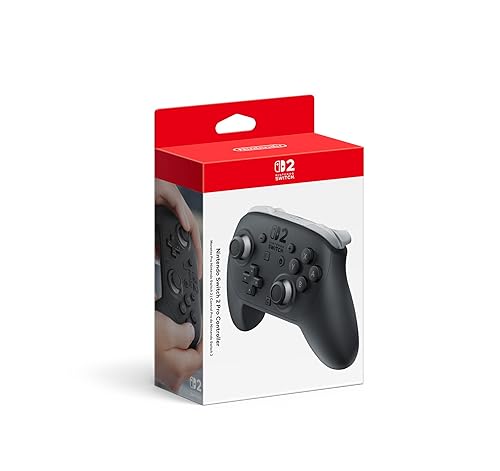
Best Controller for Docked Play
Nintendo Switch 2 Pro Controller
Bottom line: The one Switch 2 controller with every system feature built in, worth the premium for players who mostly play docked.
- Every Switch 2 feature works with no setup tricks
- About 40 hours of battery between charges
- 3.5mm headphone jack for private listening
- HD Rumble 2 and motion controls built in
- GL and GR back buttons map in system settings
- Reads amiibo and has the C button for GameChat
- Not Hall effect or TMR, so the sticks may drift over time
- Triggers are digital only and it does not work on PC

Best Case for Long Trips
Belkin Charging Case Pro for Switch 2
Bottom line: A travel case with a removable power bank, for players whose Switch 2 battery always runs low far from an outlet.
- Charges the Switch 2 while it is still inside the case
- Removable battery with an LCD charge display
- 12 game card slots
- AirTag pocket for tracking the case
- About 1.5 full Switch 2 charges from the power bank
- Kickstand groove for tabletop play while charging
- Expensive compared with standard cases
- Bulkier than slim cases, so it takes real bag space
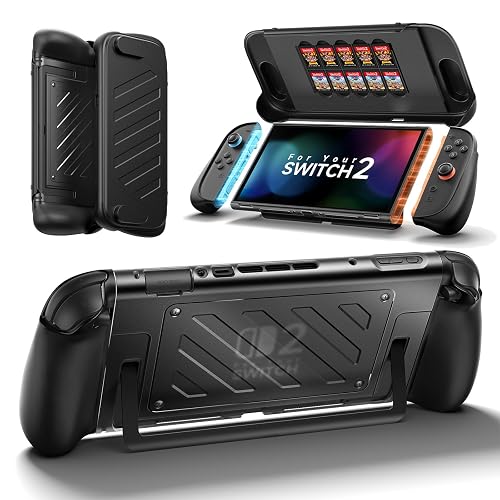
Best Grip Case for Handheld Play
JSAUX Split Protective Case for Switch 2
Bottom line: A dockable grip case that adds real comfort to handheld play without giving up the kickstand or Joy-Con 2 removal.
- Works in handheld, tabletop and TV mode
- Contoured grips add comfort for long sessions
- Joy-Con 2 detach with the case on
- Hard front cover doubles as a travel cover
- Holds 10 game cards
- U-shaped cutout keeps the kickstand usable
- Snug fit in the official dock
- The thin bottom edge of the back shell can loosen over time

Best Screen Protector
amFilm OneTouch Glass Screen Protector (2-Pack)
Bottom line: Tempered glass with an alignment tray that makes a bubble-free install close to foolproof for first-time installers.
- Auto-alignment tray makes installation fast
- Clear glass keeps the screen sharp
- Spare protector in the box
- 9H tempered glass with an oleophobic coating
- Touch response stays normal
- Cleaning kit included
- Glossy finish still reflects light
- Only two protectors per pack

Best microSD Express Card for Easy Storage
Samsung microSD Express Card for Nintendo Switch 2 (256GB)
Bottom line: The officially licensed card that removes any compatibility guesswork, for anyone whose Switch 2 storage is filling up.
- Officially branded for Switch 2
- Made by Samsung
- No compatibility guesswork
- Rated up to 800MB/s read
- Also works in microSD UHS-I devices
- Built for Switch 2 game installs and updates
- Only available in 256GB

Best Power Bank for Travel
Anker Power Bank 20,000mAh (87W)
Bottom line: A big, fast power bank with a built-in cable that keeps the Switch 2 and a phone charged on a long trip.
- Built-in USB-C cable, nothing to forget
- 65W to one device, far above what the Switch 2 needs
- Airline-approved capacity
- Recharges in about 1.5 hours with a 65W charger
- Roughly four Switch 2 charges per bank
- Two more ports for a phone and earbuds
- Heavy for a jacket pocket
- The built-in cable cannot be swapped if it ever fails

Best Spare Charger
Nintendo Switch 2 AC Adapter
Bottom line: The official replacement adapter is the no-guesswork second charger for the bedroom, dorm or a relative's house.
- Made by Nintendo for this console, so dock and handheld both work
- Works with the console directly or with the dock
- Cable detaches for easier storage
- Light at 3.2 oz and easy to toss in a bag
- Backed by a 1-year manufacturer warranty
- No wattage or port-sharing math
- Single-purpose, with no extra ports for a phone or earbuds
- Does not fold or shrink like modern GaN bricks

Best Headset for Handheld and TV
SteelSeries Arctis Nova 3P Wireless
Bottom line: A light, comfortable wireless headset that connects by dongle or Bluetooth, for players who want good audio without a flagship price.
- Very light and comfortable at 260 g
- Up to 40 hours of battery
- Easy to connect by dongle or Bluetooth
- Dual-hinge design suits smaller heads
- Fast charge, 15 minutes for up to 9 hours
- 200+ game presets in the Arctis Companion app
- Occasional interference and dropouts
- Sound needs EQ adjustment for music

Best Third-Party Controller
EasySMX S10
Bottom line: A third-party controller that gives up the least next to Nintendo's pad, with drift-resistant sticks and wake support for far less money.
- Wakes the Switch 2 over Bluetooth
- Reads amiibo
- HD rumble close to Nintendo's
- Swappable eight-way D-pad
- Drift-resistant TMR sticks
- Grippy body with two mappable back buttons
- Clicky buttons divide opinion
- The Home, screenshot and GameChat buttons are cramped

Best for Streaming and Recording
Elgato Game Capture 4K S
Bottom line: A capture card that matches the Switch 2 dock's 4K60 and 1440p120 output, for players who share clips or stream.
- Passthrough and capture both reach 4K60 and 1440p120
- Plug and play on Mac and iPad as well as Windows
- 3.5mm input for commentary
- Compact box that travels well
- VRR passthrough keeps the TV picture smooth
- HDR10 capture is Windows only
- Costs more than 1080p60 cards
- May need Switch 2 output setting tweaks for clean footage
Table of Contents
Best Switch 2 Accessories: Our Picks in Detail
1
Best Controller for Docked Play
Nintendo Switch 2 Pro Controller
Bottom line: The one Switch 2 controller with every system feature built in, worth the premium for players who mostly play docked.
Most Switch 2 owners end up wanting a full-size gamepad, because the Joy-Con 2 are small for long sessions on the TV.
Pros & Cons
Pros
- Every Switch 2 feature works with no setup tricks
- About 40 hours of battery between charges
- 3.5mm headphone jack for private listening
- HD Rumble 2 and motion controls built in
- GL and GR back buttons map in system settings
- Reads amiibo and has the C button for GameChat
Cons
- Not Hall effect or TMR, so the sticks may drift over time
- Triggers are digital only and it does not work on PC
Why We Picked It
Nintendo's own pad is the only wireless Switch 2 controller with a 3.5mm headphone jack, and it supports HD Rumble 2, motion controls, amiibo and the C button for GameChat. The GL and GR back buttons are native to the console, so you can map them in system settings without an app. The trade-off is the potentiometer sticks, which can wear and drift the way older Nintendo sticks did. Our Switch 2 controllers guide compares it with eight alternatives.
Who It's For
You play most of your Switch 2 docked, and you want a pad that behaves exactly like the console expects, with no compatibility surprises. If drift-resistant sticks matter more than the official badge, a Hall effect controller for Switch 2 is the next step, and brand fans can start with our 8BitDo controller for Switch 2 picks.
Specs & Configurations
- Sticks
- Potentiometer
- Connection
- Wireless (native), USB-C wired
- Wake Switch 2
- yes
- NFC (amiibo)
- yes
- Rumble
- HD Rumble 2
- Motion controls
- yes
- Back buttons
- 2 (GL/GR)
- Battery
- about 40 hours
- Headphone jack
- 3.5mm
Get It Now
Check Price on Amazon
2
Best Case for Long Trips
Belkin Charging Case Pro for Switch 2
Bottom line: A travel case with a removable power bank, for players whose Switch 2 battery always runs low far from an outlet.
A case is the accessory that protects the most expensive thing you own, and this one also fixes the battery.
Pros & Cons
Pros
- Charges the Switch 2 while it is still inside the case
- Removable battery with an LCD charge display
- 12 game card slots
- AirTag pocket for tracking the case
- About 1.5 full Switch 2 charges from the power bank
- Kickstand groove for tabletop play while charging
Cons
- Expensive compared with standard cases
- Bulkier than slim cases, so it takes real bag space
Why We Picked It
The removable 10,000mAh bank delivers up to 30W and can recharge the console about one and a half times, and a small LCD shows how much power is left. Because you can plug the console in while it sits in the case, long flights and road trips stop being a battery problem. It also keeps the 12 game slots and the AirTag pocket that Belkin's regular case has. If you would rather compare slimmer options, the full Switch 2 carrying case list covers twelve of them.
Who It's For
You commute, fly or road trip with the Switch 2 and refuse to hunt for a wall outlet halfway through a long level. You are fine with a thicker case in your bag in exchange for hours of extra play, and you want the console, cartridges and battery packed in one place.
Specs & Configurations
- Battery
- removable 10,000mAh power bank, up to 30W (about 1.5 full Switch 2 charges)
- Display
- LCD showing remaining charge
- Extras
- kickstand groove for tabletop play while charging, AirTag pocket
- Game cards
- 12
- Carry
- wrist strap
- Fits
- Nintendo Switch 2 (bare console)
Get It Now
Check Price on Amazon
3
Best Grip Case for Handheld Play
JSAUX Split Protective Case for Switch 2
Bottom line: A dockable grip case that adds real comfort to handheld play without giving up the kickstand or Joy-Con 2 removal.
Handheld mode is where the Switch 2 feels cramped for many adults, and a grip case is the cheapest cure.
Pros & Cons
Pros
- Works in handheld, tabletop and TV mode
- Contoured grips add comfort for long sessions
- Joy-Con 2 detach with the case on
- Hard front cover doubles as a travel cover
- Holds 10 game cards
- U-shaped cutout keeps the kickstand usable
Cons
- Snug fit in the official dock
- The thin bottom edge of the back shell can loosen over time
Why We Picked It
Most grip cases make you give something up, and this one gives up the least. The thickened grips curve into your palms, the split design lets you take the Joy-Con 2 off with the case still on, and the console still slides into the official dock. The hard front cover protects the screen in a bag and holds 10 game cards, which may save you buying a separate case. Our Switch 2 grip case guide has eleven more.
Who It's For
You play in every mode, handheld on the couch, propped up on a table and docked at the TV, and want one case that stays out of the way. Hands that cramp after an hour with the bare console are the clearest sign you need one.
Specs & Configurations
- Design
- split case with separate Joy-Con 2 grips and back shell
- Material
- PC and TPU
- Dockable
- Yes (snug fit)
- Kickstand
- open via U-shaped cutout
- Joy-Con 2 removal
- Yes, with the case on
- Front cover
- hard PC with 10 game card slots
- Weight
- 8.8 oz
- Fits
- Nintendo Switch 2
Get It Now
Check Price on Amazon
4
Best Screen Protector
amFilm OneTouch Glass Screen Protector (2-Pack)
Bottom line: Tempered glass with an alignment tray that makes a bubble-free install close to foolproof for first-time installers.
The Switch 2 has a larger 7.9-inch screen than the original, which makes a scratch more noticeable.
Pros & Cons
Pros
- Auto-alignment tray makes installation fast
- Clear glass keeps the screen sharp
- Spare protector in the box
- 9H tempered glass with an oleophobic coating
- Touch response stays normal
- Cleaning kit included
Cons
- Glossy finish still reflects light
- Only two protectors per pack
Why We Picked It
Installation is where most screen protectors go wrong, and the rigid tray here holds the glass in the right spot while you press it down, usually leaving no bubbles to chase. The glossy glass keeps colors and sharpness intact, and the spare protector covers you if dust sneaks in on the first try. Keep the console's factory film on, since it is part of the screen. See the Switch 2 screen protector roundup for matte and anti-glare options.
Who It's For
You carry the console in a bag or backpack, you have struggled with a crooked protector before, and you want clear glass without a fiddly install. Anyone who plays handheld often benefits most.
Specs & Configurations
- Material
- tempered glass, 9H surface hardness
- Finish
- glossy
- In the box
- 2 protectors, auto-alignment tray, cleaning kit
- Coating
- oleophobic (anti-fingerprint)
- Fits
- Nintendo Switch 2 (7.9 inch)
Get It Now
Check Price on Amazon
5
Best microSD Express Card for Easy Storage
Samsung microSD Express Card for Nintendo Switch 2 (256GB)
Bottom line: The officially licensed card that removes any compatibility guesswork, for anyone whose Switch 2 storage is filling up.
The Switch 2 only accepts microSD Express cards for game storage, so an older card will not do.
Pros & Cons
Pros
- Officially branded for Switch 2
- Made by Samsung
- No compatibility guesswork
- Rated up to 800MB/s read
- Also works in microSD UHS-I devices
- Built for Switch 2 game installs and updates
Cons
- Only available in 256GB
Why We Picked It
This is the card Nintendo sells alongside the console, made by Samsung and rated at up to 800MB/s read speeds. In real use its speed is in line with other Samsung cards, so you are mostly paying for the official branding and the certainty it brings. For other capacities and brands, our microSD Express card for Switch 2 guide ranks fifteen options.
Who It's For
You buy digital games, your internal storage is nearly full, and you want a card that works the first time with no research. It is also an easy gift for a new Switch 2 owner.
Specs & Configurations
- Capacity
- 256GB
- Rated speed
- up to 800MB/s read
- Branding
- official Nintendo Switch 2 card made by Samsung
- Compatibility
- Nintendo Switch 2 (microSD Express) and microSD UHS-I devices
Get It Now
Check Price on Amazon
6
Best Power Bank for Travel
Anker Power Bank 20,000mAh (87W)
Bottom line: A big, fast power bank with a built-in cable that keeps the Switch 2 and a phone charged on a long trip.
If a charging case feels like too much, a standalone power bank gives the same freedom and works with your phone too.
Pros & Cons
Pros
- Built-in USB-C cable, nothing to forget
- 65W to one device, far above what the Switch 2 needs
- Airline-approved capacity
- Recharges in about 1.5 hours with a 65W charger
- Roughly four Switch 2 charges per bank
- Two more ports for a phone and earbuds
Cons
- Heavy for a jacket pocket
- The built-in cable cannot be swapped if it ever fails
Why We Picked It
The built-in cable puts the Switch 2 one plug away, and a single device can pull up to 65W while the total across three devices is 87W. The 20,000mAh battery is roughly four times the console's 5,220mAh cell, which covers a long trip. Browse the power bank for Nintendo Switch 2 list for lighter and cheaper models.
Who It's For
You travel with the console and want a single pouch item that charges the Switch 2, a phone and earbuds. You do not mind the weight in a backpack in return for several full charges.
Specs & Configurations
- Capacity
- 20,000mAh
- USB-C output
- up to 65W single device, 87W total
- Ports
- Built-in USB-C cable plus 2 more
- Size
- 6.2 x 2.9 x 1.0 in
- Weight
- 15.5 oz
- Recharge
- about 1.5 hours with a 65W charger
Get It Now
Check Price on Amazon
7
Best Spare Charger
Nintendo Switch 2 AC Adapter
Bottom line: The official replacement adapter is the no-guesswork second charger for the bedroom, dorm or a relative's house.
A second charger saves you from unplugging the dock every time you travel.
Pros & Cons
Pros
- Made by Nintendo for this console, so dock and handheld both work
- Works with the console directly or with the dock
- Cable detaches for easier storage
- Light at 3.2 oz and easy to toss in a bag
- Backed by a 1-year manufacturer warranty
- No wattage or port-sharing math
Cons
- Single-purpose, with no extra ports for a phone or earbuds
- Does not fold or shrink like modern GaN bricks
Why We Picked It
Chargers rated at 54W or more can run the Switch 2 in any play mode, and this one is built by the console's maker to meet that requirement. The cable separates from the brick, so you can swap in a longer one later. Wanting extra ports or a smaller brick is a different job, covered in our Switch 2 charger picks.
Who It's For
You want a charger that behaves exactly like the one in the box, one that lives at the TV while the other travels. You would rather pay for certainty than compare wattage and protocols.
Specs & Configurations
- Type
- Official Nintendo replacement
- Rated output
- 60W
- Connector
- USB-C
- Cable
- detachable
- Weight
- 3.2 oz
- Warranty
- 1 year
Get It Now
Check Price on Amazon
8
Best Headset for Handheld and TV
SteelSeries Arctis Nova 3P Wireless
Bottom line: A light, comfortable wireless headset that connects by dongle or Bluetooth, for players who want good audio without a flagship price.
The Switch 2 speakers are fine, but a headset helps in noisy rooms and on public transit.
Pros & Cons
Pros
- Very light and comfortable at 260 g
- Up to 40 hours of battery
- Easy to connect by dongle or Bluetooth
- Dual-hinge design suits smaller heads
- Fast charge, 15 minutes for up to 9 hours
- 200+ game presets in the Arctis Companion app
Cons
- Occasional interference and dropouts
- Sound needs EQ adjustment for music
Why We Picked It
The Nova 3P brings SteelSeries comfort and features at a lower cost, and the USB-C dongle plugs straight into the console while Bluetooth handles phones and tablets. At 260 g it stays comfortable on long sessions, and the 40-hour battery lasts for days between charges. Our headset for Nintendo Switch 2 guide explains Nintendo's Bluetooth audio rules and lists eleven others.
Who It's For
You play on the go or in a busy home and want wireless audio that does not weigh on your head. It suits younger players and anyone on a budget who still wants a dongle for low latency.
Specs & Configurations
- Connection
- multi-platform USB-C 2.4GHz dongle, Bluetooth
- Battery
- up to 40 hours, fast charge (15 minutes for up to 9 hours)
- Weight
- 260 g, dual-hinge design
- Audio
- 200+ game presets in the Arctis Companion app
- Works with
- PC, PlayStation, Switch, handhelds, phones and tablets
Get It Now
Check Price on Amazon
9
Best Third-Party Controller
EasySMX S10
Bottom line: A third-party controller that gives up the least next to Nintendo's pad, with drift-resistant sticks and wake support for far less money.
A second controller is the accessory most households end up needing, and it does not have to cost as much as Nintendo's.
Pros & Cons
Pros
- Wakes the Switch 2 over Bluetooth
- Reads amiibo
- HD rumble close to Nintendo's
- Swappable eight-way D-pad
- Drift-resistant TMR sticks
- Grippy body with two mappable back buttons
Cons
- Clicky buttons divide opinion
- The Home, screenshot and GameChat buttons are cramped
Why We Picked It
The S10 is nearly as capable and comfortable as the official pad, and its TMR sticks are built to resist drift. It supports wake, amiibo and motion controls, and the grippier body with softer, shorter button presses suits some hands better than Nintendo's. The swappable eight-way D-pad also helps with diagonal moves in platformers.
Who It's For
You want most of the official features, drift-resistant sticks and a controller that also works with PC, Steam Deck and mobile. Cramped system buttons and clicky face buttons are the price of the lower cost.
Specs & Configurations
- Sticks
- TMR
- Connection
- Bluetooth, USB-C wired
- Wake Switch 2
- yes
- NFC (amiibo)
- yes
- Rumble
- HD
- Motion controls
- yes
- Back buttons
- 2
- Battery
- 1200mAh, up to 17 hours
- Works with
- Switch 2, Switch, PC, Steam Deck, mobile
Get It Now
Check Price on Amazon
10
Best for Streaming and Recording
Elgato Game Capture 4K S
Bottom line: A capture card that matches the Switch 2 dock's 4K60 and 1440p120 output, for players who share clips or stream.
Capture is the one accessory on this list most players can skip, but it is essential if you stream or edit clips.
Pros & Cons
Pros
- Passthrough and capture both reach 4K60 and 1440p120
- Plug and play on Mac and iPad as well as Windows
- 3.5mm input for commentary
- Compact box that travels well
- VRR passthrough keeps the TV picture smooth
Cons
- HDR10 capture is Windows only
- Costs more than 1080p60 cards
- May need Switch 2 output setting tweaks for clean footage
Why We Picked It
Many capture cards predate the Switch 2 and ask you to lower the console's output. The 4K S takes the dock's top modes as they are, and it runs on Mac and iPad as well as Windows. Our capture card for Nintendo Switch 2 guide covers four more.
Who It's For
You post clips, stream on Twitch or YouTube, or record gameplay for friends. If you only want occasional screenshots, the console's built-in capture button is enough and this is money you can keep.
Specs & Configurations
- Type
- External USB-C
- Passthrough/capture
- up to 4K60, 1440p120 or 1080p240
- Extras
- VRR passthrough, HDR10 capture (Windows only)
- Audio
- 3.5mm analog input
- Works with
- Windows, macOS, iPadOS
Get It Now
Check Price on AmazonHow to Choose Switch 2 Accessories
The Switch 2 launched with a wide range of add-ons, but not all of them are essential. Prioritize by how you play.
If You Play Docked
A full-size controller is the single most useful upgrade, because the Joy-Con 2 grip suits some players for only short sessions. Older controllers can work too, but they miss the C button and cannot wake the console from sleep. Original Joy-Con, the Switch Pro Controller and several retro-style pads are on Nintendo’s compatibility list.
If You Play Handheld or Travel
Start with protection and power. A case and screen protector guard the 7.9-inch screen, and a power bank or charging case covers the short battery life. Cheaper chargers rated below 54W may not keep up in every mode.
If You Need More Storage
Game storage on the Switch 2 requires a microSD Express card, so the old microSD cards from the original Switch only work for screenshots and clips. A 256GB card is a sensible starting point if your library is mostly digital.
Optional Extras
Headsets help in noisy places, and the console supports Bluetooth audio natively. Cameras are low priority, since few games use them and a standard USB-C webcam can stand in.
Switch 2 Accessories FAQ
What comes in the Nintendo Switch 2 box?
The box includes the console, dock, HDMI cable, power adapter, USB-C charging cable, two Joy-Con 2, a Joy-Con grip and extra rails for each controller.
Do you need a Nintendo Switch 2 camera?
No. Only a handful of games use it, such as the mini-games in Super Mario Party Jamboree Nintendo Switch 2 Edition and Mario Kart World’s face display. A compatible USB-C webcam works instead.
Will Switch 1 accessories work with the Switch 2?
Many do, including the original Joy-Con, the Switch Pro Controller and some retro controllers. microSD cards are the main exception, because the Switch 2 needs microSD Express for game storage.
Which Switch 2 Accessories Should You Buy First?
If you only buy one of the best Switch 2 accessories, make it a case and screen protector for a handheld player, or a full-size controller for a docked player. Add the microSD Express card when your internal storage runs low, and a power bank before your first long trip. Headsets and capture cards are nice to have rather than essential. If you are shopping for someone else, our gifts for Switch 2 owners guide turns these picks into present ideas.