

Your old microSD cards won’t hold Switch 2 games. The console only accepts microSD Express cards for game storage, and once a game is installed, load times barely differ between brands. That makes the best microSD Express card for Nintendo Switch 2 the one from a trusted brand, in the capacity you need, at the lowest price you can find. These 15 cover every capacity from 128GB to 1TB, with real Switch 2 copy speeds and load times for each.
Best microSD Express Card for Nintendo Switch 2 in 2026
GameCuki is reader-supported. When you buy through links on our site, we may earn an affiliate commission at no extra cost to you. As an Amazon Associate I earn from qualifying purchases. Learn more.
Our Top Picks

Best Overall
SanDisk microSD Express Card (256GB)
Bottom line: The best microSD Express card for Switch 2 for most people, consistently fast with no performance surprises.
- Fast, consistent performance with no outliers
- Doubles the Switch 2's built-in storage
- Trusted brand with heat management
- Rated up to 880MB/s read
- Waterproof, shock-proof and temperature-proof
- Backward compatible at UHS-I speeds
- Costs more than some rivals
- Load times are nearly identical to cheaper cards

Best Budget
Samsung P9 Express microSD Card (256GB)
Bottom line: The best budget card, loading games just as fast as pricier cards from a brand you can trust.
- Usually one of the cheapest cards from a big brand
- Game load times match pricier cards
- 3-year limited warranty
- Dynamic Thermal Guard helps prevent overheating
- Six types of physical protection
- Backward compatible with microSD UHS-I devices
- Slower than SanDisk when copying games to the card
- 256GB fills up fast with big digital games

Best 1TB
Lexar Play Pro microSD Express Card (1TB)
Bottom line: The card to get if you never want to delete a game again, with some of the fastest transfers of any card.
- 1TB means you'll rarely delete a game
- Fast transfers to and from the card
- One of the fastest cards overall
- Four times the Switch 2's built-in storage
- Rated up to 900MB/s read
- Backward compatible with UHS-I and UHS-II devices
- Very expensive
- Most players don't need 1TB

Best Official Card
Samsung microSD Express Card for Nintendo Switch 2 (256GB)
Bottom line: The no-guesswork choice for anyone who wants the card Nintendo itself sells.
- Officially branded for Switch 2
- Made by Samsung
- Easy, no-guesswork choice
- Rated up to 800MB/s read
- Works with microSD UHS-I devices too
- Built for Switch 2 compatibility
- Only available in 256GB

Best 512GB
SanDisk microSD Express Card (512GB)
Bottom line: Our top pick in a roomier 512GB size, for a comfortable buffer for a growing digital library.
- Triples the Switch 2's total storage
- Fast, consistent transfers
- Trusted brand
- Rated up to 880MB/s read
- ThermAdapt heat management
- Waterproof and shock-proof
- Pricier than Samsung's 512GB card
- Load times match cheaper cards

Fastest Transfers to the Card
ADATA Premier Extreme SD7.1 Express (512GB)
Bottom line: The fastest card for moving games onto it, backed by a lifetime warranty.
- Fastest card for copying games onto it
- Lifetime warranty
- Good price for 512GB
- PCIe Gen3 x1 NVMe interface
- Rated up to 800MB/s read and 700MB/s write
- Same game load times as other cards
- Less familiar brand than SanDisk or Samsung
- Load times still match other cards

Best Value 1TB
TEAMGROUP APEX microSD Express Card (1TB)
Bottom line: The best value 1TB card, among the fastest at this size, though you should check it right away.
- One of the fastest 1TB cards
- Fast transfers to and from the card
- Usually priced below other 1TB cards
- Rated up to 800MB/s read and 700MB/s write
- Resists water, shocks, X-rays and extreme temperatures
- 1TB room for a massive digital library
- Less familiar brand

Best Value 512GB
Samsung P9 Express microSD Card (512GB)
Bottom line: The best value 512GB card from a major brand, since slower copy speeds barely affect load times.
- Brand-name 512GB card at a good price
- 3-year limited warranty
- Dynamic Thermal Guard
- Rated up to 800MB/s read
- Twice the space of the 256GB version
- Backward compatible with UHS-I devices
- Copies games to the card slower than SanDisk or ADATA
- Copy speeds at 512GB are less proven than SanDisk's
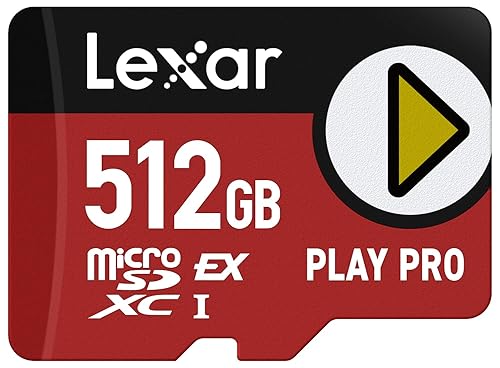
Fast Reads at 512GB
Lexar Play Pro microSD Express Card (512GB)
Bottom line: A solid 512GB choice for fast transfers back to internal storage, though it usually costs more than Samsung.
- Fast transfers back to internal storage
- Highest rated read speed on this list
- Good mid-size capacity
- Rated up to 900MB/s read
- Moves games back to internal storage at about 110MB/s
- Backward compatible with UHS-I and UHS-II devices
- Slower copies to the card than SanDisk or ADATA at 512GB
- Usually pricier than Samsung

Fastest Transfers off the Card
PNY microSD Express Card (512GB)
Bottom line: A good 512GB pick for moving games back to internal storage quickly, if you don't mind slower copies onto it.
- Among the fastest transfers back to internal storage
- Often priced well for 512GB
- Heat-dissipating design
- Rated up to 890MB/s read and 810MB/s write
- A1 app performance rating
- Moves games back to internal storage at about 114MB/s
- Slower when copying games onto the card
- May need a firmware update before the Switch 2 recognizes it

Best Officially Licensed 512GB
SanDisk microSD Express Card for Nintendo Switch 2 (512GB)
Bottom line: The officially licensed 512GB pick for buyers who want Nintendo branding with SanDisk speed.
- Officially licensed for Switch 2
- Fast, SanDisk-level performance
- Nintendo-themed design
- Rated up to 880MB/s read
- Copies games to the card at about 88.5MB/s
- Same game load times as other cards
- Pricier than the standard SanDisk 512GB card
- Same performance as the unlicensed version

Best Warranty
Silicon Power microSD Express Card (1TB)
Bottom line: The 1TB card with the best warranty, matching the top 1TB cards on speed.
- 10-year limited warranty
- Fast transfers both ways at 1TB
- Wide operating temperature range
- Rated up to 880MB/s read and 700MB/s write
- 3D TLC NAND rated for 10,000+ insertions
- Operates from 0°C to 70°C
- Lesser-known brand

Lexar at 256GB
Lexar Play Pro microSD Express Card (256GB)
Bottom line: A good 256GB option for Lexar fans, though load times match cheaper cards.
- Same Play Pro line as the 512GB and 1TB picks
- High rated read speed
- Doubles the Switch 2's storage
- Rated up to 900MB/s read and 600MB/s write
- Backward compatible with UHS-I and UHS-II devices
- Works in other microSD devices
- 256GB copy speeds are less proven than larger sizes
- Often costs more than Samsung's 256GB cards

Budget 256GB Alternative
PNY microSD Express Card (256GB)
Bottom line: A budget 256GB alternative that's often cheaper than the big names, though writing large games is slower.
- Often priced below SanDisk at 256GB
- High rated read speed
- Heat-dissipating design
- Rated up to 890MB/s read and 750MB/s write
- A1 app performance rating
- Moves games back to internal storage quickly
- Slower when copying games onto the card
- May need a firmware update before first use
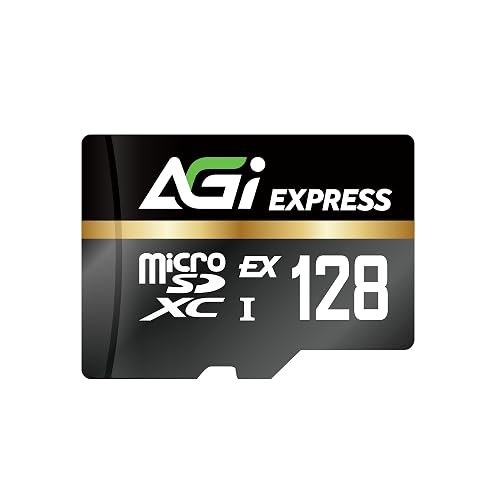
Best 128GB
AGI TF338 microSD Express Card (128GB)
Bottom line: The cheapest way into microSD Express for players who mostly buy physical games.
- Cheapest way into microSD Express
- Fast transfers back to internal storage
- Game load times match larger cards
- Rated up to 800MB/s read and 700MB/s write
- Moves games back at about 115MB/s
- Gets you started with microSD Express
- Slow when copying games onto the card
- 128GB fills up quickly
Table of Contents
Why the Switch 2 Needs a microSD Express Card
The Switch 2 uses fast UFS storage internally, much quicker than the original Switch’s eMMC storage, and Nintendo requires microSD Express cards so games run well no matter where they’re stored. microSD Express cards connect over PCI Express, the same interface SSDs use, and can reach up to 985MB/s, roughly ten times the limit of the UHS-I cards most people already own.
Regular microSD cards still fit in the slot, but the Switch 2 can only use them to view screenshots and videos you took on the original Switch. To store and play games, you need a card with the “EX” logo printed on it. Be careful not to confuse “Express” with “Extreme,” a name some brands use for ordinary microSD cards.
Best microSD Express Card for Nintendo Switch 2: Our Picks in Detail
1
Best Overall
SanDisk microSD Express Card (256GB)
Bottom line: The best microSD Express card for Switch 2 for most people, consistently fast with no performance surprises.
The SanDisk microSD Express card is the one we'd recommend to most Switch 2 owners: fast, consistent and from the biggest name in memory cards.
Pros & Cons
Pros
- Fast, consistent performance with no outliers
- Doubles the Switch 2's built-in storage
- Trusted brand with heat management
- Rated up to 880MB/s read
- Waterproof, shock-proof and temperature-proof
- Backward compatible at UHS-I speeds
Cons
- Costs more than some rivals
- Load times are nearly identical to cheaper cards
Why We Picked It
SanDisk's card loads games consistently with no performance outliers and stays near the top when moving games to and from system storage. On a Switch 2, the 256GB version transfers games to the card at about 81MB/s and back at about 112MB/s, among the best in its capacity. It also includes SanDisk's ThermAdapt heat management and is built to survive water, shocks and temperature swings. At 256GB, it doubles the console's built-in storage, which is enough for most players, and it's the best microSD Express card for Nintendo Switch 2 if you want a safe, fast choice.
Who It's For
A Switch 2 owner who wants a reliable card from a major brand without overthinking it. Games load consistently with no performance outliers, and at 256GB it doubles the console's built-in storage, which is enough for most players.
Specs & Configurations
- Capacity
- 256GB
- Rated speed
- up to 880MB/s read, 650MB/s write
- Switch 2 transfer to card
- 81.0MB/s
- Switch 2 transfer from card
- 112.3MB/s
- Extras
- ThermAdapt heat management, waterproof, shock-proof and temperature-proof
- Backward compatible
- UHS-I speeds in older devices
Get It Now
Check Price on Amazon
2
Best Budget
Samsung P9 Express microSD Card (256GB)
Bottom line: The best budget card, loading games just as fast as pricier cards from a brand you can trust.
The Samsung P9 Express is the best budget microSD Express card, and it's the cheapest way to get a card from a major memory maker.
Pros & Cons
Pros
- Usually one of the cheapest cards from a big brand
- Game load times match pricier cards
- 3-year limited warranty
- Dynamic Thermal Guard helps prevent overheating
- Six types of physical protection
- Backward compatible with microSD UHS-I devices
Cons
- Slower than SanDisk when copying games to the card
- 256GB fills up fast with big digital games
Why We Picked It
On a Switch 2, the P9 Express loads games within a fraction of a second of much pricier cards. It's a little slower when copying games onto the card, at about 74MB/s, but that only matters when you're moving a big game, not when you're playing. Samsung adds Dynamic Thermal Guard to help prevent overheating, six types of physical protection and a 3-year limited warranty.
Who It's For
A budget buyer who wants a brand-name card and does not mind a short wait when moving games. In-game load times land within a fraction of a second of much pricier cards, and the slower copy speed only matters when moving a big game.
Specs & Configurations
- Capacity
- 256GB
- Rated speed
- up to 800MB/s read
- Switch 2 transfer to card
- 74.1MB/s
- Switch 2 transfer from card
- 111.7MB/s
- Extras
- Dynamic Thermal Guard, 6-proof protection
- Warranty
- 3-year limited
Get It Now
Check Price on Amazon
3
Best 1TB
Lexar Play Pro microSD Express Card (1TB)
Bottom line: The card to get if you never want to delete a game again, with some of the fastest transfers of any card.
The Lexar Play Pro is one of the best microSD Express cards overall, and the 1TB version is the best choice if you never want to think about storage again.
Pros & Cons
Pros
- 1TB means you'll rarely delete a game
- Fast transfers to and from the card
- One of the fastest cards overall
- Four times the Switch 2's built-in storage
- Rated up to 900MB/s read
- Backward compatible with UHS-I and UHS-II devices
Cons
- Very expensive
- Most players don't need 1TB
Why We Picked It
At 1TB, the Play Pro gives you four times the Switch 2's built-in storage, enough for a huge digital library. On a Switch 2, it copies games to the card at about 91MB/s and back at about 110MB/s, among the best results of any card, and its game load times match every other card. It's expensive, but if you buy most of your games digitally, it saves a lot of deleting and redownloading.
Who It's For
A digital-first player with a big library who wants room to install everything. At 1TB it saves a lot of deleting and redownloading, and copying games to and from the card runs among the best of any card.
Specs & Configurations
- Capacity
- 1TB
- Rated speed
- up to 900MB/s read, 600MB/s write
- Switch 2 transfer to card
- 90.8MB/s
- Switch 2 transfer from card
- 109.9MB/s
- Backward compatible
- UHS-I and UHS-II devices at UHS-I speeds
Get It Now
Check Price on Amazon
4
Best Official Card
Samsung microSD Express Card for Nintendo Switch 2 (256GB)
Bottom line: The no-guesswork choice for anyone who wants the card Nintendo itself sells.
The Samsung microSD Express Card for Nintendo Switch 2 is the only officially licensed microSD Express card, and it performs well.
Pros & Cons
Pros
- Officially branded for Switch 2
- Made by Samsung
- Easy, no-guesswork choice
- Rated up to 800MB/s read
- Works with microSD UHS-I devices too
- Built for Switch 2 compatibility
Cons
- Only available in 256GB
Why We Picked It
If you want the card Nintendo itself sells alongside the console, this is it. It's made by Samsung, rated at up to 800MB/s read speeds and built for the Switch 2, so there's no question about compatibility. Performance is in line with other Samsung cards, which load games as quickly as any card in real-world use. You're mostly paying for the official branding, so if that doesn't matter to you, Samsung's own P9 Express is usually cheaper.
Who It's For
A buyer who wants the official Nintendo card, or a no-guesswork gift for a new Switch 2 owner. It is made by Samsung, built for the Switch 2, and games load as quickly as with any card in real-world use.
Specs & Configurations
- Capacity
- 256GB
- Rated speed
- up to 800MB/s read
- Branding
- official Nintendo Switch 2 card made by Samsung
- Compatibility
- Nintendo Switch 2 (microSD Express) and microSD UHS-I devices
Get It Now
Check Price on Amazon
5
Best 512GB
SanDisk microSD Express Card (512GB)
Bottom line: Our top pick in a roomier 512GB size, for a comfortable buffer for a growing digital library.
The 512GB SanDisk card is the sweet spot for players who buy a lot of digital games but don't want to pay for 1TB.
Pros & Cons
Pros
- Triples the Switch 2's total storage
- Fast, consistent transfers
- Trusted brand
- Rated up to 880MB/s read
- ThermAdapt heat management
- Waterproof and shock-proof
Cons
- Pricier than Samsung's 512GB card
- Load times match cheaper cards
Why We Picked It
512GB is the size to get if you want a comfortable buffer, and SanDisk's 512GB card is one of the fastest at that size. On a Switch 2, it copies games at about 89MB/s and back at about 111MB/s, with game load times in line with every other card. Combined with the console's 256GB of built-in storage, you'll have plenty of room for a big library.
Who It's For
A digital buyer who wants plenty of space from a trusted brand. Combined with the console's 256GB of built-in storage, it leaves room for a big library, with copy speeds near the top at this size.
Specs & Configurations
- Capacity
- 512GB
- Rated speed
- up to 880MB/s read, 650MB/s write
- Switch 2 transfer to card
- 89.2MB/s
- Switch 2 transfer from card
- 110.9MB/s
- Extras
- ThermAdapt heat management, waterproof, shock-proof
Get It Now
Check Price on Amazon
6
Fastest Transfers to the Card
ADATA Premier Extreme SD7.1 Express (512GB)
Bottom line: The fastest card for moving games onto it, backed by a lifetime warranty.
The ADATA Premier Extreme is the best 512GB card for speed, and it's the one to get if you move games around a lot.
Pros & Cons
Pros
- Fastest card for copying games onto it
- Lifetime warranty
- Good price for 512GB
- PCIe Gen3 x1 NVMe interface
- Rated up to 800MB/s read and 700MB/s write
- Same game load times as other cards
Cons
- Less familiar brand than SanDisk or Samsung
- Load times still match other cards
Why We Picked It
On a Switch 2, the 512GB ADATA card copies games to the card at about 96.5MB/s, faster than any other card here at any capacity. That makes moving large games from internal storage noticeably quicker. Game load times are the same as other cards, and ADATA backs it with a lifetime warranty.
Who It's For
A player who often shuffles games between internal storage and the card. It copies games to the card at about 96.5MB/s, which makes moving large games noticeably quicker, and a lifetime warranty backs it.
Specs & Configurations
- Capacity
- 512GB
- Rated speed
- up to 800MB/s read, 700MB/s write
- Switch 2 transfer to card
- about 96.5MB/s, the fastest of any card here
- Switch 2 transfer from card
- about 108.1MB/s
- Warranty
- lifetime
- Interface
- PCIe Gen3 x1, NVMe
Get It Now
Check Price on Amazon
7
Best Value 1TB
TEAMGROUP APEX microSD Express Card (1TB)
Bottom line: The best value 1TB card, among the fastest at this size, though you should check it right away.
The TEAMGROUP APEX 1TB is one of the fastest 1TB cards for Switch 2, and it's usually a more affordable way to get 1TB than Lexar.
Pros & Cons
Pros
- One of the fastest 1TB cards
- Fast transfers to and from the card
- Usually priced below other 1TB cards
- Rated up to 800MB/s read and 700MB/s write
- Resists water, shocks, X-rays and extreme temperatures
- 1TB room for a massive digital library
Cons
- Less familiar brand
Why We Picked It
On a Switch 2, the APEX 1TB edges out every other 1TB card when copying games onto it, at about 91.4MB/s, and loaded games just as quickly as its rivals. It's built to resist water, shocks, X-rays and extreme temperatures, and it gives you room for a massive digital library. As with any card, check it right away and return it if it isn't recognized.
Who It's For
A digital-first player who wants 1TB of room for a massive library. It copies games onto the card at about 91.4MB/s and loads them just as quickly as other cards, and it is built to resist water, shocks, X-rays and extreme temperatures.
Specs & Configurations
- Capacity
- 1TB
- Rated speed
- up to 800MB/s read, 700MB/s write
- Switch 2 transfer to card
- 91.4MB/s
- Switch 2 transfer from card
- 109.9MB/s
- Interface
- SD 7.1, PCIe Gen3 x1, NVMe 1.3
- Durability
- water, shock, X-ray and temperature resistant
Get It Now
Check Price on Amazon
8
Best Value 512GB
Samsung P9 Express microSD Card (512GB)
Bottom line: The best value 512GB card from a major brand, since slower copy speeds barely affect load times.
The 512GB P9 Express is the value pick for players who want a lot of space from a brand they trust.
Pros & Cons
Pros
- Brand-name 512GB card at a good price
- 3-year limited warranty
- Dynamic Thermal Guard
- Rated up to 800MB/s read
- Twice the space of the 256GB version
- Backward compatible with UHS-I devices
Cons
- Copies games to the card slower than SanDisk or ADATA
- Copy speeds at 512GB are less proven than SanDisk's
Why We Picked It
It brings the same features as the 256GB P9 Express, including Dynamic Thermal Guard, six types of protection and a 3-year limited warranty, with twice the space. In-game load times barely differ between cards, so the P9's slower copy speeds at 256GB rarely matter in practice. It's often one of the cheapest 512GB cards from a major brand.
Who It's For
A budget-minded player who wants 512GB from a brand they trust. In-game load times barely differ between cards, so the slower copy speed rarely matters in practice, and the 3-year limited warranty adds peace of mind.
Specs & Configurations
- Capacity
- 512GB
- Rated speed
- up to 800MB/s read
- Extras
- Dynamic Thermal Guard, 6-proof protection
- Warranty
- 3-year limited
- Backward compatible
- microSD UHS-I devices
Get It Now
Check Price on Amazon
9
Fast Reads at 512GB
Lexar Play Pro microSD Express Card (512GB)
Bottom line: A solid 512GB choice for fast transfers back to internal storage, though it usually costs more than Samsung.
The 512GB Lexar Play Pro is a solid middle option if you like Lexar but don't need a full terabyte.
Pros & Cons
Pros
- Fast transfers back to internal storage
- Highest rated read speed on this list
- Good mid-size capacity
- Rated up to 900MB/s read
- Moves games back to internal storage at about 110MB/s
- Backward compatible with UHS-I and UHS-II devices
Cons
- Slower copies to the card than SanDisk or ADATA at 512GB
- Usually pricier than Samsung
Why We Picked It
Lexar rates the Play Pro at up to 900MB/s reads, the highest on this list, and it moves games back to internal storage on a Switch 2 at about 110MB/s. Copying games onto the 512GB card is a little slower, at about 81MB/s, but game load times are the same as every other card. It's the same top-tier Play Pro line in a more affordable size.
Who It's For
A player who likes the Lexar name and wants a mid-size card without paying for a full terabyte. It sits in the same top-tier Play Pro line, moves games back to internal storage at about 110MB/s, and game load times match every other card.
Specs & Configurations
- Capacity
- 512GB
- Rated speed
- up to 900MB/s read, 600MB/s write
- Switch 2 transfer to card
- 80.8MB/s
- Switch 2 transfer from card
- 110.5MB/s
- Backward compatible
- UHS-I and UHS-II devices at UHS-I speeds
Get It Now
Check Price on Amazon
10
Fastest Transfers off the Card
PNY microSD Express Card (512GB)
Bottom line: A good 512GB pick for moving games back to internal storage quickly, if you don't mind slower copies onto it.
The PNY 512GB card is a good value pick, especially if you move games back to internal storage often.
Pros & Cons
Pros
- Among the fastest transfers back to internal storage
- Often priced well for 512GB
- Heat-dissipating design
- Rated up to 890MB/s read and 810MB/s write
- A1 app performance rating
- Moves games back to internal storage at about 114MB/s
Cons
- Slower when copying games onto the card
- May need a firmware update before the Switch 2 recognizes it
Why We Picked It
On a Switch 2, the 512GB PNY card moves games back to internal storage at about 114MB/s, one of the fastest results of any card. Copying games onto the card is slower, but once a game is installed, it loads as quickly as anything else. PNY adds a heat-dissipating design and an A1 app performance rating.
Who It's For
A value shopper with a Switch 2 who often moves games back to internal storage. Once a game is installed it loads as quickly as anything else, and the heat-dissipating design suits long sessions.
Specs & Configurations
- Capacity
- 512GB
- Rated speed
- up to 890MB/s read, 810MB/s write
- Switch 2 transfer to card
- 80.3MB/s
- Switch 2 transfer from card
- 114.0MB/s
- Extras
- heat dissipation design, A1 app performance rating
Get It Now
Check Price on Amazon
11
Best Officially Licensed 512GB
SanDisk microSD Express Card for Nintendo Switch 2 (512GB)
Bottom line: The officially licensed 512GB pick for buyers who want Nintendo branding with SanDisk speed.
If you want an officially licensed 512GB card, SanDisk's Switch 2 edition is the one to get.
Pros & Cons
Pros
- Officially licensed for Switch 2
- Fast, SanDisk-level performance
- Nintendo-themed design
- Rated up to 880MB/s read
- Copies games to the card at about 88.5MB/s
- Same game load times as other cards
Cons
- Pricier than the standard SanDisk 512GB card
- Same performance as the unlicensed version
Why We Picked It
It's officially licensed for Nintendo Switch 2 and performs just like SanDisk's standard 512GB card. The Super Mario Edition copies games to the card at about 88.5MB/s and back at about 111.5MB/s, with the same game load times as other cards. It's a nice pick for fans who want Nintendo branding, or as a gift.
Who It's For
A Nintendo fan or gift buyer who wants an officially licensed 512GB card. The Super Mario Edition combines Nintendo branding with SanDisk performance, copying games to the card at about 88.5MB/s and back at about 111.5MB/s.
Specs & Configurations
- Capacity
- 512GB
- Rated speed
- up to 880MB/s read, 650MB/s write
- License
- officially licensed for Nintendo Switch 2
- Switch 2 transfer to card
- 88.5MB/s (Super Mario Edition)
- Switch 2 transfer from card
- 111.5MB/s (Super Mario Edition)
Get It Now
Check Price on Amazon
12
Best Warranty
Silicon Power microSD Express Card (1TB)
Bottom line: The 1TB card with the best warranty, matching the top 1TB cards on speed.
The Silicon Power 1TB card is a strong alternative 1TB option with the longest warranty on this list.
Pros & Cons
Pros
- 10-year limited warranty
- Fast transfers both ways at 1TB
- Wide operating temperature range
- Rated up to 880MB/s read and 700MB/s write
- 3D TLC NAND rated for 10,000+ insertions
- Operates from 0°C to 70°C
Cons
- Lesser-known brand
Why We Picked It
On a Switch 2, Silicon Power's 1TB card copies games to the card at about 90.8MB/s and back at about 111MB/s, right alongside the Lexar and TEAMGROUP cards. It uses 3D TLC NAND rated for more than 10,000 insertions, operates from 0°C to 70°C and comes with a 10-year limited warranty, much longer than most cards here.
Who It's For
A player who wants 1TB and a long warranty. It copies games to the card at about 90.8MB/s and back at about 111MB/s, right alongside other 1TB cards, and the 10-year limited warranty is much longer than most cards here.
Specs & Configurations
- Capacity
- 1TB
- Rated speed
- up to 880MB/s read, 700MB/s write
- Switch 2 transfer to card
- 90.8MB/s
- Switch 2 transfer from card
- 111.0MB/s
- Flash
- 3D TLC NAND, rated for 10,000+ insertions
- Warranty
- 10-year limited
Get It Now
Check Price on Amazon
13
Lexar at 256GB
Lexar Play Pro microSD Express Card (256GB)
Bottom line: A good 256GB option for Lexar fans, though load times match cheaper cards.
The 256GB Lexar Play Pro is a good fit if you like the Play Pro line but only need to double your storage.
Pros & Cons
Pros
- Same Play Pro line as the 512GB and 1TB picks
- High rated read speed
- Doubles the Switch 2's storage
- Rated up to 900MB/s read and 600MB/s write
- Backward compatible with UHS-I and UHS-II devices
- Works in other microSD devices
Cons
- 256GB copy speeds are less proven than larger sizes
- Often costs more than Samsung's 256GB cards
Why We Picked It
It's the same Lexar Play Pro design as our 1TB pick, with up to 900MB/s rated reads, in a size that suits most players. Since game load times barely change between cards, the main reason to choose it over the Samsung or SanDisk 256GB cards is brand preference or a good sale price.
Who It's For
A Lexar fan who only needs to double the Switch 2's storage. It brings the same Play Pro design with up to 900MB/s rated reads in a size that suits most players, and game load times match other cards.
Specs & Configurations
- Capacity
- 256GB
- Rated speed
- up to 900MB/s read, 600MB/s write
- Backward compatible
- UHS-I and UHS-II devices at UHS-I speeds
- Use
- Nintendo Switch 2 and other microSD devices
Get It Now
Check Price on Amazon
14
Budget 256GB Alternative
PNY microSD Express Card (256GB)
Bottom line: A budget 256GB alternative that's often cheaper than the big names, though writing large games is slower.
The 256GB PNY card is a reasonable alternative when it's cheaper than the SanDisk or Samsung cards.
Pros & Cons
Pros
- Often priced below SanDisk at 256GB
- High rated read speed
- Heat-dissipating design
- Rated up to 890MB/s read and 750MB/s write
- A1 app performance rating
- Moves games back to internal storage quickly
Cons
- Slower when copying games onto the card
- May need a firmware update before first use
Why We Picked It
PNY's microSD Express cards move games back to internal storage quickly and load games just like the rest, though it's noticeably slower when writing large games onto it. At 256GB, it doubles the console's storage, and PNY's heat-dissipating design and A1 rating round it out. Buy it if it's the cheapest 256GB card in stock.
Who It's For
A budget buyer who finds a 256GB card on sale and wants to double the console's storage. It moves games back to internal storage quickly and loads games like the rest, with a heat-dissipating design and A1 rating.
Specs & Configurations
- Capacity
- 256GB
- Rated speed
- up to 890MB/s read, 750MB/s write
- Extras
- heat dissipation design, A1 app performance rating
- Backward compatible
- UHS-I and UHS-II devices
Get It Now
Check Price on Amazon
15
Best 128GB
AGI TF338 microSD Express Card (128GB)
Bottom line: The cheapest way into microSD Express for players who mostly buy physical games.
The AGI TF338 128GB is the best 128GB card for Switch 2, and it's the cheapest way to get started with microSD Express.
Pros & Cons
Pros
- Cheapest way into microSD Express
- Fast transfers back to internal storage
- Game load times match larger cards
- Rated up to 800MB/s read and 700MB/s write
- Moves games back at about 115MB/s
- Gets you started with microSD Express
Cons
- Slow when copying games onto the card
- 128GB fills up quickly
Why We Picked It
If you mostly buy physical games and only need a little extra room, a 128GB card keeps costs down. The AGI TF338 loads games just as quickly as larger cards on a Switch 2 and moves games back to internal storage at about 115MB/s. Copying games onto it is much slower, at about 39MB/s, which is typical of small cards, so expect longer waits when moving a big game.
Who It's For
A physical-game collector who only needs a little extra room for updates and a few downloads. The 128GB card loads games just as quickly as larger cards and moves them back to internal storage at about 115MB/s, keeping costs down.
Specs & Configurations
- Capacity
- 128GB
- Rated speed
- up to 800MB/s read, 700MB/s write
- Switch 2 transfer to card
- 38.9MB/s
- Switch 2 transfer from card
- 114.6MB/s
Get It Now
Check Price on AmazonDoes the Card You Pick Really Matter?
Not much, at least once a game is installed. Game load times on a Switch 2 are nearly identical across every card:
| Card (on Switch 2) | Copy to card | Copy from card | Diablo IV load | Mario Kart World load |
|---|---|---|---|---|
| ADATA Premier Extreme 512GB | 96.5MB/s | 108.1MB/s | 26.6s | 20.9s |
| TEAMGROUP APEX 1TB | 91.4MB/s | 109.9MB/s | 26.7s | 18.8s |
| Lexar Play Pro 1TB | 90.8MB/s | 109.9MB/s | 26.7s | 18.4s |
| Silicon Power 1TB | 90.8MB/s | 111.0MB/s | 26.7s | 20.7s |
| SanDisk 512GB | 89.2MB/s | 110.9MB/s | 26.7s | 19.7s |
| SanDisk 256GB | 81.0MB/s | 112.3MB/s | 26.2s | 20.5s |
| Lexar Play Pro 512GB | 80.8MB/s | 110.5MB/s | 26.7s | 21.4s |
| PNY 512GB | 80.3MB/s | 114.0MB/s | 26.2s | 19.8s |
| Samsung P9 Express 256GB | 74.1MB/s | 111.7MB/s | 26.3s | 20.5s |
| AGI TF338 128GB | 38.9MB/s | 114.6MB/s | 26.3s | 18.7s |
Every card loaded Diablo IV within about half a second of the others, and Mario Kart World within about three seconds. So simply buy whichever card is in stock for the lowest price in the capacity you want. The real differences show up when you copy games onto the card: the fastest cards move data more than twice as fast as the slowest. Also note that the Switch 2’s built-in storage is consistently faster than any card, so keep your most-played game installed internally if you want the quickest loads. If you carry spare cards, some of our picks for the best Nintendo Switch 2 carrying case have a pocket for them.
How Much Storage Do You Need?
The Switch 2 comes with 256GB of built-in storage. A 256GB card doubles that, which is plenty for most players who buy a few games a year. If you buy most of your games digitally or like to keep everything installed, a 512GB card gives you a comfortable buffer. A 1TB card is only worth it if you have a big digital library and never want to delete anything. If you mostly play physical cartridges, even a 128GB card can be enough for updates and a few downloads. Buying for someone else? Our gifts for Switch 2 owners guide has more ideas that pair well with a card.
How We Picked
We focused on microSD Express cards from established memory brands that work with the Nintendo Switch 2. We compared each card’s official specifications and warranty, real Switch 2 copy speeds and game load times, and long-term reliability, including compatibility problems, fake cards and early failures.
FAQ
What is the best microSD Express card for Nintendo Switch 2?
For most people, the best microSD Express card for Nintendo Switch 2 is the 256GB SanDisk microSD Express card. It’s fast and consistent, comes from a trusted brand and doubles the console’s storage. If you want to save money, the Samsung P9 Express performs almost the same in real games.
Can I use my old microSD card in the Switch 2?
Only for viewing screenshots and videos from the original Switch. You can’t store or play games from a regular microSD card on the Switch 2. For games, you need a microSD Express card.
How can I tell if a card is microSD Express?
Look for the “EX” logo printed on the card. Don’t confuse “Express” with “Extreme,” which some brands use for regular microSD cards. Buy from reputable sellers, since cheap unbranded cards carry a higher risk of being fake.
What’s the largest card the Switch 2 supports?
Nintendo says the Switch 2 supports microSD Express cards up to 2TB, but the largest cards currently on sale are 1TB.
Are microSD Express cards backward compatible?
Yes. They work in older microSD devices but run at UHS-I speeds, with a theoretical maximum of 104MB/s.
How long will a microSD Express card last?
Like any memory card, it isn’t meant for permanent storage. Expect several years of use, and keep anything important backed up. A long warranty, like ADATA’s lifetime or Silicon Power’s 10-year coverage, adds peace of mind.
How do I install a microSD Express card in the Switch 2?
Turn the console off, open the kickstand on the back and slide the card into the small microSD slot underneath, then turn the Switch 2 back on.