

Nintendo’s own Switch 2 Pro Controller and Joy-Con 2 still use potentiometer sticks, the same type that drifted on the original Switch. The best Hall effect controller for Switch 2 swaps those for magnetic Hall effect or TMR sticks while keeping the features you’d miss from Nintendo’s pad, like waking the console, motion controls and HD rumble. These nine range from budget picks to full Pro Controller alternatives, followed by a feature comparison and setup tips.
Best Hall Effect Controller for Switch 2
GameCuki is reader-supported. When you buy through links on our site, we may earn an affiliate commission at no extra cost to you. As an Amazon Associate I earn from qualifying purchases. Learn more.
Our Top Picks

Best Overall
EasySMX S10
Bottom line: The best Hall effect controller for Switch 2 for most players, nearly matching the Pro Controller with HD rumble, amiibo and wake.
- Wakes the Switch 2 and reads amiibo
- HD rumble that adapts Nintendo's feature well
- Mechanical buttons and a swappable D-pad
- Drift-resistant TMR sticks
- Two back buttons you can map without an app
- Home, screenshot and GameChat buttons are cramped
- Softer, shorter button presses won't suit everyone
Best for Customization
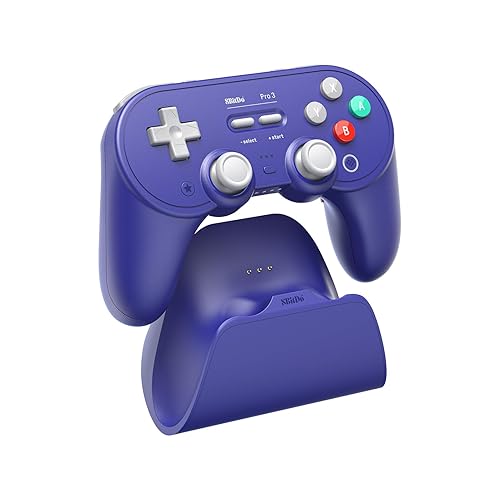
8BitDo Pro 3
Bottom line: The best pick for customization, with six extra inputs and one of the best D-pads around, though its rumble is weak.
- Six extra inputs and three custom profiles
- Magnetic face buttons for Nintendo or Xbox layouts
- Excellent D-pad
- Wake-on-shake for the Switch 2
- Dock holds a 2.4GHz receiver for PC
- Weak rumble
- No amiibo support

Best Pro Controller Feel
Mobapad Chitu2 HD
Bottom line: The controller that feels most like Nintendo's Pro Controller, with quiet TMR sticks, HD rumble and amiibo.
- Feels almost identical to the Switch 2 Pro Controller
- Quiet, smooth TMR sticks
- HD rumble, NFC and a charging dock
- Crisp micro-switch face buttons
- Two back buttons with macros
- Digital triggers, not analog
- Gyro can stutter when you press some buttons

Best Adjustable Sticks
GuliKit TT Pro
Bottom line: The pick if you want adjustable stick tension and four back paddles, though it skips amiibo.
- Adjustable stick tension
- Four back paddles
- Quiet, tactile eight-way D-pad
- Triggers that switch between Hall effect and micro-switch modes
- Wakes the Switch 2
- No amiibo support
- Rumble trails some cheaper pads

Best Xbox-Style Layout
8BitDo Ultimate 2 Bluetooth
Bottom line: The best value Switch 2 controller for Xbox-layout fans, with a charging dock in the box.
- Xbox-style offset sticks
- Charging dock included
- Hall effect triggers with a tactile mode
- TMR sticks for precise turns
- Two back buttons and RGB stick rings
- Needs a firmware update for Switch 2
- Weak rumble
Best for Switch 2 and PC
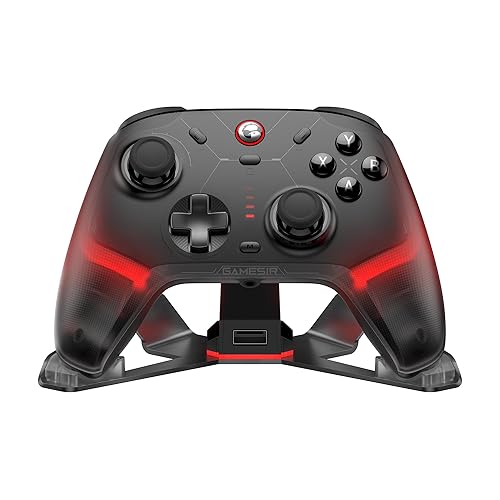
GameSir Cyclone 2
Bottom line: The best choice if you play on Switch 2 and PC, with crisp buttons and fast polling on PC.
- Fast 1000Hz polling on PC
- Crisp micro-switch buttons
- Excellent GameSir Connect software
- Aluminum charging dock that stores the dongle
- Hair-trigger mode and trigger stops
- Only two back buttons
- No amiibo support

Best Value
GameSir Super Nova
Bottom line: A comfortable, well-equipped value pick with a charging dock, though wake setup is finicky.
- Hall effect sticks and triggers
- Rubberized grips and quiet buttons
- Lots of tuning in the GameSir apps
- Charging stand included
- Trigger stops for faster shooting
- Wake setup is finicky
- Manual is thin on details

Best Budget
GameSir Nova Lite
Bottom line: The cheapest way to get drift-resistant sticks on Switch 2, though it has no motion controls.
- Hall effect sticks at a very low price
- Bluetooth plus a 2.4GHz dongle
- Comfortable, Xbox-like shape
- Linear Hall effect triggers
- Turbo function
- No motion controls
- Short battery life

Best Officially Licensed
Hori Wireless Horipad Turbo for Nintendo Switch 2
Bottom line: The officially licensed pick with TMR sticks, as long as you don't need rumble or wake.
- Officially licensed by Nintendo
- TMR sticks and motion controls
- Button lock stops accidental Home presses
- Assignable back buttons and turbo
- Quiet and comfortable
- Can't wake the Switch 2
- No rumble
Table of Contents
Best Hall Effect Controller for Switch 2: Our Picks in Detail
1
Best Overall
EasySMX S10
Bottom line: The best Hall effect controller for Switch 2 for most players, nearly matching the Pro Controller with HD rumble, amiibo and wake.
The EasySMX S10 is the best Hall effect controller for Switch 2 for most people, because it matches the Pro Controller's features and adds drift-resistant sticks.
Pros & Cons
Pros
- Wakes the Switch 2 and reads amiibo
- HD rumble that adapts Nintendo's feature well
- Mechanical buttons and a swappable D-pad
- Drift-resistant TMR sticks
- Two back buttons you can map without an app
Cons
- Home, screenshot and GameChat buttons are cramped
- Softer, shorter button presses won't suit everyone
Why We Picked It
The S10 is the most complete third-party Switch 2 controller you can buy. It's nearly as capable and comfortable as the Switch 2 Pro Controller, and its HD rumble is the best adaptation of Nintendo's feature in any third-party pad. It's one of the few controllers that can wake the Switch 2 from sleep, and it has an NFC reader for amiibo, motion controls and two back buttons you can map without an app. EasySMX added mechanical micro-switch buttons, magnetic faceplates and a swappable D-pad, and the included eight-way D-pad makes diagonal moves in games like Hollow Knight: Silksong much easier. Its 1200mAh battery is rated for up to 17 hours.
Who It's For
You play handheld-style on a Switch 2 and want a pad that does what Nintendo's Pro Controller does, from waking the console to scanning amiibo, with sticks that won't drift. The included eight-way D-pad helps with diagonal moves in platformers like Hollow Knight: Silksong, and the 1200mAh battery is rated for up to 17 hours.
Specs & Configurations
- Sticks
- TMR
- Connection
- Bluetooth, USB-C wired
- Wake Switch 2
- yes
- NFC (amiibo)
- yes
- Rumble
- HD
- Motion controls
- yes
- Back buttons
- 2
- Battery
- 1200mAh, up to 17 hours
- Works with
- Switch 2, Switch, PC, Steam Deck, mobile
Get It Now
Check Price on Amazon
2
Best for Customization
8BitDo Pro 3
Bottom line: The best pick for customization, with six extra inputs and one of the best D-pads around, though its rumble is weak.
The 8BitDo Pro 3 is the most customizable controller here, with more buttons and options than the Pro Controller.
Pros & Cons
Pros
- Six extra inputs and three custom profiles
- Magnetic face buttons for Nintendo or Xbox layouts
- Excellent D-pad
- Wake-on-shake for the Switch 2
- Dock holds a 2.4GHz receiver for PC
Cons
- Weak rumble
- No amiibo support
Why We Picked It
The Pro 3 is one of the best all-round Switch 2 controllers, with TMR sticks, trigger locks, extra buttons and one of the best D-pads on any controller. It has two back buttons and two extra L4/R4 bumpers, and its magnetic ABXY buttons pull off with an included tool so you can switch between Nintendo and Xbox layouts. Its triggers switch between Hall effect and short tactile modes, and its dock holds a 2.4GHz receiver for PC. It wakes the Switch 2 with a shake. The one big weakness is the rumble, which is weak enough that you may turn it off. Compare it with its predecessor in our 8BitDo Pro 3 vs Pro 2 guide.
Who It's For
You like a PlayStation-style layout and enjoy tuning your controls. Two back buttons, L4/R4 bumpers and three profiles put plenty of inputs under your fingers, the magnetic ABXY buttons swap between Nintendo and Xbox layouts, and the dock's 2.4GHz receiver brings it over to your PC.
Specs & Configurations
- Sticks
- TMR with 12-bit ADC
- Connection
- Bluetooth, 2.4GHz (receiver in the dock), USB-C wired
- Wake Switch 2
- yes, wake-on-shake
- NFC (amiibo)
- no
- Rumble
- yes
- Motion controls
- yes
- Extra buttons
- 2 back buttons plus L4/R4 bumpers
- Triggers
- Hall effect, switchable to tactile
- Works with
- Switch 2, Switch, PC, Steam Deck, Apple, Android
3
Best Pro Controller Feel
Mobapad Chitu2 HD
Bottom line: The controller that feels most like Nintendo's Pro Controller, with quiet TMR sticks, HD rumble and amiibo.
The Chitu2 HD is the closest thing to the Switch 2 Pro Controller, but with drift-resistant sticks.
Pros & Cons
Pros
- Feels almost identical to the Switch 2 Pro Controller
- Quiet, smooth TMR sticks
- HD rumble, NFC and a charging dock
- Crisp micro-switch face buttons
- Two back buttons with macros
Cons
- Digital triggers, not analog
- Gyro can stutter when you press some buttons
Why We Picked It
Mobapad built the Chitu2 HD to feel like Nintendo's Pro Controller, and it gets remarkably close. Its curves and back buttons feel nearly identical, and its TMR sticks are whisper-quiet. It has HD rumble from two ALPS linear motors, an NFC reader for amiibo, motion controls and two back buttons that support macros, and it wakes the Switch 2. The face buttons use mechanical micro-switches with a short 0.7mm actuation, so they feel crisp and clicky. A charging dock is included. The floating D-pad is a little louder and mushier than the rest of the controller.
Who It's For
You already love the Pro Controller's shape and want that same feel with sticks that won't drift. The curves and back buttons feel nearly identical, the whisper-quiet TMR sticks suit late-night sessions, and HD rumble, amiibo and wake support come along with a charging dock.
Specs & Configurations
- Sticks
- TMR with liquid silicone rings
- Connection
- Bluetooth, USB-C wired
- Wake Switch 2
- yes
- NFC (amiibo)
- yes
- Rumble
- HD, dual ALPS linear motors
- Motion controls
- yes
- Back buttons
- 2, with macros
- Battery
- 1000mAh, 15 to 20 hours, charging dock included
- Works with
- Switch 2, Switch, PC, mobile
Get It Now
Check Price on Amazon
4
Best Adjustable Sticks
GuliKit TT Pro
Bottom line: The pick if you want adjustable stick tension and four back paddles, though it skips amiibo.
The GuliKit TT Pro lets you tune how its sticks feel, which is rare at this level.
Pros & Cons
Pros
- Adjustable stick tension
- Four back paddles
- Quiet, tactile eight-way D-pad
- Triggers that switch between Hall effect and micro-switch modes
- Wakes the Switch 2
Cons
- No amiibo support
- Rumble trails some cheaper pads
Why We Picked It
Pop off the TT Pro's stick caps and you'll find a screw that adjusts each TMR stick's tension, like on the Xbox Elite Series 2, a rare feature at this price. It also has four removable metal back paddles, triggers that switch between Hall effect and short micro-switch modes and three vibration modes. Its floating eight-way D-pad is one of the best around, with clicks quiet enough not to bother someone reading nearby. It wakes the Switch 2 and comes with keycaps for Switch and PC layouts. Its rumble falls behind some cheaper controllers, and GuliKit's app customization arrived later than the controller itself.
Who It's For
You like a PlayStation-style layout and want sticks that feel exactly how you prefer. A screw under each stick cap sets the tension, four removable metal paddles add inputs, and the quiet floating D-pad keeps clicks low when someone is reading nearby. Keycaps for Switch and PC layouts are included.
Specs & Configurations
- Sticks
- TMR with adjustable tension
- Connection
- Bluetooth, USB-C wired, plus a Hyperlink 2 Bluetooth adapter
- Wake Switch 2
- yes
- NFC (amiibo)
- no
- Rumble
- HD, Super Haptic and rotor modes, adjustable
- Motion controls
- yes
- Back buttons
- 4 removable metal paddles
- Triggers
- Hall effect or micro-switch with trigger stops
- Works with
- Switch 2, Switch, PC, Android, iOS
Get It Now
Check Price on Amazon
5
Best Xbox-Style Layout
8BitDo Ultimate 2 Bluetooth
Bottom line: The best value Switch 2 controller for Xbox-layout fans, with a charging dock in the box.
The 8BitDo Ultimate 2 Bluetooth is the pick for players who prefer Xbox-style offset sticks.
Pros & Cons
Pros
- Xbox-style offset sticks
- Charging dock included
- Hall effect triggers with a tactile mode
- TMR sticks for precise turns
- Two back buttons and RGB stick rings
Cons
- Needs a firmware update for Switch 2
- Weak rumble
Why We Picked It
The Ultimate 2 Bluetooth is the best value Switch 2 controller, and its TMR sticks make turns and drifts in Mario Kart World feel tighter and more precise. Its triggers switch between linear Hall effect and short tactile modes, it has two back buttons and RGB rings around the sticks, and it charges on an included dock. You'll need to update both the controller and its adapter before it works on Switch 2, and 8BitDo's firmware v2.00 added wake-on-shake for the console. Like the Pro 3, its rumble is weak. See how it compares with the other models in our guide to the best 8BitDo controller for Switch 2.
Who It's For
You grew up on Xbox controllers and want that familiar offset-stick layout on your Switch 2. The TMR sticks make turns and drifts in Mario Kart World feel tighter, the triggers switch between Hall effect and tactile modes, and the included dock keeps it charged.
Specs & Configurations
- Sticks
- TMR
- Connection
- Bluetooth, 2.4GHz adapter, USB-C wired
- Wake Switch 2
- yes, wake-on-shake after a firmware update
- NFC (amiibo)
- no
- Rumble
- yes
- Motion controls
- yes (on Switch)
- Back buttons
- 2
- Triggers
- Hall effect, switchable to tactile
- Works with
- Switch 2, Switch, Windows
Get It Now
Check Price on Amazon
6
Best for Switch 2 and PC
GameSir Cyclone 2
Bottom line: The best choice if you play on Switch 2 and PC, with crisp buttons and fast polling on PC.
The GameSir Cyclone 2 is the best choice if you'll use the same controller on Switch 2 and a gaming PC.
Pros & Cons
Pros
- Fast 1000Hz polling on PC
- Crisp micro-switch buttons
- Excellent GameSir Connect software
- Aluminum charging dock that stores the dongle
- Hair-trigger mode and trigger stops
Cons
- Only two back buttons
- No amiibo support
Why We Picked It
It's one of the best TMR controllers for Switch 2, and its micro-switch buttons have a crisp, clicky feel that suggests a much pricier pad. Its triggers switch between Hall effect analog and hair-trigger modes, it has trigger stops, turbo and a gyro, and it comes with an aluminum charging dock that also stores the 2.4GHz dongle. On PC, it runs at 1000Hz over 2.4GHz and wired. GameSir Connect lets you adjust dead zones, trigger sensitivity, vibration, gyro settings and button mapping, and you can switch between three profiles with a button combo.
Who It's For
You split your time between a Switch 2 and a gaming PC and want one controller for both. Crisp micro-switch buttons and TMR sticks feel precise, 1000Hz polling over 2.4GHz keeps PC input quick, and GameSir Connect lets you save three profiles to switch with a button combo.
Specs & Configurations
- Sticks
- TMR
- Connection
- 2.4GHz, Bluetooth, USB-C wired
- Polling rate
- 1000Hz on PC (wired and 2.4GHz)
- NFC (amiibo)
- no
- Rumble
- dual asymmetric motors
- Motion controls
- yes
- Back buttons
- 2
- Triggers
- Hall effect with hair-trigger micro-switch mode
- Works with
- Switch 2, Switch, PC, Steam, Android, iOS
7
Best Value
GameSir Super Nova
Bottom line: A comfortable, well-equipped value pick with a charging dock, though wake setup is finicky.
The GameSir Super Nova packs Hall effect sticks, Hall effect triggers and a charging dock into an affordable controller.
Pros & Cons
Pros
- Hall effect sticks and triggers
- Rubberized grips and quiet buttons
- Lots of tuning in the GameSir apps
- Charging stand included
- Trigger stops for faster shooting
Cons
- Wake setup is finicky
- Manual is thin on details
Why We Picked It
It's one of the best budget Switch 2 controllers. Its Hall effect sticks stay smooth and precise in fast rotations, and its dampened face buttons stay comfortable over long sessions. It has two back buttons, trigger stops for faster shooting, motion controls and a charging stand, and the GameSir Connect app lets you change dead zones, trigger curves and stick response. GameSir advertises wake support for Switch 2, but it doesn't work reliably, so plan on pressing a Joy-Con to turn on your console.
Who It's For
You want Hall effect sticks and triggers, a dock and a comfortable grip for long sessions on Switch 2, without flagship money. The dampened face buttons stay easy on your thumbs, trigger stops speed up shooters, and the GameSir Connect app lets you shape dead zones and trigger curves.
Specs & Configurations
- Sticks
- Hall effect, rated for 5 million cycles
- Connection
- 2.4GHz, Bluetooth, USB-C wired
- Wake Switch 2
- advertised
- NFC (amiibo)
- no
- Rumble
- dual motors
- Motion controls
- yes
- Back buttons
- 2
- Triggers
- Hall effect with trigger stops and hair-trigger mode
- Works with
- Switch 2, Switch, PC, Android, iOS
Get It Now
Check Price on Amazon
8
Best Budget
GameSir Nova Lite
Bottom line: The cheapest way to get drift-resistant sticks on Switch 2, though it has no motion controls.
The GameSir Nova Lite is the cheapest way to get drift-resistant sticks on Switch 2.
Pros & Cons
Pros
- Hall effect sticks at a very low price
- Bluetooth plus a 2.4GHz dongle
- Comfortable, Xbox-like shape
- Linear Hall effect triggers
- Turbo function
Cons
- No motion controls
- Short battery life
Why We Picked It
The Nova Lite is one of the best cheap Switch 2 controllers, with drift-resisting Hall effect sticks and surprisingly solid build quality for the price. It's comfortable to hold and supports a 2.4GHz dongle alongside Bluetooth, which is rare at this level. It also has linear Hall effect triggers and a turbo function. The trade-offs are real, though. There's no gyro for motion controls, and battery life is a middling 10 or so hours. On Switch, you may need to swap the A/B and X/Y layout with the M button combo. For how it stacks up against another budget favorite, see our 8BitDo Ultimate 2C vs GameSir Nova Lite comparison.
Who It's For
You're watching your budget but still want drift-resistant sticks on your Switch 2, or you need a spare controller when a friend comes over. The Xbox-like shape is comfortable to hold, and the 2.4GHz dongle alongside Bluetooth is a bonus at this level.
Specs & Configurations
- Sticks
- Hall effect
- Connection
- Bluetooth, 2.4GHz dongle, USB-C wired
- Rumble
- yes, adjustable
- Motion controls
- no
- Back buttons
- none
- Triggers
- Hall effect, linear
- Battery
- 600mAh, up to 10 hours
- Works with
- Switch 2, Switch, PC, Steam Deck, Android, iOS
Get It Now
Check Price on Amazon
9
Best Officially Licensed
Hori Wireless Horipad Turbo for Nintendo Switch 2
Bottom line: The officially licensed pick with TMR sticks, as long as you don't need rumble or wake.
The Hori Wireless Horipad Turbo is the pick if you want a Nintendo-licensed controller with drift-resistant sticks.
Pros & Cons
Pros
- Officially licensed by Nintendo
- TMR sticks and motion controls
- Button lock stops accidental Home presses
- Assignable back buttons and turbo
- Quiet and comfortable
Cons
- Can't wake the Switch 2
- No rumble
Why We Picked It
It's officially licensed for Switch 2 and uses TMR sticks that feel fantastic. It has a gyroscope and accelerometer for motion controls, a HORI button for turbo, button assignment and profile switching, and a lock switch that disables the Home and capture buttons so you don't press them by accident. GameChat works with it too. It skips a few things, though. It can't wake the Switch 2, it has no rumble and its battery life is tepid. It's quiet and comfortable, which makes it a good second controller.
Who It's For
You want an officially licensed Switch 2 controller with TMR sticks that feel great. A lock switch disables the Home and capture buttons so you don't press them mid-game, assignable back buttons and profile switching add flexibility, and it works with GameChat. Its quiet, comfortable build makes a good second pad.
Specs & Configurations
- Sticks
- TMR
- Connection
- wireless, 33ft range
- Wake Switch 2
- no
- NFC (amiibo)
- no
- Rumble
- no
- Motion controls
- gyroscope and accelerometer
- Back buttons
- yes, assignable
- Battery
- up to 10 hours
- Works with
- Switch 2
Get It Now
Check Price on AmazonSwitch 2 Features Compared
Third-party controllers don’t all support the same Switch 2 features. Here’s how our picks compare on the ones that matter most.
| Controller | Sticks | Wakes Switch 2 | NFC (amiibo) | Rumble | Motion |
|---|---|---|---|---|---|
| EasySMX S10 | TMR | Yes | Yes | HD | Yes |
| 8BitDo Pro 3 | TMR | Yes (shake) | No | Weak | Yes |
| Mobapad Chitu2 HD | TMR | Yes | Yes | HD | Yes |
| GuliKit TT Pro | TMR | Yes | No | Standard | Yes |
| 8BitDo Ultimate 2 Bluetooth | TMR | Yes (shake, after update) | No | Weak | Yes |
| GameSir Cyclone 2 | TMR | Not listed | No | Standard | Yes |
| GameSir Super Nova | Hall effect | Advertised, unreliable | No | Standard | Yes |
| GameSir Nova Lite | Hall effect | Not listed | No | Standard | No |
| Hori Horipad Turbo | TMR | No | No | None | Yes |
Hall Effect vs. TMR Sticks
Traditional potentiometer sticks read their position with parts that physically rub together, and as those parts wear down, the stick starts registering movement on its own. That’s stick drift. Hall effect and TMR (tunneling magnetoresistance) sticks use magnets and sensors instead, so there’s no physical contact to wear out.
Both resist drift. TMR is the newer of the two, and makers say it’s more precise and uses less power, which is why most new controllers on this list use it. It’s now the gold standard for sticks that are both drift-resistant and very precise. Hall effect sticks are still a big step up from potentiometers and are common on budget controllers like the Nova Lite.
Why the Switch 2 Pro Controller Isn’t on This List
Nintendo’s Switch 2 Pro Controller is excellent, with great build quality, the new HD Rumble 2, amiibo support, a headphone jack and native wake. But it, like the Joy-Con 2, uses potentiometer sticks rather than Hall effect or TMR. That means it could develop drift over time, as many original Switch controllers did. If drift is your main worry, every controller above is a safer long-term bet.
How to Connect a Controller to Switch 2
- On the Switch 2 home screen, open Controllers.
- Select Change Grip/Order.
- Put your controller in pairing mode. Each third-party controller has its own button combo, so check its manual, and make sure it’s in Switch mode if it has a mode switch.
- Wait for the controller to appear and connect.
To make wake-from-sleep work, some controllers need one extra step the first time. With the EasySMX S10, for example, you remove and reattach a Joy-Con within 20 seconds after pairing to activate wake-up. 8BitDo controllers need the latest firmware before they connect to Switch 2 at all.
FAQ
What is the best Hall effect controller for Switch 2?
The EasySMX S10 is our top pick. It has TMR sticks and covers nearly every Pro Controller feature, including wake from sleep, HD rumble, motion controls and amiibo support.
Does the Switch 2 Pro Controller have Hall effect sticks?
No. The Switch 2 Pro Controller and the Joy-Con 2 both use potentiometer sticks, not Hall effect or TMR.
Can third-party controllers wake the Switch 2?
Some can. The EasySMX S10, Mobapad Chitu2 HD, GuliKit TT Pro and 8BitDo Pro 3 can wake the console, and the 8BitDo Ultimate 2 Bluetooth can after a firmware update. The Hori Horipad Turbo can’t.
Is TMR better than Hall effect?
Both use magnets to avoid stick drift. TMR is newer and more precise, but a good Hall effect stick is still far more durable than a traditional potentiometer stick.
Do Switch 2 controllers work on PC?
Most third-party Switch 2 controllers also work on PC over Bluetooth, a 2.4GHz dongle or a USB-C cable. The official Switch 2 Pro Controller currently can’t be used on PC.