GameCuki is reader-supported. When you buy through links on our site, we may earn an affiliate commission at no extra cost to you. As an Amazon Associate I earn from qualifying purchases. Learn more.
Sound quality is only half the story on Switch 2. Nintendo’s own support pages list real limits on Bluetooth audio, including no Bluetooth microphones and a cap on wireless controllers, so the best headset for Nintendo Switch 2 is one whose connection works around them. A USB-C wireless dongle, a 3.5mm cable or Bluetooth each changes what you can do in handheld mode, in TV mode and in GameChat.
To build this list, we compared Switch 2-compatible headsets from Turtle Beach, SteelSeries, Razer, HyperX, Corsair, PowerA, Audeze and Astro, read owner reviews, and checked Nintendo’s official Switch 2 specs and Bluetooth audio guidance. Below you’ll find 12 picks, a table showing how each one connects to a Switch 2, Nintendo’s Bluetooth rules explained, and tips for handheld and TV mode.
Best Headset for Nintendo Switch 2: Our Picks in Detail

1
Best Overall
Turtle Beach Stealth 500 for Nintendo Switch 2
Bottom line: The best headset for Switch 2 for most players, built and licensed for the console with a cable-free design that survives kids.
For most Switch 2 owners, the Turtle Beach Stealth 500 for Nintendo Switch 2 is the headset to get, because it's built and licensed for the console. Turtle Beach calls it the first officially licensed wireless headset for Switch 2. It uses a low-latency 2.4GHz connection for the console and Bluetooth for your phone, lasts up to 40 hours, and has a flip-to-mute mic and a lightweight floating headband.
Pros & Cons
Pros- Built and licensed for Switch 2
- No cable to yank out of the controller
- Light and comfortable for long sessions
- Low-latency 2.4GHz wireless for Switch 2
- Up to 40 hours of battery with quick charge
- Bluetooth for your phone
- Flip-to-mute mic
Cons- Feels light and plasticky for the price
- Mic is only average
Why We Picked It
The Stealth 500 is built and licensed for Switch 2, so there's no guesswork about compatibility. Its low-latency 2.4GHz connection frees you from cables, which is especially useful with kids who tend to yank wired headsets out of the controller, and Bluetooth handles your phone. Sound is balanced with decent bass for the price, the floating headband keeps it comfortable for long docked sessions, and the 40-hour battery lasts days. It's the best headset for Nintendo Switch 2 for most players.
Who It's For
You play docked on Switch 2 from the couch and want a wireless headset made for the console. The 2.4GHz connection frees you from cables, which helps when kids are around, Bluetooth covers your phone, and the floating headband stays comfortable through long sessions.
Specs & Configurations
- Connection
- low-latency 2.4GHz wireless for Switch 2, Bluetooth for mobile
- Battery
- up to 40 hours, quick charge
- Drivers
- 40mm
- Mic
- omnidirectional, flip-to-mute
- Comfort
- floating headband, over-ear cushions
- Licensing
- officially licensed for Nintendo Switch 2

2
Best for Game and Phone Audio
SteelSeries Arctis Nova 7P Wireless Gen 2
Bottom line: The pick for hearing your game and your phone at once, with sharp directional audio and a battery that lasts all week.
The SteelSeries Arctis Nova 7P Gen 2 lets you hear your game and your phone at once. It mixes 2.4GHz audio from its USB-C dongle with Bluetooth, lasts 50-plus hours, and has a steel frame and more than 200 game presets.
Pros & Cons
Pros- Game and phone audio at the same time
- Sharp directional audio
- Adjustable sidetone and long range
- 50+ hours of battery
- 200+ game presets
- Steel frame with elastic headband
- ClearCast Gen 2 mic with noise rejection
Cons- Default sound needs tuning in the app
- Occasional reliability issues
Why We Picked It
The Arctis Nova 7P Gen 2 is the pick if you want to hear your game and your phone at once. It mixes 2.4GHz audio from its USB-C dongle with Bluetooth, so you can take calls or play music without missing game audio, and it works across Switch, PS5, PC and mobile. Directional audio makes footsteps easy to place, sidetone is adjustable, and the 50-plus-hour battery and steel frame round out a very complete package.
Who It's For
You want game audio and your phone in your ears at once. The dongle handles game sound and Bluetooth handles calls or music, so nothing interrupts the match. It works across Switch, PS5, PC and mobile, which suits anyone who moves between a Switch 2 and a PS5 or PC.
Specs & Configurations
- Connection
- 2.4GHz USB-C dongle (USB-A adapter included) and Bluetooth at the same time
- Battery
- 50+ hours, USB-C fast charge
- Audio
- 200+ game presets, 360° Spatial Audio support
- Mic
- ClearCast Gen 2 with noise rejection
- Build
- steel frame, elastic headband, memory foam

3
Best Multi-Platform Wireless
SteelSeries Arctis Nova 5P Wireless
Bottom line: A great all-rounder if your headset needs to cover more than the Switch, with a 60-hour battery and a clear mic.
The SteelSeries Arctis Nova 5P Wireless is a great pick if your headset needs to cover more than the Switch. SteelSeries lists Switch alongside PlayStation, PC and Meta Quest for its compact USB-C dongle, it lasts up to 60 hours, and a tap switches it to Bluetooth for a call or music. It also includes a USB-C to USB-A extension cable for USB-A ports.
Pros & Cons
Pros- Comfortable and durable
- 60-hour battery
- Clear retractable mic with mic monitoring
- Bluetooth quick-switch
- 100+ game presets in the Arctis Nova 5 app
- Volume wheel with hard stops
- Fast charge gives 6 hours in 15 minutes
Cons- No active noise cancellation
- Clamping force can be tight
Why We Picked It
The Arctis Nova 5P is a great all-rounder if your headset needs to cover more than the Switch. It's comfortable and durable enough to survive drops, the 60-hour battery means you rarely think about charging, and a tap switches between the USB-C dongle and Bluetooth for calls. The retractable mic sounds clear, and practical touches like mic monitoring and a volume wheel with hard stops make everyday use easy.
Who It's For
You game on a Switch, PlayStation, PC and phone and want one wireless headset for all of them. The compact USB-C dongle moves between devices, a tap switches to Bluetooth for a call, and the 60-hour battery means you rarely think about charging.
Specs & Configurations
- Connection
- 2.4GHz USB-C dongle, Bluetooth 5.3 (quick-switch)
- Battery
- up to 60 hours, USB-C fast charge (6 hours in 15 minutes)
- Mic
- retractable ClearCast 2.X
- Extras
- 100+ game audio presets in the Arctis Nova 5 app, on-ear controls
- In the box
- USB-C to USB-A dongle extension cable
- Works with
- PlayStation, PC, Switch, Meta Quest, phones and tablets

4
Best Value Wireless
SteelSeries Arctis Nova 3P Wireless
Bottom line: The best value wireless pick, light and comfortable enough for younger players, with a battery that lasts for days.
The SteelSeries Arctis Nova 3P Wireless gives you SteelSeries quality for less. It weighs just 260 g, connects through a multi-platform USB-C dongle or Bluetooth, lasts up to 40 hours, and offers more than 200 game presets, including Fortnite and Minecraft, in its phone app.
Pros & Cons
Pros- Very light and comfortable
- Long battery life
- Easy to connect by dongle or Bluetooth
- Weighs just 260 g
- Dual-hinge design
- Fast charge, 15 minutes for up to 9 hours
- 200+ game presets in the Arctis Companion app
Cons- Occasional interference and dropouts
- Sound needs EQ for music
Why We Picked It
The Arctis Nova 3P delivers SteelSeries comfort and features for less. At 260 g it's one of the lightest headsets here and comfortable even on smaller heads, the battery lasts up to 40 hours, and it connects easily by USB-C dongle or Bluetooth. Game presets for titles like Fortnite and Minecraft make it a good fit for younger players.
Who It's For
You are a younger player or a parent shopping for one, on a budget. At 260 g it stays comfortable on smaller heads, the dongle or Bluetooth connects easily, and game presets for titles like Fortnite and Minecraft make setup simple.
Specs & Configurations
- Connection
- multi-platform USB-C 2.4GHz dongle, Bluetooth
- Battery
- up to 40 hours, fast charge (15 minutes for up to 9 hours)
- Weight
- 260 g, dual-hinge design
- Audio
- 200+ game presets in the Arctis Companion app
- Works with
- PC, PlayStation, Switch, handhelds, phones and tablets

5
Best for Comfort
Razer Barracuda X Chroma
Bottom line: The most comfortable headset here for all-day sessions, gentle on sensitive skin with a battery that keeps going.
The Razer Barracuda X Chroma is built for long, comfortable sessions. It weighs 285 g, has breathable memory foam cushions and swiveling earcups, and its SmartSwitch dual wireless connects to 2.4GHz and Bluetooth devices at the same time.
Pros & Cons
Pros- Comfortable for all-day sessions
- Gentle on sensitive skin
- Clear mic
- Breathable memory foam cushions
- Swiveling earcups
- Up to 70 hours of battery
- SmartSwitch dual wireless
Cons- Built-in EQ presets are weak
- Not compatible with Xbox
Why We Picked It
The Barracuda X Chroma is built for long sessions. At 285 g with breathable memory foam cushions and swiveling earcups, it's comfortable enough to wear for hours without headaches, and gentle on sensitive skin. Its SmartSwitch dual wireless connects 2.4GHz and Bluetooth at the same time, the battery is rated for up to 70 hours, and the mic is clear enough for calls and meetings.
Who It's For
You play for hours at a time and put comfort first. At 285 g with breathable cushions and swiveling earcups, it stays easy on your head and sensitive skin, and the clear mic handles game chat as well as work calls and meetings. Dual wireless keeps your phone connected.
Specs & Configurations
- Connection
- 2.4GHz and Bluetooth at the same time (SmartSwitch)
- Battery
- up to 70 hours
- Weight
- 285 g, swiveling earcups
- Drivers
- TriForce 40mm
- Mic
- detachable HyperClear cardioid
- Works with
- PC, Mac, PlayStation, Nintendo Switch, mobile (not Xbox)

6
Best Battery Life
HyperX Cloud III S Wireless
Bottom line: The headset that can go weeks between charges, with settings that follow you across devices.
The HyperX Cloud III S Wireless has the longest battery life on this list, rated for up to 120 hours on its 2.4GHz dongle. Its USB-C dongle comes with a USB-A adapter. It has an aluminum frame and memory foam, and uses a detachable boom mic or a built-in mic.
Pros & Cons
Pros- Up to 120 hours on 2.4GHz
- Settings save to the headset
- Comfortable aluminum frame
- Up to 200 hours on Bluetooth
- Detachable boom mic with mute LED
- Angled 53mm drivers
- Low clamping force
Cons- Switching modes isn't seamless
- Software can be finicky
Why We Picked It
The Cloud III S Wireless has the longest battery life on this list, rated for up to 120 hours on its 2.4GHz dongle, so it can go weeks between charges. Settings save to the headset and carry across devices, including PS5 and Switch 2, and the aluminum frame with low clamping force stays comfortable on larger heads. Its USB-C dongle comes with a USB-A adapter.
Who It's For
You hate charging, especially when playing handheld on the go. The battery goes weeks between charges, settings save to the headset and follow you between Switch 2, PS5 and other devices, and the aluminum frame stays comfortable on larger heads.
Specs & Configurations
- Connection
- USB-C or USB-A 2.4GHz dongle, Bluetooth
- Battery
- up to 120 hours (2.4GHz), up to 200 hours (Bluetooth)
- Drivers
- angled 53mm
- Mic
- detachable boom with mute LED, plus built-in mic
- Build
- aluminum frame, memory foam
- Works with
- PS5, PS4, Switch, PC, Mac, mobile (not Xbox)

7
Best Premium
Audeze Maxwell 2
Bottom line: The premium pick for the most detailed sound, if you don't mind a heavier headset.
The Audeze Maxwell 2 is for Switch 2 owners who want premium sound. It lists Switch among its platforms, lasts up to 80 hours, and connects through a low-latency USB dongle, Bluetooth with LE Audio and LDAC, or a cable.
Pros & Cons
Pros- Excellent sound separation and detail
- Up to 80 hours of battery
- Solid metal build
- SLAM technology for spatial immersion and bass
- Low-latency USB dongle
- Bluetooth 5.3 with LE Audio and LDAC
- Simultaneous USB and Bluetooth audio
Cons- Heavy for long sessions
- Light bass, and some units hiss
Why We Picked It
The Maxwell 2 is for players who want the most detailed sound. Footsteps, gunfire and voice chat stay clearly separated even in chaotic fights, the 80-hour battery lasts weeks, and the metal build feels premium. It connects through a low-latency USB dongle, Bluetooth with LE Audio and LDAC, or a cable.
Who It's For
You want the most detailed sound for your Switch 2 and also play on PC or PlayStation. Footsteps, gunfire and voice chat stay clearly separated, the battery lasts weeks, and the metal build feels solid at a desk.
Specs & Configurations
- Connection
- USB low-latency dongle, Bluetooth 5.3 (LE Audio, LDAC), wired
- Battery
- up to 80 hours
- Audio
- SLAM technology for spatial immersion and bass
- Extras
- simultaneous USB and Bluetooth audio, Auracast multipoint
- Works with
- PC, PlayStation, Mac, Switch
8
Best for Multiple Consoles
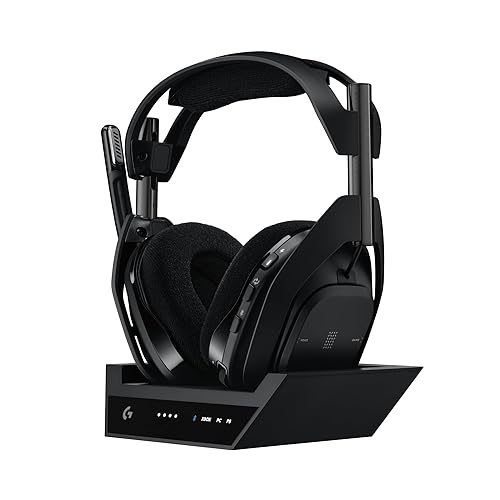
Astro A50 X
Bottom line: The best headset if your Switch 2 shares a TV with other consoles, switching between them from the earcup.
If your Switch 2 shares a TV with other consoles, the Astro A50 X keeps one headset for all of them. Its PLAYSYNC base station lists Switch/Switch 2 alongside Xbox, PS5 and PC, passes through HDMI 2.1 video, and switches systems with a button on the headset.
Pros & Cons
Pros- Switch consoles from the headset, TV input included
- Light and comfortable
- Excellent mic
- Switch/Switch 2, Xbox, PS5 and PC connected at once
- HDMI 2.1 passthrough
- Magnetic charging dock
- 10-band parametric EQ
Cons- No HDMI input for a PC on the base station
- Built around TV play, not handheld
Why We Picked It
If your Switch 2 shares a TV with other consoles, the A50 X keeps one headset for all of them. Its PLAYSYNC base station connects Switch, Xbox, PS5 and PC at once, passes through HDMI 2.1 video, and switches the TV input and audio with a button on the headset. It's also lighter and more comfortable than many premium headsets, with a mic good enough to rival a desk mic.
Who It's For
Your Switch 2 sits on a TV next to other consoles and you want one headset for the lot. The base station connects them all, passes video through and switches TV input and audio with a button on the earcup. It is a natural fit for docked play.
Specs & Configurations
- Connection
- LIGHTSPEED wireless via base station, Bluetooth for a second device
- PLAYSYNC
- Xbox, PS5, Switch/Switch 2 and PC connected at once
- Video
- HDMI 2.1 passthrough (4K 120Hz)
- Battery
- up to 24 hours (at 78 dB), magnetic charging dock
- Mic
- 48 kHz full-bandwidth

9
Best Budget Wireless
Corsair HS35 v3 Wireless
Bottom line: The cheapest good way to go wireless on Switch 2, with a surprisingly clear mic for the price.
The Corsair HS35 v3 Wireless is a low-cost way to go wireless on Switch 2. It connects through a 2.4GHz dongle, Bluetooth or a cable, lasts up to 30 hours, and has 50mm drivers, a floating headband and a detachable mic.
Pros & Cons
Pros- Very clear mic for the price
- Light and comfortable
- Three ways to connect
- 50mm neodymium drivers
- Floating headband with fabric earpads
- Up to 30 hours of battery
- Detachable omnidirectional mic
Cons- Sound isn't the cleanest
- Not great for competitive positional audio
Why We Picked It
The HS35 v3 Wireless is a low-cost way to go wireless on Switch 2. Its mic is unusually clear for the price, the battery lasts through several sessions a week without a recharge, and you can connect by 2.4GHz dongle, Bluetooth or cable to suit handheld or TV play. It's light and comfortable, too.
Who It's For
You want to go wireless on Switch 2 without a big spend. You can connect by 2.4GHz dongle, Bluetooth or cable to suit handheld or TV play, the battery lasts through several sessions a week, and the mic is clear for chatting with friends.
Specs & Configurations
- Connection
- 2.4GHz dongle, Bluetooth or wired
- Battery
- up to 30 hours
- Drivers
- 50mm neodymium
- Mic
- detachable omnidirectional
- Comfort
- floating headband, fabric earpads
- Works with
- PC, PlayStation, Switch, Mac, mobile (Dolby Atmos on PC only)

10
Best Budget Wired
Turtle Beach Airlite Fit
Bottom line: The simplest, cheapest headset for Switch 2 and an easy gift for kids, with no charging or pairing needed.
The Turtle Beach Airlite Fit is the simplest way to add a headset to a Switch 2. It's officially licensed for Nintendo Switch and also works with Switch 2, plugging in with a cable, with 40mm speakers, a flip-to-mute mic and on-ear volume control.
Pros & Cons
Pros- Good sound and mic for the price
- Light and stays put
- No charging or pairing
- Officially licensed for Nintendo Switch
- Flip-to-mute mic
- On-ear volume control
- Bi-directional mic
Cons- Cable can get yanked out
- Mic isn't built for rough handling
Why We Picked It
The Airlite Fit is the simplest way to add a headset to a Switch 2. It's officially licensed for Nintendo Switch, works with Switch 2, and offers good sound and a clear flip-to-mute mic for very little money. It's light, stays put on smaller heads, and needs no charging or pairing, which makes it an easy gift for kids.
Who It's For
You want an easy headset for a Switch 2, whether for yourself or as a gift for a kid. It plugs in with a cable, so there is no charging or pairing, the light frame stays put on smaller heads, and the flip-to-mute mic keeps chat simple.
Specs & Configurations
- Connection
- wired
- Drivers
- 40mm
- Mic
- bi-directional, flip-to-mute
- Controls
- on-ear volume
- Licensing
- officially licensed for Nintendo Switch, also works with Switch 2

11
Best Themed Headset
PowerA Wired Stereo Headset for Nintendo Switch
Bottom line: A fun pick for fans who want gear that matches their favorite games, with solid sound for the money.
For fans who want their headset to match their games, PowerA's officially licensed wired headset comes in themed designs. This Fortnite version includes a bonus in-game item, and the same headset also comes in Kirby and Pokémon designs. It has 50mm drivers, a detachable mic, a volume slider and a mute button, and needs no charging.
Pros & Cons
Pros- Fun official designs
- Solid sound and mic for the money
- Detachable mic
- Official Nintendo Switch license
- 50mm dynamic drivers
- Volume slider and mic mute on the earcup
- 2-year limited warranty
Cons- All-plastic build feels cheap
- Mic and earcups aren't the toughest
Why We Picked It
PowerA's licensed wired headset is for players who want their gear to match their games. It comes in Fortnite, Kirby and Pokémon designs, offers solid sound and a mic that's fine for chatting with friends, and is light enough to forget you're wearing it. Because it's wired, there's nothing to charge or pair.
Who It's For
You are a Nintendo fan or a parent who wants gear that matches the games. The Fortnite, Kirby and Pokémon designs are fun, the ultra-light frame is easy to forget you are wearing, and the wired connection means nothing to charge or pair.
Specs & Configurations
- Connection
- wired 3.5mm
- Drivers
- 50mm dynamic
- Mic
- detachable flexible boom
- Controls
- volume slider and mic mute on the earcup
- Comfort
- ultra-light frame, breathable over-ear pads, fabric headband
- Licensing
- officially licensed for Nintendo Switch, 2-year limited warranty

12
Best Wired Upgrade
SteelSeries Arctis Nova 1
Bottom line: A worthwhile step up from basic wired headsets, comfortable for hours with clear, detailed sound.
The SteelSeries Arctis Nova 1 is a step up from basic wired headsets. SteelSeries says it works with any device that has a 3.5mm jack, including Switch, and it has adjustable rotating earcups, breathable fabric cushions and on-board volume and mute.
Pros & Cons
Pros- Light and comfortable, even with glasses
- Clear, detailed sound
- Long-lasting ear pads
- Works with PC, Mac, PlayStation, Xbox, Switch and mobile
- Height-adjusting, rotating earcups
- AirWeave cushions
- On-board volume and mute
Cons- Short cable
- Mic is on the weak side
Why We Picked It
The Arctis Nova 1 is a step up from basic wired headsets. It's light, comfortable for hours even with glasses, and its clear, detailed sound makes footsteps and small in-game details easy to hear. It works with anything that has a 3.5mm jack, including the Switch 2 and Pro Controller, and the ear pads hold up for a long time.
Who It's For
You play handheld or with a Pro Controller and want better sound without batteries. It plugs into any 3.5mm jack, the detailed audio makes footsteps and small in-game details easy to hear, and the light, adjustable earcups stay comfortable for hours, including with glasses.
Specs & Configurations
- Connection
- wired 3.5mm
- Audio
- Nova Acoustic System, 360° Spatial Audio support
- Comfort
- ComfortMAX with height-adjusting, rotating earcups and AirWeave cushions
- Mic
- noise-cancelling, AI noise cancelling via Sonar software on PC
- Controls
- on-board volume and mute
- Works with
- PC, Mac, PlayStation, Xbox, Switch, mobile
How Each Headset Connects to Switch 2
| Headset |
Main connection |
Bluetooth |
Battery |
Licensed |
Switch 2 named in listing |
| Turtle Beach Stealth 500 (Switch 2) |
2.4GHz wireless |
For mobile |
Up to 40 hours |
Yes (Switch 2) |
Yes |
| SteelSeries Arctis Nova 7P Gen 2 |
USB-C dongle |
Same time as 2.4GHz |
50+ hours |
Not listed |
Yes (Switch 1/2) |
| SteelSeries Arctis Nova 5P |
USB-C dongle |
Quick-switch |
Up to 60 hours |
Not listed |
No (lists Switch) |
| SteelSeries Arctis Nova 3P |
USB-C dongle |
Yes |
Up to 40 hours |
Not listed |
No (lists Switch) |
| Razer Barracuda X Chroma |
2.4GHz dongle |
Same time as 2.4GHz |
Up to 70 hours |
Not listed |
Yes |
| HyperX Cloud III S Wireless |
USB-C dongle (USB-A adapter) |
Yes |
Up to 120 hours |
Not listed |
No (lists Switch) |
| Audeze Maxwell 2 |
USB dongle |
Yes |
Up to 80 hours |
Not listed |
No (lists Switch) |
| Astro A50 X |
Base station (PLAYSYNC) |
For a second device |
Up to 24 hours |
Not listed |
Yes |
| Corsair HS35 v3 Wireless |
2.4GHz dongle or wired |
Yes |
Up to 30 hours |
Not listed |
No (lists Switch) |
| Turtle Beach Airlite Fit |
Wired |
No |
Wired |
Yes (Switch, works with Switch 2) |
Yes |
| PowerA Wired Stereo Headset |
3.5mm |
No |
Wired |
Yes (Switch) |
Yes |
| SteelSeries Arctis Nova 1 |
3.5mm |
No |
Wired |
Not listed |
No (any 3.5mm device) |
“Not listed” means the listing doesn’t mention Nintendo licensing. “Lists Switch” means the listing names Switch but not Switch 2 specifically, so check the seller’s compatibility notes. Based on listings at the time of writing.
Nintendo’s Bluetooth Audio Rules on Switch 2
Switch 2 can pair Bluetooth headphones, but Nintendo’s support pages list several limits that every buyer should know:
- No Bluetooth microphones: Nintendo says Bluetooth microphones can’t be used, so a Bluetooth headset’s mic won’t work for chat on the console.
- Two wireless controllers max: while a Bluetooth audio device is connected, you can only connect up to two controllers wirelessly.
- Local multiplayer cuts it off: Bluetooth audio disconnects during local wireless communication, such as starting a local wireless multiplayer game.
- One at a time: only one Bluetooth audio device can be connected at a time, though up to 10 can be saved.
- Possible lag: Nintendo notes you may experience audio latency depending on your Bluetooth device.
- How to pair: go to System Settings > Bluetooth Audio > Pair Device, select your headset, then adjust the console volume.
Those limits are about Bluetooth audio. That’s one reason most picks on this list connect to the console through a USB dongle, a base station or a cable, and save Bluetooth for your phone.
Handheld, TV Mode and GameChat Tips
- Two USB-C ports: Nintendo says the Switch 2’s bottom USB-C port is for charging and the dock, while the top port is for accessories, which is where a USB-C dongle goes in handheld mode.
- 3.5mm on the console and Pro Controller: the Switch 2 has a 3.5mm 4-contact (CTIA) headphone jack, and Nintendo’s Switch 2 Pro Controller has a 3.5mm audio jack for headphones and headsets, which helps when you play docked.
- The console’s own mic: Nintendo says the Switch 2 has a built-in microphone with noise cancellation, echo cancellation and auto gain control, and that GameChat’s mic can pick up your voice even from far away. Since a Bluetooth headset’s mic can’t be used, that built-in mic is the alternative.
- Kids and cables: active kids can yank a wired headset’s jack out of the controller, so a wireless headset like the Stealth 500 is often the safer choice.
How to Choose a Switch 2 Headset
Dongle, cable or Bluetooth?
A wireless headset with its own dongle, like the Stealth 500 or Arctis Nova 7P Gen 2, connects through USB rather than Bluetooth, which is what Nintendo’s Bluetooth audio limits cover. A wired headset like the Airlite Fit, PowerA or Arctis Nova 1 is the simplest choice and works with the console and Pro Controller. Bluetooth alone is fine for listening, but its mic won’t work on the console.
Do you want your phone at the same time?
The Arctis Nova 7P Gen 2 and Razer Barracuda X Chroma connect to 2.4GHz and Bluetooth at the same time, while the Arctis Nova 5P switches between them with a tap.
Battery and weight for handheld play
For handheld sessions away from home, the Cloud III S (up to 120 hours), Maxwell 2 (up to 80 hours) and Barracuda X Chroma (up to 70 hours) last longest, while the Arctis Nova 3P is one of the lightest at 260 g.
FAQ
What is the best headset for Nintendo Switch 2?
For most players, the best headset for Nintendo Switch 2 is the Turtle Beach Stealth 500 for Nintendo Switch 2, an officially licensed wireless headset with a 40-hour battery. For game and phone audio at the same time, get the SteelSeries Arctis Nova 7P Gen 2, and on a budget, the wired Turtle Beach Airlite Fit.
Can you use Bluetooth headphones on Switch 2?
Yes. Go to System Settings > Bluetooth Audio > Pair Device. Nintendo notes that Bluetooth microphones can’t be used, only two wireless controllers can connect while Bluetooth audio is on, and Bluetooth audio disconnects during local wireless multiplayer.
Does the Switch 2 have a headphone jack?
Yes. Nintendo lists a 3.5mm 4-contact stereo (CTIA) headphone jack on the console, and the Switch 2 Pro Controller also has a 3.5mm audio jack for headphones and headsets.
Can I use GameChat with a wireless headset?
Nintendo says Bluetooth microphones can’t be used on Switch 2, but the console has its own built-in microphone for GameChat. Wired headsets can plug into the console’s 3.5mm jack or the Switch 2 Pro Controller’s audio jack, which Nintendo says supports headphones and headsets.
Do original Switch headsets work on Switch 2?
Some do. The Turtle Beach Airlite Fit is officially licensed for Nintendo Switch and lists Switch 2 compatibility, and PowerA’s wired headset lists both Switch and Switch 2. Any headset with a standard 3.5mm plug should fit the Switch 2’s jack.
Final Verdict: Which Switch 2 Headset Should You Buy?
How you play decides it. For most people, the officially licensed Turtle Beach Stealth 500 is the one to buy, and the SteelSeries Arctis Nova 5P Wireless is great if you also play on other systems. For value, choose the Arctis Nova 3P. For game and phone audio together, go with the Arctis Nova 7P Gen 2. For comfort, pick the Razer Barracuda X Chroma, and for battery life, the HyperX Cloud III S. Premium buyers should look at the Audeze Maxwell 2, and multi-console households at the Astro A50 X. On a budget, get the wireless Corsair HS35 v3 or the wired Turtle Beach Airlite Fit, while fans will love the themed PowerA headset and the Arctis Nova 1 is a great wired upgrade. Need a new controller too? See our guide to the best 8BitDo controller for Switch 2.

