

Switch 2 only saves a short clip, and streaming straight from the console is not an option, so anything longer needs a box between the dock and your TV. Finding the best capture card for Nintendo Switch 2 is trickier than it was on the first Switch, because the new dock can send 4K at 60 fps or 1440p and 1080p at 120 fps, and a cheap 1080p60 card has to be set up around that. Which resolution do you actually want to record, and do you want a USB box or a card inside your PC? The five below cover both, and the right one depends on that answer.
Best Capture Card for Nintendo Switch 2 in 2026
GameCuki is reader-supported. When you buy through links on our site, we may earn an affiliate commission at no extra cost to you. As an Amazon Associate I earn from qualifying purchases. Learn more.
Our Top Picks

Best Overall
Elgato Game Capture 4K S
Bottom line: It matches the Switch 2 dock's 4K60 and 1440p120 output on both passthrough and capture, and it runs plug and play on Windows, Mac and iPad, which is why it is our default pick.
- Passthrough and capture both reach 4K60 and 1440p120
- Plug and play on Mac and iPad as well as Windows
- 3.5mm input for commentary
- Compact box that travels well
- VRR passthrough
- HDR10 capture is Windows only
- Costs more than 1080p60 cards
- May need Switch 2 setting tweaks for clean footage
Best Internal Card
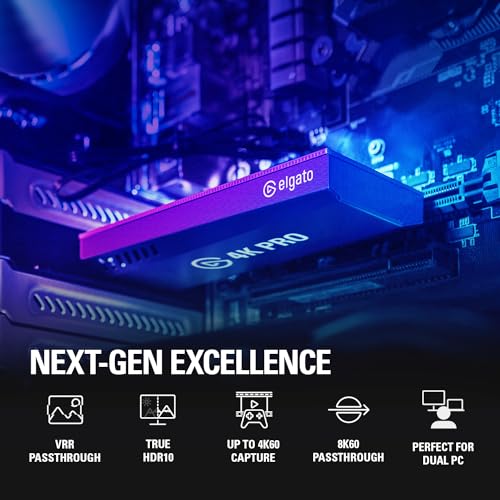
Elgato 4K Pro
Bottom line: If you have a desktop PC with a free slot, this is the highest quality way to record Switch 2 at 4K60 HDR without a USB bottleneck.
- 4K60 HDR capture from a card inside your PC
- HDMI 2.1 in and out with VRR passthrough
- Also suits PS5 and Xbox Series X/S
- No USB cable to manage
- 1080p240 recording
- Desktop PC with a free PCIe slot required
- Windows only
- Overkill if you only record 1080p

Best for Beginners
Elgato Game Capture Neo
Bottom line: A simple USB box that passes 4K60 HDR to your TV while recording clean 1080p60, which is plenty for sharing Switch 2 clips and starting a channel.
- Passes the Switch 2's 4K60 HDR to your TV
- Plug and play on PC, Mac and iPad
- Small and light
- Simplest setup of the group
- Works with OBS and QuickTime without extra drivers
- Records 1080p60 only
- No 4K capture
- Not the card for 120 fps recordings

Best for High Frame Rates
Elgato 4K X
Bottom line: An HDMI 2.1 USB 3.2 Gen 2 box that records up to 1080p240 with VRR passthrough, a good fit for fast games and a future PC or console upgrade.
- HDMI 2.1 ports and a fast USB 3.2 Gen 2 link
- VRR passthrough and HDR10
- Works on Windows, Mac and iPad
- Room to grow beyond Switch 2
- Records up to 1080p240
- Needs a USB 3.2 Gen 2 port to run at full speed
- Pricier than the 4K S
- More card than Switch 2 alone needs

Best Non-Elgato Pick
AVerMedia Live Gamer Ultra S (GC553Pro)
Bottom line: A 4K60 USB-C capture card with HDR and VRR passthrough from AVerMedia, and the pick if you want a strong alternative to Elgato.
- 4K60 capture and HDR/VRR passthrough
- Names Switch 2 as a supported source
- Works on Windows, Mac and iPad
- 5.1 audio capture on Windows
- Works with AVerMedia Streaming Center and OBS
- Smaller ecosystem of guides than Elgato
- Costs more than 1080p60 cards
Table of Contents
What the Switch 2 Dock Outputs and Why It Matters
In TV mode the Switch 2 outputs up to 3840×2160 at 60 fps, or 120 fps at 1920×1080 or 2560×1440, with HDR10 over HDMI 2.0. A capture card sits on the dock’s HDMI port, so it never touches the console’s USB-C ports. Two numbers matter on the box: passthrough, which is what your TV or monitor receives, and capture, which is what lands in your recording. A card can pass 4K60 through to the screen while recording only 1080p60, and that is fine for most clips.
Switch 2 can also be fussy about settings. If you see no audio, a washed-out picture or a blank screen, turning off HDR, 120 Hz or ALLM on the console often clears it up, so expect a little trial and error on first setup. Only enable VRR and HDR on the console if your card supports them.
Best Capture Card for Nintendo Switch 2: Our Picks in Detail
1
Best Overall
Elgato Game Capture 4K S
Bottom line: It matches the Switch 2 dock's 4K60 and 1440p120 output on both passthrough and capture, and it runs plug and play on Windows, Mac and iPad, which is why it is our default pick.
This is the card built around the Switch 2's own output. It captures and passes through 4K60, 1440p120 and 1080p240, so every mode the dock can send is covered without downscaling the picture on your TV.
Pros & Cons
Pros
- Passthrough and capture both reach 4K60 and 1440p120
- Plug and play on Mac and iPad as well as Windows
- 3.5mm input for commentary
- Compact box that travels well
- VRR passthrough
Cons
- HDR10 capture is Windows only
- Costs more than 1080p60 cards
- May need Switch 2 setting tweaks for clean footage
Why We Picked It
Most capture cards were designed before the Switch 2, and you can feel it in how often they ask you to lower the console's output. The 4K S takes the dock's maximum modes as they are, and it does not tie you to a Windows PC, since the same box works on a Mac or an iPad. The analog audio input is handy if you narrate over your play, and a good headset for Nintendo Switch 2 pairs well with it.
Who It's For
You want one card for Switch 2, PS5 and Xbox, and you may record on a laptop, a Mac or an iPad. It takes the dock's maximum modes as they are, and if you carry your setup around, pack it with a Switch 2 carrying case that has room for the dock.
Specs & Configurations
- Type
- External USB-C
- Passthrough/capture
- up to 4K60, 1440p120 or 1080p240
- Extras
- VRR passthrough, HDR10 capture (Windows only)
- Audio
- 3.5mm analog input
- Works with
- Windows, macOS, iPadOS
Get It Now
Check Price on Amazon
2
Best Internal Card
Elgato 4K Pro
Bottom line: If you have a desktop PC with a free slot, this is the highest quality way to record Switch 2 at 4K60 HDR without a USB bottleneck.
A PCIe card lives inside your tower, so there is no extra box on the desk and no USB bandwidth to share. It handles the Switch 2 dock's full range and keeps room for newer consoles later.
Pros & Cons
Pros
- 4K60 HDR capture from a card inside your PC
- HDMI 2.1 in and out with VRR passthrough
- Also suits PS5 and Xbox Series X/S
- No USB cable to manage
- 1080p240 recording
Cons
- Desktop PC with a free PCIe slot required
- Windows only
- Overkill if you only record 1080p
Why We Picked It
This is the quality pick. Capturing 4K60 HDR needs real bandwidth, and an internal card delivers it without the cable and port limits that USB cards live with. HDMI 2.1 in and out also means the card will not hold back a PS5, Xbox Series X or a gaming PC if you add one to the same setup.
Who It's For
You have a desktop PC with a free PCIe slot and want the cleanest possible Switch 2 footage, perhaps for a dual-PC streaming setup. The internal card has no extra box on the desk and no USB bandwidth to share, and it keeps room for newer consoles later.
Specs & Configurations
- Type
- Internal PCIe
- Capture
- up to 4K60 HDR
- Passthrough
- HDMI 2.1 with VRR
- Extras
- HDR10, 1080p240 recording
- Works with
- Windows desktop PC
Get It Now
Check Price on Amazon
3
Best for Beginners
Elgato Game Capture Neo
Bottom line: A simple USB box that passes 4K60 HDR to your TV while recording clean 1080p60, which is plenty for sharing Switch 2 clips and starting a channel.
The Neo keeps things simple. Your TV still gets the full 4K60 HDR picture from the dock, while the recording is a tidy Full HD file.
Pros & Cons
Pros
- Passes the Switch 2's 4K60 HDR to your TV
- Plug and play on PC, Mac and iPad
- Small and light
- Simplest setup of the group
- Works with OBS and QuickTime without extra drivers
Cons
- Records 1080p60 only
- No 4K capture
- Not the card for 120 fps recordings
Why We Picked It
Most Switch 2 clips end up on social media or YouTube at 1080p anyway, so recording at 1080p60 is a sensible trade for a card with fewer settings to manage. It is the easiest way into capturing a console, and it works with OBS, QuickTime and similar apps without extra drivers.
Who It's For
You're starting a channel or just sharing clips on social media or YouTube. Your TV still gets the full 4K60 HDR picture while the recording is a tidy 1080p60 file, and it works on PC, Mac or an iPad over a USB-C cable with OBS or QuickTime.
Specs & Configurations
- Type
- External USB
- Passthrough
- 4K60 HDR
- Capture
- 1080p60
- Works with
- Windows, macOS, iPad (USB 3.0 C-to-C cable)
- Software
- OBS, QuickTime, Elgato apps
Get It Now
Check Price on Amazon
4
Best for High Frame Rates
Elgato 4K X
Bottom line: An HDMI 2.1 USB 3.2 Gen 2 box that records up to 1080p240 with VRR passthrough, a good fit for fast games and a future PC or console upgrade.
This is the higher-end USB option for people who also game on other machines. HDMI 2.1 and a fast USB link make it a card that will not feel dated when your setup changes.
Pros & Cons
Pros
- HDMI 2.1 ports and a fast USB 3.2 Gen 2 link
- VRR passthrough and HDR10
- Works on Windows, Mac and iPad
- Room to grow beyond Switch 2
- Records up to 1080p240
Cons
- Needs a USB 3.2 Gen 2 port to run at full speed
- Pricier than the 4K S
- More card than Switch 2 alone needs
Why We Picked It
The Switch 2 tops out at 120 fps, so the 4K X is more headroom than the console needs today. We still pick it for players who record fast-paced games and plan to add a PS5, Xbox or a high-refresh PC, because one card covers every HDMI source in the room.
Who It's For
Your household or channel covers several machines, such as a Switch 2, a PS5, an Xbox or a high-refresh PC. One USB card with HDMI 2.1 handles every HDMI source in the room and won't feel dated when your setup changes.
Specs & Configurations
- Type
- External USB 3.2 Gen 2
- Interface
- HDMI 2.1 in and out
- Capture
- up to 1080p240
- Extras
- VRR passthrough, HDR10
- Works with
- Windows, macOS, iPadOS
Get It Now
Check Price on Amazon
5
Best Non-Elgato Pick
AVerMedia Live Gamer Ultra S (GC553Pro)
Bottom line: A 4K60 USB-C capture card with HDR and VRR passthrough from AVerMedia, and the pick if you want a strong alternative to Elgato.
AVerMedia's Ultra S is the card to look at if you would rather not buy Elgato. It records 4K60 and passes HDR and VRR through to your display.
Pros & Cons
Pros
- 4K60 capture and HDR/VRR passthrough
- Names Switch 2 as a supported source
- Works on Windows, Mac and iPad
- 5.1 audio capture on Windows
- Works with AVerMedia Streaming Center and OBS
Cons
- Smaller ecosystem of guides than Elgato
- Costs more than 1080p60 cards
Why We Picked It
It matches the 4K S on the headline numbers that matter for the Switch 2's dock, 4K60 capture and 4K60 or 1440p passthrough, and it adds 5.1 audio capture and ultrawide input support for other devices. That gives you a real second option when the Elgato cards are out of stock.
Who It's For
You want 4K60 USB-C capture on Windows, Mac or iPad from a brand other than Elgato. It matches the headline numbers for the Switch 2 dock, 4K60 capture and 4K60 or 1440p passthrough, and adds 5.1 audio capture.
Specs & Configurations
- Type
- External USB 3.2 Gen 1 Type-C
- Capture
- 4K60
- Passthrough
- up to 4K60, 1440p144 or 1080p240 with HDR and VRR
- Works with
- Windows, macOS, iPadOS
- Software
- AVerMedia Streaming Center, OBS
Get It Now
Check Price on AmazonSwitch 2 Capture Card Comparison
| Card | Type | Capture | Works with |
|---|---|---|---|
| Elgato 4K S | External USB-C | Up to 4K60, 1440p120, 1080p240 | Windows, macOS, iPadOS |
| Elgato 4K Pro | Internal PCIe | Up to 4K60 HDR | Windows desktop |
| Elgato Game Capture Neo | External USB | 1080p60 (4K60 HDR passthrough) | Windows, macOS, iPad |
| Elgato 4K X | External USB 3.2 Gen 2 | Up to 1080p240, HDMI 2.1 | Windows, macOS, iPadOS |
| AVerMedia Live Gamer Ultra S | External USB-C | Up to 4K60 | Windows, macOS, iPadOS |
Capture Card for Switch 2 FAQ
What is the Switch 2’s maximum video output?
In TV mode it outputs 4K at 60 fps with HDR10, and it reaches 120 fps at 1080p or 1440p.
Which card is easiest to start with?
The Elgato Game Capture Neo. It passes 4K60 HDR to your TV and records 1080p60 over a simple USB connection.
Which card gives the best quality?
The Elgato 4K Pro records 4K60 HDR from an internal PCIe slot, so it is the top choice if you have a desktop PC.
Can I capture on an iPad?
Yes. The Elgato 4K S supports iPadOS, and the Game Capture Neo works with iPads over a USB 3.0 C-to-C cable.
Does the 4K S support HDR?
Yes, with HDR10 tone mapping, but that feature is only available on Windows.