

Whether you’re replacing a drifting Joy-Con 2 or adding a second pad for Mario Kart World, the best Switch 2 controllers go beyond Nintendo’s own Pro Controller. Switch 2 controllers now come from Nintendo, PowerA, Hori and a long line of third-party brands, and the right one depends on the features you can’t live without. Nine of them are below, every one made for or listed for Switch 2, with third-party picks that use drift-resistant sticks. If drift is your main worry, our guide to the best Hall effect controller for Switch 2 goes deeper, and 8BitDo fans should see the best 8BitDo controller for Switch 2.
Best Switch 2 Controllers in 2026
GameCuki is reader-supported. When you buy through links on our site, we may earn an affiliate commission at no extra cost to you. As an Amazon Associate I earn from qualifying purchases. Learn more.
Our Top Picks
Best Overall
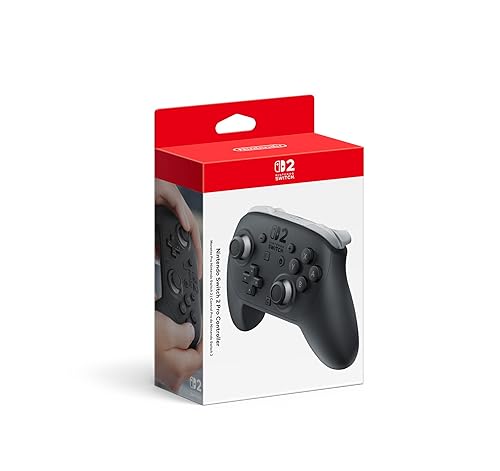
Nintendo Switch 2 Pro Controller
Bottom line: The one Switch 2 controller with every system feature built in, worth the premium unless drift-proof sticks matter more to you.
- Every Switch 2 feature built in
- About 40 hours of battery
- 3.5mm headphone jack for private listening
- HD Rumble 2 and motion controls
- GL and GR back buttons map in system settings
- Not Hall effect or TMR, so sticks may drift over time
- Triggers are digital only, and it doesn't work on PC

Best Third-Party
EasySMX S10
Bottom line: The best third-party Switch 2 controller for most players, with HD rumble, amiibo and wake for far less than Nintendo's pad.
- Wakes the Switch 2 and reads amiibo
- HD rumble close to Nintendo's
- Swappable eight-way D-pad
- Drift-resistant TMR sticks
- Grippy body with two mappable back buttons
- Clicky buttons divide opinion
- Home, screenshot and GameChat buttons are cramped
Best for Customization
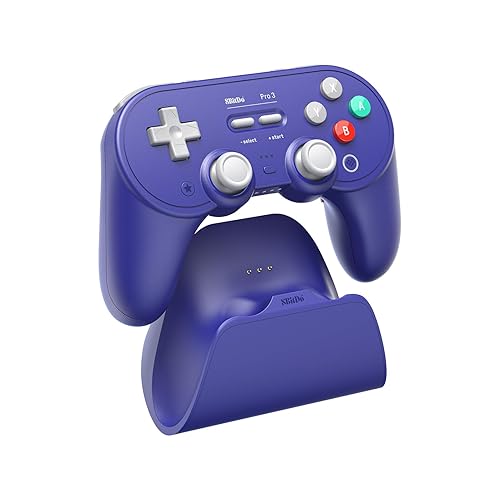
8BitDo Pro 3
Bottom line: The best Switch 2 controller for tinkerers, with extra buttons and one of the best D-pads around, as long as you can live with weak rumble.
- Six extra inputs and three custom profiles
- Magnetic face buttons for Nintendo or Xbox layouts
- Charging dock with a built-in 2.4GHz receiver
- TMR sticks and switchable Hall effect triggers
- PlayStation-style layout comfortable for smaller hands
- Rumble is weak
- No amiibo support

Best Pro Controller Feel
Mobapad Chitu2 HD
Bottom line: The one that feels most like Nintendo's Pro Controller, with quiet TMR sticks, HD rumble and amiibo for much less.
- Curves and button feel close to the Pro Controller
- Near-silent TMR sticks
- HD rumble, NFC and a charging dock
- Two back buttons with macros
- Works with Switch 2, Switch, PC and mobile
- Shoulder buttons are loud
- Home and screenshot buttons are hard to find by feel

Best for Adjustable Sticks
GuliKit TT Pro
Bottom line: A comfortable PlayStation-style pad with adjustable stick tension and four paddles, held back by rumble that trails cheaper rivals.
- Stick tension adjusts with a screw
- Quiet, floating D-pad
- Hall effect or click triggers
- Up to four removable metal back paddles
- Wake-up support on Switch 2
- Rumble falls behind cheaper models
- No amiibo support

Best With a Charging Dock
8BitDo Ultimate 2 Bluetooth
Bottom line: A well-built Pro Controller alternative with a charging dock and TMR sticks, but setup on Switch 2 takes patience.
- TMR sticks and Hall effect triggers
- Integrated charging dock
- Asymmetrical layout like the Pro Controller
- Customizable RGB rings on the sticks
- Up to 30 hours of battery without RGB
- Pairing with Switch 2 is fiddly
- Can't wake the console from sleep

Best Budget Wireless
GameSir Super Nova
Bottom line: A sturdy, customizable wireless pad that costs far less than the big names, though its console wake-up can be unreliable.
- Heavy, well-built feel for the money
- Hall effect sticks and triggers
- Charging dock and deep customization
- Xbox layout with swappable ABXY
- 1000Hz polling suits PC play
- Wake-up may not work reliably
- The D-pad is stiff

Best Wired
PowerA Advantage Wired Controller
Bottom line: The cheapest officially licensed way to get Hall effect sticks and Switch 2 buttons, if you can live with a cable and no motion controls.
- Officially licensed with Hall effect sticks
- C button and 3.5mm headphone jack
- Light and comfortable
- Mappable back buttons
- Detachable 10 ft USB-C cable
- No gyroscope or HD rumble
- Wired only

Best Officially Licensed Wireless
Hori Wireless Horipad Turbo
Bottom line: The licensed wireless pick with TMR sticks, as long as you don't need rumble or wake-up.
- Officially licensed by Nintendo
- TMR sticks and motion controls
- HORI button for turbo and profiles
- Assignable back buttons
- Wireless with a 33 ft range
- Can't wake the Switch 2
- No rumble
Table of Contents
Switch 2 Controllers: Our Picks in Detail
1
Best Overall
Nintendo Switch 2 Pro Controller
Bottom line: The one Switch 2 controller with every system feature built in, worth the premium unless drift-proof sticks matter more to you.
Nintendo's own Pro Controller is the safe default for Switch 2.
Pros & Cons
Pros
- Every Switch 2 feature built in
- About 40 hours of battery
- 3.5mm headphone jack for private listening
- HD Rumble 2 and motion controls
- GL and GR back buttons map in system settings
Cons
- Not Hall effect or TMR, so sticks may drift over time
- Triggers are digital only, and it doesn't work on PC
Why We Picked It
It's the only wireless Switch 2 controller with a 3.5mm headphone jack, and it packs HD Rumble 2, motion controls, amiibo support and a C button for GameChat. The GL and GR back buttons are native to the console, so you can map them to any other button in the system settings without an app. The matte finish and smooth sticks feel premium, and the battery lasts around 40 hours. The trade-off is the price and the sticks. They use potentiometers rather than Hall effect or TMR, so they can wear and drift the way older Nintendo sticks did.
Who It's For
You mostly play docked on the Switch 2 and want every console feature to work with no setup tricks. HD Rumble 2, motion controls, amiibo support and the C button for GameChat are all built in, and about 40 hours of battery keeps it ready for long sessions. The compact grips also suit smaller hands.
Specs & Configurations
- Sticks
- Potentiometer
- Connection
- Wireless (native), USB-C wired
- Wake Switch 2
- yes
- NFC (amiibo)
- yes
- Rumble
- HD Rumble 2
- Motion controls
- yes
- Back buttons
- 2 (GL/GR)
- Battery
- about 40 hours
- Headphone jack
- 3.5mm
- Works with
- Switch 2
Get It Now
Check Price on Amazon
2
Best Third-Party
EasySMX S10
Bottom line: The best third-party Switch 2 controller for most players, with HD rumble, amiibo and wake for far less than Nintendo's pad.
The EasySMX S10 is the third-party controller that gives up the least next to the Pro Controller.
Pros & Cons
Pros
- Wakes the Switch 2 and reads amiibo
- HD rumble close to Nintendo's
- Swappable eight-way D-pad
- Drift-resistant TMR sticks
- Grippy body with two mappable back buttons
Cons
- Clicky buttons divide opinion
- Home, screenshot and GameChat buttons are cramped
Why We Picked It
It's nearly as capable and comfortable as Nintendo's pad, with drift-resistant TMR sticks. It can remotely wake the Switch 2 over Bluetooth, reads amiibo, supports motion controls and has two back buttons you can map without an app. The HD rumble is the best adaptation of Nintendo's feature in a third-party controller, and the swappable eight-way D-pad makes diagonal moves in games like Hollow Knight: Silksong easier. It's grippier than the Pro Controller and the button presses are softer and shorter, which some players love and others don't.
Who It's For
You want nearly all of Nintendo's controller features at a lower price, with sticks that won't drift. It wakes the Switch 2 over Bluetooth, reads amiibo, supports motion controls, and the swappable eight-way D-pad helps with diagonal moves in games like Hollow Knight: Silksong.
Specs & Configurations
- Sticks
- TMR
- Connection
- Bluetooth, USB-C wired
- Wake Switch 2
- yes
- NFC (amiibo)
- yes
- Rumble
- HD
- Motion controls
- yes
- Back buttons
- 2
- Battery
- 1200mAh, up to 17 hours
- Works with
- Switch 2, Switch, PC, Steam Deck, mobile
Get It Now
Check Price on Amazon
3
Best for Customization
8BitDo Pro 3
Bottom line: The best Switch 2 controller for tinkerers, with extra buttons and one of the best D-pads around, as long as you can live with weak rumble.
The 8BitDo Pro 3 gives you more buttons and settings than any other pick here.
Pros & Cons
Pros
- Six extra inputs and three custom profiles
- Magnetic face buttons for Nintendo or Xbox layouts
- Charging dock with a built-in 2.4GHz receiver
- TMR sticks and switchable Hall effect triggers
- PlayStation-style layout comfortable for smaller hands
Cons
- Rumble is weak
- No amiibo support
Why We Picked It
It has TMR sticks, two back buttons and two extra L4/R4 bumpers, and its triggers switch between a Hall effect pull and a short tactile click. The magnetic ABXY buttons pull off with an included tool so you can swap between Nintendo and Xbox layouts, and the stick caps can be swapped for arcade-style nubs. It sits in a PlayStation-style layout and is comfortable for smaller hands. The weak point is rumble, which is poor enough that you may switch it off.
Who It's For
You like a PlayStation-style layout and enjoy remapping inputs, especially for fighting games. Two back buttons plus L4/R4, triggers that switch between Hall effect and a tactile click, and swappable magnetic ABXY buttons and stick caps let you set the pad up your way.
Specs & Configurations
- Sticks
- TMR
- Connection
- Bluetooth, 2.4GHz (receiver in dock), USB-C wired
- Wake Switch 2
- yes, wake-on-shake
- NFC (amiibo)
- no
- Rumble
- yes, weak
- Motion controls
- yes
- Extra buttons
- 2 back buttons plus L4/R4
- Triggers
- Hall effect, switchable to tactile
- Battery
- around 20 hours
- Works with
- Switch 2, Switch, PC, Steam Deck, Apple, Android
4
Best Pro Controller Feel
Mobapad Chitu2 HD
Bottom line: The one that feels most like Nintendo's Pro Controller, with quiet TMR sticks, HD rumble and amiibo for much less.
If you like how Nintendo's pad feels in the hand, the Chitu2 HD is the closest copy.
Pros & Cons
Pros
- Curves and button feel close to the Pro Controller
- Near-silent TMR sticks
- HD rumble, NFC and a charging dock
- Two back buttons with macros
- Works with Switch 2, Switch, PC and mobile
Cons
- Shoulder buttons are loud
- Home and screenshot buttons are hard to find by feel
Why We Picked It
The shape and the soft click of the GL and GR back buttons feel nearly identical to the Switch 2 Pro Controller, and it keeps the features that matter: HD rumble from dual linear motors, an NFC reader for amiibo, motion controls and wake-up. The TMR sticks are close to silent, the build is solid, and a RGB charging dock comes in the box. The floating D-pad is a little louder and mushier than GuliKit's, and the bumpers click louder than the sticks.
Who It's For
You like how Nintendo's Pro Controller feels in the hand and want that experience with drift-resistant sticks and a charging dock. The shape and soft GL and GR clicks feel nearly identical, and HD rumble, amiibo, motion controls and wake-up all carry over.
Specs & Configurations
- Sticks
- TMR
- Connection
- Bluetooth, USB-C wired
- Wake Switch 2
- yes
- NFC (amiibo)
- yes
- Rumble
- HD, dual linear motors
- Motion controls
- yes
- Back buttons
- 2, with macros
- Battery
- 1000mAh, 15 to 20 hours, dock included
- Works with
- Switch 2, Switch, PC, mobile
Get It Now
Check Price on Amazon
5
Best for Adjustable Sticks
GuliKit TT Pro
Bottom line: A comfortable PlayStation-style pad with adjustable stick tension and four paddles, held back by rumble that trails cheaper rivals.
The GuliKit TT Pro lets you tune the feel of the sticks, which is rare at this price.
Pros & Cons
Pros
- Stick tension adjusts with a screw
- Quiet, floating D-pad
- Hall effect or click triggers
- Up to four removable metal back paddles
- Wake-up support on Switch 2
Cons
- Rumble falls behind cheaper models
- No amiibo support
Why We Picked It
Both TMR sticks have adjustable tension, set with a screwdriver that is revealed when you pop off the stick caps, so you can make them fast and light or firmer. It also has a floating eight-way D-pad that is quiet but tactile, triggers that switch between Hall effect analog and a microswitch click, and up to four removable metal back paddles. It supports wake-up on Switch 2 and has a PlayStation-style layout with symmetrical sticks.
Who It's For
You like to tune how your sticks feel and prefer symmetrical sticks in a PlayStation-style layout. Both TMR sticks adjust from fast and light to firmer, the floating eight-way D-pad is quiet but tactile, and up to four removable metal paddles add extra inputs.
Specs & Configurations
- Sticks
- TMR, adjustable tension
- Connection
- Bluetooth, USB-C wired
- Wake Switch 2
- yes
- NFC (amiibo)
- no
- Rumble
- yes, multiple modes
- Motion controls
- yes
- Back buttons
- up to 4 removable paddles
- Battery
- 950mAh
- Works with
- Switch 2, Switch, PC, Android, iOS
Get It Now
Check Price on Amazon
6
Best With a Charging Dock
8BitDo Ultimate 2 Bluetooth
Bottom line: A well-built Pro Controller alternative with a charging dock and TMR sticks, but setup on Switch 2 takes patience.
The Ultimate 2 Bluetooth packs premium parts and a dock for less than Nintendo's pad.
Pros & Cons
Pros
- TMR sticks and Hall effect triggers
- Integrated charging dock
- Asymmetrical layout like the Pro Controller
- Customizable RGB rings on the sticks
- Up to 30 hours of battery without RGB
Cons
- Pairing with Switch 2 is fiddly
- Can't wake the console from sleep
Why We Picked It
It has TMR sticks with customizable RGB rings, Hall effect triggers you can switch to a tactile click, extra buttons and a dock that charges it when you set it down. The layout is asymmetrical, similar to the Pro Controller. Switch 2 support needs the controller and adapter on the latest firmware, and connecting it can mean a button combination each time you use it. Waking the console depends on the firmware version, so update it first, and the RGB rings drain the battery faster.
Who It's For
You want a dock and plenty of features in a pad with an asymmetrical, Pro Controller style layout, and you're comfortable with a pairing routine on the latest firmware. TMR sticks with RGB rings, switchable Hall effect triggers and a dock that charges it when you set it down round out the package.
Specs & Configurations
- Sticks
- TMR with RGB rings
- Connection
- Bluetooth, 2.4GHz, USB-C wired
- Wake Switch 2
- depends on firmware
- NFC (amiibo)
- no
- Rumble
- yes
- Motion controls
- yes
- Triggers
- Hall effect, switchable to tactile
- Battery
- up to 30 hours without RGB
- Works with
- Switch 2, Switch, Windows
Get It Now
Check Price on Amazon
7
Best Budget Wireless
GameSir Super Nova
Bottom line: A sturdy, customizable wireless pad that costs far less than the big names, though its console wake-up can be unreliable.
The GameSir Super Nova is the budget wireless pad to buy if you also game on PC.
Pros & Cons
Pros
- Heavy, well-built feel for the money
- Hall effect sticks and triggers
- Charging dock and deep customization
- Xbox layout with swappable ABXY
- 1000Hz polling suits PC play
Cons
- Wake-up may not work reliably
- The D-pad is stiff
Why We Picked It
It follows an Xbox layout with a swappable ABXY layout for Switch 2, plus chunky textured grips, Hall effect sticks and triggers with trigger locks, and programmable back buttons. The 1000Hz polling over wired and 2.4GHz suits PC play, and the included dock keeps it charged. It feels heavier and sturdier than many pads at this price. Two weak spots are the stiff D-pad and a wake-up feature that may not work as advertised.
Who It's For
You split your time between Switch 2 and PC on a budget. The Xbox layout with swappable ABXY, chunky textured grips, Hall effect sticks and triggers with trigger locks, programmable back buttons and an included dock give a sturdy, customizable pad.
Specs & Configurations
- Sticks
- Hall effect
- Connection
- Bluetooth, 2.4GHz dongle, USB-C wired
- Wake Switch 2
- advertised, may not work reliably
- NFC (amiibo)
- no
- Rumble
- yes
- Motion controls
- yes
- Triggers
- Hall effect with trigger stops
- Battery
- 1000mAh, up to 18 hours, dock included
- Works with
- Switch 2, Switch, PC, iOS, Android
Get It Now
Check Price on Amazon
8
Best Wired
PowerA Advantage Wired Controller
Bottom line: The cheapest officially licensed way to get Hall effect sticks and Switch 2 buttons, if you can live with a cable and no motion controls.
A cheap, reliable wired pad that still has the new Switch 2 buttons.
Pros & Cons
Pros
- Officially licensed with Hall effect sticks
- C button and 3.5mm headphone jack
- Light and comfortable
- Mappable back buttons
- Detachable 10 ft USB-C cable
Cons
- No gyroscope or HD rumble
- Wired only
Why We Picked It
PowerA's Advantage is a full-size, lightweight gamepad with Hall effect sticks, a good D-pad and responsive buttons and triggers. It keeps the Switch 2 extras: the C button for GameChat, a 3.5mm audio jack, and mappable back buttons you can program mid-game. On-board audio controls adjust headset volume, mute and EQ. It leaves out motion controls and HD rumble, and the build feels more hollow than pricier pads. A wired pad never needs charging, which suits a spare controller for local multiplayer.
Who It's For
You need a cheap, reliable spare for couch multiplayer or a pad that never needs charging. It's full size and lightweight, keeps the C button, the 3.5mm jack and mappable back buttons, and its Hall effect sticks resist drift.
Specs & Configurations
- Sticks
- Hall effect
- Connection
- Wired, detachable 10 ft USB-C cable
- Wake Switch 2
- no
- NFC (amiibo)
- no
- Rumble
- no HD rumble
- Motion controls
- no
- Back buttons
- mappable Advanced Gaming Buttons
- Extras
- C button, on-board audio controls, 3.5mm jack
- Works with
- Switch 2 (officially licensed)
Get It Now
Check Price on Amazon
9
Best Officially Licensed Wireless
Hori Wireless Horipad Turbo
Bottom line: The licensed wireless pick with TMR sticks, as long as you don't need rumble or wake-up.
The Horipad Turbo is the pick if you want a Nintendo-licensed pad with drift-resistant sticks.
Pros & Cons
Pros
- Officially licensed by Nintendo
- TMR sticks and motion controls
- HORI button for turbo and profiles
- Assignable back buttons
- Wireless with a 33 ft range
Cons
- Can't wake the Switch 2
- No rumble
Why We Picked It
It's officially licensed for Switch 2 and uses TMR sticks. A gyroscope and accelerometer give it motion controls, and the HORI button handles turbo, button assignment and profile switching. It skips a few extras: no wake-up, no rumble and only about 10 hours of battery. That makes it a fine second controller rather than a first.
Who It's For
You want a Nintendo-licensed wireless pad with drift-resistant sticks, perhaps as a second controller. TMR sticks, gyroscope and accelerometer motion controls, assignable back buttons and the HORI button for turbo and profile switching cover the essentials.
Specs & Configurations
- Sticks
- TMR
- Connection
- Wireless, 33 ft range
- Wake Switch 2
- no
- NFC (amiibo)
- no
- Rumble
- no
- Motion controls
- gyroscope and accelerometer
- Back buttons
- yes, assignable
- Battery
- up to 10 hours
- Works with
- Switch 2
Get It Now
Check Price on AmazonHow to Choose a Switch 2 Controller
Stick type: potentiometer, Hall effect or TMR
Nintendo’s Switch 2 Pro Controller and Joy-Con 2 use potentiometer sticks, which can wear and drift. Hall effect and TMR sticks use magnets instead, so nothing rubs together, and most third-party picks above use one of them.
Switch 2 features
Not every pad has the full set. Check for wake from sleep, HD rumble, motion controls, amiibo support, the C button for GameChat and the 3.5mm headphone jack. Only Nintendo’s pad has all of them, and the third-party picks above trade a few for a lower price.
Wireless or wired
Wireless pads connect over Bluetooth and some add a 2.4GHz dongle for PC. A wired pad like the PowerA Advantage never needs charging, but the cable adds clutter and doesn’t suit handheld play.
Layout and extra buttons
Asymmetrical sticks like the Pro Controller’s suit Nintendo games, while PlayStation-style symmetrical sticks, as on the GuliKit TT Pro and 8BitDo Pro 3, suit many shooters. Back buttons help you keep your thumbs on the sticks.
Pairing
Open Controllers on the Switch 2 home screen, choose Change Grip/Order, put the controller in pairing mode and wait for it to appear. Some pads need a firmware update or an extra step before they connect or wake the console.
FAQ
What is the best controller for Switch 2?
Nintendo’s Switch 2 Pro Controller is the best overall because it has every console feature. The EasySMX S10 is the best third-party alternative.
What controllers can you use with Switch 2?
Many Switch controllers work, but pads built to attach to the original Switch won’t, since the dimensions and attachment method are different. Check that a listing names Switch 2.
Are Switch 2 controllers multiplatform?
Mostly on PC. Most third-party pads work there over Bluetooth, 2.4GHz or USB-C, but they rarely work on Xbox or PlayStation consoles, and the Switch 2 Pro Controller can’t be used on PC.
Can I use a Switch 2 controller in handheld mode?
Yes. Controllers stay connected in handheld mode, which helps when the console is propped on a table.
Is the Joy-Con 2 a good controller?
Yes, with HD Rumble and mouse controls, but they’re small for long sessions and use potentiometer sticks that may drift.