GameCuki is reader-supported. When you buy through links on our site, we may earn an affiliate commission at no extra cost to you. As an Amazon Associate I earn from qualifying purchases. Learn more.
The best game controller for Mac is one that macOS recognizes without hacks, so it works in Apple Arcade, games from the App Store and Mac games on Steam. Apple officially supports several Xbox and PlayStation controllers, and some third-party makers now list macOS support too, but not every feature carries over to a Mac.
To build this list, we checked Apple’s, Sony’s and 8BitDo’s official compatibility pages, compared popular controllers on Amazon that list Mac or Apple support, and read owner reviews from people using them on MacBooks, Mac minis and other Apple devices. Below you’ll find 7 picks, a Mac compatibility table and Apple’s pairing steps. Read more about our process on our How We Review page.
Best Game Controller for Mac: Our Picks in Detail
1
Best Overall for Mac
Xbox Wireless Controller

Bottom line: Apple officially supports the Xbox Series X and S controller on Mac, and it pairs over Bluetooth in a few steps.
Pros- On Apple's official list of supported controllers
- Simple Bluetooth pairing, according to Apple's steps
- Works across Mac, iPhone, iPad, Xbox and PC
Cons- Runs on AA batteries
- Owners of the previous model report stick drift after months of heavy use
Check Price on Amazon
For most Mac gamers, the Xbox Wireless Controller is the safest choice. Apple lists the Xbox Wireless Controller Series X and Series S among the controllers you can connect to your Apple devices, and Microsoft says it connects over Bluetooth to consoles, PCs, phones and tablets.
Why We Picked It
- Official Apple support: Apple's support page lists the Series X and Series S controllers, along with the Elite Series 2 and Xbox Adaptive Controller.
- Easy to pair: Apple's steps are simple: turn it on, hold the Connect button, then select it in your Mac's Bluetooth settings.
- Modern features: a Share button, a hybrid D-pad, textured grips and a 3.5mm audio jack.
Who It's For
- Most Mac gamers: who want something that just works.
- Apple households: the same controller works with iPhone and iPad.
Who It's Not For
- Anyone who wants a rechargeable battery: it uses AA batteries.
- Heavy players worried about drift: owners of the previous model report stick drift after months of heavy use. If Apple's pairing ever asks for a firmware update, Apple says to follow Microsoft's instructions.
Specs & Configurations
- Mac support
- officially supported by Apple (Xbox Wireless Controller Series X and Series S)
- Connection to Mac
- Bluetooth
- Battery
- AA batteries, up to 40 hours (Microsoft)
- Extras
- Share button, hybrid D-pad, textured grips, 3.5mm audio jack
- Also works with
- Xbox, Windows, iPhone, iPad, Android
2
Best Third-Party Controller
8BitDo Ultimate 2 Wireless
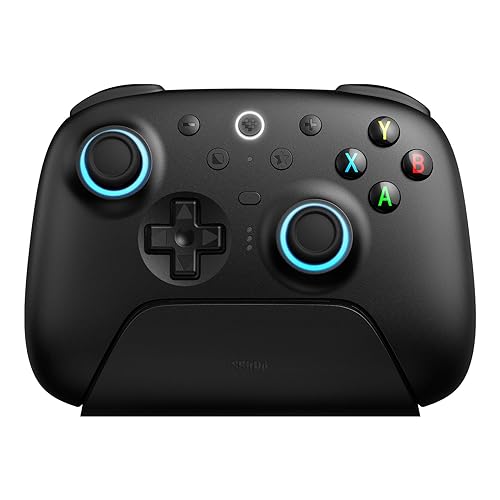
Bottom line: 8BitDo says this TMR-stick controller is officially supported by Apple on Mac, and owners love its features for the price.
Pros- 8BitDo lists official Apple support for Mac, iPhone, iPad, Apple TV and Vision Pro
- TMR sticks and Hall effect triggers that owners call buttery smooth
- Back paddles, extra bumpers and a charging dock
Cons- Requires macOS 26 or later, per 8BitDo
- One owner's PC games didn't recognize it at first
Check Price on Amazon
The 8BitDo Ultimate 2 Wireless is the best third-party option for Mac. 8BitDo says it's officially supported by Apple and lists Mac, iPhone, iPad, Apple TV and Apple Vision Pro, with macOS 26 or later, connecting over Bluetooth.
Why We Picked It
- Official Apple support: 8BitDo lists it as officially supported by Apple.
- Premium features: TMR sticks, triggers that switch between Hall effect and tactile modes, two back paddles and extra bumpers.
- Owner favorite: one owner who considered the Razer Wolverine V3 and ROG Raikiri II says everything feels buttery smooth, and another says it works across Android and iPad.
Who It's For
- Mac gamers who want more buttons: than an Xbox or PlayStation controller offers.
- Multi-device players: who also game on PC with its 2.4GHz dongle.
Who It's Not For
- Macs on older macOS versions: 8BitDo lists macOS 26 or later for Apple support.
- Anyone who won't troubleshoot: one owner had trouble getting their PC games to recognize it at first.
Specs & Configurations
- Mac support
- officially supported by Apple, macOS 26 and later (8BitDo)
- Connection to Mac
- Bluetooth
- Sticks
- TMR
- Triggers
- switchable Hall effect or tactile
- Extra buttons
- 2 back paddles + R4/L4 bumpers
- Extras
- charging dock, 6-axis motion control, rumble
3
Best for PlayStation Fans
Sony DualSense
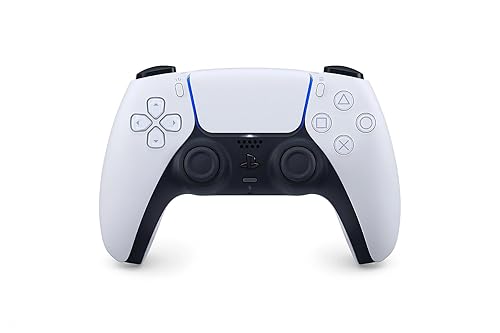
Bottom line: Sony lists Mac support for the DualSense from macOS Big Sur 11.3, though haptic feedback and the built-in mic and speaker don't work on Mac.
Pros- Supported on Macs from macOS Big Sur 11.3, per Sony
- Built-in rechargeable battery
- Owners praise its comfort and easy charging
Cons- Sony says haptic feedback, mic and speaker aren't compatible with Mac
- Headset jack needs a wired connection on Mac
Check Price on Amazon
If you prefer PlayStation's layout, the DualSense works on Mac from macOS Big Sur 11.3, over Bluetooth or a USB-C cable. Just know that some of its signature features don't come along.
Why We Picked It
- Broad Mac support: Sony lists macOS Big Sur 11.3, the oldest macOS version stated for any pick on our list.
- Rechargeable: owners like how easily it charges and how long the battery lasts.
- Comfortable: owners say it feels comfortable with responsive buttons.
Who It's For
- PlayStation fans: and Mac owners on older macOS versions.
Who It's Not For
- Players who want the full DualSense experience: Sony says haptic feedback and the built-in mic and speaker aren't compatible with Mac.
- Wireless headset users: Sony says the headset jack needs a wired connection on Mac.
Specs & Configurations
- Mac support
- macOS Big Sur 11.3 or later (Sony)
- Connection to Mac
- Bluetooth or USB-C
- Not on Mac
- haptic feedback, built-in mic and speaker (Sony)
- Headset jack
- wired connection only on Mac
- Battery
- built-in rechargeable
4
Best for Apple Arcade
SteelSeries Nimbus+

Bottom line: An Apple-licensed Bluetooth controller with a 50+ hour battery that owners use for Apple Arcade on Macs, iPhones and Apple TV.
Pros- One owner says it worked right away with an M4 Mac mini for Apple Arcade
- 50+ hour rechargeable battery
- Apple-licensed design for Apple devices
Cons- One owner says SteelSeries' firmware updater doesn't support Apple silicon Macs
- One owner's controller stopped working after 10 months
Check Price on Amazon
The SteelSeries Nimbus+ is made for the Apple ecosystem. It's Apple-licensed for iPhone, iPad and Apple TV, and owners also use it on Macs, especially for Apple Arcade.
Why We Picked It
- Works on Mac: one owner says it worked right away with their M4 Mac mini for Apple Arcade on macOS Sequoia 15.4, and a game developer uses it for iOS, macOS, iPadOS and tvOS testing.
- Huge battery: SteelSeries rates it for 50+ hours on a charge.
- Great for Apple TV too: one owner says it connects every time to their Apple TV 4K.
Who It's For
- Apple Arcade players: on Mac, iPhone, iPad and Apple TV.
Who It's Not For
- Apple silicon Mac owners who want firmware updates: one owner says SteelSeries' updater doesn't run on Apple silicon, and another had to update the firmware before it stopped locking up.
- Buyers who want proven durability: one owner's controller stopped working after 10 months, and another found that game support varies by developer. A MacBook owner also needed SteelSeries support to reset it before it worked.
Specs & Configurations
- Licensing
- Apple-licensed (made for iOS, iPadOS, tvOS)
- Connection
- Bluetooth
- Battery
- 50+ hours (rechargeable)
- Extras
- iPhone mount, tactile D-pad, clickable sticks
- Firmware
- updated with SteelSeries software
5
Best for Retro and Emulation
8BitDo Pro 3

Bottom line: A PlayStation-style 8BitDo pad with a great D-pad and TMR sticks that 8BitDo lists for macOS 26 and later, over Bluetooth or USB.
Pros- 8BitDo lists macOS support over Bluetooth or USB
- Clicky D-pad that owners love for 2D and indie games
- Swappable ABXY buttons for Nintendo or Xbox layouts
Cons- Requires macOS 26 or later, per 8BitDo
- One owner dislikes the face buttons and rumble
Check Price on Amazon
For retro games and emulators on Mac, the 8BitDo Pro 3 is our pick. It puts the D-pad in the main position, and 8BitDo lists Mac support on macOS 26 or later over Bluetooth or a USB cable.
Why We Picked It
- Great D-pad: owners describe it as clicky with little wiggle, and some bought it specifically for 2D and indie games.
- Flexible layout: magnetic ABXY buttons swap between Nintendo and Xbox layouts.
- Works across devices: one owner uses it with a PC, a Steam Machine and a Switch 2.
Who It's For
- Emulation and indie fans: on Mac.
Who It's Not For
- Older Macs: 8BitDo lists macOS 26 or later.
- Picky button feel: one owner doesn't like the face buttons and rumble.
Specs & Configurations
- Mac support
- macOS 26 and later (8BitDo)
- Connection to Mac
- Bluetooth or wired USB
- Sticks
- TMR
- Triggers
- switchable Hall effect or micro-switch
- Extra buttons
- 2 back paddles + R4/L4 bumpers
- Extras
- magnetic swappable ABXY, charging dock
6
Best Compact Controller
8BitDo SN30 Pro (Hall Effect)

Bottom line: A pocket-size SNES-style controller with Hall effect sticks that 8BitDo lists as officially supported on macOS.
Pros- Compact enough to carry with a MacBook
- Owners report no lag and solid build quality
- Works with Mac, iPhone, iPad, Apple TV and more
Cons- Triggers are digital, not analog
- Small for players with large hands
Check Price on Amazon
If you want a small controller to throw in your laptop bag, the 8BitDo SN30 Pro is a great fit. 8BitDo lists macOS, iPhone, iPad and Apple TV as officially supported, and this version has Hall effect sticks.
Why We Picked It
- Portable: one owner keeps it in a case in their purse, and another uses it with an iPad mini and iPad Air.
- Responsive: one owner reports no lag and solid build quality, and others say the Hall effect sticks feel smooth.
- Lots of devices: one owner says it works with every Steam game they've tried on a Windows laptop.
Who It's For
- MacBook gamers on the go: and retro fans.
Who It's Not For
- Racing games: one owner points out the triggers aren't analog.
- Large hands: one owner recommends it for players with smaller hands.
Specs & Configurations
- Mac support
- macOS officially supported (8BitDo)
- Connection
- Bluetooth or USB-C
- Sticks
- Hall effect
- Battery
- up to 18 hours
- Size
- 144 x 63.5 x 32.5mm
- Extras
- rumble, motion controls, turbo
7
Best Premium Controller
Xbox Elite Series 2 Core

Bottom line: Microsoft's pro controller is on Apple's supported list, with adjustable sticks, trigger locks and a 40-hour rechargeable battery.
Pros- On Apple's list of supported Xbox controllers
- Adjustable-tension sticks and trigger locks
- Up to 40 hours of rechargeable battery
Cons- Back paddles are sold separately in the Core version
- Some owners report face buttons or bumpers failing
Check Price on Amazon
For a premium controller that Apple officially supports, the Xbox Elite Series 2 Core is the one. Apple lists the Xbox Elite Wireless Controller Series 2 on its supported list, and the Core edition keeps the adjustable sticks, trigger locks and long battery life.
Why We Picked It
- Official Apple support: the Elite Series 2 is on Apple's list of supported Xbox controllers.
- Pro adjustments: adjustable-tension sticks and shorter hair trigger locks.
- Rechargeable: up to 40 hours of battery life.
Who It's For
- Serious players: who want pro features on Mac.
Who It's Not For
- Anyone who wants paddles in the box: the Core version leaves them out.
- Buyers who can't easily return: some owners had face buttons or a bumper fail.
Specs & Configurations
- Mac support
- Xbox Elite Wireless Controller Series 2 is on Apple's supported list
- Connection
- Bluetooth (also Xbox Wireless and USB-C)
- Sticks
- adjustable tension
- Triggers
- hair trigger locks
- Battery
- up to 40 hours (rechargeable)
- Extras
- 3 onboard profiles
Mac Compatibility Compared
| Controller |
Mac support source |
macOS requirement |
Connection to Mac |
| Xbox Wireless Controller |
Apple support list |
Not specified |
Bluetooth |
| 8BitDo Ultimate 2 Wireless |
8BitDo (officially supported by Apple) |
macOS 26+ |
Bluetooth |
| Sony DualSense |
Sony |
macOS Big Sur 11.3+ |
Bluetooth, USB-C |
| SteelSeries Nimbus+ |
Owner reports (Apple-licensed for iOS, iPadOS, tvOS) |
Not specified |
Bluetooth |
| 8BitDo Pro 3 |
8BitDo |
macOS 26+ |
Bluetooth, USB |
| 8BitDo SN30 Pro |
8BitDo |
Not specified |
Bluetooth, USB-C |
| Xbox Elite Series 2 Core |
Apple support list (Elite Series 2) |
Not specified |
Bluetooth |
Apple says you need macOS Ventura 13 or later to customize controllers in System Settings. Requirements are based on Apple’s, Sony’s and 8BitDo’s pages at the time of writing.
How to Connect a Controller to a Mac
- Update your Mac and, if the maker offers it, the controller’s firmware. Apple recommends both.
- Put the controller in pairing mode. On an Xbox controller, Apple says to press the Xbox button to turn it on, then hold the Connect button for a few seconds.
- Open Bluetooth settings on your Mac and select the controller from the list of nearby devices.
- Customize it in System Settings under Game Controllers (macOS Ventura 13 or later), according to Apple.
If your Mac says an Xbox controller needs a firmware update, Apple says to follow Microsoft’s instructions for updating it.
How to Choose a Controller for Mac
Check official support first
Controllers on Apple’s supported list, like the Xbox Series X and S controllers and the Elite Series 2, or ones the maker lists for macOS, like the DualSense and 8BitDo picks, are the safest bets.
Check your macOS version
Requirements vary a lot: Sony lists macOS Big Sur 11.3 for the DualSense, while 8BitDo lists macOS 26 or later for the Ultimate 2 Wireless and Pro 3.
Expect some features to be missing
Sony says the DualSense’s haptic feedback and built-in mic and speaker don’t work on Mac. Third-party makers often need their own software for firmware updates, and one Nimbus+ owner found SteelSeries’ updater doesn’t support Apple silicon Macs.
FAQ
What is the best game controller for Mac?
For most people, the best game controller for Mac is the Xbox Wireless Controller, because Apple officially supports the Series X and Series S models and it pairs easily over Bluetooth. For more features, the 8BitDo Ultimate 2 Wireless is officially supported by Apple according to 8BitDo.
Does a PS5 controller work on Mac?
Yes. Sony says the DualSense works on macOS Big Sur 11.3 or later over Bluetooth or USB-C, but haptic feedback and the built-in mic and speaker aren’t compatible with Mac.
Does an Xbox controller work on Mac?
Yes. Apple lists the Xbox Wireless Controller Series X and Series S, the Xbox Wireless Controller with Bluetooth (Model 1708), the Elite Series 2 and the Xbox Adaptive Controller as supported.
What is the best controller for Apple Arcade on Mac?
Any controller on Apple’s supported list works well. The SteelSeries Nimbus+ is popular with Apple Arcade players, and one owner says it worked right away on an M4 Mac mini.
How do I set up a controller on Mac?
Put the controller in pairing mode, open Bluetooth settings on your Mac and select it. To customize buttons, go to System Settings, then Game Controllers, on macOS Ventura 13 or later.
Final Verdict: Which Mac Controller Should You Buy?
All seven picks work on Mac, so the best game controller for Mac depends on your macOS version and how you play. The Xbox Wireless Controller is the safest choice, and the 8BitDo Ultimate 2 Wireless is the best third-party option on recent macOS. PlayStation fans should get the DualSense, Apple Arcade players the SteelSeries Nimbus+, and retro fans the 8BitDo Pro 3 or compact SN30 Pro. For a premium option, the Elite Series 2 Core is on Apple’s supported list. Also playing on PC? See our guide to the best game controller for PC Steam.