

Touch controls are fine for puzzle games, but Apple Arcade action games, emulators and Xbox Cloud Gaming all play better with real buttons. Almost any Bluetooth gamepad will pair, so picking the best controller for iPad is really about how you play: a full-size pad with the iPad on a stand, or a grip that clamps around an iPad mini? Every pick here has official support from Apple or its maker, from Microsoft’s Xbox Wireless Controller to Razer’s Kishi V3 Pro.
Best Controller for iPad in 2026
GameCuki is reader-supported. When you buy through links on our site, we may earn an affiliate commission at no extra cost to you. As an Amazon Associate I earn from qualifying purchases. Learn more.
Our Top Picks

Best Overall
Xbox Wireless Controller
Bottom line: The safest controller for most iPad owners, on Apple's own supported list and comfortable for hours, as long as you don't mind AA batteries.
- On Apple's official supported list
- Pairs in seconds over Bluetooth
- Comfortable, familiar layout
- Long battery life on a pair of AAs
- Hybrid D-pad and textured grips
- Natural match for Xbox Cloud Gaming
- Runs on AA batteries unless you add a rechargeable pack
- Sticks can drift with heavy use
- Audio jack support depends on the game
Best Third-Party Controller
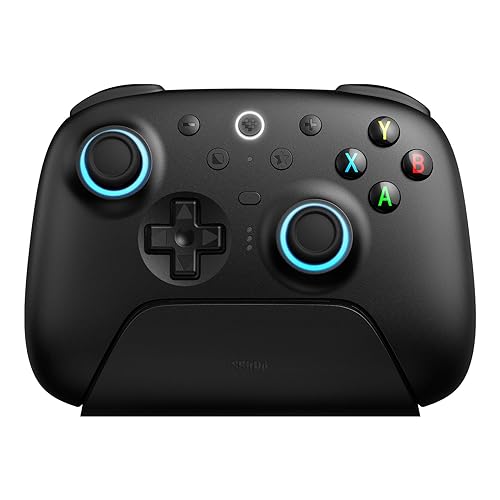
8BitDo Ultimate 2 Wireless
Bottom line: The best third-party controller for iPad, with TMR sticks, switchable triggers, extra buttons and a charging dock, if your iPad runs iPadOS 26 or later.
- TMR sticks resist drift
- Triggers switch between analog and click modes
- Back paddles and extra bumpers
- Charging dock included
- Hybrid Xbox-style layout
- 2.4GHz dongle doubles as a PC controller
- Rumble and 6-axis motion control
- Needs iPadOS 26 or later
- Extra buttons need mapping before games use them
Best for PlayStation Fans
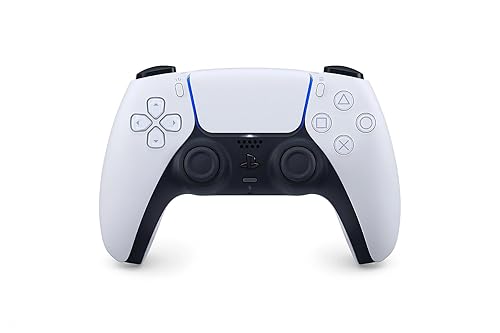
Sony DualSense
Bottom line: The pick for PlayStation fans, on Apple's supported list with a built-in rechargeable battery and the symmetrical layout you already know.
- On Apple's official supported list
- Rechargeable over USB-C
- Pairs automatically when plugged into the iPad with a data cable
- Comfortable and responsive
- Symmetrical stick layout familiar from PlayStation
- Also works with PS5, PC, Mac, iPhone and Android
- Light bar and audio jack support depends on the app
- Symmetrical sticks won't suit Xbox-layout fans

Best for Retro and Emulation
8BitDo Pro 3
Bottom line: The best iPad controller for emulators and 2D games, with a superb tactile D-pad, TMR sticks and a charging dock, if you like a SNES-style layout.
- Excellent tactile D-pad
- Magnetic ABXY buttons swap between Nintendo and Xbox layouts
- Charging dock included
- Works across iPad, Mac, PC and Switch 2
- Drift-resistant TMR sticks
- Triggers switch to a click mode
- Back paddles plus L4 and R4 bumpers
- Needs iPadOS 26 or later
- Face buttons are loud

Best for iPad mini
Razer Kishi V3 Pro
Bottom line: The best controller for iPad mini owners who want a handheld console feel, with a telescopic bridge, TMR sticks and full-size grips, though it's wired only.
- Turns a USB-C iPad mini into a handheld console
- Full-size grips and TMR sticks
- No battery to charge, with pass-through charging
- Free companion app with no subscription
- Telescopic bridge fits devices up to 8 inches
- Two clicky back buttons and two claw-grip bumpers
- 3.5mm audio jack
- USB-C only, no Bluetooth
- Bulky to carry
- Thicker cases need to come off

Best for iPhone and iPad
Backbone Pro
Bottom line: The best pick if you want one controller that clamps onto your iPhone and pairs wirelessly with your iPad, with a 40-hour battery and full-size sticks.
- Works as a phone controller and a wireless iPad controller
- Up to 40 hours of wireless battery
- Full-size sticks in a compact body
- Easy Bluetooth pairing with a dedicated button
- Remappable rear buttons
- 3.5mm headset jack
- Too small to hold an iPad
- No rumble motors
- Some app features need a Backbone+ subscription

Best for Apple Arcade
SteelSeries Nimbus+
Bottom line: Made for the Apple ecosystem, with Apple licensing, a 50-hour battery and an included iPhone mount, a dependable pick for Apple Arcade on iPad and Apple TV.
- Apple-licensed for iPad, iPhone and Apple TV
- Longest battery life here at 50-plus hours
- iPhone mount included
- Clickable sticks and a tactile D-pad
- Also works with Mac
- No back buttons or extra bumpers
- Firmware updates need SteelSeries' software

Most Portable
8BitDo SN30 Pro (Hall Effect)
Bottom line: The most portable full-featured iPad controller, a pocket-size SNES-style pad with Hall effect sticks that slips into any iPad case or bag.
- Small enough for an iPad sleeve or pocket
- Hall effect sticks resist drift
- Full button set with rumble and motion controls
- Great D-pad for retro games
- Rumble, motion controls and turbo
- Up to 18 hours of battery
- Digital triggers, not analog
- No grips, so it's less comfortable for long sessions and large hands

Best Premium Controller
Xbox Elite Series 2 Core
Bottom line: The best premium controller with official Apple support, with adjustable-tension sticks, trigger locks and a 40-hour battery, though paddles cost extra in the Core edition.
- On Apple's official supported list
- Adjustable-tension sticks and trigger locks
- Up to 40 hours of rechargeable battery
- Hair trigger locks for faster shooting
- Three onboard profiles
- Pairs over Bluetooth, Xbox Wireless and USB-C
- Back paddles aren't included in the Core edition
- Quality control is inconsistent

Best Premium for PlayStation Fans
Sony DualSense Edge
Bottom line: The premium choice for PlayStation fans, on Apple's supported list with back buttons, trigger stops and replaceable stick modules, best for players who also own a PS5.
- On Apple's official supported list
- Replaceable stick modules if drift appears
- Back buttons and trigger stops
- Carrying case included
- Adjustable trigger travel
- Three types of stick caps
- Pairs automatically over USB-C with a data cable
- Profiles and remapping are set up on a PS5
- Expensive for an iPad-only controller

Best Bluetooth Grip for Small Tablets
GameSir G8 Plus
Bottom line: A wireless clamp-on grip for phones and small tablets, with Hall effect sticks and triggers and a gyro, worth a look if you want an iPad mini handheld without a cable.
- Wireless, unlike most clamp-on controllers
- Hall effect sticks and triggers
- Console-size sticks and buttons
- 6-axis gyro and dual vibration motors
- Bluetooth keeps the iPad's USB-C port free
- 500mAh battery on each side
- Swappable magnetic parts
- GameSir doesn't publish an exact iPad fit range for this model
- Needs charging, unlike wired grips
Table of Contents
Best Controllers for iPad: Our Picks in Detail
1
Best Overall
Xbox Wireless Controller
Bottom line: The safest controller for most iPad owners, on Apple's own supported list and comfortable for hours, as long as you don't mind AA batteries.
The Xbox Wireless Controller is the easiest recommendation for iPad gaming. Apple lists the Xbox Wireless Controller Series X and Series S among the controllers it supports, so it pairs from the iPad's Bluetooth settings in a few seconds, and games, cloud gaming apps and emulators recognize it without any setup.
Pros & Cons
Pros
- On Apple's official supported list
- Pairs in seconds over Bluetooth
- Comfortable, familiar layout
- Long battery life on a pair of AAs
- Hybrid D-pad and textured grips
- Natural match for Xbox Cloud Gaming
Cons
- Runs on AA batteries unless you add a rechargeable pack
- Sticks can drift with heavy use
- Audio jack support depends on the game
Why We Picked It
Its offset-stick layout feels familiar to most players, and it's the natural match for Xbox Cloud Gaming. Microsoft rates the battery at up to 40 hours on AA batteries, which goes a long way on trips. It also has a hybrid D-pad, textured grips and a Share button, and Apple's Game Controller settings on iPad let you customize supported controllers like this one. Apple notes that support for extras like a controller's audio jack varies by game and app, so plan on using the iPad's own audio.
Who It's For
You play on an iPad, whether that is Xbox Cloud Gaming, Apple Arcade or emulators, and want a controller that pairs from Bluetooth settings in seconds and just works. The familiar offset-stick layout, textured grips and hybrid D-pad suit long sessions, and a pair of AA batteries carries you through trips. You can customize it in Apple's Game Controller settings on the iPad.
Specs & Configurations
- iPad support
- officially supported by Apple (Series X and Series S controllers)
- Connection
- Bluetooth
- Battery
- AA batteries, up to 40 hours (Microsoft)
- Extras
- Share button, hybrid D-pad, textured grips, 3.5mm audio jack
- Also works with
- Xbox, Windows, Mac, iPhone, Android
Get It Now
Check Price on Amazon
2
Best Third-Party Controller
8BitDo Ultimate 2 Wireless
Bottom line: The best third-party controller for iPad, with TMR sticks, switchable triggers, extra buttons and a charging dock, if your iPad runs iPadOS 26 or later.
The 8BitDo Ultimate 2 Wireless packs more features than any first-party controller on this list. 8BitDo says it's officially supported by Apple and lists iPhone, iPad, Mac, Apple TV and Apple Vision Pro, connecting over Bluetooth on iPadOS 26 or later.
Pros & Cons
Pros
- TMR sticks resist drift
- Triggers switch between analog and click modes
- Back paddles and extra bumpers
- Charging dock included
- Hybrid Xbox-style layout
- 2.4GHz dongle doubles as a PC controller
- Rumble and 6-axis motion control
Cons
- Needs iPadOS 26 or later
- Extra buttons need mapping before games use them
Why We Picked It
It has the same Xbox-style layout as Microsoft's controller but adds drift-resistant TMR sticks, triggers that flip between Hall effect analog and short click modes, two back paddles and L4 and R4 bumpers. It charges on an included dock, so it's always ready when you pick up your iPad, and the 2.4GHz dongle turns it into a PC controller too.
Who It's For
You game on an iPad running iPadOS 26 or later and want premium sticks and extra buttons. The drift-resistant TMR sticks, switchable triggers and back paddles give you room to tune the feel, and the included dock keeps it charged whenever you pick up your iPad. The 2.4GHz dongle lets the same controller handle your PC.
Specs & Configurations
- iPad support
- officially supported by Apple, iPadOS 26 and later (8BitDo)
- Connection
- Bluetooth on iPad, 2.4GHz dongle for PC
- Sticks
- TMR
- Triggers
- switchable Hall effect or tactile
- Extra buttons
- 2 back paddles, L4 and R4 bumpers
- Extras
- charging dock, 6-axis motion control, rumble
Get It Now
Check Price on Amazon
3
Best for PlayStation Fans
Sony DualSense
Bottom line: The pick for PlayStation fans, on Apple's supported list with a built-in rechargeable battery and the symmetrical layout you already know.
If you already own a PS5, you already own a great iPad controller. Apple lists the DualSense among its supported PlayStation controllers, and it pairs over Bluetooth or automatically when you plug it into your iPad with a USB-C cable that carries data.
Pros & Cons
Pros
- On Apple's official supported list
- Rechargeable over USB-C
- Pairs automatically when plugged into the iPad with a data cable
- Comfortable and responsive
- Symmetrical stick layout familiar from PlayStation
- Also works with PS5, PC, Mac, iPhone and Android
Cons
- Light bar and audio jack support depends on the app
- Symmetrical sticks won't suit Xbox-layout fans
Why We Picked It
It's comfortable, responsive and rechargeable, so there are no batteries to swap, and the symmetrical stick layout suits players who grew up on DualShock controllers. Like any controller on iPad, extra features such as the light bar and audio jack depend on the app you're using, according to Apple.
Who It's For
You already own a PS5 and want to use the same DualSense on your iPad, whether for PS Remote Play or iPad games. It pairs over Bluetooth or automatically when plugged in with a data cable, the built-in battery means no AA swaps, and the symmetrical sticks feel like home.
Specs & Configurations
- iPad support
- officially supported by Apple
- Connection
- Bluetooth, or USB-C cable with automatic pairing (Apple)
- Battery
- built-in rechargeable
- Layout
- symmetrical sticks
- Also works with
- PS5, PC, Mac, iPhone, Android
Get It Now
Check Price on Amazon
4
Best for Retro and Emulation
8BitDo Pro 3
Bottom line: The best iPad controller for emulators and 2D games, with a superb tactile D-pad, TMR sticks and a charging dock, if you like a SNES-style layout.
For retro games and emulators like Delta on iPad, the 8BitDo Pro 3 is our pick. Its D-pad sits in the main position, and 8BitDo lists Apple support on iPadOS 26 or later over Bluetooth or a USB cable.
Pros & Cons
Pros
- Excellent tactile D-pad
- Magnetic ABXY buttons swap between Nintendo and Xbox layouts
- Charging dock included
- Works across iPad, Mac, PC and Switch 2
- Drift-resistant TMR sticks
- Triggers switch to a click mode
- Back paddles plus L4 and R4 bumpers
Cons
- Needs iPadOS 26 or later
- Face buttons are loud
Why We Picked It
The tactile D-pad has a distinct bump on each direction but still rolls easily into diagonals, which is exactly what 2D platformers and fighting games need. The magnetic ABXY buttons pop out to switch between Nintendo and Xbox layouts, so button prompts in emulators line up with what you press. You also get drift-resistant TMR sticks, triggers that switch to a click mode and a charging dock.
Who It's For
You play emulators like Delta, retro favorites, platformers or fighting games on your iPad. The tactile D-pad gives each direction a distinct bump yet rolls into diagonals, and the magnetic ABXY buttons swap layouts so button prompts match what you press. A charging dock keeps it ready for the next session.
Specs & Configurations
- iPad support
- iPadOS 26 and later (8BitDo)
- Connection
- Bluetooth or wired USB-C
- Sticks
- TMR
- Triggers
- switchable Hall effect or micro-switch
- Extra buttons
- 2 back paddles, L4 and R4 bumpers
- Extras
- magnetic swappable ABXY, charging dock
5
Best for iPad mini
Razer Kishi V3 Pro
Bottom line: The best controller for iPad mini owners who want a handheld console feel, with a telescopic bridge, TMR sticks and full-size grips, though it's wired only.
If you play on an iPad mini, a clamp-on controller makes far more sense than balancing the tablet on a stand. Razer says the Kishi V3 Pro's telescopic bridge fits phones, the iPad mini and Android tablets up to 8 inches, and it plugs straight into the USB-C port.
Pros & Cons
Pros
- Turns a USB-C iPad mini into a handheld console
- Full-size grips and TMR sticks
- No battery to charge, with pass-through charging
- Free companion app with no subscription
- Telescopic bridge fits devices up to 8 inches
- Two clicky back buttons and two claw-grip bumpers
- 3.5mm audio jack
Cons
- USB-C only, no Bluetooth
- Bulky to carry
- Thicker cases need to come off
Why We Picked It
It feels closer to a full console controller than most mobile grips, with full-size handles, TMR sticks, Hall effect triggers and two back buttons with the clicky feel of Razer's gaming mice. It's one of the best mobile controllers available, and it's surprisingly light and comfortable for its size. Because it's wired, there's no battery to charge and no Bluetooth lag, and a second USB-C port charges your iPad while you play. Razer's Nexus app launches games and remaps buttons for free.
Who It's For
You own a USB-C iPad mini and want it to feel like a handheld console. The telescopic bridge clamps the tablet between full-size grips, there is no battery to charge or Bluetooth lag, and the pass-through USB-C port keeps your iPad powered while you play. Razer's free Nexus app launches games and remaps buttons.
Specs & Configurations
- Fits
- phones, iPad mini and tablets up to 8 inches (Razer)
- Connection
- USB-C, plugs directly into the iPad
- Sticks
- TMR with swappable caps
- Triggers
- Hall effect
- Extra buttons
- 2 mouse-click back buttons, 2 claw-grip bumpers
- Extras
- USB-C pass-through charging, 3.5mm audio jack, free Razer Nexus app
Get It Now
Check Price on Amazon
6
Best for iPhone and iPad
Backbone Pro
Bottom line: The best pick if you want one controller that clamps onto your iPhone and pairs wirelessly with your iPad, with a 40-hour battery and full-size sticks.
The Backbone Pro is two controllers in one. It snaps onto a USB-C iPhone like the Backbone One, but it also has a battery and Bluetooth, and Backbone says it works on iPad, PC, Mac and more in wireless mode.
Pros & Cons
Pros
- Works as a phone controller and a wireless iPad controller
- Up to 40 hours of wireless battery
- Full-size sticks in a compact body
- Easy Bluetooth pairing with a dedicated button
- Remappable rear buttons
- 3.5mm headset jack
Cons
- Too small to hold an iPad
- No rumble motors
- Some app features need a Backbone+ subscription
Why We Picked It
If you game on both an iPhone and an iPad, it's the only controller here that works well in both roles. It's comfortable and responsive, with full-size analog sticks and clicky buttons, and Backbone rates its battery at up to 40 hours in wireless mode. Pairing takes one press of a dedicated button. It can't physically hold an iPad, though, so you'll still need a stand, and there are no rumble motors, the triggers have a short pull, and several app features sit behind a yearly Backbone+ subscription.
Who It's For
You game on an iPhone 15 or later and an iPad and want one compact controller for both. Snap it onto your phone for a handheld feel, or pair it over Bluetooth with a single press when you are on the iPad. Full-size analog sticks, clicky buttons and a 40-hour wireless battery make it easy to carry everywhere.
Specs & Configurations
- Modes
- clamps onto USB-C phones, or Bluetooth to iPad, PC, Mac and more (Backbone)
- Phone fit
- about 3.4 to 7 inches
- Battery
- up to 40 hours in wireless mode (Backbone)
- Sticks
- full-size analog
- Triggers
- Hall effect
- Extras
- remappable rear buttons, 3.5mm headset jack, Backbone app
Get It Now
Check Price on Amazon
7
Best for Apple Arcade
SteelSeries Nimbus+
Bottom line: Made for the Apple ecosystem, with Apple licensing, a 50-hour battery and an included iPhone mount, a dependable pick for Apple Arcade on iPad and Apple TV.
The SteelSeries Nimbus+ is made for Apple devices. It's Apple-licensed for iPhone, iPad and Apple TV, so it works with every controller-supported game in the App Store and Apple Arcade.
Pros & Cons
Pros
- Apple-licensed for iPad, iPhone and Apple TV
- Longest battery life here at 50-plus hours
- iPhone mount included
- Clickable sticks and a tactile D-pad
- Also works with Mac
Cons
- No back buttons or extra bumpers
- Firmware updates need SteelSeries' software
Why We Picked It
Its 50-plus-hour rechargeable battery is the longest of any pick here, and it moves easily between an iPad, an iPhone (with the included mount) and an Apple TV.
Who It's For
You play Apple Arcade across an iPad, iPhone and Apple TV and want a controller built for Apple devices. Apple licensing means it works with every controller-supported game in the App Store, the included mount holds your iPhone, and a 50-hour rechargeable battery keeps it going for days.
Specs & Configurations
- Licensing
- Apple-licensed (made for iOS, iPadOS and tvOS)
- Connection
- Bluetooth
- Battery
- 50+ hours (rechargeable)
- Extras
- iPhone mount, clickable sticks, tactile D-pad
- Also works with
- iPhone, Apple TV, Mac
Get It Now
Check Price on Amazon
8
Most Portable
8BitDo SN30 Pro (Hall Effect)
Bottom line: The most portable full-featured iPad controller, a pocket-size SNES-style pad with Hall effect sticks that slips into any iPad case or bag.
If you carry your iPad everywhere, the 8BitDo SN30 Pro is the controller to keep with it. 8BitDo lists iPad, iPhone, Mac and Apple TV as officially supported, and this version has Hall effect sticks.
Pros & Cons
Pros
- Small enough for an iPad sleeve or pocket
- Hall effect sticks resist drift
- Full button set with rumble and motion controls
- Great D-pad for retro games
- Rumble, motion controls and turbo
- Up to 18 hours of battery
Cons
- Digital triggers, not analog
- No grips, so it's less comfortable for long sessions and large hands
Why We Picked It
The SN30 Pro is one of the best iPad controllers you can buy, and it's tiny, smaller than a standard iPhone, while still offering two sticks, triggers, rumble and motion controls. It's a modern take on the SNES pad, so it's ideal for emulators and 2D games but still works for modern titles. If you want grips, the 8BitDo Pro 3 above is essentially the bigger version.
Who It's For
You carry your iPad everywhere and want a real controller that fits in the same case or bag. The pocket-size pad is smaller than a standard iPhone yet still has two Hall effect sticks, triggers, rumble and motion controls. Its SNES-style shape is a natural fit for emulators and 2D games, and it connects over Bluetooth or USB-C.
Specs & Configurations
- iPad support
- officially supported (8BitDo)
- Connection
- Bluetooth or USB-C
- Sticks
- Hall effect
- Battery
- up to 18 hours
- Size
- 144 x 63.5 x 32.5mm
- Extras
- rumble, motion controls, turbo
Get It Now
Check Price on Amazon
9
Best Premium Controller
Xbox Elite Series 2 Core
Bottom line: The best premium controller with official Apple support, with adjustable-tension sticks, trigger locks and a 40-hour battery, though paddles cost extra in the Core edition.
For a premium controller that Apple officially supports, the Xbox Elite Series 2 Core is the one. Apple lists the Xbox Elite Wireless Controller Series 2 on its supported list, and the Core edition keeps the pro features at a lower price than the full kit.
Pros & Cons
Pros
- On Apple's official supported list
- Adjustable-tension sticks and trigger locks
- Up to 40 hours of rechargeable battery
- Hair trigger locks for faster shooting
- Three onboard profiles
- Pairs over Bluetooth, Xbox Wireless and USB-C
Cons
- Back paddles aren't included in the Core edition
- Quality control is inconsistent
Why We Picked It
It has adjustable-tension sticks, hair trigger locks for faster shooting and up to 40 hours of rechargeable battery. The Core edition skips the back paddles and extra parts, which you can add later with the separate component pack.
Who It's For
You are a competitive player who games on Xbox or PC and wants a single premium controller that also pairs with your iPad. Adjustable-tension sticks and hair trigger locks give you control over how it feels, and the rechargeable battery lasts up to 40 hours. Back paddles and extras can be added later with a separate component pack.
Specs & Configurations
- iPad support
- Xbox Elite Wireless Controller Series 2 is on Apple's supported list
- Connection
- Bluetooth (also Xbox Wireless and USB-C)
- Sticks
- adjustable tension
- Triggers
- hair trigger locks
- Battery
- up to 40 hours (rechargeable)
- Extras
- 3 onboard profiles
Get It Now
Check Price on Amazon
10
Best Premium for PlayStation Fans
Sony DualSense Edge
Bottom line: The premium choice for PlayStation fans, on Apple's supported list with back buttons, trigger stops and replaceable stick modules, best for players who also own a PS5.
The DualSense Edge brings pro features to the PlayStation layout, and Apple lists it among its supported controllers alongside the standard DualSense.
Pros & Cons
Pros
- On Apple's official supported list
- Replaceable stick modules if drift appears
- Back buttons and trigger stops
- Carrying case included
- Adjustable trigger travel
- Three types of stick caps
- Pairs automatically over USB-C with a data cable
Cons
- Profiles and remapping are set up on a PS5
- Expensive for an iPad-only controller
Why We Picked It
It adds two sets of swappable back buttons, adjustable trigger travel and replaceable stick modules, so if a stick starts drifting you can swap the module instead of buying a new controller. Three types of stick caps let you tune the feel. It also pairs automatically when plugged into an iPad with a data cable.
Who It's For
You own a PS5 and want one premium controller for the console and your iPad. Two sets of swappable back buttons, adjustable trigger travel and replaceable stick modules let you tune the feel, and the carrying case keeps everything together on trips. Plug it into the iPad with a data cable and it pairs automatically.
Specs & Configurations
- iPad support
- officially supported by Apple
- Connection
- Bluetooth, or USB-C cable with automatic pairing (Apple)
- Back buttons
- 2 swappable sets, mappable
- Triggers
- adjustable travel with trigger stops
- Sticks
- replaceable stick modules, 3 types of caps
- Extras
- on-the-fly control profiles
Get It Now
Check Price on Amazon
11
Best Bluetooth Grip for Small Tablets
GameSir G8 Plus
Bottom line: A wireless clamp-on grip for phones and small tablets, with Hall effect sticks and triggers and a gyro, worth a look if you want an iPad mini handheld without a cable.
If you want an iPad mini handheld setup without plugging into the USB-C port, the GameSir G8 Plus is the wireless alternative to the Kishi V3 Pro. GameSir lists iOS support, and its extendable design fits phones, tablets and even the Switch.
Pros & Cons
Pros
- Wireless, unlike most clamp-on controllers
- Hall effect sticks and triggers
- Console-size sticks and buttons
- 6-axis gyro and dual vibration motors
- Bluetooth keeps the iPad's USB-C port free
- 500mAh battery on each side
- Swappable magnetic parts
Cons
- GameSir doesn't publish an exact iPad fit range for this model
- Needs charging, unlike wired grips
Why We Picked It
It connects over Bluetooth, so the iPad's port stays free for charging, and it has console-size Hall effect sticks and triggers, a 6-axis gyro, dual vibration motors and swappable magnetic parts. Each side has its own 500mAh battery.
Who It's For
You use an iPad mini or another small tablet and want a clamp-on handheld without plugging into the USB-C port. The extendable design holds your device between console-size sticks and buttons, Bluetooth leaves the port free for charging, and the gyro and dual vibration motors add extra feel in supported games.
Specs & Configurations
- Type
- extendable clamp-on controller
- Connection
- Bluetooth (mobile), wired (PC)
- Fits
- phones, tablets and Switch (GameSir)
- Sticks and triggers
- Hall effect
- Extras
- 6-axis gyro, dual vibration motors, magnetic interchangeable parts
- Battery
- 500mAh per side
Get It Now
Check Price on AmazoniPad Compatibility Compared
| Controller | iPad support | Connection | Holds the iPad | Power |
|---|---|---|---|---|
| Xbox Wireless Controller | Apple supported list | Bluetooth | No | AA batteries |
| 8BitDo Ultimate 2 Wireless | 8BitDo, iPadOS 26+ | Bluetooth | No | Rechargeable, dock |
| Sony DualSense | Apple supported list | Bluetooth, USB-C | No | Rechargeable |
| 8BitDo Pro 3 | 8BitDo, iPadOS 26+ | Bluetooth, USB-C | No | Rechargeable, dock |
| Razer Kishi V3 Pro | Razer (iPad mini) | USB-C | iPad mini, up to 8 inches | Powered by the iPad |
| Backbone Pro | Backbone (wireless mode) | Bluetooth | No (phones only) | Rechargeable, 40 hours |
| SteelSeries Nimbus+ | Apple-licensed | Bluetooth | No | Rechargeable, 50+ hours |
| 8BitDo SN30 Pro | 8BitDo | Bluetooth, USB-C | No | Rechargeable, 18 hours |
| Xbox Elite Series 2 Core | Apple supported list | Bluetooth | No | Rechargeable, 40 hours |
| Sony DualSense Edge | Apple supported list | Bluetooth, USB-C | No | Rechargeable |
| GameSir G8 Plus | GameSir (iOS) | Bluetooth | Tablets (no iPad list) | Rechargeable |
Support details come from Apple’s, Sony’s, Microsoft’s and each maker’s pages at the time of writing.
How to Choose a Controller for iPad
Start With Official Support
Apple lists the Xbox Wireless Controller Series X and Series S, the Xbox Elite Series 2, the DualSense, the DualSense Edge and the DualShock 4 as supported controllers, so those are the safest bets. Third-party controllers like 8BitDo’s pads, the Nimbus+ and the Backbone Pro list Apple support on their makers’ pages. Apple says the same pairing steps work for other Bluetooth controllers that pair with a computer or phone, but official support is the best sign that buttons will map correctly.
Check Your iPadOS Version
Requirements vary. 8BitDo lists iPadOS 26 or later for the Ultimate 2 Wireless and Pro 3, so an older iPad that can’t update won’t be officially supported. Apple’s button customization in Settings, under General and then Game Controller, needs iPadOS 16 or later.
Decide Between a Clamp-On Grip and a Separate Controller
For an iPad mini, a clamp-on controller like the Razer Kishi V3 Pro or GameSir G8 Plus turns the tablet into a handheld console. Standard iPads, the iPad Air and the iPad Pro are too big for grips like the Kishi V3 Pro, which tops out at 8 inches, so pair a full-size controller with a stand or the iPad’s keyboard case. If you also play on a Mac, see our best game controller for Mac guide, since most of these picks work on both.
Expect Some Features to Vary
Apple says support for specific buttons and features, such as a controller’s audio jack or lights, varies by controller and app. Razer’s HD haptics only work on Android, and Sony’s and Microsoft’s pro controllers need a PS5, Xbox or PC to set up their profiles.
Final Thoughts
Start with the Xbox Wireless Controller unless you have a reason not to: Apple officially supports it, and nearly every iPad game is built around its layout. If your iPad runs iPadOS 26, the 8BitDo Ultimate 2 Wireless adds drift-resistant sticks, extra buttons and a dock, and the 8BitDo Pro 3 is the one to get for emulators. PlayStation fans should stick with the DualSense, and iPad mini owners will get the most console-like setup from the Razer Kishi V3 Pro. For more PlayStation-focused picks, see our best game controller for PS5 roundup.