

Dedicated lefty designs are rare, so the best left handed gaming mouse is often a symmetrical model with side buttons on the side your thumb actually reaches. We picked six that work from the left hand, one built purely for lefties and five ambidextrous mice with usable buttons on both sides or swappable ones. Each card says which kind it is, so you know what you are getting before you click.
Best Left Handed Gaming Mouse in 2026: 6 Picks for Lefties
GameCuki is reader-supported. When you buy through links on our site, we may earn an affiliate commission at no extra cost to you. As an Amazon Associate I earn from qualifying purchases. Learn more.
Our Top Picks

Best Wireless All-Rounder
Corsair M75 Wireless
Bottom line: An ambidextrous wireless mouse with swappable side buttons and long battery life that suits a left hand well, as long as you can live without a second pair of working thumb buttons.
- Swappable side buttons move to the left side for left-hand use
- Symmetrical shape that does not lean toward either hand
- 2.4 GHz and Bluetooth connections
- Up to 105 hours of battery life
- 26,000 DPI sensor tracks up to 650 IPS
- Optical switches rated for 100 million clicks
- Only two side buttons work at once
- Swapped side buttons sit flatter and are harder to find by feel
- 89 g is heavier than the ultralight mice on this list

Best for Esports Lefties
Logitech G PRO 2 LIGHTSPEED
Bottom line: A light, modular ambidextrous esports mouse with magnetic side buttons for either hand, best for lefties who want a competitive-grade wireless setup.
- Magnetic side buttons snap on for either hand
- 2 left and 2 right side button modules are included
- Optical-mechanical LIGHTFORCE switches
- HERO 2 sensor built for competitive play
- Up to 95 hours of battery life
- Up to 8 kHz polling with the optional receiver
- The 8 kHz receiver is sold separately
- Side buttons are modules you have to attach yourself
- Fewer buttons than the G903
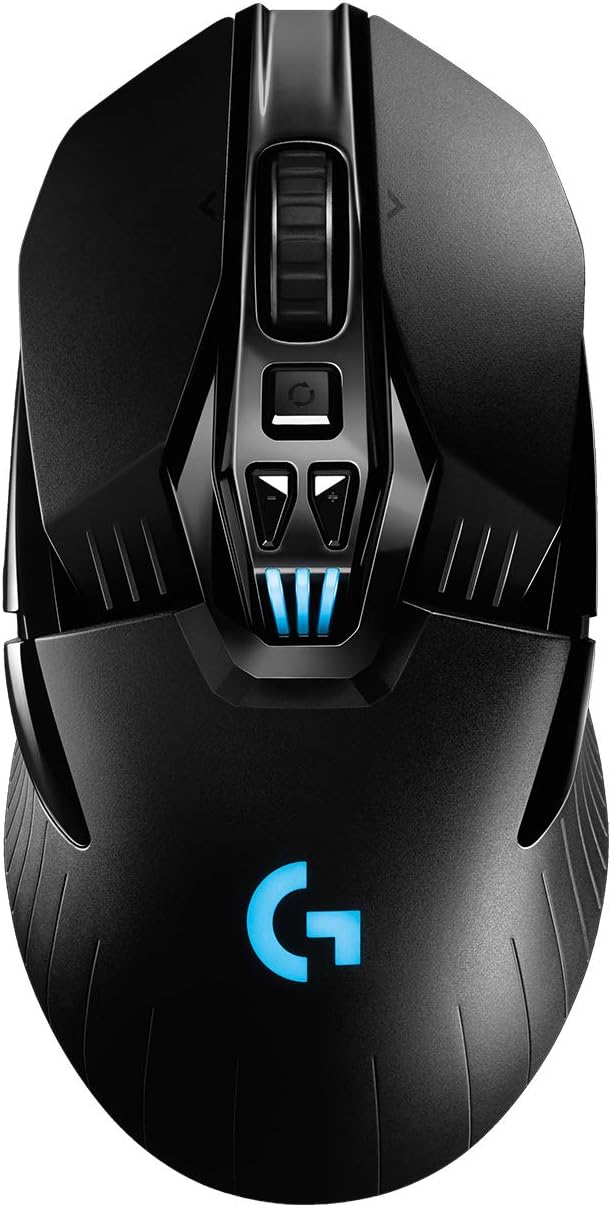
Best for Extra Buttons
Logitech G903 LIGHTSPEED
Bottom line: An ambidextrous wireless mouse with up to 11 programmable buttons and a long-lasting battery for lefties who want more controls, though it weighs more than the ultralights.
- Configurable layout for left or right-handed use
- Up to 11 programmable buttons
- Removable side buttons
- HERO 25K sensor up to 25,600 DPI
- Up to 140 hours of battery with lighting on
- Works with POWERPLAY wireless charging
- Heavier than the ultralight mice here
- Ambidextrous rather than a dedicated left-handed shape
- Costs more than most ambidextrous rivals

Best Lightweight Wireless
Razer Viper Ultimate
Bottom line: A 74 g wireless mouse with side buttons on both sides and a charging dock, best for lefties who want a fast, light shape and can accept shorter battery life.
- Programmable buttons on both sides of the shell
- 74 g wireless body
- Optical switches with no debounce delay
- 20,000 DPI optical sensor
- Up to 70 hours of battery life
- Charging dock included with this listing
- Battery life trails the M75 and G903
- Less button variety than the G903
- Ambidextrous rather than a dedicated left-handed shape

Best Wired for Shooters
Razer Viper
Bottom line: A light, wired ambidextrous mouse with side buttons on each side that makes sense for left-handed shooter fans who prefer a cable over charging.
- Buttons on both sides for a left thumb
- Roughly 70 g with a flexible SpeedFlex cable
- Optical switches with no debounce delay
- Nothing to charge or replace
- Ambidextrous shape for the left hand
- Light enough for flick-heavy play
- Side buttons cannot be disabled
- DPI button placement is awkward
- Wired only

Best True Left-Handed for MMOs
Razer Naga Left-Handed
Bottom line: A purpose-built left-handed MMO mouse with a 12-button thumb grid, best for lefties who need lots of hotkeys and can live with an older sensor.
- Shaped specifically for the left hand
- 12-button thumb grid with mechanical switches
- Scroll wheel tilts left and right
- Customizable per-button macros and hotkeys
- 32-bit ARM processor stores settings onboard
- Mechanical thumb grid switches give tactile feedback
- Wired only
- 8,200 DPI laser sensor is older than modern optical sensors
- More buttons than most non-MMO games need
Table of Contents
Best Left Handed Gaming Mouse: Our Picks in Detail
1
Best Wireless All-Rounder
Corsair M75 Wireless
Bottom line: An ambidextrous wireless mouse with swappable side buttons and long battery life that suits a left hand well, as long as you can live without a second pair of working thumb buttons.
The M75 Wireless is Corsair's ambidextrous wireless mouse, built around a symmetrical shell and side buttons that swap from one side to the other.
Pros & Cons
Pros
- Swappable side buttons move to the left side for left-hand use
- Symmetrical shape that does not lean toward either hand
- 2.4 GHz and Bluetooth connections
- Up to 105 hours of battery life
- 26,000 DPI sensor tracks up to 650 IPS
- Optical switches rated for 100 million clicks
Cons
- Only two side buttons work at once
- Swapped side buttons sit flatter and are harder to find by feel
- 89 g is heavier than the ultralight mice on this list
Why We Picked It
Most ambidextrous mice leave you with a compromise, but the M75 lets you place the side buttons where your left thumb rests. The shell has a relatively high arch that is not angled toward either side, and the wireless setup gives you both a 2.4 GHz connection for the desk and Bluetooth for a laptop. The sensor and optical switches are ready for fast shooters, and DPI shifting works through the underside button combined with the side buttons.
Who It's For
You are left-handed, play on a PC and want a wireless mouse that does not feel like a right-handed design flipped over. You get one pair of side buttons on the thumb side, a shell with no lean, and a battery that lasts for days of play. It suits fast shooters and everyday gaming alike.
Specs & Configurations
- Handedness
- ambidextrous, swappable side buttons
- Weight
- 89 g
- Size
- 5.04 x 2.56 in
- Connection
- 2.4 GHz wireless, Bluetooth, USB-C
- Sensor
- 26,000 DPI optical, 650 IPS
- Switches
- optical, rated for 100 million clicks
- Battery
- up to 105 hours
Get It Now
Check Price on Amazon
2
Best for Esports Lefties
Logitech G PRO 2 LIGHTSPEED
Bottom line: A light, modular ambidextrous esports mouse with magnetic side buttons for either hand, best for lefties who want a competitive-grade wireless setup.
Logitech designed the PRO 2 for esports players, and its modular layout makes it one of the few competitive mice that is built to be used from the left side.
Pros & Cons
Pros
- Magnetic side buttons snap on for either hand
- 2 left and 2 right side button modules are included
- Optical-mechanical LIGHTFORCE switches
- HERO 2 sensor built for competitive play
- Up to 95 hours of battery life
- Up to 8 kHz polling with the optional receiver
Cons
- The 8 kHz receiver is sold separately
- Side buttons are modules you have to attach yourself
- Fewer buttons than the G903
Why We Picked It
The box includes optional side buttons, two for the left and two for the right, plus button covers, so you set it up for a left hand instead of working around a right-hand layout. At 80 g it is light enough for quick flicks, and Logitech's LIGHTFORCE switches combine the speed of optical switches with the click of a mechanical one. The HERO 2 sensor and battery life of up to 95 hours cover the rest.
Who It's For
You are a left-handed competitive player who wants a wireless mouse with a low weight and a sensor made for fast shooters. The magnetic side buttons let you build the layout you want, and the 8 kHz polling option is there if you add the separate receiver.
Specs & Configurations
- Handedness
- ambidextrous, magnetic side buttons for left or right
- Weight
- 80 g
- Connection
- LIGHTSPEED wireless, USB-C
- Sensor
- HERO 2 optical
- Switches
- LIGHTFORCE hybrid optical-mechanical
- Battery
- up to 95 hours
- Polling
- up to 8 kHz with the separate PRO LIGHTSPEED receiver
Get It Now
Check Price on Amazon
3
Best for Extra Buttons
Logitech G903 LIGHTSPEED
Bottom line: An ambidextrous wireless mouse with up to 11 programmable buttons and a long-lasting battery for lefties who want more controls, though it weighs more than the ultralights.
The G903 packs more buttons into an ambidextrous wireless body than almost any other lefty-friendly option.
Pros & Cons
Pros
- Configurable layout for left or right-handed use
- Up to 11 programmable buttons
- Removable side buttons
- HERO 25K sensor up to 25,600 DPI
- Up to 140 hours of battery with lighting on
- Works with POWERPLAY wireless charging
Cons
- Heavier than the ultralight mice here
- Ambidextrous rather than a dedicated left-handed shape
- Costs more than most ambidextrous rivals
Why We Picked It
Logitech gives the G903 a layout you can configure for the left or right hand, with removable side buttons and up to 11 programmable buttons through G HUB. The HERO 25K sensor raises the top setting to 25,600 DPI, and the battery is rated for up to 140 hours with lighting on and up to 180 hours with it off. If you use a POWERPLAY mat, it can charge while you play.
Who It's For
You are left-handed, play games where extra buttons matter, such as MOBAs or RPGs, and want a wireless mouse that does not run out of charge mid-week. The extra thumb buttons give you room for macros and abilities, and the metal-spring button tensioning keeps clicks crisp.
Specs & Configurations
- Handedness
- ambidextrous, configurable button layout
- Buttons
- up to 11 programmable
- Connection
- LIGHTSPEED wireless
- Sensor
- HERO 25K, up to 25,600 DPI, 400+ IPS
- Battery
- up to 140 hours with lighting, up to 180 hours without
- Charging
- POWERPLAY compatible
Get It Now
Check Price on Amazon
4
Best Lightweight Wireless
Razer Viper Ultimate
Bottom line: A 74 g wireless mouse with side buttons on both sides and a charging dock, best for lefties who want a fast, light shape and can accept shorter battery life.
The Viper Ultimate is Razer's lightweight wireless mouse with side buttons on both sides, built mainly for fast shooters.
Pros & Cons
Pros
- Programmable buttons on both sides of the shell
- 74 g wireless body
- Optical switches with no debounce delay
- 20,000 DPI optical sensor
- Up to 70 hours of battery life
- Charging dock included with this listing
Cons
- Battery life trails the M75 and G903
- Less button variety than the G903
- Ambidextrous rather than a dedicated left-handed shape
Why We Picked It
Because the buttons exist on both sides, your left thumb uses the pair on the right side of the shell and the other pair is simply there. At 74 g it is among the lightest wireless options here, and the optical switches register clicks by light beam rather than by a metal contact. The 20,000 DPI optical sensor handles quick flicks, and the dock keeps it charged between sessions.
Who It's For
You are a left-handed shooter who wants a light wireless mouse and does not need a big button array. It fits well when you value flick speed, since there is little mass to drag across the pad.
Specs & Configurations
- Handedness
- ambidextrous, programmable buttons on both sides
- Weight
- 74 g
- Buttons
- 8
- Connection
- HyperSpeed wireless
- Sensor
- 20,000 DPI optical
- Switches
- Razer optical
- Battery
- up to 70 hours
Get It Now
Check Price on Amazon
5
Best Wired for Shooters
Razer Viper
Bottom line: A light, wired ambidextrous mouse with side buttons on each side that makes sense for left-handed shooter fans who prefer a cable over charging.
The original Viper is Razer's wired ambidextrous mouse, and it keeps the same lean shape as the wireless Ultimate without needing a charger.
Pros & Cons
Pros
- Buttons on both sides for a left thumb
- Roughly 70 g with a flexible SpeedFlex cable
- Optical switches with no debounce delay
- Nothing to charge or replace
- Ambidextrous shape for the left hand
- Light enough for flick-heavy play
Cons
- Side buttons cannot be disabled
- DPI button placement is awkward
- Wired only
Why We Picked It
It is light, with a SpeedFlex cable that causes little drag, and the thumb buttons sit on both sides so a left hand can use them without mods. The switches are optical, which actuate by light beam with no debounce delay. For a left-handed player who just wants a quick shooter mouse, the shape and the missing battery are the draw.
Who It's For
You are left-handed, play fast shooters and want a low-weight mouse you never have to charge. A cable is a fair trade for zero battery management, and the SpeedFlex cord keeps the drag down.
Specs & Configurations
- Handedness
- ambidextrous, buttons on both sides
- Weight
- about 70 g
- Connection
- wired USB with SpeedFlex cable
- Sensor
- 5G optical
- Switches
- Razer optical
Get It Now
Check Price on Amazon
6
Best True Left-Handed for MMOs
Razer Naga Left-Handed
Bottom line: A purpose-built left-handed MMO mouse with a 12-button thumb grid, best for lefties who need lots of hotkeys and can live with an older sensor.
This is the one pick here that is made for the left hand rather than adapted to it, with a grid of thumb buttons built for MMOs and RPGs.
Pros & Cons
Pros
- Shaped specifically for the left hand
- 12-button thumb grid with mechanical switches
- Scroll wheel tilts left and right
- Customizable per-button macros and hotkeys
- 32-bit ARM processor stores settings onboard
- Mechanical thumb grid switches give tactile feedback
Cons
- Wired only
- 8,200 DPI laser sensor is older than modern optical sensors
- More buttons than most non-MMO games need
Why We Picked It
The shape is ergonomic and mirrored for a left hand, with a 12-button mechanical thumb grid and a scroll wheel that tilts left and right. Razer's configurator lets you map every button to macros and hotkeys in game, and the onboard ARM processor keeps those settings on the mouse. If you are tired of adapting your grip to a right-handed or symmetrical shell, this is the only dedicated lefty design in the group.
Who It's For
You are a left-handed MMO or RPG player who wants a full macro pad under the thumb. The mouse gives you a button for nearly every ability, and the left-shaped body supports the hand instead of leaving the pinky hanging.
Specs & Configurations
- Handedness
- true left-handed, mirrored ergonomic shape
- Thumb grid
- 12 mechanical buttons
- Buttons
- 17 in total
- Connection
- wired USB
- Sensor
- 8,200 DPI laser
- Onboard processor
- 32-bit ARM
Get It Now
Check Price on AmazonLeft-Handed vs Ambidextrous Gaming Mouse: Which Do You Need?
A truly left-handed mouse mirrors the features of a right-handed ergonomic design, so the thumb rest, hump and slope all work for your left hand. An ambidextrous mouse takes a neutral stance instead, with a flat top and side buttons on each side or swappable ones. Neither is better for everyone, because the right choice depends on how you grip the mouse and how many buttons you use.
Check Where the Side Buttons Are
Some mice that look symmetrical only put the side buttons on the left, which is the right-hand thumb side. Look for buttons on both sides, like the Viper line, or modules you can move, like the M75 Wireless and G PRO 2.
Match the Shape to Your Grip
Claw and fingertip grips tend to work well with short, low shells, while palm grips need more mouse under the hand. Our best gaming mouse for claw grip and best gaming mouse for palm grip guides cover shapes in both camps, and small-handed lefties can also check our best gaming mouse for small hands.
Decide How Many Buttons You Need
Shooter players can get by with two thumb buttons. MMO and MOBA players may want a bigger array, which is where the G903 and the Naga Left-Handed stand out.
FAQ
Why are there so few left-handed gaming mice?
The market for them is much smaller than for right-handed mice, so brands put their effort into right-handed or symmetrical designs. More ambidextrous options have appeared in recent years.
Which brands make left-handed gaming mice?
Razer, Logitech, Corsair and SteelSeries all sell ambidextrous or left-handed models, though few have enough lefty options to match their right-handed lineups.
Is an ambidextrous mouse the same as a left-handed mouse?
No. A left-handed mouse mirrors an ergonomic right-handed design, while an ambidextrous mouse uses a neutral, symmetrical shape with buttons on both sides or swappable buttons.
Which Is the Best Left Handed Gaming Mouse for You?
If you want one mouse that fits a left hand without fuss, start with the Corsair M75 Wireless for wireless play or the Razer Viper if you prefer a cable. Competitive lefties will like the Logitech G PRO 2 for its modular buttons, while MMO players should look at the Razer Naga Left-Handed for its thumb grid. The best left handed gaming mouse is the one with usable thumb buttons on your side and a shell that fits your grip. For a wider set of options, see our best gaming mouse roundup.