GameCuki is reader-supported. When you buy through links on our site, we may earn an affiliate commission at no extra cost to you. As an Amazon Associate I earn from qualifying purchases. Learn more.
Plug a Windows gaming keyboard into a MacBook and the trouble starts at once: Command and Option sit in the wrong places, the media keys do nothing, and the RGB software never shows up. The best gaming keyboard for Mac avoids all of that, either with a Mac layout and keycaps in the box or with a macOS mode you flip with one switch. Seven boards below pass that bar, and each entry says exactly what Mac support the maker lists, so you know up front what works and what doesn’t.
Mac gaming itself is a different question. If you also need a pad for the same setup, our best game controller for Mac list covers the options that pair cleanly with macOS.
Best Gaming Keyboard for Mac: Our Picks in Detail
1
Best Overall
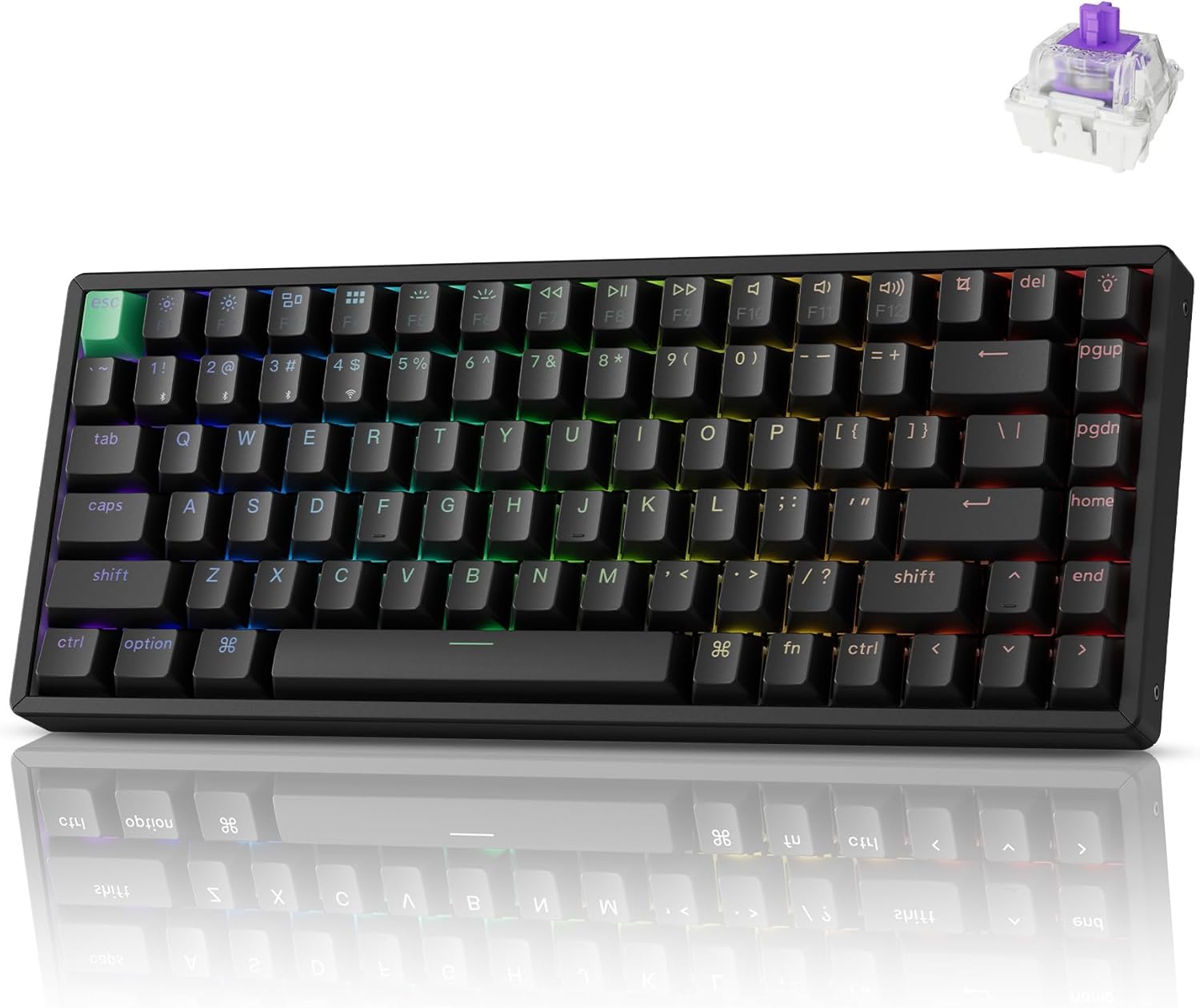
Keychron K2 HE
Bottom line: The K2 HE is the one to buy if you want real esports features, like rapid trigger and per-key actuation, in a board that treats macOS as a first-class system.
Keychron's K2 HE takes the compact 75% layout of the long-running K2 and swaps the regular switches for Hall Effect magnetic ones. That brings rapid trigger, snap action and an actuation point you can set anywhere from 0.2 to 3.8 mm, the same toolkit competitive FPS players pay more for on Windows-first boards.
Pros & Cons
Pros- Rapid trigger and adjustable actuation
- Hot-swappable switches
- Launcher runs in the browser, so macOS needs no driver
- Three connection modes
- Compact 75% layout leaves mouse room
- Actuation adjustable from 0.2 to 3.8 mm
Cons- Hot-swap sockets take only Gateron double-rail magnetic switches
- Linear feel only out of the box
Why We Picked It
Most esports-grade keyboards lean on Windows-only software, and Mac owners end up with half the features. The K2 HE moves all of its tuning into the Keychron Launcher web app, so remapping keys, building macros and adjusting actuation happen in a browser on macOS with nothing to install. Add 2.4 GHz wireless at 1000 Hz and a 75% layout that leaves mouse room on a small desk, and it is the most complete all-round Mac pick here.
Who It's For
You play Valorant, CS2 or Apex Legends on a Mac and type on the same keyboard all day. All tuning lives in the Keychron Launcher web app, so remapping, macros and actuation changes happen in a browser with nothing to install. The 75% layout leaves room for your mouse on a small desk, and 2.4 GHz wireless runs at 1000 Hz.
Specs & Configurations
- Layout
- 75%
- Switches
- Gateron double-rail magnetic (Hall Effect), linear
- Actuation
- 0.2 to 3.8 mm in 0.1 mm steps
- Connection
- 2.4 GHz/Bluetooth 5.2/USB-C
- Polling rate
- 1000 Hz
- Mac support
- macOS and Windows support, web-based Launcher (no install)

2
Best Premium
Keychron Q1 Max
Bottom line: A solid aluminum 75% board with both Mac and Windows keycaps in the box, the Q1 Max is the pick if you want your Mac setup to feel expensive.
The Q1 Max is a fully assembled custom-style keyboard: a CNC-machined aluminum case, gasket mounting, a programmable knob and pre-lubed Gateron Jupiter Red linear switches. Mac and Windows keycaps both ship in the box, so the Command and Option keys are right from the start.
Pros & Cons
Pros- Mac and Windows keycaps in the box
- QMK/VIA remapping
- Premium aluminum build
- Long battery life with backlight off
- Programmable knob doubles as volume control
- Pre-lubed Gateron Jupiter Red linear switches
Cons- Standard mechanical switches, so no rapid trigger
- Bluetooth mode does not run at 1000 Hz
Why We Picked It
It is the only board in this list built around the custom-keyboard hobby while still working as a plain gaming keyboard. QMK and VIA support let you remap keys and set up macros, the 2.4 GHz mode runs at 1000 Hz for gaming, and the knob doubles as a volume control for Mac users who like a physical dial. The upgrade over a K2 is feel and sound rather than raw speed.
Who It's For
You split your Mac time between games and work and want a keyboard that feels like the centerpiece of your desk. The CNC aluminum case, gasket mount and pre-lubed linear switches give a solid feel, while Command and Option keys are right from the first day. QMK and VIA let you remap keys, and the 2.4 GHz mode runs at 1000 Hz for gaming.
Specs & Configurations
- Layout
- 75% with knob
- Body
- CNC aluminum, double-gasket
- Switches
- Gateron Jupiter Red linear, hot-swappable
- Connection
- 2.4 GHz/Bluetooth 5.1/USB-C
- Polling rate
- 1000 Hz (2.4 GHz and wired)
- Battery
- 4000 mAh, up to 180 hours with backlight off
- Mac support
- Mac and Windows keycaps included, macOS/Windows/Linux

3
Best Tenkeyless
Keychron K8 HE
Bottom line: If a 75% board feels cramped, the K8 HE gives you a full tenkeyless layout with rapid trigger and a Mac-friendly web app.
The K8 HE keeps the standard tenkeyless layout, so it feels familiar if you grew up on a full TKL board. Hall Effect switches bring rapid trigger and a 0.2 to 3.8 mm actuation range, and the frame uses wood side pieces with an aluminum core.
Pros & Cons
Pros- Rapid trigger with adjustable actuation
- Full TKL layout with arrow and function keys
- Wood side panels and double-shot PBT keycaps
- Web app customization, no downloads
- Hot-swappable Hall Effect switches
- Actuation range of 0.2 to 3.8 mm
Cons- Wider than a 75% board, so less mouse room
- Wood-and-aluminum frame adds weight
Why We Picked It
The spacing is the draw. Arrow keys, a function row and the navigation cluster all stay where Mac users expect them, with extra rapid-trigger tuning for strafe-heavy shooters. Keychron lists support for Mac, Windows, Linux and Bluetooth tablets, and all key settings live in the Launcher web app, so there is no Windows-only utility to worry about.
Who It's For
You grew up on a tenkeyless board and don't want to relearn a compressed layout, but you want magnetic switches. Arrow keys, a function row and the navigation cluster stay where Mac users expect them, with rapid-trigger tuning for strafe-heavy shooters. Settings live in the Launcher web app, and the wood side pieces and PBT keycaps give the desk a warm, solid look.
Specs & Configurations
- Layout
- 80% TKL
- Switches
- Hall Effect magnetic, hot-swappable
- Actuation
- 0.2 to 3.8 mm
- Connection
- 2.4 GHz/Bluetooth 5.2/USB-C
- Polling rate
- 1000 Hz (2.4 GHz and wired)
- Keycaps
- double-shot OSA-profile PBT
- Mac support
- pairs with Mac, Windows, Linux, web app (no download)

4
Best Low Profile
NuPhy Air75 V3
Bottom line: At 13.2 mm thin with extra macOS and iOS keycaps in the box, the Air75 V3 is the easiest gaming keyboard to carry between a MacBook and a desk.
NuPhy builds the Air75 V3 as a thin 75% keyboard with a gasket-mounted plate, a removable knob and a 4000 mAh battery. The accessory pack includes macOS and iOS keycaps, which fixes the Command and Option layout right away.
Pros & Cons
Pros- Very thin and portable
- Extra macOS and iOS keycaps in the box
- Browser-based software, no driver install
- Pairs with up to five devices
- Gasket-mounted plate and removable knob
- Holds 1000 Hz in wired and 2.4 GHz modes
Cons- Low-profile switches feel different from full-height boards
- Not a magnetic or rapid-trigger design
Why We Picked It
This is the keyboard for gamers who play on a laptop. It slides next to a MacBook without feeling mismatched, connects over Bluetooth or a 2.4 GHz dongle, and holds 1000 Hz in wired and 2.4 GHz modes. NuPhyIO runs in the browser for key remaps, macros and lighting, so macOS needs no installer.
Who It's For
You game on a MacBook and carry your keyboard between a desk and elsewhere. At as thin as 13.2 mm, it slides next to a laptop without feeling mismatched, and the macOS and iOS keycaps fix the Command and Option layout right away. Bluetooth or a 2.4 GHz dongle connects it, NuPhyIO runs in the browser, and it still handles shooters and MOBAs.
Specs & Configurations
- Layout
- 75% low profile
- Thickness
- as thin as 13.2 mm
- Mounting
- gasket
- Connection
- Bluetooth/2.4 GHz/USB-C, up to 5 devices
- Polling rate
- 1000 Hz (wired and 2.4 GHz)
- Battery
- 4000 mAh
- Mac support
- extra macOS and iOS keycaps included, NuPhyIO browser-based software

5
Best Mac Edition
Corsair K65 Plus Wireless (Mac Edition)
Bottom line: Corsair's K65 Plus is the only major gaming brand here selling a model labeled for Mac, though the Mac software story is not spelled out.
Corsair sells the K65 Plus Wireless in a Frost White edition marketed for Mac and iPad, and the maker says it connects to Mac and PC over 2.4 GHz or Bluetooth. Underneath it is the same 75% board as the regular K65 Plus, with pre-lubricated MLX Red v2 linear switches.
Pros & Cons
Pros- Sold as a Mac edition
- Hot-swappable pre-lubricated linear switches
- Very long battery life with RGB off
- Sound dampening built in
- Connects over 2.4 GHz or Bluetooth
- Clean white colorway for a Mac setup
Cons- iCUE support on macOS is not confirmed
- Linear switches only out of the box
- Standard switches, no rapid trigger
Why We Picked It
It is the easy choice if you want a familiar gaming brand with a white colorway that matches a Mac setup. Hot-swap sockets let you change switches later, sound dampening keeps keystrokes quiet, and the battery lasts up to 266 hours with RGB off. Corsair does not say whether its iCUE software works on macOS for this model, so plan on using it as it comes, with its onboard controls.
Who It's For
You want an established gaming brand with a clean white look that matches your Mac setup. The 75% board runs on 2.4 GHz or Bluetooth for up to 266 hours with RGB off, and sound dampening keeps keystrokes quiet. Hot-swap sockets let you change switches later, and the onboard controls cover the basics without deep customization.
Specs & Configurations
- Layout
- 75%, 81 keys
- Switches
- pre-lubricated MLX Red v2 linear, hot-swappable
- Connection
- 2.4 GHz/Bluetooth/USB
- Battery
- up to 266 hours with RGB off
- Mac support
- sold as the Mac edition, connects to Mac via 2.4 GHz or Bluetooth, iCUE support on macOS not stated
6
Best Wired Esports
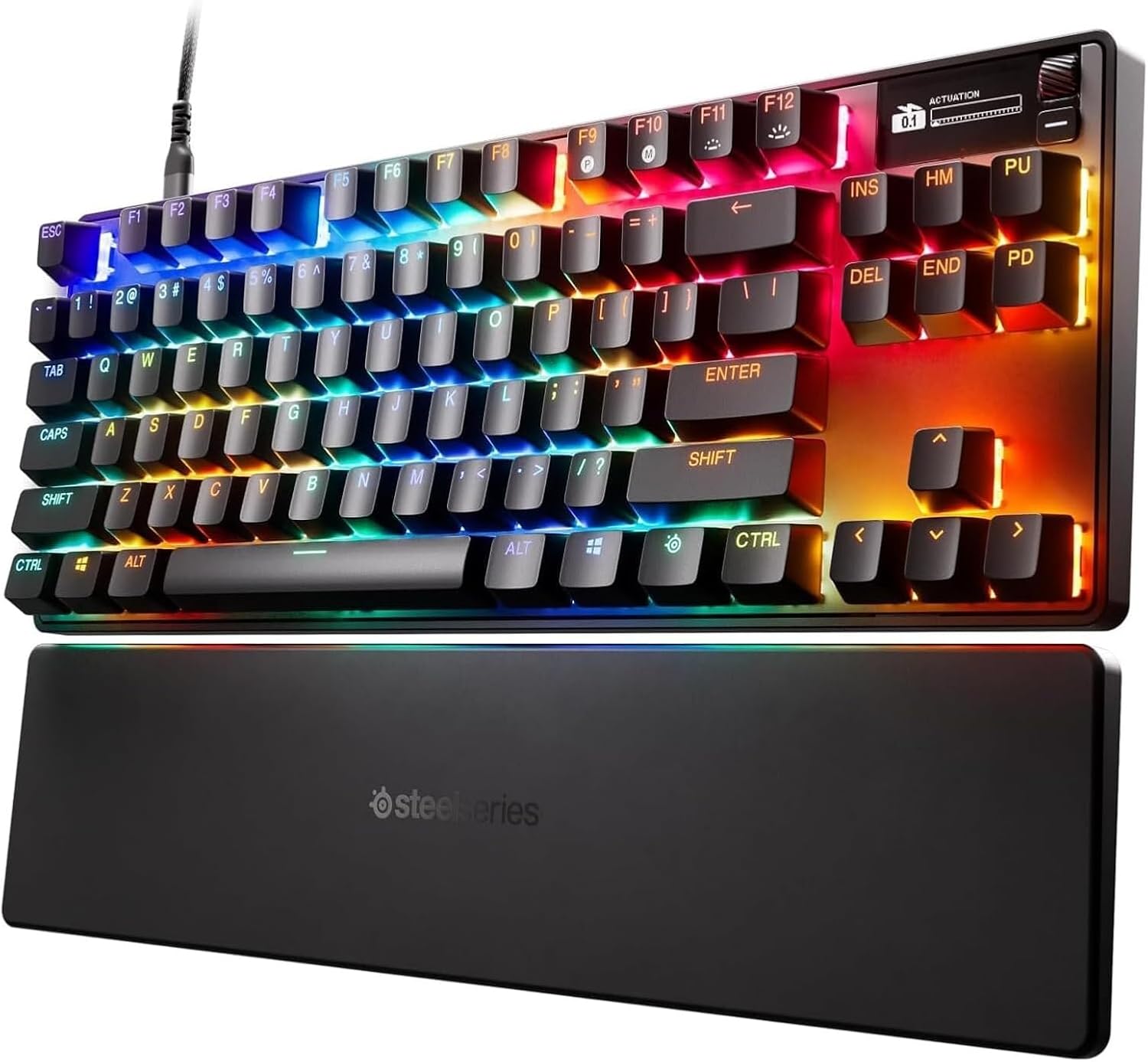
SteelSeries Apex Pro TKL Gen 3
Bottom line: For Mac players who want wired, tournament-style speed, the Apex Pro TKL Gen 3 delivers Hall Effect switches, but its extras lean toward Windows.
SteelSeries calls the Apex Pro TKL Gen 3 its fastest keyboard yet, built around OmniPoint 3.0 Hall Effect switches with Rapid Trigger, Rapid Tap and Protection Mode. The product page lists Mac OS 11 and above as supported, with the note that not all software features are available on Mac.
Pros & Cons
Pros- Rapid Trigger and Rapid Tap
- Wide 0.1 to 4.0 mm actuation range
- Protection Mode reduces accidental neighbor-key presses
- Detachable USB-C cable
- Adjustable per-key actuation
- Hall Effect switches for tournament-style speed
Cons- Wired only
- GG QuickSet presets are Windows-only
- Not all software features work on Mac
Why We Picked It
It brings the most tournament-style tuning in this list for macOS users who accept a cable. The 0.1 to 4.0 mm range is adjustable per key, Protection Mode helps stop neighbor-key slips in a clutch round, and a detachable USB-C cable keeps it easy to pack. Just know that the ready-made GG QuickSet presets are listed as Windows 10+ only, so Mac users set things up manually.
Who It's For
You play competitive shooters at a Mac desk and don't mind a cable. OmniPoint 3.0 switches let you set actuation per key from 0.1 to 4.0 mm, and Rapid Trigger, Rapid Tap and Protection Mode help in a clutch round. The detachable USB-C cable makes the TKL easy to pack, and you set things up manually.
Specs & Configurations
- Layout
- TKL
- Switches
- OmniPoint 3.0 adjustable HyperMagnetic (Hall Effect)
- Actuation
- 0.1 to 4.0 mm
- Connection
- wired, detachable USB-C cable
- Features
- Rapid Trigger, Rapid Tap, Protection Mode
- Mac support
- SteelSeries lists Mac OS 11 and above, not all software features supported

7
Best Budget
Keychron K2 (Silent K Pro Red)
Bottom line: The cheapest board here is still a proper Mac-layout keyboard, so it suits casual players who also type a lot on macOS.
This K2 version arrives with a Mac layout, macOS-friendly media keys and extra Windows keycaps in the box. The Keychron Silent K Pro Red switches are pre-lubed linears made for quieter typing, and the shine-through keycaps carry a white LED backlight.
Pros & Cons
Pros- Mac layout with native media keys
- Quiet silent linear switches
- Shine-through keycaps with white backlight
- Lowest cost on this list
- Extra Windows keycaps included
- Wired mode runs at 1000 Hz
Cons- No 2.4 GHz wireless, so wireless play uses Bluetooth
- Single-color backlight
- Not built for competitive shooters
Why We Picked It
It makes a good first gaming keyboard for a Mac. The 75% layout leaves space for a mouse, wired mode runs at 1000 Hz for lower latency, and Bluetooth lets it pair with up to three devices. The silent switches keep late-night sessions from waking anyone.
Who It's For
You are a casual Mac player on a budget who wants one board for gaming, school and work. The Mac layout has native media keys, the 75% size leaves room for a mouse, and wired mode runs at 1000 Hz. Silent switches keep late-night sessions from waking anyone, and Bluetooth pairs with up to three devices.
Specs & Configurations
- Layout
- 75%
- Switches
- pre-lubed Keychron Silent K Pro Red linear
- Connection
- Bluetooth 5.1 (up to 3 devices) or wired
- Polling rate
- 1000 Hz wired
- Backlight
- white LED
- Mac support
- Mac layout with native media keys, extra Windows keycaps included
How to Choose a Gaming Keyboard for Mac
Mac Layout and Keycaps
Windows boards put Alt and the Windows key where macOS expects Option and Command, and the order is flipped. A keyboard that ships with Mac keycaps or a macOS mode fixes that. Of the seven boards above, the Q1 Max and the Air75 V3 list Mac keycaps in the box, the K2 with Silent K Pro switches uses a Mac layout, and the Corsair K65 Plus is sold as a Mac edition.
Software on macOS
This is where Mac gaming keyboards fall short most often. Many brands run their configuration tools on Windows only. Keychron and NuPhy use browser-based apps (Launcher and NuPhyIO) that work the same on a Mac, while SteelSeries lists Mac OS 11 and above with only some software features supported. Always check what the maker says about macOS before relying on macros or lighting.
Wired or Wireless
Wired mode and 2.4 GHz wireless are the options that reach 1000 Hz on the Keychron and NuPhy boards above. Bluetooth is handy for switching between a MacBook and a phone, but it is a weaker choice for fast shooters. For wired-only picks like the Apex Pro TKL Gen 3, a short detachable USB-C cable is a plus on a MacBook with limited ports.
Layout Size
75% boards such as the K2 HE keep arrows and the function row while freeing mouse room. Tenkeyless boards like the K8 HE add the navigation cluster. If you prefer something even smaller, our best 60% keyboard for Fortnite guide covers compact layouts, though check the maker’s Mac details before you buy, because not every 60% board has a Mac setup.
Magnetic Switches
Hall Effect switches such as those in the K2 HE, K8 HE and Apex Pro TKL Gen 3 let you set the actuation point per key and use rapid trigger, which resets a key the moment you ease off. They matter most in competitive shooters. For single-player and mixed use, a regular linear switch is fine.
Mac Support at a Glance
| Keyboard |
Layout |
Connection |
What the maker lists for Mac |
| Keychron K2 HE |
75% |
2.4 GHz/Bluetooth/USB-C |
macOS and Windows support, web-based Launcher |
| Keychron Q1 Max |
75% |
2.4 GHz/Bluetooth/USB-C |
Mac and Windows keycaps included |
| Keychron K8 HE |
TKL |
2.4 GHz/Bluetooth/USB-C |
Pairs with Mac, Windows, Linux, web app |
| NuPhy Air75 V3 |
75% low profile |
2.4 GHz/Bluetooth/USB-C |
Extra macOS and iOS keycaps, NuPhyIO in browser |
| Corsair K65 Plus Wireless |
75% |
2.4 GHz/Bluetooth/USB |
Sold as Mac edition, iCUE on macOS not stated |
| SteelSeries Apex Pro TKL Gen 3 |
TKL |
Wired USB-C |
Mac OS 11+, not all software features |
| Keychron K2 (Silent K Pro Red) |
75% |
Bluetooth/USB-C |
Mac layout, native media keys |

