

Fortnite rewards fast hands: you move, build and edit in the same second, and a full-size keyboard eats the desk space your mouse needs. That’s why so many competitive players have moved to a compact board, and why the best 60 percent keyboard for Fortnite today almost always has analog switches with Rapid Trigger. These eight cover every budget, from the Wooting 60HE v2 to the Royal Kludge RK61.
Best 60 Percent Keyboard for Fortnite in 2026
GameCuki is reader-supported. When you buy through links on our site, we may earn an affiliate commission at no extra cost to you. As an Amazon Associate I earn from qualifying purchases. Learn more.
Our Top Picks
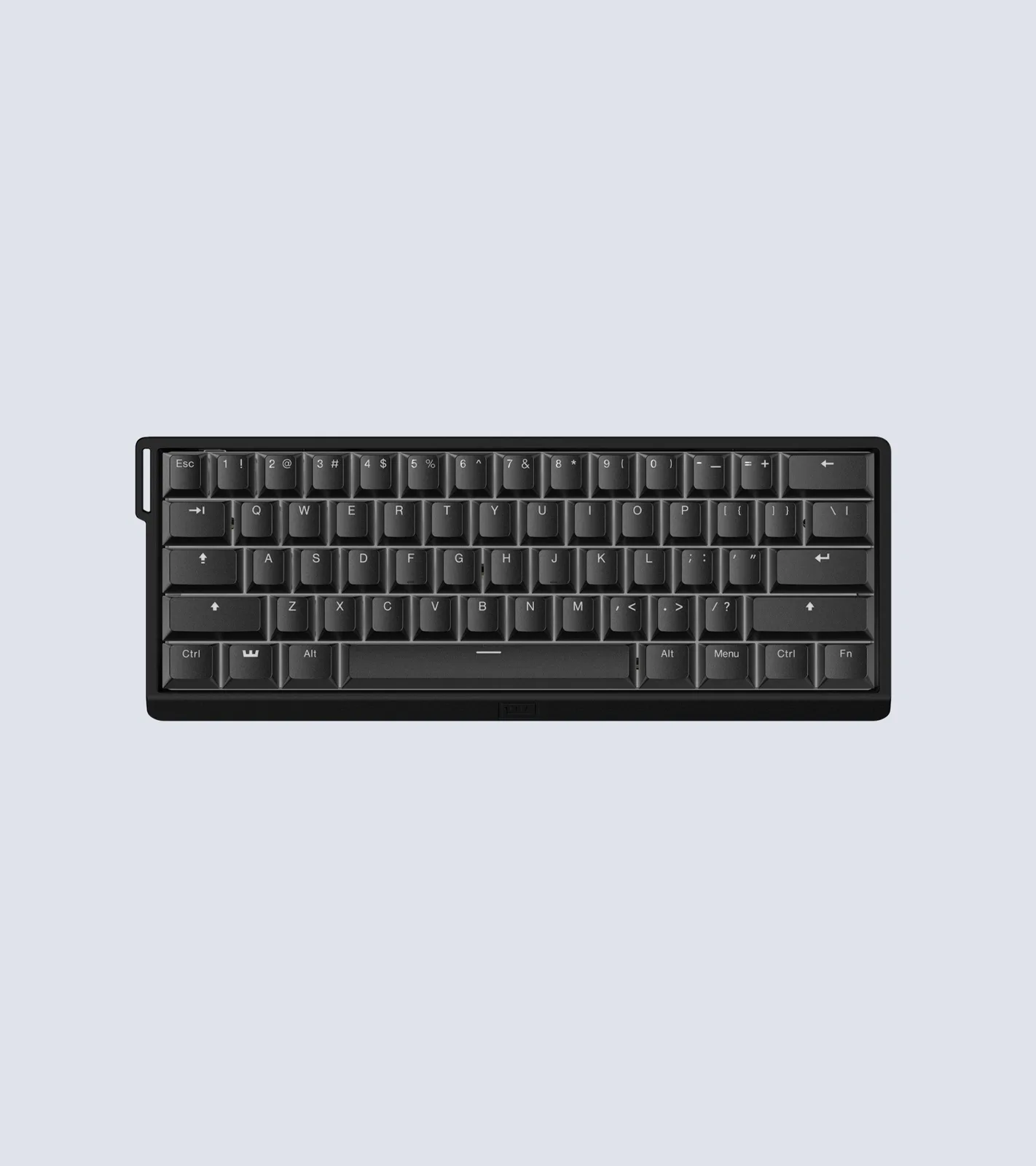
Best Overall
Wooting 60HE v2
Bottom line: The best 60% keyboard for Fortnite, with class-leading Rapid Trigger, superb software and a four-year warranty, if you can live with a wired-only board.
- Exceptionally low latency
- Wootility software is among the best, in a browser or as an app
- Four-year warranty
- Optional split spacebar for an extra input
- Adjustable actuation across the full 4 mm of travel
- Rapid Trigger, SOCD and multiple inputs per key
- Hot-swappable Lekker magnetic switches
- Wired only
- Sold mainly through Wooting's own store
- Expensive

Best From a Major Brand
SteelSeries Apex Pro Mini Gen 3
Bottom line: The best pick if you want pro-level analog performance from a brand you can buy anywhere, though it's pricey and sits tall without a wrist rest.
- SteelSeries is one of the two most used keyboard brands among Fortnite pros
- Rapid Trigger and Rapid Tap built in
- Protection Mode helps prevent accidental presses on nearby keys
- Quieter than older Apex Pro models
- 40 adjustable actuation levels
- GG QuickSet loads ready-made game presets
- Compact 60% layout frees up desk space
- Expensive
- Sits tall, so you may want a wrist rest
- No F-key row, so some games need rebinding
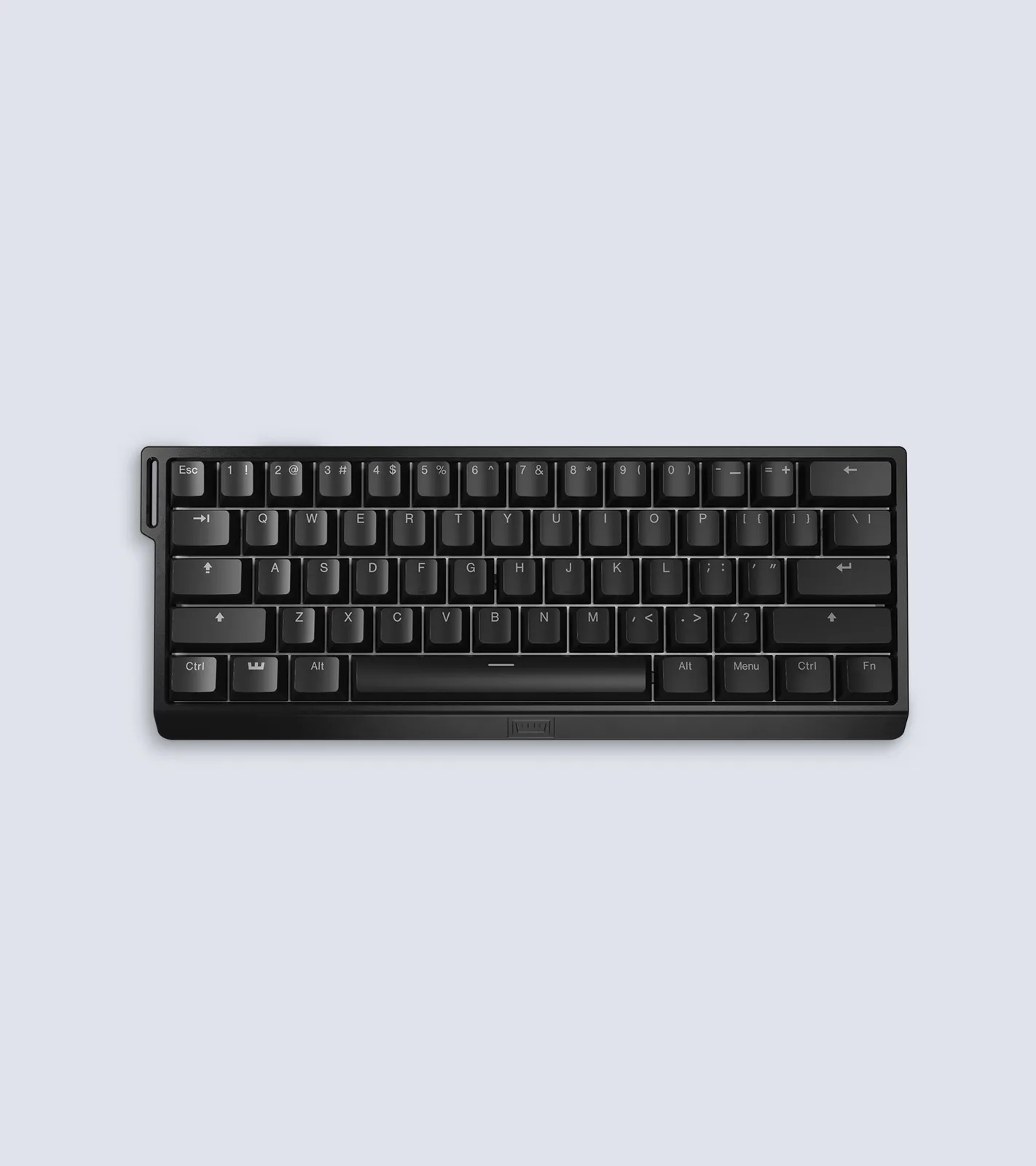
Most Used by Fortnite Pros
Wooting 60HE+
Bottom line: The 60% keyboard more Fortnite pros use than any other, with Wooting's excellent switches and software in a board made for modding.
- The most used 60% keyboard in the Fortnite pro scene
- Very precise, responsive switches
- Easy browser-based setup
- Hot-swappable and built to be modded
- Two actuation points per key
- Adjustable actuation
- Fits most aftermarket 60% cases
- Stock typing sound isn't the best
- Wired only

Best for On-Board Tuning
Razer Huntsman V3 Pro Mini
Bottom line: A strong pick for Razer fans who want to tune actuation without opening software, as long as you don't mind a loud typing sound.
- Adjust actuation and Rapid Trigger on the keyboard itself
- Snap Tap for opposite movement keys
- Bottom-right modifiers double as arrow keys
- Durable PBT keycaps
- Actuation adjustable from 0.1 to 4.0 mm
- Save settings without software
- Side-printed functions on doubleshot PBT keycaps
- Loud, unpleasant typing sound
- Expensive
- Snap Tap needs a firmware update

Best Low-Profile Keyboard
NuPhy Air60 HE
Bottom line: The best pick if you want Rapid Trigger in a low-profile board that's easier on your wrists, though its build and warranty trail the Wooting.
- Low-profile design, more comfortable without a wrist rest
- Key travel similar to taller boards
- Robust web-based software
- Performance close to the Wooting
- Hyper Tap, Rapid Shift and SOCD
- Actuation from 0.1 to 3.3 mm
- Smooth, crisp switches
- Wired only
- Plastic case
- One-year warranty
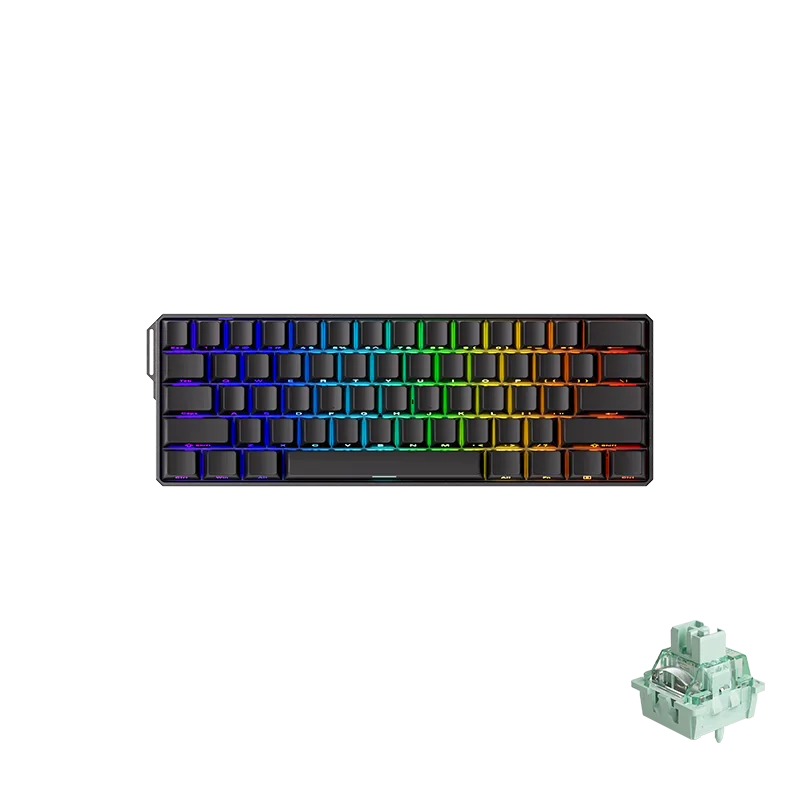
Best Budget Analog Keyboard
MonsGeek FUN60 Ultra
Bottom line: The best value 60% keyboard for Fortnite, with near-Wooting performance, an aluminum case and an optional wireless model, if you can accept rougher software.
- Performance close to the Wooting 60HE v2
- Aluminum case at a budget price
- Wireless version available
- TMR version also accepts mechanical switches
- Actuation from 0.1 to 3.4 mm
- Rapid Trigger from 0.01 to 2.0 mm
- 8,000 Hz polling rate
- Tri-mode wireless option with 4,000 mAh battery
- Software is less polished and updated less often
- One-year warranty
- Sometimes out of stock at major retailers

Best Wireless Keyboard
SteelSeries Apex Pro Mini Wireless
Bottom line: The pick for players who want a cable-free 60% board with Rapid Trigger from a major brand, though battery life is modest and it's a generation behind.
- 2.4GHz wireless plus Bluetooth
- Rapid Trigger and adjustable actuation
- Two actions on one key
- Aluminum top plate
- Actuation from 0.1 to 4.0 mm in 40 levels
- Detachable USB-C cable
- Can move between devices
- Battery life is modest, especially with RGB on
- Older OmniPoint 2.0 switches
- Software takes some setup

Best Cheap Keyboard
Royal Kludge RK61 (Wired)
Bottom line: The cheapest way into a 60% mechanical keyboard, fine for casual Fortnite, but it has no Rapid Trigger and much higher latency than the other picks.
- Very affordable
- Hot-swappable switches let you try other mechanical switches
- Compact 60% layout
- RGB backlighting
- Linear red switches
- Works with Windows, macOS and Android
- Runs QMK and VIA
- No Rapid Trigger or adjustable actuation
- Much higher latency than the other picks
- Software is hard to use
Table of Contents
What to Look For in a 60% Keyboard for Fortnite
Mechanical or analog switches. Virtually every Fortnite pro uses a mechanical or analog keyboard rather than a rubber dome board, because they’re more consistent, and a missed input can cost you a fight.
Rapid Trigger and adjustable actuation. Analog keyboards with magnetic (Hall effect) or analog optical switches let you choose how deep a key has to go before it registers. Rapid Trigger resets a key the moment you start lifting your finger, so you can tap it again sooner. That makes movement feel more responsive and helps with fast edits and precise builds. Analog boards aren’t mandatory, and plenty of players still compete on traditional mechanical keyboards, but they’re the better buy today.
The 60% trade-off. A 60% keyboard drops the number pad, the arrow and navigation keys and the function row, which frees up desk space for your mouse. The catch is that those missing keys move to Fn combinations, so if you use F keys or arrows often, expect to rebind a few things.
Best 60 Percent Keyboards for Fortnite: Our Picks in Detail
1
Best Overall
Wooting 60HE v2
Bottom line: The best 60% keyboard for Fortnite, with class-leading Rapid Trigger, superb software and a four-year warranty, if you can live with a wired-only board.
The Wooting 60HE v2 is the 60% keyboard we'd buy for Fortnite. It's the most complete gaming keyboard package you can get in this size.
Pros & Cons
Pros
- Exceptionally low latency
- Wootility software is among the best, in a browser or as an app
- Four-year warranty
- Optional split spacebar for an extra input
- Adjustable actuation across the full 4 mm of travel
- Rapid Trigger, SOCD and multiple inputs per key
- Hot-swappable Lekker magnetic switches
Cons
- Wired only
- Sold mainly through Wooting's own store
- Expensive
Why We Picked It
Its latency is exceptionally low, and its magnetic switches let you set exactly when each key actuates and resets. Wooting's software runs in a browser or as a desktop app and covers Rapid Trigger, SOCD for handling opposite movement keys pressed at the same time, and multiple inputs on a single key. Compared with the original 60HE, the v2 adds a friction-fit PCB, a better typing feel and sound and an optional split spacebar for an extra key. Wooting backs it with a four-year warranty, unusually long for a keyboard.
Who It's For
You play competitive Fortnite and want the most complete 60% package at the smallest size. Magnetic switches let you set exactly where each key actuates and resets, Rapid Trigger and SOCD keep movement crisp, and the software runs in a browser or as an app. Choose the ABS or aluminum case, and the four-year warranty covers you for the long haul.
Specs & Configurations
- Switches
- Lekker magnetic (Hall effect), hot-swappable
- Actuation
- adjustable, full 4 mm travel
- Polling rate
- 8,000 Hz (Wooting)
- Connection
- wired, USB-C
- Case
- ABS (606 g) or aluminum (945 g)
- Warranty
- 4 years (Wooting)
- Extras
- Rapid Trigger, SOCD, multiple inputs per key, split spacebar option
Get It Now
Check Price at Wooting
2
Best From a Major Brand
SteelSeries Apex Pro Mini Gen 3
Bottom line: The best pick if you want pro-level analog performance from a brand you can buy anywhere, though it's pricey and sits tall without a wrist rest.
SteelSeries and Wooting dominate Fortnite's pro scene, and the Apex Pro Mini is among the most used keyboards in it. The Gen 3 is the latest version.
Pros & Cons
Pros
- SteelSeries is one of the two most used keyboard brands among Fortnite pros
- Rapid Trigger and Rapid Tap built in
- Protection Mode helps prevent accidental presses on nearby keys
- Quieter than older Apex Pro models
- 40 adjustable actuation levels
- GG QuickSet loads ready-made game presets
- Compact 60% layout frees up desk space
Cons
- Expensive
- Sits tall, so you may want a wrist rest
- No F-key row, so some games need rebinding
Why We Picked It
Its OmniPoint 3.0 Hall effect switches offer 40 levels of actuation, Rapid Trigger and Rapid Tap, which handles opposite movement keys pressed together. Protection Mode, a SteelSeries exclusive, lowers the sensitivity of the keys around the one you press to stop accidental inputs, and GG QuickSet loads ready-made settings for popular games. It's fast and well built, noticeably quieter than the 2020 Apex Pro and frees up a lot of desk space compared with a TKL.
Who It's For
You want a keyboard from a brand the Fortnite pros use, with presets that make setup easy. The Hall effect switches offer 40 actuation levels and Rapid Trigger, Protection Mode keeps neighboring keys from firing by accident, and GG QuickSet loads game settings in one click. The 60% size frees up desk space for wide mouse swipes.
Specs & Configurations
- Switches
- OmniPoint 3.0 Hall effect
- Actuation
- 40 adjustable levels
- Connection
- wired
- Extras
- Rapid Trigger, Rapid Tap, Protection Mode, GG QuickSet game presets
Get It Now
Check Price on Amazon
3
Most Used by Fortnite Pros
Wooting 60HE+
Bottom line: The 60% keyboard more Fortnite pros use than any other, with Wooting's excellent switches and software in a board made for modding.
The Wooting 60HE is the keyboard that made Wooting famous in Fortnite, and the current 60HE+ is still the most used 60% board among the game's pros, ahead of every SteelSeries and Razer model.
Pros & Cons
Pros
- The most used 60% keyboard in the Fortnite pro scene
- Very precise, responsive switches
- Easy browser-based setup
- Hot-swappable and built to be modded
- Two actuation points per key
- Adjustable actuation
- Fits most aftermarket 60% cases
Cons
- Stock typing sound isn't the best
- Wired only
Why We Picked It
Its Lekker switches let you set the actuation point, bind two actions to different depths of one key and use Rapid Trigger, all from a browser. The hot-swappable PCB lets you replace a faulty switch instead of the whole keyboard, and it fits most popular aftermarket cases if you like to customize.
Who It's For
You want the board used by more Fortnite pros than any other, or you enjoy customizing your keyboard. The Lekker switches let you set actuation, bind two actions to different depths of one key and use Rapid Trigger, all from a browser. A hot-swappable PCB that fits most aftermarket cases means you can swap switches or cases whenever you like.
Specs & Configurations
- Switches
- Lekker magnetic (Hall effect)
- PCB
- hot-swappable, fits most aftermarket 60% cases
- Connection
- wired
- Weight
- 605 g
- Extras
- Rapid Trigger, adjustable actuation, two actuation points per key, browser-based software
Get It Now
Check Price at Wooting
4
Best for On-Board Tuning
Razer Huntsman V3 Pro Mini
Bottom line: A strong pick for Razer fans who want to tune actuation without opening software, as long as you don't mind a loud typing sound.
Razer is the third big name in Fortnite's pro scene, and the Huntsman Mini is one of the three compact boards most often recommended for the game, alongside the Wooting 60HE and Apex Pro.
Pros & Cons
Pros
- Adjust actuation and Rapid Trigger on the keyboard itself
- Snap Tap for opposite movement keys
- Bottom-right modifiers double as arrow keys
- Durable PBT keycaps
- Actuation adjustable from 0.1 to 4.0 mm
- Save settings without software
- Side-printed functions on doubleshot PBT keycaps
Cons
- Loud, unpleasant typing sound
- Expensive
- Snap Tap needs a firmware update
Why We Picked It
Razer's Gen-2 analog optical switches adjust from 0.1 to 4.0 mm, and you can change actuation and Rapid Trigger sensitivity right on the keyboard using an LED guide, then save it without software. Snap Tap prioritizes the latest of two movement keys, and the bottom-right modifier keys work as arrow keys when tapped, which makes up for some of what a 60% layout loses.
Who It's For
You use Razer gear and like tweaking settings on the fly. Adjust actuation and Rapid Trigger sensitivity right on the keyboard using the LED guide and save it without opening software. Snap Tap prioritizes the latest movement key, and the bottom-right modifiers double as arrow keys so the 60% layout does not hold you back.
Specs & Configurations
- Switches
- Razer Analog Optical Gen-2
- Actuation
- 0.1 to 4.0 mm
- Connection
- wired
- Keycaps
- textured doubleshot PBT with side-printed functions
- Extras
- Rapid Trigger, Snap Tap, on-board adjustments with LED guide, modifier keys that double as arrow keys
Get It Now
Check Price on Amazon
5
Best Low-Profile Keyboard
NuPhy Air60 HE
Bottom line: The best pick if you want Rapid Trigger in a low-profile board that's easier on your wrists, though its build and warranty trail the Wooting.
The NuPhy Air60 HE is the best mid-range 60% keyboard you can buy, and the big difference from every other pick here is its height.
Pros & Cons
Pros
- Low-profile design, more comfortable without a wrist rest
- Key travel similar to taller boards
- Robust web-based software
- Performance close to the Wooting
- Hyper Tap, Rapid Shift and SOCD
- Actuation from 0.1 to 3.3 mm
- Smooth, crisp switches
Cons
- Wired only
- Plastic case
- One-year warranty
Why We Picked It
It sits much lower on your desk, which makes long sessions more comfortable without angling your wrists or using a wrist rest, yet its key travel is similar to taller boards. You get magnetic switches with Rapid Trigger and SOCD, and its performance is only marginally behind the Wooting, a difference you won't feel in a match. The switches feel smooth and crisp, and the low profile is genuinely comfortable.
Who It's For
You find tall keyboards uncomfortable during long Fortnite sessions. The low profile sits close to the desk so your wrists stay relaxed without a wrist rest, key travel is similar to taller boards, and the magnetic switches bring Rapid Trigger and SOCD. The browser-based NuPhyIO software makes setup quick.
Specs & Configurations
- Switches
- low-profile magnetic (Hall effect)
- Actuation
- 0.1 to 3.3 mm
- Connection
- wired
- Extras
- Rapid Trigger, Hyper Tap, Rapid Shift, SOCD, web-based NuPhyIO software, RGB
Get It Now
Check Price on Amazon
6
Best Budget Analog Keyboard
MonsGeek FUN60 Ultra
Bottom line: The best value 60% keyboard for Fortnite, with near-Wooting performance, an aluminum case and an optional wireless model, if you can accept rougher software.
The FUN60 Ultra is the best price-to-performance 60% keyboard you can buy, with speed that comes close to the Wooting for much less money.
Pros & Cons
Pros
- Performance close to the Wooting 60HE v2
- Aluminum case at a budget price
- Wireless version available
- TMR version also accepts mechanical switches
- Actuation from 0.1 to 3.4 mm
- Rapid Trigger from 0.01 to 2.0 mm
- 8,000 Hz polling rate
- Tri-mode wireless option with 4,000 mAh battery
Cons
- Software is less polished and updated less often
- One-year warranty
- Sometimes out of stock at major retailers
Why We Picked It
Its software covers Rapid Trigger and SOCD, and its raw performance is close to the 60HE v2. It also has an aluminum case, which you'd usually only find on far more expensive boards, and a tri-mode wireless version, still rare among magnetic keyboards. The TMR version can even take regular 5-pin mechanical switches. It sometimes sells out at big retailers, so MonsGeek's own store is the most reliable place to find it.
Who It's For
You want Wooting-class speed on a budget. Rapid Trigger and SOCD are covered, the aluminum case feels sturdier than you would expect at this level, and a tri-mode wireless version is available when you want to cut the cable. The TMR version can even take regular 5-pin mechanical switches if you like to experiment.
Specs & Configurations
- Switches
- Akko Glare magnetic, HE or TMR versions
- Actuation
- 0.1 to 3.4 mm, Rapid Trigger 0.01 to 2.0 mm (MonsGeek)
- Polling rate
- 8,000 Hz wired or 2.4GHz (MonsGeek)
- Connection
- wired or tri-mode (2.4GHz, Bluetooth, USB-C)
- Battery
- 4,000 mAh on the tri-mode version
- Case
- aluminum
Get It Now
Check Price at MonsGeek
7
Best Wireless Keyboard
SteelSeries Apex Pro Mini Wireless
Bottom line: The pick for players who want a cable-free 60% board with Rapid Trigger from a major brand, though battery life is modest and it's a generation behind.
If you want to cut the cable, the Apex Pro Mini Wireless is the most established wireless 60% board with analog switches. It was one of the top 60% boards you could buy before the Wooting 60HE v2 and the Gen 3 arrived.
Pros & Cons
Pros
- 2.4GHz wireless plus Bluetooth
- Rapid Trigger and adjustable actuation
- Two actions on one key
- Aluminum top plate
- Actuation from 0.1 to 4.0 mm in 40 levels
- Detachable USB-C cable
- Can move between devices
Cons
- Battery life is modest, especially with RGB on
- Older OmniPoint 2.0 switches
- Software takes some setup
Why We Picked It
It connects over a 2.4GHz dongle or Bluetooth 5.0 and still offers Rapid Trigger and 40 levels of actuation from 0.1 to 4.0 mm. Its 2-in-1 action keys let you assign two actions to one key, like walking with a light press and sprinting with a deep one. It's well built and responsive, and its Rapid Trigger works exactly as advertised.
Who It's For
You want a clean, cable-free desk and still need Rapid Trigger for movement. The 2.4GHz dongle handles gaming, Bluetooth 5.0 covers your other devices, and 2-in-1 action keys let you walk with a light press and sprint with a deep one. It is well built and the aluminum top plate feels solid.
Specs & Configurations
- Switches
- OmniPoint 2.0 Hall effect
- Actuation
- 0.1 to 4.0 mm, 40 levels
- Connection
- 2.4GHz, Bluetooth 5.0, detachable USB-C
- Extras
- Rapid Trigger, 2-in-1 action keys, aluminum top plate, RGB
Get It Now
Check Price on Amazon
8
Best Cheap Keyboard
Royal Kludge RK61 (Wired)
Bottom line: The cheapest way into a 60% mechanical keyboard, fine for casual Fortnite, but it has no Rapid Trigger and much higher latency than the other picks.
The RK61 is the competent 60% keyboard for as little money as possible, and Royal Kludge boards are a common first step for budget Fortnite players.
Pros & Cons
Pros
- Very affordable
- Hot-swappable switches let you try other mechanical switches
- Compact 60% layout
- RGB backlighting
- Linear red switches
- Works with Windows, macOS and Android
- Runs QMK and VIA
Cons
- No Rapid Trigger or adjustable actuation
- Much higher latency than the other picks
- Software is hard to use
Why We Picked It
It's a full mechanical keyboard with linear red switches for a fraction of the price of an analog board, and its hot-swappable switches make it a cheap way to find out which switches you like. Its latency is much higher than the analog picks and its build less solid than the MonsGeek, and the software is frustrating, so treat it as a starter board rather than a competitive one.
Who It's For
You are new to 60% keyboards or play Fortnite casually and want to try the layout without spending much. The RK61 is a full mechanical board with linear red switches, and the hot-swappable sockets let you try other switches as you learn what you like. Plug it in over USB and you are ready to go.
Specs & Configurations
- Switches
- red linear mechanical, hot-swappable
- Connection
- wired USB
- Programming
- QMK/VIA
- Lighting
- RGB
- Works with
- Windows, macOS, Android
Get It Now
Check Price on AmazonWhat Keyboards Do Fortnite Pros Use?
Across the setups of 339 professional Fortnite players tracked as of October 5, 2026, three brands account for most of the keyboards.
| Brand (Oct. 2026) | Players | Share |
|---|---|---|
| SteelSeries | 107 | 31.56% |
| Wooting | 105 | 30.97% |
| Razer | 69 | 20.35% |
| Logitech G | 9 | 2.65% |
| Corsair | 6 | 1.77% |
The single most used keyboard is the Wooting 80HE+, a tenkeyless board, followed by the 60% Wooting 60HE+, Razer’s Huntsman V3 Pro TKL and the 60% SteelSeries Apex Pro Mini. The pattern is clear: Fortnite pros prefer smaller keyboards and are overwhelmingly moving to analog switches.
Which One Should You Buy?
Buy the Wooting 60HE v2 if you want the best performance and software and can order from Wooting directly. If you’d rather pick one up on Amazon, the Apex Pro Mini Gen 3 is the pro-favorite alternative, and if price matters most, the MonsGeek FUN60 Ultra gets you most of the Wooting’s speed for far less. Your mouse hand matters just as much in build fights, so if it gets slippery during long sessions, a mouse pad for sweaty hands is the next upgrade.