GameCuki is reader-supported. When you buy through links on our site, we may earn an affiliate commission at no extra cost to you. As an Amazon Associate I earn from qualifying purchases. Learn more.
Fortnite on PC rewards a controller that can keep up when you are building, editing and swapping weapons in a few seconds. The best controller for Fortnite on PC gives you reliable sticks, quick triggers and, ideally, back buttons so your thumbs never leave the aim stick. Our eight picks cover every budget and playstyle, from a simple Xbox pad to fully customizable pro controllers.
If you are still tuning your setup, our guide to the best controller settings for Fortnite pairs well with any pad below, and players weighing a controller against keyboard and mouse can compare it with the best gaming mouse for Fortnite.
What Makes a Great Controller for Fortnite?
Fortnite asks a lot from your hands. You aim, move, build and edit almost at once, so the features that matter most are the ones that let you do several things without lifting a thumb off a stick.
- Back buttons or paddles: mapping jump, crouch or a build key to the rear lets you keep aiming while you act.
- Trigger stops: shorter trigger travel can make firing feel faster in a shooter.
- Stick quality: Hall effect and TMR sticks use magnets instead of the contact parts that wear out in standard sticks, which helps avoid drift.
- Connection: a wired pad skips batteries and dropped signals, while a 2.4GHz dongle gives you wireless play with low latency.
- Comfort: you may play for hours, so grip shape and size matter as much as the spec sheet.
Best Controller for Fortnite on PC: Our Picks in Detail

1
Best Overall for Fortnite
Nacon Revolution X Unlimited
Bottom line: The most customizable pad here and the one to buy if you want to tune weights, sticks and buttons to your hands for long Fortnite sessions.
The Nacon Revolution X Unlimited is the most customizable controller on this list. It pairs Hall effect sticks and triggers with six mappable buttons, three sets of weights and swappable stick heads and D-pads.
Pros & Cons
Pros- Hall effect sticks resist drift
- Adjustable analog triggers suit shooters
- Six mappable shortcut buttons for build and edit keys
- Swappable weights, stick heads and D-pads
- LCD screen to change mapping without leaving the game
- Gyroscope support for extra aiming control
- Charging station included
Cons- Software is clunky
- Firmware updates can be finicky
Why We Picked It
Fortnite punishes a pad that does not fit your hands, and this one lets you adjust almost everything. Six mappable shortcut buttons can take build, edit and weapon-swap actions, Hall effect sticks resist drift, and the adjustable analog triggers are among the best for shooters. The LCD screen lets you change mapping and profiles on the controller, and it also supports PC keyboard key mapping.
Who It's For
You like to tinker and want your Fortnite controller to feel exactly right. Three weight sets, swappable stick heads and D-pads let you build a setup for large hands or a specific grip, and the extra buttons put builds and edits on shortcuts you can reach without moving your thumbs.
Specs & Configurations
- Connection
- 2.4GHz wireless, wired (3 m cable) or Bluetooth (Android)
- Sticks and triggers
- Hall effect
- Extra buttons
- 6 mappable shortcut buttons
- Battery
- up to 10 hours, charging station
- Customization
- LCD screen, 3 sets of weights, 4-way and 6-way D-pads, 3 sets of stick heads
- Extras
- gyroscope, PC keyboard key mapping, 4 vibration motors
2
Best Premium Xbox Pad
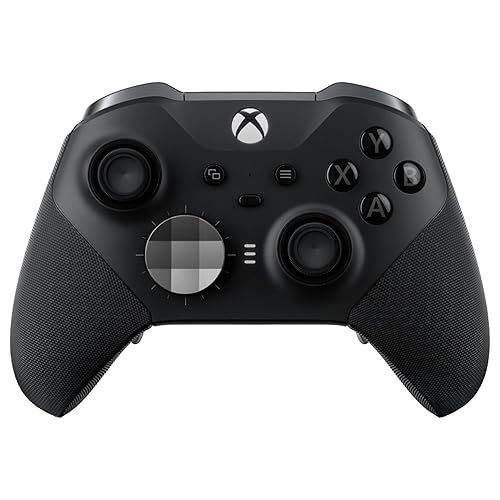
Xbox Elite Series 2
Bottom line: Microsoft's own pro controller and the premium pick for competitive Fortnite players, if you can accept inconsistent quality control.
The Xbox Elite Series 2 is Microsoft's own pro controller. It adds adjustable-tension thumbsticks, three-step hair trigger locks, four back paddles, three onboard profiles and up to 40 hours of rechargeable battery life.
Pros & Cons
Pros- Adjustable-tension sticks and three-stage trigger stops
- Four back paddles keep thumbs on the aim stick
- Swappable sticks, D-pads and paddles, plus case and dock
- Up to 40 hours of battery
- Three onboard profiles
- Rechargeable battery with charging dock included
- Works on both Xbox and PC
Cons- Quality control is inconsistent
- Paddles map only to existing controller buttons
- Priciest of the mainstream options
Why We Picked It
The Elite Series 2 gives you the controls competitive players want in a familiar Xbox shape. Paddles let you move jump, crouch or stick clicks off your thumbs, the trigger locks shorten pull distance, and stick tension can be set to your taste. It connects over Xbox Wireless, Bluetooth or USB-C, and this version includes extra sticks, D-pads, a carrying case and a charging dock.
Who It's For
You want a proven, well-supported pad and you plan to play Fortnite seriously. Stick tension, trigger locks and paddle layout can be saved in three onboard profiles, so a Fortnite setup stays one button away from your other games.
Specs & Configurations
- Connection
- Xbox Wireless, Bluetooth or USB-C
- Battery
- rechargeable, up to 40 hours
- Sticks
- adjustable tension
- Triggers
- three-step hair trigger locks
- In the box
- 6 thumbsticks, 4 paddles, 2 D-pads, carrying case, charging dock
- Extras
- 3 onboard profiles, 3.5mm jack, Xbox Accessories app

3
Best for Claw Grip Players
Razer Wolverine V3 Pro
Bottom line: A strong choice for fast shooter play, with extra bumpers that let you act without moving your thumbs, though it runs small for big hands.
The Razer Wolverine V3 Pro is built for competitive play. It has four mouse-click back buttons, two claw-grip bumpers, triggers that switch between instant actuation and analog control, and a 2.4GHz HyperSpeed dongle.
Pros & Cons
Pros- Two extra claw-grip bumpers keep thumbs on the sticks
- Four mouse-click back buttons
- Triggers switch between instant and analog modes
- Hall effect sticks for smooth control
- Tactile Mecha-Tactile action buttons and a crisp D-pad
- 1000Hz Tournament Mode when wired on PC
- Carrying case and 10 ft cable included
Cons- Stick centering isn't perfect at zero dead zone
- Small for big hands
Why We Picked It
Two extra bumpers let you reload, crouch or dodge without taking your thumbs off the sticks, which suits fast Fortnite fights. The four back buttons and the face buttons share a tactile, mouse-like click, and instant triggers cut the pull needed to fire. A PC Tournament Mode runs the wired connection at 1000Hz.
Who It's For
You play in a claw-style grip or want your thumbs on the sticks at all times. The extra bumpers and instant triggers speed up reloads, jumps and quick weapon swaps, and the included carrying case suits moving between your desk and a friend's place.
Specs & Configurations
- Connection
- 2.4GHz HyperSpeed dongle or wired (1000Hz Tournament Mode on PC)
- Sticks
- Hall effect with 2 replaceable caps
- Extra buttons
- 4 mouse-click back buttons + 2 claw-grip bumpers
- Triggers
- Pro HyperTriggers (instant or analog)
- Buttons
- Mecha-Tactile action buttons, 8-way floating D-pad
- Extras
- carrying case, 10 ft cable

4
Best Value Pro Controller
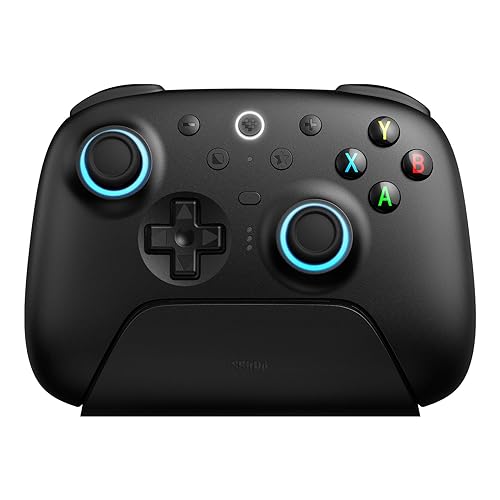
GameSir G7 Pro
Bottom line: The pick for PC players who want pro-level features and gyro aiming for much less than an Elite, as long as you can live with a mushy D-pad.
The GameSir G7 Pro is a PC-and-Xbox pad with TMR sticks, Hall effect triggers with switchable trigger stops and four extra buttons. GameSir says its built-in gyro is PC-only and can be mapped to sticks, buttons or mouse movement.
Pros & Cons
Pros- Pro-level performance for less than an Elite
- PC gyro mappable to sticks, buttons or mouse
- 1000Hz polling on PC
- Four extra buttons for jump, crouch or build keys
- TMR sticks and Hall effect triggers
- Switchable trigger stops
- Charging station included
Cons- D-pad feels mushy
- Wired-only on Xbox
Why We Picked It
The G7 Pro delivers pro-level performance for less, with 1000Hz polling over 2.4GHz on PC and four extra buttons that can hold the actions you use most. The gyro can be mapped in the GameSir Nexus app, which adds a second way to fine-tune your aim without relying on Steam Input.
Who It's For
You want pro-level features on PC without paying Elite money. The trigger stops and four extra buttons suit Fortnite fights, and the gyro gives you something extra to experiment with if you like fine aim adjustments.
Specs & Configurations
- Connection
- 2.4GHz or wired on PC, wired on Xbox, Bluetooth on Android
- Sticks
- TMR
- Triggers
- Hall effect with micro switch trigger stops
- Polling rate
- 1000Hz on PC
- Motion
- built-in gyro (PC only) via GameSir Nexus app
- Extras
- 4 extra buttons, charging station, 1200mAh battery
5
Best for Extra Inputs on a Budget
8BitDo Ultimate 2 Wireless
Bottom line: A well-priced PC pad with precise TMR sticks, back paddles and a dock, best for players who want more buttons than a standard Xbox controller.
The 8BitDo Ultimate 2 Wireless connects over 8BitDo's 8Speed 2.4GHz dongle, Bluetooth or USB, polls at 1000Hz, and packs TMR sticks, switchable triggers, two back paddles and extra bumpers.
Pros & Cons
Pros- Precise TMR sticks and Hall effect triggers
- Two back paddles plus R4/L4 bumpers
- 1000Hz polling over the 2.4GHz dongle
- Charging dock included
- Switchable trigger modes
- 6-axis motion control
- Xbox-style layout feels familiar
Cons- Some games need setup before it works
- Stick tops are a little slick
Why We Picked It
It gives you more inputs than a standard Xbox pad while keeping the layout you already know. Back paddles and R4/L4 bumpers can hold jump, crouch or edit actions, and the 1000Hz dongle keeps inputs responsive. The dock keeps it charged and ready between matches.
Who It's For
You are coming from a basic Xbox controller and want your first upgrade. The extra buttons add room for build and edit shortcuts, and the dongle, Bluetooth and USB options make it easy to use across devices.
Specs & Configurations
- Connection
- 2.4GHz (8Speed), Bluetooth or USB
- Sticks
- TMR
- Triggers
- switchable Hall effect or tactile
- Polling rate
- 1000Hz (2.4GHz and wired)
- Extra buttons
- 2 back paddles + R4/L4 bumpers
- Extras
- customizable 6-axis motion control, charging dock, rumble

6
Best for PlayStation Fans on PC
Sony DualSense Edge
Bottom line: A proven premium choice on PC with replaceable stick modules that keep it going for years, if you can afford it.
The DualSense Edge adds pro features to Sony's controller: two sets of swappable back buttons, adjustable trigger travel, remapping, quick-swap profiles and replaceable stick modules.
Pros & Cons
Pros- Reliable on PC with Steam
- Replaceable stick modules
- Two sets of swappable back buttons
- Adjustable trigger travel for faster pulls
- Quick-swap profiles
- Haptic feedback and adaptive triggers
- Very comfortable, even for larger hands
Cons- Premium price, so casual players get more value from a standard pad
- Back buttons map only to existing buttons
Why We Picked It
If PlayStation's shape is the one that feels natural, this is the version built for competitive play. It connects reliably on PC and updates through Sony's PlayStation Accessories app and Steam. Replaceable stick modules mean worn sticks do not mean a new controller, and adjustable trigger travel gives shooters a quicker pull.
Who It's For
You prefer the DualSense layout and want back buttons and trigger stops while playing Fortnite on PC. It is comfortable for larger hands, and quick-swap profiles let you keep different setups ready.
Specs & Configurations
- Connection
- wireless
- Extras
- 2 sets of swappable back buttons, adjustable trigger travel, remappable buttons, quick-swap profiles
- Sticks
- replaceable stick modules with 3 types of caps
- Also includes
- haptic feedback, adaptive triggers

7
Best Simple Plug-and-Play
Xbox Wireless Controller
Bottom line: The easy, reliable default for Fortnite on PC, with great ergonomics, as long as you do not need back buttons.
The standard Xbox Wireless Controller has textured grips on the triggers, bumpers and back, a hybrid D-pad, a Share button, a headset jack and button remapping through the Xbox Accessories app.
Pros & Cons
Pros- Excellent ergonomics with textured grips
- Reliable over long-term use
- Xbox Wireless, Bluetooth and USB-C connections
- Textured grips on triggers, bumpers and back
- Share button for screenshots and clips
- 3.5mm headset jack on the controller
- Button remapping in the Xbox Accessories app
Cons- Runs on AA batteries
- No back buttons or trigger stops
Why We Picked It
Plenty of Fortnite players want a pad that simply works, and this one connects over Xbox Wireless, Bluetooth or USB-C with no fuss on Windows. Its ergonomics are hard to improve on and it holds up well over long-term use, which makes it a safe base before you decide whether paddles are worth paying for.
Who It's For
You are new to controller play on PC or want a dependable first pad. The grips keep it secure through long sessions, and the Share button makes saving a Victory Royale clip quick.
Specs & Configurations
- Connection
- Xbox Wireless, Bluetooth or USB-C
- Features
- hybrid D-pad, textured grips, Share button
- Audio
- 3.5mm headset jack
- Customization
- button remapping and profiles in the Xbox Accessories app
- Works with
- Xbox Series X and S, Xbox One, Windows, Android, iOS

8
Best Wired for a Desk Setup
GameSir G7 HE Wired Controller
Bottom line: The smartest wired pick if your PC sits next to you, since it adds durable Hall effect sticks, hair triggers and back buttons for a modest price.
If your PC sits right next to you, a wired controller means no batteries and no connection drops. The GameSir G7 HE is officially licensed for Xbox and also works on Windows and Steam.
Pros & Cons
Pros- Durable Hall effect sticks and microswitch buttons
- Hair-trigger mode and two back buttons
- No batteries, no connection drops
- Licensed for Xbox, works on Windows and Steam
- Headset jack and mic mute
- Back buttons for jumping or reloading
Cons- Wired only
- May need GameSir's app to work on Windows 11
Why We Picked It
It adds features usually found on pricier pads: Hall effect sticks rated for 5 million cycles, a hair-trigger mode and two back buttons for jumping or reloading without moving your thumbs. A headset jack and mic mute button suit squad play.
Who It's For
Your PC sits an arm's length away and you want upgraded sticks and triggers without paying for a pro pad. A cable means no batteries to swap and no dropped connection mid-match.
Specs & Configurations
- Connection
- USB-C cable
- Sticks
- Hall effect (rated for 5 million cycles)
- Extras
- 2 back buttons, 3.5mm jack, mic mute
- Works with
- Windows, Steam, Xbox Series X/S, Xbox One
Frequently Asked Questions
Is Fortnite controller-friendly on PC?
Yes. Fortnite on PC supports gamepads, and common Xbox and PlayStation controllers connect over USB, Bluetooth or a wireless dongle. Many players tune their layout and sensitivity afterward, which our settings guide covers.
Can you use an Xbox controller to play Fortnite on PC?
Yes. The Xbox Wireless Controller works with Windows over Xbox Wireless, Bluetooth or USB-C, and the Elite Series 2 does as well.
Is a wired or wireless controller better for Fortnite?
Wired pads skip batteries and dropped connections, which suits a desk setup. Wireless pads with a 2.4GHz dongle give you freedom to sit back without a cable, and many support a 1000Hz polling rate.
Are budget controllers good for Fortnite?
They can be. Pads like the GameSir G7 HE and the 8BitDo Ultimate 2 add Hall effect or TMR sticks and back buttons without a premium price, though they may lack the polish of an Elite.
Which Controller for Fortnite on PC Should You Buy?
For most players, the Nacon Revolution X Unlimited is the best controller for Fortnite on PC if you enjoy tuning your setup, and the Xbox Elite Series 2 is the safer premium choice. If you want paddles on a tighter budget, the GameSir G7 HE and 8BitDo Ultimate 2 are the easiest upgrades. And if you are deciding which battle royale deserves your practice time, our Fortnite vs Apex Legends breakdown can help.

