

Elden Ring punishes late dodges and slow heals, so the best controller for Elden Ring on PC is one that lets you roll, swing and drink a flask without ever lifting your thumbs off the sticks. That usually means back paddles, sticks that stay accurate for hundreds of hours and a connection that never lags. These 10 pads cover Xbox and PlayStation layouts, wired and wireless, and budgets from entry level to premium.
Best Controller for Elden Ring on PC in 2026: 10 Picks
GameCuki is reader-supported. When you buy through links on our site, we may earn an affiliate commission at no extra cost to you. As an Amazon Associate I earn from qualifying purchases. Learn more.
Our Top Picks

Best for Most Elden Ring Players
GameSir G7 Pro
Bottom line: The best all-round Elden Ring pad on PC, with drift-resistant TMR sticks and four extra buttons for dodging and healing, for players who want pro features without Elite money.
- Drift-resistant TMR sticks keep your dodge direction accurate
- Four extra buttons for roll, sprint, flask or spell swap
- 1000Hz polling on PC, wired or 2.4G wireless
- Charging station included, so it is ready between sessions
- Nexus app for stick curves and button remapping
- Built-in gyro for PC games that use it
- Hall effect triggers with adjustable trigger stops
- D-pad feels mushy, so skip it if you cycle items on the D-pad constantly
- Tactile switches feel clicky, which takes getting used to

Best Premium Xbox Pick
Xbox Elite Series 2 Core
Bottom line: The most refined Xbox-style controller for Elden Ring on PC, with adjustable sticks and a 40 hour battery, as long as you are happy to add paddles separately.
- Adjustable-tension thumbsticks tune how heavy your dodge input feels
- Shorter hair trigger locks for quick attacks
- Up to 40 hours of battery life
- Three profiles saved on the controller
- Wrap-around rubberized grip for long sessions
- Works over Xbox Wireless, Bluetooth or USB-C
- 3.5mm headset jack
- Back paddles are sold separately in the Complete Component Pack
- Costs noticeably more than a standard Xbox controller

Best for Back Button Fans
Razer Wolverine V3 Pro
Bottom line: The best Elden Ring pad for players who want six remappable buttons and a fast wireless connection, if you can accept a high price.
- Six remappable buttons for dodge, sprint, flask and spell swap
- Hall effect sticks resist drift
- Mecha-Tactile face buttons are fast and cushioned
- 8-way floating D-pad for item and spell cycling
- Wireless 2.4 GHz dongle with low latency
- Tournament Mode for 1000Hz wired polling on PC
- Razer app for sticks and button layouts
- Priced at the top of this list
- Some units have arrived with grip or stick centering problems
Best for PS5 and PC Players
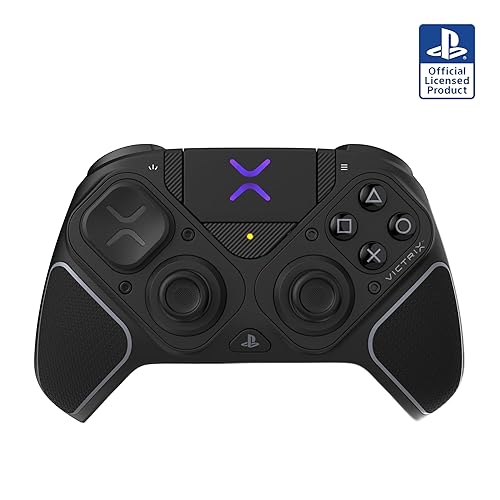
Victrix Pro BFG Reloaded
Bottom line: A modular pad for players who move between PS5 and PC, with swappable parts so you can tune the layout, at a premium price.
- Swappable modules let you rebuild the layout around your hands
- Hall effect sticks and clutch triggers
- Four mappable quick-action buttons for roll or flask
- Up to 20 hours of wireless battery life
- Wired play when you want zero battery worry
- 3.5mm audio jack
- Works on PS5, PS4 and PC
- Premium price
- Listed as the PS5 edition, so the layout is PlayStation style rather than Xbox
Best for PlayStation Layout with Paddles
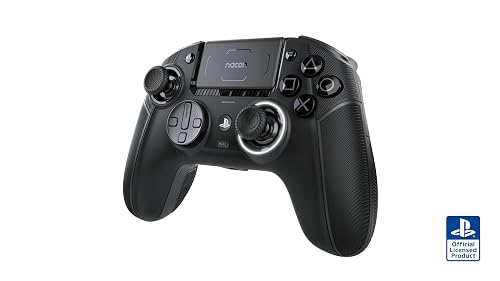
Nacon Revolution 5 Pro
Bottom line: A PlayStation-layout pad with four back paddles, Hall effect sticks and a wireless adapter for PC, for players who want pro features and are fine with a bulky grip.
- Four micro-switch back paddles for dodge, sprint and flask
- Hall effect sticks and triggers resist drift
- Wireless adapter for PC
- Wired mode with a 3 m cable
- Trigger blockers for short or long pulls
- Swappable D-pad
- Works on PS5, PS4 and PC
- Battery life is about 10 hours
- Recessed USB-C port can be picky about third-party cables
- Grips feel thick to some hands
Best Value for Paddles and Wireless
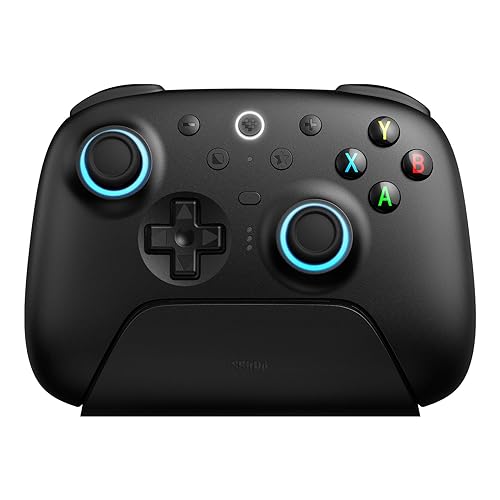
8BitDo Ultimate 2 Wireless
Bottom line: A drift-resistant wireless pad with back paddles and a charging dock, for PC players who want pro features at a reasonable price.
- TMR sticks resist drift
- Two back paddles plus R4/L4 extra bumpers
- Stable 2.4G connection with a 10 m range
- Trigger mode switch between linear and tactile
- Multifunction charging dock included
- Customizable through 8BitDo Ultimate Software V2
- 6-axis motion control
- Stick tops are a little slick
- Needs the Ultimate Software for deeper remapping

Best Budget Wireless Pad
GameSir Nova Lite
Bottom line: An affordable wireless pad with Hall effect sticks and triggers, for Elden Ring players who want drift-proof control without paying for paddles.
- Hall effect sticks and triggers resist drift
- 2.4G dongle included
- Bluetooth and USB-C options
- Multi-function M button adjusts deadzone and vibration
- Can swap the ABXY layout from the controller
- Works with Windows, Steam Deck, Switch, Android and iOS
- Turbo function for compatible buttons
- No back buttons
- About 10 hours of battery
- No data cable in the box

Best Cheap Wired Pad
GameSir Kaleid Wired
Bottom line: A low-cost wired Xbox-style pad with Hall effect sticks and triggers, for players who want drift resistance and zero battery worries.
- Hall effect sticks resist drift
- Hall effect analog triggers
- Wired, so there is no battery or lag to manage
- Four rumble motors
- Plug and play on Windows and Steam
- Adjustable lighting
- Xbox-style layout many PC games expect
- Wired only
- Triggers can feel soft or shallow to some players
- Some units have had power-connection problems

Best for Xbox-Style Wireless with Trigger Stops
Turtle Beach Stealth Ultra
Bottom line: A wireless Xbox-style pad with Hall effect sticks, microswitch buttons and four mappable buttons, for players who like adjusting trigger travel.
- Hall effect thumbsticks resist drift
- Tactile microswitch buttons feel crisp
- Adjustable trigger stops
- Four mappable quick-action buttons
- Pro-Aim Focus mode
- Bluetooth and wireless transmitter
- Firmware updates in Control Center 2
- Battery life is 8 to 10 hours out of the box
- Build quality concerns on some units, such as connection and trigger problems
Best for PlayStation Fans on PC
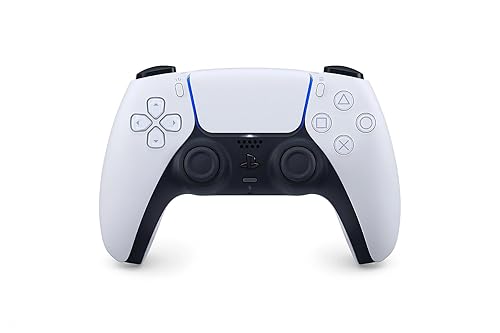
Sony DualSense Wireless Controller
Bottom line: The most comfortable plug-and-play pad for PlayStation fans on PC, if you can live without back buttons.
- Comfortable shape for long sessions
- Bluetooth or USB-C connection to a PC
- Adaptive triggers and haptics in supported PC games
- 3.5mm headset jack
- Built-in microphone
- Create button for capture
- Familiar layout for PlayStation players
- No back buttons for dodge or flask
- Sticks can drift with heavy use
- Adaptive triggers and haptics only work in supported games
Table of Contents
Best Controller for Elden Ring on PC: Our Picks in Detail
1
Best for Most Elden Ring Players
GameSir G7 Pro
Bottom line: The best all-round Elden Ring pad on PC, with drift-resistant TMR sticks and four extra buttons for dodging and healing, for players who want pro features without Elite money.
The GameSir G7 Pro is a modern Xbox-style pad built around the features that matter in a long Elden Ring run. It has TMR sticks, four remappable extra buttons and a 1000Hz connection on PC.
Pros & Cons
Pros
- Drift-resistant TMR sticks keep your dodge direction accurate
- Four extra buttons for roll, sprint, flask or spell swap
- 1000Hz polling on PC, wired or 2.4G wireless
- Charging station included, so it is ready between sessions
- Nexus app for stick curves and button remapping
- Built-in gyro for PC games that use it
- Hall effect triggers with adjustable trigger stops
Cons
- D-pad feels mushy, so skip it if you cycle items on the D-pad constantly
- Tactile switches feel clicky, which takes getting used to
Why We Picked It
Elden Ring is a game of tiny timing windows, and the G7 Pro gives you tools to widen them. The two back buttons and L5/R5 bumpers let you put dodge, sprint, item use or spell cycling under your fingers while your thumbs stay on the sticks. Its TMR sticks are built to resist drift, so a long campaign should not leave your aim wandering, and the Nexus app lets you adjust stick curves to taste. It plugs into a PC with a cable or connects over a 2.4G adapter, and the charging station keeps it topped up between sessions.
Who It's For
A PC player who wants one pad for the Lands Between and everything else, and who likes the Xbox layout. If you are tired of letting go of the right stick every time you need to heal or roll, the extra buttons fix that without a premium price.
Wireless play stays responsive thanks to the 2.4G adapter, which suits long boss attempts from the couch or the desk.
Specs & Configurations
- Layout
- Xbox style (offset sticks)
- Connection
- 2.4G or wired on PC, Bluetooth on Android
- Polling rate
- 1000Hz on PC
- Sticks
- TMR
- Triggers
- Hall effect with micro-switch trigger stops
- Extra buttons
- L5/R5 bumpers + 2 back buttons
- Battery
- 1200mAh with charging station
- Weight
- 272 g
Get It Now
Check Price on Amazon
2
Best Premium Xbox Pick
Xbox Elite Series 2 Core
Bottom line: The most refined Xbox-style controller for Elden Ring on PC, with adjustable sticks and a 40 hour battery, as long as you are happy to add paddles separately.
Microsoft's Elite Series 2 Core trims the full kit down to the essentials, while keeping the adjustable sticks, trigger locks and long battery that made the original popular.
Pros & Cons
Pros
- Adjustable-tension thumbsticks tune how heavy your dodge input feels
- Shorter hair trigger locks for quick attacks
- Up to 40 hours of battery life
- Three profiles saved on the controller
- Wrap-around rubberized grip for long sessions
- Works over Xbox Wireless, Bluetooth or USB-C
- 3.5mm headset jack
Cons
- Back paddles are sold separately in the Complete Component Pack
- Costs noticeably more than a standard Xbox controller
Why We Picked It
The Elite Series 2 is Microsoft's own premium pad, and it works with Windows without any fuss. Adjustable-tension sticks let you decide how much resistance you want on a precise dodge, and the shorter trigger locks make quick attacks faster. Up to three profiles can be saved on the controller, so you can keep an Elden Ring layout ready and switch to another game in seconds. Paddles are not in the Core box, so plan to add them if back buttons are a priority.
Who It's For
A player who wants a first-party controller that feels solid and will not fight Windows, and who is comfortable spending more for build quality. It suits long sessions where grip comfort and battery life matter as much as extra buttons.
If you already own paddles or plan to buy the component pack, it becomes a very capable Elden Ring pad.
Specs & Configurations
- Layout
- Xbox style (offset sticks)
- Connection
- Xbox Wireless, Bluetooth or USB-C
- Battery
- up to 40 hours
- Profiles
- up to 3 saved on the controller
- Triggers
- shorter hair trigger locks
- Sticks
- adjustable tension
Get It Now
Check Price on Amazon
3
Best for Back Button Fans
Razer Wolverine V3 Pro
Bottom line: The best Elden Ring pad for players who want six remappable buttons and a fast wireless connection, if you can accept a high price.
Razer's Wolverine V3 Pro packs more remappable buttons than any other pad here. Four mouse-click back buttons sit under your fingers, and two claw grip bumpers sit on top.
Pros & Cons
Pros
- Six remappable buttons for dodge, sprint, flask and spell swap
- Hall effect sticks resist drift
- Mecha-Tactile face buttons are fast and cushioned
- 8-way floating D-pad for item and spell cycling
- Wireless 2.4 GHz dongle with low latency
- Tournament Mode for 1000Hz wired polling on PC
- Razer app for sticks and button layouts
Cons
- Priced at the top of this list
- Some units have arrived with grip or stick centering problems
Why We Picked It
Back buttons are the biggest quality-of-life upgrade for Elden Ring, because they let you hold camera and movement while you roll or heal. The Wolverine V3 Pro goes further than most with four rear buttons and two extra bumpers, all remappable in the Razer app. Hall effect sticks, the floating D-pad and the fast wireless dongle make it comfortable for long boss runs, and the wired Tournament Mode adds 1000Hz polling on PC.
Who It's For
A player who wants every action on a button without moving a thumb, and who is happy with an Xbox layout. If you plan to map roll, sprint, flask and spell swap at once, six extra buttons give you room.
It also suits anyone who wants wireless freedom on PC with a USB dongle.
Specs & Configurations
- Layout
- Xbox style (offset sticks)
- Connection
- 2.4 GHz HyperSpeed dongle or wired
- Sticks
- Hall effect
- Triggers
- Razer HyperTriggers
- Extra buttons
- 4 back buttons + 2 claw grip bumpers
- Face buttons
- Mecha-Tactile with 8-way floating D-pad
- PC mode
- Tournament Mode at 1000Hz when wired
- Weight
- 14.72 oz
Get It Now
Check Price on Amazon
4
Best for PS5 and PC Players
Victrix Pro BFG Reloaded
Bottom line: A modular pad for players who move between PS5 and PC, with swappable parts so you can tune the layout, at a premium price.
The Victrix Pro BFG Reloaded is a modular controller built around parts you can swap with a small screwdriver. Hall effect modules, clutch triggers and four quick-action buttons come as standard.
Pros & Cons
Pros
- Swappable modules let you rebuild the layout around your hands
- Hall effect sticks and clutch triggers
- Four mappable quick-action buttons for roll or flask
- Up to 20 hours of wireless battery life
- Wired play when you want zero battery worry
- 3.5mm audio jack
- Works on PS5, PS4 and PC
Cons
- Premium price
- Listed as the PS5 edition, so the layout is PlayStation style rather than Xbox
Why We Picked It
Elden Ring is a long game with a lot of experimenting, and a pad that lets you rebuild its layout suits that habit. You can change stick positions and D-pad modules so the controller matches how you hold it, then map the quick-action buttons to the moves you use constantly. It lists PC alongside PS5 and PS4, so one controller can follow you between a console and a desktop.
Who It's For
A PlayStation-layout fan who plays on both a PS5 and a PC and wants a pro-level pad that adapts to their hands. If you like tinkering with sticks and modules until it feels right, this is where that pays off.
Specs & Configurations
- Layout
- PlayStation style
- Platforms
- PS5, PS4 and PC
- Connection
- wired or wireless, up to 20 hours of battery
- Modules
- 3 customizable Hall effect modules
- Triggers
- 5-stop Hall effect clutch triggers
- Extra buttons
- 4 mappable quick-action buttons
- Parts
- 11 interchangeable components
- Weight
- 9.28 oz
Get It Now
Check Price on Amazon
5
Best for PlayStation Layout with Paddles
Nacon Revolution 5 Pro
Bottom line: A PlayStation-layout pad with four back paddles, Hall effect sticks and a wireless adapter for PC, for players who want pro features and are fine with a bulky grip.
The Nacon Revolution 5 Pro adds paddles and Hall effect sensors to a PlayStation layout. Its wireless adapter plugs into a PC.
Pros & Cons
Pros
- Four micro-switch back paddles for dodge, sprint and flask
- Hall effect sticks and triggers resist drift
- Wireless adapter for PC
- Wired mode with a 3 m cable
- Trigger blockers for short or long pulls
- Swappable D-pad
- Works on PS5, PS4 and PC
Cons
- Battery life is about 10 hours
- Recessed USB-C port can be picky about third-party cables
- Grips feel thick to some hands
Why We Picked It
For players who prefer symmetrical sticks, this is one of the few pro pads that supports PC with a PlayStation layout. The four Omron micro-switch paddles give you room to map every Elden Ring action you do not want to reach for, and trigger blockers shorten the pull so quick attacks land faster.
Who It's For
A PlayStation-layout player who wants paddles on a PC and does not mind a chunkier shape. It works well for long boss attempts when a stable adapter connection is more important than saving weight.
Specs & Configurations
- Layout
- PlayStation style
- Platforms
- PS5, PS4 and PC
- Connection
- USB-A wireless adapter or wired with 3 m cable
- Battery
- up to 10 hours
- Sticks and triggers
- Hall effect
- Extra buttons
- 4 Omron micro-switch back paddles
- D-pad
- swappable specialized or traditional
6
Best Value for Paddles and Wireless
8BitDo Ultimate 2 Wireless
Bottom line: A drift-resistant wireless pad with back paddles and a charging dock, for PC players who want pro features at a reasonable price.
The 8BitDo Ultimate 2 Wireless is a pro-style Xbox-layout controller. It adds TMR sticks, back paddles and a charging dock.
Pros & Cons
Pros
- TMR sticks resist drift
- Two back paddles plus R4/L4 extra bumpers
- Stable 2.4G connection with a 10 m range
- Trigger mode switch between linear and tactile
- Multifunction charging dock included
- Customizable through 8BitDo Ultimate Software V2
- 6-axis motion control
Cons
- Stick tops are a little slick
- Needs the Ultimate Software for deeper remapping
Why We Picked It
The back paddles and extra bumpers cover roll, sprint and item use, and the trigger mode switch lets you pick between smooth linear pulls and a tactile click. The 2.4G dongle runs at 1000Hz, and the dock keeps the controller charged between sessions. It gives you most of what a premium pad does without the premium price.
Who It's For
A PC player who wants drift-resistant sticks and paddles with a dock, and who values value over brand name. It fits a desk setup where you want to grab the pad and play.
Specs & Configurations
- Layout
- Xbox style (offset sticks)
- Connection
- 2.4G dongle or wired
- Polling rate
- 1000Hz on 2.4G and wired
- Sticks
- TMR
- Triggers
- switch between linear Hall effect and tactile
- Extra buttons
- 2 back paddles + R4/L4 bumpers
- Motion
- 6-axis
- Dock
- multifunction charging dock included
7
Best Budget Wireless Pad
GameSir Nova Lite
Bottom line: An affordable wireless pad with Hall effect sticks and triggers, for Elden Ring players who want drift-proof control without paying for paddles.
GameSir's Nova Lite keeps the essentials and drops the extras. You get Hall effect sticks and triggers, a 2.4G dongle and Bluetooth.
Pros & Cons
Pros
- Hall effect sticks and triggers resist drift
- 2.4G dongle included
- Bluetooth and USB-C options
- Multi-function M button adjusts deadzone and vibration
- Can swap the ABXY layout from the controller
- Works with Windows, Steam Deck, Switch, Android and iOS
- Turbo function for compatible buttons
Cons
- No back buttons
- About 10 hours of battery
- No data cable in the box
Why We Picked It
Elden Ring does not demand a flashy controller, but it does demand sticks that stay accurate. The Nova Lite delivers Hall effect sticks and triggers at a budget price, and the M button lets you adjust stick deadzones on the fly.
Who It's For
A PC player who wants a wireless pad that will not drift and does not need paddles. It also works as a second pad for travel or a Steam Deck dock.
Specs & Configurations
- Connection
- 2.4G dongle, Bluetooth or USB-C
- Sticks and triggers
- Hall effect
- Battery
- 600mAh, up to 10 hours
- Charge time
- about 2 hours
- Platforms
- Windows 10/11, Switch, Android, iOS, Steam Deck
- Weight
- 0.31 kg
Get It Now
Check Price on Amazon
8
Best Cheap Wired Pad
GameSir Kaleid Wired
Bottom line: A low-cost wired Xbox-style pad with Hall effect sticks and triggers, for players who want drift resistance and zero battery worries.
GameSir's Kaleid is a wired Xbox-style pad with Hall effect sticks and triggers. It costs far less than the pro pads above.
Pros & Cons
Pros
- Hall effect sticks resist drift
- Hall effect analog triggers
- Wired, so there is no battery or lag to manage
- Four rumble motors
- Plug and play on Windows and Steam
- Adjustable lighting
- Xbox-style layout many PC games expect
Cons
- Wired only
- Triggers can feel soft or shallow to some players
- Some units have had power-connection problems
Why We Picked It
A wired connection means no battery and no latency, which suits a game where one late input can end a boss attempt. Hall effect sticks and triggers keep control consistent, and four rumble motors give feedback on impacts.
Who It's For
A desktop player who sits near the PC and wants drift-resistant sticks for less. It is also a good spare for co-op sessions.
Specs & Configurations
- Layout
- Xbox style (offset sticks)
- Connection
- wired USB
- Platforms
- Xbox Series X/S, Xbox One and Windows 10/11
- Sticks
- Hall effect
- Triggers
- Hall effect analog
- Rumble
- four motors, two in grips and two in triggers
- Lighting
- adjustable effects
Get It Now
Check Price on Amazon
9
Best for Xbox-Style Wireless with Trigger Stops
Turtle Beach Stealth Ultra
Bottom line: A wireless Xbox-style pad with Hall effect sticks, microswitch buttons and four mappable buttons, for players who like adjusting trigger travel.
Turtle Beach's Stealth Ultra mixes Hall effect sticks and microswitch buttons with a wireless transmitter and four programmable buttons.
Pros & Cons
Pros
- Hall effect thumbsticks resist drift
- Tactile microswitch buttons feel crisp
- Adjustable trigger stops
- Four mappable quick-action buttons
- Pro-Aim Focus mode
- Bluetooth and wireless transmitter
- Firmware updates in Control Center 2
Cons
- Battery life is 8 to 10 hours out of the box
- Build quality concerns on some units, such as connection and trigger problems
Why We Picked It
Crisp microswitch buttons and adjustable trigger stops give quick, consistent inputs for dodges and heavy attacks. The four mappable buttons can hold roll, sprint, flask or spell swap.
Who It's For
A PC player who prefers an Xbox layout and wants wireless play with plenty of tuning. It suits people who like adjusting trigger travel and button feel.
Specs & Configurations
- Layout
- Xbox style (offset sticks)
- Connection
- wireless transmitter or Bluetooth
- Platforms
- Xbox Series X/S, Xbox One, Windows, Android
- Sticks
- Hall effect
- Buttons
- tactile microswitch
- Extra buttons
- 4 mappable quick-action buttons
- Battery
- 8 to 10 hours, up to 20 hours in Eco Power Mode
- Weight
- 13.28 oz
Get It Now
Check Price on Amazon
10
Best for PlayStation Fans on PC
Sony DualSense Wireless Controller
Bottom line: The most comfortable plug-and-play pad for PlayStation fans on PC, if you can live without back buttons.
The DualSense is the simplest way to play Elden Ring on a PC with a PlayStation-style layout.
Pros & Cons
Pros
- Comfortable shape for long sessions
- Bluetooth or USB-C connection to a PC
- Adaptive triggers and haptics in supported PC games
- 3.5mm headset jack
- Built-in microphone
- Create button for capture
- Familiar layout for PlayStation players
Cons
- No back buttons for dodge or flask
- Sticks can drift with heavy use
- Adaptive triggers and haptics only work in supported games
Why We Picked It
It is comfortable, widely available and easy to connect over Bluetooth or USB-C. Elden Ring does not need extras, but the DualSense gives you a familiar layout and solid build.
Who It's For
A PlayStation fan who wants a no-frills pad. If you rely on back paddles for dodging, upgrade to a pad with them, but if you prefer simplicity the DualSense is a dependable pick.
Specs & Configurations
- Layout
- PlayStation style (symmetrical sticks)
- Connection
- Bluetooth or USB-C
- Triggers
- adaptive triggers
- Feedback
- haptic feedback in supported games
- Audio
- built-in mic, speaker and 3.5mm jack
- Weight
- 280 g
Get It Now
Check Price on AmazonWhat to Look for in a Controller for Elden Ring on PC
Back Paddles
Remappable back buttons let you put dodge, sprint or item use under your fingers while your thumbs stay on the sticks. Mapped well, they let you roll and move at the same time and use healing flasks without breaking camera control.
Stick Quality
Hall effect and TMR sticks use magnets instead of worn contact points, so they resist the drift that creeps into standard sticks. For a game that takes hundreds of hours, that matters.
Wired or Wireless
A wired pad avoids latency and battery worries. A 2.4G adapter keeps lag low if you want wireless, while Bluetooth is convenient but can be less consistent.
Layout and Comfort
Pick the Xbox layout if you want offset sticks or PlayStation symmetrical sticks if that is what you are used to. Elden Ring plays well on either. If you are still choosing a game to pair with it, see how it stacks up in our Sekiro vs Elden Ring and Lies of P vs Elden Ring comparisons.
FAQ
Can you use a console controller on PC?
Yes. Xbox and PlayStation controllers usually work on PC with a cable or Bluetooth, although you may need a little setup the first time.
Is Elden Ring better with a controller on PC?
For most people, yes. FromSoftware built the combat around a gamepad, and a controller makes dodging, lock-on and analog movement feel more natural than keyboard and mouse.
Do I need back paddles for Elden Ring?
You can finish the game without them, but paddles make it easier to roll, heal and switch items without lifting your thumbs. For a broader look at pads that suit PC, see our guide to the best PC controllers.
Which Controller Should You Buy for Elden Ring on PC?
Choosing the best controller for Elden Ring on PC comes down to keeping your thumbs on the sticks and your inputs consistent. For most players, the GameSir G7 Pro does that best. If you want a first-party feel, choose the Elite Series 2 Core, and if you want the most buttons, go for the Razer Wolverine V3 Pro. Budget buyers will be happy with the GameSir Nova Lite or the wired Kaleid.