GameCuki is reader-supported. When you buy through links on our site, we may earn an affiliate commission at no extra cost to you. As an Amazon Associate I earn from qualifying purchases. Learn more.
GameCuki VerdictRecommended
What Our Verdicts Mean
GameCuki Top PickThe best option in its class, with no serious, repeated problems.
RecommendedA good buy for most people. Weaknesses are minor or only matter to some players.
Buy With CaveatsRight for a specific kind of player only, because of a significant drawback.
Skip ItNot recommended. A better option exists at a similar price.
The Bottom LineA clean-sounding, easy-to-use USB mic with grille-wide reactive RGB and a handy gain dial, held back by clunky software and lighting that doubles as the only status indicator.
Supercardioid capsule keeps the focus on your voice and cuts room noise
RGB covers most of the grille and reacts to Chroma games and stream events
Tap-to-mute sensor on top, plus a front gain dial and headphone jack for monitoring
Metal stand and boom arm compatible, with 3/8 and 5/8 inch threading
Built-in shock absorber and a digital gain limiter against pops and peaks
Single USB-C port, plug-and-play setup
Cons
Razer Synapse is needed for most controls and can require a reboot after install
All status feedback runs through the lighting, with no dedicated LEDs
Touch controls can cause accidental mutes until you learn the timing
Razer Seiren V3 Chroma Specs
Capsule
16 mm condenser
Pickup pattern
Supercardioid
Max sample rate
96 kHz (44.1, 48 or 96 kHz in Synapse)
Connection
USB-C on the mic, USB-A cable included (79.5 in)
Height
8.5 in with stand
Controls
Tap-to-mute sensor, front gain dial, 3.5 mm headphone jack
Lighting
Razer Chroma RGB, stream and game reactive
Mount threads
3/8 in and 5/8 in
Software
Razer Synapse
Streamers love a mic that lights up, but a pretty grille means little if you sound like you are inside a tin can, so this Razer Seiren V3 Chroma review asks whether the sound and controls back up the looks. Razer’s USB condenser wraps a 16 mm supercardioid capsule in a perforated grille that glows across most of its body, then adds a tap-to-mute sensor and a front gain dial. It lands between the stripped-down Seiren V3 Mini and the XLR-capable Seiren V3 Pro, and it goes up against the HyperX QuadCast S and the Elgato Wave line. If you are comparing, our HyperX QuadCast 2 S review and Elgato Wave 3 review cover two of its closest rivals.
Design and Build: Rounded, Metal-Accented and Easy to Set Up
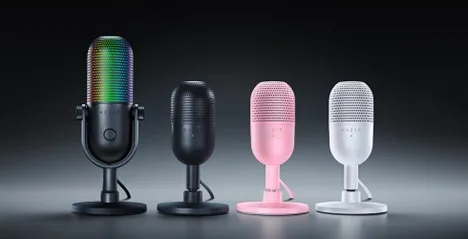
The Seiren V3 Chroma (left) is taller than the Seiren V3 Mini and adds a gain dial and headphone jack. (Image: Razer)
The Seiren V3 Chroma has a rounded, pill-shaped look that avoids the sharp angles common on gaming gear. It stands about 8.5 inches tall on its stand, and the grille is metal, with extra metal on the yoke. The mount sits on the desk, tilts upward and can be swapped for a boom arm, since the mic carries both 3/8 and 5/8 inch threading. Setup is plug-and-play: screw the mic onto the base, connect the braided USB-C to USB-A cable (about 79.5 inches long) and it works. There is only one port on the back, so it is hard to get wrong.
Razer sells it in black, white and a pink Quartz finish. The Amazon button on this page points to the Quartz version, which Amazon sells directly. The mic body is mostly capsule and grille, so the stand does the heavy lifting on stability, and it stays where you put it.
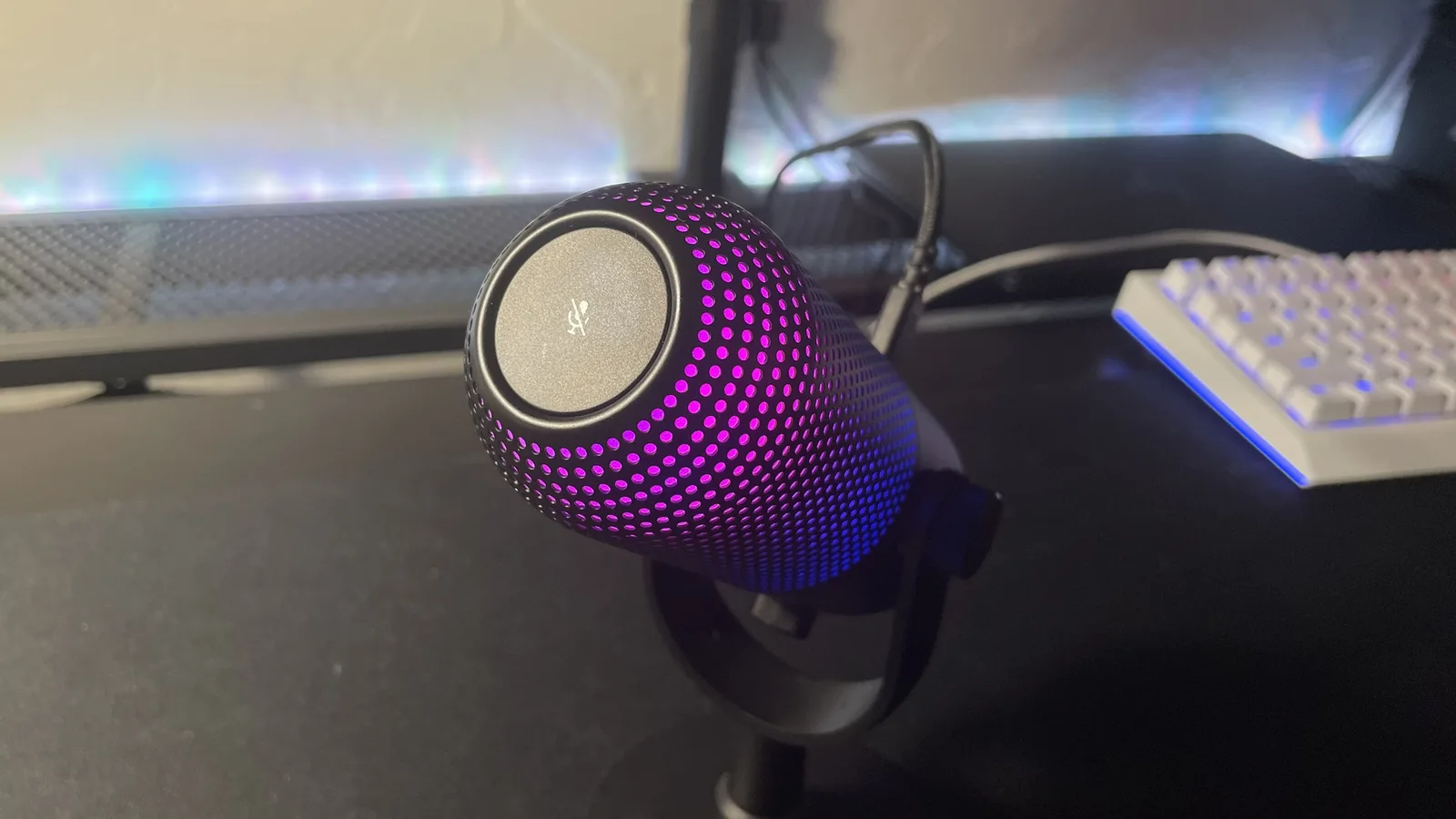
The tap-to-mute sensor sits on the top of the mic. (Image: Laptop Mag)
The controls are a strength. A tap-to-mute sensor on top mutes the feed, and extra taps can cycle lighting effects or switch the digital gain limiter on and off, with the actions mappable in Razer Synapse. Muting turns the whole mic red, so you can see it from across the room. A front dial adjusts gain or volume, and a 3.5 mm headphone jack lets you monitor your own voice with no delay.
The catch is the touch surface. It can feel finicky at first, and accidental mutes are easy until you get the timing right, and a capacitive sensor is never as satisfying as a physical button. The lighting is also the only status display, with no dedicated LEDs, so the indicator and the light show compete for the same job.
Sound Quality: Clear Voice Capture With Tight Pickup
The 16 mm supercardioid capsule favors sound from directly in front of the mic and rejects the sides and rear, which suits a desk, a game chat and an untreated room. The result is clean, clear voice capture with a slightly warm tone. Against the smaller Seiren V3 Mini it handles background noise noticeably better, though it can come across a little quieter, so you may need to raise the gain. A built-in shock absorber and a digital gain limiter help against desk bumps and sudden loud moments.
Sample rate goes up to 96 kHz, selectable in Synapse alongside 44.1 and 48 kHz, and a high-pass filter is available there too. It is a USB condenser, so expect good results for streaming, Discord and calls rather than a replacement for an XLR setup. Because the pattern is fixed, it is not the pick for two-person podcasts or group recordings around one mic.
RGB Lighting: Reactive and Hard to Miss
Razer Chroma RGB runs across most of the grille. (Image: Razer)
This is the main reason to pick the Chroma over the Mini. The backlight covers over half of the main body and uses Razer Chroma RGB, so it can sync with other Chroma gear, react to Chroma-integrated games and respond to stream events such as emotes and alerts. Several presets are included, and you can turn the lighting off completely.
If you do not stream or care about matching a setup, the lighting is a cost you pay for nothing. In that case a plainer mic is the better value.
Razer Synapse: Plenty of Options, Some Friction
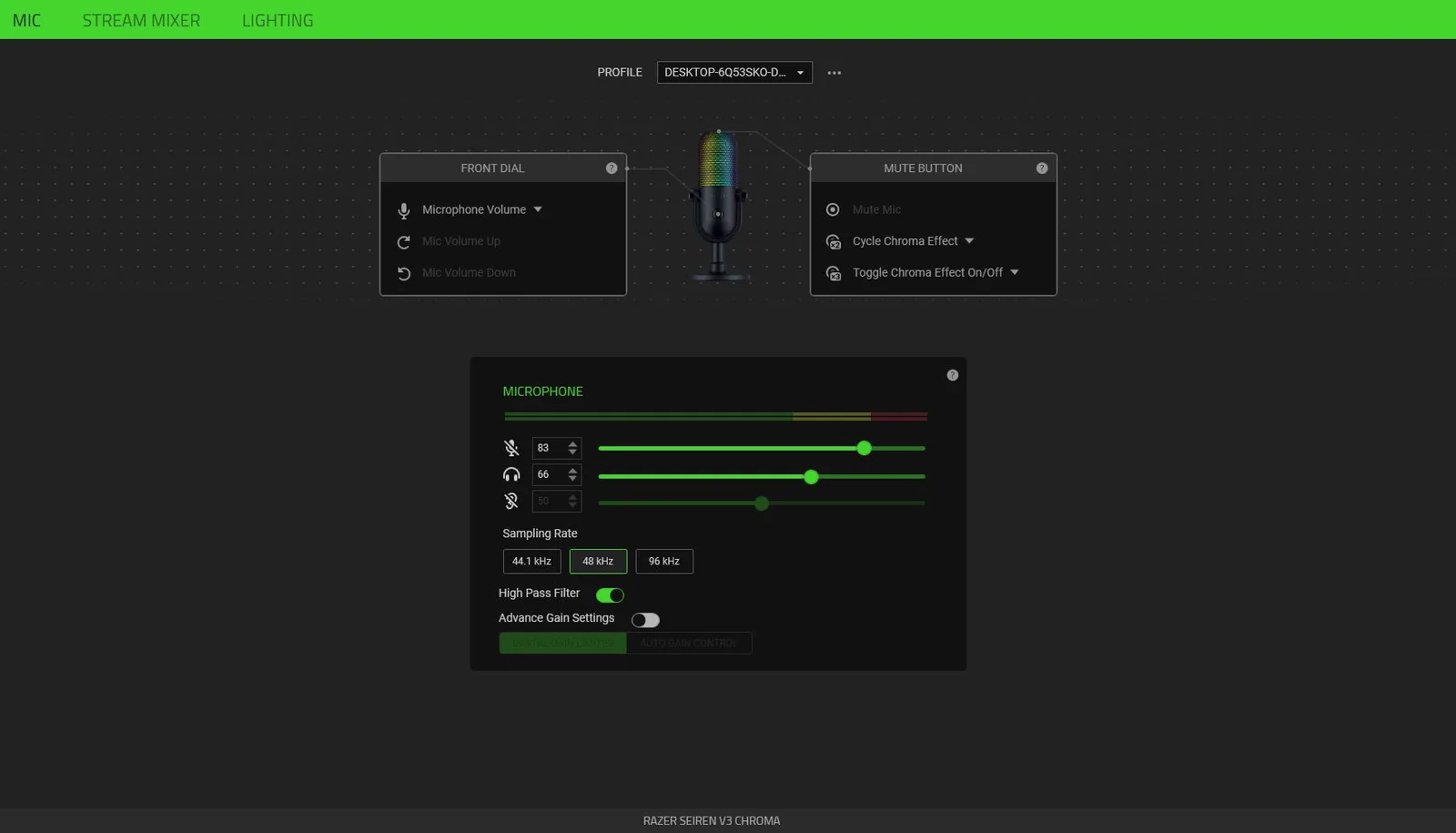
The Synapse Mic tab sets sampling rate, high-pass filter, gain limiter and button actions. (Image: Laptop Mag)
Most of the mic’s flexibility lives in Razer Synapse: sample rate, high-pass filter, digital limiter, button and dial actions, a stream mixer and the lighting editor. It works, but a reboot may be needed after installing it, and it offers less control than Logitech’s Yeti GX, which has a fuller mixer and more voice effects. If you want to avoid extra software, note that much of the useful tuning sits behind it.
Seiren V3 Chroma vs Seiren V3 Mini
The Mini uses a 14 mm capsule, a smaller body about 6.5 inches tall, a 51 inch cable and only 5/8 inch threading. It has no gain knob or headphone jack, so volume is set in the operating system or Synapse, and its software options are thinner. The Chroma adds more metal, the RGB, better noise rejection and a warmer sound. If you only want a simple budget mic, the Mini gets close in sound for far less. If you care about the lighting and controls, the Chroma is the one to buy.
The Newer Seiren V3 Chroma 32-Bit DSP
Razer launched a Seiren V3 Chroma 32-Bit DSP on July 21, 2026. It looks the same but adds an onboard 32-bit DSP, AI-assisted setup with automatic gain control and a deeper Synapse suite with EQ, compressor, limiter and reverb. The boom arm adapter is also included in the box. The original reviewed here keeps the same capsule and design, so if the newer model is available at a similar price, it is worth comparing before you buy. Check the listing title to see which version you are getting.
Is the Razer Seiren V3 Chroma Worth It?
Razer Seiren V3 Chroma
GameCuki VerdictRecommended
What Our Verdicts Mean
GameCuki Top PickThe best option in its class, with no serious, repeated problems.
RecommendedA good buy for most people. Weaknesses are minor or only matter to some players.
Buy With CaveatsRight for a specific kind of player only, because of a significant drawback.
Skip ItNot recommended. A better option exists at a similar price.
The Razer Seiren V3 Chroma is worth it if you want a USB mic that sounds clean, sits neatly on a desk and puts on a reactive light show to match a Razer setup. Skip it if you hate installing extra software, want a polar pattern switch for group recording, or care more about sound than lighting, where a plainer USB mic or the newer 32-Bit DSP version may suit you better.
I'm Fraser, and I write the reviews on GameCuki. That covers consoles and handhelds, PC gaming hardware, controllers, headsets and accessories, from big purchases like gaming laptops to small add-ons like screen protectors and grips. I build each review from the manufacturer's specs, professional reviews and verified owner feedback, and I check long-term issues like comfort, battery life and durability against several sources before they make it into the pros and cons. Every review ends with who the product is for and who should skip it. I don't accept free products or paid placements, and what I write comes from research, not my own use of the products. You can read my full process on our How We Review page.