GameCuki is reader-supported. When you buy through links on our site, we may earn an affiliate commission at no extra cost to you. As an Amazon Associate I earn from qualifying purchases. Learn more.
Gaming chair vs office chair looks like a style question, but it is really a question about how you sit for hours. One is shaped like a racing seat and built to lean back. The other is built to keep your spine supported while you work. Seat shape, lumbar support, recline, adjustments and materials decide it.
Best Gaming Chair for Lounging
Secretlab Titan Evo
Bottom LineA padded-bolster racing chair that reclines flat and comes in three sizes, for players who lean back, put their feet up and want a bold look.
Seat Shape: Bucket Bolsters Look Great and Limit Movement
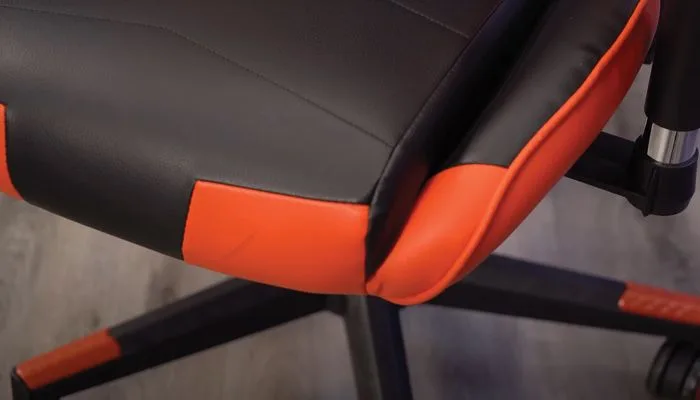
Most gaming chairs copy a car bucket seat, with raised side bolsters that hug your hips and back. It looks sporty, but racing seats are built to hold a driver in place, not to keep someone comfortable through a workday. Hard bolsters can dig into your thighs, stop you from sitting cross-legged and make it harder to shift position.
Office chairs use a flatter, more open seat, so you can change posture without fighting the cushion. A few gaming chairs, such as the Secretlab Titan Evo, use padded bolsters that give more room, which is why they are the exception worth considering.
A gaming chair’s raised side bolster can press into your thighs. (Image: BTOD)
Price: Gaming Chairs Pay for Looks, Office Chairs Pay for Parts
Part of a gaming chair’s price goes to its appearance: bold colors, contrast stitching and team logos. At a similar budget, an office chair usually puts that money into mechanisms, frames and adjustments instead. Office chairs also have a far higher ceiling, with premium models adding features no gaming chair offers.
On a tight budget, a plain mesh task chair or a refurbished high-end office chair often beats a gaming chair at the same cost. If you are set on a gaming chair, see our best gaming chair under $200 picks for the ones that hold up.
Lumbar Support: Pillows Slip, Built-In Curves Stay Put
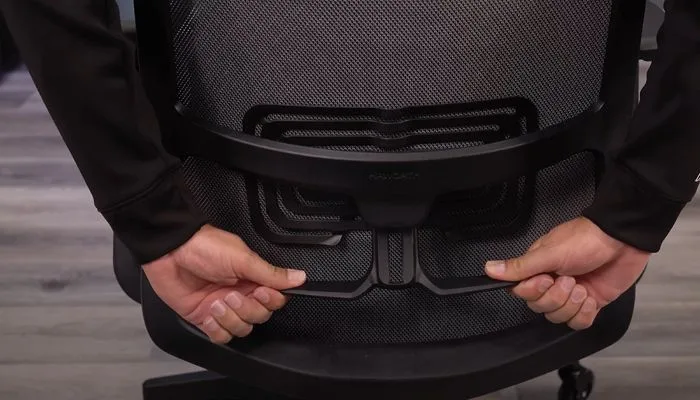
Gaming chairs usually rely on a strap-on lumbar pillow. These tend to slide out of position, go flat over time and often sit too high or push you forward. Many office chairs build a curved backrest into the chair so it follows the natural curve of your spine, and many add an adjustable lumbar system on top.
Many office chairs have a lumbar panel built into the backrest. (Image: BTOD)
Quick pick: if lower back comfort is the reason you are shopping, favor a chair with built-in, adjustable lumbar over one that ships with a pillow.
Recline: Gaming Chairs Lie Back, Office Chairs Move With You
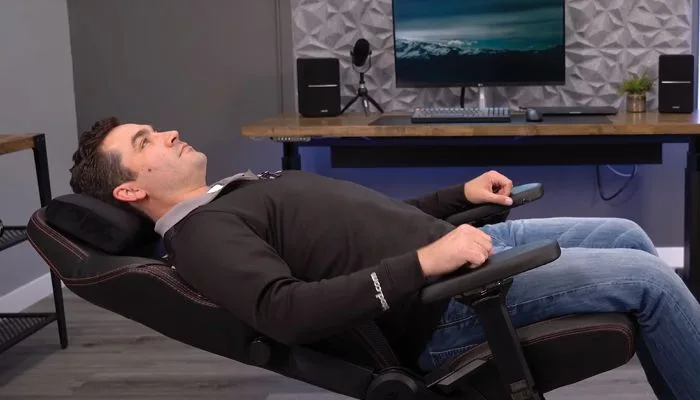
Gaming chairs recline much further, often almost flat, which is great for a break between matches. Most use a center-tilt mechanism, where the whole chair tips back together and your knees rise as you lean.
Most office chairs use synchro-tilt, where the backrest moves further back than the seat so your posture stays supported through the recline. The trade-off is range: you will not get a flat nap position from most of them.
Gaming chairs can recline almost flat, but the screen drops out of view. (Image: BTOD)
If you like to lounge, a gaming chair makes sense for that. Some people own both: an office chair for work and a gaming chair for relaxing.
Adjustments: Office Chairs Give You More Controls
At similar prices, office chairs are generally more adjustable. Forward seat tilt, backrest height, seat depth and adjustable headrests are common on office chairs and rare on gaming chairs. Gaming chairs usually fix the seat depth, so the cushion can feel too long or too short depending on your legs.
Gaming chairs do offer sizes, which helps taller or larger buyers, but the bolsters can still pinch. Office chairs also come in big and tall versions with full adjustability. If you are shopping for support above all, our best ergonomic gaming chair list covers gaming-style models that add real adjustment.
Budget gaming chairs often use PU leather, which does not breathe and can peel with wear, and thick padding adds to the heat. Office chairs typically use fabric or mesh, which is cooler and tends to last longer.
Foam matters too. Soft foam feels great on day one, but cheap foam compresses until you are sitting on the base. Firmer seats feel stiff at first and often hold up better. If you switch from a soft chair to a firmer one, expect a break-in period of a few weeks.
Gaming Chair vs Office Chair: Full Specs
Feature
Gaming Chair
Office Chair
Seat shape
Bucket seat with raised bolsters
Flatter, open seat Wins
Lumbar support
Usually a strap-on pillow
Often built into the backrest Wins
Recline
Deep, often almost flat (center-tilt) Wins
Moderate (synchro-tilt)
Adjustments
Fewer, fixed seat depth common
More, such as seat depth and backrest height Wins
Headrest
Pillow, often fixed
Adjustable on many models Wins
Typical materials
PU leather, thick foam
Mesh or fabric Wins
Cooling
Can run warm
Breathable mesh common Wins
Styling
Bold colors and logos Wins
Understated
Sizing
Often sold in sizes
Many models plus big and tall versions
Frequently Asked Questions
Is a gaming chair or office chair better for long hours at a desk?
An office chair is usually the better fit. Synchro-tilt, adjustable lumbar and flexible frames keep you supported through the workday.
Are gaming chairs bad for your back?
Not by default, but most lack the adjustable support a good office chair has, and a strap-on pillow does not replace it. If you have back problems, talk to a medical professional, and look for a chair with adjustable lumbar.
Is Secretlab a gaming chair or an office chair?
The Titan Evo is a gaming chair, with a bucket seat, side bolsters and knee-tilt recline. It is firm, comes in several sizes and suits larger buyers better than most.
Why does my back hurt after switching to an ergonomic chair?
It is common for the first few weeks, especially when coming from a soft chair. Set the seat height, depth and lumbar carefully, and buy from a seller with a return policy.
And the Winner Is…
WinnerOffice Chair
The gaming chair has real strengths: it reclines deeper, looks bolder and suits lounging between matches. For most people, though, an office chair is the better buy, because it puts your money into lumbar support, adjustments, breathable materials and a recline that keeps you supported, which matter more than looks over a long day. In the gaming chair vs office chair debate, the office chair wins for work and long desk sessions. Pick a gaming chair if you mostly lounge, want the styling, or find a model with padded bolsters and real adjustments.
Gaming Chair or Office Chair: Which Should You Buy?
If you sit upright for hours, work from home or want one chair that does everything, buy an office chair. If you game in short bursts and love to lean back, a gaming chair is a fine second seat. And if you want a bit of both, a gaming-style chair with built-in lumbar and real adjustments is a sensible middle ground. Whichever you choose in the gaming chair vs office chair choice, check the recline, seat depth and lumbar support before the color.
I'm Sean, and I write the comparisons on GameCuki. I cover anything gamers weigh up before buying: consoles and handhelds, PC components and gaming laptops, monitors, controllers, headsets and accessories, plus subscriptions and services like Game Pass and PlayStation Plus. I put both options on the same checklist, using official specs, professional reviews and owner feedback, and I only mention what owners say when at least two of them report the same thing. Every comparison ends with one clear verdict and the type of player each option suits. I don't accept free products or payment from brands, and what I write comes from research, not my own use of the products. You can read my full process on our How We Review page.
Areas of Focus
Controller Match-UpsHeadset Match-UpsConsole vs. ConsoleSpecs & Latency