

A chair that looks like a race car seat is not automatically a chair that supports you through a six-hour session. The best ergonomic gaming chair gives you real adjustment (lumbar, armrests, tilt, seat height) and room to change position as you play. This guide covers eleven chairs, from racing-style seats with deep adjustment to office-grade task chairs that happen to suit a gaming desk, and each one is framed around how you actually sit and play.
Best Ergonomic Gaming Chair in 2026: 11 Picks for Long Sessions
GameCuki is reader-supported. When you buy through links on our site, we may earn an affiliate commission at no extra cost to you. As an Amazon Associate I earn from qualifying purchases. Learn more.
Our Top Picks

Best for Adjustability
Secretlab Titan Evo
Bottom line: A racing-style chair with four-way lumbar, 4D armrests and three sizes, for players who want to dial in a fit instead of accepting one.
- Four-way lumbar support adjusts to the curve of your lower back
- Backrest reclines from 85 to 165 degrees, including a fully flat position
- 4D armrests move up, down, forward, back and rotate inward or outward
- Three sizes cover a wide range of heights and builds
- Magnetic memory foam head pillow snaps on and adjusts for height
- Spacious seat suits different sitting positions
- Fabric and leatherette upholstery options
- The seat cushion can feel firm to some players
- The recline lever can occasionally jam
- The head pillow can slip down when you lean back

Best for Movement-Following Support
LiberNovo Omni SE
Bottom line: A flexible-back task chair whose headrest, backrest and armrests move with you, for players who shift around instead of sitting still.
- Backrest flexes slightly so it follows you as you shift
- Headrest, backrest, seat and armrests move together as you lean or recline
- Five lock positions from 105 to 160 degrees suit work and lounging
- Lumbar support dials in with a knob, with a wide range of travel
- Headrest adjusts in height, depth and tilt
- Tilt resistance knob is easy to reach while seated
- Quiet, solid build with clear assembly instructions
- The armrests do not lock and can slide out of place
- The lumbar support has no height adjustment, so it must line up with your back
- The fabric collects hair and dust, and some players will find it warm in long sessions

Best for Lumbar Support
Razer Iskur V2
Bottom line: An adaptive lumbar panel that moves with your turns and adjusts up, down, in and out, for players who care most about lower back support.
- Lumbar panel adjusts 60 mm up and down and 40 mm in and out
- Adaptive lumbar follows you as you turn or shift
- Foam bolsters hold you without feeling restrictive
- Reactive seat tilt and recline up to 152 degrees
- Firm 4D armrests rise and swivel, handy for mobile gaming
- Soft, cushioned neck pillow
- Large lumbar stays supportive even when reclined
- The neck pillow does not adjust as precisely as you might like
- The lumbar can feel too prominent for shorter players
- Synthetic leather can run warmer than fabric

Best for a Tight Budget
Razer Iskur V2 X
Bottom line: A well-built, breathable-fabric chair with built-in lumbar and a wide seat, for players who want a sensible ergonomic base without paying for every adjustment.
- Built-in lumbar arch supports a neutral sitting position
- Lightly curved backrest is comfortable without adjusting anything
- Breathable fabric stays cooler than faux leather
- Wide seat base with reduced edges gives room to shift
- Full recline up to 152 degrees
- High-density foam cushions mold to your body
- Build quality carries over from the pricier Iskur V2
- The lumbar is fixed, so it cannot be moved to match your back
- The 2D armrests only adjust in height and rotation
- Fabric is harder to clean than leatherette

Best Task Chair With Gaming Comfort
ThunderX3 Flex Pro
Bottom line: A self-adjusting task chair with 19 dimensions of adjustment that still reclines like a gaming chair, for players who also work at their desk.
- 19 dimensions of adjustment cover most of the chair
- Lumbar support is excellent and self-adjusts as you move
- Headrest and neck support adjust extensively
- 5D armrests rotate a full 360 degrees
- Synchronous tilt moves seat and backrest together
- Forward seat tilt keeps your lower body free
- Relaxed reclined comfort that many office chairs lack
- Some parts move more easily than you may want
- The seat is on the small side
- It can be hard to settle into a perfectly straight posture

Best for Armrest Positioning
ThunderX3 Solo 360
Bottom line: A simple, firm and easy-to-build chair with armrests that rotate all the way around, for players who care most about getting arm position right.
- Armrests turn a full 360 degrees and retract backward
- Synchronous tilt moves backrest and seat together
- Firm but comfortable seat
- Adjustable headrest moves vertically and locks
- Molded foam is built to hold its shape
- Curved lumbar design follows the spine
- Straightforward assembly
- Recline stops around 125 degrees, so it is not a lie-back chair
- The warranty is short compared with office-style chairs

Best for Bigger Frames
AndaSeat Kaiser 4 XL
Bottom line: A roomy chair with a pop-out lumbar cushion and magnetic head pillow, for larger players who need space as well as support.
- Roomy dimensions give larger players real space
- Pop-out lumbar cushion is comfortable and supportive
- Magnetic head cushion is easy to position
- Weight capacity of about 395 lb
- Recline up to 130 degrees
- Attractive finish that looks premium
- Armrest adjustment for different arm positions
- Soft backing is prone to damage if you bump it into furniture
- Armrests have a little too much wobble
- Branding is not subtle

Best Mesh Chair for Desk Gaming
Steelcase Karman
Bottom line: A light, mesh task chair that adjusts to your weight and movement, for players who prefer a sit-upright setup over a racing-style seat.
- Weight-activated frame adjusts support as you move
- Light at about 29 lb and arrives assembled
- Hybrid seat puts mesh over a padded cushion
- Intermix mesh feels more like fabric than plasticky mesh
- One-size design fits many people without adjustment
- Four-step comfort dial controls recline resistance
- Breathable back and seat
- It barely reclines, so lounging is limited
- Adjustments are limited and it only comes in one size
- The seat is fairly shallow, which can be a poor fit for long legs
Best Splurge for Desk Gaming
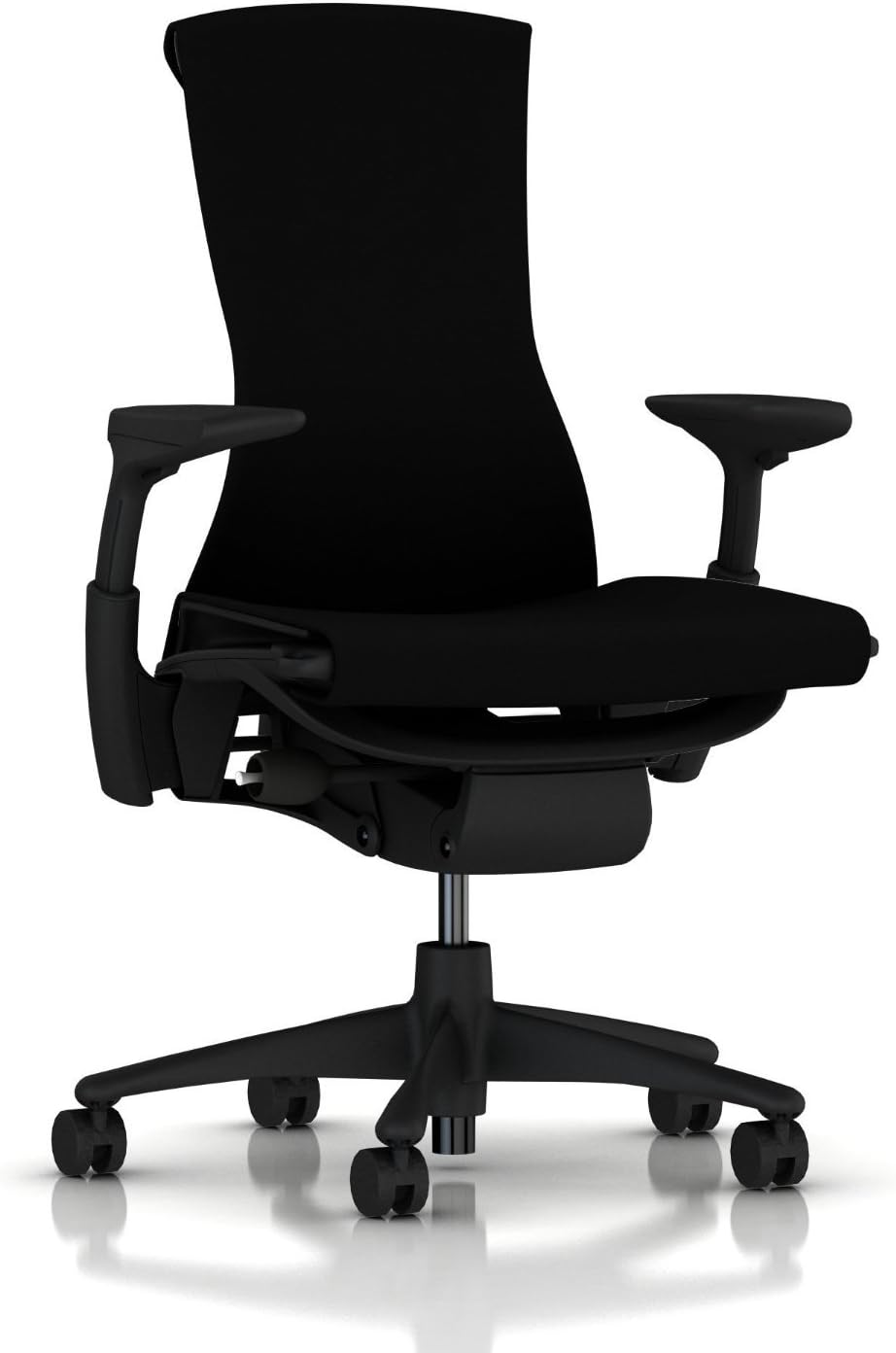
Herman Miller Embody
Bottom line: An office-grade chair with spine-following back support and a long warranty, for players who sit for hours and want to buy once.
- BackFit adjustment lines the backrest up with your spine's curve
- Backrest adapts as you lean forward or recline
- Height and width adjustable armrests
- Seat depth adjustment fits different leg lengths
- Tilt limiter sets how far you recline
- Arrives with no assembly needed
- Long 12-year warranty
- It is very expensive
- The armrests cannot rotate
- It does not recline like a racing-style chair

Best for Heat and Massage Features
DXRacer Martian Pro
Bottom line: A heavy, steel-framed racing chair with 4D lumbar, heating, cooling and massage, for players who get hot or stiff in long sessions.
- Solid steel frame feels sturdy
- Four-way lumbar support with two adjustable supports
- 4D armrests adjust in several directions
- Magnetic headrest is easy to reposition
- Built-in heating and cooling
- Built-in massage function
- Seat is a little less bucket-shaped than most racing chairs
- At about 69 lb it is heavy to assemble and move
- Seat heating and venting buttons sit close to where you sit
- Recline is electric, which is slower than a lever

Best Wide Fabric Seat
Corsair TC500 Luxe
Bottom line: A wide, quilted fabric chair with two-dial lumbar and a magnetic neck pillow, for players who like to sit cross-legged or lounge.
- Wide seat leaves room to shift or sit cross-legged
- Breathable fabric instead of faux leather
- Two dials adjust lumbar vertically and side to side
- Omniflex armrests adjust in five directions
- Magnetic neck pillow changes height easily
- Steel frame with premium feel
- Straightforward assembly with a slide bracket
- The armrests do not lock in place
- The seat cushion is firm and seat depth is not adjustable
- The warranty is only two years
Table of Contents
Best Ergonomic Gaming Chair: Our Picks in Detail
1
Best for Adjustability
Secretlab Titan Evo
Bottom line: A racing-style chair with four-way lumbar, 4D armrests and three sizes, for players who want to dial in a fit instead of accepting one.
The Titan Evo is Secretlab's flagship, and the Regular size in leatherette is the one linked here.
Pros & Cons
Pros
- Four-way lumbar support adjusts to the curve of your lower back
- Backrest reclines from 85 to 165 degrees, including a fully flat position
- 4D armrests move up, down, forward, back and rotate inward or outward
- Three sizes cover a wide range of heights and builds
- Magnetic memory foam head pillow snaps on and adjusts for height
- Spacious seat suits different sitting positions
- Fabric and leatherette upholstery options
Cons
- The seat cushion can feel firm to some players
- The recline lever can occasionally jam
- The head pillow can slip down when you lean back
Why We Picked It
Adjustability is the first thing that makes a chair ergonomic, and the Titan Evo delivers more of it than most racing-style chairs. The lumbar knob moves support in four directions, the armrests follow your arms across a mouse, keyboard or controller, and the backrest covers everything from upright to flat. Sizing also matters: Secretlab offers Small, Regular and XL versions so the chair fits the player rather than the other way around.
Who It's For
You play long sessions at a desk, switch between mouse and keyboard and a controller, and want a chair you can reshape as your posture changes through the evening. You like the bucket-seat look but refuse to give up proper lumbar and armrest adjustment.
Specs & Configurations
- Sizes
- Small/Regular/XL
- Lumbar
- 4-way adjustable
- Recline
- 85 to 165 degrees
- Armrests
- 4D
- Weight limit (Regular)
- 285 lb
Get It Now
Check Price on Amazon
2
Best for Movement-Following Support
LiberNovo Omni SE
Bottom line: A flexible-back task chair whose headrest, backrest and armrests move with you, for players who shift around instead of sitting still.
This listing is the Omni SE with manual lumbar adjustment, not the motorized Omni model.
Pros & Cons
Pros
- Backrest flexes slightly so it follows you as you shift
- Headrest, backrest, seat and armrests move together as you lean or recline
- Five lock positions from 105 to 160 degrees suit work and lounging
- Lumbar support dials in with a knob, with a wide range of travel
- Headrest adjusts in height, depth and tilt
- Tilt resistance knob is easy to reach while seated
- Quiet, solid build with clear assembly instructions
Cons
- The armrests do not lock and can slide out of place
- The lumbar support has no height adjustment, so it must line up with your back
- The fabric collects hair and dust, and some players will find it warm in long sessions
Why We Picked It
The Omni SE takes a different route from a racing-style seat. Its backrest and supports are connected so they move as you do, which is the kind of self-adjusting behavior that suits people who fidget and change position during a session. A knob-based lumbar system keeps it simple and avoids a motor to charge.
Who It's For
You play, work and stream from the same desk, move between leaning forward in a shooter and sinking back for a story game, and want a chair that keeps up without constant tweaking. A task-chair feel appeals to you more than a bucket seat.
Specs & Configurations
- Recline
- five lock positions, 105 to 160 degrees
- Lumbar
- knob adjustable
- Weight limit
- 300 lb
- Dimensions
- 31.2 x 30.1 x 50 in
- Armrests
- height, forward/back, pivot
Get It Now
Check Price on Amazon
3
Best for Lumbar Support
Razer Iskur V2
Bottom line: An adaptive lumbar panel that moves with your turns and adjusts up, down, in and out, for players who care most about lower back support.
The linked listing is the faux leather Iskur V2 with the adaptive lumbar system.
Pros & Cons
Pros
- Lumbar panel adjusts 60 mm up and down and 40 mm in and out
- Adaptive lumbar follows you as you turn or shift
- Foam bolsters hold you without feeling restrictive
- Reactive seat tilt and recline up to 152 degrees
- Firm 4D armrests rise and swivel, handy for mobile gaming
- Soft, cushioned neck pillow
- Large lumbar stays supportive even when reclined
Cons
- The neck pillow does not adjust as precisely as you might like
- The lumbar can feel too prominent for shorter players
- Synthetic leather can run warmer than fabric
Why We Picked It
Lumbar is the Iskur V2's headline feature, and it is a real one. Instead of a pillow that drifts or a fixed arch, it is a panel that matches the curve of your lower back, adjusts in two directions and follows you as you turn. It ranks among the most comfortable chairs in its class, with a well-tuned backrest tension and a wide range of recline lock positions.
Who It's For
You sit a long time, lower back support is your top priority, and you want a chair that keeps supporting you when you lean back to play a controller game. You are average height or taller and want a firm, structured seat.
Specs & Configurations
- Lumbar
- adaptive, 60 mm height and 40 mm depth travel
- Recline
- up to 152 degrees
- Armrests
- 4D
- Weight limit
- 300 lb
- Warranty
- 3 years
Get It Now
Check Price on Amazon
4
Best for a Tight Budget
Razer Iskur V2 X
Bottom line: A well-built, breathable-fabric chair with built-in lumbar and a wide seat, for players who want a sensible ergonomic base without paying for every adjustment.
This is the standard black fabric version of the Iskur V2 X.
Pros & Cons
Pros
- Built-in lumbar arch supports a neutral sitting position
- Lightly curved backrest is comfortable without adjusting anything
- Breathable fabric stays cooler than faux leather
- Wide seat base with reduced edges gives room to shift
- Full recline up to 152 degrees
- High-density foam cushions mold to your body
- Build quality carries over from the pricier Iskur V2
Cons
- The lumbar is fixed, so it cannot be moved to match your back
- The 2D armrests only adjust in height and rotation
- Fabric is harder to clean than leatherette
Why We Picked It
Not everyone needs every knob. The Iskur V2 X keeps the shape and build of Razer's top chair and drops the extra adjustments, which means a comfortable lumbar curve, a wide seat and breathable fabric with fewer parts to fiddle with. For one person who sits in the chair every day, that is often enough.
Who It's For
You are the only person using the chair, you want a solid ergonomic starting point on a tighter budget, and you would rather sit down and play than adjust lumbar height. Hot rooms and long sessions are the reason you want fabric.
Specs & Configurations
- Lumbar
- built-in, fixed
- Recline
- up to 152 degrees
- Armrests
- 2D
- Upholstery
- multi-layered fabric
- Weight limit
- 300 lb
Get It Now
Check Price on Amazon
5
Best Task Chair With Gaming Comfort
ThunderX3 Flex Pro
Bottom line: A self-adjusting task chair with 19 dimensions of adjustment that still reclines like a gaming chair, for players who also work at their desk.
The listing shows the Loft Dark Grey fabric version.
Pros & Cons
Pros
- 19 dimensions of adjustment cover most of the chair
- Lumbar support is excellent and self-adjusts as you move
- Headrest and neck support adjust extensively
- 5D armrests rotate a full 360 degrees
- Synchronous tilt moves seat and backrest together
- Forward seat tilt keeps your lower body free
- Relaxed reclined comfort that many office chairs lack
Cons
- Some parts move more easily than you may want
- The seat is on the small side
- It can be hard to settle into a perfectly straight posture
Why We Picked It
The Flex Pro sits between a task chair and a gaming chair, and that is its strength. It has the lumbar, headrest and armrest flexibility of an office seat, yet it still leans back comfortably for a controller session. Assembly takes around half an hour for one person.
Who It's For
Your desk is also your workspace, you spend the day typing and then switch to games, and you want one chair with serious adjustment that does not look like a race car. You like parts that move easily and adapt as you fidget.
Specs & Configurations
- Adjustment
- 19 dimensions
- Armrests
- 5D, 360-degree rotation
- Mechanism
- synchronous tilt with forward seat tilt
- Recline
- 90 to 135 degrees
Get It Now
Check Price on Amazon
6
Best for Armrest Positioning
ThunderX3 Solo 360
Bottom line: A simple, firm and easy-to-build chair with armrests that rotate all the way around, for players who care most about getting arm position right.
Several Solo 360 versions exist, and this one is the black leather model with a car-style headrest.
Pros & Cons
Pros
- Armrests turn a full 360 degrees and retract backward
- Synchronous tilt moves backrest and seat together
- Firm but comfortable seat
- Adjustable headrest moves vertically and locks
- Molded foam is built to hold its shape
- Curved lumbar design follows the spine
- Straightforward assembly
Cons
- Recline stops around 125 degrees, so it is not a lie-back chair
- The warranty is short compared with office-style chairs
Why We Picked It
Arm position decides how your shoulders feel at a keyboard and mouse, and the Solo 360 treats it seriously. The armrests rotate in a complete circle on top of the usual height and width moves. The rest of the chair is simple, firm and quick to put together, which suits a gaming desk that does not need a dozen levers.
Who It's For
You use a mouse and keyboard, you want the cleanest arm position you can get, and you prefer a subtle design to a flashy one. You sit mostly upright and rarely recline all the way back.
Specs & Configurations
- Mechanism
- synchronous tilt
- Armrests
- 3D, 360-degree rotation
- Recline
- about 125 degrees
- Weight limit
- 300 lb
Get It Now
Check Price on Amazon
7
Best for Bigger Frames
AndaSeat Kaiser 4 XL
Bottom line: A roomy chair with a pop-out lumbar cushion and magnetic head pillow, for larger players who need space as well as support.
This is the Kaiser 4 in XL, black leather.
Pros & Cons
Pros
- Roomy dimensions give larger players real space
- Pop-out lumbar cushion is comfortable and supportive
- Magnetic head cushion is easy to position
- Weight capacity of about 395 lb
- Recline up to 130 degrees
- Attractive finish that looks premium
- Armrest adjustment for different arm positions
Cons
- Soft backing is prone to damage if you bump it into furniture
- Armrests have a little too much wobble
- Branding is not subtle
Why We Picked It
Many ergonomic chairs are cut for average builds, which leaves bigger players perched on the edge. The Kaiser 4 XL is built for them, with enough seat and back width to feel supported. The new pop-out lumbar cushion is a clear step up from earlier Kaiser models.
Who It's For
You are tall or broad, most gaming chairs feel narrow, and you want a chair whose lumbar support and head cushion work for your size instead of fighting it. Space and weight capacity matter as much as adjustments.
Specs & Configurations
- Size
- XL
- Weight limit
- about 395 lb
- Recline
- 130 degrees
- Lumbar
- pop-out cushion
- Head support
- magnetic pillow
Get It Now
Check Price on Amazon
8
Best Mesh Chair for Desk Gaming
Steelcase Karman
Bottom line: A light, mesh task chair that adjusts to your weight and movement, for players who prefer a sit-upright setup over a racing-style seat.
The linked listing is the Baltic mesh version in the medium size.
Pros & Cons
Pros
- Weight-activated frame adjusts support as you move
- Light at about 29 lb and arrives assembled
- Hybrid seat puts mesh over a padded cushion
- Intermix mesh feels more like fabric than plasticky mesh
- One-size design fits many people without adjustment
- Four-step comfort dial controls recline resistance
- Breathable back and seat
Cons
- It barely reclines, so lounging is limited
- Adjustments are limited and it only comes in one size
- The seat is fairly shallow, which can be a poor fit for long legs
Why We Picked It
The Karman is not trying to be a gaming chair, and that is part of its appeal for a desk setup. Its frame and mesh respond to your weight, so you do not have to tune a dozen settings, and the hybrid seat avoids the pressure of bare mesh.
Who It's For
You play mostly at a desk, keep your back upright, run warm in long sessions, and want a chair that works the same way for work and games. You do not need to recline fully flat.
Specs & Configurations
- Upholstery
- Intermix mesh with hybrid seat
- Weight limit
- 350 lb
- Recline
- weight-activated, four-step comfort dial
- Weight
- about 29 lb
Get It Now
Check Price on Amazon
9
Best Splurge for Desk Gaming
Herman Miller Embody
Bottom line: An office-grade chair with spine-following back support and a long warranty, for players who sit for hours and want to buy once.
This is the standard Herman Miller Embody, the same chair sold in the Logitech G edition.
Pros & Cons
Pros
- BackFit adjustment lines the backrest up with your spine's curve
- Backrest adapts as you lean forward or recline
- Height and width adjustable armrests
- Seat depth adjustment fits different leg lengths
- Tilt limiter sets how far you recline
- Arrives with no assembly needed
- Long 12-year warranty
Cons
- It is very expensive
- The armrests cannot rotate
- It does not recline like a racing-style chair
Why We Picked It
The Embody is a design built around posture, and the Logitech G version is the same chair as the office original. For gamers who spend a full day at the desk it offers the kind of fine adjustment, seat depth control and long warranty that gaming brands rarely match.
Who It's For
Your chair is the biggest purchase in your setup, you sit for many hours, and you plan to keep it for years. You play at a desk with an upright posture and do not need to lie back.
Specs & Configurations
- Back support
- BackFit adjustment
- Armrests
- height and width adjustable
- Seat
- adjustable depth
- Tilt
- limiter
- Weight limit
- 300 lb
- Warranty
- 12 years
Get It Now
Check Price on Amazon
10
Best for Heat and Massage Features
DXRacer Martian Pro
Bottom line: A heavy, steel-framed racing chair with 4D lumbar, heating, cooling and massage, for players who get hot or stiff in long sessions.
The linked listing is the Martian L in the Red Triangle Martian Pro style.
Pros & Cons
Pros
- Solid steel frame feels sturdy
- Four-way lumbar support with two adjustable supports
- 4D armrests adjust in several directions
- Magnetic headrest is easy to reposition
- Built-in heating and cooling
- Built-in massage function
- Seat is a little less bucket-shaped than most racing chairs
Cons
- At about 69 lb it is heavy to assemble and move
- Seat heating and venting buttons sit close to where you sit
- Recline is electric, which is slower than a lever
Why We Picked It
The Martian Pro packs ergonomic adjustment into a classic racing look and adds heat, cooling and massage. It is a lot of chair, and the steel frame backs that up. Its heating and cooling are short-run features rather than a replacement for a room's climate, but they are useful when a chair gets too warm.
Who It's For
You like the racing-chair look, you get sweaty or stiff in long sessions, and you want powered features on top of lumbar and armrest adjustment. You are fine with a heavy chair and charging a battery.
Specs & Configurations
- Lumbar
- 4D
- Armrests
- 4D
- Recline
- electric, up to 135 degrees
- Weight limit
- 275 lb
- Weight
- about 69 lb
Get It Now
Check Price on Amazon
11
Best Wide Fabric Seat
Corsair TC500 Luxe
Bottom line: A wide, quilted fabric chair with two-dial lumbar and a magnetic neck pillow, for players who like to sit cross-legged or lounge.
The linked listing is the green version of the TC500 Luxe.
Pros & Cons
Pros
- Wide seat leaves room to shift or sit cross-legged
- Breathable fabric instead of faux leather
- Two dials adjust lumbar vertically and side to side
- Omniflex armrests adjust in five directions
- Magnetic neck pillow changes height easily
- Steel frame with premium feel
- Straightforward assembly with a slide bracket
Cons
- The armrests do not lock in place
- The seat cushion is firm and seat depth is not adjustable
- The warranty is only two years
Why We Picked It
The TC500 Luxe borrows the comfort of an office chair and the look of a gaming chair. Its wide seat and quilted fabric are the standout, and lumbar is controlled by two wheels on the backrest, one for height and one for side to side. The magnetic pillow is easy to move.
Who It's For
You sit in your chair in different ways, legs up or crossed, and wide seats matter. You prefer fabric to faux leather and want a toned-down design that still suits a gaming desk.
Specs & Configurations
- Seat width
- 59 cm
- Lumbar
- 4-way via two dials
- Armrests
- Omniflex, 5-way
- Weight limit
- 264 lb
- Max height
- 6 ft 2 in
Get It Now
Check Price on AmazonHow to Choose an Ergonomic Gaming Chair
Adjustability matters more than a “gaming” label. A good chair lets you change seat height, seat depth, armrests, lumbar support and backrest tilt, and a chair should make it easy to change posture rather than lock you into one. Look at how far each adjustment goes, not just whether it exists.
Check size and weight limits before anything else. Many chairs come in several sizes, and seat width, backrest height and weight capacity vary widely, so compare them to your own build. Upholstery affects comfort too: faux leather is easier to wipe clean and may run warm, while mesh and fabric are more breathable but can hold dust. If you share the chair with someone, favor models with wider ranges of adjustment. If you are on the shorter side, see our picks for the best gaming chair for short people.
Ergonomic Gaming Chair FAQ
Is a gaming chair better than an office chair?
Neither is better by default. Racing-style gaming chairs offer deep recline and bold looks, while task chairs usually offer finer adjustment and longer warranties. The line between the two is blurring, and several picks above sit in between.
How do I fix wobbly armrests?
Many gaming chairs use 4D armrests that do not lock in place, so some looseness is part of the design. If the arms wobble where they attach, tighten the bolts underneath the chair.
Which Ergonomic Gaming Chair Should You Buy?
If you want one answer to the best ergonomic gaming chair question, the Secretlab Titan Evo is the safest all-round choice for most players who want deep adjustment in a racing-style seat. Choose the Razer Iskur V2 for lumbar support, the Flex Pro or LiberNovo Omni SE if you want a task-chair feel, and the Kaiser 4 XL if you need room. If you play on a budget, the Iskur V2 X is the place to start.