

Searching for the best Xbox Series X cooling fan usually starts with one worry: will the console cook itself during a long session? The honest answer is that the Series X was built to cool itself, so a fan is optional for most players, though some setups benefit from one. This guide covers ten add-on fans and fan stands, and explains when you actually need one. For more gear, see our best Xbox Series X accessories.
Best Xbox Series X Cooling Fan in 2026: 10 Picks and Do You Need One
GameCuki is reader-supported. When you buy through links on our site, we may earn an affiliate commission at no extra cost to you. As an Amazon Associate I earn from qualifying purchases. Learn more.
Our Top Picks

Best Overall for Dust Protection
MENEEA Cooling Fan with Dust Cover for Xbox Series X
Bottom line: A top-mounted fan with removable dust covers and silicone port plugs, for players who want cooling and dust control from one plug-in accessory.
- Sits on top of the console and helps move hot air out of the top vent
- Three fan speeds on a touch switch, starting on low when powered
- Dust covers sit over the fan and can be taken off for more airflow
- Silicone plugs cover the USB and HDMI ports against dust
- One USB 3.0 port passes data, a second port charges accessories
- The light strip has its own switch, so you can run the fan with lights off
- Draws power from the console, so there is no extra adapter or outlet
- Two spare dust covers come in the box
- It loses power when the console is in standby, so the fan does not run then
- The second USB port only charges and does not carry data
- It adds RGB lighting you may not want in a dark setup

Best for Auto Speed and a Temp Readout
G-STORY Cooling Fan with Temperature Display
Bottom line: A fan that watches the console's temperature, shifts speed on its own and shows a live readout, for players who want to set it once and forget it.
- Automatic mode raises and lowers fan speed with console temperature
- The fan stays off while the console is below 95°F (35°C), which keeps noise down
- Manual mode gives three fixed speeds if you prefer to choose
- An LED readout shows the console temperature during a session
- Color changes with fan speed, so you can read the speed at a glance
- A three-speed range of 1500 to 2000 RPM stays in a modest band
- Just place it on the console and plug in one cable
- It adds little bulk with a 5.5 inch square footprint
- The temperature readout reflects the fan's sensor, not Xbox's internal sensors
- Switching between auto and manual means holding a button for three seconds
- It is a plain fan with no dust cover or port plugs

Best Auto Fan with Headset Mount
KOVA Auto Cooling Fan with LED Display and Headset Mount
Bottom line: An auto-speed fan with a Fahrenheit and Celsius display plus a headset hook, for players who want cooling and a place to park their headphones.
- Automatic mode switches fan speed in three temperature bands
- The LED display switches between Fahrenheit and Celsius
- Manual mode offers low, medium and high
- Nine lighting presets include two dynamic effects
- A USB 2.0 hub charges controllers or a headset while you play
- A headset mount with anti-slip silicone pads holds your headphones
- The fan and the lights can be controlled independently
- Compact build at about 0.8 lb
- The USB ports are for charging, so do not count on them for data
- Its auto mode waits until the console passes about 97°F before spinning up
- The maker's brand is newer and less established than some others here
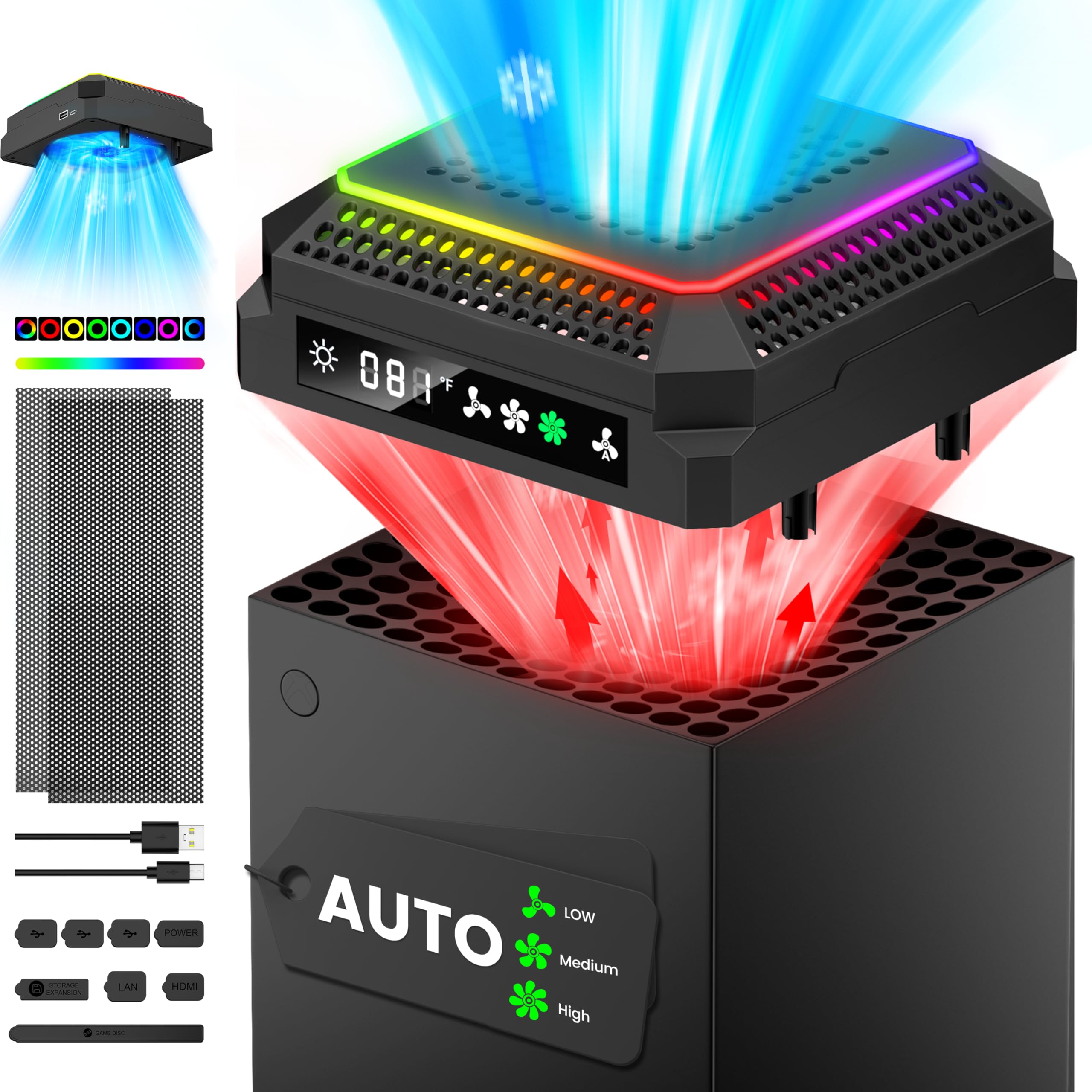
Best for the Fastest Fan Speeds
CATZARMOR Auto Cooling Fan with LED Display
Bottom line: A nine-blade fan that runs up to 2400 RPM with a temperature display and a finger guard, for players who want the strongest airflow in this group.
- Three speeds up to 2400 RPM, the highest of the picks here
- Nine blades are meant to move more air at each speed
- Automatic mode adjusts the fan to the console's temperature
- An LED screen shows the temperature and the fan level
- An anti-touch guard keeps fingers away from the spinning blades
- A USB-C cable connects the fan to the console
- A USB 2.0 port on the back charges controllers or other devices
- Silicone dust screens and dust plugs are included
- Higher speeds are louder, so this is not the quietest choice
- It is a newer listing with fewer owner reviews than the big sellers
- Expect an extra cable run from the back of the console to the top

Best Stand with Extra USB Ports
Mcbazel Cooling Fan Stand for Xbox Series X
Bottom line: A vertical stand with a fan in the base and three extra USB ports, for players who want to stand the console up and add ports.
- Stands the console upright and keeps it in place
- A fan in the base pushes air along ducts aligned with the vents
- Three speeds are shown by orange, blue and green indicators
- Adds a USB 3.0 port for data and two ports for charging
- Powered by a single cable to the console USB port
- Six colors and a mixed mode, controlled by a separate touch switch
- 1800 to 2000 RPM keeps the speed range narrow
- Works as a stand and a hub in one piece
- It cannot be used with rear fans at the same time
- The two USB 2.0 ports are charge only
- It suits vertical placement only, so skip it if your console lies flat
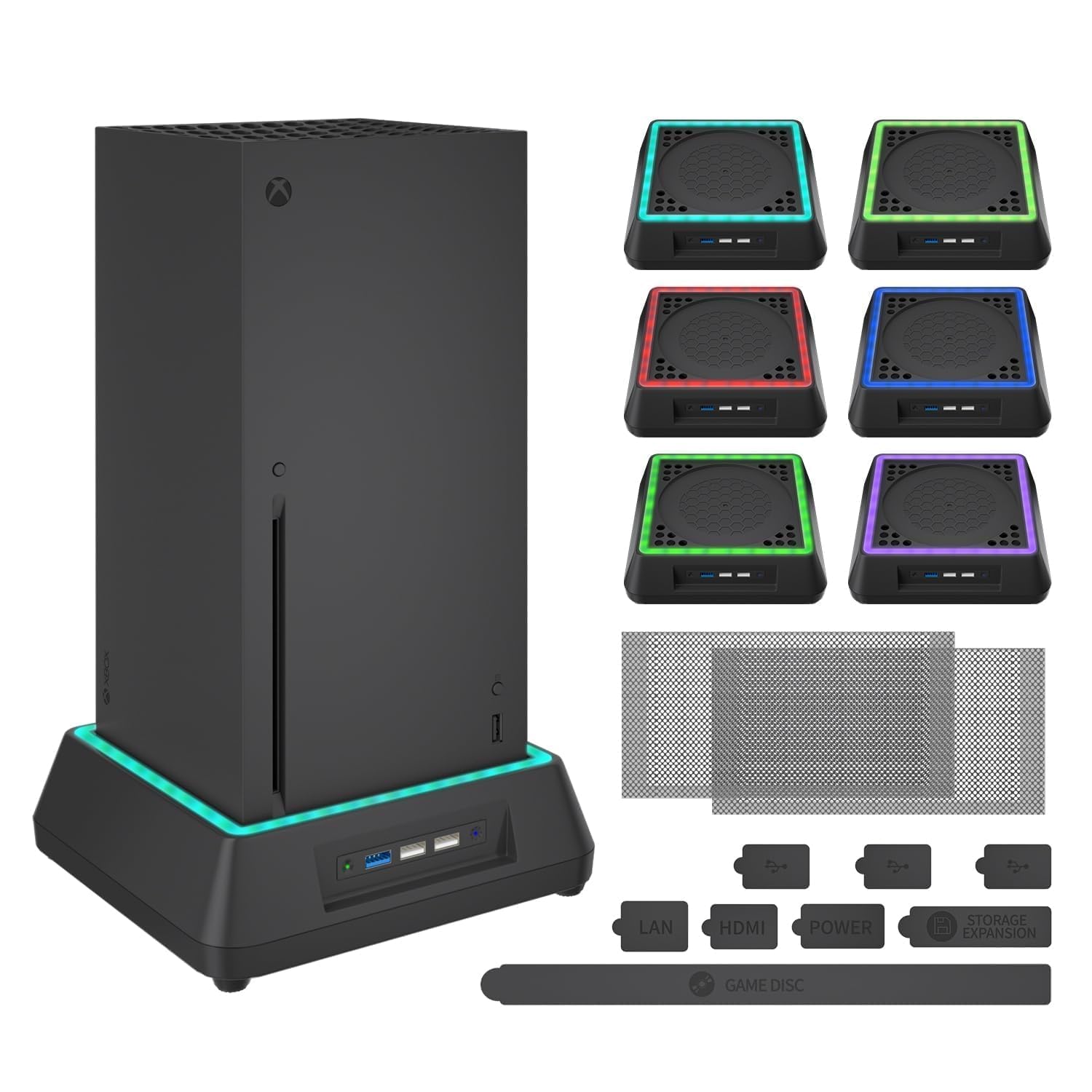
Best for Dust Filters and USB Charging
Mviioe Cooling Fan with Dust Filters
Bottom line: A large fan on a stand with dust filters and three USB ports, for players who want a quiet-leaning fan at modest speeds.
- A large fan runs at three speeds from 1800 to 2000 RPM
- Three colors of indicator show the speed level
- Dust filters help keep dust out of the console
- Three USB ports handle accessory charging
- The light has its own touch switch
- The speed range is narrow, which keeps noise down
- Plugs into the console and starts with it
- Light at about 15.5 oz
- Higher speeds are louder, as the maker notes
- The USB ports should not be loaded beyond 5V 1A
- It is designed only for the Series X, so it will not carry over to another console

Best for a Low Price and Dual Fans
Linkstyle Dual Fan Vertical Cooling Stand
Bottom line: A budget vertical stand with two fans and an on/off switch, for players who want forced airflow without paying for extras.
- Two fans share the work of moving air
- Five-blade fans are listed at up to 4500 RPM
- A power switch with an LED indicator turns the fans off
- Lights shift color while the fans spin
- Installs by plugging into a console USB port
- Adds one USB port
- Small footprint
- One of the lowest-cost fans in this guide
- No speed control, so it runs at one speed whenever it is on
- At 4500 RPM it can be louder than a slower fan, despite the low-noise claim on the page
- It has the fewest features, with no dust protection or display

Best Budget Fan with Dust Cover
Raryars Absorb-Type Cooling Fan with Dust Cover
Bottom line: An intake and exhaust fan design with a top dust cover and two USB ports, for budget buyers who still want dust protection.
- Uses intake and exhaust fans in one unit
- Top dust cover helps against dust build-up while the fan runs
- 1800 RPM keeps the speed modest
- Draws only 3 watts from the console USB
- Touch switch turns the fan on, with a blue indicator
- Two USB ports for charging
- One-year warranty is listed
- Low price for a fan with a dust cover
- Single speed, with no automatic or manual control
- The product listing is thin on details compared with larger brands
- Fewer features than the display models above

Best Charging Station with Fan
MENEEA Cooling Fan and Controller Charging Station
Bottom line: A dock that charges two controllers, holds your headset and adds rear fans, for players who want one stand to organize the whole setup.
- Dual rear fans pull heat away from the console
- Three fan speeds with LED indicators
- Charges two Xbox controllers at once
- Overcurrent, overvoltage and overheat protection is built in
- A headset hanger is included
- Slots store game cards and expansion cards
- 15 lighting effects with a memory mode
- One-year warranty
- Battery packs are not included, and it works only with the official rechargeable battery
- It stands the console vertically and takes more desk space than a top fan
- The fan will not work unless it is seated properly in the dock

Best Top Fan with Charge Stand and Batteries
MENEEA Auto Cooling Fan and Controller Charge Stand
Bottom line: A top auto fan, a dual controller dock and two rechargeable batteries in one kit, for players who want to skip buying batteries separately.
- Top fan with automatic mode that starts when the console warms
- Manual mode offers low, medium and high
- Two 1400 mAh rechargeable batteries come with the kit
- Dual dock charges both controllers
- Headset stand is built in
- Stores six game discs and two expansion cards
- 11 RGB modes controlled from a separate switch
- One-year warranty
- The fan works only when connected to the charging stand
- It charges only the original battery and the ones supplied, not third-party batteries
- It is the most expensive kind of setup here and takes the most desk space
Table of Contents
Does the Xbox Series X Need a Cooling Fan?
For most players, no. The Series X pulls in air and exhausts it through the vent on top, and it has its own internal fan. Heat coming off the top of the console is part of its design. An external fan can add airflow, but it cannot fix a broken internal fan or a console boxed in without space.
An add-on fan makes more sense when the console sits in a warm room, a tight media cabinet or a spot where airflow stays poor. Clearing clutter around the console, keeping the top vent open and keeping dust out usually matter first. Our guide to cleaning an Xbox Series X covers the dust side.
Fans also have costs: extra noise, another cable and in some cases more dust pulled toward the vents. Treat any promised drop of a set number of degrees with caution, because results depend on the room and the console placement.
How to Choose an Xbox Series X Cooling Fan
Match the console. Most fans here are made only for the Series X, not the Series S. Check the listing before you order.
Pick a type. Top fans sit on the console and pull hot air out of the top vent. Stands hold the console upright and push air from below. Docks add controller charging and storage to a fan.
Look at control. Automatic fans change speed with the console’s temperature. Manual fans give you fixed speeds. A single-speed fan is simplest but cannot be turned down.
Mind the noise. Higher RPM means more air and more sound. A narrow speed range, such as 1800 to 2000 RPM, tends to be quieter than a fan that goes to 2400 or beyond.
Plan for power. These fans draw from the console’s USB port, and many stop working when the console is in standby or the USB power is off.
Do not forget dust. Dust covers and port plugs help reduce build-up, and removable covers let you open the airflow when you want it.
Best Xbox Series X Cooling Fan: Our Picks in Detail
GameCuki may earn a commission if you buy through the links below. That never changes which products make the list or how they rank.
1
Best Overall for Dust Protection
MENEEA Cooling Fan with Dust Cover for Xbox Series X
Bottom line: A top-mounted fan with removable dust covers and silicone port plugs, for players who want cooling and dust control from one plug-in accessory.
MENEEA's top fan is the version most shoppers meet first when they search for an Xbox Series X cooling fan.
Pros & Cons
Pros
- Sits on top of the console and helps move hot air out of the top vent
- Three fan speeds on a touch switch, starting on low when powered
- Dust covers sit over the fan and can be taken off for more airflow
- Silicone plugs cover the USB and HDMI ports against dust
- One USB 3.0 port passes data, a second port charges accessories
- The light strip has its own switch, so you can run the fan with lights off
- Draws power from the console, so there is no extra adapter or outlet
- Two spare dust covers come in the box
Cons
- It loses power when the console is in standby, so the fan does not run then
- The second USB port only charges and does not carry data
- It adds RGB lighting you may not want in a dark setup
Why We Picked It
This one earns the top spot because it pairs a plain three-speed fan with the most practical extras: removable dust covers, port plugs and a data-capable USB 3.0 port. It does the job of an add-on fan without asking for a complicated setup.
Who It's For
Your console sits in an open shelf or a dusty room and you want one accessory that moves air and keeps dust off the top vent. You play for long stretches and like having a switch to turn the fan down when the room is quiet.
You want plug-in-and-go: the cable runs to a console USB port and the fan starts when the console wakes.
Specs & Configurations
- Fan speeds
- Three, touch switch
- Lighting
- 6 solid colors plus 1 mixed
- USB
- One 3.0, one 2.0 (charge only)
- Dust protection
- 2 covers, silicone port plugs
- Power
- Console USB, works only while the console is on
- Model
- XSX34
Get It Now
Check Price on Amazon
2
Best for Auto Speed and a Temp Readout
G-STORY Cooling Fan with Temperature Display
Bottom line: A fan that watches the console's temperature, shifts speed on its own and shows a live readout, for players who want to set it once and forget it.
G-STORY's fan is the pick for anyone who wants the cooling to run itself.
Pros & Cons
Pros
- Automatic mode raises and lowers fan speed with console temperature
- The fan stays off while the console is below 95°F (35°C), which keeps noise down
- Manual mode gives three fixed speeds if you prefer to choose
- An LED readout shows the console temperature during a session
- Color changes with fan speed, so you can read the speed at a glance
- A three-speed range of 1500 to 2000 RPM stays in a modest band
- Just place it on the console and plug in one cable
- It adds little bulk with a 5.5 inch square footprint
Cons
- The temperature readout reflects the fan's sensor, not Xbox's internal sensors
- Switching between auto and manual means holding a button for three seconds
- It is a plain fan with no dust cover or port plugs
Why We Picked It
Most add-on fans make you choose a speed. This one reads the heat and chooses for you, then idles when the console is cool. That behavior suits the way a console is used, with long cool periods in menus and hot stretches in demanding games.
Who It's For
You jump between lighter games and heavy sessions and do not want to touch a switch each time. The fan stays out of the way when the console is cool and ramps up when it warms.
You like seeing a number on the display so you know the fan is doing something.
Specs & Configurations
- Modes
- Automatic and manual
- Speeds
- 1500/1750/2000 RPM
- Auto trigger
- Idles below 95°F (35°C)
- Display
- LED temperature readout, color changes with speed
- Power
- Console USB
Get It Now
Check Price on Amazon
3
Best Auto Fan with Headset Mount
KOVA Auto Cooling Fan with LED Display and Headset Mount
Bottom line: An auto-speed fan with a Fahrenheit and Celsius display plus a headset hook, for players who want cooling and a place to park their headphones.
KOVA's fan blends temperature-based cooling with a small desk-organizer function.
Pros & Cons
Pros
- Automatic mode switches fan speed in three temperature bands
- The LED display switches between Fahrenheit and Celsius
- Manual mode offers low, medium and high
- Nine lighting presets include two dynamic effects
- A USB 2.0 hub charges controllers or a headset while you play
- A headset mount with anti-slip silicone pads holds your headphones
- The fan and the lights can be controlled independently
- Compact build at about 0.8 lb
Cons
- The USB ports are for charging, so do not count on them for data
- Its auto mode waits until the console passes about 97°F before spinning up
- The maker's brand is newer and less established than some others here
Why We Picked It
The headset mount and the temperature bands set it apart. Instead of one cut-off, the fan steps through low, medium and high as the console warms, and the display uses Fahrenheit, which suits a US setup.
Who It's For
You game with a headset that currently lives on the desk or the couch cushion. A hook on top of the console keeps it in one spot.
You like a readout in Fahrenheit and want charging for a controller within reach.
Specs & Configurations
- Auto steps
- Low 97 to 108°F, Medium 108 to 118°F, High above 118°F
- Display
- LED, switchable °F/°C
- Lighting
- 9 presets
- USB
- 2.0 hub, charging at 5V/2A
- Weight
- 0.36 kg
Get It Now
Check Price on Amazon
4
Best for the Fastest Fan Speeds
CATZARMOR Auto Cooling Fan with LED Display
Bottom line: A nine-blade fan that runs up to 2400 RPM with a temperature display and a finger guard, for players who want the strongest airflow in this group.
CATZARMOR aims for airflow first, with a faster top speed than the other fans on this list.
Pros & Cons
Pros
- Three speeds up to 2400 RPM, the highest of the picks here
- Nine blades are meant to move more air at each speed
- Automatic mode adjusts the fan to the console's temperature
- An LED screen shows the temperature and the fan level
- An anti-touch guard keeps fingers away from the spinning blades
- A USB-C cable connects the fan to the console
- A USB 2.0 port on the back charges controllers or other devices
- Silicone dust screens and dust plugs are included
Cons
- Higher speeds are louder, so this is not the quietest choice
- It is a newer listing with fewer owner reviews than the big sellers
- Expect an extra cable run from the back of the console to the top
Why We Picked It
If you want the most air for an add-on fan, speed and blade count are the specs to watch. This model leads on both, and it adds the safety guard that fast fans should have.
Who It's For
Your console sits in a warm room or a crowded cabinet, and you want a fan with headroom. You can accept some extra fan noise when you run it on the top setting.
You still want automatic mode so the fan does not run at full blast when it is not needed.
Specs & Configurations
- Speeds
- 1600/2000/2400 RPM
- Blades
- 9
- Connection
- USB-C cable to the console
- Extra USB
- One 2.0 charge port
- Weight
- 12.6 oz
- In the box
- 2 silicone dust screens, 8 dust plugs
Get It Now
Check Price on Amazon
5
Best Stand with Extra USB Ports
Mcbazel Cooling Fan Stand for Xbox Series X
Bottom line: A vertical stand with a fan in the base and three extra USB ports, for players who want to stand the console up and add ports.
Mcbazel's cooling stand treats the fan as part of a base rather than a lid.
Pros & Cons
Pros
- Stands the console upright and keeps it in place
- A fan in the base pushes air along ducts aligned with the vents
- Three speeds are shown by orange, blue and green indicators
- Adds a USB 3.0 port for data and two ports for charging
- Powered by a single cable to the console USB port
- Six colors and a mixed mode, controlled by a separate touch switch
- 1800 to 2000 RPM keeps the speed range narrow
- Works as a stand and a hub in one piece
Cons
- It cannot be used with rear fans at the same time
- The two USB 2.0 ports are charge only
- It suits vertical placement only, so skip it if your console lies flat
Why We Picked It
A stand with a built-in fan covers two jobs: it keeps the console steady and it moves air from underneath. The extra USB 3.0 port is useful on a console whose rear ports are hard to reach.
Who It's For
Your Series X stands upright on a shelf or desk and you run out of front USB ports. The base adds three while giving the console some forced airflow.
You prefer a stable stand to a fan perched on top.
Specs & Configurations
- Fan
- 3 speeds, 1800 to 2000 RPM
- USB
- One 3.0, two 2.0 (charge only)
- Lighting
- 6 colors plus 1 mixed
- Mount
- Tabletop stand
- Weight
- 532 g
Get It Now
Check Price on Amazon
6
Best for Dust Filters and USB Charging
Mviioe Cooling Fan with Dust Filters
Bottom line: A large fan on a stand with dust filters and three USB ports, for players who want a quiet-leaning fan at modest speeds.
Mviioe's fan is a middle-of-the-road design that adds dust filters and USB charging.
Pros & Cons
Pros
- A large fan runs at three speeds from 1800 to 2000 RPM
- Three colors of indicator show the speed level
- Dust filters help keep dust out of the console
- Three USB ports handle accessory charging
- The light has its own touch switch
- The speed range is narrow, which keeps noise down
- Plugs into the console and starts with it
- Light at about 15.5 oz
Cons
- Higher speeds are louder, as the maker notes
- The USB ports should not be loaded beyond 5V 1A
- It is designed only for the Series X, so it will not carry over to another console
Why We Picked It
It keeps the formula simple. Three speeds, dust filters and charging ports cover what most buyers want from an add-on fan without a long feature list.
Who It's For
You want a simple fan with a dust filter and a few ports for charging a controller and a phone. You do not care about a display.
You plan to run it on the low or medium setting for a quieter room.
Specs & Configurations
- Speeds
- 1800/1900/2000 RPM
- Lighting
- 6 solid colors plus 1 mixed
- USB
- 3 ports for charging
- Dimensions
- 7.87 x 2.36 x 8.27 in
- Weight
- 440 g
Get It Now
Check Price on Amazon
7
Best for a Low Price and Dual Fans
Linkstyle Dual Fan Vertical Cooling Stand
Bottom line: A budget vertical stand with two fans and an on/off switch, for players who want forced airflow without paying for extras.
Linkstyle trades features for a lower price and two fans.
Pros & Cons
Pros
- Two fans share the work of moving air
- Five-blade fans are listed at up to 4500 RPM
- A power switch with an LED indicator turns the fans off
- Lights shift color while the fans spin
- Installs by plugging into a console USB port
- Adds one USB port
- Small footprint
- One of the lowest-cost fans in this guide
Cons
- No speed control, so it runs at one speed whenever it is on
- At 4500 RPM it can be louder than a slower fan, despite the low-noise claim on the page
- It has the fewest features, with no dust protection or display
Why We Picked It
With two fans in a slim stand, this is the straightforward way to add airflow. It leaves out dust filters, displays and speed settings, which is the point at this price.
Who It's For
You want to try an external fan without spending much, and you are fine with an on/off switch and nothing else.
Your console stands upright and you want airflow underneath it.
Specs & Configurations
- Fans
- Dual, 4500 RPM
- Noise
- Listed below 30 dB
- USB
- One port
- Power
- Console USB
- Size
- 5.9 x 0.8 x 4.3 in
Get It Now
Check Price on Amazon
8
Best Budget Fan with Dust Cover
Raryars Absorb-Type Cooling Fan with Dust Cover
Bottom line: An intake and exhaust fan design with a top dust cover and two USB ports, for budget buyers who still want dust protection.
Raryars offers a low-cost fan that still brings a dust cover.
Pros & Cons
Pros
- Uses intake and exhaust fans in one unit
- Top dust cover helps against dust build-up while the fan runs
- 1800 RPM keeps the speed modest
- Draws only 3 watts from the console USB
- Touch switch turns the fan on, with a blue indicator
- Two USB ports for charging
- One-year warranty is listed
- Low price for a fan with a dust cover
Cons
- Single speed, with no automatic or manual control
- The product listing is thin on details compared with larger brands
- Fewer features than the display models above
Why We Picked It
Dust is the quiet enemy of any console, and many budget fans skip protection against it. This one includes a top cover, which makes it more useful than a bare fan at a similar price.
Who It's For
You want a cheap, no-fuss fan and you care about dust in a house with pets or carpet.
You do not need lights, a readout or speed control.
Specs & Configurations
- Fan
- Intake and exhaust, 1800 RPM
- Power
- 5V, 3 watts
- USB
- 2 ports
- Dust protection
- Top dust cover
- Warranty
- One year
Get It Now
Check Price on Amazon
9
Best Charging Station with Fan
MENEEA Cooling Fan and Controller Charging Station
Bottom line: A dock that charges two controllers, holds your headset and adds rear fans, for players who want one stand to organize the whole setup.
This MENEEA dock turns a cooling fan into a full charging and storage stand.
Pros & Cons
Pros
- Dual rear fans pull heat away from the console
- Three fan speeds with LED indicators
- Charges two Xbox controllers at once
- Overcurrent, overvoltage and overheat protection is built in
- A headset hanger is included
- Slots store game cards and expansion cards
- 15 lighting effects with a memory mode
- One-year warranty
Cons
- Battery packs are not included, and it works only with the official rechargeable battery
- It stands the console vertically and takes more desk space than a top fan
- The fan will not work unless it is seated properly in the dock
Why We Picked It
A fan alone solves one problem. This stand also keeps controllers charged and your headset off the floor, which is why it belongs on a list for a living-room setup.
Who It's For
You share a console with family and want one spot for controllers, a headset and game cards. A fan that comes along is a bonus.
You use Xbox's official rechargeable batteries and want to dock them between sessions.
Specs & Configurations
- Fans
- Rear dual suction, 3 speeds
- Charging
- Two controllers, about 3.5 hours
- Lighting
- 15 RGB effects
- Storage
- 8 game card slots, 2 expansion card slots
- Warranty
- 1 year
Get It Now
Check Price on Amazon
10
Best Top Fan with Charge Stand and Batteries
MENEEA Auto Cooling Fan and Controller Charge Stand
Bottom line: A top auto fan, a dual controller dock and two rechargeable batteries in one kit, for players who want to skip buying batteries separately.
This kit combines a self-adjusting top fan with a dock and batteries.
Pros & Cons
Pros
- Top fan with automatic mode that starts when the console warms
- Manual mode offers low, medium and high
- Two 1400 mAh rechargeable batteries come with the kit
- Dual dock charges both controllers
- Headset stand is built in
- Stores six game discs and two expansion cards
- 11 RGB modes controlled from a separate switch
- One-year warranty
Cons
- The fan works only when connected to the charging stand
- It charges only the original battery and the ones supplied, not third-party batteries
- It is the most expensive kind of setup here and takes the most desk space
Why We Picked It
Where the earlier dock leaves out batteries, this one includes them. That makes it the most complete single purchase on the list, if you want cooling and charging handled together.
Who It's For
You want to set up a whole Xbox corner in one purchase, with a fan, charging, a headset stand and storage.
You do not own spare rechargeable batteries yet.
Specs & Configurations
- Fan
- Top, automatic and manual, starts near 97°F (36°C)
- Batteries
- 2 x 1400 mAh included
- Lighting
- 11 RGB modes
- Storage
- 6 discs, 2 expansion cards
- Warranty
- 1 year
Get It Now
Check Price on AmazonWhich Xbox Series X Cooling Fan Should You Buy?
If your console runs in an open, well-ventilated space, you may not need any of these. If you do want a fan, the MENEEA top fan is the easiest answer for most Series X owners, the G-STORY suits anyone who wants auto speed, and the Mcbazel stand is the choice for an upright console that needs more USB ports. Choose the best Xbox Series X cooling fan for your room, not for the lights, and keep the top vent clear whichever one you pick. If a dock is what you need, see the best charging stations for Xbox Series X controllers.