

A VR headset for PC is really two purchases in one: the headset and a graphics card that can feed it. The best VR headset for PC is the one that matches both your budget and your space, because some models plug in with a single cable while others want base stations in the corners of the room. These seven picks cover wireless Quest headsets, the room-scale Valve Index, a console headset that works on PC and two high-resolution options for sims and serious VR fans, with the resolution, field of view and tracking type of each.
Best VR Headset for PC in 2026: 7 Picks for Every Budget
GameCuki is reader-supported. When you buy through links on our site, we may earn an affiliate commission at no extra cost to you. As an Amazon Associate I earn from qualifying purchases. Learn more.
Our Top Picks

Best for Wireless PC VR
Meta Quest 3
Bottom line: Sharp pancake lenses and a huge library, for players who want PC VR over a cable or Wi-Fi and a headset that also works without a PC.
- 2064 x 2208 pixels per eye with slim pancake lenses gives a clear picture across the lens
- 110-degree field of view feels open for a headset in this class
- Plays PC VR over a USB-C cable or wirelessly through Air Link, so you pick cable-free or lowest latency
- Standalone mode means you can play Quest games when the PC is off or in another room
- Color passthrough lets you see the room without taking the headset off
- Inside-out tracking needs no base stations or extra setup space
- Front-heavy design and a basic stock strap get tiring in long sessions
- Battery lasts about two hours, so long wireless sessions need a charger or battery strap
- PC VR is an add-on to a Quest-first headset, and wireless play wants a Wi-Fi 6E router or better

Best Budget Way Into PC VR
Meta Quest 3S
Bottom line: The cheapest sensible entry to PC VR, for players who want SteamVR on a modest budget and can live with softer lenses.
- Same Snapdragon XR2 Gen 2 chip and 8GB of RAM as the Quest 3, so menus and standalone games feel just as quick
- 120Hz refresh rate keeps motion smooth when your PC can keep up
- Lighter and slimmer than the Quest 3 at 1.13 lb
- Works with SteamVR through a link cable or Air Link and Steam Link streaming
- Full-color passthrough and 6DoF inside-out tracking with no base stations
- Standalone library means it is useful even when your PC is busy
- Fresnel lenses at roughly 20 pixels per degree look softer and show more distortion than the Quest 3
- IPD adjusts in presets instead of a smooth dial, which can leave some faces slightly off
- Bulky shape and a Y-strap that can loosen with a lot of movement

Best for Room-Scale SteamVR
Valve Index (Headset Only)
Bottom line: A wide 130-degree view, 120Hz and finger-tracking controllers, for PC players who want the most immersive wired SteamVR setup and have room for base stations.
- 130-degree field of view is the widest on this list and cuts the tunnel-vision feeling
- 120Hz refresh rate, with a 144Hz experimental mode, keeps head movement smooth
- Knuckles controllers track each finger, which makes grabbing and gesturing feel natural
- Built-in flip-down speakers sit near your ears without covering them
- Base station tracking is very accurate for room-scale play and fast movement
- Deep Steam integration makes it simple to launch SteamVR games
- This listing is the headset only, so controllers and base stations are separate purchases
- Setup needs base stations, several cables and a free outlet or two, and a GPU strong enough to drive it
- Valve no longer manufactures the Index, so third-party stock can run well above the original price

Best for PS5 Owners Who Also Play PC
PlayStation VR2 (PC Adapter Required)
Bottom line: OLED visuals and 120Hz on a single cable, for players who own a PS5 and want to use the same headset on a gaming PC through the PC adapter.
- 2000 x 2040 OLED panels per eye give vivid color and deep blacks
- 120Hz refresh rate and a 110-degree field of view keep the image smooth and wide
- Single USB-C cable from the headset to the adapter keeps setup simple
- Comfortable fit with built-in 3D audio and a see-through view
- Finger-touch detection and rumble still work on PC
- Doubles as a PS5 headset, so one purchase covers both platforms
- The PC adapter is a separate purchase, and a DisplayPort 1.4 cable is also required
- On PC you lose HDR, eye tracking, adaptive triggers and headset feedback
- Some of the best features only exist on PS5, so it is a weaker value if you only own a PC

Best for High-Resolution SteamVR
HTC Vive Pro 2
Bottom line: Sharp 5K-class visuals and a 120-degree view, for PC players with a powerful graphics card who want detail for flight and racing sims.
- 2448 x 2448 pixels per eye reduces the screen-door effect and keeps small text readable
- 120-degree field of view and up to 120Hz refresh rate keep the view wide and smooth
- Listing includes the headset, two Base Station 2.0 units and two controllers, so it is a complete kit
- Built-in headphones deliver strong audio without a separate headset
- IPD dial lets you line the lenses up with your eyes
- Balanced design and adjustable head strap, with support for glasses wearers
- Needs a very powerful PC, as its system requirements are demanding
- Several cables and two base stations make setup clunky and tie you to one room
- Can run warm after a short session, so it suits shorter bursts better than marathons

Best for Work and PC VR Together
HTC Vive XR Elite (Deluxe Pack)
Bottom line: A compact standalone and PC-capable headset with a swappable battery, for players who want PC VR plus mixed reality for work in one device.
- 1920 x 1920 per eye at about 19 pixels per degree is clear enough for most games and desktop work
- Up to 110-degree field of view is wide for a compact headset
- Works with PC VR over wireless or USB streaming, and as a standalone headset
- Hot-swappable battery gives about two hours per pack and can be replaced to keep playing
- Stepless IPD and diopter adjustments help people with different eyesight
- Full-color passthrough supports mixed reality and virtual desk setups
- PC VR runs through streaming rather than a native connection, so image quality depends on your link
- The USB streaming cable is sold separately
- At 90Hz and 1920 x 1920 per eye it is not the sharpest or smoothest choice in this price tier
Best for Flight and Racing Sims
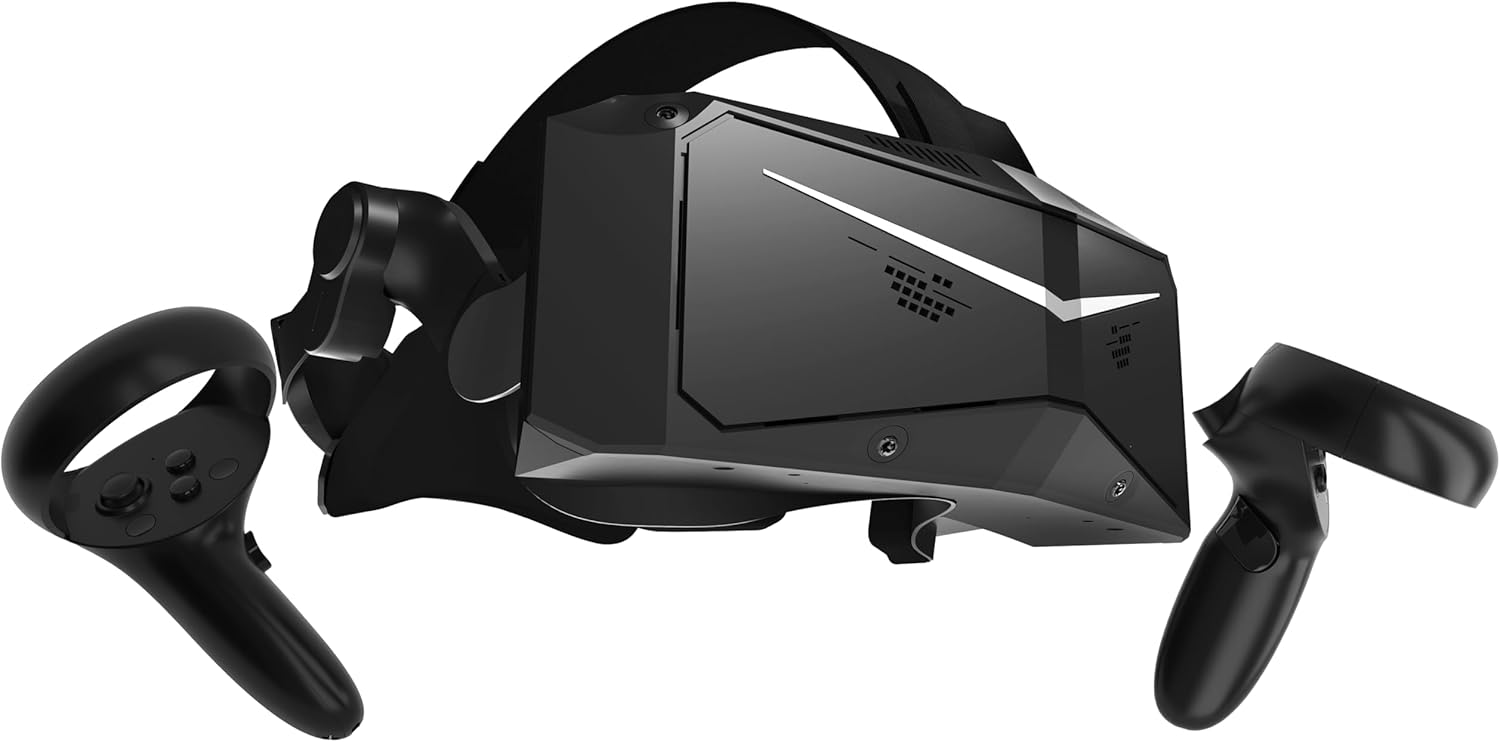
Pimax Crystal Light
Bottom line: A high-resolution, lighter PC VR headset for sim players with a strong graphics card who want to read gauges and track details.
- 2880 x 2880 per eye at 35 pixels per degree keeps small instruments and in-game text readable
- QLED panels with local dimming improve contrast in dark scenes
- Refresh rate options of 72Hz, 90Hz or 120Hz let you match your graphics card
- Described as 30 percent lighter than the original Crystal with balanced weight distribution
- Works with inside-out cameras or Lighthouse base stations for tracking
- Works with SteamVR games such as Half-Life: Alyx and with Microsoft Flight Simulator and iRacing
- A 2880 x 2880 per-eye display needs a powerful graphics card to run well at higher refresh rates
- It is a tethered PC-only headset with no standalone mode
- Premium pricing and Pimax's own software mean more tinkering than a Quest
Table of Contents
Best VR Headset for PC: Our Picks in Detail
1
Best for Wireless PC VR
Meta Quest 3
Bottom line: Sharp pancake lenses and a huge library, for players who want PC VR over a cable or Wi-Fi and a headset that also works without a PC.
The Quest 3 is the headset most PC players end up on. It runs its own library from the built-in chip, and when you want SteamVR it connects to your PC with a good USB-C cable or streams over Wi-Fi.
Pros & Cons
Pros
- 2064 x 2208 pixels per eye with slim pancake lenses gives a clear picture across the lens
- 110-degree field of view feels open for a headset in this class
- Plays PC VR over a USB-C cable or wirelessly through Air Link, so you pick cable-free or lowest latency
- Standalone mode means you can play Quest games when the PC is off or in another room
- Color passthrough lets you see the room without taking the headset off
- Inside-out tracking needs no base stations or extra setup space
Cons
- Front-heavy design and a basic stock strap get tiring in long sessions
- Battery lasts about two hours, so long wireless sessions need a charger or battery strap
- PC VR is an add-on to a Quest-first headset, and wireless play wants a Wi-Fi 6E router or better
Why We Picked It
The Quest 3 is the one headset here that does everything reasonably well. Its pancake lenses and 2064 x 2208 panels look noticeably cleaner than older Fresnel designs, and inside-out tracking means a full PC VR session starts with a few clicks instead of a room rebuild. That balance of image quality, freedom and a mature library is why it sits at the top of this list.
Who It's For
You own a gaming PC and want to play Steam VR games, but you also like the idea of grabbing a headset and playing something on the couch. You would rather not mount base stations, and you are happy to trade a little comfort for a headset that fits any room.
Specs & Configurations
- Resolution
- 2064 x 2208 per eye
- Field of view
- 110 degrees
- Refresh rate
- Up to 120Hz
- Chipset
- Snapdragon XR2 Gen 2, 8GB RAM
- Tracking
- Inside-out, 6DoF
- PC connection
- USB-C cable or Wi-Fi streaming
Get It Now
Check Price on Amazon
2
Best Budget Way Into PC VR
Meta Quest 3S
Bottom line: The cheapest sensible entry to PC VR, for players who want SteamVR on a modest budget and can live with softer lenses.
This is the lowest-cost way to try PC VR with a headset that still has modern tracking and a full library behind it. Plug it into your PC or stream wirelessly, and it behaves like its pricier sibling.
Pros & Cons
Pros
- Same Snapdragon XR2 Gen 2 chip and 8GB of RAM as the Quest 3, so menus and standalone games feel just as quick
- 120Hz refresh rate keeps motion smooth when your PC can keep up
- Lighter and slimmer than the Quest 3 at 1.13 lb
- Works with SteamVR through a link cable or Air Link and Steam Link streaming
- Full-color passthrough and 6DoF inside-out tracking with no base stations
- Standalone library means it is useful even when your PC is busy
Cons
- Fresnel lenses at roughly 20 pixels per degree look softer and show more distortion than the Quest 3
- IPD adjusts in presets instead of a smooth dial, which can leave some faces slightly off
- Bulky shape and a Y-strap that can loosen with a lot of movement
Why We Picked It
The Quest 3S keeps the processor and memory of the Quest 3 and cuts the optics, which is exactly the right place to save money for PC VR. You give up some lens clarity, but you keep the tracking, controllers and software that make a Quest easy to live with. Add a better strap later if comfort matters, and our Quest 3 controller grips guide is a place to start if you want to upgrade how the controllers feel.
Who It's For
You want to see what Half-Life: Alyx and the rest of the Steam VR library feel like without buying a thousand-dollar kit. You play seated or in a small space, you care more about getting started than about the sharpest possible image, and you already have a graphics card that can handle VR.
Specs & Configurations
- Resolution
- 1832 x 1920 per eye
- Field of view
- 96 degrees horizontal
- Refresh rate
- Up to 120Hz
- Chipset
- Snapdragon XR2 Gen 2, 8GB RAM
- Weight
- 1.13 lb
- PC connection
- USB-C cable or Wi-Fi streaming
Get It Now
Check Price on Amazon
3
Best for Room-Scale SteamVR
Valve Index (Headset Only)
Bottom line: A wide 130-degree view, 120Hz and finger-tracking controllers, for PC players who want the most immersive wired SteamVR setup and have room for base stations.
The Index is a wired, PC-only headset built around SteamVR. It is the pick for players who treat VR as a main way to play and are willing to set up a proper play space.
Pros & Cons
Pros
- 130-degree field of view is the widest on this list and cuts the tunnel-vision feeling
- 120Hz refresh rate, with a 144Hz experimental mode, keeps head movement smooth
- Knuckles controllers track each finger, which makes grabbing and gesturing feel natural
- Built-in flip-down speakers sit near your ears without covering them
- Base station tracking is very accurate for room-scale play and fast movement
- Deep Steam integration makes it simple to launch SteamVR games
Cons
- This listing is the headset only, so controllers and base stations are separate purchases
- Setup needs base stations, several cables and a free outlet or two, and a GPU strong enough to drive it
- Valve no longer manufactures the Index, so third-party stock can run well above the original price
Why We Picked It
Years after launch, the Index still has one of the widest views and best controllers in PC VR. The Knuckles design lets your fingers move freely, and the flip-down speakers are comfortable enough that you rarely need separate headphones. The trade-off is setup, plus the fact that you must source controllers and base stations to go with this listing.
Who It's For
You have a dedicated corner or room, a capable PC and a Steam library you want to explore in full. You enjoy fiddling with a setup once so every session after is accurate, and you want the strongest immersion that SteamVR has to offer more than you want a portable headset.
Specs & Configurations
- Resolution
- 1440 x 1600 per eye
- Field of view
- 130 degrees
- Refresh rate
- 120Hz (144Hz experimental)
- Weight
- 1.79 lb
- Tracking
- SteamVR base stations (outside-in), 6DoF
- Included
- Headset only, controllers and base stations separate
Get It Now
Check Price on Amazon
4
Best for PS5 Owners Who Also Play PC
PlayStation VR2 (PC Adapter Required)
Bottom line: OLED visuals and 120Hz on a single cable, for players who own a PS5 and want to use the same headset on a gaming PC through the PC adapter.
The PlayStation VR2 started as a console headset, and Sony now sells an adapter that lets it work with SteamVR. It pairs strong panels with a simple one-cable setup.
Pros & Cons
Pros
- 2000 x 2040 OLED panels per eye give vivid color and deep blacks
- 120Hz refresh rate and a 110-degree field of view keep the image smooth and wide
- Single USB-C cable from the headset to the adapter keeps setup simple
- Comfortable fit with built-in 3D audio and a see-through view
- Finger-touch detection and rumble still work on PC
- Doubles as a PS5 headset, so one purchase covers both platforms
Cons
- The PC adapter is a separate purchase, and a DisplayPort 1.4 cable is also required
- On PC you lose HDR, eye tracking, adaptive triggers and headset feedback
- Some of the best features only exist on PS5, so it is a weaker value if you only own a PC
Why We Picked It
The OLED panels are the draw here, since they make colors and dark scenes stand out. The PC route has trade-offs, because several headline features, including eye tracking and adaptive triggers, do not work with the adapter. Even so, the core experience is crisp, comfortable and easy to set up, which is why it earns a place here.
Who It's For
You already play on PS5 and want a second life for the headset on your PC, or you want an OLED image without paying for a Pimax or Vive. You are fine with a one-time adapter purchase and a PC that can output over DisplayPort.
Specs & Configurations
- Resolution
- 2000 x 2040 per eye (OLED)
- Field of view
- 110 degrees
- Refresh rate
- Up to 120Hz
- Weight
- 1.24 lb
- Tracking
- Inside-out, 6DoF
- PC connection
- Sony PC adapter and DisplayPort 1.4 cable
Get It Now
Check Price on Amazon
5
Best for High-Resolution SteamVR
HTC Vive Pro 2
Bottom line: Sharp 5K-class visuals and a 120-degree view, for PC players with a powerful graphics card who want detail for flight and racing sims.
The Vive Pro 2 is the sharpest wired headset in this group for people who prize detail over convenience. It is a complete kit, so you can start with SteamVR without hunting down extras.
Pros & Cons
Pros
- 2448 x 2448 pixels per eye reduces the screen-door effect and keeps small text readable
- 120-degree field of view and up to 120Hz refresh rate keep the view wide and smooth
- Listing includes the headset, two Base Station 2.0 units and two controllers, so it is a complete kit
- Built-in headphones deliver strong audio without a separate headset
- IPD dial lets you line the lenses up with your eyes
- Balanced design and adjustable head strap, with support for glasses wearers
Cons
- Needs a very powerful PC, as its system requirements are demanding
- Several cables and two base stations make setup clunky and tie you to one room
- Can run warm after a short session, so it suits shorter bursts better than marathons
Why We Picked It
When the goal is a crisp image, the Vive Pro 2 delivers it with a 2448 x 2448 panel for each eye and a 120-degree view. Flight sims and racing games are where that detail shows up most. It does ask a lot of your PC and your patience during setup, but you get a headset that few others on this list can match for pure clarity.
Who It's For
You fly Microsoft Flight Simulator, race in a cockpit setup or simply like looking at fine detail, and your graphics card is up to the job. You have a fixed play space where two base stations can stay mounted, and you do not need to move the headset between rooms.
Specs & Configurations
- Resolution
- 2448 x 2448 per eye
- Field of view
- 120 degrees
- Refresh rate
- 90 to 120Hz
- Weight
- 1.9 lb
- Tracking
- SteamVR Base Station 2.0 (outside-in), 6DoF
- Included
- Headset, 2 base stations, 2 controllers
Get It Now
Check Price on Amazon
6
Best for Work and PC VR Together
HTC Vive XR Elite (Deluxe Pack)
Bottom line: A compact standalone and PC-capable headset with a swappable battery, for players who want PC VR plus mixed reality for work in one device.
The XR Elite is a flexible headset that switches between standalone use, mixed reality and PC VR. The Deluxe Pack listing adds a face gasket, strap, temple clips and MR gasket.
Pros & Cons
Pros
- 1920 x 1920 per eye at about 19 pixels per degree is clear enough for most games and desktop work
- Up to 110-degree field of view is wide for a compact headset
- Works with PC VR over wireless or USB streaming, and as a standalone headset
- Hot-swappable battery gives about two hours per pack and can be replaced to keep playing
- Stepless IPD and diopter adjustments help people with different eyesight
- Full-color passthrough supports mixed reality and virtual desk setups
Cons
- PC VR runs through streaming rather than a native connection, so image quality depends on your link
- The USB streaming cable is sold separately
- At 90Hz and 1920 x 1920 per eye it is not the sharpest or smoothest choice in this price tier
Why We Picked It
Most headsets here do one job well. The XR Elite is built to change roles during the day, with a virtual desk for work and PC VR for play. Its adjustable fit and battery design make it easy to wear for a while, and it is compact enough to travel. You trade top-tier image quality for that versatility.
Who It's For
You want a headset that works for virtual desktops and mixed reality as well as SteamVR, and you do not mind streaming games from your PC. You value a lightweight, adjustable fit and a swappable battery more than the highest resolution or refresh rate.
Specs & Configurations
- Resolution
- 1920 x 1920 per eye
- Field of view
- Up to 110 degrees
- Refresh rate
- 90Hz
- Weight
- 1.38 lb
- Tracking
- Inside-out, 6DoF
- PC connection
- Wireless or USB streaming (USB cable sold separately)
Get It Now
Check Price on Amazon
7
Best for Flight and Racing Sims
Pimax Crystal Light
Bottom line: A high-resolution, lighter PC VR headset for sim players with a strong graphics card who want to read gauges and track details.
The Crystal Light aims at players who want a sharper image than mainstream headsets and are willing to pay for it. It is a PC-only headset with a high-resolution display and flexible tracking options.
Pros & Cons
Pros
- 2880 x 2880 per eye at 35 pixels per degree keeps small instruments and in-game text readable
- QLED panels with local dimming improve contrast in dark scenes
- Refresh rate options of 72Hz, 90Hz or 120Hz let you match your graphics card
- Described as 30 percent lighter than the original Crystal with balanced weight distribution
- Works with inside-out cameras or Lighthouse base stations for tracking
- Works with SteamVR games such as Half-Life: Alyx and with Microsoft Flight Simulator and iRacing
Cons
- A 2880 x 2880 per-eye display needs a powerful graphics card to run well at higher refresh rates
- It is a tethered PC-only headset with no standalone mode
- Premium pricing and Pimax's own software mean more tinkering than a Quest
Why We Picked It
In sims, resolution matters more than convenience, and the Crystal Light brings far more pixels than a Quest. Choosing between inside-out tracking and Lighthouse base stations gives sim builders a way to fit it into their own rig. It is the most advanced option here that still comes with controllers in the box.
Who It's For
You sit in a cockpit or racing rig and spend long sessions reading dials, signs and distant details. You have a high-end GPU and are comfortable adjusting settings in Pimax's software until the picture and frame rate line up.
Specs & Configurations
- Resolution
- 2880 x 2880 per eye
- Pixel density
- 35 pixels per degree
- Display
- QLED with local dimming
- Refresh rate
- 72Hz, 90Hz or 120Hz
- Tracking
- Inside-out, or Lighthouse base stations
- Included
- Headset and controllers
Get It Now
Check Price on AmazonHow to Choose the Best VR Headset for PC
Match the Headset to Your PC
VR is demanding, and a weak graphics card compromises the image no matter which headset you buy. Check the system requirements for the headset and for the games you want to play, and confirm your PC has the ports it needs, typically USB-C, DisplayPort or HDMI. If you are shopping for a new machine at the same time, our best prebuilt gaming PCs and best gaming laptop guides are a good starting point.
Wired, Wireless or Standalone
Cable-connected headsets such as the Valve Index and Vive Pro 2 give the most stable connection. Standalone headsets like the Quest 3 and Quest 3S can connect to a PC with a USB-C link cable or stream wirelessly, and wireless play works best over a Wi-Fi 6E router or better. Think about whether you want the option to play without a PC at all.
Resolution, Field of View and Refresh Rate
Higher resolution per eye means a sharper picture and less of the screen-door effect. A field of view of 90 degrees or more feels more natural, and a 90Hz refresh rate or higher keeps motion comfortable. Pixels per degree gives a better sense of clarity than resolution alone, and 18 or more is a good target.
Tracking: Inside-Out or Base Stations
Inside-out tracking uses cameras on the headset, so it is plug-and-play and suits small spaces. Base stations, also called lighthouses, track more precisely for room-scale play and simulation, but they need more setup and a bigger play space.
Comfort and Fit
Weight balance, padding and strap design decide how long you can wear a headset. IPD adjustment and glasses support also matter, and a headset that is a poor fit for your face will sit unused. If your headset is a Quest, accessories such as a better facial interface can help.
VR Headset for PC FAQ
Do I need a powerful PC to use VR?
For most PC VR games, yes. VR runs two displays at a high refresh rate, so a capable graphics card and processor matter. Check the minimum and recommended requirements for the headset and the games you plan to play before you buy.
Do I need a PC at all for VR?
Not always. Standalone headsets like the Meta Quest 3 and 3S run their own games without a computer, and they can also connect to a PC when you want SteamVR. Headsets such as the Valve Index and Vive Pro 2 require a PC.
Can I use a Meta Quest as a PC VR headset?
Yes. You can connect a Quest to your PC with a high-quality USB-C cable and the Steam app, or play wirelessly with Air Link over a good Wi-Fi connection, ideally Wi-Fi 6E or better.
Can PlayStation VR2 work on a PC?
Yes, with Sony’s PC adapter and a DisplayPort 1.4 cable. Some features, including HDR, eye tracking, adaptive triggers and headset feedback, are not available on PC.
Are inside-out cameras as good as base stations?
Inside-out tracking has improved a lot and is excellent for most players, but base stations can still be more precise for room-scale play and simulators. They also need more setup and space.
Which VR Headset for PC Should You Buy?
If you want the best VR headset for PC that also works without one, the Meta Quest 3 is the safest buy, and the Quest 3S gets you into SteamVR for much less. Room-scale fans with space and a strong GPU should look at the Valve Index, while sim players chasing detail can pick the Vive Pro 2 or the Pimax Crystal Light. PS5 owners can reuse the PlayStation VR2 with Sony’s adapter, and the Vive XR Elite suits anyone who wants mixed reality and a virtual desk alongside PC VR. Before you buy, make sure your PC has the graphics power the headset needs, and consider a lens protector if you own a Quest.