

A gaming laptop has two jobs: run today’s games at a smooth frame rate, and still fit in a bag when you need it to. The best gaming laptop for you depends on which job matters more, so these nine picks are sorted by need, from a 15.6-inch RTX 5050 budget machine to an 18-inch RTX 5090 flagship. Every pick lists the exact configuration of the listing we link, because one model name often covers several very different CPU, GPU, RAM and storage combinations.
Best Gaming Laptop in 2026: 9 Picks for Every Need and Budget
GameCuki is reader-supported. When you buy through links on our site, we may earn an affiliate commission at no extra cost to you. As an Amazon Associate I earn from qualifying purchases. Learn more.
Our Top Picks

Best Overall for High-End Play
ASUS ROG Strix Scar 16 (2025)
Bottom line: A 16-inch RTX 5080 machine with a 240Hz Mini LED screen, 32GB of RAM and 2TB of storage, built for players who want flagship speed without going to an 18-inch chassis.
- RTX 5080 Laptop GPU and Core Ultra 9 275HX handle current games at the screen's native 2560 x 1600
- Mini LED panel runs at 240Hz with 2,000+ dimming zones and 100% DCI-P3 color
- 32GB of DDR5 and a 2TB SSD are included, so the game library has room from day one
- Tool-free latch gives quick access to RAM, SSD and fans for upgrades
- End-to-end vapor chamber, tri-fan design and liquid metal keep the hardware cooling under long sessions
- 90Wh battery and Wi-Fi 7 round out the spec sheet
- Lid-mounted AniMe Vision display and a surround RGB light bar make it a showpiece on the desk
- Fans get loud when the laptop works hard
- The number pad overlay on the touchpad is easy to trigger by accident
- At about 6.3 lb and over an inch thick, it is a desk machine first and a travel laptop second
Best for a Tight Budget
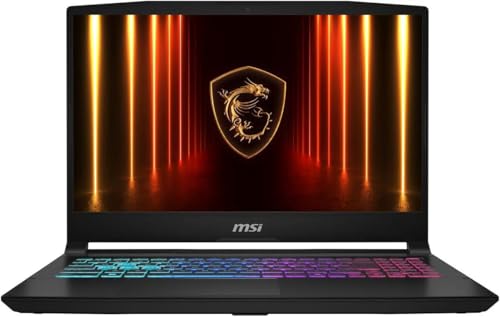
MSI Katana 15 HX
Bottom line: An RTX 5050 and a 16-core Core i7 give this 15.6-inch laptop smooth 1080p gaming at the lowest entry point on this list, with RAM and storage you can upgrade later.
- RTX 5050 with DLSS 4 frame generation runs demanding games at 1080p
- Core i7-14650HX has 16 cores, enough to avoid bottlenecking the GPU
- 144Hz screen is well above the 60Hz baseline of entry-level laptops
- This configuration ships with 1TB of storage, double what many budget models include
- RAM, SSD and Wi-Fi card are slotted, so the laptop can grow with you
- Four-zone RGB keyboard is uncommon at this price
- Ports include HDMI 2.1, USB-C with DisplayPort, three USB-A and Ethernet
- The 1080p IPS panel is dim and has a narrow color range, so games look flatter than on pricier laptops
- The plastic chassis is chunky for a 15.6-inch laptop and the keyboard can run warm
- An 8GB RTX 5050 is a 1080p GPU, so it is not the pick if you plan to play at 1440p or higher

Best 16-Inch Screen on a Budget
Acer Nitro V 16 AI
Bottom line: A roomy 16-inch 16:10 display at 180Hz and an RTX 5050 make this a fast, affordable starter laptop for competitive and AAA games at 1200p.
- 180Hz refresh rate is high for an entry-level laptop
- 16-inch 16:10 panel gives more vertical space than a 15.6-inch screen
- RTX 5050 keeps AAA games running at high settings at 1200p
- Keyboard spacing is comfortable for gaming
- Battery life is long for the category
- Ports include three USB-A, USB-C, HDMI 2.1, Gigabit Ethernet and a microSD reader
- Ryzen 5 240 is a 6-core, 12-thread chip that boosts to 5.0GHz
- Color range is narrow, which makes the screen a poor fit for photo or video work
- 512GB of storage fills up fast with modern game installs
- The touchpad is average

Best OLED Screen for the Money
Lenovo Legion 5 Gen 10
Bottom line: A 15.1-inch 2560 x 1600 OLED at 165Hz paired with an RTX 5060 gives you premium-looking visuals in a mid-range laptop with generous ports.
- OLED panel delivers deep blacks, high contrast and rich color that flagship laptops usually reserve for themselves
- 165Hz refresh rate keeps the OLED responsive in fast games
- RTX 5060 is a capable mid-range GPU for modern titles with DLSS
- Ryzen 7 260 has 8 cores and 16 threads, boosting up to 5.1GHz
- Sturdy, understated chassis looks fine in a dorm, office or living room
- Port selection includes HDMI 2.1, two USB-C, three USB-A and Ethernet
- Two RAM slots support up to 64GB for later upgrades
- The glossy OLED screen is very reflective, so a bright room or window behind you will show up in the picture
- This configuration includes only 512GB of storage
- Configurations stop at an RTX 5070, so there is no high-end option in this line

Best 18-Inch Screen Without Flagship Pricing
Gigabyte Gaming A18
Bottom line: An 18-inch 2560 x 1600 165Hz screen with 32GB of RAM and 1TB of storage, ideal if you want a monitor-sized display and an RTX 5070 without flagship spending.
- 18-inch 16:10 IPS screen at 165Hz gives a monitor-like view without a separate display
- 2560 x 1600 resolution is a good match for an RTX 5070 with DLSS
- Ryzen 7 260 is an 8-core, 16-thread chip that boosts up to 5.1GHz
- 32GB of DDR5 and a 1TB SSD are included in this configuration
- About 0.98 inch thick, which is slim for an 18-inch laptop
- 180-degree hinge opens flat for sharing the screen or setting up on a couch tray
- Two RAM slots support up to 64GB
- The RTX 5070 runs at a conservative power limit, so it delivers less than some other RTX 5070 laptops
- Creative and productivity apps run slower than on laptops with Core Ultra 9 or Ryzen 9 chips
- At about 6.2 lb it is a desk machine, not something to carry daily

Best for Travel and Portability
Razer Blade 14 (2025)
Bottom line: At 3.59 lb and 0.62 inch thick with a 3K OLED screen and an RTX 5070, the Blade 14 is the gaming laptop to buy if it has to travel with you.
- Weighs 3.59 lb and measures 0.62 inch thick, light enough to slip into a small bag
- All-metal aluminum unibody feels more premium than plastic competitors
- 14-inch 3K OLED runs at 120Hz with a 0.2 ms response time
- RTX 5070 with DLSS 4 plays modern games well at the screen's resolution
- 72Wh battery is rated for up to 11 hours of on-screen use
- SSD is user-upgradable
- 32GB of fast LPDDR5X memory comes standard
- The price of entry is high for a laptop whose top graphics option is an RTX 5070
- Larger laptops at a similar price carry stronger GPUs, so thin design costs raw performance
- 120Hz is slower than the 240Hz panels on larger gaming laptops

Best Desktop Replacement
Alienware 16 Area-51
Bottom line: A Core Ultra 9 275HX and RTX 5070 Ti with a big airflow-focused chassis, 240Hz screen and 96Wh battery for players who want one machine that does everything at a desk.
- Core Ultra 9 275HX and RTX 5070 Ti give high-end performance at 2560 x 1600
- Built to run higher processor and graphics power limits than slimmer laptops
- The Cryo-Chamber design lifts the laptop and adds a much larger air intake
- 16-inch 240Hz matte display suits fast play and avoids reflections
- Ports are plentiful for a full desk setup
- Three M.2 SSD slots and slotted RAM leave room to upgrade
- Dell includes a 1 year on-site service plan with this listing
- At about 7.5 lb and 1.12 inches thick, it is bulky and heavy to carry
- Battery life is short compared with thinner laptops
- No OLED display option is offered, even at this price

Best 4K Display
ASUS ROG Strix Scar 18 (2026)
Bottom line: An 18-inch 4K 240Hz Mini LED screen, an RTX 5080 and dual Thunderbolt 5 ports make this the laptop for players who want the sharpest, brightest picture available.
- 18-inch 4K Mini LED panel runs at the full 240Hz, with 2,000+ dimming zones and peak brightness listed up to 1,600 nits
- RTX 5080 and Core Ultra 9 290HX Plus handle demanding games at high settings
- Dual Thunderbolt 5 ports give up to 3x the bandwidth of Thunderbolt 4
- 20% larger vapor chamber and tri-fan cooling with 91% more airflow than the previous generation
- Tool-free latch opens RAM, SSD and fans for upgrades
- Large chassis leaves room for the cooling the hardware needs
- Wi-Fi 7 is included
- It is a very expensive laptop, and 4K gaming on a laptop still leans on DLSS to hit high frame rates
- Ports are mounted on the sides, which some desk setups will find awkward
- It is a heavy 18-inch laptop built for a desk, not a commute

Best for Esports and Creative Work
Razer Blade 18 (2026)
Bottom line: An RTX 5090, 64GB of RAM and a dual-mode 18-inch screen that switches between 4K at 240Hz and 1200p at 440Hz make this the most capable laptop here for players who also create.
- RTX 5090 Laptop GPU with up to 175W TGP plus 25W Dynamic Boost is the fastest graphics on this list
- Dual-mode display switches between 3840 x 2400 at 240Hz for visuals and 1920 x 1200 at 440Hz for esports
- 64GB of DDR5-6400 is installed and the laptop supports up to 128GB
- Two M.2 slots, one PCIe Gen 5 and one Gen 4, support up to 8TB each
- Thunderbolt 5, Thunderbolt 4, HDMI 2.1, SD UHS-II and 2.5Gb Ethernet cover almost any desk setup
- CNC-aluminum build is slimmer and more refined than most 18-inch gaming laptops
- THX Spatial Audio and a 5MP IR webcam with Windows Hello are included
- It is priced far above nearly every other laptop here
- It can run hot under load, so keep it on a desk and give it airflow
- The 440Hz mode only matters if you play fast competitive games
Table of Contents
Best Gaming Laptop: Our Picks in Detail
1
Best Overall for High-End Play
ASUS ROG Strix Scar 16 (2025)
Bottom line: A 16-inch RTX 5080 machine with a 240Hz Mini LED screen, 32GB of RAM and 2TB of storage, built for players who want flagship speed without going to an 18-inch chassis.
This is the 2025 ROG Strix Scar 16, listing model G635LW, configured with a Core Ultra 9 275HX, an RTX 5080 Laptop GPU, 32GB of DDR5, a 2TB SSD and a 16-inch 2560 x 1600 Mini LED display at 240Hz.
Pros & Cons
Pros
- RTX 5080 Laptop GPU and Core Ultra 9 275HX handle current games at the screen's native 2560 x 1600
- Mini LED panel runs at 240Hz with 2,000+ dimming zones and 100% DCI-P3 color
- 32GB of DDR5 and a 2TB SSD are included, so the game library has room from day one
- Tool-free latch gives quick access to RAM, SSD and fans for upgrades
- End-to-end vapor chamber, tri-fan design and liquid metal keep the hardware cooling under long sessions
- 90Wh battery and Wi-Fi 7 round out the spec sheet
- Lid-mounted AniMe Vision display and a surround RGB light bar make it a showpiece on the desk
Cons
- Fans get loud when the laptop works hard
- The number pad overlay on the touchpad is easy to trigger by accident
- At about 6.3 lb and over an inch thick, it is a desk machine first and a travel laptop second
Why We Picked It
The Scar 16 is the cleanest answer to "what is the best gaming laptop if I want the top tier but not a giant screen." The RTX 5080 and a 24-core Core Ultra 9 deliver high frame rates at 1600p, and the 16:10 Mini LED panel keeps motion fast while adding the contrast of a premium display. Asus also leaves the RAM and SSD easy to reach, which is rare at this level, and the cooling design is built for sustained load rather than short benchmark runs.
Who It's For
You play demanding AAA games and fast shooters on the same machine, and you want the screen to be as good as the GPU behind it. This is the laptop you set up on a desk with a mouse and headset and leave there, with enough memory and storage that you will not be shopping for upgrades next year.
Specs & Configurations
- CPU
- Intel Core Ultra 9 275HX
- GPU
- NVIDIA GeForce RTX 5080 Laptop GPU
- RAM
- 32GB DDR5-5600
- Storage
- 2TB PCIe Gen 4 SSD
- Screen
- 16 in, 2560 x 1600, 240Hz Mini LED
- Weight
- 6.3 lb
Get It Now
Check Price on Amazon
2
Best for a Tight Budget
MSI Katana 15 HX
Bottom line: An RTX 5050 and a 16-core Core i7 give this 15.6-inch laptop smooth 1080p gaming at the lowest entry point on this list, with RAM and storage you can upgrade later.
This Katana 15 HX listing is the B14WEK model with a Core i7-14650HX, an RTX 5050 with 8GB of GDDR7, 16GB of DDR5, a 1TB SSD and a 15.6-inch 1920 x 1080 display at 144Hz.
Pros & Cons
Pros
- RTX 5050 with DLSS 4 frame generation runs demanding games at 1080p
- Core i7-14650HX has 16 cores, enough to avoid bottlenecking the GPU
- 144Hz screen is well above the 60Hz baseline of entry-level laptops
- This configuration ships with 1TB of storage, double what many budget models include
- RAM, SSD and Wi-Fi card are slotted, so the laptop can grow with you
- Four-zone RGB keyboard is uncommon at this price
- Ports include HDMI 2.1, USB-C with DisplayPort, three USB-A and Ethernet
Cons
- The 1080p IPS panel is dim and has a narrow color range, so games look flatter than on pricier laptops
- The plastic chassis is chunky for a 15.6-inch laptop and the keyboard can run warm
- An 8GB RTX 5050 is a 1080p GPU, so it is not the pick if you plan to play at 1440p or higher
Why We Picked It
Gaming laptops with current-generation graphics rarely sit near the entry price, and the Katana is the one that keeps the trade-offs sensible. The processor is a full HX-class chip, the GPU is a real RTX 50 series part, and the chassis has the upgrade access that budget machines often skip. The screen is the compromise, but a panel is the easiest part to live with when the frame rates are good.
Who It's For
You are a student, a first-time PC gamer or anyone moving up from integrated graphics, and you want a laptop that plays this year's releases at 1080p on a budget. You will plug in a mouse and headphones, game at a desk and upgrade the storage when your library grows.
Specs & Configurations
- CPU
- Intel Core i7-14650HX
- GPU
- NVIDIA GeForce RTX 5050 8GB GDDR7
- RAM
- 16GB DDR5
- Storage
- 1TB NVMe SSD
- Screen
- 15.6 in, 1920 x 1080, 144Hz IPS
- Weight
- 5.29 lb
Get It Now
Check Price on Amazon
3
Best 16-Inch Screen on a Budget
Acer Nitro V 16 AI
Bottom line: A roomy 16-inch 16:10 display at 180Hz and an RTX 5050 make this a fast, affordable starter laptop for competitive and AAA games at 1200p.
This listing is the Nitro V 16 AI with a Ryzen 5 240, an RTX 5050 with 8GB of VRAM, 16GB of DDR5, a 512GB SSD and a 16-inch 1920 x 1200 IPS display at 180Hz.
Pros & Cons
Pros
- 180Hz refresh rate is high for an entry-level laptop
- 16-inch 16:10 panel gives more vertical space than a 15.6-inch screen
- RTX 5050 keeps AAA games running at high settings at 1200p
- Keyboard spacing is comfortable for gaming
- Battery life is long for the category
- Ports include three USB-A, USB-C, HDMI 2.1, Gigabit Ethernet and a microSD reader
- Ryzen 5 240 is a 6-core, 12-thread chip that boosts to 5.0GHz
Cons
- Color range is narrow, which makes the screen a poor fit for photo or video work
- 512GB of storage fills up fast with modern game installs
- The touchpad is average
Why We Picked It
Most budget gaming laptops stop at 15.6 inches and 144Hz. The Nitro V 16 AI pushes both numbers up while staying a plastic, no-frills build, which is the right trade for a machine built to play. A 16:10 screen suits shooters, strategy games and anything with a lot of interface.
Who It's For
You want a bigger screen than the Katana offers and you care about fast refresh for competitive games like Valorant, Fortnite or Apex Legends. You are fine with a basic panel and a small drive now, and you will add an SSD or an external drive when you need more space.
Specs & Configurations
- CPU
- AMD Ryzen 5 240
- GPU
- NVIDIA GeForce RTX 5050 8GB
- RAM
- 16GB DDR5
- Storage
- 512GB SSD
- Screen
- 16 in, 1920 x 1200, 180Hz IPS
- Weight
- 5.4 lb
Get It Now
Check Price on Amazon
4
Best OLED Screen for the Money
Lenovo Legion 5 Gen 10
Bottom line: A 15.1-inch 2560 x 1600 OLED at 165Hz paired with an RTX 5060 gives you premium-looking visuals in a mid-range laptop with generous ports.
This is the Legion 5 (Gen 10, model 15AHP10) with a Ryzen 7 260, an RTX 5060, 16GB of DDR5, a 512GB SSD and a 15.1-inch 2560 x 1600 OLED display at 165Hz.
Pros & Cons
Pros
- OLED panel delivers deep blacks, high contrast and rich color that flagship laptops usually reserve for themselves
- 165Hz refresh rate keeps the OLED responsive in fast games
- RTX 5060 is a capable mid-range GPU for modern titles with DLSS
- Ryzen 7 260 has 8 cores and 16 threads, boosting up to 5.1GHz
- Sturdy, understated chassis looks fine in a dorm, office or living room
- Port selection includes HDMI 2.1, two USB-C, three USB-A and Ethernet
- Two RAM slots support up to 64GB for later upgrades
Cons
- The glossy OLED screen is very reflective, so a bright room or window behind you will show up in the picture
- This configuration includes only 512GB of storage
- Configurations stop at an RTX 5070, so there is no high-end option in this line
Why We Picked It
OLED panels used to cost flagship money, and the Legion 5 is one of the clearest examples of that changing. The display is the reason to buy it: it looks better than the IPS screens on laptops with similar graphics, and the RTX 5060 is strong enough to feed it. The chassis is solid, and the wide port selection means a monitor, mouse, keyboard and Ethernet cable can all stay plugged in.
Who It's For
You play story-driven games and want them to look as good as possible, but you are not ready to spend on an RTX 5080 flagship. You watch shows and edit photos on the same laptop and will take a picture-quality upgrade over a bigger GPU.
Specs & Configurations
- CPU
- AMD Ryzen 7 260
- GPU
- NVIDIA GeForce RTX 5060 8GB GDDR7
- RAM
- 16GB DDR5
- Storage
- 512GB SSD
- Screen
- 15.1 in, 2560 x 1600, 165Hz OLED
- Weight
- 5.5 lb
Get It Now
Check Price on Amazon
5
Best 18-Inch Screen Without Flagship Pricing
Gigabyte Gaming A18
Bottom line: An 18-inch 2560 x 1600 165Hz screen with 32GB of RAM and 1TB of storage, ideal if you want a monitor-sized display and an RTX 5070 without flagship spending.
The Gaming A18 listing here is configured with a Ryzen 7 260, an RTX 5070 with 8GB of GDDR7, 32GB of DDR5, a 1TB SSD and an 18-inch 2560 x 1600 IPS display at 165Hz.
Pros & Cons
Pros
- 18-inch 16:10 IPS screen at 165Hz gives a monitor-like view without a separate display
- 2560 x 1600 resolution is a good match for an RTX 5070 with DLSS
- Ryzen 7 260 is an 8-core, 16-thread chip that boosts up to 5.1GHz
- 32GB of DDR5 and a 1TB SSD are included in this configuration
- About 0.98 inch thick, which is slim for an 18-inch laptop
- 180-degree hinge opens flat for sharing the screen or setting up on a couch tray
- Two RAM slots support up to 64GB
Cons
- The RTX 5070 runs at a conservative power limit, so it delivers less than some other RTX 5070 laptops
- Creative and productivity apps run slower than on laptops with Core Ultra 9 or Ryzen 9 chips
- At about 6.2 lb it is a desk machine, not something to carry daily
Why We Picked It
Most 18-inch gaming laptops pair the big screen with the most expensive parts. The Gaming A18 breaks that pattern by using a mid-range processor and GPU, which keeps the price below true flagship laptops while preserving the part you notice most: screen size. The 32GB of RAM is generous for this class.
Who It's For
You want a gaming laptop that replaces a desktop monitor, you mostly stay at a desk, and you would rather spend on screen size than on the last few percent of GPU speed. It also suits students and creators who want a big canvas for work and play.
Specs & Configurations
- CPU
- AMD Ryzen 7 260
- GPU
- NVIDIA GeForce RTX 5070 8GB GDDR7
- RAM
- 32GB DDR5
- Storage
- 1TB SSD
- Screen
- 18 in, 2560 x 1600, 165Hz IPS
- Weight
- 6.2 lb
Get It Now
Check Price on Amazon
6
Best for Travel and Portability
Razer Blade 14 (2025)
Bottom line: At 3.59 lb and 0.62 inch thick with a 3K OLED screen and an RTX 5070, the Blade 14 is the gaming laptop to buy if it has to travel with you.
This listing is the 2025 Blade 14 with a Ryzen AI 9 365, an RTX 5070, 32GB of LPDDR5X, a 1TB SSD and a 14-inch 2880 x 1800 OLED display at 120Hz.
Pros & Cons
Pros
- Weighs 3.59 lb and measures 0.62 inch thick, light enough to slip into a small bag
- All-metal aluminum unibody feels more premium than plastic competitors
- 14-inch 3K OLED runs at 120Hz with a 0.2 ms response time
- RTX 5070 with DLSS 4 plays modern games well at the screen's resolution
- 72Wh battery is rated for up to 11 hours of on-screen use
- SSD is user-upgradable
- 32GB of fast LPDDR5X memory comes standard
Cons
- The price of entry is high for a laptop whose top graphics option is an RTX 5070
- Larger laptops at a similar price carry stronger GPUs, so thin design costs raw performance
- 120Hz is slower than the 240Hz panels on larger gaming laptops
Why We Picked It
Portability is where gaming laptops usually fall apart, and the Blade 14 is built around fixing that. It is thin enough to slide into a small bag, light enough to forget about, and still carries a dedicated RTX 50 series GPU and a display that makes games look as good as any laptop in this guide. The battery is the other reason: Razer rates it for up to 11 hours of on-screen use.
Who It's For
You carry your laptop between a dorm, an office, a train and a friend's couch, and you want a single machine that does homework, spreadsheets and Baldur's Gate 3 equally well. It also fits creators who edit on the road and play at night.
Specs & Configurations
- CPU
- AMD Ryzen AI 9 365
- GPU
- NVIDIA GeForce RTX 5070
- RAM
- 32GB LPDDR5X
- Storage
- 1TB SSD
- Screen
- 14 in, 2880 x 1800, 120Hz OLED
- Weight
- 3.59 lb
Get It Now
Check Price on Amazon
7
Best Desktop Replacement
Alienware 16 Area-51
Bottom line: A Core Ultra 9 275HX and RTX 5070 Ti with a big airflow-focused chassis, 240Hz screen and 96Wh battery for players who want one machine that does everything at a desk.
The Area-51 16 listing here has a Core Ultra 9 275HX, an RTX 5070 Ti with 12GB of GDDR7, 32GB of DDR5, a 1TB SSD and a 16-inch 2560 x 1600 matte display at 240Hz.
Pros & Cons
Pros
- Core Ultra 9 275HX and RTX 5070 Ti give high-end performance at 2560 x 1600
- Built to run higher processor and graphics power limits than slimmer laptops
- The Cryo-Chamber design lifts the laptop and adds a much larger air intake
- 16-inch 240Hz matte display suits fast play and avoids reflections
- Ports are plentiful for a full desk setup
- Three M.2 SSD slots and slotted RAM leave room to upgrade
- Dell includes a 1 year on-site service plan with this listing
Cons
- At about 7.5 lb and 1.12 inches thick, it is bulky and heavy to carry
- Battery life is short compared with thinner laptops
- No OLED display option is offered, even at this price
Why We Picked It
Desktop replacements trade portability for power and upgrade room, and the Area-51 leans into that completely. The chassis is built for airflow, the power limits are set high, and the internal layout leaves room for more storage later. It is the pick for players who want the performance and the upgrade path of a desktop in a package that still folds shut.
Who It's For
You game at a desk, you do not move your computer often, and you want a laptop that behaves like a desktop tower with a built-in screen. You like a distinctive design that stands out on the desk.
Specs & Configurations
- CPU
- Intel Core Ultra 9 275HX
- GPU
- NVIDIA GeForce RTX 5070 Ti 12GB GDDR7
- RAM
- 32GB DDR5
- Storage
- 1TB SSD
- Screen
- 16 in, 2560 x 1600, 240Hz matte
- Weight
- 7.5 lb
Get It Now
Check Price on Amazon
8
Best 4K Display
ASUS ROG Strix Scar 18 (2026)
Bottom line: An 18-inch 4K 240Hz Mini LED screen, an RTX 5080 and dual Thunderbolt 5 ports make this the laptop for players who want the sharpest, brightest picture available.
This Scar 18 listing is the 2026 model with a Core Ultra 9 290HX Plus, an RTX 5080, 32GB of DDR5-6400, a 1TB PCIe Gen 4 SSD and an 18-inch 3840 x 2400 Mini LED display at 240Hz.
Pros & Cons
Pros
- 18-inch 4K Mini LED panel runs at the full 240Hz, with 2,000+ dimming zones and peak brightness listed up to 1,600 nits
- RTX 5080 and Core Ultra 9 290HX Plus handle demanding games at high settings
- Dual Thunderbolt 5 ports give up to 3x the bandwidth of Thunderbolt 4
- 20% larger vapor chamber and tri-fan cooling with 91% more airflow than the previous generation
- Tool-free latch opens RAM, SSD and fans for upgrades
- Large chassis leaves room for the cooling the hardware needs
- Wi-Fi 7 is included
Cons
- It is a very expensive laptop, and 4K gaming on a laptop still leans on DLSS to hit high frame rates
- Ports are mounted on the sides, which some desk setups will find awkward
- It is a heavy 18-inch laptop built for a desk, not a commute
Why We Picked It
The 2026 Scar 18 pairs a big chassis and strong cooling with a price that stays below the most extreme laptops. The new part is the display, a 4K panel that still reaches 240Hz. Many large gaming laptops make you choose between sharpness and speed, and this one does not.
Who It's For
You want the best possible picture from a laptop, you play single-player games at high settings, and you also care about fast motion. It suits desk setups with a dock or Thunderbolt 5 monitor, and it fits players who treat their laptop as their only PC.
Specs & Configurations
- CPU
- Intel Core Ultra 9 290HX Plus
- GPU
- NVIDIA GeForce RTX 5080 16GB GDDR7
- RAM
- 32GB DDR5-6400
- Storage
- 1TB PCIe Gen 4 SSD
- Screen
- 18 in, 3840 x 2400, 240Hz Mini LED
- Battery
- 90Wh
Get It Now
Check Price on Amazon
9
Best for Esports and Creative Work
Razer Blade 18 (2026)
Bottom line: An RTX 5090, 64GB of RAM and a dual-mode 18-inch screen that switches between 4K at 240Hz and 1200p at 440Hz make this the most capable laptop here for players who also create.
This Blade 18 listing is the 2026 model with a Core Ultra 9 290HX, an RTX 5090 with 24GB of GDDR7, 64GB of DDR5-6400, a 2TB SSD and an 18-inch dual-mode display (UHD+ 240Hz or FHD+ 440Hz).
Pros & Cons
Pros
- RTX 5090 Laptop GPU with up to 175W TGP plus 25W Dynamic Boost is the fastest graphics on this list
- Dual-mode display switches between 3840 x 2400 at 240Hz for visuals and 1920 x 1200 at 440Hz for esports
- 64GB of DDR5-6400 is installed and the laptop supports up to 128GB
- Two M.2 slots, one PCIe Gen 5 and one Gen 4, support up to 8TB each
- Thunderbolt 5, Thunderbolt 4, HDMI 2.1, SD UHS-II and 2.5Gb Ethernet cover almost any desk setup
- CNC-aluminum build is slimmer and more refined than most 18-inch gaming laptops
- THX Spatial Audio and a 5MP IR webcam with Windows Hello are included
Cons
- It is priced far above nearly every other laptop here
- It can run hot under load, so keep it on a desk and give it airflow
- The 440Hz mode only matters if you play fast competitive games
Why We Picked It
The Blade 18 delivers desktop-class power in a more refined, thinner chassis than most 18-inch laptops, and its dual-mode screen is the standout. You get 4K for visual detail in single-player games and 440Hz at 1200p for esports in one panel, which no other laptop in this guide offers. Memory and storage are upgradable, and the port selection is broad.
Who It's For
You play competitive shooters and big single-player games, and you edit video, render 3D or work with large files too. You want one extremely capable machine with a premium finish, and you are comfortable carrying a large laptop only occasionally.
Specs & Configurations
- CPU
- Intel Core Ultra 9 290HX
- GPU
- NVIDIA GeForce RTX 5090 24GB GDDR7
- RAM
- 64GB DDR5-6400
- Storage
- 2TB SSD
- Screen
- 18 in, dual mode UHD+ 240Hz or FHD+ 440Hz
- Weight
- 7.1 lb
Get It Now
Check Price on AmazonHow to Choose the Best Gaming Laptop
Start With the Graphics Card
The GPU does most of the work in games, and in a laptop it is soldered to the board, so it cannot be swapped later. An RTX 5050 is an entry-level chip that handles 1080p well with DLSS. The RTX 5060 starts the mainstream tier, the RTX 5070 is the most common midrange choice, and the RTX 5070 Ti sits between midrange and the premium RTX 5080 and RTX 5090. Laptop GPUs also run at different power limits, so two laptops with the same GPU name can perform differently. If you must choose, put money into the graphics card before the processor.
Processor, RAM and Storage
Look for H or HX processors from Intel and AMD, which are the high-performance laptop chips. Core 7 and Ryzen 7 class parts are enough for most players, and 9-class chips matter mainly for heavy creative work. Plan for 16GB of RAM as a minimum and 32GB if you multitask or stream. For storage, 512GB fills up quickly with modern games, 1TB is the practical sweet spot and 2TB is ideal. Many laptops let you add RAM and a second SSD later, though thinner models may solder the memory.
Screen Size and Refresh Rate
Sixteen inches has become the standard size, 14-inch models favor portability, and 18-inch models act as desktop replacements. A 2560 x 1600 panel is a strong match for midrange and high-end GPUs, while 1080p or 1200p screens keep frame rates high on budget hardware. A 144Hz panel is common, 240Hz is popular for fast shooters, and OLED and 4K screens look better but are usually slower or more demanding. Match the panel to the games you play.
Battery Life and Portability
Gaming laptops rarely last eight hours away from a charger, and most perform best when plugged in. Thin 14-inch models last longest, while large desktop replacements run out quickly. If you will game mostly at a desk, size and cooling matter more than battery life.
Gaming Laptop FAQ
Are gaming laptops worth it?
Yes, if you want to play PC games away from a desk or save space. A gaming laptop combines a discrete graphics card, a high-refresh screen, a keyboard and cooling in one device, and it can handle everyday work too. Compared with a desktop of similar speed, you pay more for portability and give up some upgrade options.
Can you upgrade a gaming laptop?
Partly. The CPU and GPU are soldered, so those are fixed at purchase. Many models let you replace the SSD and RAM, and some add a second SSD slot, which helps because game installs are large. Thicker laptops are usually easier to open and upgrade than thin ones, so check this before buying.
Which GPU should I get in a gaming laptop?
Most games depend on the graphics card, so spend there first. An RTX 5050 suits 1080p and lighter games, an RTX 5060 or RTX 5070 is the range most players land in, and the RTX 5080 and RTX 5090 are for high resolutions and big budgets. Because laptop GPUs vary by power limit, compare the full listing, not only the GPU name.
What screen size and refresh rate are best for a gaming laptop?
Sixteen inches is the all-round size, 14 inches is best for travel and 18 inches is for desk use. For refresh rate, 144Hz is a good baseline and 240Hz helps most in esports titles. A 2560 x 1600 resolution pairs well with a powerful GPU, and a lower resolution keeps frame rates high on budget hardware.
How long does a gaming laptop battery last?
Expect less than a typical ultrabook. Light use can stretch to several hours, but gaming drains the battery quickly, and the best performance needs the charger plugged in. If battery life matters, a 14-inch model with a large battery is your best bet.
More Gaming PC and Laptop Guides
Once you pick a laptop, these guides cover the rest of a gaming setup. Keep a laptop cool during long sessions with our best gaming laptop cooling pad roundup. If you would rather have a desktop, start with the best prebuilt gaming PCs, then look at the best gaming PCs for 1440p or the best gaming PCs for 4K if you want higher resolution.
Final Thoughts on the Best Gaming Laptop
If you want one gaming laptop that does it all, the ROG Strix Scar 16 pairs flagship speed with a 16-inch size you can actually live with. The Katana 15 HX and Nitro V 16 AI cover tight budgets, the Legion 5 adds an OLED screen to the mid-range, and the Blade 14 is the pick for anyone who travels. Players who want a big screen should look at the Gaming A18 for value, the Area-51 for desktop-class power or the Scar 18 and Blade 18 for the sharpest displays. Whichever you choose, read the exact CPU, GPU, RAM and storage on the listing, because that configuration is what decides whether you bought the best gaming laptop for your games.