GameCuki is reader-supported. When you buy through links on our site, we may earn an affiliate commission at no extra cost to you. As an Amazon Associate I earn from qualifying purchases. Learn more.
Gaming at 4K means rendering four times as many pixels as 1080p, and that puts more pressure on your graphics card than anything else. A good 4K gaming PC needs a powerful GPU with plenty of video memory, a CPU that won’t hold it back, and cooling that keeps everything stable through long sessions.
To find the best gaming PCs for 4K, we compared the spec sheets of high-end prebuilt desktops on Amazon from Skytech, Lenovo, Alienware and HP, and read owner reviews to see how they perform, how loud they get and how reliable they are after delivery. Every pick below has a graphics card with at least 16GB of video memory, from the RTX 5070 Ti up to the RTX 5090. You’ll also find a full spec comparison, a noise rundown and the setup issues owners ran into. Read more about our process on our How We Review page.
The Best Gaming PCs for 4K: Our Picks in Detail
1
Best Overall for 4K
Skytech Azure 3 (Ryzen 7 9800X3D, RTX 5080)

Bottom line: An RTX 5080 and Ryzen 7 9800X3D PC with quality parts and a 360mm cooler, and our top 4K pick.
Pros- RTX 5080 and Ryzen 7 9800X3D in a well-built, well-packaged system
- Owners praise the brand-name parts and clean cable management
- Removable magnetic dust filters, according to one owner
Cons- One owner says the graphics card sounds like a vacuum at full load
- One owner found outdated BIOS firmware and says support was limited
Check Price on Amazon
The Skytech Azure 3 with an RTX 5080 is the 4K gaming PC we'd recommend to most people. Owners are impressed by what's inside, and one buyer liked it so much they bought a second Skytech for their daughter.
Why We Picked It
- 4K-class hardware: NVIDIA's 16GB RTX 5080 with AMD's Ryzen 7 9800X3D, 32GB of DDR5-6000, a 2TB SSD, a 360mm liquid cooler and an 850W Gold power supply.
- Quality build: one owner says the components are close to what the parts would cost on their own, with good cable management and room to add another SSD. Another says Skytech uses good brand-name parts where other builders cut corners.
- Support and extras: lifetime tech support on top of the 1-year warranty, plus a keyboard and mouse.
Who It's For
- Most 4K gamers: one owner who pairs it with a curved OLED monitor calls it amazing.
- Buyers who care about packaging: several mention it arrived excellently packed.
Who It's Not For
- Noise-sensitive players: one owner says the graphics card sounds like a vacuum when it's working hard, and the included keyboard is already showing wear.
- People who want zero setup: one buyer had to push the graphics card back into its slot after shipping, and a 1-star reviewer found the BIOS out of date and Secure Boot not set up, and felt support was limited.
Specs & Configurations
- GPU
- NVIDIA GeForce RTX 5080 16GB GDDR7
- CPU
- AMD Ryzen 7 9800X3D (up to 5.2 GHz)
- Memory
- 32GB DDR5-6000 RGB
- Storage
- 2TB NVMe SSD
- Cooling
- 360mm AIO liquid cooler
- Power supply
- 850W Gold ATX 3
- Warranty
- 1 year parts and labor + lifetime tech support
2
Best No-Compromise 4K
Skytech Legacy 4 (Ryzen 9 9950X3D, RTX 5090)
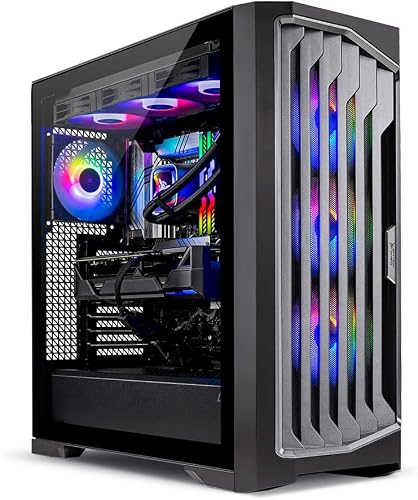
Bottom line: The most powerful 4K PC here, with an RTX 5090 and 32GB of video memory, but very few reviews.
Pros- RTX 5090 with 32GB of video memory, the most powerful GPU on this list
- 16-core Ryzen 9 9950X3D, 64GB of DDR5 and a 4TB SSD
- Wi-Fi 7 and a 1200W power supply
Cons- Very few owner reviews so far, and two of the four we read report serious failures
- Owners say support isn't available on weekends
Check Price on Amazon
If you want the most powerful 4K gaming PC you can get, the Skytech Legacy 4 is built around an RTX 5090 with 32GB of video memory, twice as much as any other pick here.
Why We Picked It
- No-compromise GPU: an RTX 5090 with 32GB of GDDR7.
- Workstation-class extras: a 16-core Ryzen 9 9950X3D, 64GB of DDR5-6000, a 4TB SSD, a 1200W power supply and Wi-Fi 7.
- Smooth gameplay: one parent says it handles every game their son plays, and the stutters he used to blame on games disappeared.
Who It's For
- Enthusiasts with a big budget: who want the best GPU available.
- Gamers who also create: and can use 64GB of memory and 4TB of storage.
Who It's Not For
- Risk-averse buyers: the listing has only a handful of reviews, and two of the four we read are 1-star. One owner says it stopped working after two weeks, and another received a faulty power supply and returned it.
- Anyone who needs weekend support: one owner says there was no weekend support. Buy from a seller with an easy return policy and test it thoroughly in the first few days.
Specs & Configurations
- GPU
- NVIDIA GeForce RTX 5090 32GB GDDR7
- CPU
- AMD Ryzen 9 9950X3D (16 cores, up to 5.7 GHz)
- Memory
- 64GB DDR5-6000 RGB
- Storage
- 4TB Gen4 NVMe SSD
- Cooling
- 360mm AIO liquid cooler
- Power supply
- 1200W Gold ATX 3
- Connectivity
- Wi-Fi 7
- Warranty
- 1 year parts and labor + lifetime tech support
3
Best for Gaming and Creating
Lenovo Legion Tower 7i Gen 10 (Core Ultra 9 285K, RTX 5080)

Bottom line: An RTX 5080 tower with 64GB of RAM and quiet liquid cooling for gaming and creative work.
Pros- 64GB of DDR5 for gaming, streaming and editing at the same time
- Owners say the liquid cooling keeps it fast and quiet
- Windows 11 Pro, keyboard, mouse and a bonus USB hub included
Cons- Only a few owner reviews so far
- Slower DDR5-5600 memory than the Skytech picks
Check Price on Amazon
The Lenovo Legion Tower 7i is the pick for people who game at 4K and also stream, edit video or run heavy apps. The owner reviews so far are all positive.
Why We Picked It
- Built for multitasking: an RTX 5080 with Intel's 24-core Core Ultra 9 285K and 64GB of DDR5. Owners say it stays fast with Discord and streams open.
- Quiet cooling: Lenovo's 360mm Coldfront liquid cooling, which owners say keeps it quiet.
- Complete setup: a 2TB SSD, Wi-Fi 6E, 2.5Gb Ethernet, Windows 11 Pro, a keyboard, a mouse and a bonus USB hub.
Who It's For
- Streamers and creators: one owner uses it for coding and AI workflows as well as gaming.
- Console converts: another owner calls it as user friendly as a gaming console.
Who It's Not For
- Buyers who want a long track record: it's newer, with only a few reviews so far, so long-term reliability is unknown.
- Memory-speed chasers: its DDR5-5600 is slower than the Skytech picks. One owner also reminds buyers to remove the protective plastic from the graphics card.
Specs & Configurations
- GPU
- NVIDIA GeForce RTX 5080 16GB GDDR7
- CPU
- Intel Core Ultra 9 285K (up to 5.7 GHz)
- Memory
- 64GB DDR5-5600
- Storage
- 2TB SSD
- Cooling
- Legion Coldfront 360mm liquid cooling
- Connectivity
- Wi-Fi 6E, 2.5Gb Ethernet
- Warranty
- 1 year
4
Quietest 4K Pick
Alienware Aurora (Core Ultra 9 285, RTX 5080)
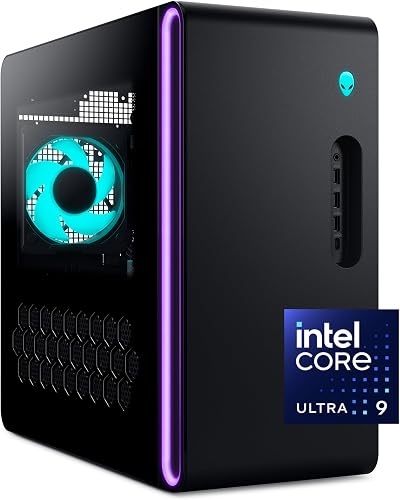
Bottom line: The quietest 4K-class PC on our list, with an RTX 5080 and Dell onsite service.
Pros- Several owners say it is very quiet and runs cool
- 1-year onsite service: Dell can send a technician if remote support fails
- Owners report max settings in Red Dead Redemption 2 and Forza Horizon
Cons- Locked down, with limited tuning and overclocking
- Only 1TB of storage and slower DDR5-5200 memory
Check Price on Amazon
If noise matters to you, the Alienware Aurora stands out. Several owners describe it as very quiet, even silent, while staying cool, which not every 4K-class PC on this list can claim.
Why We Picked It
- Quiet and cool: repeated owner praise for low noise.
- Strong 4K performance: an RTX 5080 with Intel's Core Ultra 9 285. One owner runs Red Dead Redemption 2 and Forza Horizon at max settings, and another gets 70+ fps in Escape from Tarkov's Streets map on ultra.
- Onsite service: Dell can send a technician if a hardware problem can't be fixed remotely.
Who It's For
- Living room and bedroom setups: where fan noise matters.
- People who value support: over tweaking options.
Who It's Not For
- Tinkerers: one owner notes the system is locked down for tweaking.
- Big game libraries: it ships with 1TB of storage, and a 1-star reviewer finds the DDR5-5200 memory and basic keyboard and mouse dated for the price. One owner's motherboard also failed after four weeks with parts on backorder.
Specs & Configurations
- GPU
- NVIDIA GeForce RTX 5080 16GB GDDR7
- CPU
- Intel Core Ultra 9 285 (up to 5.6 GHz)
- Memory
- 32GB DDR5-5200
- Storage
- 1TB SSD
- Cooling
- liquid CPU cooling
- Warranty
- 1 year onsite service
5
Best AMD Graphics
Skytech Azure 3 (Ryzen 7 9850X3D, RX 9070 XT)

Bottom line: An all-AMD 4K-ready PC with a 16GB RX 9070 XT, but no owner reviews for this exact configuration yet.
Pros- 16GB AMD Radeon RX 9070 XT with an all-AMD Ryzen 7 9850X3D platform
- 2TB Gen4 SSD and a 360mm liquid cooler
- Same lifetime tech support as other Skytech PCs
Cons- No owner reviews for this exact configuration yet (the listing's reviews are for older Skytech models)
- Slower DDR5-5600 memory and older Wi-Fi 5 (802.11ac)
Check Price on Amazon
If you'd rather go with AMD graphics, this version of the Skytech Azure 3 swaps in a 16GB Radeon RX 9070 XT and pairs it with the Ryzen 7 9850X3D. Be aware that the Amazon listing pools reviews from older Skytech PCs with much weaker parts, so we couldn't find owner feedback for this specific configuration.
Why We Picked It
- AMD graphics with 16GB: a Radeon RX 9070 XT with the Ryzen 7 9850X3D.
- Solid platform: 32GB of DDR5, a 2TB Gen4 SSD, a 360mm liquid cooler and an 850W Gold power supply, plus a keyboard and mouse.
- Skytech support: the same lifetime tech support as other Skytech PCs.
Who It's For
- AMD fans: who want an all-AMD 4K-ready system.
- Buyers who liked our top pick: it uses the same Azure 3 case. See the RTX 5080 version above for owner impressions of the build.
Who It's Not For
- Buyers who rely on reviews: there's no owner feedback for this configuration yet, and Skytech notes the graphics card brand may vary.
- Anyone who needs fast Wi-Fi: it has older Wi-Fi 5 and slower DDR5-5600 memory.
Specs & Configurations
- GPU
- AMD Radeon RX 9070 XT 16GB GDDR6
- CPU
- AMD Ryzen 7 9850X3D (up to 5.6 GHz)
- Memory
- 32GB DDR5-5600
- Storage
- 2TB Gen4 NVMe SSD
- Cooling
- 360mm AIO liquid cooler
- Power supply
- 850W Gold ATX 3
- Warranty
- 1 year parts and labor + lifetime tech support
6
Best Entry-Level 4K
HP OMEN 45L (Core Ultra 7 265K, RTX 5070 Ti)
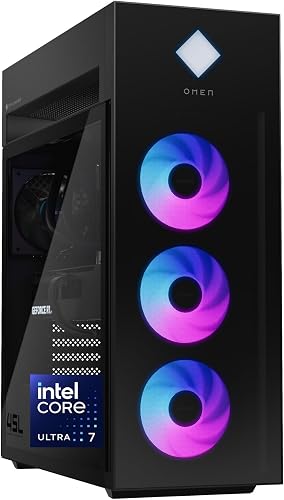
Bottom line: The most affordable way into 4K on our list, with a 16GB RTX 5070 Ti and room to upgrade.
Pros- 16GB RTX 5070 Ti, the most affordable GPU tier on this list
- Industry-standard form factor with tool-less access for future upgrades
- Four video outputs: 1 HDMI 2.1b and 3 DisplayPort 2.1b
Cons- Very heavy (49.8 lb listed)
- A couple of owners had lockups or random shutdowns
Check Price on Amazon
The HP OMEN 45L with an RTX 5070 Ti is the most affordable way into 4K gaming on our list, and the easiest to upgrade later. For more on this PC, see our best prebuilt gaming PCs guide.
Why We Picked It
- 16GB of video memory: the RTX 5070 Ti has the same VRAM as the RTX 5080, paired with a Core Ultra 7 265K, 32GB of DDR5, Wi-Fi 6E and Windows 11 Pro.
- Upgrade path: HP says the case uses an industry-standard form factor with tool-less access, so you could drop in a faster GPU later.
- 4K-ready outputs: one HDMI 2.1b and three DisplayPort 2.1b outputs.
Who It's For
- Budget-minded 4K gamers: who are happy to use upscaling in the most demanding games.
- Creators: a video editor who uses Adobe Premiere Pro says it arrived early and worked perfectly.
Who It's Not For
- Small desks: it's listed at 49.8 pounds, and one owner had to remove expanding foam from inside the case.
- Buyers who want flawless reliability reports: one owner needed several patches to fix memory-related lockups, and another says theirs keeps shutting down.
Specs & Configurations
- GPU
- NVIDIA GeForce RTX 5070 Ti 16GB GDDR7
- CPU
- Intel Core Ultra 7 265K (up to 5.5 GHz)
- Memory
- 32GB DDR5-5600
- Storage
- 1TB PCIe Gen4 NVMe SSD
- Cooling
- 360mm LCD liquid cooler with OMEN Cryo Chamber
- Connectivity
- Wi-Fi 6E, Bluetooth 5.3
- Warranty
- 1 year
Best 4K Gaming PCs Compared
| PC |
GPU (VRAM) |
CPU |
RAM |
Storage |
Power supply |
| Skytech Azure 3 (RTX 5080) |
RTX 5080 (16GB) |
Ryzen 7 9800X3D |
32GB DDR5-6000 |
2TB |
850W Gold |
| Skytech Legacy 4 |
RTX 5090 (32GB) |
Ryzen 9 9950X3D |
64GB DDR5-6000 |
4TB |
1200W Gold |
| Lenovo Legion Tower 7i Gen 10 |
RTX 5080 (16GB) |
Core Ultra 9 285K |
64GB DDR5-5600 |
2TB |
Not listed |
| Alienware Aurora |
RTX 5080 (16GB) |
Core Ultra 9 285 |
32GB DDR5-5200 |
1TB |
Not listed |
| Skytech Azure 3 (RX 9070 XT) |
RX 9070 XT (16GB) |
Ryzen 7 9850X3D |
32GB DDR5-5600 |
2TB |
850W Gold |
| HP OMEN 45L |
RTX 5070 Ti (16GB) |
Core Ultra 7 265K |
32GB DDR5-5600 |
1TB |
Not listed |
Specs are taken from each product’s Amazon listing at the time of writing. Configurations change, so confirm the exact model before you buy.
How Loud Are They?
A 4K gaming PC works its graphics card hard, so noise is worth checking before you buy. Here’s what owners say:
- Quietest: owners of the Alienware Aurora repeatedly describe it as very quiet or silent, and Lenovo Legion Tower 7i owners say its liquid cooling keeps it quiet.
- Can get loud: one Skytech Azure 3 (RTX 5080) owner says the graphics card sounds like a vacuum at full load, although another calls its fans quiet and powerful.
- Not enough data: we didn’t find noise comments for the Skytech Legacy 4, the RX 9070 XT Azure 3 or the HP OMEN 45L.
What Owners Ran Into on Day One
High-end prebuilts are shipped carefully, which sometimes means extra work before the first boot. These issues came up in owner reviews of the PCs on this list:
- Shipping foam inside the case: the Skytech Legacy 4 and HP OMEN 45L both arrive with protective foam that you need to remove.
- Protective film on the graphics card: a Lenovo Legion owner reminds buyers to peel it off.
- Loose graphics card: one Skytech Azure 3 owner had to push the card back into its slot before the PC would display anything.
- Firmware and Windows setup: one Azure 3 owner found the BIOS out of date and Secure Boot not configured, and another had to use the Windows activation troubleshooter.
- Power supply failure: one Legacy 4 buyer received a faulty power supply and returned the PC.
For a step-by-step list of what to check when any prebuilt arrives, see the first-30-minutes checklist in our best prebuilt gaming PCs guide.
How to Choose a 4K Gaming PC
Graphics card and video memory come first
At 4K, the GPU does most of the work. Every pick here has at least 16GB of video memory, and the RTX 5090 in the Skytech Legacy 4 doubles that to 32GB. As a rule of thumb, the RTX 5070 Ti and RX 9070 XT are entry points for 4K gaming, often with upscaling such as NVIDIA DLSS or AMD FSR turned on, while the RTX 5080 and RTX 5090 give you more room for higher settings and frame rates.
32GB or 64GB of RAM?
Four of our six picks have 32GB of DDR5, which is plenty for gaming. The Skytech Legacy 4 and Lenovo Legion Tower 7i have 64GB, which makes more sense if you also stream, edit 4K video or run other heavy apps alongside your games.
Cooling and power
All six picks list liquid CPU cooling. Where the power supply is listed, the RTX 5080 and RX 9070 XT Skytech PCs use 850W Gold units, while the RTX 5090 Legacy 4 steps up to 1200W. If you plan to upgrade the graphics card later, check the power supply rating first.
Don’t forget storage
Modern games with high-resolution textures take up a lot of space. Two of our picks ship with 1TB SSDs, which can fill up quickly, while the others have 2TB or 4TB.
FAQ
What is the best gaming PC for 4K?
For most people, the Skytech Azure 3 with an RTX 5080 and Ryzen 7 9800X3D is the best 4K gaming PC on our list. It has a 16GB RTX 5080, 32GB of DDR5-6000, a 2TB SSD and a 360mm liquid cooler, and owners praise its build quality. If you want the absolute most power, the RTX 5090 Skytech Legacy 4 steps up to 32GB of video memory.
Is an RTX 5070 Ti enough for 4K gaming?
It’s a good entry point. The RTX 5070 Ti has 16GB of video memory, the same as the RTX 5080, but less raw power, so in the most demanding games you’ll often rely on upscaling or lower some settings at 4K. If you want higher settings without compromises, step up to an RTX 5080 or RTX 5090.
RTX 5080 or RTX 5090 for 4K?
The RTX 5080 has 16GB of video memory and is the GPU in three of our six picks. The RTX 5090 doubles that to 32GB and is the most powerful option, but it’s also found in much more expensive systems. For most 4K gamers, an RTX 5080 PC is the better balance.
Which 4K gaming PC is the quietest?
Based on owner reviews, the Alienware Aurora is the quietest, with several owners calling it very quiet or silent. Lenovo Legion Tower 7i owners also say its liquid cooling keeps noise down.
Can I use a 4K gaming PC with a 1440p monitor?
Yes. A 4K-class PC will simply run games at higher frame rates on a 1440p screen. One Skytech Azure 3 (RTX 5080) owner reports running AAA games at max settings and high frame rates at 1440p. If 1440p is your main resolution, see our guide to the best gaming PCs for 1440p.
Final Verdict: Which 4K Gaming PC Should You Buy?
All six picks are among the best gaming PCs for 4K you can buy on Amazon right now. For most players, the Skytech Azure 3 with an RTX 5080 offers the best balance of performance, build quality and support. If money is no object, the Skytech Legacy 4 brings an RTX 5090, though we’d buy it with a solid return policy. Creators should look at the 64GB Lenovo Legion Tower 7i, noise-sensitive players at the Alienware Aurora, and AMD fans at the RX 9070 XT Azure 3. On a tighter budget, the HP OMEN 45L with an RTX 5070 Ti is the most affordable way in and the easiest to upgrade. Completing your setup? Check out our guides to the best PC controllers and best gaming headsets under $100.