GameCuki is reader-supported. When you buy through links on our site, we may earn an affiliate commission at no extra cost to you. As an Amazon Associate I earn from qualifying purchases. Learn more.
You don’t need to spend $200 to get a gaming headset that sounds good, feels comfortable for hours and makes you easy to understand on Discord. Some of the best gaming headsets under $100 cost less than half that.
To build this list, we compared the specs of the most popular budget headsets, and read owner reviews to find out what holds up over time and what goes wrong. Every pick below was under $100 at the time of writing. You’ll also find a platform compatibility table and a short buying guide.
The Best Gaming Headsets Under $100: Our Picks in Detail

1
Best Overall
HyperX Cloud III
Bottom line: The safest gaming headset under $100 for most players, comfortable for long sessions and tough enough to last for years on almost any device.
The HyperX Cloud III is the safest pick for most people. It comes with USB-C, USB-A and 3.5mm connections, so the same headset works on a PC, a PS5, an Xbox controller or a phone, and its angled 53mm drivers are tuned for games.
Pros & Cons
Pros- Plush comfort for long sessions
- Tough enough for years of use
- USB-C, USB-A and 3.5mm connections
- Angled 53mm drivers tuned for games
- Detachable noise-cancelling mic with LED mute light
- Two-year warranty
Cons- Ear cushions get warm
- Mic and sound are good, not great
Why We Picked It
The HyperX Cloud III is the safest pick for most people. It works almost anywhere thanks to USB-C, USB-A and 3.5mm connections, so one headset covers your PC, PS5, Xbox controller and phone, and its angled 53mm drivers are tuned for games. Plush memory foam and light clamping force keep it comfortable through 4- to 6-hour sessions, and the sturdy frame survives years of moves and drops, which makes it the best gaming headset under $100 for most players.
Who It's For
You play on more than one device and want a single headset for all of them. USB-C, USB-A and 3.5mm connections cover your PC, PS5, Xbox controller and phone, and the plush memory foam with light clamping force keeps 4- to 6-hour sessions comfortable.
Specs & Configurations
- Connection
- wired (USB-C, USB-A or 3.5mm)
- Drivers
- angled 53mm
- Mic
- detachable 10mm, noise-cancelling, LED mute light
- Weight
- 308 g (listed)
- Warranty
- 2 years

2
Best Budget
Razer BlackShark V2 X
Bottom line: The most headset for the least money, light enough to forget you're wearing it, though it won't block much outside noise.
If you want the most headset for the least money, get the Razer BlackShark V2 X. It usually costs well under half our $100 budget.
Pros & Cons
Pros- Lightest pick at 240 g
- Good game audio from 50mm drivers
- Very low price
- Simple 3.5mm connection to PC, PlayStation and Switch
- Closed earcups for focused sound
- HyperClear cardioid mic and two-year warranty
Cons- Software 7.1 surround is Windows-only
- Doesn't fully block outside noise
Why We Picked It
If you want the most headset for the least money, get the Razer BlackShark V2 X. At 240 g it's the lightest pick here and one of the most comfortable headsets you can wear, its 50mm drivers and closed earcups deliver good game audio, and it connects to PC, PlayStation and Switch over a simple 3.5mm jack, all for well under half our $100 budget.
Who It's For
You want a proven headset that costs very little and weighs almost nothing on your head. A plain 3.5mm jack plugs into your PC, PlayStation or Switch, and the 50mm drivers deliver good game audio.
Specs & Configurations
- Connection
- wired (3.5mm)
- Drivers
- 50mm TriForce Titanium
- Mic
- HyperClear cardioid
- Weight
- 240 g
- Warranty
- 2 years

3
Best Wireless
Razer Barracuda X
Bottom line: The wireless headset we'd buy under $100, thanks to easy switching between 2.4GHz and Bluetooth and a battery that lasts for days.
The Barracuda X is the wireless headset we'd recommend under $100 for most players, with comfortable, clear and balanced sound.
Pros & Cons
Pros- 2.4GHz and Bluetooth with one-button switching
- Up to 50 hours of battery
- Comfortable with clear, balanced sound
- Low-latency USB-C dongle
- Also works on Linux
- Detachable HyperClear cardioid mic
Cons- 7.1 surround is emulated and Windows-only
- Sound can be tinny for some
Why We Picked It
The Barracuda X is the wireless headset we'd recommend under $100 for most players. Its SmartSwitch button flips between a low-latency 2.4GHz USB-C dongle and Bluetooth, so it moves easily from PC or console to your phone, and the battery lasts up to 50 hours. It's comfortable with clear, balanced sound, and it even works on Linux.
Who It's For
You hop between your PC or console and your phone, and you are tired of charging every night. The SmartSwitch button flips between the 2.4GHz dongle and Bluetooth, the battery lasts up to 50 hours, and the same headset handles your commute playlist.
Specs & Configurations
- Connection
- 2.4GHz USB-C dongle, Bluetooth or 3.5mm cable
- Battery
- up to 50 hours, USB-C charging
- Drivers
- 40mm TriForce
- Mic
- detachable HyperClear cardioid
- Weight
- 250 g

4
Best Wireless for PC
Razer BlackShark V2 HyperSpeed
Bottom line: Worth the extra money for PC players who want a wireless headset with a genuinely great mic, as long as they don't need Xbox support.
If you play mainly on PC and want a wireless headset with a great mic, the BlackShark V2 HyperSpeed is worth the extra money over the Barracuda X.
Pros & Cons
Pros- Standout Super Wideband mic
- Up to 70 hours of battery
- Excellent wireless range and comfortable fit
- 50mm TriForce Titanium drivers tuned for competitive games
- Fits comfortably even on larger heads
- Works over 2.4GHz, Bluetooth 5.2 or USB
Cons- Not compatible with Xbox
- Needs Razer Synapse for best sound
Why We Picked It
If you play mainly on PC and want a wireless headset with a great mic, the BlackShark V2 HyperSpeed is worth the extra money over the Barracuda X. Its Super Wideband mic captures a wider vocal range and rivals a decent lavalier mic, 50mm TriForce Titanium drivers are tuned for competitive games, and the battery lasts up to 70 hours. Wireless range is excellent, and it fits comfortably even on larger heads.
Who It's For
You play mostly on PC and spend a lot of time on Discord or in team games, where a clear voice matters. The Super Wideband mic captures a wider vocal range, the wireless range is excellent, and the 70-hour battery fits larger heads comfortably through long sessions. PlayStation, Switch and Mac work too.
Specs & Configurations
- Connection
- 2.4GHz HyperSpeed, Bluetooth 5.2 or USB
- Battery
- up to 70 hours, USB-C charging
- Drivers
- 50mm TriForce Titanium
- Mic
- HyperClear Super Wideband
- Weight
- 280 g

5
Best Microphone
Corsair HS65 Surround
Bottom line: The pick if your friends keep asking you to repeat yourself, with one of the clearest mics you'll find at this price.
If people often ask you to repeat yourself in voice chat, start with the Corsair HS65 Surround.
Pros & Cons
Pros- Clear mic with noise-cancelling options
- Dolby Atmos on PC and Tempest 3D Audio on PS5
- Works on PC, PS5, Xbox, Switch and mobile
- 50mm neodymium drivers
- SoundID tuning adapts sound to your hearing
- Flip-to-mute mic
Cons- No mute button (flip the mic to mute)
- Full sound tuning needs a paid subscription
Why We Picked It
If people often ask you to repeat yourself in voice chat, start with the Corsair HS65 Surround. Its mic is one of the clearest you'll find under $60, with several noise-cancelling options in Corsair's software, and its 50mm drivers support Dolby Atmos on PC and Tempest 3D Audio on PS5, plus SonarWorks SoundID tuning that adapts the sound to your hearing.
Who It's For
You spend your evenings in voice chat and want your teammates to hear you the first time. The mic is clear, Corsair's software offers several noise-cancelling options, and one headset works across PC, PS5, Xbox, Switch and mobile.
Specs & Configurations
- Connection
- wired (3.5mm, USB adapter)
- Drivers
- 50mm neodymium
- Mic
- omnidirectional, flip-to-mute
- Audio
- Dolby Atmos on PC, Tempest 3D on PS5
- Weight
- 282 g

6
Most Proven
HyperX Cloud II
Bottom line: A proven classic that has lasted for years on countless desks, and still one of the safest wired buys for PC players.
The HyperX Cloud II has been around for years, and that's exactly why it's here: it's one of the most proven gaming headsets you can buy.
Pros & Cons
Pros- Durability proven over years
- Discord and TeamSpeak certified mic
- Hardware 7.1 surround on PC
- Sturdy aluminum frame
- Detachable noise-cancelling mic
- Two-year warranty
Cons- Surround is PC-only
- Hinges and headband material can wear
Why We Picked It
The HyperX Cloud II has been around for years, and that's exactly why it's here. Its sturdy aluminum frame has a long track record of lasting many years, the detachable mic is certified for Discord and TeamSpeak, and the included USB sound card adds hardware 7.1 virtual surround on PC. It's a safe bet with a long history behind it.
Who It's For
You want a headset with a long track record and no surprises. On a PC, the included USB sound card adds hardware 7.1 virtual surround (plug it into the motherboard's rear USB ports for the best sound), and the detachable mic is certified for Discord and TeamSpeak.
Specs & Configurations
- Connection
- wired (3.5mm, USB sound card)
- Drivers
- 53mm
- Weight
- 320 g (listed)
- Mic
- detachable, noise-cancelling, Discord and TeamSpeak certified
- Surround
- hardware 7.1 on PC and Mac
- Warranty
- 2 years
7
Best Retractable Mic
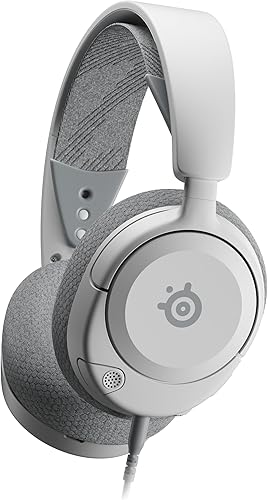
SteelSeries Arctis Nova 1P
Bottom line: A comfortable, clean-looking headset with a mic that hides away, though it's not the most durable choice here.
The Arctis Nova 1P is a good fit if you want a clean-looking headset with no mic sticking out.
Pros & Cons
Pros- Retractable noise-cancelling mic
- Comfortable, adjustable fit, even with glasses
- Clear sound and a long cable
- 360° spatial audio and Tempest 3D on PS5
- Rotating, height-adjustable earcups
- Clean look with no mic sticking out
Cons- Weakest reliability on our list
- Wired only
Why We Picked It
The Arctis Nova 1P is a good fit if you want a clean-looking headset with no mic sticking out. Its ClearCast Gen 2 mic cuts background noise and slides into the earcup, rotating, height-adjustable earcups and a stretchy band keep it comfortable for long sessions (even with glasses), and its clear sound makes footsteps easy to hear.
Who It's For
You wear glasses and tight headsets leave you with sore temples, or you simply like a tidy desk setup. The mic slides into the earcup, the stretchy band and rotating earcups stay comfortable for long sessions, and the clear sound makes footsteps easy to hear.
Specs & Configurations
- Connection
- wired (3.5mm)
- Mic
- ClearCast Gen 2, retracts into the earcup
- Audio
- 360° spatial audio, Tempest 3D on PS5
- Weight
- 280 g (listed)
- Warranty
- 1 year

8
Best Cheap Lightweight
HyperX Cloud Stinger 2 Core
Bottom line: A light, cheap and comfortable everyday headset, as long as you don't need a streaming-quality mic.
The Cloud Stinger 2 Core is a simple, cheap headset from a brand known for comfort.
Pros & Cons
Pros- Light and comfortable
- Loud, punchy sound
- Swivel-to-mute mic and on-ear volume
- Cheap enough to keep as a spare
- Works on PC, PlayStation, Xbox, Switch and phone
- Two-year DTS Headphone:X code for PC
Cons- Mic is tinny for streaming
- Tight on very large heads
Why We Picked It
The Cloud Stinger 2 Core is a simple, cheap headset from a brand known for comfort. At 275 g with HyperX memory foam and a solid steel slider, it's comfortable for long sessions, it gets loud with punchy bass, and a swivel-to-mute mic and on-ear volume keep controls simple. A two-year DTS Headphone:X code adds spatial audio on PC.
Who It's For
You need an everyday headset for casual sessions, a kid's setup or a spare, on PC, PlayStation, Xbox, Switch or phone. At 275 g with memory foam and a steel slider it stays comfortable, it gets loud with punchy bass, and the controls stay simple.
Specs & Configurations
- Connection
- wired (3.5mm, PC extension cable included)
- Drivers
- 40mm
- Mic
- swivel-to-mute
- Extras
- 2-year DTS Headphone:X code
- Weight
- 275 g
Best Gaming Headsets Under $100 Compared
| Headset |
Connection |
Weight |
Drivers |
Battery |
Mic |
| HyperX Cloud III |
Wired (USB-C, USB-A, 3.5mm) |
308 g |
53mm |
– |
Detachable, noise-cancelling |
| Razer BlackShark V2 X |
Wired (3.5mm) |
240 g |
50mm |
– |
Cardioid |
| Razer Barracuda X |
2.4GHz, Bluetooth, 3.5mm |
250 g |
40mm |
Up to 50 hrs |
Detachable cardioid |
| Razer BlackShark V2 HyperSpeed |
2.4GHz, Bluetooth, USB |
280 g |
50mm |
Up to 70 hrs |
Super Wideband |
| Corsair HS65 Surround |
Wired (3.5mm, USB) |
282 g |
50mm |
– |
Omnidirectional, flip-to-mute |
| HyperX Cloud II |
Wired (3.5mm, USB) |
320 g |
53mm |
– |
Detachable, noise-cancelling |
| SteelSeries Arctis Nova 1P |
Wired (3.5mm) |
280 g |
Not listed |
– |
Retractable, noise-cancelling |
| HyperX Cloud Stinger 2 Core |
Wired (3.5mm) |
275 g |
40mm |
– |
Swivel-to-mute |
Weights, drivers, battery life and mic types are taken from each product’s listing.
This is where many budget headsets trip people up, so check this table before you buy.
| Headset |
PC |
PS5 |
Xbox |
Switch |
Phone |
| HyperX Cloud III |
Yes |
Yes |
Yes |
Not listed |
Yes |
| Razer BlackShark V2 X |
Yes |
Yes |
Yes (Xbox One stereo adapter may be required) |
Yes |
Not listed |
| Razer Barracuda X |
Yes |
Not listed |
Not listed |
Not listed |
Yes (Bluetooth) |
| Razer BlackShark V2 HyperSpeed |
Yes |
Yes |
No |
Yes |
Yes (Bluetooth) |
| Corsair HS65 Surround |
Yes |
Yes |
Yes |
Yes |
Yes |
| HyperX Cloud II |
Yes (7.1) |
Not listed (PS4: stereo) |
Stereo (Xbox One listed) |
Stereo |
Yes |
| SteelSeries Arctis Nova 1P |
Yes |
Yes |
Yes |
Yes |
Yes |
| HyperX Cloud Stinger 2 Core |
Yes |
Yes |
Yes |
Yes |
Yes |
Compatibility is based on each manufacturer’s product listing. “Not listed” means the listing doesn’t mention that platform, not that it definitely won’t work.
How to Choose a Gaming Headset Under $100
Wired or wireless?
Wired headsets never need charging, and on this list they are also the cheapest picks. Wireless headsets like the Barracuda X and BlackShark V2 HyperSpeed are worth it if you play from the couch, get up often, or want one headset for both gaming and your phone.
Check platform support first
A 3.5mm plug works with almost everything, including PS5, Xbox and Switch controllers. Wireless dongles are a different story: the BlackShark V2 HyperSpeed, for example, doesn’t work with Xbox at all. Use the compatibility table above before you buy.
The mic matters more than you think
If you play with friends or in competitive matches, your teammates hear your mic far more than you notice your headphones. Look for a cardioid or noise-cancelling mic, and a quick way to mute, like a button, an LED or a flip-to-mute boom.
Comfort and weight
Every headset on this list weighs around 240 to 320 grams. Lighter is usually better for long sessions, but clamping force and cushion material matter too. If you wear glasses or have a larger head, check the fit notes in each pick above.
Do you need surround sound?
Virtual 7.1 and spatial audio can help you locate footsteps in shooters. On the headsets in this list, surround modes work on PC (and Mac for the Cloud II), while some models support Sony’s Tempest 3D audio on PS5. Treat them as a bonus, not the main reason to buy.
FAQ
What is the best gaming headset under $100?
For most people, the HyperX Cloud III is the best gaming headset under $100. It works on PC, PlayStation, Xbox and phones thanks to USB-C, USB-A and 3.5mm connections, and it’s comfortable, durable and has a clear mic.
What is the best wireless gaming headset under $100?
The Razer Barracuda X is our top wireless pick because it switches between a 2.4GHz dongle and Bluetooth, lasts up to 50 hours and weighs just 250 g. PC players who don’t need Xbox support should also consider the BlackShark V2 HyperSpeed for its 70-hour battery and better mic. Want to spend even less? See our best wireless gaming headset under $50.
Is a $50 gaming headset good enough?
Yes. The Razer BlackShark V2 X, Corsair HS65 Surround, HyperX Cloud II and Cloud Stinger 2 Core all cost under $50 at the time of writing, and each is a solid choice for the money. Spending more mainly gets you wireless, longer warranties or better mics.
Do these headsets work with PS5 and Xbox?
Most of them list PS5 and Xbox support, usually through the 3.5mm jack on your controller. The big exception is the Razer BlackShark V2 HyperSpeed, which Razer says is not compatible with Xbox consoles. See our platform table above for every pick.
Are gaming headset mics good enough for Discord?
Most are. The HyperX Cloud II’s mic is even Discord certified, and the Corsair HS65, HyperX Cloud III and BlackShark V2 HyperSpeed have especially good mics. If you stream, consider a separate USB mic instead.
Final Verdict: Which Gaming Headset Should You Buy?
If you want one headset that does everything well, get the HyperX Cloud III, the best all-around choice thanks to its comfort, clear mic and USB-C, USB-A and 3.5mm connections. On a tight budget, the Razer BlackShark V2 X is light, comfortable and hugely popular. If you want to cut the cord, the Razer Barracuda X is the most versatile wireless option. And if you’re also shopping for a gamepad, check out our guide to the best PC controllers.