

The stock pad on a Quest 3 soaks up sweat, leaves a gap over your nose and presses a narrow frame into your face, which is why swapping it is one of the cheapest comfort upgrades you can make. The best facial interface for Meta Quest 3 depends on your head strap, your face shape and whether you charge on a dock, so these seven cover every setup, from AMVR’s adjustable FC3 to Meta’s own Open Facial Interface.
Best Facial Interface for Meta Quest 3 in 2026
GameCuki is reader-supported. When you buy through links on our site, we may earn an affiliate commission at no extra cost to you. As an Amazon Associate I earn from qualifying purchases. Learn more.
Our Top Picks

Best Overall
AMVR FC3 (Q3FC3) Facial Interface
Bottom line: The best all-round Quest 3 facial interface, with knob-adjustable depth, two pads and a tall top that spreads pressure, though it can clash with some halo straps.
- Knob lets you fine-tune depth for comfort, field of view or glasses
- Two pads, easy-clean PU leather and breathable ice silk
- Extended top spreads pressure across your forehead
- Wide frame suits wider faces
- Y-shaped vents let heat out
- Silicone nose guard blocks light
- 12-month warranty
- Tall top can conflict with some halo-style straps
- Edges can dig into the cheeks of narrow faces
- Not for Quest 3S

Most Customizable
Globular Cluster F3 V3
Bottom line: The most customizable Quest 3 interface, with magnetic pads, frames and light blockers for every face and household, but it won't fit charging docks.
- Magnetic pads swap in seconds, great for sharing a headset
- Three frame heights for different nose shapes
- Removable side blockers for open or sealed play
- Nose blocker stops essentially all light
- Three pads in PU leather, fabric and mesh
- Two glasses spacers, 4 mm and 6 mm
- Half-open or open face modes
- Not compatible with the official charging dock or most third-party docks
- Pricier than most picks
- Can press on the cheekbones of some faces

Best Simple Upgrade
KIWI design V3 Facial Interface
Bottom line: The easiest upgrade from the stock interface, with thick wipe-clean pads and excellent light blocking, as long as you don't need depth adjustment.
- Excellent light blocking around the nose
- Thick, soft PU leather pads, two in the box
- Vents keep lenses from fogging
- Installs in seconds
- Two nose pieces included
- L-shaped vents let warm air out without letting light in
- No depth or spacer adjustment
- Wide nose guard can brush your eyelashes

Best With a Fan Head Strap
BOBOVR F3 Facial Interface
Bottom line: The best match for a BOBOVR S3 Pro fan strap, with forehead air channels and stepless depth wheels, though its build has a few rough edges.
- Air channels line up with the S3 Pro's fan
- Stepless depth adjustment on both sides
- Seals out light completely
- Works with BOBOVR's D3 charging dock
- Three forehead air channels guide fan air
- Lycra fabric nose guard
- Wipe-clean leatherette cover
- Adhesive strips can peel off during setup
- Fabric nose guard can irritate some users
- Best only with BOBOVR's own strap

Best for Halo Straps
AMVR FC4A Facial Interface
Bottom line: The AMVR to get if you use a halo or fan head strap, with more vents and the same handy depth knob, though the knob can slip a notch.
- Shaped for halo straps, unlike the FC3
- Extra vents on top and sides
- Two pads included
- Room for glasses with the depth knob
- Stepless depth knob with 3 recommended heights
- Silicone nose guard blocks light
- Depth knob can slip back a notch when you take the headset off
- Ice silk pad works best with a fan strap

Best for Mixed Reality and Workouts
Meta Quest 3 Open Facial Interface
Bottom line: The official choice for mixed reality and sweaty workouts, with the best airflow and full dock support, but it lets in light and isn't adjustable.
- Best airflow of any pick
- See your surroundings in mixed reality
- Works with Meta's charging dock and cases
- Flexible frame contours to your face
- Removable, hand-washable fabric pad
- Works with the official carrying cases
- Open sides reduce sweat and lens fog
- Lets in light in bright rooms
- No depth adjustment like the stock interface
- Thin cushion
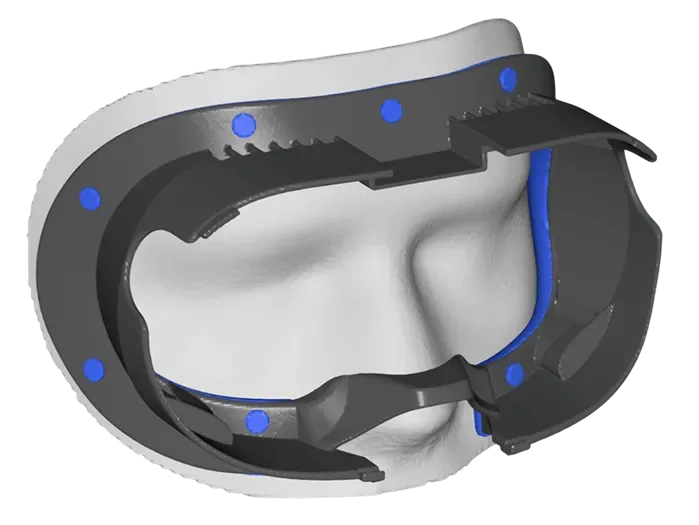
Best Custom Fit
Oblik Custom Facial Interface
Bottom line: The most comfortable option if no off-the-shelf interface fits your face, made from a 3D scan, though it costs far more and only fits you.
- Frame shaped to your face from a 3D scan
- Distributes pressure evenly and seals out light
- Design reviewed before it's made
- Silicone padding with hex-pattern air pockets for softness
- Quest 3S version available
- Much more expensive than other picks
- Scanning requires an iPhone
- Not ideal for shared headsets
Table of Contents
Best Facial Interfaces for Meta Quest 3: Our Picks in Detail
1
Best Overall
AMVR FC3 (Q3FC3) Facial Interface
Bottom line: The best all-round Quest 3 facial interface, with knob-adjustable depth, two pads and a tall top that spreads pressure, though it can clash with some halo straps.
AMVR's FC3, sold on AMVR's own store as the Q3FC3, is the facial interface we'd buy for most Quest 3 owners. It's comfortable, adjustable and blocks light well, all at a mid-range price.
Pros & Cons
Pros
- Knob lets you fine-tune depth for comfort, field of view or glasses
- Two pads, easy-clean PU leather and breathable ice silk
- Extended top spreads pressure across your forehead
- Wide frame suits wider faces
- Y-shaped vents let heat out
- Silicone nose guard blocks light
- 12-month warranty
Cons
- Tall top can conflict with some halo-style straps
- Edges can dig into the cheeks of narrow faces
- Not for Quest 3S
Why We Picked It
Its extended top gives it more surface area than other interfaces, which spreads pressure more evenly, especially with Elite-style straps that put all the weight on the interface. A knob slides the frame closer to or farther from the lenses, so you can maximize field of view or make room for glasses. You get a PU leather pad that wipes clean and an ice silk pad for sweaty games, plus deep vents and a silicone nose guard that keep light out.
Who It's For
You use a Quest 3 with an Elite-style strap or glasses and want comfort over long sessions. The extended top spreads pressure across your forehead instead of a single spot, and the knob slides the frame closer to the lenses for more field of view or farther out to make room for glasses. Swap to the ice silk pad for sweaty games and the PU leather pad for easy cleanup.
Specs & Configurations
- Fits
- Meta Quest 3 only
- Pads
- PU leather and ice silk
- Depth
- knob adjustment with 3 recommended heights
- Ventilation
- Y-shaped vents
- Light blocking
- silicone nose guard
- Warranty
- 12 months (AMVR)
Get It Now
Check Price on Amazon
2
Most Customizable
Globular Cluster F3 V3
Bottom line: The most customizable Quest 3 interface, with magnetic pads, frames and light blockers for every face and household, but it won't fit charging docks.
The Globular Cluster F3 V3 isn't a single interface but a kit you build to fit your face, which makes it the best choice for households where several people share one headset.
Pros & Cons
Pros
- Magnetic pads swap in seconds, great for sharing a headset
- Three frame heights for different nose shapes
- Removable side blockers for open or sealed play
- Nose blocker stops essentially all light
- Three pads in PU leather, fabric and mesh
- Two glasses spacers, 4 mm and 6 mm
- Half-open or open face modes
Cons
- Not compatible with the official charging dock or most third-party docks
- Pricier than most picks
- Can press on the cheekbones of some faces
Why We Picked It
A base plate stays on the headset, and everything else attaches with magnets: three frames in low, middle and high profiles, two glasses spacers, three pads in PU leather, fabric and mesh, a nose guard and side light blockers you can remove for an open-face mode. Each family member can keep their own pad, and the combination of frames and spacers gives it a wide field of view on most faces.
Who It's For
You share one Quest 3 with family or friends and want everyone to keep their own pad. A base plate stays on the headset while frames, spacers, pads and light blockers attach with magnets, so each person can swap in their own fit in seconds. Choose a sealed, half-open or open face mode, and the combination of frames and spacers gives most faces a wide field of view.
Specs & Configurations
- Fits
- Meta Quest 3 only
- Pads
- PU leather, fabric and breathable mesh
- Frames
- low, middle and high profile
- Spacers
- 4 mm and 6 mm magnetic glasses spacers
- Light blocking
- magnetic nose guard and side blockers
- Modes
- full, half-open or open face
Get It Now
Check Price on Amazon
3
Best Simple Upgrade
KIWI design V3 Facial Interface
Bottom line: The easiest upgrade from the stock interface, with thick wipe-clean pads and excellent light blocking, as long as you don't need depth adjustment.
If you just want a better version of the stock interface without extra parts, the KIWI design V3 is the one to get. It does exactly what you'd expect, and it does it well.
Pros & Cons
Pros
- Excellent light blocking around the nose
- Thick, soft PU leather pads, two in the box
- Vents keep lenses from fogging
- Installs in seconds
- Two nose pieces included
- L-shaped vents let warm air out without letting light in
Cons
- No depth or spacer adjustment
- Wide nose guard can brush your eyelashes
Why We Picked It
Its L-shaped vents let warm air out without letting light in, so your lenses stay clear, and its nose piece closes the gap the stock interface leaves open. The PU leather pads are thick, soft and easy to wipe down, and you get two of them. It feels cooler, blocks more light and is far more comfortable than the original.
Who It's For
You want a better version of the stock interface without adding parts or fuss. The thick, soft PU leather pads wipe clean, the L-shaped vents keep your lenses clear, the nose piece closes the gap the stock interface leaves open, and it installs in seconds. It feels cooler and blocks more light than the original.
Specs & Configurations
- Fits
- Meta Quest 3 only
- Pads
- 2 PU leather pads
- Depth
- fixed, no adjustment
- Ventilation
- L-shaped vent bracket
- Light blocking
- 2 nose pieces
- Install
- under 10 seconds (KIWI design)
Get It Now
Check Price on Amazon
4
Best With a Fan Head Strap
BOBOVR F3 Facial Interface
Bottom line: The best match for a BOBOVR S3 Pro fan strap, with forehead air channels and stepless depth wheels, though its build has a few rough edges.
BOBOVR designed the F3 to work with its S3 Pro head strap and its built-in fan. Paired together, they make one of the coolest-running sealed setups for a Quest 3.
Pros & Cons
Pros
- Air channels line up with the S3 Pro's fan
- Stepless depth adjustment on both sides
- Seals out light completely
- Works with BOBOVR's D3 charging dock
- Three forehead air channels guide fan air
- Lycra fabric nose guard
- Wipe-clean leatherette cover
Cons
- Adhesive strips can peel off during setup
- Fabric nose guard can irritate some users
- Best only with BOBOVR's own strap
Why We Picked It
Three channels in the forehead foam guide the fan's air across your face without blowing it into your eyes, and wheels on both sides adjust the distance to the lenses steplessly. With the S3 Pro, it blocks light completely and keeps your face cool for long sessions, and the leatherette cover wipes clean after workouts. Without the S3 Pro, it's roughly on par with AMVR's interface.
Who It's For
You run a BOBOVR S3 Pro fan strap or exercise in your headset. The three forehead channels guide the fan's air across your face without blowing it into your eyes, the stepless wheels on both sides adjust distance to the lenses, and the leatherette cover wipes clean after a workout. Light stays out completely, and the D3 dock works with it.
Specs & Configurations
- Fits
- Meta Quest 3 only
- Padding
- soft silicone and foam with a PU-style cover
- Depth
- stepless wheels on both sides
- Ventilation
- 3 forehead channels designed for the S3 Pro fan
- Light blocking
- Lycra fabric nose guard
- Dock
- works with the BOBOVR D3 dock (BOBOVR)
Get It Now
Check Price on Amazon
5
Best for Halo Straps
AMVR FC4A Facial Interface
Bottom line: The AMVR to get if you use a halo or fan head strap, with more vents and the same handy depth knob, though the knob can slip a notch.
The FC4A fixes the main complaint about the FC3: its tall top doesn't always play well with halo straps. AMVR designed this one specifically for halo straps, especially those with a fan, and it's the brand's most airflow-focused design.
Pros & Cons
Pros
- Shaped for halo straps, unlike the FC3
- Extra vents on top and sides
- Two pads included
- Room for glasses with the depth knob
- Stepless depth knob with 3 recommended heights
- Silicone nose guard blocks light
Cons
- Depth knob can slip back a notch when you take the headset off
- Ice silk pad works best with a fan strap
Why We Picked It
It adds vents on the top and both sides, keeps the stepless depth knob and comes with both PU leather and ice silk pads. It works well with the BOBOVR S3 Pro's fan, and the depth knob leaves enough room to wear glasses without them pressing on your face.
Who It's For
You use a halo or fan head strap and want an interface built for it. Extra vents on the top and both sides move air, the stepless depth knob leaves room for your glasses, and PU leather and ice silk pads come in the box. It pairs well with a fan strap, and the knob lets you fine-tune the fit.
Specs & Configurations
- Fits
- Meta Quest 3 only
- Designed for
- halo head straps, especially with fans
- Pads
- PU leather and ice silk
- Depth
- stepless knob with 3 recommended heights
- Ventilation
- extra openings on top and both sides
- Light blocking
- silicone nose guard
Get It Now
Check Price on Amazon
6
Best for Mixed Reality and Workouts
Meta Quest 3 Open Facial Interface
Bottom line: The official choice for mixed reality and sweaty workouts, with the best airflow and full dock support, but it lets in light and isn't adjustable.
Meta's Open Facial Interface takes the opposite approach to every other pick here. It leaves the sides open, so you see the room around you and air flows freely.
Pros & Cons
Pros
- Best airflow of any pick
- See your surroundings in mixed reality
- Works with Meta's charging dock and cases
- Flexible frame contours to your face
- Removable, hand-washable fabric pad
- Works with the official carrying cases
- Open sides reduce sweat and lens fog
Cons
- Lets in light in bright rooms
- No depth adjustment like the stock interface
- Thin cushion
Why We Picked It
It's the only pick with official support for Meta's charging dock and carrying cases, and its flexible frame adapts to your face. It's the most comfortable option for workouts, with far less sweat and lens fog, and the open sides stop being distracting after a session or two. It also makes mixed reality feel more natural.
Who It's For
You work out in your Quest 3 or play mixed reality games where you want to see your room. The open sides let air flow freely, so you sweat less and your lenses stay clear, and the flexible frame adapts to your face. It works with Meta's charging dock and carrying cases, so it fits right into your routine.
Specs & Configurations
- Fits
- Meta Quest 3
- Design
- open sides
- Pad
- removable, hand-washable fabric
- Works with
- official Charging Dock, Carrying Case and Compact Carrying Case
Get It Now
Check Price on Amazon
7
Best Custom Fit
Oblik Custom Facial Interface
Bottom line: The most comfortable option if no off-the-shelf interface fits your face, made from a 3D scan, though it costs far more and only fits you.
Oblik makes facial interfaces from a scan of your face, which makes it the premium answer for anyone whose face is too narrow, too wide or too unusual for mass-produced interfaces.
Pros & Cons
Pros
- Frame shaped to your face from a 3D scan
- Distributes pressure evenly and seals out light
- Design reviewed before it's made
- Silicone padding with hex-pattern air pockets for softness
- Quest 3S version available
Cons
- Much more expensive than other picks
- Scanning requires an iPhone
- Not ideal for shared headsets
Why We Picked It
You scan your face with Oblik's iPhone app, and the company designs a frame to match your facial geometry, reviewing each design before it's made. The result spreads pressure evenly, blocks light well and stays comfortable through long sessions, with silicone padding that uses hex-shaped air pockets for softness.
Who It's For
You have tried off-the-shelf interfaces and none fit your face, whether it is narrow, wide or unusual. You scan your face with Oblik's iPhone app and a frame is designed to match your facial geometry, reviewed before it is made. The result spreads pressure evenly, blocks light well and stays comfortable through long sessions.
Specs & Configurations
- Fits
- Meta Quest 3 (Quest 3S version available)
- Fit
- custom, made from a 3D face scan
- Scan
- iPhone app (Oblik)
- Padding
- silicone with hex-pattern air pockets
Get It Now
Check Price at OblikQuest 3 Facial Interfaces Compared
| Facial interface | Pads | Depth adjustment | Cooling | Charging dock |
|---|---|---|---|---|
| AMVR FC3 (Q3FC3) | PU leather, ice silk | Knob | Vents | Not listed |
| Globular Cluster F3 V3 | PU leather, fabric, mesh | 3 frames, 2 spacers | Vents, open-face modes | Not compatible |
| KIWI design V3 | 2 PU leather | None | Vents | Not listed |
| BOBOVR F3 | Silicone and foam | Stepless wheels | Channels for S3 Pro fan | BOBOVR D3 |
| AMVR FC4A | PU leather, ice silk | Knob | Extra top and side vents | Not listed |
| Meta Open Facial Interface | Washable fabric | None | Open sides | Official dock |
| Oblik Custom | Silicone | Custom fit | Air pockets | Not listed |
What to Check Before You Buy
Quest 3 or Quest 3S. The two headsets need different interfaces. Every pick above is the Quest 3 version, and most brands, including AMVR, KIWI design and Globular Cluster, sell a separate Quest 3S model.
Your head strap. Tall interfaces like the AMVR FC3 are made for the stock and Elite-style straps and can be a tight fit with halo straps like the BOBOVR S3 Pro. If you use a halo or fan strap, the AMVR FC4A or BOBOVR F3 is the safer choice.
Your charging dock. Many third-party interfaces block the dock’s charging pins under the headset. The Globular Cluster F3 V3 doesn’t fit the official dock or most third-party docks, and Meta’s Open Facial Interface is the one pick with official dock support.
Glasses and field of view. If you wear glasses, pick an interface with depth adjustment, like the AMVR, BOBOVR or Globular Cluster spacers. Without glasses, set the interface as close to the lenses as is comfortable for the widest field of view.
Your face shape. Fit is personal. The wide AMVR frame can dig into the cheeks of narrower faces, while the Globular Cluster can press on prominent cheekbones. Buy from a store with easy returns in case your first choice doesn’t fit.