GameCuki is reader-supported. When you buy through links on our site, we may earn an affiliate commission at no extra cost to you. As an Amazon Associate I earn from qualifying purchases. Learn more.
A PS5 that sounds like a hair dryer in a long session sends a lot of players shopping for the best PS5 cooling fan, and the first catch is that the original PS5, the Slim and the Pro each need a different one. The fans below clip onto the back of the console or sit in a stand beneath it, so we sorted nine picks by console model and by whether you also want a stand that charges your controllers.
Before you spend anything, know what a fan can and cannot do. Sony’s own guidance for a hot console is about open vents, free space and clean dust, and it does not mention add-on coolers, so treat a fan as an extra on top of good placement. Our guides to fixing PS5 overheating and cleaning a PS5 safely cover the steps that matter most.
Best PS5 Cooling Fan: Our Picks in Detail
GameCuki may earn a commission if you buy through the links below. That never changes which products make the list or how they rank. Check the current listing for your exact console model before you order, because a fan built for one PS5 will not fit another.

1
Best for the Original PS5
KIWIHOME Cooling Fan for PS5 (original, 2020)
Bottom line: An auto-speed fan for the original disc and digital PS5 that switches on and off with the console, for players who want a set-and-forget cooler.
The KIWIHOME is a three-fan exhaust cooler that hooks onto the back of the original PS5 and plugs into a rear USB port.
Pros & Cons
Pros- Auto mode reads the console's temperature and adjusts fan speed
- The fan turns on and off with the console in Auto or Constant mode
- A USB 3.0 passthrough port gives back the port the fan uses
- An elastic lock holds it in place with the console standing or lying flat
- Blue LEDs show at a glance that the fans are running
- It runs from the console's USB port, so there is no extra power adapter
- The maker rates it at 28.8 dB(A), a figure aimed at quiet play
Cons- It only fits the original 2020 PS5, not the Slim or the Pro
- It needs free space behind the console so air can leave
- It takes up one of the console's rear USB ports, even with the passthrough
Why We Picked It
Most cheap PS5 fans are a switch and a motor. This one adds a temperature sensor and an Auto mode, so the fan speed follows the console instead of you reaching behind the TV stand to change it, and it powers down with the PS5. For a first cooling fan on an original console, that low-effort setup is the point.
Who It's For
You own a launch-era PS5, the big one with the white side panels, and it gets loud or warm in long sessions or in a stuffy room. You want something that installs in a minute and that you can forget about afterward.
You do not want to manage another gadget. Auto mode and power-on with the console mean you set it once and play.
Specs & Configurations
- Fits
- Original PS5 disc and digital (2020)
- Fan modes
- Auto and constant, with a temperature sensor
- Max speed
- 5,000 RPM (maker rating)
- Power
- Console USB port, 5V
- USB passthrough
- One USB 3.0 port
- Install
- Elastic lock on the back of the console

2
Best Simple Fan for the Original PS5
NANANINO PS5 Cooling Fan
Bottom line: A plug-and-play three-fan cooler with a charging port for the original PS5, for players who want a basic fan with a manual switch.
The NANANINO is a three-fan clip-on cooler for the original PS5 with a small USB charging port built into the body.
Pros & Cons
Pros- It is built for the original PS5 models CFI-10xx and CFI-11xx
- Three fans move air out of the back of the console
- Installation is mount, plug in and flip a switch, with no tools
- A blue LED shows the fan is working
- The built-in USB port can charge a controller or other accessory
Cons- It does not fit the PS5 Slim or the Pro
- The extra USB port is power only and does not carry data, so it cannot connect an external drive
- The listing describes a switch and no temperature-based Auto mode, so you control it yourself
Why We Picked It
Not everyone wants sensors and menus. This is the plainest way to add airflow behind an original console, with a mount-plug-switch routine, and the charging port is a handy extra for a controller cable.
Who It's For
You have an original PS5 and want a straightforward fan without Auto-mode extras. You are happy to flip a switch when a long session starts and you like having a spare port to top up a DualSense.
You are on a tight budget or setting up a second console for a kid's room, and the basics are enough.
Specs & Configurations
- Fits
- Original PS5 disc and digital (CFI-10xx and CFI-11xx)
- Fans
- 3
- Extra port
- USB 2.0, power only
- Control
- On/off switch
- Indicator
- Blue LED
- Install
- Mounts on the back, plugs into USB

3
Best for the PS5 Slim
NexiGo Silent Enhanced Cooling Fan for PS5 Slim
Bottom line: A three-fan, three-speed USB fan made for the Slim that keeps a USB 3.0 port free, for Slim owners who want a no-fuss add-on from a dedicated accessory maker.
The NexiGo is a three-fan add-on for the PS5 Slim that gets its power from one of the console's rear USB-A ports.
Pros & Cons
Pros- It is made for the PS5 Slim, disc and digital editions
- Three fans exhaust air from the back of the console
- Three speeds let you trade airflow for noise
- The fans turn off automatically with the console
- A USB 3.0 port is kept free for drives and accessories
- It works with the console standing up or lying flat
- Blue LEDs show when it is running
Cons- It fits the Slim only, not the original PS5 or the Pro
- Speed is set by a button on the back, with no temperature-based Auto mode in the listing
- It uses a rear USB-A port for power
Why We Picked It
NexiGo lists a three-speed button, automatic power-off with the console and a USB 3.0 passthrough, which covers the things Slim owners ask for most: choose your noise level, avoid forgetting to switch it off, and keep your ports. It also works in both orientations.
Who It's For
You bought the Slim and your play sessions run long, or the console sits in a media cabinet with limited air. You want a simple add-on and you do not mind choosing the speed yourself.
You use a USB drive or a charging cable on the back of the console and do not want to lose that port.
Specs & Configurations
- Fits
- PS5 Slim disc and digital
- Fans
- 3
- Speeds
- 3, set with a button on the back
- Power
- Console USB-A port, 2.5 W
- USB passthrough
- One USB 3.0 port
- Orientation
- Vertical or horizontal

4
Best Auto-Start Fan for the PS5 Slim
JUSPRO Cooling Fan for PS5 Slim
Bottom line: A Slim fan that starts by itself once the console passes about 102°F, for owners who want cooling only when the console is warm.
The JUSPRO is a three-fan Slim cooler with an automatic temperature sensor that starts the fan only when the console gets warm.
Pros & Cons
Pros- Auto mode turns the fan on above 102°F and off below it
- It is made for the PS5 Slim disc and digital editions
- Three fans spread airflow across the back of the console
- An elastic lock keeps it in place standing up or lying flat
- Installation is a hook and a USB plug, with no tools
- An extended USB port is kept free for other devices
- A blue light shows when it is running
Cons- It fits the Slim only
- Only two speeds are offered
- A fan that runs only above a set temperature leaves the console to handle lighter sessions on its own
Why We Picked It
Rather than spinning all the time, this one waits until the console passes 102°F, per its listing, and shuts off when it drops back. That keeps the added noise limited to the sessions that run warm.
Who It's For
You have a PS5 Slim and mostly play quieter games, with the occasional marathon of something demanding. You would rather the fan decide when it is needed than hear it all evening.
You like the idea of a set-and-forget accessory but want a more active response than a plain on and off switch.
Specs & Configurations
- Fits
- PS5 Slim disc and digital
- Fans
- 3
- Auto mode
- Starts above 102°F, stops below it
- Speeds
- 2
- Max speed
- 5,000 RPM (maker rating)
- Install
- Hook on top, USB connector

5
Best for the PS5 Pro
KIWIHOME Cooling Fan for PS5 Pro
Bottom line: A three-fan, auto-speed cooler built for the Pro that powers on and off with the console, for Pro owners who want a clean install.
The KIWIHOME Pro fan is a three-fan cooler for the PS5 Pro that plugs into a rear USB port.
Pros & Cons
Pros- It is made for the PS5 Pro, which is identified by three horizontal lines on the side panel
- Three hydraulic fans with larger blades push air out of the back
- Auto mode reads the console's temperature and adjusts speed
- The fan turns on and off with the console
- A USB 3.0 passthrough port gives back the port it uses
- It works vertically or horizontally
- Blue LEDs show it is running
Cons- It only fits the PS5 Pro, not the original or the Slim
- It takes a rear USB port for power
Why We Picked It
A fan that follows the console's temperature and powers down with it keeps the routine simple. The listing is specific about fit, which matters when each PS5 generation needs a different shape.
Who It's For
You own a PS5 Pro and you want a fan that works in the background. It suits players who want one USB 3.0 port to stay free for a drive or a headset dongle.
You want something that works in both orientations so you can move the console later.
Specs & Configurations
- Fits
- PS5 Pro disc and digital
- Fans
- 3 hydraulic fans
- Fan modes
- Auto and constant
- Max speed
- 5,000 RPM (maker rating)
- USB passthrough
- One USB 3.0 port
- Orientation
- Vertical or horizontal

6
Best Four-Fan Option for the PS5 Pro
JUSPRO Cooling Fan for PS5 Pro
Bottom line: A four-fan Pro cooler with an auto temperature sensor, for owners who want the most fans the Pro category offers in a slim body.
The JUSPRO Pro cooler packs four fans into a slim attachment for the PS5 Pro and adds an automatic temperature sensor.
Pros & Cons
Pros- It is made for the PS5 Pro disc and digital editions
- Four fans spread airflow more evenly than a three-fan unit, per the maker
- An automatic sensor adjusts the fan to the console's temperature
- In Auto mode the fan turns on and off with the console
- A hook and a USB plug install it without tools
- An extended USB port is kept free for a keyboard or other device
- It works vertically or horizontally
Cons- It fits the Pro only
- Only two speeds are offered
Why We Picked It
Four fans is the headline here, and the maker positions that as more even airflow than three-fan models. It also has the Auto mode that ties the fan to the console, which is what makes a fan easy to live with.
Who It's For
You have a PS5 Pro and you want the strongest fan setup you can clip onto it. You play demanding games for hours and would rather have the extra fan count.
You plan to use Auto mode so the fan only works when the console calls for it.
Specs & Configurations
- Fits
- PS5 Pro disc and digital
- Fans
- 4
- Auto mode
- Temperature sensor
- Speeds
- 2
- Power
- Console USB, 5 W
- Orientation
- Vertical or horizontal

7
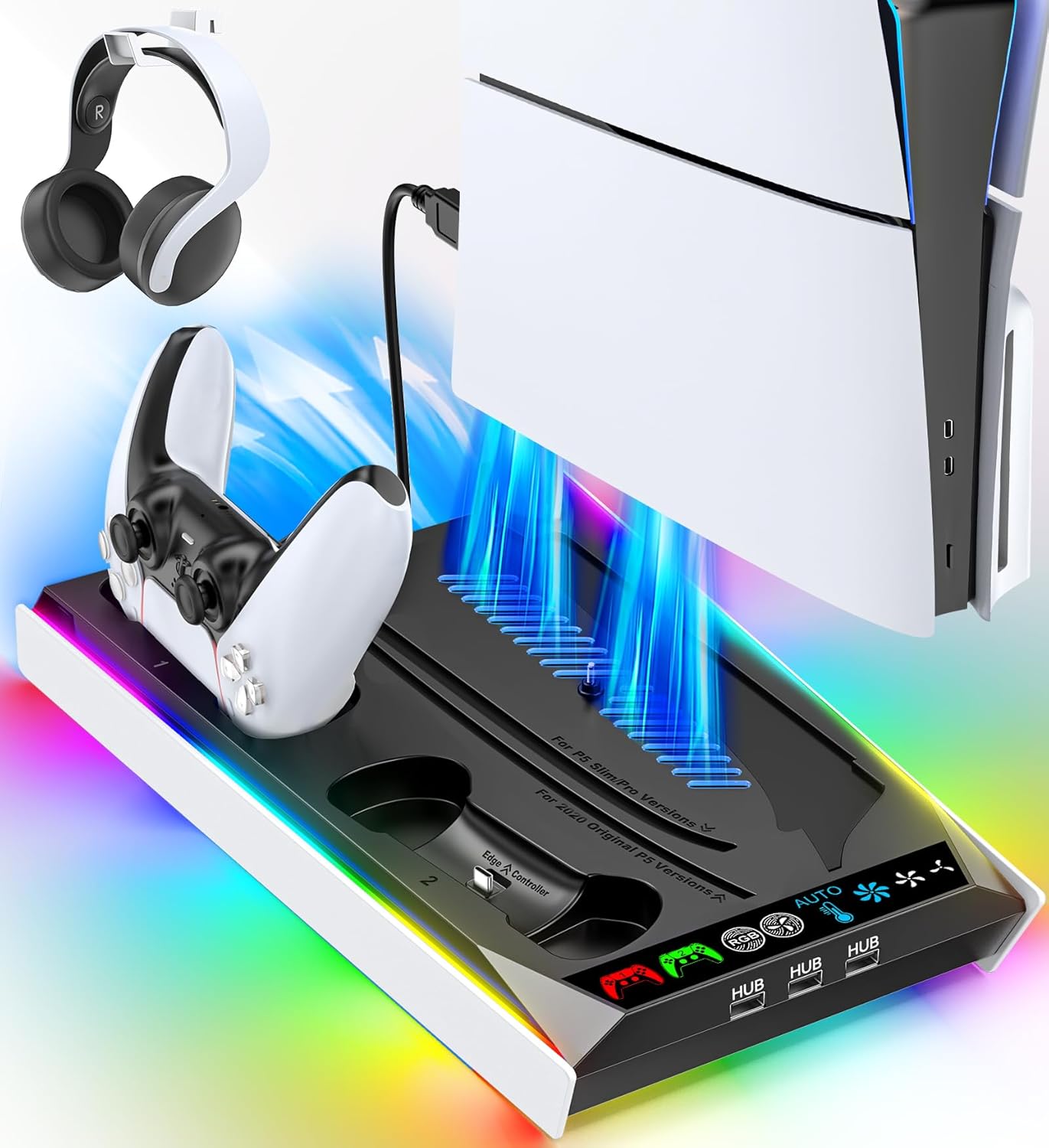
Best Cooling Stand With Controller Charging
OIVO PS5 Stand and Cooling Station
Bottom line: A vertical PS5 stand with a three-speed fan, dual controller charging and disc storage, for players who want one dock instead of a loose fan.
The OIVO is a vertical PS5 stand with a built-in fan, a two-controller charging station and storage for discs and a remote.
Pros & Cons
Pros- One stand fits the PS5, Slim and Pro
- A three-speed fan sits in the base and can be turned off with a touch switch
- It charges two controllers at once in about 2.5 hours
- Three extra USB ports add connections
- It holds 14 game discs and a remote
- A headset holder keeps the desk tidy
- Overcharge, overheat, overvoltage and short-circuit protection are listed
Cons- It is a vertical stand, so it only suits players who run the console standing up
- Charging does not start when a controller battery is above 70 percent
- It is a bigger, more involved setup than a clip-on fan, so it is not for anyone who only wants a fan
Why We Picked It
Most stands only hold the console. This one folds a fan, a charger, extra USB ports and storage into the base, which is why it works as a cooling stand and a charging dock at once, and why it fits all three PS5 generations.
Who It's For
You want your PS5 standing up beside the TV and you are tired of loose cables and charging leads. A single base that holds the console, charges both controllers and stores your discs keeps the shelf neat.
You have a disc-based PS5 and a few physical games, and a headset that needs a place to hang.
Specs & Configurations
- Fits
- PS5, PS5 Slim and PS5 Pro
- Fan
- 3 speeds, 3,100 to 3,500 RPM
- Charging
- Two controllers, about 2.5 hours
- Extra ports
- 3 USB
- Storage
- 14 game discs, remote slot, headset holder
- Protection
- Overcharge, overheat, overvoltage, short circuit
8
Best Cooling Stand With Auto Fan
Rysker PS5 Cooling and Charging Station
Bottom line: A PS5 stand with an Auto fan mode, RGB lighting and Edge controller charging, for players who want a cooling dock with a lit-up look.
The Rysker is a vertical PS5 dock that combines an adjustable fan, a controller charger, a USB hub and RGB lighting.
Pros & Cons
Pros- It fits the PS5, Slim and Pro
- The fan has three levels and an Auto setting
- It charges a DualSense in about 3.5 hours and a DualSense Edge in about 2.5 hours
- The charging port moves to suit either controller
- A three-port USB hub sits on the side
- A slot holds the media remote
- It carries a 2-year warranty
Cons- You have to fasten it to the console with the included screws and cables during setup
- It is a vertical dock, so it does not suit a flat console
- Charging two controllers at once is not listed, so it suits one-controller households best
Why We Picked It
The Auto setting is the difference here, since it lets the fan respond to the console rather than run at a fixed speed. The adjustable charging port covers both the standard DualSense and the Edge,, and it carries a 2-year warranty.
Who It's For
You use a DualSense Edge or switch between controllers and want one dock to charge either. You like RGB lighting around the console and you want the fan to manage itself.
You are comfortable with a few minutes of setup with screws to get a stable fit.
Specs & Configurations
- Fits
- PS5, PS5 Slim and PS5 Pro
- Fan
- 3 levels plus Auto
- Charging
- DualSense in about 3.5 hours, DualSense Edge in about 2.5 hours
- USB hub
- 3 ports
- Power
- Console USB, PC, hub or wall adapter
- Warranty
- 2 years

9
Best Horizontal Stand and Fan Combo
FASTSNAIL Horizontal Stand and Cooling Fan for PS5 Slim and Pro
Bottom line: A horizontal stand with a separate three-speed fan and five extra USB ports, for Slim and Pro owners who keep the console lying flat.
The FASTSNAIL kit gives a PS5 Slim or Pro a horizontal stand plus a separate LED cooling fan in one box.
Pros & Cons
Pros- It pairs a horizontal stand and a cooling fan in one kit
- The fan has three speeds plus off
- A memory function turns the fan on at startup at your last speed
- Five extra USB ports cover accessories and charging, with a fast-charging USB 3.0 port
- The stand lifts the console off the surface, which cuts the contact area
- The fan can be used standing or lying flat, even without the stand
- Non-slip pads and ABS construction keep it stable
Cons- It fits the Slim and the Pro only, not the original PS5
- It is built around a horizontal layout, so players who stand the console up will use the fan alone
- Only one of the five extra ports is USB 3.0, the rest are USB 2.0
Why We Picked It
It solves two problems at once, a stand that lifts the console and a fan that exhausts air, and both work with the console lying flat. The memory function means the fan starts at your chosen speed each time you power up.
Who It's For
You keep your PS5 Slim or Pro flat on a media shelf and want a fan and stand without a charging dock. You want extra USB ports within reach for a headset, a drive or a phone.
You like the option of using the fan alone later if you move the console to a vertical setup.
Specs & Configurations
- Fits
- PS5 Slim and PS5 Pro, disc and digital
- Included
- Horizontal stand plus LED cooling fan
- Fan
- 3 speeds with memory function
- Extra ports
- 4 on the stand, 1 on the fan
- Material
- ABS with non-slip pads
Do PS5 Cooling Fans Actually Work?
An add-on fan moves extra air past the back of the console, and that is all it does. No independent measurements that we could locate show how much a clip-on PS5 fan lowers internal temperatures, so the claims on product pages are the makers’ own and should be read that way. The console already has its own fan and a cooling design whose fan control Sony has said it can tune through software updates.
What Sony’s support pages do stress is the basics: keep the side and back vents unblocked, leave at least 10 cm (about 4 inches) of free space on each side, avoid narrow or cramped spots and carpets with long fibers, and keep dust from building up around the vents. A louder fan in some games is normal, because the console speeds its fan up to cool itself. A third-party fan does not replace any of that.
So here is a fair way to think about it. If your PS5 is boxed into a cabinet with no airflow, fix the space first. If it is dusty, clean it. A fan is a reasonable extra for a console that sits in a warm room or runs long sessions, and it does nothing for an unventilated cabinet or a clogged vent.
How to Choose a PS5 Cooling Fan or Cooling Stand
Match the Fan to Your Exact Console
The original PS5, the Slim and the Pro are different shapes, and the fans in this guide are built for one model each. Look at your console before ordering. One maker’s listing identifies the Pro by three horizontal lines on its side panel, and the Slim is the 2023 redesign. A fan for the wrong model will not mount properly.
Clip-On Fan or Cooling Stand
A clip-on fan attaches to the back and uses a USB port. A cooling stand is a dock that holds the console and puts a fan in the base, and many also charge controllers. Stands are bigger and usually vertical or horizontal only, so pick one that matches how you place the console.
Auto Mode, Speeds and Noise
Auto mode starts and stops the fan based on the console’s temperature, so the added noise only shows up when it is needed. Manual speeds let you pick quiet or strong airflow. Noise figures on product pages come from the makers and are not directly comparable between brands, so treat them as a rough guide.
USB Port and Power
Most of these fans take power from a rear USB port. Some give a USB 3.0 port back through the fan body, which matters if you use an external drive. Because they draw USB power, a fan may keep running in Rest Mode depending on your console’s power settings, so check that setting if you hear it after you stop playing.
Is a PS5 Cooling Fan Worth Buying?
The best PS5 cooling fan is the one that fits your exact console and that you will actually leave plugged in, and for most players that means a model-specific clip-on from this list. Pick the KIWIHOME or NANANINO for an original PS5, the NexiGo or JUSPRO for the Slim, and the KIWIHOME or JUSPRO for the Pro. If you want a dock that also charges controllers and cleans up the shelf, the OIVO or Rysker stand is the better route, and the FASTSNAIL suits a console lying flat. Keep your expectations realistic: a fan helps with airflow, but clear vents and open space come first.

