GameCuki is reader-supported. When you buy through links on our site, we may earn an affiliate commission at no extra cost to you. As an Amazon Associate I earn from qualifying purchases. Learn more.
Plenty of great wireless gaming headsets simply won’t connect to an Xbox. The best headset for Xbox Series X has to clear that bar first. Microsoft’s own headset pairs straight to the console, while most third-party wireless headsets need an Xbox-specific dongle or base station, so when you shop for a wireless headset for Xbox Series X, buying the right version matters as much as sound quality.
To build this list, we compared Xbox headsets from Microsoft, SteelSeries, Turtle Beach, Audeze, Astro, Razer and HyperX, read owner reviews to see how they work on Xbox, and checked Microsoft’s own information on Xbox headsets and spatial sound. Below you’ll find 12 picks, a table showing how each one connects to an Xbox, why the “Xbox version” matters, and the Xbox problems owners ran into.
Best Headset for Xbox Series X: Our Picks in Detail

1
Best Overall
Xbox Wireless Headset
Bottom line: The easiest headset to live with on Xbox Series X, pairing straight to the console and performing like a pricier model.
For most Xbox Series X owners, Microsoft's Xbox Wireless Headset is the easiest headset to live with. It pairs directly to the console over Xbox Wireless, with no dongle or base station, and connects to your phone or PC over Bluetooth at the same time. Dolby Atmos is included at no extra cost, and you turn the earcup dials to change volume and the balance between game audio and chat.
Pros & Cons
Pros- Pairs directly to the Xbox with no dongle
- Dolby Atmos included at no extra cost
- Performs like a more expensive headset
- Dolby Atmos, Windows Sonic and DTS Headphone:X
- Earcup dials for volume and game/chat balance
- Dual boom mics with auto-mute
- Bluetooth connection at the same time
Cons- Tight fit until it breaks in
- No charger in the box (charges over USB-C)
Why We Picked It
Microsoft's Xbox Wireless Headset is the easiest headset to live with on an Xbox Series X. It pairs directly to the console with no dongle or base station, connects to your phone or PC over Bluetooth at the same time, and includes Dolby Atmos at no extra cost. The earcup dials make volume and game-chat balance effortless, and the sound, which leans bassy out of the box, is easy to tune in the Xbox Accessories app. It performs like a more expensive headset, which makes it the best headset for Xbox Series X for most players.
Who It's For
You play on an Xbox Series X and want wireless audio and chat without extra hardware. It pairs straight to the console, and the earcup dials let you shift between game and chat on the fly. Bluetooth keeps your phone or PC connected too, so it works across your whole setup.
Specs & Configurations
- Connection
- Xbox Wireless (no dongle or base station), Bluetooth 5.3, or both at once
- Spatial audio
- Dolby Atmos included, Windows Sonic, DTS Headphone:X
- Battery
- up to 20 hours
- Mic
- dual boom mics with auto-mute and voice isolation
- Controls
- earcup dials for volume and game/chat balance
- Extras
- Bluetooth LE Audio on supported Windows 11 PCs, handhelds and phones, EQ in the Xbox Accessories app

2
Best for Game and Phone Audio
SteelSeries Arctis Nova 7X Wireless Gen 2
Bottom line: The pick for players who listen to their phone while they game, with separate EQs and a battery that lasts all week.
The SteelSeries Arctis Nova 7X Gen 2 is the pick if you like listening to your phone while you play. It mixes 2.4GHz game audio from its USB-C dongle with Bluetooth audio from your phone, lasts 50-plus hours, and has more than 200 game-specific audio presets.
Pros & Cons
Pros- Game and phone audio at the same time
- Separate EQ for each source
- Light and comfortable for hours
- 50+ hours of battery
- 200+ game-specific presets
- Wireless range that covers a whole house
- Steel frame with elastic headband
Cons- Default sound needs tuning in the app
- Earcups are a little small
Why We Picked It
The Arctis Nova 7X Gen 2 is the pick if you like listening to your phone while you play. It mixes game audio from its Xbox-ready USB-C dongle with Bluetooth from your phone, each with its own EQ, so audiobooks, music or calls never interrupt the game. More than 200 game presets make it easy to dial in shooters like Battlefield 6, the battery lasts 50-plus hours, and the wireless range covers a whole house.
Who It's For
You like music, podcasts or YouTube running while you play on Xbox. The dongle handles game audio and Bluetooth handles your phone, each with its own EQ, so an audiobook or call never interrupts the match. It switches over to PC when you do, and the 50-plus-hour battery lasts the week.
Specs & Configurations
- Connection
- 2.4GHz USB-C dongle (USB-A adapter included), Bluetooth at the same time
- Battery
- 50+ hours, USB-C fast charge
- Audio
- 200+ game-specific presets, 360° Spatial Audio support
- Mic
- ClearCast Gen 2 with noise rejection
- Build
- steel frame, elastic headband, memory foam
- Works with
- Xbox, PC, PS5/PS4, Switch 1/2, mobile

3
Best Value
Turtle Beach Stealth 600 Gen 3
Bottom line: The best value Xbox headset, with an 80-hour battery and a mic that filters out background noise.
The Turtle Beach Stealth 600 Gen 3 gives you a lot for the money. It has up to 80 hours of battery life, 50mm drivers, glasses-friendly memory foam cushions and a flip-to-mute mic with AI noise reduction, and a QuickSwitch button jumps between 2.4GHz wireless and Bluetooth.
Pros & Cons
Pros- Up to 80 hours of battery
- Clear mic that filters background noise
- Strong sound for the price
- Glasses-friendly memory foam cushions
- 50mm Nanoclear drivers
- QuickSwitch button for Bluetooth
- 10-band EQ in the Swarm II app
Cons- Swarm II software is buggy
- Isolates so well you can't hear yourself
Why We Picked It
The Stealth 600 Gen 3 gives you a lot for the money. Battery life is excellent at up to 80 hours with fast charging, the 50mm drivers make footsteps and sneaking enemies easier to hear, and the AI noise-reducing mic keeps your voice clear while filtering out background noise like a vacuum. Glasses-friendly memory foam cushions and a QuickSwitch button for Bluetooth round out the best value pick here.
Who It's For
You want long battery life and clear sound on Xbox without a big spend. The 50mm drivers help you hear footsteps, the AI noise-reducing mic keeps your voice clean in chat, and the glasses-friendly cushions stay comfortable through long sessions. One button jumps between wireless and Bluetooth.
Specs & Configurations
- Connection
- low-latency 2.4GHz wireless, Bluetooth 5.4 (QuickSwitch button)
- Battery
- up to 80 hours, quick charge
- Drivers
- 50mm Nanoclear
- Mic
- flip-to-mute with AI noise reduction
- Comfort
- memory foam with glasses-friendly design
- Extras
- Swarm II app with 10-band EQ, Superhuman Hearing mode

4
Best for Game Audio Presets
SteelSeries Arctis Nova 5X Wireless
Bottom line: A lighter, simpler alternative to the 7X with excellent positional audio and plenty of game presets.
The SteelSeries Arctis Nova 5X Wireless is a lighter, simpler alternative to the 7X. It switches between 2.4GHz and Bluetooth with a tap, lasts up to 60 hours, and lets you pick from more than 100 game-specific presets in SteelSeries' phone app.
Pros & Cons
Pros- Excellent positional audio
- Light and comfortable, even with glasses
- Battery lasts days of play
- Quick-switch between 2.4GHz and Bluetooth
- Retractable ClearCast 2.X mic
- Up to 60 hours with fast charge
- 100+ game presets in the Arctis Nova 5 app
Cons- Occasional mic dropouts
- Firmware updates need a PC
Why We Picked It
The Arctis Nova 5X is a lighter, simpler alternative to the 7X with excellent positional audio, sharp enough in Warzone to tell what surface footsteps are on. It's very light and comfortable even with glasses, switches between 2.4GHz and Bluetooth with a tap, lasts up to 60 hours, and offers more than 100 game presets in SteelSeries' phone app. Call quality and incoming call alerts are excellent too.
Who It's For
You play many different games on Xbox and want a preset tuned to each. The light fit stays comfortable even with glasses, the positional audio is sharp enough in Warzone to tell what surface footsteps are on, and incoming call alerts come through clearly.
Specs & Configurations
- Connection
- USB-C 2.4GHz dongle, Bluetooth 5.3 (quick-switch)
- Battery
- up to 60 hours, USB-C fast charge (6 hours in 15 minutes)
- Audio
- 100+ game presets in the Arctis Nova 5 app
- Mic
- retractable ClearCast 2.X
- Controls
- power, mute, volume, ChatMix, Quick-Switch
- Works with
- Xbox, PC, PlayStation, Switch, Meta Quest, phones and tablets

5
Best for Xbox and PC
Turtle Beach Stealth 700 Gen 3
Bottom line: The best headset if you play on both Xbox and PC, with two transmitters and an 80-hour battery.
The Turtle Beach Stealth 700 Gen 3 is built for players with an Xbox and a PC. Its CrossPlay dual transmitter system connects two systems, and it plays 2.4GHz wireless and Bluetooth audio at the same time, with 60mm dual drivers and up to 80 hours of battery.
Pros & Cons
Pros- Game and Bluetooth audio at the same time
- Two transmitters for Xbox and PC
- Up to 80 hours of battery
- 60mm Eclipse dual drivers
- AI noise reduction on the flip-to-mute mic
- Glasses-friendly, lay-flat design
- 10-band EQ in the Swarm II app
Cons- Mutes only by flipping the mic up
- PC audio can briefly drop when sound stops
Why We Picked It
The Stealth 700 Gen 3 is built for players with an Xbox and a PC. Its CrossPlay dual transmitter system connects both, and it plays 2.4GHz game audio and Bluetooth at the same time, so YouTube or Spotify can run in the background. The 60mm dual drivers sound excellent, the battery lasts up to 80 hours, and it's comfortable for long sessions.
Who It's For
You play on an Xbox and a PC and want one headset for both. The CrossPlay dual transmitters keep both connected, and Bluetooth runs at the same time so YouTube or Spotify can play in the background. The 80-hour battery and steel-reinforced build suit long sessions.
Specs & Configurations
- Connection
- CrossPlay dual transmitter, 2.4GHz plus Bluetooth 5.2 at the same time
- Battery
- up to 80 hours, quick charge
- Drivers
- 60mm Eclipse dual drivers
- Mic
- flip-to-mute with AI noise reduction
- Build
- lay-flat, steel-reinforced, glasses-friendly memory foam
- Extras
- Swarm II app with 10-band EQ, mappable wheel and mode button

6
Best Premium
SteelSeries Arctis Nova Pro Wireless for Xbox
Bottom line: Our premium Xbox pick, with swappable batteries that make it feel almost wired, though the pads get warm.
The SteelSeries Arctis Nova Pro Wireless for Xbox is our premium pick. Its OLED base station has two USB ports for an Xbox and another system, it has active noise cancellation, and two hot-swappable batteries mean you can swap one in seconds while the other charges. SteelSeries says it's fully compatible with Microsoft Spatial Sound on Xbox.
Pros & Cons
Pros- Connect an Xbox and a PC and switch with a button
- Swap batteries in seconds
- Movable transmitter avoids interference
- Active noise cancellation with Transparency Mode
- OLED base station with dual USB ports
- Microsoft Spatial Sound on Xbox
- Retractable ClearCast Gen 2 mic
Cons- Pleather pads get very warm
- ANC housing can press on some ears
Why We Picked It
The Arctis Nova Pro Wireless for Xbox is our premium pick. Its OLED base station connects an Xbox and a second system at once, it has active noise cancellation, and two hot-swappable batteries mean you never stop to charge, which makes it feel almost like a wired headset. Because the transmitter is separate, you can place it away from sources of interference like soundbars, and it's compatible with Microsoft Spatial Sound on Xbox.
Who It's For
You play on an Xbox and a PC and want a premium headset for both, including work calls. The OLED base station keeps two systems connected, the spare battery means you never wait on a charge, and noise cancellation helps in a busy room. The transmitter can sit away from interference like a soundbar.
Specs & Configurations
- Connection
- OLED base station with dual USB ports, 2.4GHz plus Bluetooth at the same time
- Battery
- 2 hot-swappable batteries, spare charges in the base station
- Noise control
- active noise cancellation with variable Transparency Mode
- Audio
- Microsoft Spatial Sound on Xbox, Tempest 3D Audio on PS5, Sonar parametric EQ
- Mic
- retractable ClearCast Gen 2

7
Best Noise Cancelling
Turtle Beach Stealth Pro II
Bottom line: The best noise-cancelling headset for Xbox, with swappable batteries that last days of heavy play.
The Turtle Beach Stealth Pro II is the best noise-cancelling headset here. It has active noise cancellation, two swappable batteries with a charging dock for up to 80 hours, Dolby Atmos, 60mm drivers and Turtle Beach's CrossPlay 2.0, which switches between up to four audio sources.
Pros & Cons
Pros- Superb ANC
- Swappable batteries last days of heavy play
- Precise directional audio
- Switch between up to four audio sources
- Anodized aluminum build
- Dolby Atmos with 60mm Eclipse dual drivers
- Charging dock with spare battery
Cons- Tight for the first few days
- Software can be troublesome
Why We Picked It
The Stealth Pro II is the best noise-cancelling headset here, with ANC strong enough to outclass rivals like the Astro A50. Two swappable batteries and a charging dock deliver up to 80 hours, enough for days of heavy play, and directional audio is precise while you listen to music from your phone at the same time. Dolby Atmos, 60mm drivers and CrossPlay 2.0 switching between up to four sources complete a true flagship.
Who It's For
You play on Xbox in a noisy home and want strong noise cancellation. Two swappable batteries and a dock give days of heavy play, directional audio is precise, and Bluetooth lets you listen to music from your phone at the same time. It also works with PlayStation and other systems.
Specs & Configurations
- Connection
- CrossPlay 2.0 (switch between up to 4 audio sources), USB wireless plus Bluetooth at the same time
- Battery
- 2 swappable batteries, up to 80 hours, charging dock
- Noise control
- active noise cancellation
- Audio
- certified Hi-Res wireless and wired audio, Dolby Atmos, 60mm Eclipse dual drivers
- Mic
- 9mm floating mic, flip-to-mute, AI noise reduction
- Build
- anodized aluminum

8
Best Sound Quality
Audeze Maxwell 2 for Xbox
Bottom line: The headset for players who care most about sound, delivering some of the best audio in gaming, if you can handle the weight.
The Audeze Maxwell 2 for Xbox is for players who care most about sound. Its USB-C dongle has a switch for Xbox or PC, it lasts up to 80 hours, and Audeze's SLAM technology is designed for spatial immersion and punchier bass.
Pros & Cons
Pros- Outstanding sound quality
- Up to 80 hours of battery
- Clear party chat
- SLAM technology for spatial immersion and bass
- USB-C dongle with an Xbox/PC switch
- Bluetooth 5.3 with LE Audio and LDAC
- Simultaneous USB and Bluetooth audio
Cons- Heavy with limited adjustment
- Quality control is inconsistent
Why We Picked It
The Maxwell 2 for Xbox is for players who care most about sound, and it delivers some of the best audio of any gaming headset. Its USB-C dongle switches between Xbox and PC, the battery lasts up to 80 hours, Audeze's SLAM technology adds spatial immersion and punchier bass, and party chat comes through clearly. It's a strong pick for competitive modes like Search and Destroy, too.
Who It's For
You care about how your games sound on Xbox and want a premium build to match. The dongle switches between Xbox and PC, the bass hits harder with SLAM, and party chat comes through clearly. It is a strong fit for competitive modes where directional cues matter.
Specs & Configurations
- Connection
- USB-C dongle with Xbox/PC switch, Bluetooth 5.3 (LE Audio, LDAC), wired
- Battery
- up to 80 hours
- Audio
- SLAM technology for spatial immersion and bass
- Extras
- simultaneous USB and Bluetooth audio, Auracast multipoint (Android)
- Works with
- Xbox, PC, Mac, Switch, PlayStation

9
Best Dongle-Free Alternative
Razer Kaira Pro for Xbox
Bottom line: A comfortable, dongle-free alternative to Microsoft's headset that runs Bluetooth at the same time.
Like Microsoft's own headset, the Razer Kaira Pro pairs straight to your Xbox with a dedicated pairing button, no dongle needed. It's officially licensed for Xbox, connects to your phone over Bluetooth at the same time, and has a detachable supercardioid boom mic plus a hidden mobile mic.
Pros & Cons
Pros- Pairs directly to Xbox with no dongle
- Xbox audio and Bluetooth at the same time
- Very comfortable, even with large ears
- Detachable HyperClear supercardioid boom mic
- Volume wheel and game/chat balance on the earcup
- Four EQ modes
- Mic monitoring
Cons- Occasional crackling
- Sensitive mic picks up background noise
Why We Picked It
Like Microsoft's own headset, the Kaira Pro pairs straight to your Xbox with a dedicated button, no dongle needed, and runs Bluetooth at the same time for podcasts or music while you play. It's one of the most comfortable headsets here, with breathable cushions, and volume, chat mix and mute controls sit right on the earcups. It's built to last for years with care.
Who It's For
You want a dongle-free setup for Xbox and put comfort first. It pairs with a dedicated button, Bluetooth runs at the same time for podcasts or music, and the breathable cushions suit long sessions, including players with larger ears. Volume, chat mix and mute controls sit right on the earcups.
Specs & Configurations
- Connection
- pairs directly to Xbox, plus Bluetooth 5.0
- Drivers
- TriForce Titanium 50mm
- Mic
- detachable HyperClear supercardioid boom, plus hidden mobile mic
- Controls
- volume wheel, game/chat balance, mic monitoring, 4 EQ modes
- Comfort
- breathable memory foam ear cushions
- Licensing
- officially licensed for Xbox

10
Best Budget Wired
HyperX CloudX
Bottom line: The best budget wired headset for Xbox, officially licensed and tough enough to last for years.
On a budget, the HyperX CloudX is an official Xbox-licensed wired headset certified by Microsoft for Xbox controllers that have a 3.5mm jack. It has 53mm drivers, an aluminum frame, memory foam cushions, a detachable mic and in-line volume and mute controls.
Pros & Cons
Pros- Durable aluminum frame
- Comfortable memory foam
- Plug in and play, with no charging
- Official Xbox license, certified by Microsoft
- 53mm drivers
- In-line volume and mic mute
- Detachable noise-cancelling mic
Cons- Mic needs a splitter on most PCs
- Gets warm in summer
Why We Picked It
The HyperX CloudX is the best budget wired headset for Xbox. It's officially licensed and certified by Microsoft for Xbox controllers, survives drops thanks to its aluminum frame, and holds up through years of heavy use. Memory foam cushions keep it comfortable for long sessions, and it fits smaller heads without slipping.
Who It's For
You want a reliable wired headset for Xbox party chat on a budget. It plugs into your controller's 3.5mm jack with nothing to charge, the aluminum frame survives drops, and the memory foam stays comfortable on long nights. It also fits smaller heads without slipping.
Specs & Configurations
- Connection
- wired 3.5mm to the Xbox controller
- Drivers
- 53mm
- Mic
- detachable noise-cancelling
- Controls
- in-line volume and mic mute
- Build
- aluminum frame, memory foam, braided cable
- Licensing
- official Xbox licensed, certified by Microsoft

11
Best Hi-Res Audio
SteelSeries Arctis Nova Pro Omni
Bottom line: The best-sounding SteelSeries headset yet, connecting to up to five devices, though setup on Windows can be finicky.
The SteelSeries Arctis Nova Pro Omni is SteelSeries' newest all-in-one headset. Its OmniPlay system connects up to five devices, including Xbox, PC and PlayStation over three USB ports, and mixes up to four audio sources at once. It's Hi-Res Wireless certified at 96kHz/24-bit, with active noise cancellation and a ClearCast Pro mic.
Pros & Cons
Pros- Sounds better than the Nova Pro Wireless
- Hot-swap batteries
- Comfortable enough to wear all day
- Hi-Res Wireless certified at 96kHz/24-bit
- Active noise cancellation
- Mixes up to four audio sources at once
- Connects up to five devices
Cons- Windows connection can be finicky
- Firmware updates need a Windows PC
Why We Picked It
The Arctis Nova Pro Omni is SteelSeries' newest all-in-one headset, and it improves on the Nova Pro Wireless in sound, with clean footsteps in Rainbow Six and Valorant even during hectic fights. Its OmniPlay system connects up to five devices, including Xbox, PC and PlayStation, and mixes up to four audio sources, while hot-swap batteries mean it never stops to charge. It's Hi-Res certified, with ANC and a ClearCast Pro mic, and comfortable enough for all-day wear.
Who It's For
You have an Xbox, a PC and other systems and want everything connected at once. The OmniPlay system handles Xbox, PC and PlayStation over three USB ports, hot-swap batteries mean no stopping to charge, and the cinematic sound suits single-player games. It stays comfortable for all-day wear.
Specs & Configurations
- Connection
- OmniPlay, 3 USB systems plus Bluetooth 5.3 LE and line-in
- Audio
- Hi-Res Wireless certified 96kHz/24-bit
- Noise control
- active noise cancellation
- Mic
- ClearCast Pro with AI noise rejection
- Mixing
- up to 4 audio sources at once
- Works with
- PC, PlayStation, Xbox, Switch, mobile
12
Best for Multiple Consoles
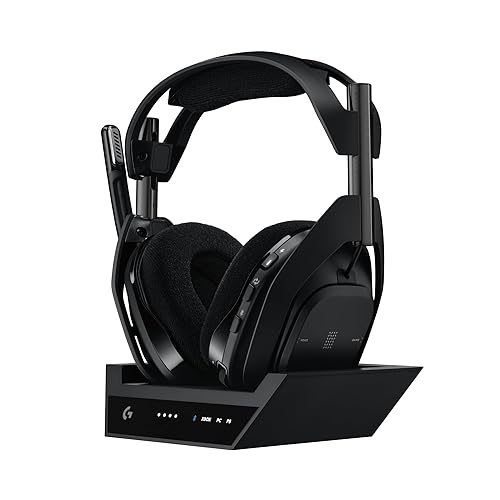
Astro A50 X
Bottom line: The best headset if you own an Xbox and a PS5, switching consoles and TV inputs with a button on the earcup.
If you own an Xbox and a PS5, the Astro A50 X saves you from swapping headsets. Its base station connects your consoles and PC at once, passes through HDMI 2.1 video at 4K 120Hz, and lets you switch systems with a button on the headset.
Pros & Cons
Pros- Switch consoles from the headset, TV input included
- Light and comfortable for long sessions
- Excellent mic
- Switch consoles with a button on the earcup
- HDMI 2.1 passthrough at 4K 120Hz
- Magnetic charging dock
- 48 kHz full-bandwidth mic
Cons- No HDMI input for a PC on the base station
- Battery life is on the short side
Why We Picked It
If you own an Xbox and a PS5, the A50 X saves you from swapping headsets. Its base station connects your consoles and PC at once, passes through HDMI 2.1 video at 4K 120Hz, and switches the TV input and audio with a button on the headset. Sound is excellent on every system, it's lighter and more comfortable than many premium rivals, and the mic rivals a desk mic.
Who It's For
You have an Xbox, PS5 and PC on one TV or monitor and want to stop swapping headsets. The base station connects all of them, passes video through at 4K 120Hz and switches the TV input with the headset button. Docking to charge is simple, and the light fit suits long sessions.
Specs & Configurations
- Connection
- LIGHTSPEED wireless via base station, Bluetooth for a second device
- PLAYSYNC
- Xbox, PS5, Switch/Switch 2 and PC connected at once
- Video
- HDMI 2.1 passthrough (4K 120Hz)
- Battery
- up to 24 hours (at 78 dB), magnetic charging dock
- Mic
- 48 kHz full-bandwidth
- Extras
- 10-band parametric EQ in G HUB and mobile app
How Each Headset Connects to Xbox Series X
| Headset |
Xbox connection |
Phone at the same time |
Battery |
ANC |
| Xbox Wireless Headset |
Direct (Xbox Wireless) |
Yes, Bluetooth |
Up to 20 hours |
Not listed |
| SteelSeries Arctis Nova 7X Gen 2 |
USB-C dongle |
Yes, Bluetooth |
50+ hours |
Not listed |
| Turtle Beach Stealth 600 Gen 3 |
2.4GHz dongle |
QuickSwitch to Bluetooth |
Up to 80 hours |
Not listed |
| SteelSeries Arctis Nova 5X |
USB-C dongle |
Quick-switch to Bluetooth |
Up to 60 hours |
Not listed |
| Turtle Beach Stealth 700 Gen 3 |
Dual transmitter |
Yes, Bluetooth |
Up to 80 hours |
Not listed |
| SteelSeries Arctis Nova Pro Wireless (Xbox) |
OLED base station |
Yes, Bluetooth |
2 swappable batteries |
Yes |
| Turtle Beach Stealth Pro II |
USB wireless (CrossPlay 2.0) |
Yes, Bluetooth |
Up to 80 hours (2 batteries) |
Yes |
| Audeze Maxwell 2 (Xbox) |
USB-C dongle (Xbox/PC switch) |
Yes, Bluetooth |
Up to 80 hours |
Not listed |
| Razer Kaira Pro (Xbox) |
Direct pairing |
Yes, Bluetooth |
Not listed |
Not listed |
| SteelSeries Arctis Nova Pro Omni |
USB (OmniPlay, up to 3 systems) |
Yes, Bluetooth |
Swappable batteries |
Yes |
| Astro A50 X |
Base station (HDMI passthrough) |
Yes, Bluetooth |
Up to 24 hours |
Not listed |
| HyperX CloudX |
3.5mm to controller |
No |
Wired |
Not listed |
“Not listed” means the feature isn’t stated in the product’s listing. Based on listings at the time of writing.
How to Choose an Xbox Headset
Direct, dongle or wired?
The Xbox Wireless Headset and Razer Kaira Pro pair directly to the console. Most third-party wireless headsets use an Xbox-specific dongle or base station, so buy the Xbox version. Wired headsets like the HyperX CloudX plug into your controller and never need charging.
Do you want your phone at the same time?
The Xbox Wireless Headset, Arctis Nova 7X Gen 2, Stealth 700 Gen 3, Arctis Nova Pro, Nova Pro Omni, Stealth Pro II, Maxwell 2, A50 X and Kaira Pro play Xbox and Bluetooth audio together. The Stealth 600 Gen 3 and Arctis Nova 5X switch between them instead.
Noise cancellation and batteries
Only the Arctis Nova Pro Wireless, Arctis Nova Pro Omni and Stealth Pro II list active noise cancellation, and all three use swappable batteries so you never have to stop to charge. For a single battery, the Stealth 600 and 700 Gen 3 and Maxwell 2 are rated for up to 80 hours.
FAQ
What is the best headset for Xbox Series X?
For most players, the best headset for Xbox Series X is Microsoft’s Xbox Wireless Headset, because it pairs directly to the console, includes Dolby Atmos and connects to your phone at the same time. For long battery life on a budget, get the Turtle Beach Stealth 600 Gen 3, and for premium features like ANC and swappable batteries, the Arctis Nova Pro Wireless or Stealth Pro II.
Do PlayStation versions of headsets work on Xbox?
Wirelessly, not always. Most third-party wireless headsets need the Xbox version of their dongle or base station to connect to an Xbox PC versions of wireless headsets only work on Xbox when plugged into the controller. Any headset with a 3.5mm cable can plug into the controller.
Can you use Bluetooth headphones with Xbox Series X?
Microsoft’s Xbox Wireless Headset connects to the console over Xbox Wireless and uses Bluetooth for PCs and phones. The wireless headsets on our list connect to the Xbox through Xbox Wireless, a dongle or a base station, with Bluetooth reserved for your phone or other devices.
What is the best wireless headset for Xbox Series X?
The best wireless headset for Xbox Series X for most players is the Xbox Wireless Headset, which pairs directly to the console with no dongle and connects to your phone over Bluetooth at the same time. The Razer Kaira Pro also pairs directly, the Arctis Nova 7X Gen 2 mixes game and phone audio through its USB-C dongle, and the Arctis Nova Pro Wireless and Stealth Pro II add ANC and swappable batteries. Eleven of the 12 headsets on our list are wireless.
Is Dolby Atmos free on Xbox?
Windows Sonic for Headphones is free on every Xbox Series X and Series S. Dolby Atmos is included at no extra cost with the Xbox Wireless Headset, and DTS Headphone:X needs a separate purchase.
What is the best wired headset for Xbox Series X?
The HyperX CloudX is our wired pick. It’s officially licensed for Xbox, is certified by Microsoft for controllers that have a 3.5mm jack, and it’s built to last for years.
Final Verdict: Which Xbox Headset Should You Buy?
Connection comes first, then features. For most people, Microsoft’s own Xbox Wireless Headset is the simplest answer, and the Razer Kaira Pro is a dongle-free alternative. For game and phone audio together, choose the Arctis Nova 7X Gen 2. For value and battery life, go with the Turtle Beach Stealth 600 Gen 3. For game presets, pick the Arctis Nova 5X, and for Xbox and PC, the Stealth 700 Gen 3. Premium buyers should look at the Arctis Nova Pro Wireless or the noise-cancelling Stealth Pro II, audio lovers at the Audeze Maxwell 2 or Hi-Res Arctis Nova Pro Omni, households with several consoles at the Astro A50 X, and budget buyers at the wired HyperX CloudX. Need a new pad too? See our guide to the best Xbox controller. Shopping on a tighter budget? See our best gaming headsets under $100.

