

Missed a jump in Celeste because your thumb slid into a diagonal? That’s a D-pad problem, not a skill problem. Most modern gamepads are built around analog sticks, so their D-pads end up mushy or tucked out of reach, and the best controller for 2D platformers fixes exactly that. These seven have D-pads you can trust, from the 8BitDo Pro 3 to the budget Logitech F310. Torn between 8BitDo’s two flagship pads? See our 8BitDo Pro 3 vs Pro 2 comparison.
Best Controller for 2D Platformers in 2026
GameCuki is reader-supported. When you buy through links on our site, we may earn an affiliate commission at no extra cost to you. As an Amazon Associate I earn from qualifying purchases. Learn more.
Our Top Picks

Best Overall
8BitDo Pro 3
Bottom line: The best all-round controller for 2D platformers, with a tactile SNES-style D-pad in the top spot and modern extras, if you don't mind clicky buttons.
- Tactile D-pad with a clear bump on each direction
- D-pad sits in the main position
- Works on PC, Switch 1 and Switch 2
- Charging dock and back buttons included
- Drift-resistant TMR sticks
- Triggers switch between Hall effect and tactile modes
- Bluetooth, 2.4GHz or wired USB-C
- Face buttons are loud and clicky
- Battery is sealed inside
- Symmetrical sticks won't suit Xbox-layout fans

Best SNES-Style Controller
8BitDo SN30 Pro (Hall Effect)
Bottom line: The pick for retro fans who want the classic SNES feel with modern sticks, though its small dog-bone shape won't suit big hands.
- Excellent classic D-pad for 2D games
- Small and light, easy to carry
- Hall effect sticks resist drift
- Works across PC, Switch, Apple and Android
- Rumble and motion controls
- Rechargeable battery
- Works with Steam Deck and Raspberry Pi
- Dog-bone shape isn't ergonomic for larger hands
- Doesn't work with Switch 2
- No back buttons
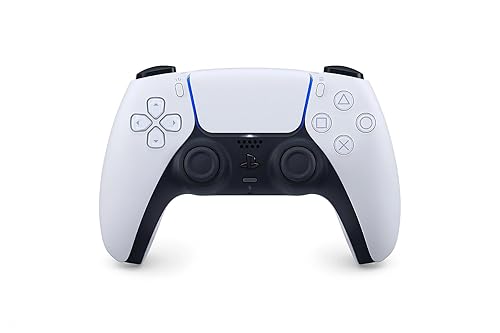
Best for PlayStation Fans
Sony DualSense
Bottom line: The pick for players who want a first-party controller with the D-pad in the top spot, though battery life is short for long PC sessions.
- D-pad in the primary position
- Comfortable, familiar shape
- Haptics and adaptive triggers in supported PC games
- Works over Bluetooth or USB-C
- Built-in mic and 3.5mm jack
- Also runs your PS5 games
- Battery lasts only about six to eight hours
- Sticks can drift after heavy use

Best Sega-Style D-Pad
8BitDo M30 Bluetooth
Bottom line: The best D-pad for retro purists, a Saturn-style six-button pad that feels superb, as long as you don't need analog sticks.
- Near-perfect round D-pad
- Six-button Sega layout for retro games
- Light and comfortable
- Bluetooth or wired
- Rechargeable battery
- Turbo function on supported platforms
- No analog sticks
- Not supported by 8BitDo's Ultimate Software
- D-pad may act as the left stick until you change the mode

Best Budget Controller
Logitech G F310
Bottom line: The best cheap controller for 2D platformers on PC, with a four-switch D-pad in the top spot, as long as you can live with a cable and no rumble.
- Very affordable
- D-pad built on four switches for quick direction changes
- D-pad in the top-left spot
- Plug-and-play on Windows
- 10 programmable buttons
- Works on Windows 10 and 11, recognized by Steam
- 6 ft cord
- Wired only
- No rumble
- Basic plastic build
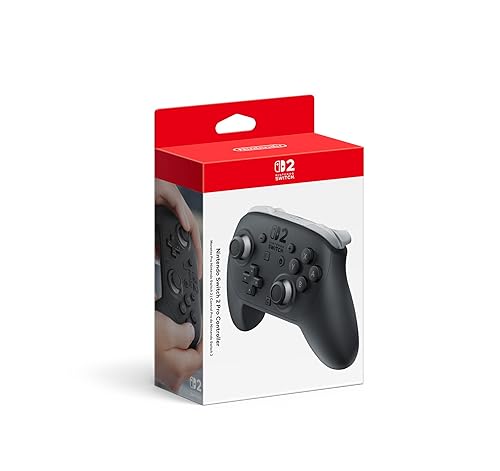
Best for Switch 2
Nintendo Switch 2 Pro Controller
Bottom line: The best choice for Switch 2 platformers, with a proper D-pad and Nintendo-only features, though it costs more than third-party pads.
- Proper D-pad, unlike the Joy-Con's separate buttons
- Two mappable rear buttons
- HD Rumble 2 and amiibo support
- Large, comfortable buttons and sticks
- 3.5mm audio jack
- Motion controls
- C button opens GameChat
- Pricier than third-party controllers
- Built for Switch 2 first

Best Fightpad-Style Controller
HORI Fighting Commander OCTA (PS5, PS4 and PC)
Bottom line: A great pick if you want a big, precise D-pad with clicky buttons, though diagonals can be inconsistent and it's small for big hands.
- Large, precise D-pad
- Clicky micro switch buttons
- Works on PS5, PS4 and PC
- Long cable
- Adjustable D-pad sensitivity
- HORI Device Manager app with 4 profiles
- Diagonals can register inconsistently
- Small for average to large hands
- D-pad needs some break-in
Table of Contents
What Makes a Controller Good for 2D Platformers
Three things matter more than anything else on the spec sheet.
The D-pad’s design. Some D-pads are a single piece rocking on one pivot point, which is where mushy feel and accidental diagonals come from. Logitech, for example, builds the F310’s D-pad on four separate switches so it reacts quickly to changes in direction. Shape matters too. A SNES-style cross suits players who want clean up, down, left and right, while Sega Saturn-style round pads are loved by fans of shooters and fighting games for their smooth rolling motions.
Where the D-pad sits. On PlayStation, Nintendo and most 8BitDo controllers, the D-pad sits in the top-left spot where your thumb naturally rests. On Xbox controllers it sits lower, below the left stick, which makes quick D-pad inputs more awkward. If you use the D-pad a lot, the higher position is easier on your thumb.
D-pad or stick. Not everyone needs a great D-pad. Plenty of players use the analog stick almost all the time and switch to the D-pad only for very precise tricks. Others find a D-pad far more reliable in games that only use four directions. If you mostly play with the stick, any comfortable controller works. If you want D-pad precision, start with the picks below.
Best Controllers for 2D Platformers: Our Picks in Detail
1
Best Overall
8BitDo Pro 3
Bottom line: The best all-round controller for 2D platformers, with a tactile SNES-style D-pad in the top spot and modern extras, if you don't mind clicky buttons.
The 8BitDo Pro 3 is the controller we'd buy for 2D platformers. It keeps the SNES-style layout of the 8BitDo Pro 2, long a favorite of metroidvania players for its D-pad, and adds a long list of modern upgrades.
Pros & Cons
Pros
- Tactile D-pad with a clear bump on each direction
- D-pad sits in the main position
- Works on PC, Switch 1 and Switch 2
- Charging dock and back buttons included
- Drift-resistant TMR sticks
- Triggers switch between Hall effect and tactile modes
- Bluetooth, 2.4GHz or wired USB-C
Cons
- Face buttons are loud and clicky
- Battery is sealed inside
- Symmetrical sticks won't suit Xbox-layout fans
Why We Picked It
Its D-pad has a distinct tactile bump on each of the four directions but still rolls smoothly into diagonals, and it sits above the left stick where your thumb rests. You also get drift-resistant TMR sticks, triggers that switch between Hall effect and tactile modes, two back buttons, magnetic face buttons for Nintendo or Xbox layouts and a charging dock. Read our 8BitDo Pro 3 review for the full breakdown.
Who It's For
You play 2D platformers and metroidvanias on a PC or Switch and want a SNES-style D-pad with a distinct bump on each direction that still rolls smoothly into diagonals. The D-pad sits above the left stick where your thumb rests, and the charging dock, back buttons and magnetic face buttons make it just as capable for everything else you play.
Specs & Configurations
- D-pad
- tactile, top-left position
- Connection
- Bluetooth, 2.4GHz adapter, wired USB-C
- Works with
- Switch 1 and 2, Windows PC, Apple, SteamOS, Android
- Sticks
- TMR
- Triggers
- switchable Hall effect or tactile
- Extras
- charging dock, 2 back buttons, L4 and R4 bumpers, magnetic swappable ABXY
2
Best SNES-Style Controller
8BitDo SN30 Pro (Hall Effect)
Bottom line: The pick for retro fans who want the classic SNES feel with modern sticks, though its small dog-bone shape won't suit big hands.
If you grew up on the SNES, the 8BitDo SN30 Pro is the closest thing to that controller with everything a modern game needs. It's one of the most recommended D-pad controllers for 2D games, and next to it, most other Switch D-pads feel cheap.
Pros & Cons
Pros
- Excellent classic D-pad for 2D games
- Small and light, easy to carry
- Hall effect sticks resist drift
- Works across PC, Switch, Apple and Android
- Rumble and motion controls
- Rechargeable battery
- Works with Steam Deck and Raspberry Pi
Cons
- Dog-bone shape isn't ergonomic for larger hands
- Doesn't work with Switch 2
- No back buttons
Why We Picked It
8BitDo calls its D-pad a "perfect classic D-pad," and it lives up to that. It's particularly well suited to 2D games, barely takes up desk space, and packs a full dual-analog, four-trigger layout into the SNES dog-bone shape, with Hall effect sticks that last longer than standard ones.
Who It's For
You grew up on the SNES and want that feel with sticks and triggers for modern games. The classic D-pad is excellent for 2D games and the pad is small and light at about 100 g, so it slips into a bag for travel. Hall effect sticks last longer than standard ones, and it connects over Bluetooth or USB-C to PC, Switch, Apple, Android and Steam Deck.
Specs & Configurations
- D-pad
- classic SNES-style
- Connection
- Bluetooth, wired USB-C
- Works with
- Switch, Windows, Apple, Android, Steam Deck, Raspberry Pi
- Sticks
- Hall effect
- Weight
- 100 g (Amazon listing)
- Extras
- rumble, motion controls, rechargeable battery
Get It Now
Check Price on Amazon
3
Best for PlayStation Fans
Sony DualSense
Bottom line: The pick for players who want a first-party controller with the D-pad in the top spot, though battery life is short for long PC sessions.
PlayStation pads have long been favorites for platformers because the D-pad sits in the upper-left spot of a symmetrical layout, right under your thumb. The DualShock 4 earned a reputation as one of the most precise platformer controllers, and the DualSense keeps the same layout.
Pros & Cons
Pros
- D-pad in the primary position
- Comfortable, familiar shape
- Haptics and adaptive triggers in supported PC games
- Works over Bluetooth or USB-C
- Built-in mic and 3.5mm jack
- Also runs your PS5 games
Cons
- Battery lasts only about six to eight hours
- Sticks can drift after heavy use
Why We Picked It
The DualSense connects to a PC or Mac over Bluetooth or USB-C, and in supported PC games it adds haptic feedback and adaptive triggers. It's comfortable with responsive buttons, and it's the one controller here that also runs your PS5 games.
Who It's For
You own a PS5 and want the same controller on your PC or Mac. The D-pad sits in the upper-left spot of the symmetrical layout, right under your thumb, and it connects over Bluetooth or USB-C. In supported PC games you also get haptic feedback and adaptive triggers, so platformers and bigger games all feel at home.
Specs & Configurations
- D-pad
- top-left position, symmetrical layout
- Connection
- Bluetooth, USB-C
- Works with
- PS5, Windows PC, Mac
- Extras
- haptic feedback, adaptive triggers in supported PC games, built-in mic, 3.5mm jack
- Weight
- 280 g (Amazon listing)
Get It Now
Check Price on Amazon
4
Best Sega-Style D-Pad
8BitDo M30 Bluetooth
Bottom line: The best D-pad for retro purists, a Saturn-style six-button pad that feels superb, as long as you don't need analog sticks.
The 8BitDo M30 copies the Sega Saturn controller, a pad retro fans still rank among the best ever made, and its D-pad is arguably the best 8BitDo has ever built.
Pros & Cons
Pros
- Near-perfect round D-pad
- Six-button Sega layout for retro games
- Light and comfortable
- Bluetooth or wired
- Rechargeable battery
- Turbo function on supported platforms
Cons
- No analog sticks
- Not supported by 8BitDo's Ultimate Software
- D-pad may act as the left stick until you change the mode
Why We Picked It
The round D-pad is superb for shoot-'em-ups and 2D games, and it misreads far fewer directions than 8BitDo's SN30 Pro. It's light, works over Bluetooth or a USB-C cable and runs on a rechargeable battery. There's also a wired version licensed for Xbox, which we recommend in our best controller for fighting games on PC guide.
Who It's For
You love retro games, shoot-'em-ups and 2D platformers and want the Sega Saturn-style D-pad. The round pad is superb for D-pad-only play, the six face buttons match classic Sega layouts, and it is light enough to hold for hours. Connect over Bluetooth or USB-C to Switch, Windows, Android or Raspberry Pi.
Specs & Configurations
- D-pad
- Sega Saturn-style round pad
- Layout
- six face buttons, no analog sticks
- Connection
- Bluetooth, wired USB-C
- Works with
- Switch, Windows 10 or later, Android, Raspberry Pi
- Weight
- 4.8 oz (Amazon listing)
- Extras
- turbo (not on Switch), rechargeable battery
Get It Now
Check Price on Amazon
5
Best Budget Controller
Logitech G F310
Bottom line: The best cheap controller for 2D platformers on PC, with a four-switch D-pad in the top spot, as long as you can live with a cable and no rumble.
The Logitech F310 is the cheapest controller worth using for 2D platformers on PC, and it's tough enough that some players have stuck with the same model for over a decade.
Pros & Cons
Pros
- Very affordable
- D-pad built on four switches for quick direction changes
- D-pad in the top-left spot
- Plug-and-play on Windows
- 10 programmable buttons
- Works on Windows 10 and 11, recognized by Steam
- 6 ft cord
Cons
- Wired only
- No rumble
- Basic plastic build
Why We Picked It
Logitech builds its D-pad on four switches instead of a single pivot point, which makes it responsive to quick changes in direction, and it sits in the top-left spot like a PlayStation controller. The buttons are clicky and responsive, it works on Windows 10 and 11, and Steam recognizes it out of the box. It costs a fraction of a first-party controller.
Who It's For
You play 2D platformers on a Windows PC and want a dedicated controller without spending much. The D-pad sits in the top-left spot like a PlayStation pad and is built on four switches for quick direction changes. Steam recognizes it right out of the box, so you plug it in and start playing.
Specs & Configurations
- D-pad
- floating, on four switches
- Connection
- wired USB, 6 ft cord
- Works with
- Windows PC
- Layout
- PlayStation-style, Xbox 360 button set
- Buttons
- 10 programmable, 8-way programmable D-pad
- Extras
- Logitech Profiler software
Get It Now
Check Price on Amazon
6
Best for Switch 2
Nintendo Switch 2 Pro Controller
Bottom line: The best choice for Switch 2 platformers, with a proper D-pad and Nintendo-only features, though it costs more than third-party pads.
If you play platformers on Switch 2, Nintendo's own Pro Controller is the most complete option, with a proper directional pad instead of the Joy-Con's four separate direction buttons.
Pros & Cons
Pros
- Proper D-pad, unlike the Joy-Con's separate buttons
- Two mappable rear buttons
- HD Rumble 2 and amiibo support
- Large, comfortable buttons and sticks
- 3.5mm audio jack
- Motion controls
- C button opens GameChat
Cons
- Pricier than third-party controllers
- Built for Switch 2 first
Why We Picked It
Beyond the D-pad, you get large buttons and sticks, two rear GL and GR buttons you can map to any button, HD Rumble 2, motion controls and built-in amiibo support. The C button opens GameChat, and there's a 3.5mm audio jack.
Who It's For
You play platformers on a Switch 2 and want the full first-party experience. The proper D-pad replaces the Joy-Con's four separate direction buttons, the large buttons and sticks stay comfortable, and the GL and GR rear buttons map to anything you like. HD Rumble 2, motion controls and amiibo support round out the package.
Specs & Configurations
- D-pad
- proper directional pad
- Works with
- Nintendo Switch 2
- Extras
- GL and GR mappable rear buttons, HD Rumble 2, motion controls, amiibo, C button for GameChat, 3.5mm audio jack
Get It Now
Check Price on Amazon
7
Best Fightpad-Style Controller
HORI Fighting Commander OCTA (PS5, PS4 and PC)
Bottom line: A great pick if you want a big, precise D-pad with clicky buttons, though diagonals can be inconsistent and it's small for big hands.
Fightpads are built around the D-pad, and HORI's pads have a following among platformer fans too, especially players whose thumbs get sore on smaller D-pads.
Pros & Cons
Pros
- Large, precise D-pad
- Clicky micro switch buttons
- Works on PS5, PS4 and PC
- Long cable
- Adjustable D-pad sensitivity
- HORI Device Manager app with 4 profiles
Cons
- Diagonals can register inconsistently
- Small for average to large hands
- D-pad needs some break-in
Why We Picked It
The OCTA has a large D-pad with adjustable sensitivity, six micro switch face buttons and a 10-foot cable, and HORI's Device Manager app lets you remap buttons and save four profiles. It works well for metroidvanias like Bloodstained: Ritual of the Night, and the D-pad becomes very accurate once it breaks in.
Who It's For
You play platformers, metroidvanias or fighting games on a PS5, PS4 or PC and want a big D-pad with arcade-style buttons. The large D-pad has adjustable sensitivity, the six micro switch buttons click crisply, and the 10-foot cable reaches your couch. Save four profiles in the Device Manager app and the D-pad becomes very accurate once it breaks in.
Specs & Configurations
- D-pad
- large, adjustable sensitivity
- Layout
- six face buttons
- Buttons
- micro switch
- Connection
- wired, 10 ft cable
- Works with
- PS5, PS4, PC
- Extras
- HORI Device Manager app with 4 profiles
Get It Now
Check Price on AmazonWhy the Standard Xbox Controller Isn’t on This List
The Xbox Wireless Controller is a great all-round pad, but it’s a weak choice for 2D games. Its D-pad sits low, below the left stick, in an awkward spot for quick inputs, while PlayStation and 8BitDo layouts put it right under your thumb. The old Xbox 360 D-pad was even worse. The newer Xbox Series D-pad is a real improvement, so if you already own one, try it before buying something new.
If you want to stay with Microsoft, the Xbox Elite Series 2 has an interchangeable D-pad. Note that the cheaper Core version ships with just one D-pad, and the extra parts come in the separately sold Complete Component Pack.