

They already own the console, the controller and the headset, so skip the basics. Gifts for gamers who have everything work best as upgrades they’d rarely buy for themselves: a pro controller, a Hall effect keyboard, a headset with swappable batteries, a LEGO Game Boy for the shelf or a real arcade cabinet for the game room. These 24 ideas cover PC and console players, grouped by type.
Gifts for Gamers Who Have Everything: 24 Ideas for 2026
GameCuki is reader-supported. When you buy through links on our site, we may earn an affiliate commission at no extra cost to you. As an Amazon Associate I earn from qualifying purchases. Learn more.
GameCuki Recommends

Best for PS5 Owners
PlayStation Portal Remote Player
Bottom line: A brilliant gift for PS5 owners who share a TV, as long as their home Wi-Fi is strong enough to stream games smoothly.
- Feels just like holding a DualSense
- Big, sharp screen
- Frees up the TV without stopping a game
- Streams the PS5 library around the house
- Cloud streaming of select games with PlayStation Plus Premium
- Needs strong Wi-Fi for smooth play
- No VR games or extra peripherals

Best Keyboard Upgrade
Lemokey P1 HE Wireless Gaming Keyboard
Bottom line: A premium Hall effect keyboard that feels like a custom build and plays like an esports board, making it a standout upgrade for PC gamers.
- Premium, heavy aluminum build
- Adjustable actuation and Rapid Trigger for competitive games
- Wireless with long battery life
- Gasket mount and sound-dampening foam for a cushioned feel
- Browser-based app on Windows, macOS and Linux
- Bluetooth for up to three devices
- Very heavy
- Only compatible magnetic switches can be swapped in

Best Headset Upgrade
SteelSeries Arctis Nova Pro Wireless
Bottom line: The headset to buy when price is no object, because swappable batteries and a two-system base station make it the most convenient wireless headset around.
- Swap batteries and never stop to charge
- Switch between two systems with one button
- ANC and Bluetooth for phone calls
- OLED base station with volume, EQ and ChatMix
- 2.4GHz and Bluetooth at the same time
- Works with PC, Mac, Xbox, PlayStation and Switch
- Expensive
- Earcup fit doesn't suit every ear

Best Collectible
LEGO Super Mario Game Boy (72046)
Bottom line: The safest crowd-pleaser on this list, a fun two-hour build that any adult who grew up with a Game Boy will proudly display.
- Remarkably close to the real Game Boy
- Fun, relaxing build
- Looks great on a desk or shelf
- Pressable buttons and a contrast dial
- Two swappable Game Paks
- Lenticular screens you can swap
- Display piece only, it doesn't play games
- Quick build for experienced LEGO fans

Best Practical Gift
iFixit Mako Driver Kit
Bottom line: The most useful gift on this list for anyone who opens their gear, with a bit for nearly every console and controller screw.
- Covers nearly every console and controller screw
- High-quality bits and driver
- Bits can be replaced individually
- 64 precision bits including Torx, tri-wing and Pentalobe
- Magnetic case with a lid that doubles as a sorting tray
- Not a full repair kit (no opening tools)
- Overkill for someone who never opens their gear
Table of Contents
- GameCuki Recommends
- Gifts for Gamers Who Have Everything: Pro Controllers and Play-Anywhere Gear
- Gifts for Gamers Who Have Everything: Desk and Setup Upgrades
- Gifts for Gamers Who Have Everything: Headsets and Storage
- Gifts for Gamers Who Have Everything: Game Room Lighting
- Gifts for Gamers Who Have Everything: Retro and Collectibles
- Gifts for Gamers Who Have Everything: Tools and Subscriptions
- FAQ
- Final Thoughts
Gifts for Gamers Who Have Everything: Pro Controllers and Play-Anywhere Gear
Most gamers already have a controller and a console. What they often don’t have is the premium version, or a way to keep playing when someone else needs the TV.

1
Best Pro Controller for PS5
PlayStation DualSense Edge Wireless Controller
Bottom line: The best gift for a serious PS5 player, since swappable stick modules, back buttons and trigger stops make it the last controller they'll need for years.
The DualSense Edge is Sony's own pro controller for PS5, the kind of upgrade people want but rarely buy for themselves.
Pros & Cons
Pros
- Fixes stick wear with swappable modules
- Back buttons and trigger stops built in
- Feels like a standard DualSense, only more premium
- Three styles of stick caps to tune the feel
- Profiles save on the controller and switch mid-game
- Hard carrying case included
Cons
- Expensive
- Replacement stick modules cost extra
Why We Picked It
It solves the problems that send most controllers to the drawer. When a stick starts to wear, you swap in a fresh stick module instead of buying a new pad, and three styles of stick caps let you tune the feel. Two sets of back buttons can take over any input, trigger stops shorten the pull for faster shots in shooters and you can save full control setups as profiles and switch between them mid-game. It all comes in a hard carrying case, which makes it feel like a gift from the moment it's opened.
Who It's For
The person getting this plays a lot on PS5, whether that's competitive shooters or long weekly sessions, and has worn through a standard pad or two. A fresh stick module swaps in when a stick wears, trigger stops shorten the pull for faster shots, and the whole thing arrives in a hard case that feels like a gift from the moment it's opened.
Specs & Configurations
- Platform
- PS5
- Back buttons
- 2 swappable sets, mappable to any input
- Triggers
- adjustable travel length
- Sticks
- replaceable stick modules, 3 types of stick caps
- Profiles
- saved on the controller, switch on the fly
- Extras
- carrying case
Get It Now
Check Price on Amazon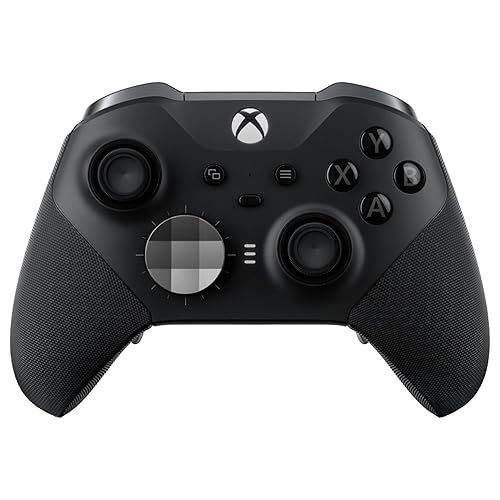
2
Best Pro Controller for Xbox and PC
Xbox Elite Wireless Controller Series 2
Bottom line: The pro controller Xbox and PC gamers want but rarely buy themselves, with every tuning option, a charging dock and a case right in the box.
The Xbox Elite Series 2 is the controller most Xbox and PC players want but rarely buy for themselves.
Pros & Cons
Pros
- Huge range of tuning options
- Charging dock and case included
- Works on Xbox and PC out of the box
- Adjustable stick tension and hair trigger locks
- Up to 40 hours of battery
- Up to three profiles stored on the controller
Cons
- Expensive
- Heavier than a standard Xbox controller
Why We Picked It
Everything is in the box: six thumbsticks, two D-pads, four paddles, a hard case and a charging dock. The sticks have adjustable tension, three-step hair trigger locks shorten each pull and up to three profiles live on the controller, with a dedicated button to switch between them. The battery runs up to 40 hours, and it connects to Xbox, PC and cloud gaming over Xbox Wireless, Bluetooth or USB-C. The Xbox Accessories app handles button mapping and dead zones, and it can even map buttons to keyboard keys in supported games.
Who It's For
The person getting this games on Xbox and PC and has probably wanted a premium controller for a while without buying one. Six thumbsticks, four paddles, two D-pads, a hard case and a charging dock all come in the box, and the Xbox Accessories app handles button mapping and dead zones for both platforms.
Specs & Configurations
- Platform
- Xbox Series X and S, Xbox One, Windows PC, cloud
- Connection
- Xbox Wireless, Bluetooth, USB-C
- Battery
- rechargeable, up to 40 hours
- Sticks
- adjustable tension
- Triggers
- 3-step hair trigger locks
- In the box
- 6 thumbsticks, 4 paddles, 2 D-pads, carrying case, charging dock
Get It Now
Check Price on Amazon
3
Best for PS5 Owners
PlayStation Portal Remote Player
Bottom line: A brilliant gift for PS5 owners who share a TV, as long as their home Wi-Fi is strong enough to stream games smoothly.
The PlayStation Portal is the gift for the PS5 owner who already has the console, the controllers and the games.
Pros & Cons
Pros
- Feels just like holding a DualSense
- Big, sharp screen
- Frees up the TV without stopping a game
- Streams the PS5 library around the house
- Cloud streaming of select games with PlayStation Plus Premium
Cons
- Needs strong Wi-Fi for smooth play
- No VR games or extra peripherals
Why We Picked It
It lets them play their PS5 library anywhere in the house. The Portal streams any compatible game installed on the PS5 to a bright 8-inch, 1080p screen at up to 60fps, with DualSense-style controls on both sides, so it feels like holding a controller with a screen in the middle. With PlayStation Plus Premium, it can also stream select games from the cloud, no PS5 download required. It depends on Wi-Fi, so a fast connection makes a big difference, but on a good network it turns the PS5 into a handheld without stopping a game when the TV is needed.
Who It's For
The person getting this already owns a PS5 and has the controllers and games, but shares the TV with family or likes to play in bed. DualSense-style controls on both sides of an 8-inch, 1080p screen turn the console into a handheld, so a game keeps going when someone else needs the TV.
Specs & Configurations
- Screen
- 8-inch LCD, 1080p, up to 60fps
- Remote Play
- streams games installed on your PS5
- Cloud streaming
- select games with PlayStation Plus Premium
- Audio
- 3.5mm jack, PlayStation Link
- Wi-Fi
- 5Mbps minimum, 15Mbps or faster recommended
Get It Now
Check Price on Amazon
4
Best for Phone Gaming
Backbone One (2nd Gen, USB-C)
Bottom line: The easiest way to turn a phone into a real handheld for cloud gaming and Remote Play, and it's small enough to take everywhere.
The Backbone One is the easiest way to add a handheld to a gamer's life, because they already carry the screen.
Pros & Cons
Pros
- Turns a phone into a real handheld
- Compact enough for a pocket or bag
- Works with cloud gaming and Remote Play
- Plugs into USB-C with no Bluetooth pairing
- Adapters fit many phone cases
- Controller works without a subscription
Cons
- Some features need a Backbone+ subscription
- Needs a USB-C phone (Lightning model sold separately)
Why We Picked It
It clips around a phone and gives it proper triggers, sticks, a D-pad and face buttons, so mobile games, Xbox Game Pass and GeForce NOW streaming and PlayStation or Xbox Remote Play all feel like console gaming. It plugs straight into the USB-C port, so there's no Bluetooth pairing, and the included adapters make room for many phone cases. It's small enough to keep in a bag for flights, waiting rooms and lunch breaks. Extras like recording and the iOS emulator need a Backbone+ membership, but the controller itself works without one.
Who It's For
The person getting this commutes, travels or waits around a lot and already carries a phone everywhere. Real triggers, sticks and face buttons make mobile games, Xbox Game Pass, GeForce NOW and Remote Play feel like console gaming, and the pocket-size controller fits in a bag for flights and lunch breaks.
Specs & Configurations
- Platforms
- iPhone (USB-C) and most Android phones
- Connection
- plugs into the phone's USB-C port
- Plays
- mobile games, Xbox Game Pass and GeForce NOW cloud, PlayStation and Xbox Remote Play
- Extras
- adapters for phone cases, Backbone+ trial
- Emulator
- in-app on iOS 18.4+, with Backbone+
Get It Now
Check Price on Amazon
5
Best VR Gift
Meta Quest 3S (128GB)
Bottom line: The gift a gamer with every console probably still doesn't have, with wireless VR that needs no PC and is simple enough for the whole family.
The Meta Quest 3S is the gift that even a gamer with every console probably doesn't have.
Pros & Cons
Pros
- No wires, no PC or console required
- Mixed reality with color passthrough
- Easy for the whole family to set up
- Runs games on its own Snapdragon XR2 Gen 2 chip
- 3-month games trial in the box
Cons
- Stock strap isn't comfy for long sessions
- Battery lasts a couple of hours
Why We Picked It
VR is a whole new way to play, and the Quest 3S needs nothing else to work. It runs games on its own Snapdragon XR2 Gen 2 chip with 8GB of RAM, has no wires to trip over and uses two color cameras to blend virtual objects with the room around you. Setup is simple enough for kids to handle, and the box includes a 3-month trial of Meta's games catalog plus Gorilla Tag bonus items. The included strap is fine for short sessions and travel, but a comfort strap with a built-in battery is a popular upgrade for longer play.
Who It's For
The person getting this is 13 or older, owns plenty of consoles and has never tried VR. It runs on its own with no PC or wires to trip over, setup is simple enough for kids to handle, and the 3-month games trial and Gorilla Tag items give them something to play right away.
Specs & Configurations
- Type
- standalone VR, no PC or console needed
- Chip
- Snapdragon XR2 Gen 2, 8GB RAM
- Storage
- 128GB
- Passthrough
- full color, two RGB cameras
- Battery
- 2+ hours
- Extras
- 3-month games trial, Gorilla Tag items
- Age
- 13+
Get It Now
Check Price on AmazonGifts for Gamers Who Have Everything: Desk and Setup Upgrades
A gamer’s setup is never finished. These upgrades make the desk or couch nicer to play at every day, and most are things people put off buying for themselves.
6
Best Keyboard Upgrade
Lemokey P1 HE Wireless Gaming Keyboard
Bottom line: A premium Hall effect keyboard that feels like a custom build and plays like an esports board, making it a standout upgrade for PC gamers.
The Lemokey P1 HE is the kind of keyboard gamers research for weeks and still hesitate to buy.
Pros & Cons
Pros
- Premium, heavy aluminum build
- Adjustable actuation and Rapid Trigger for competitive games
- Wireless with long battery life
- Gasket mount and sound-dampening foam for a cushioned feel
- Browser-based app on Windows, macOS and Linux
- Bluetooth for up to three devices
Cons
- Very heavy
- Only compatible magnetic switches can be swapped in
Why We Picked It
It combines a custom-keyboard feel with competitive gaming features. The magnetic Hall effect switches let you set each key's actuation point anywhere from 0.2 to 3.8mm, and Rapid Trigger resets keys instantly for fast strafing in shooters. The aluminum case and plate, gasket mount and sound-dampening foam give it a solid, cushioned typing feel, and it works wired or wirelessly at 1000Hz, with Bluetooth for up to three devices. Everything is set up in a browser-based app that works on Windows, macOS and Linux. It's heavy, which keeps it planted but makes it a desk-only keyboard.
Who It's For
The person getting this plays shooters or competitive games on a PC and has been eyeing a premium keyboard for weeks. Adjustable actuation from 0.2 to 3.8mm and Rapid Trigger help with fast strafing, while the aluminum build keeps it planted on the desk and the wireless mode runs at 1000Hz.
Specs & Configurations
- Layout
- 75% (81 keys) with knob
- Switches
- Gateron Double-Rail magnetic (Hall effect)
- Actuation
- 0.2 to 3.8mm in 0.1mm steps
- Gaming
- Rapid Trigger, Snap Click, Dynamic Keystrokes
- Connection
- 2.4GHz and USB-C at 1000Hz, Bluetooth 5.2
- Battery
- 4000mAh, up to 100 hours with lights off
- Build
- aluminum case and plate, gasket mount, PBT keycaps
Get It Now
Check Price on Amazon
7
Best Retro Keyboard
8BitDo Retro Mechanical Keyboard (C64 Edition)
Bottom line: A fun, nostalgic keyboard that's also great to type on, perfect for retro fans who don't mind loud, clicky switches.
The 8BitDo Retro Mechanical Keyboard is a nostalgia piece that's also a genuinely good daily keyboard.
Pros & Cons
Pros
- Looks like a classic home computer
- Satisfying clicky switches
- Hot-swappable for future switch changes
- Two programmable Super Buttons
- Chunky SA-profile keycaps
Cons
- Clicky switches are loud
- No macOS support listed
Why We Picked It
The C64 Edition borrows the look of the Commodore 64, with chunky SA-profile keycaps and retro colors, and pairs it with modern guts: Kailh Box White clicky switches, a hot-swappable board and n-key rollover. The two oversized Super Buttons can be programmed for shortcuts or game actions, which makes it a fun desk centerpiece. The clicky switches are part of the charm but loud, so it's best for a gamer with their own room.
Who It's For
The person getting this loves retro computing and games, uses a Windows or Android setup and has their own room where clicky switches won't bother anyone. The Commodore 64 look is a desk centerpiece, and the two Super Buttons can be programmed for shortcuts or game actions.
Specs & Configurations
- Layout
- 87 keys (tenkeyless)
- Switches
- Kailh Box White (clicky), hot-swappable
- Keycaps
- double-shot ABS, SA profile
- Extras
- Dual Super Buttons, programmable keys
- Compatibility
- Windows 10 and later, Android 9 and later
Get It Now
Check Price on Amazon
8
Best Desk Speakers
Creative Pebble Pro Desktop Speakers
Bottom line: A small, affordable speaker upgrade that sounds far bigger than it looks and adds a bit of RGB flair to any desk.
The Creative Pebble Pro is a simple upgrade for a gamer still relying on monitor speakers or a single headset.
Pros & Cons
Pros
- Big sound for their size
- USB-C, Bluetooth and aux in one set
- RGB lighting you can switch off
- Single USB-C cable for power and audio
- Clear Dialog keeps voices clear
- Headset and mic port included
Cons
- Needs a separate USB-C power adapter for full volume
- Bass is limited compared with a 2.1 set
Why We Picked It
These small speakers sit on the desk without taking up much room, angle their drivers up at your ears and sound much bigger than they look. BassFlex adds low end and Clear Dialog keeps voices clear in games and videos. They run on a single USB-C cable, add Bluetooth 5.3 and an aux input for a phone or console and include a port for a headset or mic. RGB rings match a lit-up setup, and a button switches them off when they're too much. Plug in an optional power adapter for the full 20W.
Who It's For
The person getting this still relies on monitor speakers or a single headset at a PC desk with limited room. The compact speakers angle their drivers up at the listener, connect over USB-C, Bluetooth or aux for a phone or console, and add RGB rings that match a lit-up setup.
Specs & Configurations
- Power
- up to 10W RMS, 20W peak over USB-C
- Connection
- USB-C, Bluetooth 5.3, 3.5mm aux in
- Extras
- RGB lighting with 3 effects, Clear Dialog, headset and mic port
- Design
- 45-degree angled drivers
Get It Now
Check Price on Amazon
9
Best for Streamers
Elgato Stream Deck MK.2
Bottom line: A must-have for streamers that quickly becomes a favorite shortcut tool for any PC gamer, even ones who never go live.
The Stream Deck MK.2 is a gadget most gamers didn't know they needed until they have one.
Pros & Cons
Pros
- Each key shows its own icon
- Huge plugin library
- Useful for games, streaming and everyday shortcuts
- 15 programmable LCD keys
- Multi-action macros on one key
Cons
- Needs a PC or Mac
- Less useful for console-only gamers
Why We Picked It
Each of its 15 keys is a tiny screen you can program to do almost anything: switch OBS scenes, mute the mic in Discord, skip a Spotify track, change the room lights or launch a game. Keys can trigger a single action or a whole sequence, and the plugin library covers most streaming and creator tools. It's a must for anyone who streams, but it's just as handy for everyday shortcuts and game hotkeys.
Who It's For
The person getting this streams, makes content or just loves keyboard shortcuts on a PC or Mac. Each of the 15 keys can switch OBS scenes, mute Discord, skip a Spotify track, change the room lights or launch a game, so it earns its place on the desk even if they never go live.
Specs & Configurations
- Keys
- 15 customizable LCD keys
- Plugins
- OBS, Twitch, YouTube, Discord, Spotify, Philips Hue and more
- Actions
- single or multi-action macros
- Connection
- USB-C
- Works with
- Windows PC and Mac
Get It Now
Check Price on Amazon
10
Best for Couch PC Gaming
Couchmaster CYCON³ Gaming Lap Desk
Bottom line: The best way to play PC games from the couch, as long as there's room to store a desk this big.
The Couchmaster CYCON³ is the gift for the PC gamer who wishes they could play on the big TV from the couch.
Pros & Cons
Pros
- Turns the couch into a PC gaming spot
- Built-in USB hub keeps cables tidy
- Comfortable for long sessions
- Fits a full keyboard and mouse
- Washable memory foam cushion covers
- RGB light bar adds flair
Cons
- Big and awkward to store
- Needs long cables to reach the PC
Why We Picked It
It's a wide, stable board that sits on two memory foam cushions on your lap, with plenty of room for a full keyboard and mouse. A built-in USB hub with six USB 3.0 ports and a USB-C fast-charging port means one cable runs to the PC while everything else plugs into the desk, and an RGB light bar adds a bit of flair. It's large and hard to tuck away, but for anyone who games from the couch or bed, it's a big comfort upgrade over a laptop on their knees.
Who It's For
The person getting this plays PC games and wishes they could do it on the big TV from the couch or bed. The wide board sits on memory foam cushions with room for a full keyboard and mouse, and six USB 3.0 ports plus USB-C charging mean one cable runs back to the PC.
Specs & Configurations
- Board
- detachable, fits a full keyboard and mouse
- Cushions
- adjustable memory foam with washable covers
- Ports
- 6 USB 3.0, 1 USB-C fast charging
- Lighting
- HORIZONLIGHT RGB bar with touch panel
- Width
- about 32.7 inches
- Weight
- 4.2kg
Get It Now
Check Price on AmazonGifts for Gamers Who Have Everything: Headsets and Storage
Even gamers with a headset and plenty of games usually have one that’s worn out or a drive that’s full. These are the premium replacements.
11
Best Headset Upgrade
SteelSeries Arctis Nova Pro Wireless
Bottom line: The headset to buy when price is no object, because swappable batteries and a two-system base station make it the most convenient wireless headset around.
The Arctis Nova Pro Wireless is the headset gamers upgrade to when they want the best of everything.
Pros & Cons
Pros
- Swap batteries and never stop to charge
- Switch between two systems with one button
- ANC and Bluetooth for phone calls
- OLED base station with volume, EQ and ChatMix
- 2.4GHz and Bluetooth at the same time
- Works with PC, Mac, Xbox, PlayStation and Switch
Cons
- Expensive
- Earcup fit doesn't suit every ear
Why We Picked It
Its standout feature is the Infinity Power System: the headset runs on one battery while the other charges in the base station, so you just swap and keep playing. The OLED base station connects to two systems at once, like a PC and a console, and switches between them with a button press, while also giving you volume, EQ and ChatMix control without leaving the game. Active noise cancellation shuts out the room, Bluetooth runs alongside 2.4GHz for calls and music and the ClearCast Gen 2 mic retracts into the earcup. The earcups sit close to the ear, so comfort can vary.
Who It's For
The person getting this plays on more than one system, such as a PC and a console, and wants one wireless headset for both. While one battery runs, the other charges in the OLED base station, and a single button switches between systems, with noise cancellation to shut out the room.
Specs & Configurations
- Connection
- 2.4GHz and Bluetooth at the same time
- Base station
- OLED, 2 USB ports, charges the spare battery
- Battery
- 2 hot-swappable batteries
- Noise control
- ANC with Transparency Mode
- Mic
- retractable ClearCast Gen 2 with AI noise cancellation
- Works with
- PC, Mac, Xbox, PlayStation, Switch
Get It Now
Check Price on Amazon
12
Best Competitive Headset
Razer BlackShark V2 Pro (PlayStation)
Bottom line: One of the best headsets for competitive PS5 and PC players, thanks to a superb mic, clear positional audio and long battery life.
The BlackShark V2 Pro is a favorite of competitive players, and this version is built for PS5.
Pros & Cons
Pros
- Clear, natural-sounding mic
- Comfortable memory foam earcups
- Long battery life
- Pro-tuned FPS profiles for hearing footsteps and reloads
- Low-latency 2.4GHz or Bluetooth
- Works with PS5, PC, Mac and Switch 2
Cons
- No wired 3.5mm audio option
- PlayStation version (Xbox version sold separately)
Why We Picked It
It's tuned for hearing footsteps and reloads, with titanium-coated drivers that split highs, mids and lows and on-headset FPS profiles tuned with esports pros. The detachable super wideband mic sounds clearer and more natural than most gaming mics, and the memory foam cups seal out distractions while staying comfortable for hours. It connects over low-latency 2.4GHz or Bluetooth, and the battery lasts a long time between charges. It's wireless only, so there's no cable to fall back on, and Xbox players should get the Xbox version.
Who It's For
The person getting this plays competitive shooters on PS5 or PC and cares about clear comms and positional audio. The detachable super wideband mic sounds clear and natural, the memory foam cups stay comfortable for hours, and the FPS profiles were tuned with esports pros.
Specs & Configurations
- Drivers
- TriForce Titanium 50mm
- Connection
- HyperSpeed 2.4GHz wireless, Bluetooth
- Mic
- detachable HyperClear Super Wideband
- Audio
- pro-tuned FPS profiles
- Earcups
- noise-isolating, memory foam
- Works with
- PS5, PC, Mac, Switch 2
Get It Now
Check Price on Amazon
13
Best Storage Gift
Lexar SL500 1TB Portable SSD
Bottom line: A fast, pocket-size SSD that's a practical gift for any gamer whose PC or console storage is always full.
Storage is the gift gamers always need, because game installs never stop getting bigger.
Pros & Cons
Pros
- Very fast on supported PCs
- Thin and light enough for a pocket
- Works across PC, consoles and phones
- Up to 2000MB/s read speeds
- Thermal design keeps speeds up in long transfers
Cons
- Slower on ports without USB 3.2 Gen 2x2
- 1TB fills up fast with modern games
Why We Picked It
The Lexar SL500 is a thin metal SSD that slips into a pocket but moves data at up to 2000MB/s on a PC with a USB 3.2 Gen 2x2 port. It works as extra space for a PC game library, as overflow storage for a PS5 or Xbox and as a fast drive for phone videos. Lexar's thermal design keeps speeds up during long transfers. On ports without Gen 2x2 support, speeds drop to the port's limit, which is still far faster than a hard drive.
Who It's For
The person getting this is always deleting games to make room on a PC or console. The pocket-size SSD adds space for a PC library, overflow storage for a PS5 or Xbox and a fast drive for phone videos, and it moves data far faster than a hard drive even on slower ports.
Specs & Configurations
- Capacity
- 1TB
- Speed
- up to 2000MB/s read, 1800MB/s write (USB 3.2 Gen 2x2)
- Connection
- USB-C
- Build
- thin metal body with thermal control
- Works with
- PC, Mac, iPhone 15 and 16, Android, PS5, Xbox Series X and S, PS4
- Weight
- 1.6 oz
Get It Now
Check Price on AmazonGifts for Gamers Who Have Everything: Game Room Lighting
Lighting is one of the easiest ways to make a gaming setup feel new. These add color and atmosphere without taking up desk space.

14
Best Wall Lights
Govee Glide Hexa Light Panels
Bottom line: The easiest way to give a gaming setup a striking backdrop, though the adhesive needs backup on textured walls.
Govee's Glide Hexa panels are the wall lighting you see behind streamers and in setup photos.
Pros & Cons
Pros
- Bright, vibrant colors
- Music sync makes a setup feel alive
- App suggests layouts for you
- Different colors along each hexagon edge
- Works with Alexa and Google Assistant
- Six music sync modes
Cons
- Adhesive can loosen over time
- Each adapter powers up to 12 panels
Why We Picked It
Each hexagon lights up with multiple colors along its edges, so effects flow smoothly across the whole design, and the translucent backs glow onto the wall. The app suggests layouts, animates rainbow and nature scenes and has six music sync modes that pulse along with game soundtracks. They also work with Alexa and Google Assistant. The included adhesive is the weak point, so reinforce it with mounting strips on textured walls.
Who It's For
The person getting this wants their gaming setup or stream backdrop to look like the ones in setup photos. The hexagons glow along multiple colors, pulse to game soundtracks in six music sync modes, and the app suggests layouts so they can design their own wall.
Specs & Configurations
- Lighting
- RGBIC, different colors on each edge
- Modes
- 6 music sync modes, animated scenes
- Control
- Govee Home app, Alexa, Google Assistant
- Layout
- design your own in the app (up to 12 panels per adapter)
- Mounting
- adhesive
Get It Now
Check Price on Amazon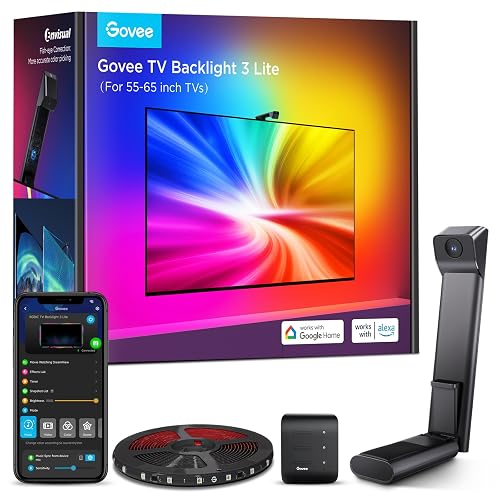
15
Best for Console Gamers
Govee TV Backlight 3 Lite
Bottom line: A big immersion upgrade for console gamers that works with any device, once you get through a slightly fiddly setup.
The Govee TV Backlight 3 Lite makes a console gamer's TV feel bigger and more immersive.
Pros & Cons
Pros
- Works with any console or source
- Makes games and movies more immersive
- Strong value for camera-based sync
- Warm white LED for more natural tones
- Syncs with other Govee lights in the room
Cons
- Setup and calibration take some time
- Adhesive could be stronger
Why We Picked It
A small camera watches the screen and the LED strip behind the TV mirrors its colors, so explosions and sunsets spill onto the wall. Because it reads the picture with a camera, it works with any console, streaming box or PC without special compatibility. It adds a warm white LED for more natural tones and can sync with other Govee lights in the room. Expect to spend some time on setup and calibration, but once it's dialed in, it's a big upgrade for game nights.
Who It's For
The person getting this plays on a console connected to a 55 to 65-inch TV and loves immersive game nights. A camera reads the picture so explosions and sunsets spill onto the wall, it works with any console, streaming box or PC, and it can sync with other Govee lights in the room.
Specs & Configurations
- Fits
- 55 to 65-inch TVs (11.8ft strip)
- Sync
- camera with fish-eye correction
- LEDs
- RGBICW with warm white
- Control
- Govee Home app, Alexa, Google Assistant
- Extras
- DreamView sync with up to 7 other Govee lights
Get It Now
Check Price on Amazon
16
Best Small Gift
Paladone PlayStation Icons Light
Bottom line: An inexpensive, instantly recognizable decoration that every PlayStation fan will be happy to see on their shelf.
The PlayStation Icons Light is a small, affordable gift that every PlayStation fan recognizes instantly.
Pros & Cons
Pros
- Instantly recognizable decor
- Music-reactive mode
- USB or battery power
- Officially licensed by PlayStation
- Color-phasing mode
Cons
- Decorative rather than a real room light
- Batteries not included
Why We Picked It
It's a 12-inch shelf light shaped like the triangle, circle, cross and square symbols, with a steady glow, a color-phasing mode and a sound-reactive mode that flashes along with music or games. It runs from USB or batteries, so it can sit on a desk, a shelf or next to the TV. It's a great add-on to a bigger gift or a fun stocking stuffer.
Who It's For
The person getting this is a PlayStation fan who likes a game room with personality. The 12-inch light shaped like the triangle, circle, cross and square symbols glows steadily, phases through colors or flashes with music, and sits on a desk, shelf or next to the TV.
Specs & Configurations
- Size
- about 12 x 4 inches
- Power
- USB (cable included) or 3 AAA batteries
- Modes
- standard, color phasing, sound reactive
- License
- officially licensed by PlayStation
Get It Now
Check Price on AmazonGifts for Gamers Who Have Everything: Retro and Collectibles
For the gamer who really does have every console, nostalgia is the answer. These gifts celebrate gaming history and look great on display.
17
Best Collectible
LEGO Super Mario Game Boy (72046)
Bottom line: The safest crowd-pleaser on this list, a fun two-hour build that any adult who grew up with a Game Boy will proudly display.
The LEGO Game Boy is one of the most-loved retro gift ideas, and it's an easy hit with anyone who grew up with the original.
Pros & Cons
Pros
- Remarkably close to the real Game Boy
- Fun, relaxing build
- Looks great on a desk or shelf
- Pressable buttons and a contrast dial
- Two swappable Game Paks
- Lenticular screens you can swap
Cons
- Display piece only, it doesn't play games
- Quick build for experienced LEGO fans
Why We Picked It
It recreates Nintendo's 1989 handheld almost to scale, with buttons that press, a contrast dial and two Game Paks that slide into the back. Swap the lenticular screens to show different games, then set it on the included stand. The build takes about two hours, which makes it a perfect holiday afternoon project, and it looks great on a desk or a game room shelf afterward. It doesn't light up or play games, but that's not the point. It's a nostalgia piece that every Game Boy fan will want to show off.
Who It's For
The person getting this is an adult who grew up with the original Game Boy, or loves LEGO. The 421-piece set recreates the 1989 handheld almost to scale in about two hours, with pressable buttons, a contrast dial and two Game Paks, and it ends up on a desk or game room shelf.
Specs & Configurations
- Pieces
- 421
- Size
- over 5 in. high, 11.5 in. wide, 1 in. deep (with stand)
- Features
- pressable buttons, contrast dial, 2 swappable Game Paks, lenticular screens
- Age
- 18+
- Build time
- about 2 hours
Get It Now
Check Price on Amazon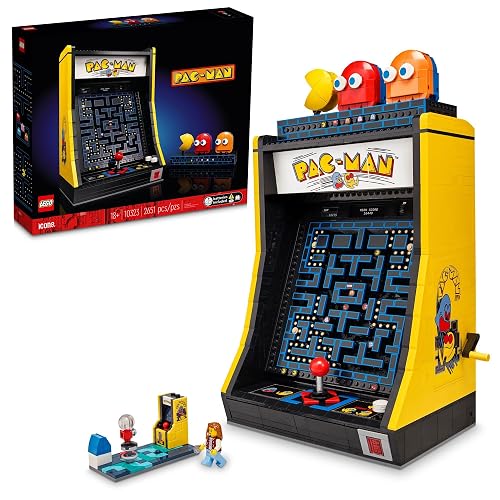
18
Best Big LEGO Build
LEGO Icons PAC-MAN Arcade (10323)
Bottom line: A bigger, more mechanical LEGO build for arcade fans who want an impressive display piece and a project to enjoy.
The LEGO PAC-MAN Arcade is a bigger, more involved build for the retro fan who loves a project.
Pros & Cons
Pros
- Clever moving maze mechanism
- Big, impressive display piece
- Engaging build for adults
- Light-up coin slot and adjustable score display
- Display case with rotating character figures
- Includes an arcade minifigure
Cons
- Pricey for a display model
- Takes a few hours to build
Why We Picked It
It's a full arcade cabinet in LEGO form, with a 4-way joystick, a coin slot that lights up and a score display you can change. Turn the crank and Pac-Man and the ghosts chase each other around the maze, and you can open the back to watch the mechanism work. A separate display case adds rotating character figures and a 1980s arcade scene with a gamer minifigure. The gears and moving parts make the build feel more like engineering than a typical set.
Who It's For
The person getting this loves arcades and enjoys a build project that feels more like engineering than a typical set. A 4-way joystick, a lit coin slot and a crank that sends Pac-Man and the ghosts around the maze make a display worth showing off.
Specs & Configurations
- Size
- over 12.5 in. high, 10 in. wide, 7 in. deep
- Features
- 4-way joystick, light-up coin slot, adjustable score display, crank-driven maze mechanism
- Extras
- display case with rotating PAC-MAN, BLINKY and CLYDE figures, arcade minifigure
- Note
- display model, not a working game
Get It Now
Check Price on Amazon
19
Best Retro Console
Atari 2600+ Console
Bottom line: The best way to play real Atari cartridges on a modern TV, as long as you add a USB wall adapter to the gift.
The Atari 2600+ is the retro console for the gamer who still has a box of old cartridges.
Pros & Cons
Pros
- Plays real cartridges on a modern TV
- Authentic woodgrain look and switches
- 10 classic games included
- HDMI output for modern TVs
- Faithful CX40+ joystick replica
- Works with hundreds of 2600 and 7800 cartridges
Cons
- USB wall adapter not included
- Not every old cartridge is compatible
Why We Picked It
It looks like a slightly smaller woodgrain 2600, with switches that feel like the original, but it plugs into a modern TV over HDMI. The cartridge slot works with hundreds of original 2600 and 7800 games, and the included 10-in-1 cartridge covers classics like Adventure, Missile Command and Yars' Revenge. The CX40+ joystick is a faithful replica. Add a 1A USB wall adapter to the gift, since one isn't in the box, and check Atari's compatibility list if they plan to use old cartridges.
Who It's For
The person getting this grew up with Atari, still has a box of old cartridges or collects physical games. It looks like a slightly smaller woodgrain 2600, plays hundreds of original 2600 and 7800 cartridges over HDMI, and the 10-in-1 cartridge covers Adventure, Missile Command and Yars' Revenge.
Specs & Configurations
- Output
- HDMI, multiple screen resolutions
- Compatibility
- hundreds of original Atari 2600 and 7800 cartridges
- Included
- CX40+ joystick, 10-in-1 cartridge, HDMI cable, USB power cable
- Games
- Adventure, Combat, Missile Command, Yars' Revenge and 6 more
- Power
- USB (1A wall adapter not included)
Get It Now
Check Price on Amazon
20
Best Splurge
Arcade1Up PAC-MAN Deluxe Arcade Machine
Bottom line: The ultimate showpiece gift for a game room, if you have the space for a 5-foot cabinet and a helper to build it.
The Arcade1Up PAC-MAN Deluxe is the showpiece gift for the gamer with a game room, a basement or a garage hangout.
Pros & Cons
Pros
- Real arcade feel at home
- Multiple classics in one cabinet
- Online high-score competition
- 14 games including PAC-MAN, Galaga and Dig Dug
- 17-inch color display
- Real-feel joystick and buttons
Cons
- Big and heavy
- Requires assembly
Why We Picked It
It's a 5-foot cabinet with a light-up marquee, a faux coin door and a 17-inch screen that plays 14 arcade classics, including PAC-MAN, Ms. PAC-MAN, Galaga and Dig Dug, with a real-feel joystick and buttons. Built-in Wi-Fi posts high scores to online leaderboards, so there's always a record to chase. It takes a couple of hours to assemble and weighs 81 pounds, so make sure there's space and a helper.
Who It's For
The person getting this has a game room, basement or garage hangout with space for a 5-foot cabinet and a helper for the two-hour assembly. The light-up marquee and 17-inch screen play 14 classics, and Wi-Fi leaderboards give them high scores to chase.
Specs & Configurations
- Games
- 14, including PAC-MAN, Ms. PAC-MAN, Galaga and Dig Dug
- Screen
- 17-inch color display
- Controls
- real-feel joystick and buttons
- Online
- Wi-Fi leaderboards
- Size
- over 5 ft tall, 81 lbs
- Assembly
- required, about 2 hours
Get It Now
Check Price on Amazon
21
Best Stocking Stuffer
Paladone Game Boy Heat Changing Mug
Bottom line: A cheap, cheerful stocking stuffer that makes a Nintendo fan smile every morning, as long as it stays out of the dishwasher.
The Game Boy heat changing mug is a small, cheerful gift that gets used every day.
Pros & Cons
Pros
- Fun reveal every morning
- Gift box included
- Affordable add-on to a bigger gift
- Heat-activated Game Boy screen design
- Officially licensed Nintendo
Cons
- Hand wash only to protect the design
- Smaller than a standard mug
Why We Picked It
Pour in coffee, tea or hot chocolate and the Game Boy screen "powers on" to show a game, then fades back as it cools. It comes in a gift box and pairs well with the LEGO Game Boy for a themed bundle. Hand wash it to keep the effect working.
Who It's For
The person getting this is a Nintendo or retro fan who starts the day with coffee, tea or hot chocolate. The Game Boy screen powers on to show a game when the mug is hot and fades back as it cools, and it arrives in a gift box ready to wrap.
Specs & Configurations
- Capacity
- 10 oz
- Effect
- heat-activated screen design
- Care
- hand wash only, not microwave safe
- Packaging
- gift box
- License
- officially licensed Nintendo
Get It Now
Check Price on AmazonGifts for Gamers Who Have Everything: Tools and Subscriptions
The last two kinds of gifts never go to waste: tools to keep their gear running, and more games to play.
22
Best Practical Gift
iFixit Mako Driver Kit
Bottom line: The most useful gift on this list for anyone who opens their gear, with a bit for nearly every console and controller screw.
The iFixit Mako is the gift gamers end up using far more than they expect.
Pros & Cons
Pros
- Covers nearly every console and controller screw
- High-quality bits and driver
- Bits can be replaced individually
- 64 precision bits including Torx, tri-wing and Pentalobe
- Magnetic case with a lid that doubles as a sorting tray
Cons
- Not a full repair kit (no opening tools)
- Overkill for someone who never opens their gear
Why We Picked It
It has a bit for almost every screw in gaming hardware, including the tri-wing, Torx and Pentalobe screws used in consoles and controllers. That makes it perfect for cleaning a PS5, replacing worn controller sticks or swapping a Switch shell. The aluminum driver has a knurled grip and a swivel top, the bits fit snugly and the magnetic case keeps everything organized, with a lid that doubles as a screw tray.
Who It's For
The person getting this mods controllers, cleans consoles or builds PCs, and keeps running into odd screws. Tri-wing, Torx and Pentalobe bits cover a PS5, a Switch shell and worn controller sticks, and the magnetic case keeps every bit organized with a lid that doubles as a screw tray.
Specs & Configurations
- Bits
- 64 precision bits, including Torx, tri-wing and Pentalobe
- Driver
- aluminum handle with magnetic socket, swivel top
- Extras
- flexible extension
- Case
- magnetic, foam insert, lid doubles as a sorting tray
- Works on
- PS5, Switch, controllers, PCs, phones
Get It Now
Check Price on Amazon
23
Best Repair Kit
iFixit Pro Tech Toolkit
Bottom line: The complete repair kit for gamers who mod controllers or restore retro consoles, backed by a lifetime warranty.
The Pro Tech Toolkit is the step up for a gamer who likes to repair, mod or restore hardware.
Pros & Cons
Pros
- Everything needed to open and repair gaming gear
- Lifetime warranty
- Backed by iFixit's free repair guides
- Opening tools, tweezers and anti-static wristband included
- 64 precision bit driver set
Cons
- More expensive than the Mako kit
- More tools than a casual fixer needs
Why We Picked It
It includes the same 64 precision bits and driver as the Mako kit, plus the opening tools, tweezers and anti-static wristband you need to safely pry open handhelds, controllers, consoles and laptops. It's handy for restoring retro systems like Game Boys, GameCubes and SNES consoles, and it pairs with iFixit's free online repair guides. iFixit replaces any tool that breaks for as long as you own it.
Who It's For
The person getting this repairs, mods or restores hardware, from retro Game Boys, GameCubes and SNES consoles to modern controllers and handhelds. The opening tools, tweezers and anti-static wristband let them pry open devices safely, iFixit's free repair guides show the way, and any tool that breaks is replaced for as long as they own it.
Specs & Configurations
- Includes
- 64 precision bit driver set, flex extension, tweezers, opening tools, anti-static wristband
- Case
- magnetic with foam insert, lid sorting tray
- Warranty
- lifetime
- Works on
- consoles, controllers, handhelds, laptops, phones
Get It Now
Check Price on Amazon
24
Best Digital Gift
Xbox Game Pass Ultimate (3 Months)
Bottom line: The perfect last-minute gift for Xbox and PC players who own every game, since it unlocks hundreds more instantly.
Game Pass Ultimate solves the "they already own every game" problem by giving them access to hundreds more.
Pros & Cons
Pros
- Hundreds of games to try
- New first-party games on day one
- Instant digital delivery
- Online console multiplayer included
- Cloud gaming on phones, TVs and handhelds
- EA Play and member perks
Cons
- Only useful on Xbox, PC or cloud
- Games leave the library over time
Why We Picked It
Three months of Ultimate unlocks a big library of games on Xbox, PC and the cloud, including new games from Xbox Game Studios, Bethesda and Activision on day one. It also includes online console multiplayer, EA Play and member perks, and cloud gaming lets them play on phones, TVs and handhelds. It arrives as a digital code, which makes it a perfect last-minute gift.
Who It's For
The person getting this plays on Xbox or PC and already owns every game they want. Three months of Ultimate opens up a big library, including new games from Xbox Game Studios, Bethesda and Activision on day one, plus online console multiplayer and cloud play on phones, TVs and handhelds, all delivered as a digital code.
Specs & Configurations
- Length
- 3 months
- Delivery
- digital code
- Includes
- hundreds of games, day-one releases, EA Play, online console multiplayer, cloud gaming, member perks
- Platforms
- Xbox Series X and S, Xbox One, Windows PC, cloud devices
Get It Now
Check Price on AmazonFAQ
What do you get a gamer who has everything?
The best gifts for gamers who have everything are premium upgrades and things they’d never buy for themselves. Think a pro controller like the DualSense Edge or Xbox Elite Series 2, a high-end keyboard like the Lemokey P1 HE, a headset with swappable batteries or a collectible like the LEGO Game Boy.
Are there gifts that work for both PC and console gamers?
Yes. Lighting like the Govee Glide Hexa panels, a portable SSD like the Lexar SL500, the iFixit Mako Driver Kit and retro collectibles all work no matter what they play. The Arctis Nova Pro Wireless connects to a PC and a console at the same time.
What are good gifts for long gaming sessions?
Comfort and power upgrades help most. A headset with swappable batteries, a controller with a long battery life like the Xbox Elite Series 2 and a Couchmaster lap desk for couch PC gaming all make long sessions easier.
What should I get a gamer who mostly plays Nintendo?
Nostalgia gifts like the LEGO Game Boy and the Game Boy heat changing mug are easy wins. For Switch 2 gear, see our guide to gifts for Switch 2 owners.
What’s a good last-minute gift for a gamer?
A digital code like Xbox Game Pass Ultimate arrives instantly. Small gifts like the PlayStation Icons Light or the Game Boy mug also ship quickly and make great stocking stuffers.
Final Thoughts
The LEGO Game Boy is the gift almost nobody already owns, while the Arctis Nova Pro Wireless and the Lemokey P1 HE are premium upgrades most gamers would love but rarely buy for themselves. PS5 owners will get daily use out of the PlayStation Portal, and the iFixit Mako Driver Kit is the practical gift they’ll reach for again and again. If you want a showpiece, the Arcade1Up PAC-MAN Deluxe turns any room into an arcade.
Shopping for a specific console? See our gifts for PS5 gamers and gifts for Xbox gamers, grab a few stocking stuffers for gamers or browse all our gift guides for gamers.