

Twenty-five dollars won’t buy a new game, but it can buy something a gamer uses every day. These gifts for gamers under $25 include a drift-resistant controller, a PS5 headset, a Switch 2 screen protector, a card game for game night and a book about how their favorite games got made, all $25 or less when we checked and grouped by type.
Gifts for Gamers Under $25: 26 Ideas for 2026
GameCuki is reader-supported. When you buy through links on our site, we may earn an affiliate commission at no extra cost to you. As an Amazon Associate I earn from qualifying purchases. Learn more.
GameCuki Recommends

Best Controller Under $25
GameSir Nova Lite Wireless Controller
Bottom line: The best controller you can buy for under $25, with drift-resistant Hall effect sticks and three ways to connect, though pairing modes take a minute to learn.
- Hall effect sticks resist drift
- Works on PC, Switch, phones and Steam Deck
- Feels like a full-size Xbox-style pad
- Connects over 2.4G dongle, Bluetooth or USB-C
- Included 2.4G dongle
- Turbo function
- Pairing modes can be confusing
- No USB-C cable in the box

Best Headset Under $25
HyperX Cloud Stinger 2 Core (PlayStation)
Bottom line: The best headset gift under $25, light and comfortable with a swivel-to-mute mic from a brand known for comfort.
- Light and comfortable
- Swivel-to-mute is simple to use
- Durable for the price
- On-earcup volume control
- Plugs straight into a DualSense, nothing to charge
- 40mm drivers add punchy bass
- Basic mic
- Can slip on smaller heads

Best for Switch 2 Owners
amFilm OneTouch Screen Protector for Switch 2
Bottom line: The perfect cheap gift for a new Switch 2 owner, because its alignment tray makes a bubble-free install almost foolproof.
- Foolproof tray installation
- Clear glass keeps touch response natural
- Protects the screen from scratches
- 9H tempered glass
- Anti-fingerprint coating
- Install takes about 30 seconds
- Glossy finish still reflects light
- Only fits Switch 2

Best Party Game
Exploding Kittens (Original Edition)
Bottom line: A quick, hilarious card game that's easy to learn and a hit at family and friend game nights.
- Easy to learn in minutes
- Fast, funny rounds
- Small enough to travel
- Illustrated by The Oatmeal
- Plays with 2 to 5 players
- Suits ages 7 and up
- Best with three or more players
- Gets repetitive for some groups

Best Book for Gamers
Blood, Sweat, and Pixels by Jason Schreier
Bottom line: The best book to give a gamer, a gripping behind-the-scenes look at how hit games actually get made.
- Gripping, easy to read
- Fascinating for casual and hardcore gamers
- Great for anyone who wants to make games
- Each chapter follows a different game
- Easy to read in short sessions
- Focuses on development, not gameplay
- Some stories are familiar to industry fans
Table of Contents
- GameCuki Recommends
- Gifts for Gamers Under $25: Controllers and Adapters
- Gifts for Gamers Under $25: Headsets and PC Gear
- Gifts for Gamers Under $25: Console Accessories
- Gifts for Gamers Under $25: Digital Gifts
- Gifts for Gamers Under $25: Room Decor and Collectibles
- Gifts for Gamers Under $25: Tabletop and Party Games
- Gifts for Gamers Under $25: Books and Nostalgia
- Final Thoughts
Gifts for Gamers Under $25: Controllers and Adapters
A controller under $25 used to mean a flimsy knockoff. These three are genuinely good, and one turns the controllers they already own into something more useful.
1
Best Controller Under $25
GameSir Nova Lite Wireless Controller
Bottom line: The best controller you can buy for under $25, with drift-resistant Hall effect sticks and three ways to connect, though pairing modes take a minute to learn.
The Nova Lite is the cheapest controller we'd happily give as a gift.
Pros & Cons
Pros
- Hall effect sticks resist drift
- Works on PC, Switch, phones and Steam Deck
- Feels like a full-size Xbox-style pad
- Connects over 2.4G dongle, Bluetooth or USB-C
- Included 2.4G dongle
- Turbo function
Cons
- Pairing modes can be confusing
- No USB-C cable in the box
Why We Picked It
Its Hall effect sticks use magnets instead of parts that wear down, so they're built to resist the drift that ruins cheap pads. It connects over the included 2.4G dongle, Bluetooth or USB-C, so one controller works with a PC, a Switch, a phone or a Steam Deck. It feels like a lighter Xbox controller in the hand, and the 10-hour battery recharges in about two hours.
Who It's For
The person getting this needs a reliable second controller for a PC, a Switch, a phone or a Steam Deck. The magnet-based Hall effect sticks are built to resist drift, the included dongle, Bluetooth and USB-C let one pad work across devices, and the full-size Xbox-style shape feels familiar in the hand.
Specs & Configurations
- Platforms
- Windows 10 and 11, Switch, Android, iOS, Steam Deck
- Connection
- 2.4G dongle (included), Bluetooth, USB-C
- Sticks
- Hall effect
- Triggers
- linear analog
- Battery
- 600mAh, up to 10 hours, 2-hour charge
- Extras
- turbo function
Get It Now
Check Price on Amazon
2
Best Retro Controller
8BitDo M30 2.4G Wireless Gamepad
Bottom line: The best gift for Sega fans, a faithful six-button Genesis-style pad that's comfortable, responsive and easy to set up.
The M30 is the controller to give anyone who still loves Sonic, Streets of Rage or Street Fighter on a six-button pad.
Pros & Cons
Pros
- Authentic six-button Sega layout
- Precise D-pad and buttons
- Plug-and-play with the included receiver
- Light at 114g
- Built-in rechargeable battery
Cons
- Made mainly for Sega minis and Switch
- No analog sticks
Why We Picked It
8BitDo recreated the six-button Genesis layout with a responsive D-pad and buttons, and the 2.4G receiver makes it plug-and-play with the Sega Genesis Mini, Mega Drive Mini and Switch. It's light, comfortable and simple enough for young kids to pick up, which also makes it a good retro pad for family game time.
Who It's For
The person getting this loves Sonic, Streets of Rage or Street Fighter on a six-button pad, and likely owns a Genesis Mini, Mega Drive Mini or Switch. The 2.4G receiver makes setup plug-and-play, and the light, simple design is easy for young kids to pick up during family game time.
Specs & Configurations
- Layout
- 6-button Sega Genesis style
- Compatibility
- Sega Genesis Mini, Mega Drive Mini, Switch
- Connection
- 2.4G receiver (included)
- Battery
- built-in rechargeable
- Weight
- 114g
- Extras
- turbo (not on Switch)
Get It Now
Check Price on Amazon
3
Best Controller Adapter
8BitDo Wireless USB Adapter 2
Bottom line: A clever, inexpensive gift that lets a gamer use their favorite Xbox or PlayStation controller on a Switch, PC or Steam Deck.
The USB Adapter 2 is the small gift that makes a gamer's best controller work almost anywhere.
Pros & Cons
Pros
- Use one favorite controller across systems
- Motion controls on Switch
- Custom mapping and macros
- Supports Xbox, PlayStation and Switch Pro controllers
- Works with Switch, PC, Mac and Steam Deck
Cons
- Pairs one controller at a time
- Needs a firmware update for best results
Why We Picked It
Plug it into a Switch, PC, Mac or Steam Deck, pair an Xbox, PlayStation or Switch Pro controller to it and play. On Switch, it even supports 6-axis motion, and 8BitDo's software lets them remap buttons, tweak stick and trigger sensitivity and create macros. It's perfect for someone who loves their DualSense or Xbox controller and wants to use it on Switch.
Who It's For
The person getting this has a favorite DualSense or Xbox controller and wants to use it on a Switch, PC, Mac or Steam Deck. They plug in the adapter, pair the controller and play, with 6-axis motion on Switch and software to remap buttons, adjust sensitivity and create macros.
Specs & Configurations
- Controllers
- Xbox Series X and S, Xbox One Bluetooth, PS5, PS4, PS3, Switch Pro, Wii U Pro, Wii Remote, 8BitDo Bluetooth controllers
- Systems
- Switch, Switch 2, Windows, macOS, Steam Deck, Raspberry Pi
- Features
- 6-axis motion on Switch, vibration in X-input mode
- Software
- button mapping, sensitivity, macros
Get It Now
Check Price on AmazonGifts for Gamers Under $25: Headsets and PC Gear
These picks prove you don’t need a big budget for gear from brands gamers trust.
4
Best Headset Under $25
HyperX Cloud Stinger 2 Core (PlayStation)
Bottom line: The best headset gift under $25, light and comfortable with a swivel-to-mute mic from a brand known for comfort.
The Cloud Stinger 2 Core is a real HyperX headset at a stocking-stuffer price.
Pros & Cons
Pros
- Light and comfortable
- Swivel-to-mute is simple to use
- Durable for the price
- On-earcup volume control
- Plugs straight into a DualSense, nothing to charge
- 40mm drivers add punchy bass
Cons
- Basic mic
- Can slip on smaller heads
Why We Picked It
It plugs straight into a DualSense, so there's nothing to charge or pair, and at 260g it stays comfortable through long sessions. The 40mm drivers add punchy bass, the flexible mic mutes when swiveled up and the volume control sits right on the earcup. It's a solid first headset for a younger player or a reliable spare for anyone.
Who It's For
The person getting this plays on a PS5, whether they're a kid or teen getting a first headset or someone who wants a reliable spare. It plugs straight into the DualSense with nothing to charge or pair, and at 260g it stays comfortable through long sessions.
Specs & Configurations
- Drivers
- 40mm directional
- Mic
- flexible, swivel-to-mute
- Controls
- on-headset volume
- Connection
- 3.5mm
- Weight
- 260g
- Made for
- PS5, PS4
Get It Now
Check Price on Amazon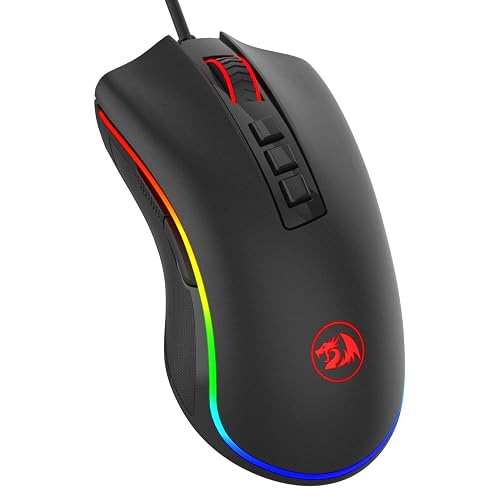
5
Best Mouse Under $25
Redragon M711 Cobra Gaming Mouse
Bottom line: The best gaming mouse you can give under $25, with RGB lighting, seven programmable buttons and a build that takes a beating.
The M711 Cobra is a budget mouse that feels far more expensive than it is.
Pros & Cons
Pros
- Very durable for the price
- Lots of DPI and button options
- Braided cable
- Seven programmable buttons
- RGB lighting with five saved profiles
- Comfortable for long sessions
Cons
- Software is Windows-only
- Wired only
Why We Picked It
It has an accurate sensor with five DPI presets you can fine-tune, seven programmable buttons and RGB lighting with five saved profiles. The braided cable and solid build hold up to rough use, and its shape is comfortable for long sessions. For a new PC gamer, it's a big step up from a basic office mouse.
Who It's For
The person getting this is new to PC gaming or replacing a worn mouse and is stepping up from a basic office mouse. The sensor offers five fine-tunable DPI presets, seven programmable buttons and RGB profiles, while the braided cable and solid build hold up to rough use.
Specs & Configurations
- DPI
- up to 10,000, 5 presets
- Buttons
- 7 programmable
- Lighting
- RGB with 5 memory profiles
- Cable
- braided
- Compatibility
- Windows PC
Get It Now
Check Price on Amazon
6
Best Mousepad
SteelSeries QcK Large Mousepad
Bottom line: The classic esports mousepad, a smooth, roomy upgrade that almost every PC gamer can use.
The QcK Large is an easy gift that makes aiming feel better right away.
Pros & Cons
Pros
- Smooth, consistent tracking
- Roomy enough for low-sensitivity aiming
- Stays put on the desk
- Micro-woven cloth works with any gaming mouse
- Rolls up for a stocking
- Rubber base
Cons
- Plain black design
- Cloth needs the occasional wash
Why We Picked It
At 450 by 400mm, it gives plenty of room for low-sensitivity aiming without covering the whole desk. The micro-woven cloth tracks smoothly with any gaming mouse, the rubber base keeps it from sliding and it rolls up for a stocking. SteelSeries' QcK has been trusted by esports pros for years.
Who It's For
The person getting this plays on a PC with a small or worn-out mousepad and likes low-sensitivity aiming. At 450 by 400mm it gives room to swipe without covering the whole desk, the cloth surface tracks smoothly, and the rubber base keeps it from sliding.
Specs & Configurations
- Size
- 450 x 400 x 2mm
- Surface
- micro-woven cloth
- Base
- non-slip rubber
- Sensors
- optimized for optical and laser
Get It Now
Check Price on AmazonGifts for Gamers Under $25: Console Accessories
Small accessories fix the little annoyances console players deal with every day, from dead batteries to scratched screens.
7
Best for Switch 2 Owners
amFilm OneTouch Screen Protector for Switch 2
Bottom line: The perfect cheap gift for a new Switch 2 owner, because its alignment tray makes a bubble-free install almost foolproof.
A screen protector is the first accessory most Switch 2 owners need, and this one is the easiest to install.
Pros & Cons
Pros
- Foolproof tray installation
- Clear glass keeps touch response natural
- Protects the screen from scratches
- 9H tempered glass
- Anti-fingerprint coating
- Install takes about 30 seconds
Cons
- Glossy finish still reflects light
- Only fits Switch 2
Why We Picked It
The rigid tray fits over the console so the glass lands exactly where it should, and you simply press it down. Even people who've botched screen protectors before get a clean, bubble-free fit. The tempered glass stays clear and responsive to touch, and an oil-repellent coating keeps fingerprints down. It's also our top pick for the best Switch 2 screen protector.
Who It's For
The person getting this just picked up a Switch 2 and wants to protect the screen, but may be nervous about installing a protector. The rigid tray lines the glass up exactly, so a clean, bubble-free fit takes about 30 seconds, and the oil-repellent coating keeps fingerprints down.
Specs & Configurations
- Material
- 9H tempered glass
- Install
- auto-alignment tray, about 30 seconds
- Coating
- anti-fingerprint
- Fits
- Nintendo Switch 2
Get It Now
Check Price on Amazon
8
Best Switch 2 Charger
FYOUNG Joy-Con 2 Charging Dock
Bottom line: A cheap, practical dock that keeps up to four Joy-Con 2 charged and organized, with lights that switch off when they're full.
The FYOUNG dock solves the "which Joy-Con is charged?" problem for families with extra controllers.
Pros & Cons
Pros
- Charges four controllers at once
- Keeps Joy-Con 2 organized
- Lights don't stay on all the time
- Magnetic slots marked for left and right
- Overcharge and short-circuit protection
Cons
- Only for Switch 2 Joy-Con
- Third-party, not from Nintendo
Why We Picked It
It holds up to four Joy-Con 2 upright in magnetic slots marked for left and right, so they always go in the right way. Red and green lights show the charging status, and built-in protection guards against overcharging. It keeps controllers tidy next to the console for very little money.
Who It's For
The person getting this lives in a Switch 2 household with extra Joy-Con 2 and a constant question of which one is charged. Four magnetic slots marked for left and right hold the controllers upright next to the console, and red and green lights show charging status.
Specs & Configurations
- Charges
- up to 4 Joy-Con 2 controllers
- Ports
- magnetic, with L/R and +/- markers
- Indicators
- red while charging, green when full
- Protection
- overcharge, overcurrent, short-circuit
- Fits
- Nintendo Switch 2 Joy-Con 2 only
Get It Now
Check Price on Amazon
9
Best PS5 Charger
NexiGo PS5 Controller Charging Station
Bottom line: An inexpensive dual dock that keeps two DualSense controllers charged and tidy, with lights that won't light up the room.
The NexiGo dock means no more starting a game with a dead DualSense.
Pros & Cons
Pros
- Charges two controllers at once
- Subtle status lights
- Doubles as a controller stand
- Charges in about three hours
- Over-charge and overheat protection
Cons
- No wall adapter included
- Uses two console USB ports
Why We Picked It
It charges two controllers at once in about three hours, its red and green lights are easy to read without being distracting and built-in protection prevents overcharging. It also works as a neat stand next to the console.
Who It's For
The person getting this has a PS5 with two DualSense controllers and hates starting a game with a dead one. The dock charges both in about three hours, its red and green lights are easy to read without being distracting, and it works as a neat stand next to the console.
Specs & Configurations
- Charges
- 2 DualSense controllers in about 3 hours
- Power
- PS5 rear USB ports (no wall adapter included)
- Indicators
- red while charging, green when full
- Protection
- over-charge, over-voltage, overheat, short-circuit
Get It Now
Check Price on Amazon
10
Best Xbox Accessory
PowerA Play & Charge Kit for Xbox
Bottom line: The cheapest way to end an Xbox player's AA battery habit, officially licensed with a two-year warranty.
A rechargeable kit is the most practical small gift for an Xbox player.
Pros & Cons
Pros
- Charge while you play
- Officially licensed
- Very affordable
- Works with PowerA charging stands
- Replaces AA batteries with rechargeable packs
- 2-year limited warranty
Cons
- Battery life is only average
- No charging stand included
Why We Picked It
The standard Xbox controller runs on AA batteries, and this kit swaps them for rechargeable packs you can charge while you play. It's officially licensed, works with PowerA charging stands and has a two-year warranty.
Who It's For
The person getting this plays Xbox on a controller that runs on AA batteries and is tired of replacing them. The rechargeable pack charges while they play, is officially licensed, works with PowerA charging stands and carries a two-year warranty.
Specs & Configurations
- Compatibility
- Xbox Series X and S, Xbox One and Windows controllers
- Charging
- play while charging or charge the battery directly
- Works with
- PowerA charging stands
- Warranty
- 2-year limited
Get It Now
Check Price on Amazon
11
Best for Shooter Fans
KontrolFreek FPS Freek Galaxy (PS5)
Bottom line: A small, inexpensive upgrade that gives shooter fans better grip and finer aim, and protects their controller's sticks.
Thumbstick grips are a classic small gift for Call of Duty and Fortnite players.
Pros & Cons
Pros
- Better grip with less thumb fatigue
- Finer aim with the taller right stick
- Protects the stock sticks
- Mid-rise left stick helps with movement
- Non-slip rubber
- Fits PS5 and PS4 controllers
Cons
- Takes a few days to get used to
- Buy the right version for their console
Why We Picked It
The taller right stick gives more precise aim, the mid-rise left stick helps with movement and the grippy rubber keeps thumbs from slipping. They also protect the controller's own sticks from wear.
Who It's For
The person getting this plays Call of Duty, Fortnite or other shooters on a PS5 or PS4 controller. The taller right stick adds precision to aim, the mid-rise left stick helps with movement, and the grippy rubber keeps thumbs from slipping.
Specs & Configurations
- Fits
- PS5 and PS4 controllers
- Right stick
- high-rise concave, adds 10mm
- Left stick
- mid-rise concave, adds 6.5mm
- Material
- non-slip rubber
Get It Now
Check Price on Amazon
12
Best Controller Makeover
GeekShare PS5 Controller Skin Set
Bottom line: A cute, grippy silicone skin that makes a DualSense feel new and protects it from scratches.
A controller skin is a fun, affordable way to refresh a DualSense.
Pros & Cons
Pros
- Soft, grippy feel
- Protects against scratches and drops
- Fun designs
- Two thumb grip caps included
- Two stickers included
Cons
- Fit can be loose in spots
- Best removed while charging
Why We Picked It
The soft silicone adds texture that keeps the controller from slipping in sweaty hands, protects it from scratches and drops and comes in playful designs. Thumb grip caps and stickers are included, so it feels like a full makeover kit.
Who It's For
The person getting this uses a PS5 DualSense and wants it to feel grippier and more personal. The textured silicone keeps the controller from slipping in sweaty hands, protects it from scratches and drops, and the thumb grip caps and stickers make it a full makeover kit.
Specs & Configurations
- In the box
- silicone skin, 2 thumb grip caps, 2 stickers
- Grip
- textured, non-slip silicone
- Fits
- PS5 DualSense only
- Tip
- remove the skin while charging
Get It Now
Check Price on AmazonGifts for Gamers Under $25: Digital Gifts
Digital memberships arrive fast and get used every time they play online.

13
Best for Switch Players
Nintendo Switch Online 12-Month Membership
Bottom line: A year of online play, cloud saves and classic Nintendo games, and a gift every Switch owner will actually use.
Nintendo Switch Online unlocks online play in games like Mario Kart and Smash.
Pros & Cons
Pros
- Needed for most online multiplayer
- Big library of classic games
- Cloud saves protect progress
- NES, Super NES and Game Boy libraries included
- Voice chat in compatible games
- Physical card is easy to wrap
Cons
- Codes can't be refunded
- They may already subscribe
Why We Picked It
A full year of membership lets them play online with friends, backs up their saves to the cloud and adds NES, Super NES and Game Boy classics. The physical card is easy to wrap.
Who It's For
The person getting this plays a Switch or Switch 2 online in games like Mario Kart and Smash. A full year covers online play with friends, cloud save backups and a library of NES, Super NES and Game Boy classics.
Specs & Configurations
- Length
- 12 months, individual membership
- Includes
- online play, cloud saves, NES, Super NES and Game Boy libraries
- App
- voice chat in compatible games
- Delivery
- physical card, redeemed online
Get It Now
Check Price on Amazon
14
Best Last-Minute Gift
Xbox Game Pass Ultimate (1 Month)
Bottom line: An instant digital gift that unlocks hundreds of games, day-one releases and online play for Xbox and PC players.
A month of Game Pass Ultimate is the perfect last-minute gift for an Xbox or PC player.
Pros & Cons
Pros
- Arrives in minutes
- Hundreds of games to try
- Online multiplayer included
- Day-one releases
- EA Play included
- Cloud gaming on supported devices
Cons
- Only one month
- Games leave the library over time
Why We Picked It
It unlocks a big library of games on console, PC and the cloud, including new Xbox releases on day one, plus online multiplayer and EA Play. The code arrives by email in minutes, so it works even on the day of the party.
Who It's For
The person getting this plays on Xbox or a PC and likes trying new games. The code arrives by email in minutes, even on party day, and unlocks hundreds of games across console, PC and the cloud, with new Xbox releases on day one, online multiplayer and EA Play.
Specs & Configurations
- Length
- 1 month
- Delivery
- digital code by email
- Includes
- hundreds of games, day-one releases, EA Play, online console multiplayer, cloud gaming
- Platforms
- Xbox Series X and S, Xbox One, Windows PC, cloud devices
Get It Now
Check Price on AmazonGifts for Gamers Under $25: Room Decor and Collectibles
For gamers who already have the gear, a little decor or a collectible makes their space feel like theirs.

15
Best Nintendo Decor
Paladone Super Mario Bros. Icons Light
Bottom line: A cheerful, officially licensed Mario light that works as a night light or a game room decoration.
The Mario Icons Light is an easy win for any Nintendo fan's room.
Pros & Cons
Pros
- Instantly recognizable Mario icons
- Music-reactive mode
- Soft enough for a night light
- Officially licensed by Nintendo
- Steady, color-phasing and sound-reactive modes
- Runs on USB or batteries
Cons
- Micro USB cable can work loose
- Decorative, not a room lamp
Why We Picked It
Classic Mario icons light up in three modes, including one that pulses with music or game audio. It runs from USB or batteries, so it can sit on a shelf, desk or nightstand.
Who It's For
The person getting this is a Mario fan of any age with a shelf, desk or nightstand to brighten. The classic icons light up in three modes, including one that pulses with music or game audio.
Specs & Configurations
- Size
- 11.8 x 4.3 inches
- Modes
- steady, color phasing, sound reactive
- Power
- micro USB or batteries
- License
- officially licensed by Nintendo
Get It Now
Check Price on Amazon
16
Best PlayStation Decor
Paladone PlayStation Icons Light
Bottom line: An inexpensive, instantly recognizable light that adds atmosphere to any PlayStation fan's room.
The PlayStation Icons Light is the decor gift PlayStation fans recognize instantly.
Pros & Cons
Pros
- Iconic PlayStation design
- Music-reactive mode
- USB or battery power
- Officially licensed by PlayStation
- Steady, color-phasing and sound-reactive modes
Cons
- Batteries not included
- Decorative, not a room lamp
Why We Picked It
It's shaped like the triangle, circle, cross and square buttons and glows in three modes, including one that reacts to music. It runs from USB or batteries, so it fits on a shelf, desk or next to the TV.
Who It's For
The person getting this is a PlayStation fan who likes game room decor. The light is shaped like the triangle, circle, cross and square buttons, glows in three modes including one that reacts to music, and fits on a shelf, desk or next to the TV.
Specs & Configurations
- Size
- about 12 x 4 inches
- Modes
- standard, color phasing, sound reactive
- Power
- USB (cable included) or 3 AAA batteries
- License
- officially licensed by PlayStation
Get It Now
Check Price on Amazon
17
Best Setup Lighting
Govee RGBIC LED Strip Lights (16.4 ft)
Bottom line: The cheapest way to transform a gaming setup, with multicolor effects and music sync controlled from a phone.
LED strips are the fastest way to give a gaming room that streamer look.
Pros & Cons
Pros
- Multicolor effects on one strip
- Music sync
- Very affordable
- 11 music sync modes
- 64+ scenes in the Govee Home app
- Sticks easily behind a desk, monitor or bed
Cons
- No voice assistant support
- Needs a clean surface to stick
Why We Picked It
Different sections of the strip can show different colors at once, so effects flow across a desk or wall. The Govee Home app has dozens of scenes and 11 music sync modes, and the strip sticks easily behind a desk, monitor or bed.
Who It's For
The person getting this wants their gaming room to have that streamer look. Different sections of the strip show different colors at once so effects flow across a desk or wall, and the Govee Home app offers dozens of scenes and 11 music sync modes.
Specs & Configurations
- Length
- 16.4 ft
- Lighting
- RGBIC, multiple colors on one strip
- Control
- Govee Home app over Bluetooth
- Modes
- 11 music sync modes, 64+ scenes
- Note
- no Alexa support
Get It Now
Check Price on Amazon
18
Best Stocking Stuffer
Paladone Game Boy Heat Changing Mug
Bottom line: A cheap, cheerful gift that makes a Nintendo fan smile every morning, as long as it stays out of the dishwasher.
The Game Boy mug is the kind of small gift that gets used every day.
Pros & Cons
Pros
- Fun reveal every morning
- Gift box included
- Very affordable
- Heat-activated Game Boy screen
- Officially licensed Nintendo
Cons
- Hand wash only
- Smaller than a standard mug
Why We Picked It
Pour in a hot drink and the Game Boy screen powers on to show a game, then fades back as it cools. It arrives in a gift box, so it's ready to give.
Who It's For
The person getting this is a Nintendo or retro fan who starts the day with a hot drink. The Game Boy screen powers on to show a game when the mug is hot and fades back as it cools, and the gift box makes it ready to give.
Specs & Configurations
- Capacity
- 10 oz
- Effect
- heat-activated Game Boy screen
- Care
- hand wash only, not microwave safe
- Packaging
- gift box
- License
- officially licensed Nintendo
Get It Now
Check Price on Amazon
19
Best Small Collectible
Funko Pop! Games: Pokémon Pikachu (Waving)
Bottom line: A cheap, cute collectible that Pokémon fans of all ages will happily put on their desk.
Funko Pops are the classic small gift, and Pikachu is the safest choice.
Pros & Cons
Pros
- Instantly recognizable
- Fits any desk or shelf
- Very affordable
- Officially licensed Pokémon
- About 3.75 inches tall
Cons
- Display only
- Collectors may already own it
Why We Picked It
It's small, affordable and loved by Pokémon fans of every age. Funko makes Pops for almost every major game, so swap in their favorite character if Pikachu isn't it.
Who It's For
The person getting this is a Pokémon fan or collector of any age who likes a little character on the desk. The waving Pikachu is small and simple to tuck into a stocking or pair with a bigger gift.
Specs & Configurations
- Height
- about 3.75 inches
- Material
- vinyl
- License
- officially licensed Pokémon
Get It Now
Check Price on AmazonGifts for Gamers Under $25: Tabletop and Party Games
Gamers love game night too. These are quick to learn and fun with friends and family.
20
Best Party Game
Exploding Kittens (Original Edition)
Bottom line: A quick, hilarious card game that's easy to learn and a hit at family and friend game nights.
Exploding Kittens is a favorite with gamers who like an off-screen game night.
Pros & Cons
Pros
- Easy to learn in minutes
- Fast, funny rounds
- Small enough to travel
- Illustrated by The Oatmeal
- Plays with 2 to 5 players
- Suits ages 7 and up
Cons
- Best with three or more players
- Gets repetitive for some groups
Why We Picked It
Players draw cards and try to avoid the Exploding Kitten, using action cards to skip turns, shuffle the deck or defuse it. Rounds are quick, the rules take minutes to learn and The Oatmeal's art keeps everyone laughing.
Who It's For
The person getting this likes an off-screen game night with family or friends. Players draw cards and try to avoid the Exploding Kitten, using action cards to skip turns, shuffle the deck or defuse it, and the quick rounds keep everyone laughing.
Specs & Configurations
- Players
- 2 to 5
- Age
- 7+
- Cards
- 56, illustrated by The Oatmeal
- Play time
- quick rounds
Get It Now
Check Price on Amazon
21
Best for Mario Fans
Jenga: Super Mario Edition
Bottom line: A clever way to get a Mario-obsessed kid to sit down for a family board game, though the blocks are plastic, not wood.
Jenga: Super Mario Edition turns a classic into a Mario adventure.
Pros & Cons
Pros
- Fun Mario twist on classic Jenga
- Spinner keeps every turn different
- Gets kids off the screen
- Race to the top to defeat Bowser
- Suits ages 8 and up
Cons
- Plastic blocks
- Best for younger players
Why We Picked It
A spinner tells players how many blocks to stack, how many layers their Mario character climbs or whether to collect coins, so every turn is different from regular Jenga. Players race to the top to defeat Bowser, which keeps young Mario fans hooked.
Who It's For
The person getting this is a Mario-obsessed kid in a family that wants a board game night. A spinner decides how many blocks to stack, how many layers to climb or whether to collect coins, and the race to defeat Bowser keeps young Mario fans hooked.
Specs & Configurations
- Age
- 8+
- Gameplay
- spinner decides blocks to stack, layers to climb or coins to collect
- Goal
- climb the tower to defeat Bowser
Get It Now
Check Price on Amazon
22
Best Retro Card Game
The Oregon Trail Card Game
Bottom line: A funny, nostalgic co-op card game for anyone who grew up dying of dysentery on the trail.
The Oregon Trail Card Game is the nostalgia gift for millennial gamers.
Pros & Cons
Pros
- Nostalgic 8-bit art and humor
- Cooperative, so everyone plays together
- Quick to learn
- Based on the classic computer game
- Plays with 2 to 6 players
Cons
- Can be brutally random
- Not everyone enjoys losing to the trail
Why We Picked It
It brings the classic computer game to the table, with 8-bit art and the same cheeky sense of humor, including dying of dysentery. Players work together to survive the trail, and the random events make every game a story.
Who It's For
The person getting this grew up with the original Oregon Trail computer game and still laughs about dying of dysentery. Players work together to survive the trail with 8-bit art and the same cheeky humor, and the random events make every game a story.
Specs & Configurations
- Players
- 2 to 6
- Age
- 12+
- Style
- cooperative
- Art
- 8-bit, based on the classic computer game
Get It Now
Check Price on Amazon
23
Best for Tabletop RPG Fans
1985 Games Mystery Dice Set
Bottom line: A fun surprise for Dungeons and Dragons players, with seven quality dice in a mystery design.
New dice are always welcome at the table, and the mystery design adds a little extra fun.
Pros & Cons
Pros
- Fun surprise unboxing
- Solid, easy-to-read dice
- Very affordable
- Full seven-piece polyhedral set
- Works for D&D and other tabletop RPGs
Cons
- You can't choose the design
- Possible duplicates if you buy several
Why We Picked It
Each pack has a full seven-piece polyhedral set in a surprise color and pattern, with easy-to-read numbers for new and experienced players. It's a small gift any tabletop gamer will use at their next session.
Who It's For
The person getting this plays Dungeons and Dragons or other tabletop RPGs and is always happy to have new dice. Each pack has a full seven-piece polyhedral set in a surprise color and pattern with easy-to-read numbers for their next session.
Specs & Configurations
- Dice
- 7-piece polyhedral set
- Design
- mystery colors and patterns
- Use
- D&D and other tabletop RPGs
Get It Now
Check Price on AmazonGifts for Gamers Under $25: Books and Nostalgia
These gifts are about the love of games rather than playing them, and they’re great for long winter breaks.
24
Best Book for Gamers
Blood, Sweat, and Pixels by Jason Schreier
Bottom line: The best book to give a gamer, a gripping behind-the-scenes look at how hit games actually get made.
Blood, Sweat, and Pixels is the book gamers recommend to other gamers.
Pros & Cons
Pros
- Gripping, easy to read
- Fascinating for casual and hardcore gamers
- Great for anyone who wants to make games
- Each chapter follows a different game
- Easy to read in short sessions
Cons
- Focuses on development, not gameplay
- Some stories are familiar to industry fans
Why We Picked It
Jason Schreier tells the stories behind the making of well-known games in a fast, readable way. Each chapter follows a different game, so it's easy to read in short sessions, and it gives gamers a new appreciation for their favorite titles.
Who It's For
The person getting this loves games and wonders how their favorites actually get made, or hopes to work in games someday. Each chapter follows a different well-known game in fast, readable narrative journalism, so it works for short sessions and a new appreciation for old favorites.
Specs & Configurations
- Author
- Jason Schreier
- Format
- paperback
- Topic
- the making of 10 well-known games
- Style
- narrative journalism
Get It Now
Check Price on Amazon
25
Best Follow-Up Read
Press Reset by Jason Schreier
Bottom line: A sobering, well-researched follow-up for anyone who loved Blood, Sweat, and Pixels, though it's a heavier read.
Press Reset is the natural next read for anyone who enjoyed Schreier's first book.
Pros & Cons
Pros
- Thoroughly researched
- Great for aspiring game developers
- Pairs well with Blood, Sweat, and Pixels
- Clear look at how the game industry works
- Narrative journalism style
Cons
- More somber than the first book
- Focuses on the industry, not specific games
Why We Picked It
It follows what happens to developers when studios close and how they rebuild their careers, giving a clear look at how the game industry really works. It's more somber than Blood, Sweat, and Pixels, but it's just as well researched and especially useful for anyone thinking about working in games.
Who It's For
The person getting this loved Jason Schreier's first book and wants to understand the game industry more deeply, or is thinking about working in games. It follows developers through studio closures and how they rebuild their careers, with the same careful research.
Specs & Configurations
- Author
- Jason Schreier
- Format
- paperback
- Topic
- studio closures and the people behind them
- Style
- narrative journalism
Get It Now
Check Price on Amazon
26
Best Nostalgia Gift
Tamagotchi Original
Bottom line: A fun hit of '90s nostalgia for adult gamers that's just as fun for kids discovering it for the first time.
A Tamagotchi is a small, playful gift that sparks memories for anyone who grew up in the '90s.
Pros & Cons
Pros
- Pure '90s nostalgia
- Fits on a keychain
- Battery included
- Original 1997 programming
- Seven possible adults
- Ready to play right away
Cons
- Very simple compared with modern games
- Beeps at inconvenient times
Why We Picked It
It runs the original 1997 programming, so they can feed, clean and care for a pet that grows into one of seven adults. It clips onto a keychain and includes its battery, so it's ready to play right away.
Who It's For
The person getting this grew up in the '90s, or is a younger player who loves virtual pets. They feed, clean and care for a pet that grows into one of seven adults, and it clips onto a keychain with its battery included.
Specs & Configurations
- Programming
- original 1997 generation 2
- Gameplay
- raise a pet from egg to adult, 7 possible adults
- Extras
- number guessing game, keychain
- Battery
- CR2032 included
- Age
- 8+
Get It Now
Check Price on AmazonFinal Thoughts
For someone who plays every day, nothing here beats the GameSir Nova Lite or the HyperX Cloud Stinger 2 Core, while the amFilm OneTouch screen protector is the perfect small gift for a new Switch 2 owner. For game night, Exploding Kittens is a guaranteed laugh, and Blood, Sweat, and Pixels is the book every gamer should read. Prices change often, so check before you buy, since a few picks sit close to $25.
Have a bigger budget? See our gifts for gamers under $50 and gifts for gamers who have everything, grab a few stocking stuffers for gamers or browse all our gift guides for gamers.