

Fifty dollars is the sweet spot for gaming gifts: enough for real gear, not so much that you’re guessing at their setup. These gifts for gamers under $50 range from a drift-resistant controller and a comfortable headset to a faster mouse, a charging kit and a LEGO Game Boy for the shelf, all $50 or less when we checked and grouped by type.
Gifts for Gamers Under $50: 24 Ideas for 2026
GameCuki is reader-supported. When you buy through links on our site, we may earn an affiliate commission at no extra cost to you. As an Amazon Associate I earn from qualifying purchases. Learn more.
GameCuki Recommends
Best Controller Gift
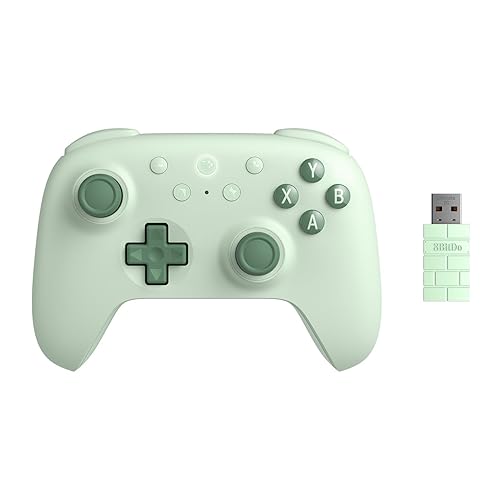
8BitDo Ultimate 2C Wireless Controller
Bottom line: The best controller you can give for under $50, with drift-resistant sticks, a fast wireless dongle and battery life that lasts for days.
- Hall effect sticks and triggers resist drift
- Fast, reliable 2.4G connection
- Long battery life
- Metal stick rings resist wear
- L4/R4 bumpers mappable without software
- 1000Hz polling over the dongle
- Officially supports only Windows and Android
- No back paddles

Best Headset Gift
Razer BlackShark V2 X
Bottom line: The best headset gift under $50, light enough to forget you're wearing it, with great game audio and a clear mic.
- Very light and comfortable
- Clear, detailed game audio
- Works on almost every platform
- Breathable foam cushions keep ears cool
- Cardioid mic cuts background sound
- Simple 3.5mm plug
- Surround sound is Windows-only
- Wired only

Best Mouse Gift
Logitech G305 Lightspeed Wireless Gaming Mouse
Bottom line: The best gaming mouse gift under $50, with lag-free wireless, a precise sensor and a battery that lasts for months.
- Lag-free wireless for competitive games
- Battery lasts for months
- Light and portable
- HERO sensor tracks precisely
- Receiver stores inside the mouse
- Six programmable buttons
- Runs on an AA battery
- Small for very large hands

Best Collectible
LEGO Super Mario Game Boy (72046)
Bottom line: The best nostalgia gift under $50, a fun two-hour build that any adult who grew up with a Game Boy will proudly display.
- Remarkably close to the real Game Boy
- Fun, relaxing build
- Great desk or shelf piece
- Pressable buttons and a contrast dial
- Game Paks slide in and out
- Swappable lenticular screens
- Display model, it doesn't play games
- Quick build for experienced LEGO fans

Best Practical Gift
iFixit Mako Driver Kit
Bottom line: The most useful gift on this list for anyone who opens their gear, with a bit for nearly every console and controller screw.
- Covers nearly every gaming screw
- High-quality bits and driver
- Bits can be replaced individually
- 64 precision bits including Torx, tri-wing and Pentalobe
- Aluminum driver with magnetic socket and swivel top
- Magnetic case with sorting tray lid
- No opening tools included
- Overkill for someone who never opens their gear
Table of Contents
- GameCuki Recommends
- Gifts for Gamers Under $50: Controllers
- Gifts for Gamers Under $50: Headsets and Speakers
- Gifts for Gamers Under $50: PC Desk Upgrades
- Gifts for Gamers Under $50: Console Accessories
- Gifts for Gamers Under $50: Collectibles and Room Decor
- Gifts for Gamers Under $50: Fun and Practical Picks
- Final Thoughts
Gifts for Gamers Under $50: Controllers
A second controller is the gift most gamers can always use, whether it’s for a friend on the couch or replacing a pad that’s started to drift. These three bring features that used to cost far more.
1
Best Controller Gift
8BitDo Ultimate 2C Wireless Controller
Bottom line: The best controller you can give for under $50, with drift-resistant sticks, a fast wireless dongle and battery life that lasts for days.
The 8BitDo Ultimate 2C packs features from much pricier controllers into a pad that costs far less than an Xbox controller.
Pros & Cons
Pros
- Hall effect sticks and triggers resist drift
- Fast, reliable 2.4G connection
- Long battery life
- Metal stick rings resist wear
- L4/R4 bumpers mappable without software
- 1000Hz polling over the dongle
Cons
- Officially supports only Windows and Android
- No back paddles
Why We Picked It
Its Hall effect sticks and triggers sense position with magnets, so they're far less likely to drift, and wear-resistant metal rings protect the sticks. The 2.4G dongle polls at 1000Hz for a responsive, lag-free connection on PC, the extra L4 and R4 bumpers can be mapped right on the controller and the battery lasts for days of play. It's the controller to give a PC gamer who's still using a worn-out pad.
Who It's For
The person getting this games on a PC or Android phone and is still using a worn-out pad. Hall effect sticks and triggers are far less likely to drift, the 2.4G dongle polls at 1000Hz for a responsive connection, and the L4 and R4 bumpers can be mapped right on the controller.
Specs & Configurations
- Platforms
- Windows PC, Android
- Connection
- 2.4G dongle and wired at 1000Hz, Bluetooth
- Sticks and triggers
- Hall effect, metal stick rings
- Extra buttons
- L4/R4 bumpers, mappable without software
- Extras
- turbo function
Get It Now
Check Price on Amazon
2
Best Multi-Platform Controller
GameSir Nova Lite 2 Wireless Controller
Bottom line: A cheap, versatile controller for PC, Switch and phones, with Hall effect sticks, trigger stops and back buttons, though its battery life is only average.
The Nova Lite 2 is the budget controller to give someone who plays on more than one device.
Pros & Cons
Pros
- Works on PC, Switch and phones
- Trigger stops and two back buttons
- Hall effect sticks at a very low price
- Mechanical circular D-pad
- 1000Hz polling
- Connects over 2.4G dongle, Bluetooth or cable
Cons
- Battery life is only average
- Setup can take a little fiddling
Why We Picked It
It connects to a PC, a Switch or Switch 2, an Android phone or an iPhone over a 2.4G dongle, Bluetooth or a cable, so one controller covers most of a gamer's devices. Hall effect sticks resist drift, trigger stops shorten the pull for faster shots in shooters and two back buttons can be mapped or set up with macros. A mechanical circular D-pad and 1000Hz polling round out a lot of features for the price.
Who It's For
The person getting this plays across several devices, such as a PC, a Switch or Switch 2, an Android phone or an iPhone. The 2.4G dongle, Bluetooth and cable options let one controller cover them all, and the drift-resistant sticks, trigger stops and macro-ready back buttons suit shooters and everyday play.
Specs & Configurations
- Platforms
- PC, Switch, Switch 2, Android, iOS
- Connection
- 2.4G dongle, Bluetooth, wired
- Polling
- 1000Hz
- Sticks
- Hall effect with anti-friction rings
- Triggers
- 2-way trigger stops plus hair trigger mode
- Extras
- 2 back buttons with macro recording, mechanical D-pad
Get It Now
Check Price on Amazon
3
Best for Xbox
PowerA Advantage Wired Controller with Lumectra for Xbox
Bottom line: An officially licensed Xbox controller with back buttons, trigger locks and customizable RGB for less than a standard pad, though durability is inconsistent.
The PowerA Advantage brings pro-style features to an Xbox controller that costs less than Microsoft's own.
Pros & Cons
Pros
- Back buttons and trigger locks for less
- Officially licensed for Xbox
- Fun, customizable RGB lighting
- Impulse triggers keep the rumble Xbox players expect
- Feels like a standard Xbox controller
- Works on Xbox and Windows PCs
Cons
- Durability is inconsistent
- Wired only
Why We Picked It
It feels like a standard Xbox controller, but adds two back buttons you can program mid-game without touching any menus and three-way trigger locks that shorten the pull for shooters. Impulse triggers keep the rumble Xbox players expect, and four lighting zones make it a fun match for an RGB setup. It's officially licensed, so it works on Xbox Series X and S, Xbox One and Windows PCs without fuss.
Who It's For
The person getting this plays shooters on Xbox Series X/S, Xbox One or a Windows PC and wants pro-style extras. Two back buttons can be programmed mid-game without menus, three-way trigger locks shorten the pull, and four RGB zones match a lit-up setup.
Specs & Configurations
- Platforms
- Xbox Series X and S, Xbox One, Windows 10 and 11
- Connection
- wired USB
- Extra buttons
- 2 mappable buttons you can program mid-game
- Triggers
- 3-way trigger locks, impulse triggers
- Lighting
- 4 RGB zones, 3 modes
- License
- officially licensed for Xbox
Get It Now
Check Price on AmazonGifts for Gamers Under $50: Headsets and Speakers
A good headset is one of the best gifts under $50, because gamers wear it for hours and a cheap one quickly shows its flaws. These are the ones that punch above their price.
4
Best Headset Gift
Razer BlackShark V2 X
Bottom line: The best headset gift under $50, light enough to forget you're wearing it, with great game audio and a clear mic.
The BlackShark V2 X is one of the most popular budget headsets for good reason.
Pros & Cons
Pros
- Very light and comfortable
- Clear, detailed game audio
- Works on almost every platform
- Breathable foam cushions keep ears cool
- Cardioid mic cuts background sound
- Simple 3.5mm plug
Cons
- Surround sound is Windows-only
- Wired only
Why We Picked It
At 240g, it's light enough for marathon sessions, and its breathable foam cushions keep ears cool. Razer's 50mm TriForce Titanium drivers make footsteps and gunfire easy to place, the closed earcups block out room noise and the cardioid mic keeps your voice clear while cutting background sound. Because it uses a simple 3.5mm plug, it works with PC, PlayStation, Switch and most other devices.
Who It's For
The person getting this games for long sessions on PC, PlayStation, Switch or another device with a headphone jack. At 240g with breathable foam cushions it stays comfortable, the 50mm drivers make footsteps and gunfire easy to place, and the cardioid mic keeps their voice clear.
Specs & Configurations
- Drivers
- 50mm TriForce Titanium
- Mic
- HyperClear cardioid
- Connection
- 3.5mm
- Weight
- 240g
- Surround
- 7.1 on Windows 10 and 11 (64-bit)
- Works with
- PC, Mac, PS5, PS4, Switch, Xbox (adapter may be needed)
Get It Now
Check Price on Amazon
5
Best Wired Headset
HyperX Cloud Alpha
Bottom line: A durable, great-sounding wired headset with an aluminum frame and detachable mic, and a real step up from most budget headsets.
The Cloud Alpha is a long-time favorite that often sells for under $50, which makes it a standout gift.
Pros & Cons
Pros
- Sturdy aluminum frame
- Clear sound with good bass
- Detachable mic and cable
- Inline controls for volume and mute
- Dual chamber drivers separate bass from mids and highs
- Plugs into PC, PlayStation, Xbox and Switch
Cons
- Swivel joints are its weak point
- Leatherette pads get warm
Why We Picked It
HyperX's dual chamber drivers separate bass from mids and highs for clearer sound, and the aluminum frame makes it much sturdier than plastic headsets at this price. The mic detaches when you just want to listen to music, the braided cable detaches too and the inline controls handle volume and mute. It plugs into PC, PlayStation, Xbox and Switch, so it covers almost any gamer.
Who It's For
The person getting this wants a wired headset that feels solid and lasts. The aluminum frame is sturdier than plastic builds, the mic and braided cable both detach, and the 3.5mm plug works with PC, PlayStation, Xbox and Switch.
Specs & Configurations
- Drivers
- HyperX Dual Chamber
- Frame
- aluminum with expanded headband
- Mic
- detachable, noise-cancelling
- Cable
- detachable braided cable with inline controls
- Connection
- 3.5mm
- Works with
- PC, PS5, PS4, Xbox, Switch, mobile
Get It Now
Check Price on Amazon
6
Best Wireless Headset
HyperX Cloud Jet
Bottom line: The rare trusted-brand wireless headset under $50, light and comfortable with both 2.4GHz and Bluetooth, as long as they don't play on Xbox.
The Cloud Jet is one of the few wireless headsets from a major gaming brand that fits a $50 budget.
Pros & Cons
Pros
- Wireless gaming plus Bluetooth for phones
- Light, breathable and comfortable
- Sidetone lets you hear your own voice
- Swivel-to-mute mic is easy to use
- Elastic suspension headband
- Up to 25 hours on Bluetooth
Cons
- Not compatible with Xbox
- Shorter battery life than some rivals
Why We Picked It
It switches between a low-latency 2.4GHz dongle for PC and PlayStation and Bluetooth 5.3 for a phone or tablet, so it covers gaming and everyday listening. Breathable mesh earpads and an elastic suspension headband keep it comfortable, the swivel-to-mute mic is easy to use and always-on sidetone lets the wearer hear their own voice so they don't shout in party chat. It's also one of our picks for the best wireless gaming headset under $50.
Who It's For
The person getting this plays on a PC or PlayStation and wants to cut the cord. The 2.4GHz dongle handles low-latency gaming, Bluetooth 5.3 covers a phone or tablet, and mesh earpads with an elastic headband stay comfortable while sidetone keeps them from shouting in party chat.
Specs & Configurations
- Connection
- 2.4GHz USB-A dongle, Bluetooth 5.3
- Works with
- PC, Mac, PS5, PS4, mobile (not Xbox)
- Drivers
- 40mm
- Mic
- swivel-to-mute with sidetone
- Battery
- up to 20 hours (2.4GHz), 25 hours (Bluetooth)
- Weight
- 298g
Get It Now
Check Price on Amazon
7
Best for Console Players
Turtle Beach Recon 70
Bottom line: A simple, lightweight headset that plugs into any controller and is easy for kids and casual players to use.
The Recon 70 is the easy, no-fuss headset gift for console players.
Pros & Cons
Pros
- Light and comfortable for hours
- Flip-to-mute mic is easy to use
- Works with almost any console controller
- Nothing to charge or pair
- Noise-isolating cushions help them focus
- On-ear volume dial
Cons
- Sound is good, not great
- Plastic build
Why We Picked It
It plugs straight into the 3.5mm jack on a PlayStation, Xbox or Switch controller, so there's nothing to charge or pair. The flip-to-mute mic and on-ear volume dial are simple enough for younger players, noise-isolating cushions help them focus and it supports spatial audio on consoles that offer it. It's light enough to wear through long sessions.
Who It's For
The person getting this is a kid, teen or casual player on a PlayStation, Xbox or Switch. It plugs into the controller's 3.5mm jack with nothing to charge or pair, and the flip-to-mute mic and on-ear volume dial are simple enough for younger players.
Specs & Configurations
- Drivers
- 40mm
- Mic
- flip-to-mute
- Controls
- on-ear volume
- Connection
- 3.5mm
- Works with
- PS5, PS4, Xbox, Switch, PC, mobile
- Audio
- compatible with spatial audio
Get It Now
Check Price on Amazon
8
Best for PC Surround
Logitech G432
Bottom line: A comfortable PC headset with big 50mm drivers and DTS:X surround through its USB adapter, though it's not the toughest build.
The G432 is a strong gift for PC gamers who want surround sound without a big budget.
Pros & Cons
Pros
- DTS:X surround helps place enemies on PC
- Big, clear sound
- Comfortable for long sessions
- Leatherette cups rotate 90 degrees to rest around the neck
- Also works over 3.5mm with consoles and phones
- Flip-to-mute boom mic
Cons
- Plastic build can crack if dropped
- Surround needs the USB adapter
Why We Picked It
Plug it into a PC through the included USB adapter and DTS Headphone:X 2.0 surround makes it easier to hear enemies sneaking up behind you. Big 50mm drivers deliver full sound, the 6mm boom mic mutes when flipped up and the leatherette cups rotate 90 degrees to rest around the neck. It also works over 3.5mm with consoles and phones.
Who It's For
The person getting this plays on a PC and wants to hear enemies sneaking up from behind. The included USB adapter unlocks DTS Headphone:X 2.0 surround, the big 50mm drivers deliver full sound, and the 3.5mm option covers consoles and phones too.
Specs & Configurations
- Drivers
- 50mm
- Surround
- DTS Headphone:X 2.0 on PC via USB DAC
- Mic
- 6mm boom, flip-to-mute
- Connection
- USB DAC or 3.5mm
- Works with
- PC, Mac, PS5, PS4, Switch, mobile
- Ear cups
- leatherette, rotate 90 degrees
Get It Now
Check Price on Amazon
9
Best Desk Speakers
Creative Pebble V3 Speakers
Bottom line: Compact, clean-looking desk speakers that sound much bigger than they look, perfect for a gamer still using monitor speakers.
The Pebble V3 is an easy upgrade for a gamer who's tired of tinny laptop or monitor speakers.
Pros & Cons
Pros
- One cable for power and audio
- Bluetooth for phones
- Small and stylish
- Angled drivers point sound at your ears
- Clear Dialog keeps voices easy to hear
- 3.5mm input for a console
Cons
- Thin bass for music
- Gain boost needs a separate adapter
Why We Picked It
These compact speakers run on a single USB-C cable for both power and sound, so the desk stays tidy, and they add Bluetooth and a 3.5mm input for a phone or console. Angled drivers point the sound at your ears, Clear Dialog keeps voices easy to hear in games and videos and a gain switch makes them louder when plugged into a 10W adapter.
Who It's For
The person getting this games on a small desk with tinny laptop or monitor speakers. The compact set runs on a single USB-C cable, adds Bluetooth and a 3.5mm input for a phone or console, and angles its drivers up at their ears.
Specs & Configurations
- Drivers
- 2.25-inch full-range
- Connection
- single USB-C cable, Bluetooth 5.0, 3.5mm input
- Features
- Clear Dialog, gain switch for louder audio (needs a 10W adapter)
- Design
- 45-degree angled drivers
- In the box
- USB-C to USB-A adapter
Get It Now
Check Price on AmazonGifts for Gamers Under $50: PC Desk Upgrades
For PC gamers, a better mouse, keyboard or mousepad makes every session feel better. These upgrades are affordable but still from brands gamers trust.
10
Best Mouse Gift
Logitech G305 Lightspeed Wireless Gaming Mouse
Bottom line: The best gaming mouse gift under $50, with lag-free wireless, a precise sensor and a battery that lasts for months.
The G305 is real gaming gear at a gift-friendly price.
Pros & Cons
Pros
- Lag-free wireless for competitive games
- Battery lasts for months
- Light and portable
- HERO sensor tracks precisely
- Receiver stores inside the mouse
- Six programmable buttons
Cons
- Runs on an AA battery
- Small for very large hands
Why We Picked It
Logitech's HERO sensor tracks precisely and its Lightspeed wireless connection is fast enough for shooters like Valorant and Fortnite. A single AA battery lasts up to 250 hours of play, the mouse is light and compact and the USB receiver stores inside it, so it's easy to take to a friend's house or pack with a laptop.
Who It's For
The person getting this plays shooters like Valorant and Fortnite on a PC, or carries a laptop to a friend's house. The HERO sensor tracks precisely, Lightspeed wireless keeps response fast, a single AA battery lasts up to 250 hours, and the receiver stores inside the mouse.
Specs & Configurations
- Sensor
- HERO, up to 12,000 DPI
- Connection
- Lightspeed wireless, 1ms response
- Battery
- up to 250 hours on one AA
- Buttons
- 6 programmable
- Extras
- receiver storage inside the mouse
Get It Now
Check Price on Amazon
11
Best Budget Mouse
Logitech G203 Lightsync
Bottom line: The best cheap gaming mouse you can give, with crisp clicks, RGB lighting and Logitech's software for well under $50.
The G203 is the budget mouse many gamers start with, and it's an easy gift.
Pros & Cons
Pros
- Crisp, reliable clicks
- Customizable RGB lighting
- Very affordable
- Metal-spring main buttons
- Six programmable buttons
- Up to five DPI levels in G HUB
Cons
- Wired only
- Small for larger hands
Why We Picked It
Its mechanical main buttons are tensioned with metal springs for crisp, consistent clicks, the sensor is accurate enough for most games and Lightsync RGB can match the rest of a setup. Logitech G HUB lets them program six buttons and set up to five DPI levels. It's a big step up from a basic office mouse for very little money.
Who It's For
The person getting this is new to PC gaming or replacing a worn mouse, and is stepping up from a basic office mouse. Metal-spring buttons give crisp, consistent clicks, Lightsync RGB matches their setup, and Logitech G HUB lets them program buttons and DPI levels.
Specs & Configurations
- Sensor
- up to 8,000 DPI
- Buttons
- 6 programmable, metal-spring main buttons
- Lighting
- Lightsync RGB
- Connection
- wired USB-A, 2.1m cable
- Software
- Logitech G HUB
Get It Now
Check Price on Amazon
12
Best Keyboard Gift
Redragon K552 Mechanical Keyboard
Bottom line: A real mechanical keyboard for the price of a basic one, compact and sturdy, though its rainbow lighting can't be customized.
The K552 is the most affordable way to give someone a real mechanical keyboard.
Pros & Cons
Pros
- True mechanical switches for little money
- Compact layout saves desk space
- Heavy, sturdy build
- Smooth linear red switches
- Every key registers when pressed together
- Works on Windows, macOS and Linux without drivers
Cons
- Lighting colors are fixed
- Wired only
Why We Picked It
Its linear red switches feel smooth and fast for gaming, the tenkeyless layout leaves more room for mouse movement and the metal top plate makes it heavy and solid on the desk. Every key registers correctly even when they're pressed together, and it plugs in and works on Windows, macOS and Linux without drivers.
Who It's For
The person getting this is moving up from a membrane keyboard on a PC. The tenkeyless layout leaves more room for mouse movement, the linear red switches feel smooth and fast, and the metal top plate keeps it solid on the desk.
Specs & Configurations
- Layout
- 87-key tenkeyless
- Switches
- linear red mechanical
- Build
- metal top plate, anti-slip feet
- Lighting
- rainbow LED with 6 modes (fixed colors)
- Features
- full anti-ghosting, N-key rollover
- Warranty
- 1 year
Get It Now
Check Price on Amazon
13
Best Desk Mat
SteelSeries QcK XXL Mousepad
Bottom line: A huge, smooth desk mat from the brand esports pros trust, and an upgrade almost every PC gamer can use.
The QcK XXL is a gift that instantly makes a setup look cleaner.
Pros & Cons
Pros
- Covers the whole desk area
- Smooth, consistent tracking
- Stays put
- Room for both keyboard and mouse
- Rubber base keeps it from sliding
- Micro-woven cloth surface
Cons
- Plain black design
- Cloth needs occasional cleaning
Why We Picked It
At 35 by 16 inches, it covers enough desk for both the keyboard and the mouse, so low-sensitivity players have plenty of room to aim. The micro-woven cloth gives smooth, consistent tracking and the rubber base keeps it from sliding. SteelSeries' QcK has been an esports staple for years.
Who It's For
The person getting this has a PC desk with room for a 35 by 16 inch mat and plays at low sensitivity, needing space for big mouse swipes. The micro-woven cloth tracks consistently, the rubber base stays put, and the keyboard and mouse sit on one clean surface.
Specs & Configurations
- Size
- 35 x 16 x 0.08 inches
- Surface
- micro-woven cloth
- Base
- non-slip rubber
- Coverage
- keyboard, mouse and more
Get It Now
Check Price on AmazonGifts for Gamers Under $50: Console Accessories
Not every gift has to be big. These small console upgrades fix everyday annoyances, from dead batteries to slipping thumbs.

14
Best for Xbox Controllers
PowerA Play & Charge Kit for Xbox
Bottom line: The cheapest way to end an Xbox player's AA battery habit, officially licensed with a two-year warranty.
A rechargeable battery kit is the most practical small gift for an Xbox player.
Pros & Cons
Pros
- Charge while you play
- Works with PowerA charging stands
- Very affordable
- Officially licensed for Xbox
- Replaces AA batteries with rechargeable packs
- 2-year limited warranty
Cons
- Battery life is only average
- No charging stand included
Why We Picked It
The standard Xbox controller runs on AA batteries, and this kit replaces them with rechargeable packs that charge while you play or on their own. It's officially licensed, works with every PowerA charging stand and comes with a two-year warranty.
Who It's For
The person getting this plays Xbox on a controller that runs on AA batteries and is tired of buying more. The rechargeable pack charges while they play or on its own, works with every PowerA charging stand and comes with a two-year warranty.
Specs & Configurations
- Compatibility
- Xbox Series X and S, Xbox One and Windows controllers
- Charging
- play while charging or charge the battery directly
- Works with
- all PowerA charging stands and stations
- Warranty
- 2-year limited
- License
- officially licensed for Xbox
Get It Now
Check Price on Amazon
15
Best for PS5
NexiGo PS5 Controller Charging Station
Bottom line: An inexpensive dual dock that keeps two DualSense controllers charged and tidy, with lights that won't light up the room.
The NexiGo dock is a simple gift that means no more starting a game with a dead controller.
Pros & Cons
Pros
- Charges two controllers at once
- Subtle red and green lights
- Works as a tidy controller stand
- Charges in about three hours
- Over-charge and overheat protection
Cons
- No wall adapter included
- Uses two console USB ports
Why We Picked It
It charges two DualSense controllers at once in about three hours, and its red and green status lights are easy to read without being distracting. Built-in protection guards against overcharging and overheating, and it doubles as a neat stand next to the console.
Who It's For
The person getting this has a PS5 and two DualSense controllers and hates starting a game with a dead one. The dock charges both in about three hours, its red and green lights are easy to read without lighting up the room, and it doubles as a neat stand next to the console.
Specs & Configurations
- Charges
- 2 DualSense controllers in about 3 hours
- Power
- PS5 rear USB ports (no wall adapter included)
- Indicators
- red while charging, green when full
- Protection
- over-charge, over-voltage, overheat and short-circuit
- Extras
- doubles as a controller stand
Get It Now
Check Price on Amazon
16
Best Stocking Stuffer
KontrolFreek FPS Freek Galaxy (PS5)
Bottom line: A small, inexpensive gift that gives shooter fans better grip and finer aim, and protects their controller's sticks.
Thumbstick grips are a classic small gift for anyone who plays Call of Duty or Fortnite.
Pros & Cons
Pros
- Better grip with less thumb fatigue
- Taller right stick for finer aim
- Protects the stock sticks from wear
- Mid-rise left stick adds movement control
- Non-slip rubber compound
- Fits PS5 and PS4 controllers
Cons
- Takes a few days to get used to
- Buy the right version for their console
Why We Picked It
The taller right stick gives more precise aim, the mid-rise left stick adds control for movement and the grippy rubber keeps thumbs from slipping during long sessions. They also protect the controller's own sticks from wear.
Who It's For
The person getting this plays shooters like Call of Duty or Fortnite on a PS5 or PS4 controller. The taller right stick gives more precise aim, the mid-rise left stick adds control for movement, and the grippy rubber keeps thumbs from slipping during long sessions.
Specs & Configurations
- Fits
- PS5 and PS4 controllers
- Right stick
- high-rise concave, adds 10mm
- Left stick
- mid-rise concave, adds 6.5mm
- Material
- non-slip rubber compound
Get It Now
Check Price on Amazon
17
Best for Switch Players
Nintendo Switch Online 12-Month Membership
Bottom line: A year of online play, cloud saves and classic Nintendo games, and a gift every Switch owner will actually use.
Nintendo Switch Online is the gift that unlocks online play in games like Mario Kart and Smash.
Pros & Cons
Pros
- Needed for most online multiplayer
- Big library of classic games
- Cloud saves protect their progress
- NES, Super NES and Game Boy libraries included
- Voice chat in compatible games
- Physical card makes it easy to wrap
Cons
- Codes can't be returned or refunded
- They may already be a member
Why We Picked It
A year of membership lets them play online with friends, backs up their saves to the cloud and adds a library of NES, Super NES and Game Boy classics. The physical card makes it easy to wrap.
Who It's For
The person getting this owns a Switch or Switch 2 and plays online in games like Mario Kart and Smash, or loves retro games. A year of membership covers online play with friends, cloud save backups and the classic NES, Super NES and Game Boy libraries.
Specs & Configurations
- Length
- 12 months, individual membership
- Includes
- online play, cloud save backup, NES, Super NES and Game Boy libraries
- App
- voice chat in compatible games
- Delivery
- physical gift card, redeemed online
Get It Now
Check Price on AmazonGifts for Gamers Under $50: Collectibles and Room Decor
For gamers who already have the gear, a collectible or a bit of lighting makes their space feel more like theirs.
18
Best Collectible
LEGO Super Mario Game Boy (72046)
Bottom line: The best nostalgia gift under $50, a fun two-hour build that any adult who grew up with a Game Boy will proudly display.
The LEGO Game Boy is one of the easiest gaming gifts to get right.
Pros & Cons
Pros
- Remarkably close to the real Game Boy
- Fun, relaxing build
- Great desk or shelf piece
- Pressable buttons and a contrast dial
- Game Paks slide in and out
- Swappable lenticular screens
Cons
- Display model, it doesn't play games
- Quick build for experienced LEGO fans
Why We Picked It
It recreates the original Game Boy almost to scale, with buttons that press, a contrast dial and Game Paks that slide in and out. Swappable lenticular screens show different games, and the finished model sits on its own stand. It's a quick, relaxing build that makes a great holiday afternoon project.
Who It's For
The person getting this is an adult who grew up with a Game Boy, or loves LEGO. The model recreates the original almost to scale, with pressable buttons, a contrast dial and Game Paks, and the quick, relaxing build makes a great holiday afternoon project before it goes on its stand.
Specs & Configurations
- Pieces
- 421
- Size
- over 5 in. high, 11.5 in. wide, 1 in. deep (with stand)
- Features
- pressable buttons, contrast dial, swappable Game Paks and lenticular screens
- Age
- 18+
Get It Now
Check Price on Amazon
19
Best Room Light
Paladone Super Mario Bros. Icons Light
Bottom line: A cheerful, officially licensed Mario light that works as a night light or a game room decoration.
The Mario Icons Light is a fun, inexpensive gift for any Nintendo fan's room.
Pros & Cons
Pros
- Instantly recognizable Mario icons
- Music-reactive mode
- Soft enough for a night light
- Officially licensed by Nintendo
- Steady, color-phasing and sound-reactive modes
- Runs on USB or batteries
Cons
- Micro USB cable can work loose
- Decorative, not a room lamp
Why We Picked It
It lights up classic Super Mario icons in three modes, including one that pulses along with music or game audio. It runs from USB or batteries, so it can sit on a shelf, a desk or a nightstand, and it's bright enough to add color without being distracting.
Who It's For
The person getting this is a Mario fan of any age with a bedroom, game room or desk that needs some color. The classic icons light up in three modes, one of which pulses along with music or game audio, and the light sits on a shelf, desk or nightstand.
Specs & Configurations
- Size
- 11.8 x 4.3 inches
- Modes
- steady, color phasing, sound reactive
- Power
- micro USB or batteries
- License
- officially licensed by Nintendo
Get It Now
Check Price on Amazon
20
Best Setup Lighting
Govee RGBIC LED Strip Lights (16.4 ft)
Bottom line: The cheapest way to transform a gaming setup, with multicolor effects and music sync controlled from a phone.
LED strips are the fastest way to give a gaming room that streamer look.
Pros & Cons
Pros
- Multicolor effects on a single strip
- Music sync makes a setup feel alive
- Very affordable
- 11 music sync modes
- 64+ preset scenes
- Controlled from the Govee Home app
Cons
- No voice assistant support
- Needs a clean surface to stick well
Why We Picked It
RGBIC means different sections of the strip can show different colors at once, so effects flow across the desk or wall. The Govee Home app offers dozens of scenes and 11 music sync modes, and the strip is easy to stick behind a desk, monitor or bed.
Who It's For
The person getting this wants their gaming room to have that streamer look. Different sections of the strip show different colors at once, the Govee Home app offers dozens of scenes and music sync modes, and it sticks easily behind a desk, monitor or bed.
Specs & Configurations
- Length
- 16.4 ft
- Lighting
- RGBIC, multiple colors on one strip
- Control
- Govee Home app over Bluetooth
- Modes
- 11 music sync modes, 64+ preset scenes
- Note
- no Alexa support
Get It Now
Check Price on Amazon
21
Best Small Collectible
Funko Pop! Games: Pokémon Pikachu (Waving)
Bottom line: A cheap, cute collectible that Pokémon fans of all ages will happily put on their desk.
Funko Pops are the classic small add-on gift, and Pikachu is the safest choice.
Pros & Cons
Pros
- Instantly recognizable
- Fits any desk or shelf
- Very affordable add-on gift
- Officially licensed Pokémon
- Vinyl figure about 3.75 inches tall
Cons
- Display only
- Collectors may already own it
Why We Picked It
It's small, affordable and appeals to Pokémon fans of every age. Pair it with a bigger gift or tuck it into a stocking. Funko makes Pops for almost every major game, so swap in their favorite character if Pikachu isn't it.
Who It's For
The person getting this is a Pokémon fan or collector of any age who likes a little character on the desk. The waving Pikachu is small, easy to pair with a bigger gift or tuck into a stocking, and fits any shelf.
Specs & Configurations
- Height
- about 3.75 inches
- Material
- vinyl
- License
- officially licensed Pokémon
Get It Now
Check Price on AmazonGifts for Gamers Under $50: Fun and Practical Picks
These gifts aren’t gear, but they’re easy wins for gamers who like nostalgia, game nights or fixing their own stuff.
22
Best Practical Gift
iFixit Mako Driver Kit
Bottom line: The most useful gift on this list for anyone who opens their gear, with a bit for nearly every console and controller screw.
The iFixit Mako is the gift gamers end up using far more than they expect.
Pros & Cons
Pros
- Covers nearly every gaming screw
- High-quality bits and driver
- Bits can be replaced individually
- 64 precision bits including Torx, tri-wing and Pentalobe
- Aluminum driver with magnetic socket and swivel top
- Magnetic case with sorting tray lid
Cons
- No opening tools included
- Overkill for someone who never opens their gear
Why We Picked It
It includes the tri-wing, Torx and Pentalobe bits used in consoles and controllers, so it's ready for cleaning a PS5, replacing worn controller sticks or building a PC. The aluminum driver feels great, the bits fit snugly and the magnetic case keeps everything organized.
Who It's For
The person getting this mods controllers, cleans consoles or builds PCs. The tri-wing, Torx and Pentalobe bits are the ones used in consoles and controllers, so cleaning a PS5 or replacing worn controller sticks is easy, and the magnetic case keeps everything organized.
Specs & Configurations
- Bits
- 64 precision bits, including Torx, tri-wing and Pentalobe
- Driver
- aluminum handle with magnetic socket and swivel top
- Extras
- flexible extension
- Case
- magnetic, lid doubles as a sorting tray
- Works on
- PS5, Switch, controllers, PCs, phones
Get It Now
Check Price on Amazon
23
Best Nostalgia Gift
Tamagotchi Original
Bottom line: A fun hit of '90s nostalgia for adult gamers that's just as fun for kids discovering it for the first time.
A Tamagotchi is a small, playful gift that sparks memories for anyone who grew up in the '90s.
Pros & Cons
Pros
- Pure '90s nostalgia
- Fits on a keychain
- Battery included
- Original 1997 programming
- Seven possible adults depending on care
- Ready to play out of the box
Cons
- Very simple compared with modern games
- Beeps at inconvenient times
Why We Picked It
It runs the original 1997 programming, so they can feed, clean and care for a pet that grows into one of seven adults depending on how well it's raised. It clips onto a keychain, includes its battery and is ready to go right out of the box.
Who It's For
The person getting this grew up in the '90s, or is a younger gamer who loves virtual pets. They feed, clean and care for a pet that grows into one of seven adults, and it clips onto a keychain with its battery already included.
Specs & Configurations
- Programming
- original 1997 generation 2
- Gameplay
- raise a pet from egg to adult, 7 possible adults
- Extras
- number guessing game, keychain
- Battery
- CR2032 included
- Age
- 8+
Get It Now
Check Price on Amazon
24
Best Game Night Gift
Exploding Kittens (Original Edition)
Bottom line: A quick, hilarious card game that's easy to learn and a hit at family and friend game nights.
Exploding Kittens is a favorite with gamers who like an off-screen game night.
Pros & Cons
Pros
- Easy to learn in minutes
- Fast, funny rounds
- Small enough to travel
- Illustrated by The Oatmeal
- Plays with 2 to 5 players
- Fun for ages 7 and up
Cons
- Best with three or more players
- Gets repetitive for some groups
Why We Picked It
Players draw cards and try to avoid the Exploding Kitten, using action cards to skip turns, shuffle the deck or defuse the bomb. Rounds are quick, the rules take minutes to learn and The Oatmeal's art keeps everyone laughing. It's one of the most successful Kickstarter games ever.
Who It's For
The person getting this loves an off-screen game night with family or friends. Players draw cards and try to avoid the Exploding Kitten, using action cards to skip turns, shuffle the deck or defuse the bomb, and the rules take only minutes to learn.
Specs & Configurations
- Players
- 2 to 5
- Age
- 7+
- Cards
- 56, illustrated by The Oatmeal
- Play time
- quick rounds
Get It Now
Check Price on AmazonFinal Thoughts
You can’t go wrong with the 8BitDo Ultimate 2C or the Razer BlackShark V2 X for someone who plays every day, while the Logitech G305 is the easiest upgrade for a PC player. The LEGO Game Boy is the gift to choose if they already have all the gear, and the iFixit Mako is the practical one they’ll keep using for years. Prices change often, so check before you buy, since some picks sit close to $50.
On a tighter budget? Try our gifts for gamers under $25. Want to spend a little more? See our gifts for gamers who have everything, grab a few stocking stuffers for gamers or browse all our gift guides for gamers.