

A keyboard can fly a Cessna, but it will never feel like one. The best yoke for flight simulator play gives you a real control column to pull, push and bank, which makes landings, crosswind corrections and long cruises far more natural. We compared eight yokes on travel, build, switches, platform support and force feedback, from budget PC models to airliner-style columns and force feedback bases, to find the right fit for each kind of pilot. If you fly fighters more than airliners, our HOTAS guide covers the stick-and-throttle side.
Best Flight Simulator Yoke in 2026: 8 Picks for PC and Xbox
GameCuki is reader-supported. When you buy through links on our site, we may earn an affiliate commission at no extra cost to you. As an Amazon Associate I earn from qualifying purchases. Learn more.
Our Top Picks

Best Overall for PC
Honeycomb Alpha Flight Controls Yoke
Bottom line: A smooth 180-degree yoke with a built-in switch panel, ideal for PC pilots who want a realistic general aviation setup without paying for force feedback.
- 180 degrees of roll rotation matches how far a real yoke turns
- Solid steel shaft on two linear ball bearings keeps movement smooth
- Dampened self-centering with no center detent and minimal deadzone makes small corrections easy
- Built-in switch panel adds master, alternator, avionics and light switches plus a 5-position ignition switch
- Red LED backlighting keeps the panel readable on night flights
- 8-way view switch, rocker switches and a push-to-talk button sit right on the handles
- Detachable base plate and adjustable feet let you set the angle and mount it to most desks
- No throttle quadrant is included, so you need a separate throttle for engine controls
- PC only, so Xbox pilots should look elsewhere
- The switch panel adds bulk and cost that cockpit builders with their own panels may not need
Best for Xbox and PC
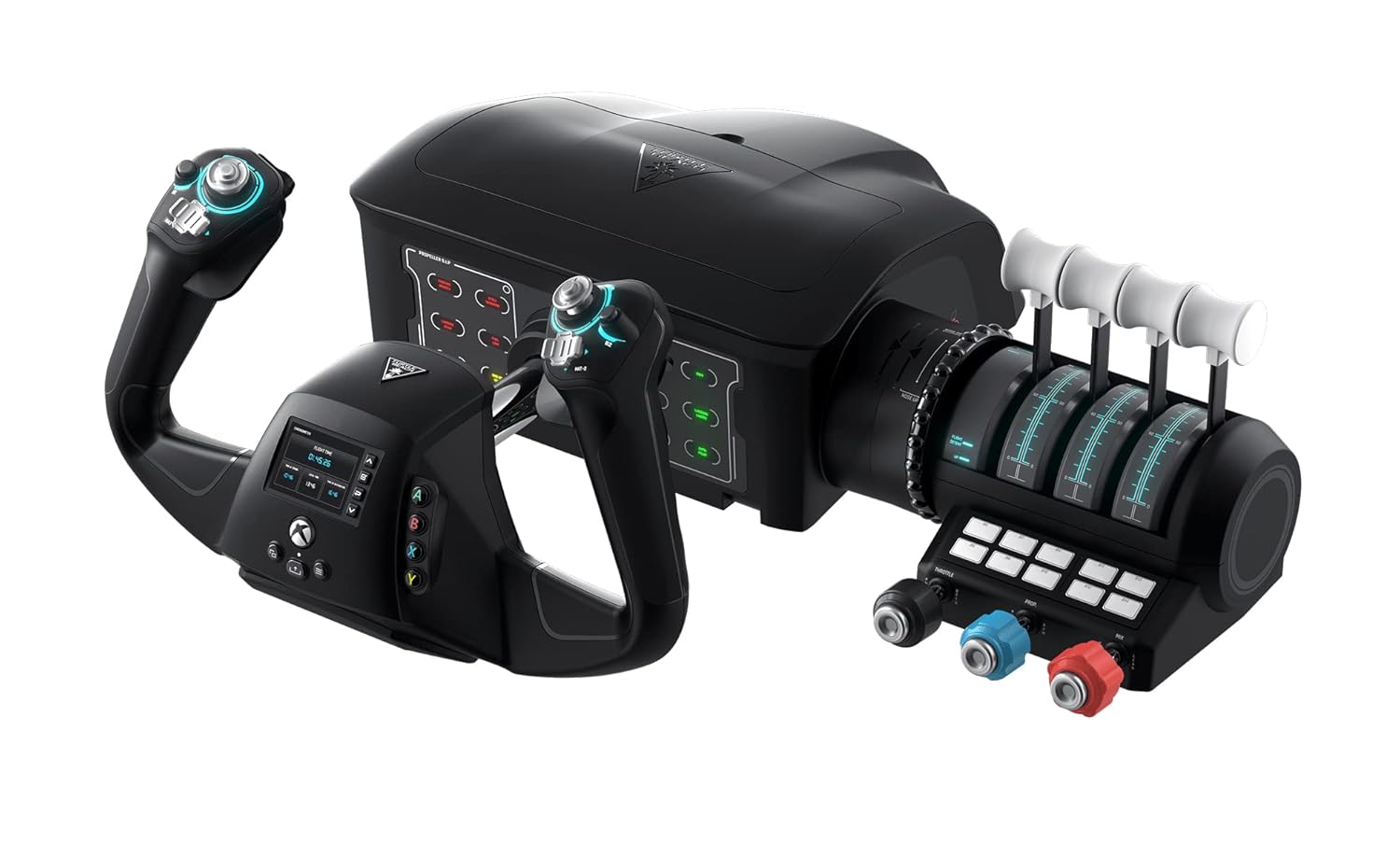
Turtle Beach VelocityOne Flight Universal Control System
Bottom line: An all-in-one yoke, throttle quadrant and trim wheel that works on Xbox Series X/S and PC, so console pilots get a full cockpit in one box.
- Yoke, throttle quadrant and pitch trim wheel come in one package, so nothing else is needed to start flying
- 180 degrees of yoke rotation with a non-contact Hall effect sensor avoids wear from friction
- Works on Xbox Series X/S, Xbox One and Windows PC
- Designed for Microsoft Flight Simulator 2020 and 2024
- Rudder and brake controls are built in, so you can taxi and steer without pedals
- 12 analog axes, two POV switches and two 4-way hat switches give plenty of binding options
- A color flight management display helps you configure the system
- Secure clamping system fits a variety of home desks
- It is a large unit at around 10 pounds, so small desks fill up fast
- No force feedback, like every other non-motorized yoke on this list
- The all-in-one design means you cannot swap the throttle for a different brand without leaving part of it unused

Best for Tight Budgets
Honeycomb Alpha Lite Flight Yoke
Bottom line: Alpha-grade steel and 180-degree rotation without the switch panel, a smart entry yoke for PC pilots who plan to add their own panels later.
- Same 180 degrees of self-centering rotation as the full Alpha
- Solid steel axis with ball bearings gives a smooth feel at an entry-level cost
- Minimal center dead zone helps with fine pitch and roll corrections
- Streamlined handles still include a POV switch, rocker switches and programmable buttons
- Works with Microsoft Flight Simulator 2020 and 2024 on PC
- Clean layout leaves room for add-on panels and fits VR setups and custom cockpits
- Clamp mounting secures it to a flat, rigid surface
- No switch panel, so lights, magnetos and avionics need the keyboard, mouse or a separate panel
- PC only, with no Xbox support
- Setup may need calibration in Windows and the sim, and the yoke can feel stiff at first until it breaks in

Best Yoke and Throttle Starter Kit
Logitech G Pro Flight Yoke System
Bottom line: A yoke and throttle quadrant in one box, with a mode switch that triples your bindings, for PC pilots who want a complete starter set.
- Yoke and throttle quadrant are included, so you can control engine power right away
- Stainless steel shaft with precision bearings gives accurate elevator and aileron control
- Five axes cover pitch, roll and throttle levers
- A 3-position mode switch on the yoke multiplies your bindings to 75 user-definable controls
- Throttle levers are detachable and programmable, with detents
- An integrated USB hub connects other Logitech G flight hardware
- Adjustable clamps hold both the yoke and quadrant firmly to a desk
- It needs a plug-in or software download to work with Microsoft Flight Simulator, FSX, X-Plane 10 and Prepar3D
- Windows PC only, with no Xbox support
- The Saitek-era design is older than newer rivals, so stock can be hit or miss

Best for Mac Pilots
CH Products Flight Sim Yoke USB
Bottom line: A long-running USB yoke with three throttle levers on the column and plug-and-play support for Mac, a rare option for pilots outside Windows.
- Plug-and-play USB with no drivers on both PC and Mac
- Five axes and 20 buttons and switches cover the basics for general aviation
- Three levers on the yoke handle throttle, prop and mixture, so you need no separate quadrant
- X and Y axes sit on the grips for aileron and elevator input
- Optional programming software supports up to 144 programmable functions
- Includes an 8-way POV hat, two flip switches and two rocker switches
- Two-year manufacturer warranty
- The design is older and the software targets legacy Windows versions, so setup can take more effort than newer yokes
- No switch panel or force feedback
- The three levers sit on the yoke, which suits light aircraft more than airliners with a separate throttle quadrant

Best for Airliner Fans
Thrustmaster TCA Yoke Pack Boeing Edition
Bottom line: A licensed 787-style yoke and quadrant with pendular motion and an autopilot panel, built for PC and Xbox pilots who fly heavy jets.
- Officially licensed Boeing design, a 1:1 scale replica inspired by the 787 Dreamliner
- PENDUL'R mechanism mimics the pendular movement of a Dreamliner with an 8.3 in (21 cm) range
- Adjustable spring tension and a suspended mechanism give fluid, precise control
- 100% metal internal structure feels solid and well balanced
- 35 action buttons and 2 extra axes with magnetic technology
- Throttle quadrant includes Boeing-style autopilot functions for altitude, airspeed and heading
- Works on PC and Xbox, and supports Thrustmaster TFRP and TPR rudder pedals sold separately
- Rudder pedals are not included
- The airliner layout is less natural for small general aviation aircraft
- No force feedback, so turbulence and control loading are not simulated

Best Entry to Force Feedback
MOZA AY90 Force Feedback Yoke Base
Bottom line: The cheapest way into force feedback, giving PC pilots real turbulence and control loading in a light, compact base that clamps to a desk.
- 4.2 Nm of roll torque and 90 N of push-pull force let you feel turbulence and control loading
- 180 degrees of roll rotation (plus or minus 90) covers the full range of a typical yoke
- Aluminum alloy quick-release allows tool-free handle swaps with a secure fit
- Lightweight composite housing at about 6 pounds suits desks and cockpit rigs
- Customizable RGB lighting strip can display telemetry like engine RPM
- Desk clamp and profile rail mounting, plus standard bolt holes for aluminum extrusion
- Four buttons on the base add extra bindings
- It is a base, and a yoke handle is sold separately, so budget for both
- Pitch travel is only 95 mm, shorter than most standard yokes
- PC only, and the forces need a solid mount to feel right

Best Force Feedback Yoke
MOZA AY210 Force Feedback Yoke Base
Bottom line: Strong force, 150 mm of pitch travel and a quick-release handle system make this the most realistic yoke here for PC pilots who want the full feel of flight.
- 9 Nm of torque and 210 N of push force deliver detailed feedback that follows aircraft behavior
- 150 mm of pitch travel gives more control range and precision
- Dual high-torque servo motors keep the feedback smooth
- Aircraft-grade aluminum body with MOZA's quick-release system
- 15-bit magnetic encoder and a 280 MHz processor support fine, responsive input
- 13 mappable switches are fully customizable
- Works with Microsoft Flight Simulator 2020 and 2024 and X-Plane
- It is the most expensive yoke on this list
- PC only, and the forces call for a firm mount
- The listing is for the yoke base, so confirm the handle you need before ordering
Table of Contents
Best Yoke for Flight Simulator: Our Picks in Detail
1
Best Overall for PC
Honeycomb Alpha Flight Controls Yoke
Bottom line: A smooth 180-degree yoke with a built-in switch panel, ideal for PC pilots who want a realistic general aviation setup without paying for force feedback.
Honeycomb designed the Alpha with input from pilots and aerospace engineers.
Pros & Cons
Pros
- 180 degrees of roll rotation matches how far a real yoke turns
- Solid steel shaft on two linear ball bearings keeps movement smooth
- Dampened self-centering with no center detent and minimal deadzone makes small corrections easy
- Built-in switch panel adds master, alternator, avionics and light switches plus a 5-position ignition switch
- Red LED backlighting keeps the panel readable on night flights
- 8-way view switch, rocker switches and a push-to-talk button sit right on the handles
- Detachable base plate and adjustable feet let you set the angle and mount it to most desks
Cons
- No throttle quadrant is included, so you need a separate throttle for engine controls
- PC only, so Xbox pilots should look elsewhere
- The switch panel adds bulk and cost that cockpit builders with their own panels may not need
Why We Picked It
The Alpha gets the basics right: a heavy steel shaft, a full 180 degrees of roll and a damped feel that stays predictable at low speeds on final approach. The switch panel is the extra that sets it apart, since flipping a real ignition switch and master switch makes every start-up feel like a checklist instead of a menu.
Who It's For
You fly general aviation planes on a PC and want your hands to do what a pilot's hands do. The panel and the handle controls let you set lights, avionics and radio without reaching for the keyboard.
It also suits anyone building a desk setup that will grow, because it pairs with separate throttle quadrants and rudder pedals.
Specs & Configurations
- Roll rotation
- 180 degrees
- Shaft
- Solid steel with 2 linear ball bearings
- Switch panel
- Included, with ignition switch
- Buttons
- 33
- Platform
- PC
Get It Now
Check Price on Amazon
2
Best for Xbox and PC
Turtle Beach VelocityOne Flight Universal Control System
Bottom line: An all-in-one yoke, throttle quadrant and trim wheel that works on Xbox Series X/S and PC, so console pilots get a full cockpit in one box.
This is the console-friendly choice, built by Turtle Beach for the Xbox version of Microsoft Flight Simulator.
Pros & Cons
Pros
- Yoke, throttle quadrant and pitch trim wheel come in one package, so nothing else is needed to start flying
- 180 degrees of yoke rotation with a non-contact Hall effect sensor avoids wear from friction
- Works on Xbox Series X/S, Xbox One and Windows PC
- Designed for Microsoft Flight Simulator 2020 and 2024
- Rudder and brake controls are built in, so you can taxi and steer without pedals
- 12 analog axes, two POV switches and two 4-way hat switches give plenty of binding options
- A color flight management display helps you configure the system
- Secure clamping system fits a variety of home desks
Cons
- It is a large unit at around 10 pounds, so small desks fill up fast
- No force feedback, like every other non-motorized yoke on this list
- The all-in-one design means you cannot swap the throttle for a different brand without leaving part of it unused
Why We Picked It
Most good yokes are PC only, which leaves Xbox pilots with very few options. The VelocityOne Flight solves that by packing the yoke, throttle and trim wheel into one controller that plugs straight into a console, and the trim wheel adds a detail most budget kits skip. A built-in color display helps you learn and configure the system.
Who It's For
You play Microsoft Flight Simulator on an Xbox Series X or S, or you split time between console and PC, and you want a complete cockpit without researching which parts work together. The built-in rudder controls mean you can fly right away and add pedals later.
It also works for new pilots who want everything they need on the desk in a single purchase.
Specs & Configurations
- Roll rotation
- 180 degrees
- Sensor
- Non-contact Hall effect
- Axes
- 12 analog
- Platform
- Xbox Series X/S, Xbox One, PC
- Included
- Throttle quadrant and trim wheel
Get It Now
Check Price on Amazon
3
Best for Tight Budgets
Honeycomb Alpha Lite Flight Yoke
Bottom line: Alpha-grade steel and 180-degree rotation without the switch panel, a smart entry yoke for PC pilots who plan to add their own panels later.
Honeycomb built the Alpha Lite for pilots who want the Alpha's mechanical quality and have no use for the switch panel.
Pros & Cons
Pros
- Same 180 degrees of self-centering rotation as the full Alpha
- Solid steel axis with ball bearings gives a smooth feel at an entry-level cost
- Minimal center dead zone helps with fine pitch and roll corrections
- Streamlined handles still include a POV switch, rocker switches and programmable buttons
- Works with Microsoft Flight Simulator 2020 and 2024 on PC
- Clean layout leaves room for add-on panels and fits VR setups and custom cockpits
- Clamp mounting secures it to a flat, rigid surface
Cons
- No switch panel, so lights, magnetos and avionics need the keyboard, mouse or a separate panel
- PC only, with no Xbox support
- Setup may need calibration in Windows and the sim, and the yoke can feel stiff at first until it breaks in
Why We Picked It
The yoke is the part that matters most for feel, and the Lite keeps the same core approach: a steel axis, ball bearings and a self-centering mechanism. Dropping the panel is where the savings come from. It is a sensible way to start with a real yoke and spend the difference on rudder pedals or a throttle.
Who It's For
You are moving up from a gamepad or a joystick, you fly Microsoft Flight Simulator on a PC, and you want a yoke that will still make sense when your setup grows. VR pilots also benefit, since a simple handle is easy to find without seeing it.
Cockpit builders with their own switch panels can treat it as a clean base to build around.
Specs & Configurations
- Roll rotation
- 180 degrees
- Axis
- Solid steel with ball bearings
- Handle controls
- POV switch, 2 rockers, 4 buttons
- Switch panel
- Not included
- Platform
- PC
Get It Now
Check Price on Amazon
4
Best Yoke and Throttle Starter Kit
Logitech G Pro Flight Yoke System
Bottom line: A yoke and throttle quadrant in one box, with a mode switch that triples your bindings, for PC pilots who want a complete starter set.
The Pro Flight Yoke System keeps the classic Saitek layout, with the yoke, quadrant and clamps packed together.
Pros & Cons
Pros
- Yoke and throttle quadrant are included, so you can control engine power right away
- Stainless steel shaft with precision bearings gives accurate elevator and aileron control
- Five axes cover pitch, roll and throttle levers
- A 3-position mode switch on the yoke multiplies your bindings to 75 user-definable controls
- Throttle levers are detachable and programmable, with detents
- An integrated USB hub connects other Logitech G flight hardware
- Adjustable clamps hold both the yoke and quadrant firmly to a desk
Cons
- It needs a plug-in or software download to work with Microsoft Flight Simulator, FSX, X-Plane 10 and Prepar3D
- Windows PC only, with no Xbox support
- The Saitek-era design is older than newer rivals, so stock can be hit or miss
Why We Picked It
It earns a spot because the package is complete. You get a yoke, a throttle quadrant with detachable levers and a mode switch that gives you three profiles on the same buttons. That makes it easy to put a different set of functions on each mode, such as one for flying, one for navigation and one for systems.
Who It's For
You want one box that covers pitch, roll and engine power, and you do not mind a bit of setup. It is a good fit for pilots who like a traditional layout and plan to add rudder pedals or more modules from the same family over time.
It also suits anyone who prefers to flip modes instead of memorizing a long list of keyboard shortcuts.
Specs & Configurations
- Axes
- 5
- Mode switch
- 3 positions, 75 programmable controls
- Shaft
- Stainless steel with precision bearings
- Included
- Throttle quadrant and desk clamps
- Platform
- Windows PC
Get It Now
Check Price on Amazon
5
Best for Mac Pilots
CH Products Flight Sim Yoke USB
Bottom line: A long-running USB yoke with three throttle levers on the column and plug-and-play support for Mac, a rare option for pilots outside Windows.
CH Products has sold this yoke for years, and the layout still appeals to pilots who want mixture and prop levers within reach.
Pros & Cons
Pros
- Plug-and-play USB with no drivers on both PC and Mac
- Five axes and 20 buttons and switches cover the basics for general aviation
- Three levers on the yoke handle throttle, prop and mixture, so you need no separate quadrant
- X and Y axes sit on the grips for aileron and elevator input
- Optional programming software supports up to 144 programmable functions
- Includes an 8-way POV hat, two flip switches and two rocker switches
- Two-year manufacturer warranty
Cons
- The design is older and the software targets legacy Windows versions, so setup can take more effort than newer yokes
- No switch panel or force feedback
- The three levers sit on the yoke, which suits light aircraft more than airliners with a separate throttle quadrant
Why We Picked It
It is one of the few yokes that lists plug-and-play Mac support, and the lever bank on the column removes the need for a separate quadrant. For piston singles that use throttle, prop and mixture, that is a practical and compact way to fly.
Who It's For
You fly on a Mac or an older PC, you mostly fly single-engine piston aircraft, and you want a durable controller that skips modern software layers. The straightforward driverless setup also appeals to anyone who dislikes installing extra utilities.
It rewards pilots who care about function over modern looks.
Specs & Configurations
- Axes
- 5
- Buttons and switches
- 20
- Programmable functions
- 144 with included software
- Throttle levers
- 3 (throttle, prop, mixture)
- Platform
- Windows and Mac OS X
Get It Now
Check Price on Amazon
6
Best for Airliner Fans
Thrustmaster TCA Yoke Pack Boeing Edition
Bottom line: A licensed 787-style yoke and quadrant with pendular motion and an autopilot panel, built for PC and Xbox pilots who fly heavy jets.
Thrustmaster pairs its TCA yoke with a Boeing-style throttle quadrant for pilots who want the airliner experience in a single package.
Pros & Cons
Pros
- Officially licensed Boeing design, a 1:1 scale replica inspired by the 787 Dreamliner
- PENDUL'R mechanism mimics the pendular movement of a Dreamliner with an 8.3 in (21 cm) range
- Adjustable spring tension and a suspended mechanism give fluid, precise control
- 100% metal internal structure feels solid and well balanced
- 35 action buttons and 2 extra axes with magnetic technology
- Throttle quadrant includes Boeing-style autopilot functions for altitude, airspeed and heading
- Works on PC and Xbox, and supports Thrustmaster TFRP and TPR rudder pedals sold separately
Cons
- Rudder pedals are not included
- The airliner layout is less natural for small general aviation aircraft
- No force feedback, so turbulence and control loading are not simulated
Why We Picked It
The pendular motion is the standout detail. Instead of a plain push-pull column, the yoke moves like the one in a 787, and the longer pitch range gives more room for smooth flare inputs. The quadrant with an autopilot panel adds the feel of flying a modern jet without a separate hardware purchase.
Who It's For
You like long-haul flights in the Boeing 787 or 737 and care about cockpit realism over a compact desk footprint. If you run airliner routes in Microsoft Flight Simulator on PC or Xbox, this pack lines up with how those aircraft are flown.
It also gives Xbox pilots a more airliner-focused alternative to the VelocityOne.
Specs & Configurations
- Pitch range
- 8.3 in (21 cm)
- Build
- 100% metal internal structure
- Buttons
- 35
- Platform
- PC, Xbox Series X/S
- Included
- Yoke and throttle quadrant
Get It Now
Check Price on Amazon
7
Best Entry to Force Feedback
MOZA AY90 Force Feedback Yoke Base
Bottom line: The cheapest way into force feedback, giving PC pilots real turbulence and control loading in a light, compact base that clamps to a desk.
MOZA's AY90 is the smaller, lighter sibling of the AY210 base, designed to bring force feedback to desk setups.
Pros & Cons
Pros
- 4.2 Nm of roll torque and 90 N of push-pull force let you feel turbulence and control loading
- 180 degrees of roll rotation (plus or minus 90) covers the full range of a typical yoke
- Aluminum alloy quick-release allows tool-free handle swaps with a secure fit
- Lightweight composite housing at about 6 pounds suits desks and cockpit rigs
- Customizable RGB lighting strip can display telemetry like engine RPM
- Desk clamp and profile rail mounting, plus standard bolt holes for aluminum extrusion
- Four buttons on the base add extra bindings
Cons
- It is a base, and a yoke handle is sold separately, so budget for both
- Pitch travel is only 95 mm, shorter than most standard yokes
- PC only, and the forces need a solid mount to feel right
Why We Picked It
Force feedback changes how a yoke feels more than any other upgrade. The AY90 delivers it at the lowest entry point on this list, with enough force to simulate the weight of the controls and the shake of turbulence. Its compact size and quick-release system also make it easier to live with than the big bases.
Who It's For
You have moved past basic yokes, you fly on a PC, and you want the control loading and turbulence that spring-based models cannot produce. It fits desk setups where space is tight, and a profile rail option is there if you later move to a full rig.
It is a good first step for pilots curious about force feedback without the cost of the heaviest bases.
Specs & Configurations
- Roll torque
- 4.2 Nm
- Pitch force
- 90 N
- Pitch travel
- 95 mm
- Roll range
- 180 degrees
- Platform
- PC
Get It Now
Check Price on Amazon
8
Best Force Feedback Yoke
MOZA AY210 Force Feedback Yoke Base
Bottom line: Strong force, 150 mm of pitch travel and a quick-release handle system make this the most realistic yoke here for PC pilots who want the full feel of flight.
MOZA designed the AY210 for both general aviation and airliner simulation, and it is the most powerful model here.
Pros & Cons
Pros
- 9 Nm of torque and 210 N of push force deliver detailed feedback that follows aircraft behavior
- 150 mm of pitch travel gives more control range and precision
- Dual high-torque servo motors keep the feedback smooth
- Aircraft-grade aluminum body with MOZA's quick-release system
- 15-bit magnetic encoder and a 280 MHz processor support fine, responsive input
- 13 mappable switches are fully customizable
- Works with Microsoft Flight Simulator 2020 and 2024 and X-Plane
Cons
- It is the most expensive yoke on this list
- PC only, and the forces call for a firm mount
- The listing is for the yoke base, so confirm the handle you need before ordering
Why We Picked It
Compared with spring-loaded yokes, force feedback adds feel you cannot get any other way: the weight of the controls, the shake in turbulence and the push back as speed builds. The AY210 offers high torque and a generous pitch travel, plus a quick-release system that makes it easy to swap handles for different aircraft.
Who It's For
You fly on PC, you take the hobby seriously and you want the closest thing to real control feel your desk can host. It suits pilots who have already tried a good spring yoke and now want the next step in immersion.
Plan on a sturdy mounting surface, since a base this strong needs a rigid setup to feel right.
Specs & Configurations
- Roll torque
- 9 Nm
- Pitch force
- 210 N
- Pitch travel
- 150 mm
- Roll range
- plus or minus 90 degrees
- Platform
- PC
Get It Now
Check Price on AmazonHow to Choose a Flight Simulator Yoke
Platform
Most yokes work on PC only. If you play on Xbox, the Turtle Beach VelocityOne Flight and the Thrustmaster Boeing pack are the two picks here that support Xbox Series X/S. Mac users should check support before buying, since the CH Products yoke is the one listing here that advertises plug-and-play Mac use.
Yoke Travel and Feel
Pitch travel is how far the column moves in and out. More travel gives you finer control over small inputs, which matters most during flare and landing. Roll range is usually 180 degrees on a good yoke. A spring or damper sets how heavy the controls feel, and force feedback adds changing resistance based on what the aircraft is doing.
Sensors and Build
Hall effect and magnetic sensors do not wear from contact, which helps accuracy over time. Steel shafts and ball bearings keep movement smooth. Entry models use simpler parts, which is fine for casual flying.
Extras and Mounting
Decide whether you want a switch panel, a throttle quadrant and rudder pedals in the box or as separate purchases. Check that your desk can hold the clamps or suction mount, and pick a solid surface for anything with force feedback.
Flight Simulator Yoke FAQ
Do you need a yoke for Microsoft Flight Simulator?
No, but it helps. You can fly with a keyboard, gamepad or joystick, though a yoke gives you a control column that matches what most general aviation and airliner pilots use, which is more natural for small corrections.
Is a HOTAS or a yoke better for flight simulation?
It depends on what you fly. A yoke suits Cessnas, airliners and other civil aircraft. A HOTAS stick and throttle fits fighters and space sims better.
Are force feedback yokes worth it?
Force feedback adds turbulence, control loading and speed-based resistance that spring yokes cannot copy. It costs more and needs a firm mount, so it makes the most sense after you have outgrown a standard yoke.
Why does yoke travel distance matter?
Longer pitch travel allows smaller, more precise movements, which helps with smooth landings. Compact bases trade some travel for a smaller footprint.
Which Yoke for Flight Simulator Should You Buy?
The best yoke for flight simulator play depends on your platform and how much you want to spend. PC pilots who fly light aircraft should start with the Honeycomb Alpha, or the Alpha Lite if the budget is tight. Xbox pilots get a full cockpit from the Turtle Beach VelocityOne Flight, airliner fans will enjoy the Thrustmaster Boeing pack, and anyone chasing true control feel should look at MOZA’s force feedback bases.