

Keyboard and mouse can fly a ship in Star Citizen, but they cannot give you smooth, analog control over all six degrees of freedom. The best HOTAS for Star Citizen fixes that with a real stick for pitch, roll and yaw, plus throttle or a second stick for thrust and strafing. These 8 sticks and throttles run from a budget starter to a dual-stick HOSAS rig, so you can match one to your desk, your hands and the way you like to fly.
Best HOTAS for Star Citizen in 2026: 8 Sticks and Throttles for Space Flight
GameCuki is reader-supported. When you buy through links on our site, we may earn an affiliate commission at no extra cost to you. As an Amazon Associate I earn from qualifying purchases. Learn more.
Our Top Picks

Best Overall HOTAS
Thrustmaster Sol-R4 HOTAS
Bottom line: The best all-round HOTAS for Star Citizen pilots who want Hall effect precision, a stick packed with buttons and a traditional throttle.
- 21 buttons on the grip keep weapons, countermeasures and targeting under one hand
- Ministick on the grip gives you an analog input for strafing
- Hall effect sensors on all three stick axes avoid potentiometer wear
- 16-bit resolution on the stick axes for fine aim adjustments
- Throttle detent can be repositioned to mark a speed you use often
- Onboard switches and a mini throttle handle secondary ship functions
- Ambidextrous grip works for left or right hand
- The throttle does not spring back to center, so strafing leans on the ministick or the keyboard
- Software needs manual profile loading
- Ministick can register stray inputs on some units

Best HOSAS for Six-Axis Flight
Thrustmaster Sol-R2 HOSAS
Bottom line: The best dual-stick option for Star Citizen pilots who want analog control of both rotation and strafing.
- Two sticks give analog control of rotation on one hand and strafing on the other
- 88 programmable buttons leave room for every ship system
- Hall effect sensors on X, Y and Z axes avoid drift from wear
- Each base carries a central throttle
- Interchangeable wrist and thumb rests adjust the fit for your hands
- Backlit sci-fi styling suits a space sim desk
- Ambidextrous grips can be swapped between sides
- Twist axis can feel stiffer than on lighter sticks
- The bottom button is easy to press by accident
- Needs two sticks' worth of desk width and two USB connections

Best Budget HOSAS
Thrustmaster T.16000M FCS Space Sim Duo
Bottom line: The most affordable way to get two analog sticks on your desk for Star Citizen, with Hall effect sensors and weighted bases.
- Two matching sticks give you a HOSAS layout without a premium rig
- Hall effect sensors on both sticks avoid wear drift
- Fully ambidextrous design adapts to left, right or dual-stick use
- Weighted bases keep the sticks planted on the desk
- Wide contoured hand rests support long sessions
- Braille-style button markings help you find buttons by feel
- T.A.R.G.E.T. software supports custom and community profiles
- 32 buttons across both sticks is far fewer than the Sol-R2
- The grip has fewer controls than newer designs, so more binds stay on the keyboard
- No dedicated throttle on either base

Best for Customizable Feel
Logitech G X56 H.O.T.A.S.
Bottom line: The best HOTAS for Star Citizen players who want adjustable stick force, twin throttles and mini-sticks on a tried and true layout.
- Four interchangeable springs let you set how stiff the stick feels
- Mini analog sticks add inputs for strafing and gimballed weapons
- Twin throttles with a friction adjuster hold a speed you set
- Throttle lock keeps the throttle from drifting
- 16-bit Hall effect sensors on the main stick axes
- RGB backlighting can match the rest of your rig
- Stick and throttle ship as a matched HOTAS pair
- Throttle can feel stiff until broken in
- Some units show axis-response quirks after a reboot
- The grip thumbstick can feel loose on some units
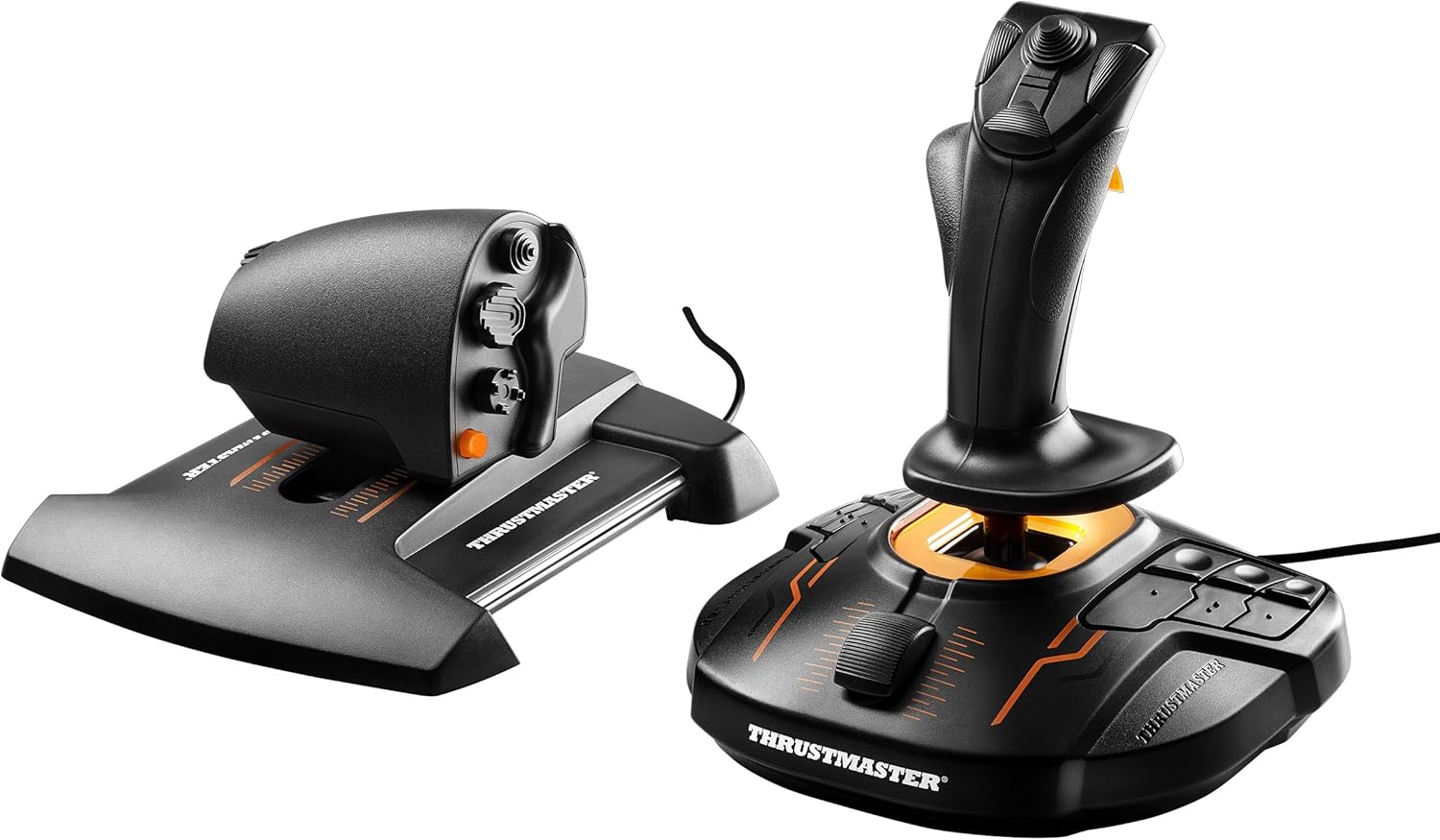
Best Value Starter HOTAS
Thrustmaster T.16000M FCS HOTAS
Bottom line: A proven, affordable stick and throttle pair with Hall effect sensors for pilots buying their first Star Citizen setup.
- Hall effect sensors on the stick avoid potentiometer wear
- Twist rudder gives you yaw without extra pedals
- Braille-style button markings help you find controls by feel
- Eight-way hat plus two four-way switches on the stick
- A standard HOTAS layout is easy to learn
- Slider and push mini-stick add extra inputs on the grip
- Fewer grip buttons than newer sticks, so keyboard binds remain
- Twist yaw may not suit pilots who want an analog strafe axis
- A basic desk setup rather than a cockpit-style rig

Best for Button-Heavy Binds
Logitech G X52 Flight Control System
Bottom line: A longtime HOTAS option with an LCD, twist yaw and hundreds of programmable commands for pilots who like a busy layout.
- Magnetic X and Y axis sensors avoid contact wear
- Multifunction LCD shows programmed commands before you use them
- Twist yaw with a rudder lock prevents accidental input if you add pedals
- 5-position grip system adapts to your hand
- Three modes multiply the number of commands on the same buttons
- Separate throttle and stick layout is familiar for flight sims
- Illuminated buttons help in a dim room
- Centering can soften with age, which may call for larger deadzones
- The lightweight plastic build can slide without a mount
- Stick and throttle need two USB connections

Best Starter Under a Tight Budget
Thrustmaster T-Flight Hotas X
Bottom line: The simplest way for a newcomer to get a stick and throttle on the desk and start flying ships by hand.
- Detachable throttle lets you position the stick and throttle separately
- Resistance dial adjusts how stiff the stick feels
- Twist handle or tilting lever gives dual rudder control
- Preset memory and plug and play setup get you flying quickly
- Wide hand rest supports long sessions
- Five axes cover pitch, roll, yaw and throttle
- Only 12 action buttons, so keyboard binds remain essential
- Lighter build than metal-base sticks
- Few hats or switches compared with larger sets

Best Metal Build for a Fixed Desk
Thrustmaster HOTAS Warthog MKII
Bottom line: A heavy-duty, Hall effect stick and dual throttle for pilots who want a premium aircraft-style rig and have the desk space for it.
- Metal base structure is built for long, heavy sessions
- Hall effect sensors for lasting accuracy
- Dual-throttle layout fits big ships with separate engine control
- Stick and throttle total 36 action buttons
- Mouse hat on the throttle works like a cursor for menus
- Compatible with other Thrustmaster grips through the 6-pin connection
- Official U.S. Air Force VIPER grip replica for a realistic feel
- No twist rudder on the stick
- Built for aircraft sims first, so strafe needs extra binds
- A heavy, premium rig that is overkill as a first stick
Table of Contents
Best HOTAS for Star Citizen: Our Picks in Detail
1
Best Overall HOTAS
Thrustmaster Sol-R4 HOTAS
Bottom line: The best all-round HOTAS for Star Citizen pilots who want Hall effect precision, a stick packed with buttons and a traditional throttle.
Star Citizen asks a lot of a pilot's hands, and the Sol-R4 is built around that. It is the one pick here that gives you a full stick and a full throttle with a button count high enough to leave most keyboard binds behind.
Pros & Cons
Pros
- 21 buttons on the grip keep weapons, countermeasures and targeting under one hand
- Ministick on the grip gives you an analog input for strafing
- Hall effect sensors on all three stick axes avoid potentiometer wear
- 16-bit resolution on the stick axes for fine aim adjustments
- Throttle detent can be repositioned to mark a speed you use often
- Onboard switches and a mini throttle handle secondary ship functions
- Ambidextrous grip works for left or right hand
Cons
- The throttle does not spring back to center, so strafing leans on the ministick or the keyboard
- Software needs manual profile loading
- Ministick can register stray inputs on some units
Why We Picked It
The Sol-R4 puts 58 programmable buttons across the stick and the base, with 21 of them on the grip alone: two triggers, two hat switches, a ministick and a thumbwheel. That is enough to map weapon groups, countermeasures, targeting and quantum functions without reaching for the keyboard. All three stick axes use Thrustmaster's Hall effect sensors at 16-bit resolution, so there is no potentiometer track to wear down and drift. The 3.1 inch throttle travel has a detent you can move to a speed you want to find by feel. The base adds switches, a selector, a mini throttle and RGB LEDs for the functions you use less often.
Who It's For
This is the pick for the pilot who wants one box that feels like a cockpit and does not need to be assembled from parts. If you fly a mix of dogfights, cargo runs and mining and want everything within reach on a single desk footprint, the Sol-R4 covers it.
It is a conventional throttle layout, so lateral and vertical strafe come from the ministick rather than a second analog stick. Pilots who want true analog strafing should look at the dual-stick options below.
Specs & Configurations
- Buttons
- 58 programmable, 21 on the grip
- Grip
- 2 triggers, 2 hat switches, ministick, thumbwheel
- Sensors
- Hall effect (H.E.A.R.T.), 16-bit on X, Y and Z axes
- Throttle travel
- 3.1 in with repositionable detent
- Base
- switches, pads, selector, mini throttle, RGB LEDs
- Connection
- USB-C, PC
Get It Now
Check Price on Amazon
2
Best HOSAS for Six-Axis Flight
Thrustmaster Sol-R2 HOSAS
Bottom line: The best dual-stick option for Star Citizen pilots who want analog control of both rotation and strafing.
Star Citizen ships move in six degrees of freedom, and a HOSAS (hands on stick and stick) layout gives one hand to rotation and the other to translation. The Sol-R2 is a purpose-built version of that idea.
Pros & Cons
Pros
- Two sticks give analog control of rotation on one hand and strafing on the other
- 88 programmable buttons leave room for every ship system
- Hall effect sensors on X, Y and Z axes avoid drift from wear
- Each base carries a central throttle
- Interchangeable wrist and thumb rests adjust the fit for your hands
- Backlit sci-fi styling suits a space sim desk
- Ambidextrous grips can be swapped between sides
Cons
- Twist axis can feel stiffer than on lighter sticks
- The bottom button is easy to press by accident
- Needs two sticks' worth of desk width and two USB connections
Why We Picked It
The kit ships as two complete sticks, each with 21 grip buttons, a ministick, a thumbwheel and its own central throttle, for 88 programmable inputs in total. Hall effect H.E.A.R.T. sensors at 16-bit resolution cover the X, Y and Z axes, which is where a long session of constant small corrections would normally wear out a cheaper stick. Weighted bases, interchangeable wrist rests and thumb rests let you adjust the fit instead of adapting your hand to the stick.
Who It's For
You fly ships where precise strafing matters: docking in tight hangars, fighting at close range or lining up a landing pad. You are happy to give up desk space for two sticks and want the control scheme that treats thrust the same way it treats rotation.
Pilots who also fly aircraft sims will find the left-hand stick takes some getting used to, since it replaces a traditional throttle.
Specs & Configurations
- Buttons
- 88 programmable across both sticks
- Grips
- 2 detachable ambidextrous grips, 21 buttons each
- Per grip
- 2 triggers, 2 hats, ministick, thumbwheel
- Sensors
- Hall effect (H.E.A.R.T.), 16-bit on X, Y and Z axes
- Rests
- interchangeable wrist and thumb rests
- Connection
- USB, PC
Get It Now
Check Price on Amazon
3
Best Budget HOSAS
Thrustmaster T.16000M FCS Space Sim Duo
Bottom line: The most affordable way to get two analog sticks on your desk for Star Citizen, with Hall effect sensors and weighted bases.
If a dual-stick layout appeals to you but a full rig does not fit your plans, this kit is the entry point.
Pros & Cons
Pros
- Two matching sticks give you a HOSAS layout without a premium rig
- Hall effect sensors on both sticks avoid wear drift
- Fully ambidextrous design adapts to left, right or dual-stick use
- Weighted bases keep the sticks planted on the desk
- Wide contoured hand rests support long sessions
- Braille-style button markings help you find buttons by feel
- T.A.R.G.E.T. software supports custom and community profiles
Cons
- 32 buttons across both sticks is far fewer than the Sol-R2
- The grip has fewer controls than newer designs, so more binds stay on the keyboard
- No dedicated throttle on either base
Why We Picked It
The Space Sim Duo pairs two of Thrustmaster's T.16000M sticks, each with Hall effect magnetic sensors that avoid the wear drift of potentiometer sticks. Between them you get 32 programmable buttons, and each stick comes with three detachable components so it can be set up for the left hand, the right hand or true dual-stick use. Weighted bases and wide hand rests keep things steady through long flights.
Who It's For
You want to try rotation on one hand and strafing on the other, but you are not ready for an 88-button rig. This is a straightforward way to build a first HOSAS, and the accurate main X and Y axes carry the flying itself.
It is a plainer grip, so you will keep some binds on the keyboard and rely on button combinations for the rest.
Specs & Configurations
- Buttons
- 32 programmable across both sticks
- Sensors
- Hall effect, drift-free
- Layout
- 3 detachable ergonomic components per stick
- Grip
- ambidextrous, left, right or dual stick
- Base
- weighted
- Software
- T.A.R.G.E.T. programming suite
Get It Now
Check Price on Amazon
4
Best for Customizable Feel
Logitech G X56 H.O.T.A.S.
Bottom line: The best HOTAS for Star Citizen players who want adjustable stick force, twin throttles and mini-sticks on a tried and true layout.
The X56 gives you a full HOTAS with the controls most space sims use laid out across both the stick and the throttle.
Pros & Cons
Pros
- Four interchangeable springs let you set how stiff the stick feels
- Mini analog sticks add inputs for strafing and gimballed weapons
- Twin throttles with a friction adjuster hold a speed you set
- Throttle lock keeps the throttle from drifting
- 16-bit Hall effect sensors on the main stick axes
- RGB backlighting can match the rest of your rig
- Stick and throttle ship as a matched HOTAS pair
Cons
- Throttle can feel stiff until broken in
- Some units show axis-response quirks after a reboot
- The grip thumbstick can feel loose on some units
Why We Picked It
Its mini analog sticks can handle pitch, roll and yaw or forward, backward, up, down, left and right movement, plus gimballed weapons, which maps well onto Star Citizen's flight model. The 4-spring system lets you adjust how much force the main stick needs, and the twin throttles come with a friction adjuster and a throttle lock. The aileron and elevator axes use 16-bit Hall effect sensors.
Who It's For
You want a conventional HOTAS with a lot of physical switches and the ability to dial in stick feel. Pilots who prefer a heavier, more deliberate stick can add stiffness with the springs, while those who like a light touch can go the other way.
Specs & Configurations
- Programmable controls
- 189+ (Logitech figure)
- Stick axes
- 16-bit Hall effect on aileron and elevator
- Stick force
- 4-spring adjustable system
- Throttle
- twin throttles with friction adjuster and throttle lock
- Extras
- mini analog sticks, RGB lighting
- Connection
- 2x USB 2.0, Windows
Get It Now
Check Price on Amazon
5
Best Value Starter HOTAS
Thrustmaster T.16000M FCS HOTAS
Bottom line: A proven, affordable stick and throttle pair with Hall effect sensors for pilots buying their first Star Citizen setup.
A reliable first stick can make Star Citizen feel different from the first flight, and the T.16000M has long been a standard way to start.
Pros & Cons
Pros
- Hall effect sensors on the stick avoid potentiometer wear
- Twist rudder gives you yaw without extra pedals
- Braille-style button markings help you find controls by feel
- Eight-way hat plus two four-way switches on the stick
- A standard HOTAS layout is easy to learn
- Slider and push mini-stick add extra inputs on the grip
Cons
- Fewer grip buttons than newer sticks, so keyboard binds remain
- Twist yaw may not suit pilots who want an analog strafe axis
- A basic desk setup rather than a cockpit-style rig
Why We Picked It
The stick packs 16 action buttons with braille-style identification, four independent axes including a twist rudder, and Hall effect sensors for accuracy. Its hat switches, slider and mini-stick cover the basics of flight and weapons control. As a starter option it gives you proper analog control for a fraction of the complexity of a larger rig.
Who It's For
You are moving from keyboard and mouse or a gamepad and want a stick that does the job without a big commitment. The layout is simple enough to learn quickly and sturdy enough to keep on the desk if you upgrade later.
Specs & Configurations
- Buttons
- 30 (16 stick, 14 throttle)
- Stick
- 16 action buttons with braille-style identification
- Axes
- 4 independent, including twist rudder
- Sensors
- Hall effect magnetic sensors on the stick
- Connection
- USB, PC
Get It Now
Check Price on Amazon
6
Best for Button-Heavy Binds
Logitech G X52 Flight Control System
Bottom line: A longtime HOTAS option with an LCD, twist yaw and hundreds of programmable commands for pilots who like a busy layout.
The X52 is an older design that still earns a place on a Star Citizen shortlist because it was built for exactly this kind of heavy binding.
Pros & Cons
Pros
- Magnetic X and Y axis sensors avoid contact wear
- Multifunction LCD shows programmed commands before you use them
- Twist yaw with a rudder lock prevents accidental input if you add pedals
- 5-position grip system adapts to your hand
- Three modes multiply the number of commands on the same buttons
- Separate throttle and stick layout is familiar for flight sims
- Illuminated buttons help in a dim room
Cons
- Centering can soften with age, which may call for larger deadzones
- The lightweight plastic build can slide without a mount
- Stick and throttle need two USB connections
Why We Picked It
The X52 carries 282 programmable commands over three modes, and Logitech built it with space sims such as Elite Dangerous and Star Citizen in mind. The LCD lets you check programmed commands before activating them, and the twist axis includes a rudder lock for pilots who add pedals.
Who It's For
You like a stick with a lot of buttons and a throttle with a big control surface, and you want a ready-made HOTAS without adding parts. If you already own one, it still works for the game.
Specs & Configurations
- Programmable commands
- 282 over 3 modes (Logitech figure)
- Sensors
- magnetic, non-contact X and Y axes
- Display
- multifunction LCD with clock
- Twist
- 3D twist with rudder lock
- Grip
- 5-position system
- Connection
- USB
Get It Now
Check Price on Amazon
7
Best Starter Under a Tight Budget
Thrustmaster T-Flight Hotas X
Bottom line: The simplest way for a newcomer to get a stick and throttle on the desk and start flying ships by hand.
Not everyone needs 58 buttons before they have flown a single ship by hand, and this is the set for that moment.
Pros & Cons
Pros
- Detachable throttle lets you position the stick and throttle separately
- Resistance dial adjusts how stiff the stick feels
- Twist handle or tilting lever gives dual rudder control
- Preset memory and plug and play setup get you flying quickly
- Wide hand rest supports long sessions
- Five axes cover pitch, roll, yaw and throttle
Cons
- Only 12 action buttons, so keyboard binds remain essential
- Lighter build than metal-base sticks
- Few hats or switches compared with larger sets
Why We Picked It
The T-Flight Hotas X offers 12 action buttons and 5 axes with a detachable throttle and a resistance dial for the stick. Dual rudder control via handle rotation or a tilting lever helps with yaw, and the preset memory makes setup simple.
Who It's For
You want to see whether a stick is for you before spending more. Keep the keyboard close for the binds that do not fit on 12 buttons, and expect to move up to a bigger set if the hobby sticks.
Specs & Configurations
- Buttons
- 12 programmable
- Axes
- 5
- Throttle
- detachable, full size
- Stick
- adjustable resistance dial
- Rudder
- twist or tilting lever
- Connection
- USB, PC
Get It Now
Check Price on Amazon
8
Best Metal Build for a Fixed Desk
Thrustmaster HOTAS Warthog MKII
Bottom line: A heavy-duty, Hall effect stick and dual throttle for pilots who want a premium aircraft-style rig and have the desk space for it.
This is the HOTAS you buy once and keep, and its metal base is the reason it keeps showing up in space sim lists.
Pros & Cons
Pros
- Metal base structure is built for long, heavy sessions
- Hall effect sensors for lasting accuracy
- Dual-throttle layout fits big ships with separate engine control
- Stick and throttle total 36 action buttons
- Mouse hat on the throttle works like a cursor for menus
- Compatible with other Thrustmaster grips through the 6-pin connection
- Official U.S. Air Force VIPER grip replica for a realistic feel
Cons
- No twist rudder on the stick
- Built for aircraft sims first, so strafe needs extra binds
- A heavy, premium rig that is overkill as a first stick
Why We Picked It
The MKII revision redesigns the base for smoother movement and more durability, pairing it with a 19-button VIPER stick replica and a 17-button A-10C throttle. Hall effect sensors keep accuracy from fading over time. The 6-pin connector supports up to 128 buttons and 8 axes, so it can grow with other Thrustmaster grips.
Who It's For
You already know you are staying with flight sims, you have a fixed spot for a heavy rig and you want it to feel like hardware, not a toy. Expect to work to get strafing onto spare buttons.
Specs & Configurations
- Stick
- 19 action buttons, 2-step trigger, 8-way hat
- Throttle
- 17 action buttons, mouse hat and 8-way hat
- Sensors
- Hall effect (H.E.A.R.T.)
- Base
- redesigned metal structure
- Connector
- 6-pin, up to 128 buttons and 8 axes
- Connection
- USB, PC (Windows 10/11)
Get It Now
Check Price on AmazonHOTAS vs HOSAS: Which Layout Fits Star Citizen?
Ships in Star Citizen move in six degrees of freedom, and a conventional aircraft throttle does not return to neutral on its own, which makes fast forward-to-reverse changes awkward. A HOSAS layout puts rotation on the right stick and translation on the left, with both centering automatically. A HOTAS is the better fit if you also fly aircraft and want a classic throttle, though strafing then comes from a ministick or secondary control.
If you can buy only one device to start, a single stick is a sensible first step, and you can handle strafe from the keyboard until you add a second stick or a throttle.
How to Choose a HOTAS for Star Citizen
Hall Effect vs Potentiometer Sensors
Potentiometer sticks use a contact track that wears over time and shows up as drift. Hall effect sticks read a magnet’s position without contact, so they avoid that wear. If you want a stick that stays accurate, look for Hall effect on the main axes. The same idea is behind drift-free gamepads in our best Hall effect controllers guide.
Button Count and Placement
Star Citizen has a lot of functions, from boost and space brake to countermeasures and targeting. More grip buttons mean fewer keyboard binds, but only if you can find them by feel. Look at how the buttons are shaped and where the hats and triggers sit before counting the total.
Space for the Rig
Dual sticks and metal-base HOTAS rigs take real desk width, and a mount may be worth considering. If you play on a gamepad today, our best PC controllers list covers the pads that work in the same setup.
Best HOTAS for Star Citizen: FAQ
Is HOSAS or HOTAS better for Star Citizen?
HOSAS keeps both rotation and translation analog, which suits a game where ships move in six degrees of freedom. A HOTAS works well if you also fly aircraft sims and prefer a traditional throttle.
Do I need rudder pedals for Star Citizen?
Not necessarily. Pedals are optional, and worth adding only if twist control on the stick limits your aim or comfort.
Can I use an older stick like the X52 or T.16000M?
Yes. Both remain usable, though worn units may need larger deadzones.
What is the best single device to buy first?
A single quality stick is the usual starting point, with the keyboard covering strafe until you add a second device.
Which HOTAS Should You Buy for Star Citizen?
For one box that covers most of what the game asks, the Sol-R4 is the best HOTAS for Star Citizen in this list. If you want analog strafing as well, go with the Sol-R2 HOSAS, or the Space Sim Duo if you are watching the budget. The T.16000M FCS and T-Flight Hotas X are the easiest ways to start, and you can move up as your binds grow.