

The PlayStation Portal ships with a USB-C cable and not much else, so the best PlayStation Portal accessories are the ones that fix what the box leaves out: sound, a place to charge, and protection for the 8-inch screen. Because the Portal has no standard Bluetooth headset support, even the audio choice is narrower than on a PS5. We compared seven add-ons by what they solve, how well they fit the Portal, and the trade-offs each one brings.
Best PlayStation Portal Accessories: Our Picks in Detail

PlayStation Pulse Explore Wireless Earbuds
Bottom line: The simplest way to get wireless sound on a Portal, ideal for players who want lossless audio without a cable.
Sony's own earbuds are built around PlayStation Link, the wireless standard the Portal uses for audio.
Pros & Cons
- PlayStation Link gives a direct wireless connection to the Portal with no cable to snag
- Planar magnetic drivers give clear detail in effects and dialogue
- Two hidden mics use AI noise rejection to keep party chat clear
- Up to 5 hours per charge, plus about 10 more from the charging case
- Adaptive noise cancellation helps on a train or flight
- Also pairs with PS5 and PC, so one set covers the whole setup
- Water resistant for sweaty commutes
- Premium price for earbuds
- Battery life per charge is shorter than a full headset, so long sessions need the case
- Not for anyone who dislikes in-ear fit
Why We Picked It
The Portal cannot pair with most Bluetooth headsets, which makes a native PlayStation Link option the least fiddly route to wireless audio. The Pulse Explore also keeps working with a PS5 and PC, so it is not a Portal-only purchase.
Who It's For
You play the Portal in bed, on the couch while someone else watches TV, or on the go, and you want to hear every footstep without a cord dangling from the handheld.
If you also game on a PS5 or PC, the same earbuds follow you between all three.
Specs & Configurations
- Connection
- PlayStation Link
- Drivers
- Planar magnetic
- Battery
- 5 hours + 10 from case
- Noise control
- Adaptive
- Mics
- 2 with AI noise rejection
Get It Now
Check Price on Amazon
PlayStation Pulse Elite Wireless Headset
Bottom line: A full-size planar magnetic headset with all-day battery, best for players who want over-ear comfort and a retractable mic on the Portal.
The Pulse Elite is Sony's over-ear counterpart to the Explore, with the same PlayStation Link connection and a bigger battery.
Pros & Cons
- PlayStation Link connects straight to the Portal, PS5, PC and Mac
- Planar magnetic drivers deliver low distortion and deep bass
- Up to 30 hours of battery covers many sessions between charges
- Fast charging and a charging hanger make topping up easy
- Retractable mic with AI noise rejection keeps your voice clear
- Bluetooth lets you take phone calls while staying connected to a PlayStation Link device
- 3.5 mm jack gives a wired option for phones
- Comes with a carrying case
- Over-ear size is bulky next to a handheld you carry in a bag
- Premium pricing
- Plenty of players find a headset more than they need for casual play
Why We Picked It
Sony lists the Portal among the Elite's PlayStation Link devices, so setup is plug-in-and-play. For anyone who spends hours on remote play, the long battery and cushioned fit matter more than pocketability.
Who It's For
You play long evenings on the Portal, often in a different room from your PS5, and you want proper over-ear sound with a boom-style mic for chat.
It suits players who treat the Portal as a main way to play, not a travel extra.
Specs & Configurations
- Connection
- PlayStation Link
- Drivers
- Planar magnetic
- Battery
- Up to 30 hours
- Mic
- Retractable, AI noise rejection
- Also
- Bluetooth 5.0 and 3.5 mm
Get It Now
Check Price on Amazon
PowerA Charging Station for PlayStation Portal
Bottom line: An officially licensed dock that charges and displays the Portal, perfect for anyone who wants it topped up and ready beside the PS5.
This is the dock that gives the Portal a home next to your console.
Pros & Cons
- Officially licensed by PlayStation
- Magnetic USB-C adapter lets the Portal slide into place without plugging in
- Weighted base keeps the dock steady
- Built-in RGB charging indicator with five lighting modes
- Includes a 5 ft USB-C to USB-C cable
- Displays the Portal next to your PS5 when not in use
- Two-year manufacturer warranty
- Cases should come off before docking for the best fit and connection
- Not suited to charging on the move since it needs a power source
- Not the fastest way to charge
Why We Picked It
Portal battery life is limited, so a dock you actually use matters. The magnetic adapter removes the fiddly cable step, and a licensed design means the fit and finish match the console it sits beside.
Who It's For
You pick the Portal up and put it down several times a day and want it charged without hunting for a cable. It also suits anyone who likes a tidy shelf or desk.
The touch-button lighting is easy to switch off if a glowing bar bothers you in a dark room.
Specs & Configurations
- Licensing
- Official
- Connection
- Magnetic USB-C adapter
- Cable
- 5 ft USB-C to USB-C
- Lighting
- RGB with touch button
- Warranty
- 2 years
Get It Now
Check Price on Amazon
ivoler Tempered Glass Screen Protector for PlayStation Portal
Bottom line: A low-cost two-pack of 9H glass that guards the 8-inch screen, a no-brainer for anyone who carries the Portal around.
A tempered glass sheet is the cheapest insurance you can buy for the Portal's screen.
Pros & Cons
- Cut for the Portal's 8-inch screen
- 9H glass resists scratches from keys and coins in a bag
- Keeps touchscreen response intact
- Two protectors per pack, so there is a spare
- Dry and wet wipes plus an install guide are included
- Transparent 99.99% HD clarity keeps the picture sharp
- Glass can be fiddly to apply and remove
- Glossy finish can reflect in bright light
- Does not protect the shell or sticks from drops
Why We Picked It
The display is the most exposed part of a handheld, and a single drop can crack it. This pack ships with two sheets and installation extras, so a first-time attempt that goes wrong is not a waste.
Who It's For
You toss the Portal in a backpack or let it ride on the couch cushions, and you want scratches stopped before they start.
It is also a good first purchase for anyone adding accessories on a tight budget.
Specs & Configurations
- Pack
- 2 protectors
- Hardness
- 9H
- Screen size
- 8 inch
- Material
- Glass
- Extras
- Wipes and guide
Get It Now
Check Price on Amazon
PowerA Protection Case for PlayStation Portal
Bottom line: A hard-shell zippered case with a charging pass-through, best for players who take the Portal in a bag.
PowerA's case is a dedicated hard shell for carrying the Portal.
Pros & Cons
- Sturdy outer shell protects against bumps in a bag
- Molded interior holds the Portal in place
- Padded flap covers the screen
- Mesh pocket stores cables and small accessories
- Charging cable can be plugged in while the Portal is inside
- Top handle makes it easy to carry
- Dual zipper pulls open from either side
- Bulkier than a slip cover or sleeve
- Bag-only protection means it does nothing while you play
- Mesh pocket suits small items, not larger accessories
Why We Picked It
It shares a brand with the charging station, and PowerA also sells the case in a bundle with a charging station and screen protection kit. That makes it an easy partner in a complete setup. The charging cable access is the detail travelers will notice most.
Who It's For
You pack the Portal for flights, road trips or visits to friends, and want one case that also keeps cables together.
It is built for transport, not for holding while you play.
Specs & Configurations
- Shell
- Sturdy outer
- Closure
- Dual zipper pulls
- Carry
- Top handle
- Storage
- Mesh accessory pocket
- Charging
- Cable access while stored
Get It Now
Check Price on Amazon
PlayVital Silicone Protective Case with Thumb Grips for PS Portal
Bottom line: A soft silicone cover with an anti-slip studded texture, ideal for players who want a firmer hold and some drop cushioning.
This soft cover adds texture and cushioning to the Portal's grips.
Pros & Cons
- Silicone absorbs impact if the Portal is dropped
- 3D studded texture improves grip for sweaty hands
- Thicker feel can reduce hand fatigue in long sessions
- Custom cutouts leave buttons and ports accessible
- Thumb grips are included
- Easy to put on and take off
- Very light at about 18 g
- Does not cover the screen, so pair it with a protector
- Silicone grips can feel tacky next to the Portal's smooth shell
- Adds bulk, so it may not fit tight carrying cases
Why We Picked It
The Portal's smooth plastic can feel slippery in long sessions. A silicone sleeve gives the hands something to hold on to and a layer of protection without changing how the handheld plays.
Who It's For
You play handheld style for hours and want a more secure hold, or you have dropped a controller before and would rather have padding.
Wear it with a screen protector for full coverage.
Specs & Configurations
- Material
- Silicone
- Texture
- 3D studded anti-slip
- Fit
- Custom for PS Portal
- Includes
- Thumb grips
- Weight
- 18 g
Get It Now
Check Price on Amazon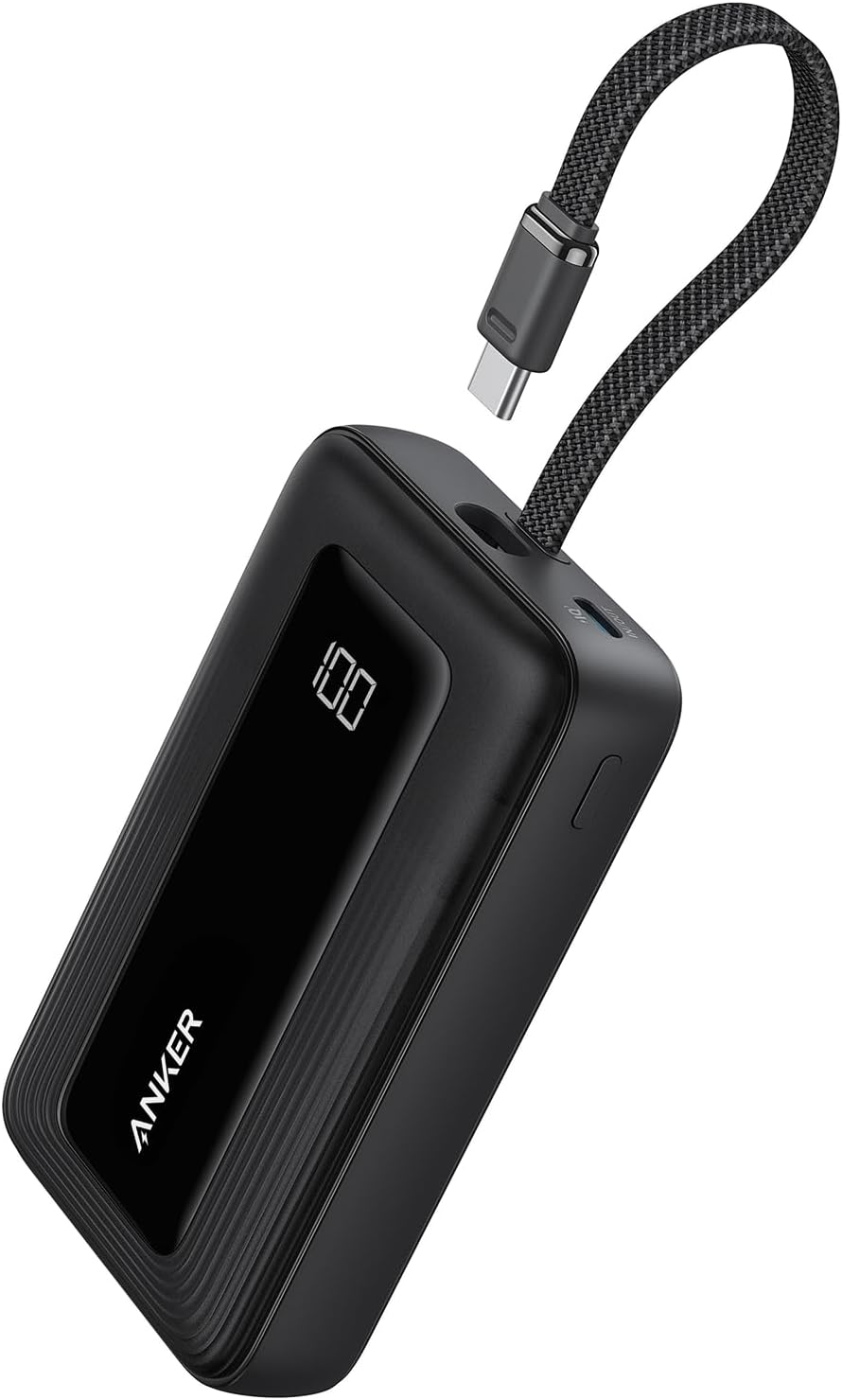
Anker 10,000mAh 30W Power Bank
Bottom line: A compact 30W USB-C power bank that keeps the Portal going away from an outlet, best for travelers and commuters.
A power bank solves the Portal's biggest travel limit, which is the battery.
Pros & Cons
- 10,000 mAh capacity gives a meaningful top-up away from an outlet
- 30W output charges quickly
- Built-in USB-C cable means no extra cord
- Compact enough to fit a bag pocket
- Second USB-C and a USB-A port handle other devices
- Also works with Steam Deck and Switch
- 18-month warranty
- Adds weight to a bag
- Not made for the Portal specifically, so charge speed varies
- Needs charging itself, so remember to top it up
Why We Picked It
The Portal's battery lasts roughly 4.5 hours at full brightness and 50% volume, which is not much for a flight or a long train ride. A USB-C bank with a built-in cable is the tidy fix, and this model is small enough to forget about in a bag.
Who It's For
You use the Portal for cloud streaming or remote play on trips and cannot count on finding an outlet.
If you only play at home, a dock is the better habit.
Specs & Configurations
- Capacity
- 10,000 mAh
- Output
- 30W
- Ports
- Built-in USB-C cable + USB-C + USB-A
- Size
- 4.32 x 2.58 x 0.98 in
- Weight
- 223 g
Get It Now
Check Price on AmazonFinal Thoughts: The Best PlayStation Portal Accessories to Buy First
If you buy only one thing, make it the screen protector, because it is cheap and protects the part that matters most. After that, the best PlayStation Portal accessories depend on how you play. Couch players should add the dock and a silicone cover, travelers need the case and power bank, and anyone who wants wireless sound should start with the Pulse Explore or Pulse Elite. If you are still deciding on a headset, our Pulse Elite vs INZONE H9 comparison shows how Sony’s over-ear option stacks up.