

Your mouse hand never rests in a shooter, and your other hand still has to juggle movement, abilities, reloads and a pile of hotkeys. The best one handed gaming keyboard shrinks all of that into a few inches under your left fingers and clears the desk for wide mouse swings. Picking one mostly means choosing between a thumbstick, Hall effect speed, a budget mechanical layout or wireless freedom, and the ten keypads below cover each of those routes.
Best One Handed Gaming Keyboard in 2026: 10 Keypads for PC and Console
GameCuki is reader-supported. When you buy through links on our site, we may earn an affiliate commission at no extra cost to you. As an Amazon Associate I earn from qualifying purchases. Learn more.
Our Top Picks

Best Overall
Razer Tartarus Pro
Bottom line: The Tartarus Pro is the keypad to buy if you want analog speed, a proper thumbpad and 32 keys in one familiar, ergonomic shell, and you can accept a premium price.
- Rapid Trigger resets keys with an upward motion as small as 0.1 mm
- Adjustable actuation suits twitchy or deliberate play
- 8-way thumbpad for movement
- Hypershift lets every key take a second function
- Wrist rest and volume roller included
- 32 programmable keys
- Thumbpad is digital, not an analog stick
- Wired only

Best With Thumbstick
Azeron Cyborg II
Bottom line: If you want a keypad that molds to your hand and gives you a real analog stick, the Cyborg II is the one to save up for.
- Hall effect thumbstick avoids stick drift
- Adjustable parts fit your hand
- Each button is individually connected, with no connection matrices
- Stores six layouts on the keypad
- Thumbstick can also act as a mouse
- WASD or 360 degree analog movement
- Priciest keypad on this list
- Needs time to set up and get used to
- PC only

Best for Competitive Play
Razer Tartarus V2 Pro
Bottom line: With an analog stick, 8000 Hz polling and an adjustable wrist rest, the Tartarus V2 Pro is the one-handed keypad that aims straight at competitive FPS and long raid nights.
- Anti-drift TMR thumbstick for analog movement
- 8000 Hz polling
- Wrist rest adjusts across several axes
- Razer Snap Tap prioritizes the latest directional input
- Doubleshot PBT keycaps with lubricated switches
- Rapid Trigger with 0.1 to 4.0 mm actuation
- Costs the most of the Razer keypads
- Wired only

Best Hall Effect
Keychron C0 HE 8K
Bottom line: The Keychron C0 HE 8K delivers Rapid Trigger magnetic switches and 8K polling with a layout that stays close to a normal keyboard.
- Rapid Trigger and adjustable actuation
- 8K polling for low input delay
- Configured in a browser, no install needed
- Works with Windows and macOS
- Actuation tuned in 0.01 mm steps
- 35 keys in a regular keyboard layout
- No thumbstick or thumbpad
- Cable is not detachable
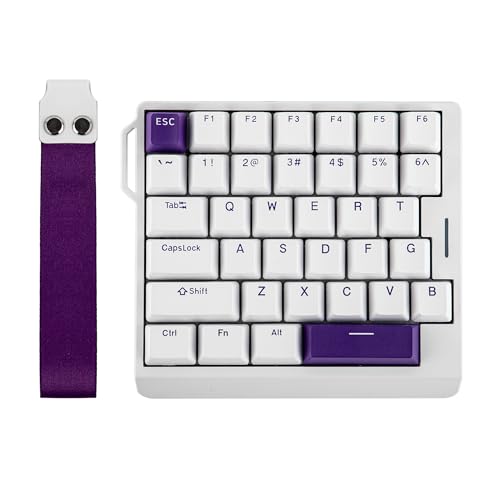
Best Compact Hall Effect
EPOMAKER HE30
Bottom line: The HE30 packs Hall effect switches into a compact 30% layout, ideal if you game on a small desk or carry a keypad to LANs.
- Hall effect switches with 8,000 Hz polling
- Compact 30% layout leaves room for mouse swings
- PBT keycaps resist shine and fading
- Snap Key (SOCD) prioritizes the latest direction
- Removable wrist strap for carrying
- 36 programmable keys
- No wrist rest, only a strap
- Wired only

Best Value Razer
Razer Tartarus V2
Bottom line: The Tartarus V2 gives you Razer's keypad shape, 32 keys and a thumbpad for far less than the analog models, as long as you do not need Rapid Trigger.
- 32 programmable keys with Hypershift
- 8-way thumbpad for movement
- Soft, cushioned Mecha-Membrane switches
- Per-key Chroma RGB
- Lower cost than the analog Tartarus models
- Left-hand shape
- No Rapid Trigger or adjustable actuation
- Wired only

Best Budget Mechanical
Redragon K585 DITI
Bottom line: For a cheap, swappable mechanical keypad with seven dedicated macro keys and a magnetic wrist rest, the K585 is hard to beat.
- Hot-swap sockets let you change switches without soldering
- 7 macro keys for MMO and MOBA rotations
- USB pass-through port tidies up the desk
- Detachable magnetic wrist rest
- Low cost
- 42-key mechanical layout
- Clicky switches are loud
- Wired only

Best Wireless
Redragon K585 PRO Wireless
Bottom line: The K585 PRO adds Bluetooth and 2.4 GHz to the proven K585 layout for a small step up in price, which makes it the easy wireless pick.
- Bluetooth and 2.4 GHz wireless
- 15 to 20 hours of continuous play per charge
- Hot-swappable switches
- Same 7 macro keys as the wired K585
- Detachable wrist rest
- Moves between desktop, laptop and tablet
- Blue switches are loud
- Battery needs recharging

Best Cheap Pick
MageGee 35-Key One Handed Keyboard
Bottom line: The MageGee is a small, cheap, plug-and-play mechanical keypad that proves you do not need to spend much to try one-handed play.
- Plug and play, no driver required
- 6 macro keys recorded directly on the keypad
- Big palm rest for wrist support
- 35 non-conflict keys
- Very low cost
- Lighting with static and dynamic modes
- Loud clicky Blue switches
- No dedicated software for deep customization

Best for PS5 and PS4
HORI Tactical Assault Commander Mechanical Keypad
Bottom line: If you play on PlayStation with a mouse, the licensed HORI TAC is the keypad built for it, with six profiles per console and a palm rest.
- Designed for keyboard and mouse mode on PS5 and PS4
- Up to six profiles per console through the companion app
- Adjustable palm rest
- Officially licensed by Sony
- Works on PC as well
- Assignable keys and LED lighting
- Needs a separate mouse
- Works only with titles that support keyboard and mouse mode
Table of Contents
Best One Handed Gaming Keyboard: Our Picks in Detail
1
Best Overall
Razer Tartarus Pro
Bottom line: The Tartarus Pro is the keypad to buy if you want analog speed, a proper thumbpad and 32 keys in one familiar, ergonomic shell, and you can accept a premium price.
The Tartarus Pro is Razer's analog-optical take on the classic left-hand gaming keypad. It has 32 programmable keys, an 8-way thumbpad and a wrist rest, and it builds Rapid Trigger into a shape that many players already know.
Pros & Cons
Pros
- Rapid Trigger resets keys with an upward motion as small as 0.1 mm
- Adjustable actuation suits twitchy or deliberate play
- 8-way thumbpad for movement
- Hypershift lets every key take a second function
- Wrist rest and volume roller included
- 32 programmable keys
Cons
- Thumbpad is digital, not an analog stick
- Wired only
Why We Picked It
Most keypads give you buttons, and this one gives you tuning. Actuation can be set anywhere from 1.5 to 3.6 mm, and keys reset the moment your finger lifts, which helps with fast strafing and repeated taps in shooters. The thumbpad covers movement without leaving the home position, and Hypershift doubles up the key count for MMO and MOBA binds. It is the most complete all-rounder here.
Who It's For
You play FPS, MMO and action games and want a polished, proven left-hand keypad with fast switches and plenty of keys. Actuation sets anywhere from 1.5 to 3.6 mm and keys reset the moment your finger lifts, which helps fast strafing and repeated taps. The thumbpad covers movement without leaving the home position, and Hypershift doubles the key count for MMO and MOBA binds.
Specs & Configurations
- Keys
- 32 programmable
- Switches
- Razer Analog Optical with Rapid Trigger
- Actuation
- 1.5 to 3.6 mm, adjustable
- Thumbpad
- 8-way directional
- Connection
- Wired USB
- Lighting
- Per-key Chroma RGB
Get It Now
Check Price on Amazon
2
Best With Thumbstick
Azeron Cyborg II
Bottom line: If you want a keypad that molds to your hand and gives you a real analog stick, the Cyborg II is the one to save up for.
The Cyborg II is a 3D-printed, adjustable keypad built around a Hall effect thumbstick and 30 mappable inputs. The version shown is made for right-handed players who keep the mouse in their right hand.
Pros & Cons
Pros
- Hall effect thumbstick avoids stick drift
- Adjustable parts fit your hand
- Each button is individually connected, with no connection matrices
- Stores six layouts on the keypad
- Thumbstick can also act as a mouse
- WASD or 360 degree analog movement
Cons
- Priciest keypad on this list
- Needs time to set up and get used to
- PC only
Why We Picked It
This is the keypad that plays differently from a keyboard. The thumbstick supports plain WASD or 360 degree analog movement in compatible games, with adjustable dead zones, sensitivity and cone angles, so racing, flight and third-person games feel closer to a controller. The adjustable build lets you set the keypad around your own hand instead of the other way around, and six layouts live on the device so your binds follow you from game to game.
Who It's For
You want analog movement on a keyboard and mouse setup and enjoy tuning a custom fit. The adjustable build lets you set the keypad around your own hand, with 6.3 to 7.5 in hand size in mind, and the thumbstick supports WASD or 360 degree analog movement with adjustable dead zones and sensitivity. Racing, flight and third-person games feel closer to a controller, and six layouts follow you from game to game.
Specs & Configurations
- Inputs
- 30 mappable
- Thumbstick
- Hall effect, WASD or 360 degree analog
- Onboard layouts
- Up to 6
- Hand size
- 6.3 to 7.5 in (medium)
- Connection
- Wired USB-C
- Version shown
- Right-handed gamers (keypad in left hand)
Get It Now
Check Price on Amazon
3
Best for Competitive Play
Razer Tartarus V2 Pro
Bottom line: With an analog stick, 8000 Hz polling and an adjustable wrist rest, the Tartarus V2 Pro is the one-handed keypad that aims straight at competitive FPS and long raid nights.
The V2 Pro keeps the classic Tartarus silhouette and adds the things the older models lacked: an analog thumbstick, a high polling rate and an adjustable wrist rest.
Pros & Cons
Pros
- Anti-drift TMR thumbstick for analog movement
- 8000 Hz polling
- Wrist rest adjusts across several axes
- Razer Snap Tap prioritizes the latest directional input
- Doubleshot PBT keycaps with lubricated switches
- Rapid Trigger with 0.1 to 4.0 mm actuation
Cons
- Costs the most of the Razer keypads
- Wired only
Why We Picked It
It combines the two features players ask for most, analog switches and an analog stick, in one body. Rapid Trigger and 0.1 to 4.0 mm actuation tuning give shooters sharp control, while 8000 Hz polling cuts input delay. The dense foam and lubricated switches make it quieter and smoother than earlier Tartarus models, and three profiles with up to 24 keymaps handle MMOs, shooters and strategy games without re-binding every night.
Who It's For
You are a competitive FPS player or MMO raider who wants an analog stick and the fastest polling on one hand. Rapid Trigger and 0.1 to 4.0 mm actuation tuning give sharp control, while 8000 Hz polling cuts input delay. The adjustable wrist rest helps during long raid nights, and three profiles with up to 24 keymaps handle MMOs, shooters and strategy games.
Specs & Configurations
- Controls
- 31 programmable
- Switches
- Razer Analog Optical Gen-2, Rapid Trigger
- Actuation
- 0.1 to 4.0 mm, adjustable
- Thumbstick
- Full-size TMR, anti-drift
- Polling
- 8000 Hz
- Profiles
- 3 profiles, up to 24 keymaps
- Connection
- Wired USB-A
Get It Now
Check Price on Amazon
4
Best Hall Effect
Keychron C0 HE 8K
Bottom line: The Keychron C0 HE 8K delivers Rapid Trigger magnetic switches and 8K polling with a layout that stays close to a normal keyboard.
The C0 HE 8K is a compact one-handed board that trades flashy extras for fast Hall effect switches. Its 35 keys follow a regular keyboard layout, so the learning curve is short.
Pros & Cons
Pros
- Rapid Trigger and adjustable actuation
- 8K polling for low input delay
- Configured in a browser, no install needed
- Works with Windows and macOS
- Actuation tuned in 0.01 mm steps
- 35 keys in a regular keyboard layout
Cons
- No thumbstick or thumbpad
- Cable is not detachable
Why We Picked It
Magnetic switches register key travel in real time rather than at one fixed point, so you can tune actuation in 0.01 mm steps and reset keys instantly. Together with 8K polling, that makes it a strong match for fast shooters such as Valorant and CS2. The browser-based setup also means it works across machines without installing software, which helps if you move between a desktop and a laptop. Mac gamers can also look at our best gaming keyboard for Mac guide for full-size options.
Who It's For
You play fast shooters like Valorant and CS2 and want Hall effect speed in a layout close to a normal keyboard. Its 35 keys follow a regular layout, so the learning curve is short, and you tune actuation in 0.01 mm steps with 8K polling behind it. Browser-based setup means it works across a desktop and a laptop, on Windows or macOS, without installing software.
Specs & Configurations
- Keys
- 35 programmable
- Switches
- Hall effect magnetic with Rapid Trigger
- Actuation precision
- 0.01 mm
- Polling
- 8K
- Software
- Browser-based configurator
- Compatibility
- Windows and macOS
- Connection
- Wired USB-A, non-detachable cable
Get It Now
Check Price on Amazon
5
Best Compact Hall Effect
EPOMAKER HE30
Bottom line: The HE30 packs Hall effect switches into a compact 30% layout, ideal if you game on a small desk or carry a keypad to LANs.
The HE30 squeezes 36 programmable keys into a compact left-hand layout. A removable wrist strap makes it easy to clip to a gear bag.
Pros & Cons
Pros
- Hall effect switches with 8,000 Hz polling
- Compact 30% layout leaves room for mouse swings
- PBT keycaps resist shine and fading
- Snap Key (SOCD) prioritizes the latest direction
- Removable wrist strap for carrying
- 36 programmable keys
Cons
- No wrist rest, only a strap
- Wired only
Why We Picked It
It gives you most of what the pricier Hall effect keypads offer. Snap Key (SOCD) stops your character from freezing when you press opposite directions, Dynamic Keystroke lets one key trigger two actions, and the factory-lubed switches keep key travel smooth. The tight footprint is a real plus for low-sensitivity players who want a huge mouse area.
Who It's For
You play shooters on a small desk or carry a gaming setup to LANs. The 30% left-hand layout fits 36 programmable keys in a tight footprint, leaving a huge mouse area for low-sensitivity play, and the removable wrist strap clips to a gear bag. Snap Key stops your character freezing on opposite directions, and Dynamic Keystroke lets one key trigger two actions.
Specs & Configurations
- Keys
- 36 programmable
- Layout
- Compact 30% left-hand
- Switches
- Magnetic Hall effect, factory-lubed
- Polling
- 8,000 Hz, 0.125 ms latency
- Keycaps
- PBT
- Extras
- Removable wrist strap, Snap Key and DKS
- Connection
- Wired
Get It Now
Check Price on Amazon
6
Best Value Razer
Razer Tartarus V2
Bottom line: The Tartarus V2 gives you Razer's keypad shape, 32 keys and a thumbpad for far less than the analog models, as long as you do not need Rapid Trigger.
The Tartarus V2 is the older, simpler Razer keypad. It keeps the 32-key layout and thumbpad of its pricier siblings but swaps analog switches for Mecha-Membrane keys.
Pros & Cons
Pros
- 32 programmable keys with Hypershift
- 8-way thumbpad for movement
- Soft, cushioned Mecha-Membrane switches
- Per-key Chroma RGB
- Lower cost than the analog Tartarus models
- Left-hand shape
Cons
- No Rapid Trigger or adjustable actuation
- Wired only
Why We Picked It
Many MMO and MOBA players do not need Rapid Trigger, they need a lot of well-placed keys. This keypad has them, along with Hypershift to remap every key to a second command. The Mecha-Membrane keys give a cushioned feel that is easy on the fingers over long sessions.
Who It's For
You play MMOs, RPGs or MOBAs where you need a lot of well-placed keys more than analog tuning. The Tartarus layout gives 32 programmable keys and an 8-way thumbpad, and Hypershift remaps every key to a second command. The cushioned Mecha-Membrane keys are easy on the fingers over long sessions, at a sensible price.
Specs & Configurations
- Keys
- 32 programmable
- Switches
- Mecha-Membrane
- Thumbpad
- 8-way directional
- Software
- Razer Hypershift remapping
- Lighting
- Chroma RGB, per-key
- Connection
- Wired USB-A
- Hand
- Left
Get It Now
Check Price on Amazon
7
Best Budget Mechanical
Redragon K585 DITI
Bottom line: For a cheap, swappable mechanical keypad with seven dedicated macro keys and a magnetic wrist rest, the K585 is hard to beat.
The K585 is a 42-key mechanical keypad with seven G-keys and a USB pass-through port. It is a long-running budget favorite and is hot-swappable, which is rare at this level.
Pros & Cons
Pros
- Hot-swap sockets let you change switches without soldering
- 7 macro keys for MMO and MOBA rotations
- USB pass-through port tidies up the desk
- Detachable magnetic wrist rest
- Low cost
- 42-key mechanical layout
Cons
- Clicky switches are loud
- Wired only
Why We Picked It
It covers the basics well and then adds the extras that usually cost more. Seven macro keys across four profiles handle ability chains with one press, the pass-through port lets you plug your mouse in the keypad, and hot-swap sockets mean you can change the switch feel later. If a loud click is a problem, a different switch drops in without touching a soldering iron.
Who It's For
You are on a budget and want a real mechanical keypad with macro keys and a wrist rest. Seven macro keys across four profiles handle ability chains with one press, the USB pass-through port lets you plug your mouse into the keypad, and hot-swap sockets mean you can change the switch feel later. It is a long-running budget favorite for good reason.
Specs & Configurations
- Layout
- 42 keys
- Macro keys
- 7 onboard, 28 across 4 profiles
- Switches
- Clicky (hot-swappable, 3 or 5 pin)
- Extras
- USB pass-through port, detachable magnetic wrist rest
- Connection
- Wired
Get It Now
Check Price on Amazon
8
Best Wireless
Redragon K585 PRO Wireless
Bottom line: The K585 PRO adds Bluetooth and 2.4 GHz to the proven K585 layout for a small step up in price, which makes it the easy wireless pick.
The K585 PRO takes the K585 and removes the cable. It also gives you three ways to connect, so it can move between a desktop, a laptop and a tablet.
Pros & Cons
Pros
- Bluetooth and 2.4 GHz wireless
- 15 to 20 hours of continuous play per charge
- Hot-swappable switches
- Same 7 macro keys as the wired K585
- Detachable wrist rest
- Moves between desktop, laptop and tablet
Cons
- Blue switches are loud
- Battery needs recharging
Why We Picked It
Placing the keypad wherever your hand falls is the whole appeal. The 2.4 GHz mode suits gaming, Bluetooth covers other devices, and a charge lasts 15 to 20 hours of continuous play. You keep the wrist rest, the macro keys and the socketed switches that make the wired K585 good value.
Who It's For
You want to ditch the cable for a clean desk setup and keep a low price. Place the keypad wherever your hand falls, use 2.4 GHz for gaming and Bluetooth for a laptop or tablet, and a charge lasts 15 to 20 hours of continuous play. You keep the wrist rest, the seven macro keys and the socketed switches.
Specs & Configurations
- Layout
- 42 keys
- Macro keys
- 7 onboard, 28 across 4 profiles
- Connection
- Bluetooth, 2.4 GHz, USB-C
- Battery
- 15 to 20 hours of continuous play
- Switches
- Blue, rated for 50 million keypresses, hot-swappable
- Extras
- Detachable magnetic wrist rest, RGB
Get It Now
Check Price on Amazon
9
Best Cheap Pick
MageGee 35-Key One Handed Keyboard
Bottom line: The MageGee is a small, cheap, plug-and-play mechanical keypad that proves you do not need to spend much to try one-handed play.
The MageGee is a 35-key mechanical keypad with a built-in palm rest. It uses simple key combinations to record macros, with no software to install.
Pros & Cons
Pros
- Plug and play, no driver required
- 6 macro keys recorded directly on the keypad
- Big palm rest for wrist support
- 35 non-conflict keys
- Very low cost
- Lighting with static and dynamic modes
Cons
- Loud clicky Blue switches
- No dedicated software for deep customization
Why We Picked It
This is the safest way to find out whether one-handed play suits you. The 35 keys cover movement and the main action row, six macro keys store your longer combos, and the palm rest takes pressure off your wrist. It works with a plain USB connection on a wide range of systems, so setup takes seconds.
Who It's For
You are a first-time buyer or casual FPS or MMO player who wants to try one-handed play without risk. The 35 keys cover movement and the main action row, six macro keys store longer combos, and the palm rest takes pressure off your wrist. A plain USB-C connection and no driver means setup takes seconds.
Specs & Configurations
- Keys
- 35, all non-conflict
- Switches
- Blue
- Macros
- 6 recordable macro keys
- Lighting
- RGB with static and dynamic modes
- Extras
- Large palm rest
- Connection
- Wired USB-C, no driver needed
Get It Now
Check Price on Amazon
10
Best for PS5 and PS4
HORI Tactical Assault Commander Mechanical Keypad
Bottom line: If you play on PlayStation with a mouse, the licensed HORI TAC is the keypad built for it, with six profiles per console and a palm rest.
The HORI TAC Mechanical is a keypad made for PlayStation players who want a PC-style setup. It pairs with a mouse to give console shooters the keyboard and mouse control scheme.
Pros & Cons
Pros
- Designed for keyboard and mouse mode on PS5 and PS4
- Up to six profiles per console through the companion app
- Adjustable palm rest
- Officially licensed by Sony
- Works on PC as well
- Assignable keys and LED lighting
Cons
- Needs a separate mouse
- Works only with titles that support keyboard and mouse mode
Why We Picked It
Most keypads on this list are PC-first, and this is the one that treats consoles as the main target. Customizable profiles, assignable key functions and an adjustable palm rest cover the basics. Because it carries Sony's official license, you can expect it to plug straight into a PS5 or PS4 without fuss.
Who It's For
You play shooters on PlayStation with keyboard and mouse mode and want a compact left-hand keypad. It targets PS5 and PS4 first, carries Sony's official license, and pairs with your mouse for the PC-style control scheme. Customizable profiles, assignable keys and an adjustable palm rest cover the basics, and it works on PC too.
Specs & Configurations
- Platforms
- PS5, PS4 and PC
- License
- Officially licensed by Sony
- Profiles
- Up to six per console
- Extras
- Assignable keys, LED lighting, adjustable palm rest
- Requires
- A mouse, not included
- Connection
- Wired USB
Get It Now
Check Price on AmazonHow to Choose a One Handed Gaming Keyboard
Pick your movement style first. A thumbstick, as on the Azeron and the Tartarus V2 Pro, gives smooth analog movement, a thumbpad such as the Tartarus Pro gives eight directions, and a plain key layout like the Keychron or Redragon keeps things close to WASD.
Count the keys you actually use. MMO and MOBA players tend to need 30 or more mapped inputs, while competitive shooter players often need fewer, faster keys. Compact layouts such as the 36-key HE30 leave more room for your mouse.
Choose the switch type that fits your room. Hall effect and analog optical keypads offer adjustable actuation and Rapid Trigger for fast resets. Clicky Blue switches feel crisp but are loud, so avoid them if you share a space.
Check connection and platform. Most keypads here are wired and PC only. The Redragon K585 PRO is the wireless pick, and the HORI TAC is the one to look at for PlayStation. Also think about a palm rest, because a one-handed keypad keeps your hand in one position for a long time.
Mind the hand and size. Many of these keypads are built for the left hand, and the Azeron lists a medium size meant for hands between 6.3 and 7.5 inches. If you use a very low sensitivity, our best 60 percent keyboard for Fortnite guide is worth a look as an alternative to a keypad.
FAQ
Are one-handed gaming keyboards actually better for gaming?
They are not automatically better, but they place movement and ability keys right under your fingers and free up desk space for the mouse. The benefit is greatest in MMOs, MOBAs and shooters with many binds.
Do one-handed keypads work on PS5 or Xbox?
Only in games that support keyboard and mouse. The HORI TAC is officially licensed for PS5 and PS4, and most others on this list target PC.
Are they good for FPS games?
Yes, especially Hall effect and analog optical keypads such as the Keychron C0 HE, EPOMAKER HE30 and Razer Tartarus Pro, since fast key reset helps with strafing and counter-strafing.
Can I type on one every day?
You can for short messages, but a 30 to 42 key layout is built around gaming, not full typing, so keep a regular keyboard for work.
Which One-Handed Gaming Keyboard Should You Get?
The right one-handed keypad depends on how you move in your favorite games. Take the Tartarus Pro for the most balanced speed and comfort, the Azeron for analog movement, and a Redragon or MageGee if you simply want to try the idea for a low price.